Home office gear in 2026 has quietly shifted from “comfortable” to “responsive” — desks, lighting, and audio devices increasingly aim to adapt to the person using them rather than sit there as static furniture. That shift is useful for deep work specifically: the tools below don’t just sit on the desk, they actively remove the interruptions that break a focus block before it produces anything.
Deep work — long, uninterrupted stretches on cognitively demanding tasks — doesn’t happen by accident in a home office. A closed door doesn’t stop a barking dog, a bright room doesn’t reduce Slack notifications, and willpower alone rarely outlasts a housemate walking through the background of a video call. The fix is largely environmental: control what you can hear, what you can see, and how time is marked, and the number of things competing for attention drops on its own.
This guide covers five pieces of gear that address those three levers directly, plus the layout habits that make them work.
Quick Comparison
| Spec | Sony WH-1000XM6 | LectroFan EVO Sound Machine | Quntis Monitor Light Bar PRO+ | Kasa Smart Plug Mini (KP115) | Time Timer MOD - Home Edition |
|---|---|---|---|---|---|
| Rating | 9.3/10 | 8.6/10 | 8.2/10 | 9.1/10 | 8.4/10 |
| Price | $293.12-$458.00as of Oct 18, 2026 | $64.95as of Oct 18, 2026 | $66.49-$69.99as of Oct 18, 2026 | $10.39-$15.99as of Oct 18, 2026 | $19.95as of Oct 18, 2026 |
| Type | Over-ear, closed-back | — | — | — | — |
| Connectivity | Bluetooth 5.3 (LDAC, LC3, AAC, SBC) | — | — | — | — |
| Battery | 30hr ANC on / 40hr ANC off | — | — | — | — |
| Weight | 254g | — | — | — | — |
| Microphones | 12 (AI beamforming) | — | — | — | — |
| Chip | HD NC Processor QN3 | — | — | — | — |
| Quick Charge | 3 min = 3hr playback | — | — | — | — |
| Sound Options | — | 22 non-looping (10 fan, 10 white/pink/brown noise, 2 ocean) | — | — | — |
| Power | — | USB or AC adapter | USB-A | — | 1 AA battery (not included) |
| Max Volume | — | ~67-79 dB depending on sound | — | — | — |
| Sleep/Focus Timer | — | 30, 60, 90 min, up to 8hr, or continuous | — | — | — |
| Headphone Jack | — | 3.5mm for private listening | — | — | — |
| Dimensions | — | 4.7 x 4.7 x 3.3 in | — | — | — |
| Light Source | — | — | LED array | — | — |
| Color Temperature | — | — | 3000K-6500K | — | — |
| CRI | — | — | ~95 | — | — |
| Max Illuminance | — | — | > 1200 lx (center) | — | — |
| Controller | — | — | Wireless remote (AA batteries) | — | — |
| Auto-Dimming | — | — | Ambient light sensor | — | — |
| Max Load | — | — | — | 15A / 1800W | — |
| WiFi | — | — | — | 2.4GHz | — |
| Energy Monitoring | — | — | — | Yes | — |
| Voice Control | — | — | — | Alexa, Google Assistant | — |
| Hub Required | — | — | — | No | — |
| App | — | — | — | Kasa (iOS/Android) | — |
| Form Factor | — | — | — | Slim (doesn't block second outlet) | — |
| Size | — | — | — | — | 3.47 x 3.47 x 2.05 in |
| Timer Length | — | — | — | — | 60 minutes |
| Alert | — | — | — | — | Optional end-of-time beep, silent by default |
| Display | — | — | — | — | Disappearing red disk |
| Recognition | — | — | — | — | Wirecutter 2026 Best New Picks |
| Check Price → | Check Price → | Check Price → | Check Price → | Check Price → |
Prices change daily — tap Check Price for the current Amazon price.
The Three Levers: Sound, Light, and Time
Every home office distraction traces back to one of three things: unwanted sound, poor or distracting light, and the absence of a clear boundary around when a focus block starts and ends. Fixing all three at once is unnecessary — most home offices only have one or two actual weak points. Identify which lever is loosest before buying anything.
Control Sound
Sound is the hardest distraction to filter out mentally and the easiest to fix with gear. Two approaches solve different problems: noise-cancelling headphones remove sound entirely, while a white noise machine masks it so the brain stops flagging every creak and voice as worth attention.
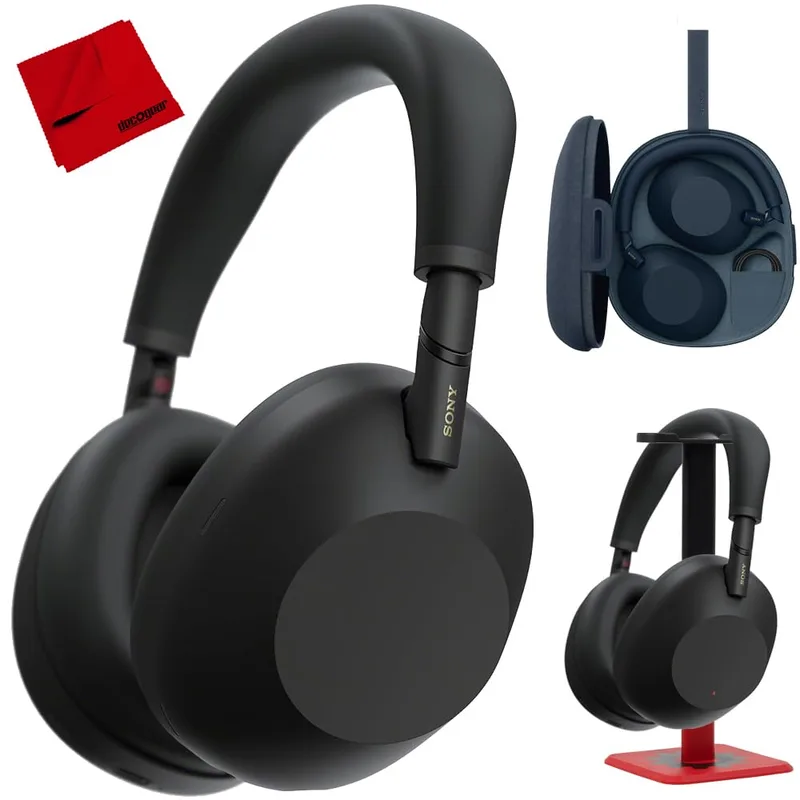
Sony WH-1000XM6
Pros
- QN3 chip and 12 AI beamforming microphones deliver class-leading noise cancellation — the single biggest lever for shutting out a noisy household during a focus block
- 30-hour battery with ANC enabled covers a full work week without daily charging, so it's always ready for the next deep work session
- Multipoint pairing keeps it connected to both laptop and phone, so ANC stays on between a focus block and the call that follows it
- Foldable design and included case make it easy to keep at the desk without cluttering the workspace
Cons
- At $298+, it's a serious investment if noise-cancelling headphones are the only tool being added to a focus routine
- Touch controls on the earcup are sensitive and easy to trigger by accident when adjusting fit mid-session
For workers who don’t want headphones on for hours at a time, a dedicated white noise or fan-sound machine handles the same masking job without anything on your ears — useful for anyone who finds all-day headphone wear uncomfortable, or who wants ambient sound in the room rather than isolation.
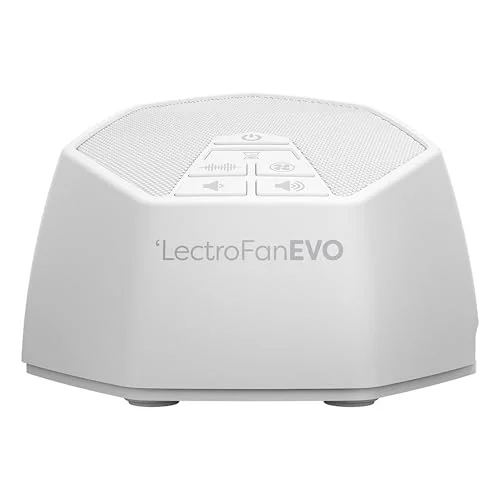
LectroFan EVO Sound Machine
Pros
- Non-looping sound generation means the ear never locks onto a repeating pattern — a common complaint with looping white noise apps that makes background noise more noticeable, not less
- 22 sound profiles let you match the masking noise to the specific distraction — a different fan tone for a barking dog than for street traffic
- USB powered, so it runs off any laptop charger, power bank, or dock already on the desk — no extra outlet needed
- 3.5mm headphone jack allows private listening without disturbing a partner or roommate sharing the space
Cons
- No smartphone app or scheduling — every setting is a physical button on the unit
- Max volume masks moderate ambient noise well but won't fully cover a genuinely loud environment like nearby construction without headphones layered on top
For call-heavy days rather than pure focus blocks, noise-cancelling earbuds trade some isolation for the ability to move around the house between meetings. For a deeper comparison of ANC options: Best Noise-Cancelling Headphones for Remote Work →
Control Light
Poor lighting doesn’t just strain the eyes over a multi-hour block — a dim or glare-heavy desk pushes people toward brighter, more stimulating screens to compensate, which undercuts the point of reducing digital distraction in the first place.
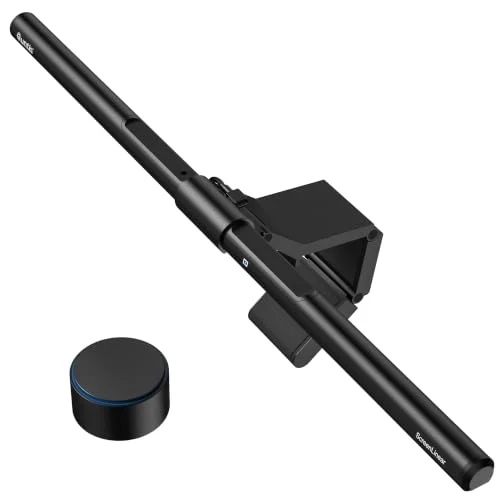
Quntis Monitor Light Bar PRO+
Pros
- CRI 95 color accuracy and auto-dimming reduce the eye strain that builds up over multi-hour focus blocks, at roughly half the price of premium alternatives
- Mounts above the monitor and points down at the desk, so it lights the workspace without adding any glare to the screen itself — unlike an overhead room light
- Wireless remote runs on standard AA batteries, so there's no cable or recharging cycle to interrupt a session to manage
- Wide clip range (0.12-2.36 in) fits both thin laptop displays and thick external monitor bezels
Cons
- Plastic housing and clip mechanism feel less premium than BenQ's lineup, with some units developing a loose clip over time
- No backlight option — front-facing task light only, so it won't reduce screen contrast glare from a dark room behind the monitor
A light bar mounted above the monitor solves the two most common home office lighting problems at once: it adds enough light to read a printed document or notebook without turning on an overhead room light, and it does so without throwing glare onto the screen the way a desk lamp pointed sideways does. For the full range of options by price and brightness: Best Monitor Light Bars for Home Office →
Control Time
The most overlooked lever is time itself. Without a visible marker, a 90-minute focus block silently becomes 40 minutes of real work and 50 minutes of context-switching. Two tools address this from different angles — one marks the block visually, the other automates the environment around it.
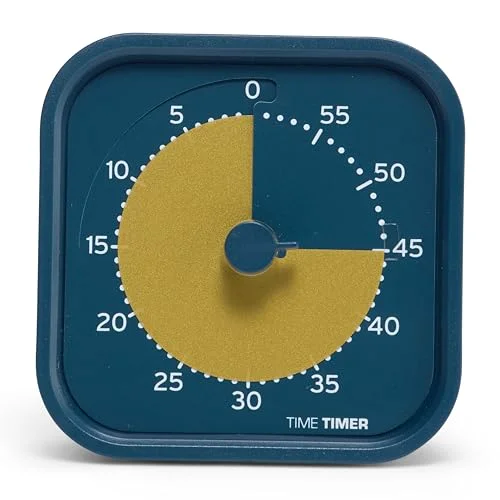
Time Timer MOD - Home Edition
Pros
- The shrinking red disk makes elapsed time visible at a glance without picking up a phone — the device most likely to break a focus block with a stray notification
- Fully silent by default, with the end-of-time beep as an optional add — no ticking to compete with white noise or a call
- Works for Pomodoro-style time-blocking without an app, screen, or account, so it adds zero digital surface area to get distracted by
- Small desk footprint that doesn't compete for space with a monitor light bar or dock
Cons
- 60-minute maximum means longer deep work blocks require a manual reset partway through
- AA battery isn't included in the box, and there's no vibration or remote alert if you're not at the desk when time runs out
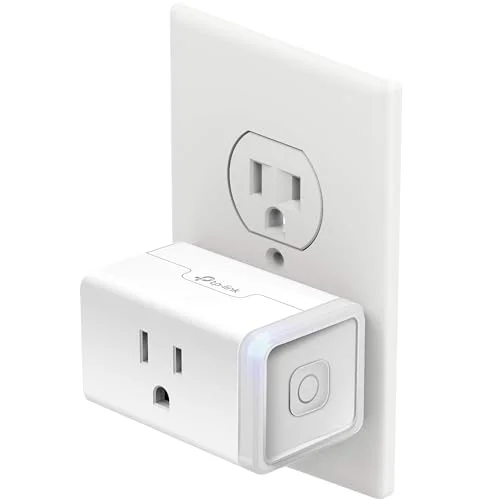
Kasa Smart Plug Mini (KP115)
Pros
- Scheduling in the Kasa app turns a desk lamp, ring light, or white noise machine on and off automatically at the same time every day, building the environmental cue that a focus block has started
- Slim form factor doesn't block the second socket on a standard outlet — useful on a desk with limited plugs
- Energy monitoring shows exactly how much power desk equipment draws, useful for anyone consolidating a multi-device setup onto fewer outlets
- Works with Alexa and Google Assistant for voice control without leaving the desk
Cons
- 2.4GHz WiFi only — won't connect to 5GHz-only networks
- Scheduling is time-based, not app-aware — it won't detect that a focus block actually started, only that the clock hit a set time
Pairing a visual timer with a scheduled smart plug creates a repeatable cue: the light bar or white noise machine switches on automatically at the same time every day, and the timer marks how long the block runs. Over a few weeks that combination becomes a trigger the brain recognizes on its own — the environment signals “focus block” before any conscious decision to start one. For more automation options: Best Smart Plugs for Home Office →
Layout Strategies Beyond Gear
Gear solves sound, light, and time — layout solves everything else:
- Separate the focus zone from the call zone. If the webcam and the keyboard face the same direction, the desk trains you to expect interruption at all times. Angling the monitor slightly away from the door, or working with the webcam off during non-call blocks, reinforces that a focus block is different from an open-door meeting stretch.
- Put the phone somewhere that requires standing up. A phone within arm’s reach gets checked reflexively regardless of willpower. A drawer, another room, or even just face-down across the desk measurably cuts the number of glances.
- Match chair and desk height to the actual task. Deep work sessions run long enough that poor ergonomics becomes a distraction on its own within the first hour. A standing desk that allows a position change partway through a block helps more than most people expect — sustained discomfort is itself an interruption.
- Keep the keyboard and mouse setup consistent. Switching between a laptop keyboard and an external one mid-week adds friction that isn’t worth paying during a focus block. An ergonomic keyboard set up once and left alone removes one more variable.
- Close everything that isn’t the current task, not just silence notifications. Muting Slack doesn’t remove the visual pull of an unread badge sitting in a taskbar. Fully closing the app for the length of a block is more effective than muting it.
Buying Guide: What to Prioritize by Budget
Not every home office needs all five pieces of gear. Prioritize based on which lever is weakest:
| Budget | Priority pick | Why |
|---|---|---|
| Under $25 | Time Timer MOD ($19.95) | Cheapest way to add a visible time boundary; works even if sound and light are already fine |
| Under $75 | Add a Kasa Smart Plug ($8.82+) or Quntis Light Bar ($66.49+) | Automates the environmental cue or fixes glare-free task lighting, whichever is the bigger gap |
| Under $150 | Add the LectroFan EVO ($64.95) | Covers sound masking for anyone who doesn’t want headphones on all day |
| $300+ | Add Sony WH-1000XM6 ($298+) | Full noise isolation for the loudest households or shared-space setups |
Households with a genuinely quiet, separate office space can often skip the audio gear entirely and get most of the benefit from just the light bar and timer. Shared or noisy spaces get the most value from solving sound first.
FAQ
Do I need all five products to get better at deep work?
No. Most home offices have one clearly weak lever — usually sound in shared spaces, light in windowless rooms, or time in homes with a lot of ambient interruption. Fix the weakest one first and reassess before adding more gear.
Are noise-cancelling headphones or a white noise machine better for deep work?
They solve different problems. Headphones remove sound entirely and work well for genuinely loud environments or open floor plans. A white noise machine masks sound rather than blocking it, which suits people who find all-day headphone wear uncomfortable or who want to stay aware of what’s happening in the room (a doorbell, a kid, a delivery).
Does a monitor light bar actually help with focus, not just eye strain?
Indirectly, yes. Reduced eye strain means less need for breaks driven by physical discomfort rather than an actual stopping point in the work. Glare-free task lighting also removes the temptation to increase screen brightness to compensate for a dim room, which keeps the display less visually fatiguing over a multi-hour block.
Can I automate a “focus mode” without buying a smart plug?
Software can approximate it — calendar-blocked focus time plus a do-not-disturb schedule covers notifications — but it doesn’t create a physical environmental cue the way a light or white noise machine switching on automatically does. The smart plug is optional, not required, but it’s the cheapest item on this list at under $13.
What’s the single highest-impact change for someone starting from zero?
A visible time boundary. A $20 visual timer costs less than any other item here and directly targets the most common deep work failure: sessions quietly dissolving into context-switching without a clear stopping or starting point. Add sound or light control next, based on whichever is the actual weak point in the space.
Conclusion
Deep work in a home office is an environmental design problem more than a willpower problem. Sound, light, and time are the three levers that consistently produce the interruptions that break a focus block, and each has a specific, inexpensive fix. Start with whichever lever is weakest — for most shared or noisy homes, that’s sound; for windowless or glare-heavy setups, it’s light; for anyone whose focus blocks quietly turn into distracted browsing, it’s time.
Top pick if starting from scratch: the Time Timer MOD for the cheapest fix, paired with the Sony WH-1000XM6 for anyone in a genuinely noisy household. For more budget-tiered buying advice across a full home office setup, see the Home Office Upgrade Priority Guide → and tips on reducing video call fatigue →.
Detailed Reviews
Sony WH-1000XM6
Pros
- QN3 chip and 12 AI beamforming microphones deliver class-leading noise cancellation — the single biggest lever for shutting out a noisy household during a focus block
- 30-hour battery with ANC enabled covers a full work week without daily charging, so it's always ready for the next deep work session
- Multipoint pairing keeps it connected to both laptop and phone, so ANC stays on between a focus block and the call that follows it
- Foldable design and included case make it easy to keep at the desk without cluttering the workspace
Cons
- At $298+, it's a serious investment if noise-cancelling headphones are the only tool being added to a focus routine
- Touch controls on the earcup are sensitive and easy to trigger by accident when adjusting fit mid-session
LectroFan EVO Sound Machine
Pros
- Non-looping sound generation means the ear never locks onto a repeating pattern — a common complaint with looping white noise apps that makes background noise more noticeable, not less
- 22 sound profiles let you match the masking noise to the specific distraction — a different fan tone for a barking dog than for street traffic
- USB powered, so it runs off any laptop charger, power bank, or dock already on the desk — no extra outlet needed
- 3.5mm headphone jack allows private listening without disturbing a partner or roommate sharing the space
Cons
- No smartphone app or scheduling — every setting is a physical button on the unit
- Max volume masks moderate ambient noise well but won't fully cover a genuinely loud environment like nearby construction without headphones layered on top
Quntis Monitor Light Bar PRO+
Pros
- CRI 95 color accuracy and auto-dimming reduce the eye strain that builds up over multi-hour focus blocks, at roughly half the price of premium alternatives
- Mounts above the monitor and points down at the desk, so it lights the workspace without adding any glare to the screen itself — unlike an overhead room light
- Wireless remote runs on standard AA batteries, so there's no cable or recharging cycle to interrupt a session to manage
- Wide clip range (0.12-2.36 in) fits both thin laptop displays and thick external monitor bezels
Cons
- Plastic housing and clip mechanism feel less premium than BenQ's lineup, with some units developing a loose clip over time
- No backlight option — front-facing task light only, so it won't reduce screen contrast glare from a dark room behind the monitor
Kasa Smart Plug Mini (KP115)
Pros
- Scheduling in the Kasa app turns a desk lamp, ring light, or white noise machine on and off automatically at the same time every day, building the environmental cue that a focus block has started
- Slim form factor doesn't block the second socket on a standard outlet — useful on a desk with limited plugs
- Energy monitoring shows exactly how much power desk equipment draws, useful for anyone consolidating a multi-device setup onto fewer outlets
- Works with Alexa and Google Assistant for voice control without leaving the desk
Cons
- 2.4GHz WiFi only — won't connect to 5GHz-only networks
- Scheduling is time-based, not app-aware — it won't detect that a focus block actually started, only that the clock hit a set time
Time Timer MOD - Home Edition
Pros
- The shrinking red disk makes elapsed time visible at a glance without picking up a phone — the device most likely to break a focus block with a stray notification
- Fully silent by default, with the end-of-time beep as an optional add — no ticking to compete with white noise or a call
- Works for Pomodoro-style time-blocking without an app, screen, or account, so it adds zero digital surface area to get distracted by
- Small desk footprint that doesn't compete for space with a monitor light bar or dock
Cons
- 60-minute maximum means longer deep work blocks require a manual reset partway through
- AA battery isn't included in the box, and there's no vibration or remote alert if you're not at the desk when time runs out