BenQ launched the ScreenBar Halo 2 in early 2026, and it’s already the most-reviewed monitor light bar of the year — HowToGeek called it “the most polished desk automation available at any price” in their March 2026 evaluation. The launch reignited interest in the entire category, and for good reason: a proper monitor light bar solves one of the most overlooked problems in home office setups.
The problem is contrast. Most home offices have a bright monitor surrounded by a dark or dim room. Your eyes constantly readjust between the two zones, and that readjustment is cumulative — after six hours, the strain adds up. A good monitor light bar directs focused light onto your desk surface without any beam hitting the screen directly. The result: no glare, better document readability, and significantly less eye fatigue over a full workday.
This roundup covers five monitor light bars evaluated across the most relevant criteria for remote workers: brightness (lux output), glare control, color accuracy (CRI), ease of adjustment, and compatibility with the monitors most commonly used in 2026 home offices — including ultrawide and curved displays.
Quick Comparison
| Light Bar | Brightness | CRI | Controller | Backlight | Price |
|---|---|---|---|---|---|
| BenQ ScreenBar Halo 2 | 1000 lx | >95 | Wireless puck | Yes | $199.00 as of Oct 18, 2026 |
| BenQ ScreenBar Plus | 500 lx | >95 | Wired desktop dial | No | Unavailable |
| BenQ ScreenBar Pro | 1000 lx | >95 | Touch on bar | No | $139.00 as of Oct 18, 2026 |
| Quntis Monitor Light Bar PRO+ | 1200+ lx | ~95 | Wireless remote | No | $66.49-$69.99 as of Oct 18, 2026 |
| Baseus Monitor Light Bar | N/A | N/A | Touch on bar | No | Unavailable |
1. BenQ ScreenBar Halo 2 — Editor’s Pick
BenQ ScreenBar Halo 2
Pros
- Dual-zone lighting with both a front task light and a rear-facing backlight reduces eye strain significantly — the backlight eliminates the harsh contrast between a bright monitor and a dark room, which is the primary cause of visual fatigue during long evening work sessions
- Wireless rechargeable controller charges via USB-C and maintains a connection without any dongle or cable on your desk — the puck sits flat and responds instantly to brightness and color temperature adjustments without reaching up to the bar
- Ultrasonic presence sensor activates the light when you sit down and dims it after inactivity, with timeout adjustable from 3 to 15 minutes — genuinely hands-free operation that reviewers in HowToGeek's March 2026 evaluation called 'the most polished desk automation available at any price'
- CRI > 95 means colors on paper, documents, and photos appear nearly identical to natural light — important for anyone doing design work, photo editing, or color-critical tasks from a home office
- Curved monitor compatibility up to 1800R curvature covers nearly every modern curved display — the adjustable clip mechanism holds securely without requiring tape, adhesive, or monitor damage
- Launched in early 2026 with dual-colour LED technology that allows independent warm/cool control of front and rear zones — this level of tuning was previously only available in professional studio lighting at much higher prices
Cons
- At $169–$179, it's the most expensive monitor light bar in this roundup and costs nearly three times the Quntis PRO+ — the backlight and wireless controller are genuine upgrades, but they're not necessary for every remote worker
- The wireless controller requires occasional USB-C recharging — roughly every 3–4 weeks depending on usage, which is minor but means tracking another rechargeable device
- Rear backlight creates a glow on the wall behind the monitor that some users find distracting during video calls, requiring adjustment before meetings
The ScreenBar Halo 2 is the best monitor light bar available in 2026. Its front-and-rear dual-zone lighting addresses something no other bar in this roundup handles: the contrast between a bright monitor and the wall behind it.
That rear backlight matters more than it sounds. Standard monitor light bars illuminate your desk but leave the wall behind the screen dark. Your eyes end up doing constant micro-adjustments between the screen’s brightness and the surrounding darkness — exactly the kind of fatigue that accumulates silently over the course of a remote workday. The Halo 2’s rear-facing LED casts a soft ambient glow on the wall, bringing the background brightness closer to the screen’s level. Multiple reviewers in early 2026 noted measurable reductions in eye fatigue compared to using a front-only bar.
The wireless rechargeable controller is the other major upgrade over previous-generation ScreenBars. It sits flat on the desk, charges via USB-C, and controls both the front and rear zones independently. Rotating it adjusts brightness; pressing and rotating switches between control zones. The response is immediate and doesn’t require any software or app.
The ultrasonic presence sensor works as advertised. It detects movement within a 60 × 10 cm cone in front of the screen, activates the light when you sit down, and dims it after your chosen timeout (3, 5, 10, or 15 minutes of inactivity). Over a week of standard workday use, this sensor becomes invisible — the light is simply there when you need it.
Launched in early 2026 with BenQ’s dual-colour LED technology, it supports independent warm/cool adjustment for both front and rear zones. The front task light can be set to a daylight 6500K while the rear ambient glow stays at a warm 2700K — useful for evening work where you want task clarity without the visual stimulation of a fully cool-white environment.
The price is real. At $169–$179, it costs nearly three times the Quntis PRO+ and 50% more than the ScreenBar Plus. If you work exclusively during daylight hours in a well-lit room, the backlight and wireless controller are premium features you may not need. But for evening workers, those spending more than six hours daily at their desk, or anyone doing design or color-sensitive work, this is the correct light bar to own.
Best for: Remote workers who work evenings, spend 6+ hours daily at their desk, do color-sensitive work, or want the most complete lighting upgrade available.
2. BenQ ScreenBar Plus — Best for Desk Control
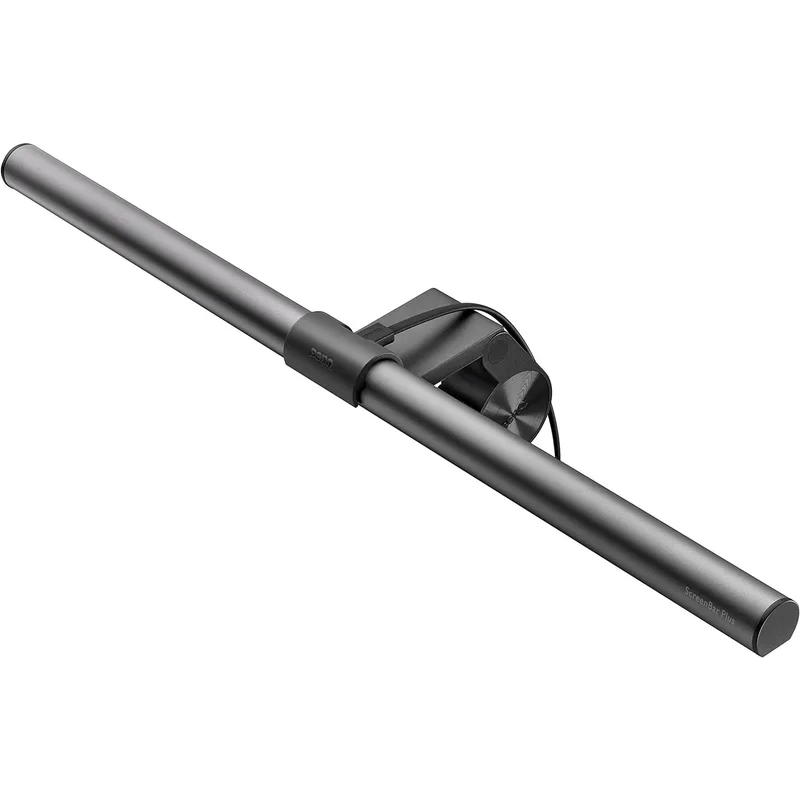
BenQ ScreenBar Plus
Pros
- The desktop dial controller is the most intuitive light control system available — one rotation adjusts brightness, one push toggles between modes, and a second rotation adjusts color temperature, all without looking away from your screen or touching the bar
- Ambient light sensor auto-dims the bar to match your room's natural light level, maintaining consistent illuminance as daylight shifts throughout the day — useful for remote workers who work across morning, afternoon, and evening sessions
- Asymmetric optical design directs light downward onto the desk surface without any beam pointing toward the screen — eliminates screen glare completely, a persistent problem with traditional desk lamps positioned at standard desk height
- CRI > 95 rendering accuracy makes documents and reference materials appear with true-to-life color, which matters for anyone reviewing printed vs. digital color consistency
- Well-established product with years of Amazon reviews confirming durability — the clip mechanism and cable quality have been validated across multiple production runs
Cons
- The desktop dial has a wired cable that runs from the bar down to the desk surface — this cable needs routing and management, which is a minor but real desk clutter issue
- USB-A power connection is showing its age in 2026 when most setups use USB-C — the Plus does not charge or accept USB-C for power
- No backlight means the monitor-to-wall contrast remains when working in a dark room — the light bar illuminates your desk but does not reduce the brightness differential behind the screen
- Not compatible with curved monitors out of the box — the clip is designed for flat monitor edges and may not grip properly on curved displays
The ScreenBar Plus has been the top recommendation in this category for three years running, and the core formula still works: a high-quality LED bar with a wired desktop dial controller that makes adjustment effortless without reaching up to the bar or navigating an app.
The dial is the reason to choose the Plus over the standard ScreenBar. It sits on the desk in front of the keyboard, connected by a cable that routes along the desk edge. Rotating it adjusts brightness from 0–100% with a smooth analog feel. Pressing the center button changes modes. Rotating again adjusts color temperature from 2700K to 6500K. These two adjustments cover 95% of what you’ll actually change day-to-day, and you can execute both without glancing down.
The asymmetric optics are BenQ’s core differentiator across their entire ScreenBar lineup. The LED lens angles downward toward the desk rather than at the screen, distributing light in a 60 × 30 cm pattern on the surface while keeping the screen glare-free. This is the fundamental problem that monitor light bars solve: traditional desk lamps create glare because their light source is at screen height pointing toward the monitor. The ScreenBar’s beam angle eliminates that entirely.
The ambient light sensor is reliable. It samples room light through a sensor on the bar and adjusts output to maintain consistent desk illumination as natural light shifts. For home offices with large windows, this removes one repetitive manual adjustment from the workday.
The USB-A power connection is the one friction point in 2026. Most modern docking stations and monitors have USB-A ports available, so it’s not a showstopper, but USB-C would be more current. The ScreenBar Pro addresses this if USB-C compatibility is a priority.
The ScreenBar Plus does not work reliably with curved monitors. The clip mechanism is designed for flat top edges, and on curved monitors it may tip forward or fail to grip. If your monitor is curved, go to the ScreenBar Pro or Quntis PRO+ instead.
Best for: Remote workers with flat monitors who want precise manual control via a desktop dial and a proven, well-reviewed product with strong long-term reliability.
3. BenQ ScreenBar Pro — Best for Curved and Ultrawide Monitors
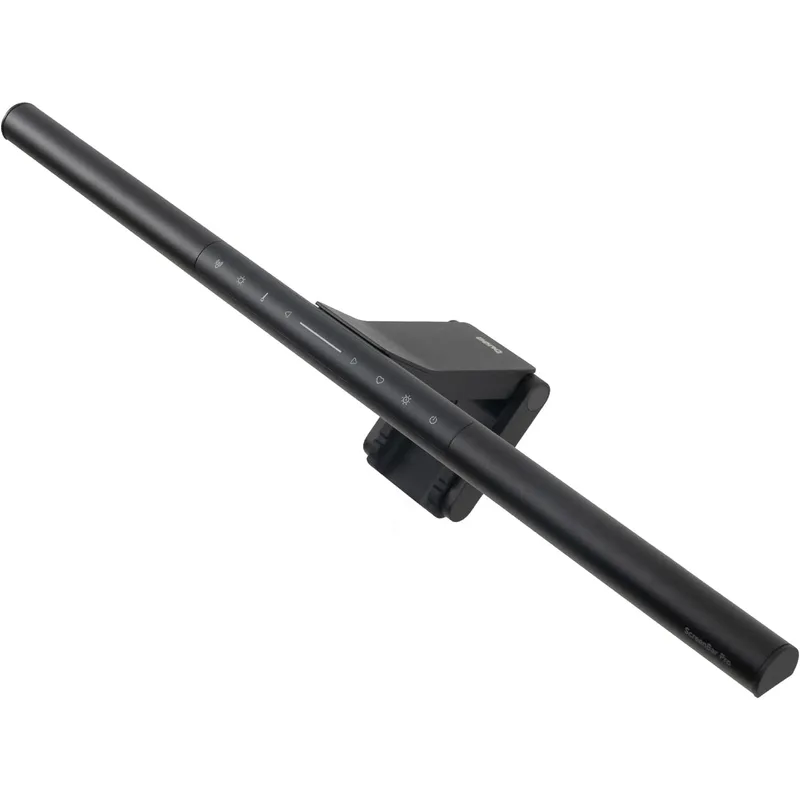
BenQ ScreenBar Pro
Pros
- Extended light bar at 21.3 inches covers ultrawide and 34-inch monitors that standard ScreenBars leave partially unlit at the edges — if your primary display is a 34-inch ultrawide, this is the correct BenQ to buy
- USB-C power connection matches the cable already in use on most 2026 docking station setups — no USB-A to USB-C adapter required
- Ultrasonic motion sensor auto-activates when you approach and dims after inactivity — the same reliable proximity detection as the Halo 2 but at a lower price point
- Curved monitor compatibility with the same 1000–1800R curvature range covers the full spectrum of curved displays from 27-inch 1500R gaming monitors to 34-inch business ultrawides
- 1000 lx center illuminance at 20 inches above the desk surface is notably brighter than the ScreenBar Plus, useful for high-brightness work environments or large desks where the light source sits further from the work surface
Cons
- Touch-only controls on the light bar require reaching up to adjust brightness or color temperature — less convenient than the ScreenBar Plus dial or the Halo 2 wireless puck during work sessions
- No backlight means the same evening contrast issue as the ScreenBar Plus — step up to the Halo 2 if working in dark rooms is common
- At $129–$140, it costs roughly twice the Quntis PRO+ while offering similar brightness; the main advantage is the BenQ build quality, extended width for ultrawide monitors, and the motion sensor
The ScreenBar Pro is BenQ’s answer for two specific monitor types that the ScreenBar Plus doesn’t serve well: curved monitors and ultrawide displays. At 21.3 inches long, it covers the width of a 34-inch ultrawide without leaving the edges unlit. The redesigned clip mechanism handles curvature up to 1800R — which covers the entire range of curved monitors available in 2026.
The brightness spec is also a step up from the ScreenBar Plus. The Pro delivers 1000 lx at center — the same as the Halo 2 — versus 500 lx for the Plus. On large desk surfaces where the light bar sits further from the primary work area, higher lux output is the difference between adequate and genuinely bright illumination.
USB-C power is the right call for a 2026 product. The Pro connects to any USB-C port — on a dock, a monitor’s USB hub, or a laptop directly — without an adapter. Combined with the extended bar width, this is the right upgrade path for remote workers who made the move to ultrawide monitors and found the ScreenBar Plus insufficient.
The touch controls on the bar are a step down from the Plus’s desktop dial. Adjusting brightness or color temperature requires reaching up to the bar, which is inconvenient when the monitor is at eye level or mounted on an arm at the back of a large desk. This is the clear tradeoff the Pro makes versus the Plus: better compatibility, better brightness, USB-C — but worse daily controls.
The motion sensor is the same ultrasonic system used in the Halo 2, and it works reliably. Auto-on when you approach, auto-dim after inactivity. At $129–$140, this is the right choice for curved/ultrawide monitor owners who want BenQ quality without paying for the Halo 2’s backlight and wireless controller.
Best for: Remote workers with 34-inch ultrawide or curved monitors who need full-width coverage and curved-clip compatibility.
4. Quntis Monitor Light Bar PRO+ — Best Value
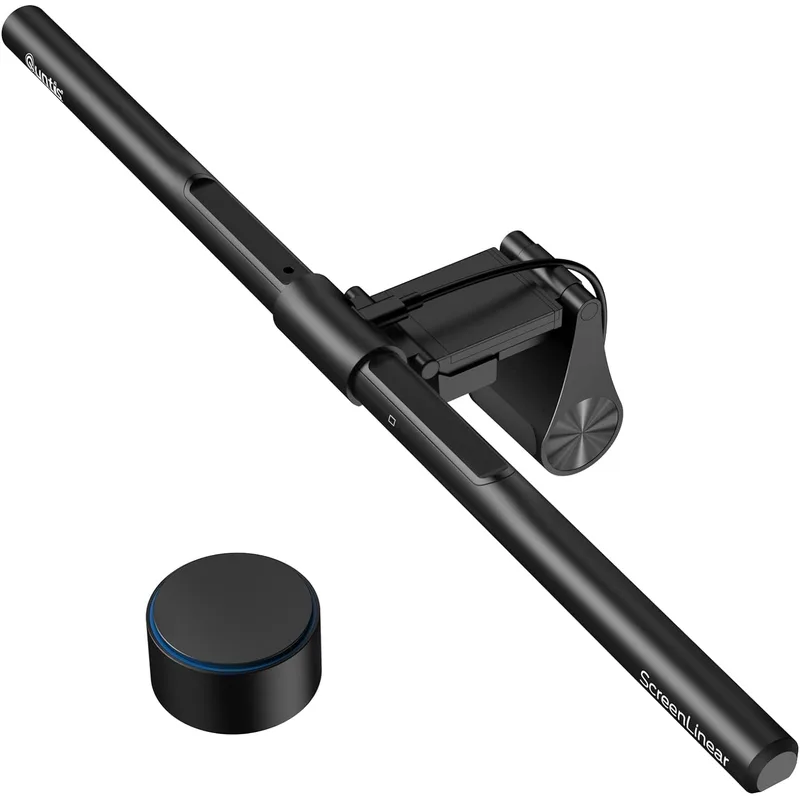
Quntis Monitor Light Bar PRO+
Pros
- At $59–$70, it delivers CRI 95 color accuracy, wireless remote control, and auto-dimming that match BenQ's capabilities at roughly half the price — consistently ranked as the best-value monitor light bar by multiple 2026 review sites
- Wireless remote uses standard AA batteries, which means no recharging and no cable — the remote can stay on your desk or mount to the side of the monitor and works reliably without pairing setup
- Wider clip range (0.12–2.36 inches thick) accommodates both thin laptop displays and thick monitor bezels, making it compatible with a broader range of monitors than most competitors
- 1200+ lux center illuminance is measurably brighter than BenQ ScreenBar Plus, which is useful for large desk surfaces where the light needs to reach further to illuminate documents
- Works on curved monitors without the 'flat only' restriction of the ScreenBar Plus — the spring-loaded clip adjusts to accommodate curvature
Cons
- Build quality has visible differences from BenQ — the plastic housing and clip mechanism feel less premium, with some units developing a loose clip over time
- No backlight option available in this model — limited to front-facing task light only
- The remote's AA battery operation means occasional battery replacement rather than recharging; the remote itself is small and easy to misplace
- Color temperature floor at 3000K is warmer than BenQ's 2700K — cannot achieve the very warmest candlelight tones that help signal wind-down to the visual system
The Quntis PRO+ at $59–$70 delivers CRI ~95 color accuracy, wireless remote control, auto-dimming, and curved monitor compatibility for roughly half the price of the cheapest BenQ in this roundup. It has become the default recommendation for budget-conscious remote workers who don’t want to compromise on core lighting quality.
The wireless remote is the key differentiator from other budget options. Unlike the Baseus’s touch-only bar controls or cheaper single-mode bars, the PRO+ remote sits anywhere on your desk and adjusts both brightness and color temperature with dedicated controls. The remote runs on AA batteries — no recharging, no pairing setup, works immediately out of the box.
The 1200+ lux center illuminance is genuinely bright — brighter than the BenQ ScreenBar Plus and comparable to the ScreenBar Pro. For a $60 product, this output is remarkable. The CRI ~95 (measured by third-party reviewers at approximately 95-96) means color rendering is nearly indistinguishable from BenQ’s rated >95 specification in practice.
Curved monitor compatibility is a meaningful practical advantage over the ScreenBar Plus. The spring-loaded clip adjusts to fit monitors from 0.12 to 2.36 inches thick — thinner than most BenQ clips require and thick enough for monitors with substantial top bezels.
The build quality gap is real but acceptable. The plastic housing and clip mechanism are noticeably less solid than BenQ’s metal and premium plastic construction. Some units develop clip looseness after extended use. This is the expected tradeoff for a product at half the price — it does the job well without the premium finish.
Best for: Remote workers who want solid brightness, wireless control, and CRI 95+ color accuracy without paying BenQ prices.
5. Baseus Monitor Light Bar — Best Budget
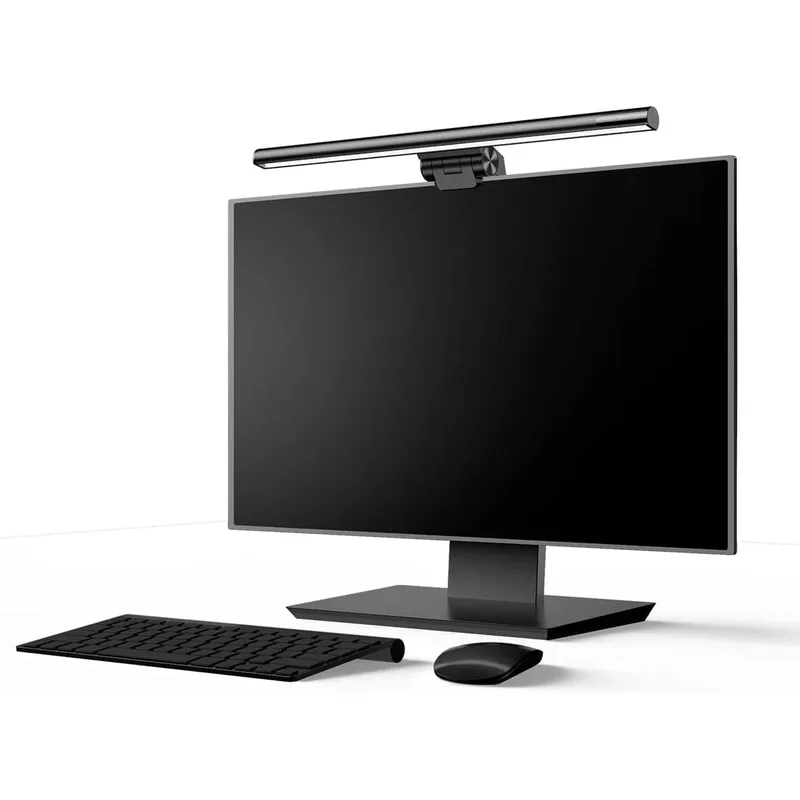
Baseus Monitor Light Bar
Pros
- At $29–$35, it's the most accessible entry point into monitor light bars — effectively removes screen glare from traditional desk lamps for the cost of a few coffees
- Three preset color modes (warm/neutral/cool) cover the most common lighting needs — warm for relaxed morning work, neutral for general tasks, cool for focused detail work — without requiring any app or remote
- Touch sensor on the bar cycles through modes and brightness levels with a single tap — responsive and reliable for a basic control scheme
- USB-A power draw is minimal, running off any powered USB hub without affecting other connected devices
Cons
- No ambient light sensor or auto-dimming — brightness must be adjusted manually when room light changes throughout the day
- Only three fixed color temperature modes, not stepless adjustment — cannot fine-tune to a specific kelvin value between presets
- Monitor compatibility limited to 0.3–0.8 inch thickness, which excludes many monitors with thicker bezels; check your monitor's top edge before purchasing
- CRI specification is not published — color rendering accuracy cannot be verified, which matters for design work or any task requiring accurate color perception
- No remote control requires touching the bar to adjust settings — a minor inconvenience that becomes noticeable when the monitor is at eye level or higher
The Baseus is the entry point for remote workers who want to solve the desk glare problem at minimum cost. At $29–$35, it eliminates screen glare from desk lamps with a clip-on bar, provides three color temperature presets, and requires nothing beyond plugging into a USB port.
The three presets — warm (2800K), neutral (4000K), and cool (5500K) — cover the most practical lighting scenarios without stepless adjustment. Warm works for low-light morning ramp-up sessions or late evening work; neutral handles standard tasks; cool provides higher alertness for focused work. For remote workers who don’t need to fine-tune their color temperature to a specific kelvin value, this is sufficient.
Touch controls on the bar are simple: one tap cycles through the three modes, and holding adjusts brightness. The sensor is responsive and accurate. The build quality for the price is adequate — the clip grips firmly on flat monitors within its specified 0.3–0.8 inch thickness range.
The compatibility limitation is the most important thing to check before buying. Monitors with top-edge thickness outside the 0.3–0.8 inch range (7.6–20.3 mm) will not clip securely. Thin-bezel modern monitors typically fall within this range, but older monitors with chunky bezels may not. Measure the thickness of your monitor’s top edge before purchasing.
The absence of auto-dimming or a remote is genuinely noticeable after using a bar with those features. The Baseus requires manual adjustment when room light changes, and adjusting requires touching the bar. It’s a real limitation compared to the Quntis PRO+ at $25–$35 more. If your budget allows, the PRO+ is significantly more capable for the price difference.
Best for: Remote workers with a flat monitor under 0.8 inches thick who want basic monitor task lighting at the lowest price available.
Buying Guide: How to Choose a Monitor Light Bar
Brightness (Lux)
Most quality monitor light bars target 500–1200 lux at the center point, measured at approximately 20 inches above the desk surface. For a standard single-monitor setup with a relatively small desk, 500 lux is sufficient. For large desks, ultrawide setups, or users who need to illuminate a wider work area, 1000+ lux provides meaningfully better coverage.
The lux spec is most meaningful at the center point. Coverage area determines how much of your desk receives useful illumination — a 500 lx bar with a 60 × 30 cm coverage area covers less surface than a 500 lx bar with an 85 × 50 cm pattern. Check both values if desk coverage matters.
Color Rendering Index (CRI)
CRI measures how accurately a light source renders colors compared to natural light, on a scale from 0 to 100. For practical desk work, CRI > 90 is the threshold where color perception becomes reliable. CRI > 95 (found in all BenQ and Quntis products in this roundup) means document colors, fabric samples, printed materials, and screen references align closely with real-world appearance.
If you do design work, photo editing, color grading, or any task where printed and digital color consistency matters, prioritize CRI > 95. For standard productivity tasks (writing, spreadsheets, video calls), CRI > 90 is fine.
Glare Control
All five bars in this roundup use asymmetric optical designs that direct light downward rather than toward the screen. This is the fundamental mechanism that separates monitor light bars from traditional desk lamps. However, the quality of implementation varies: bars with broader beam angles can produce edge glare on flat screens, while bars with tighter downward focus eliminate it entirely.
BenQ’s patented asymmetric optics are the benchmark. Quntis achieves similar results at lower cost. Check for glare reports specifically on your monitor size — a bar that’s glare-free on a 27-inch screen may produce edge glare on a 34-inch ultrawide where the beam reaches further across the surface.
Controller Type
The daily-use reality of monitor light bars is that you will adjust brightness and color temperature multiple times per workday as natural light and tasks change. The controller type determines how convenient those adjustments are:
- Desktop dial (ScreenBar Plus): Most ergonomic — rotation for brightness, push-rotate for color temp, no look-down required
- Wireless puck (Halo 2): Second most convenient, portable, rechargeable
- Wireless remote (Quntis PRO+): Good — keeps controls off the bar, AA batteries, no pairing
- Touch controls on bar: Least convenient — requires reaching up, which is noticeable over a workday
Backlight vs. No Backlight
This distinction matters primarily for evening and low-light workers. A front-only light bar illuminates the desk but leaves the wall behind the monitor dark, creating high contrast that contributes to eye strain over long sessions. A backlight (only available in the Halo 2 in this roundup) illuminates the wall behind the screen, reducing that contrast and providing ambient room light simultaneously.
If you work exclusively in a well-lit room during daylight hours, the backlight is a premium feature you won’t benefit from. If you regularly work evenings or in rooms with limited ambient light, the Halo 2’s backlight addresses a real problem the other bars leave unsolved.
Curved Monitor Compatibility
Flat monitor clips are standardized. Curved monitor compatibility is not — check your monitor’s curvature radius (usually listed as a number like 1500R or 1800R in the specs) against the bar’s stated compatibility range.
- ScreenBar Halo 2: 1000–1800R
- ScreenBar Pro: 1000–1800R
- Quntis PRO+: curved and flat (spring clip)
- ScreenBar Plus: flat only
- Baseus: flat only (0.3–0.8 in)
FAQ
Does a monitor light bar actually reduce eye strain?
Yes, specifically when used to replace a poorly positioned desk lamp. Traditional desk lamps create glare by directing light horizontally toward both the desk and the screen. Monitor light bars use asymmetric optics to direct light downward onto the desk surface only. Combined with proper placement (the bar sits on top of the monitor), this eliminates screen glare while maintaining the desk illuminance needed to read physical documents. The reduction in glare directly reduces one major cause of eye strain during desk work.
Can I use a monitor light bar on an ultrawide or curved monitor?
Yes, with the right bar. The BenQ ScreenBar Plus and Baseus are designed for flat monitors only — their clips may not seat properly on curved top edges. The BenQ ScreenBar Halo 2, ScreenBar Pro, and Quntis PRO+ all explicitly support curved monitors (1000–1800R curvature range). For ultrawide displays wider than 32 inches, also check the bar’s length — the BenQ ScreenBar Pro at 21.3 inches provides better coverage on 34-inch ultrawides than standard 17.9-inch bars.
How is a monitor light bar different from a regular desk lamp?
Position and optics. A desk lamp sits on the desk surface at roughly elbow height, which puts the light source roughly level with the monitor. Light from this position travels horizontally and hits the screen, creating glare. Monitor light bars clip to the top edge of the monitor, positioning the light source directly above and behind the line of sight. From this angle, asymmetric optics direct all light downward toward the desk — no horizontal beam, no screen glare.
Is the BenQ ScreenBar worth the price premium over budget options?
Depends on your use case. For standard productivity tasks (documents, spreadsheets, video calls) in a normally-lit room, the Quntis PRO+ at $59–$70 delivers 90% of the BenQ experience at half the cost. The gap narrows further for the Baseus at $29–$35 for simple daytime work. The BenQ premium pays off for evening workers (Halo 2 backlight), ultrawide monitor owners who need the extended coverage (ScreenBar Pro), and users who spend 7+ hours daily at the desk where build quality and control ergonomics become meaningful over time.
Do monitor light bars work with monitor arms?
Yes, with one consideration. The light bar clips to the top edge of the monitor panel itself, not to the stand, so monitor arm vs. stand mounting doesn’t affect compatibility. The only issue that arises is with certain monitor arm mounts that clamp to the top edge of the monitor — some monitor arms grip the same area the light bar clip uses. If your arm mounts to the top edge rather than the VESA mount point or stand neck, check the clearance before buying.
Conclusion
For most remote workers with flat monitors, the BenQ ScreenBar Plus remains the most sensible purchase: proven optics, CRI > 95 color accuracy, and the best daily-use controls available in a monitor light bar. The desktop dial is genuinely ergonomic in a way that touch controls and even wireless remotes are not.
If you’re upgrading in 2026 or already work evenings at your desk, the BenQ ScreenBar Halo 2 is worth the premium. The dual-zone lighting — front task light plus rear ambient backlight — addresses the contrast fatigue problem that front-only bars don’t solve. The wireless puck controller and presence sensor make it the most convenient option in the roundup.
For curved or ultrawide monitors specifically, buy the BenQ ScreenBar Pro over the Plus. The extended bar width and improved clip handle the geometries that the Plus was not designed for.
Budget-constrained remote workers should start with the Quntis PRO+ rather than the Baseus. The $30 difference buys CRI 95+ color accuracy, wireless remote control, and compatibility with curved monitors — upgrades that become noticeable within the first week of use.
Detailed Reviews
BenQ ScreenBar Halo 2
Pros
- Dual-zone lighting with both a front task light and a rear-facing backlight reduces eye strain significantly — the backlight eliminates the harsh contrast between a bright monitor and a dark room, which is the primary cause of visual fatigue during long evening work sessions
- Wireless rechargeable controller charges via USB-C and maintains a connection without any dongle or cable on your desk — the puck sits flat and responds instantly to brightness and color temperature adjustments without reaching up to the bar
- Ultrasonic presence sensor activates the light when you sit down and dims it after inactivity, with timeout adjustable from 3 to 15 minutes — genuinely hands-free operation that reviewers in HowToGeek's March 2026 evaluation called 'the most polished desk automation available at any price'
- CRI > 95 means colors on paper, documents, and photos appear nearly identical to natural light — important for anyone doing design work, photo editing, or color-critical tasks from a home office
- Curved monitor compatibility up to 1800R curvature covers nearly every modern curved display — the adjustable clip mechanism holds securely without requiring tape, adhesive, or monitor damage
- Launched in early 2026 with dual-colour LED technology that allows independent warm/cool control of front and rear zones — this level of tuning was previously only available in professional studio lighting at much higher prices
Cons
- At $169–$179, it's the most expensive monitor light bar in this roundup and costs nearly three times the Quntis PRO+ — the backlight and wireless controller are genuine upgrades, but they're not necessary for every remote worker
- The wireless controller requires occasional USB-C recharging — roughly every 3–4 weeks depending on usage, which is minor but means tracking another rechargeable device
- Rear backlight creates a glow on the wall behind the monitor that some users find distracting during video calls, requiring adjustment before meetings
BenQ ScreenBar Plus
Pros
- The desktop dial controller is the most intuitive light control system available — one rotation adjusts brightness, one push toggles between modes, and a second rotation adjusts color temperature, all without looking away from your screen or touching the bar
- Ambient light sensor auto-dims the bar to match your room's natural light level, maintaining consistent illuminance as daylight shifts throughout the day — useful for remote workers who work across morning, afternoon, and evening sessions
- Asymmetric optical design directs light downward onto the desk surface without any beam pointing toward the screen — eliminates screen glare completely, a persistent problem with traditional desk lamps positioned at standard desk height
- CRI > 95 rendering accuracy makes documents and reference materials appear with true-to-life color, which matters for anyone reviewing printed vs. digital color consistency
- Well-established product with years of Amazon reviews confirming durability — the clip mechanism and cable quality have been validated across multiple production runs
Cons
- The desktop dial has a wired cable that runs from the bar down to the desk surface — this cable needs routing and management, which is a minor but real desk clutter issue
- USB-A power connection is showing its age in 2026 when most setups use USB-C — the Plus does not charge or accept USB-C for power
- No backlight means the monitor-to-wall contrast remains when working in a dark room — the light bar illuminates your desk but does not reduce the brightness differential behind the screen
- Not compatible with curved monitors out of the box — the clip is designed for flat monitor edges and may not grip properly on curved displays
BenQ ScreenBar Pro
Pros
- Extended light bar at 21.3 inches covers ultrawide and 34-inch monitors that standard ScreenBars leave partially unlit at the edges — if your primary display is a 34-inch ultrawide, this is the correct BenQ to buy
- USB-C power connection matches the cable already in use on most 2026 docking station setups — no USB-A to USB-C adapter required
- Ultrasonic motion sensor auto-activates when you approach and dims after inactivity — the same reliable proximity detection as the Halo 2 but at a lower price point
- Curved monitor compatibility with the same 1000–1800R curvature range covers the full spectrum of curved displays from 27-inch 1500R gaming monitors to 34-inch business ultrawides
- 1000 lx center illuminance at 20 inches above the desk surface is notably brighter than the ScreenBar Plus, useful for high-brightness work environments or large desks where the light source sits further from the work surface
Cons
- Touch-only controls on the light bar require reaching up to adjust brightness or color temperature — less convenient than the ScreenBar Plus dial or the Halo 2 wireless puck during work sessions
- No backlight means the same evening contrast issue as the ScreenBar Plus — step up to the Halo 2 if working in dark rooms is common
- At $129–$140, it costs roughly twice the Quntis PRO+ while offering similar brightness; the main advantage is the BenQ build quality, extended width for ultrawide monitors, and the motion sensor
Quntis Monitor Light Bar PRO+
Pros
- At $59–$70, it delivers CRI 95 color accuracy, wireless remote control, and auto-dimming that match BenQ's capabilities at roughly half the price — consistently ranked as the best-value monitor light bar by multiple 2026 review sites
- Wireless remote uses standard AA batteries, which means no recharging and no cable — the remote can stay on your desk or mount to the side of the monitor and works reliably without pairing setup
- Wider clip range (0.12–2.36 inches thick) accommodates both thin laptop displays and thick monitor bezels, making it compatible with a broader range of monitors than most competitors
- 1200+ lux center illuminance is measurably brighter than BenQ ScreenBar Plus, which is useful for large desk surfaces where the light needs to reach further to illuminate documents
- Works on curved monitors without the 'flat only' restriction of the ScreenBar Plus — the spring-loaded clip adjusts to accommodate curvature
Cons
- Build quality has visible differences from BenQ — the plastic housing and clip mechanism feel less premium, with some units developing a loose clip over time
- No backlight option available in this model — limited to front-facing task light only
- The remote's AA battery operation means occasional battery replacement rather than recharging; the remote itself is small and easy to misplace
- Color temperature floor at 3000K is warmer than BenQ's 2700K — cannot achieve the very warmest candlelight tones that help signal wind-down to the visual system
Baseus Monitor Light Bar
Pros
- At $29–$35, it's the most accessible entry point into monitor light bars — effectively removes screen glare from traditional desk lamps for the cost of a few coffees
- Three preset color modes (warm/neutral/cool) cover the most common lighting needs — warm for relaxed morning work, neutral for general tasks, cool for focused detail work — without requiring any app or remote
- Touch sensor on the bar cycles through modes and brightness levels with a single tap — responsive and reliable for a basic control scheme
- USB-A power draw is minimal, running off any powered USB hub without affecting other connected devices
Cons
- No ambient light sensor or auto-dimming — brightness must be adjusted manually when room light changes throughout the day
- Only three fixed color temperature modes, not stepless adjustment — cannot fine-tune to a specific kelvin value between presets
- Monitor compatibility limited to 0.3–0.8 inch thickness, which excludes many monitors with thicker bezels; check your monitor's top edge before purchasing
- CRI specification is not published — color rendering accuracy cannot be verified, which matters for design work or any task requiring accurate color perception
- No remote control requires touching the bar to adjust settings — a minor inconvenience that becomes noticeable when the monitor is at eye level or higher