Disclosure: SetupRanked earns a commission on qualifying purchases made through links on this page, at no extra cost to you.
Engadget updated their ergonomic keyboard guide in early 2026 after evaluating 15 boards — including Logitech, Kinesis, and Dygma models — specifically for remote workers dealing with all-day typing fatigue. The conclusion was consistent with what occupational therapists have been saying for years: the right keyboard can meaningfully reduce wrist and shoulder strain for people spending 6-8 hours per day at a desk.
Most remote workers spend more time on their keyboard than any other peripheral. A flat, straight keyboard forces both wrists to rotate inward (pronation) and bend outward (ulnar deviation) simultaneously — a positioning that builds cumulative stress in tendons and joints over months and years of daily use. Ergonomic keyboards address these angles directly: split designs allow each hand to sit at shoulder width, curved profiles reduce ulnar deviation, and tented options add wrist supination for a true neutral hand position.
This roundup covers five ergonomic keyboards evaluated for real remote work use: daily video calls, long writing sessions, code editing, and spreadsheet work. The picks range from $39 to $205 and span from entry-level comfort improvements to purpose-built split mechanical boards.
Quick Comparison
| Keyboard | Type | Connection | Switch | Wrist Rest | Price |
|---|---|---|---|---|---|
| Logitech ERGO K860 | Split curved | Wireless | Membrane | Included | $76.79-$119.99 as of Oct 18, 2026 |
| Logitech Wave Keys | Wave profile | Wireless | Membrane | Included | $42.17-$69.99 as of Oct 18, 2026 |
| Kinesis Freestyle2 | Fully split | Wired/BT | Membrane | Optional | $94.00 as of Oct 18, 2026 |
| Keychron Q11 | Fully split | Wired | Mechanical | Not included | Unavailable |
| Microsoft Ergonomic | Split curved | Wired | Scissor | Integrated | $119.00-$314.94 as of Oct 18, 2026 |
1. Logitech ERGO K860 — Editor’s Pick
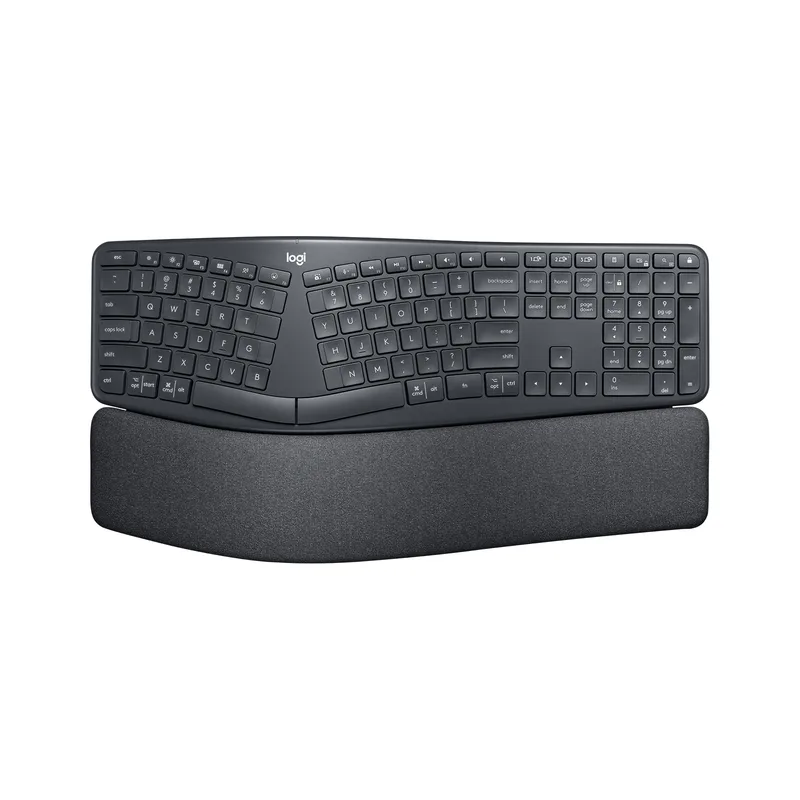
Logitech ERGO K860
Pros
- The integrated wrist rest is the best-in-class at this price — memory foam covered in stain-resistant fabric cradles the palm and provides genuine wrist elevation throughout an 8-hour workday without compressing or losing shape over time
- Split curved layout reduces ulnar deviation (the sideways wrist bend that causes RSI) without requiring a separate split adjustment — it works out of the box without an adjustment period for membrane keyboard users
- Logitech's Logi Bolt wireless receiver delivers a more stable connection than Bluetooth for long video calls and typing sessions — lag-free performance even with USB interference from monitors and docks
- Multi-device Easy-Switch pairing lets you type across a laptop, desktop, and tablet with one button press — practical for remote workers who use both a personal and company-issued machine at the same desk
- At $119-$130, it undercuts premium split keyboards (Kinesis, Keychron Q11) while delivering proven ergonomics that have made it the top recommendation in multiple 2026 ergonomic roundups from Engadget and PCWorld
- Logitech Flow software enables mouse cursor movement between computers on the same network — combined with the keyboard's multi-device pairing, this creates a seamless dual-computer workflow without a KVM switch
Cons
- Membrane switches have a soft, mushy tactile response that mechanical keyboard users will find unsatisfying — no mechanical switch option exists for the K860
- Not a fully split keyboard — the two halves share a fixed chassis, so you cannot separate them wider than their built-in angle, which may be insufficient for broad-shouldered users
- Backlit version is not available — the K860 has no keyboard illumination, which is a problem for low-light environments or evening work sessions
The K860 is the ergonomic keyboard most remote workers should buy. It solves the two most common desk posture problems — ulnar wrist deviation and pronation — through its split curved layout and elevated wrist rest, without requiring any adjustment or configuration beyond plugging in the Logi Bolt receiver.
The memory foam wrist rest is worth noting separately because it actually holds up. Most keyboard wrist rests compress flat within a few months of daily use. The K860’s stain-resistant fabric-covered memory foam maintains its shape and support through extended daily use — it still provides elevation after a year of eight-hour workdays in a way that gel or flat foam rests do not.
The multi-device pairing is practical, not just a spec checkbox. The Easy-Switch button cycles through three paired devices: the work laptop, the personal machine, and a tablet for reference reading. Logitech Flow software adds cursor movement between computers — drag the mouse to the edge of one screen and it crosses to the next computer. For the majority of remote workers with a two-machine desk setup, this eliminates every KVM switch consideration.
At $119-$130, it costs less than the Kinesis Freestyle2 with tent kit ($140-$200) and substantially less than the Keychron Q11 ($179-$205), while covering the ergonomic needs of 90% of remote workers who don’t need mechanical switches or complete half-separation.
Best for: Remote workers who want immediate ergonomic improvement from day one, wireless convenience, and a built-in wrist rest without accessories.
2. Logitech Wave Keys — Best Budget
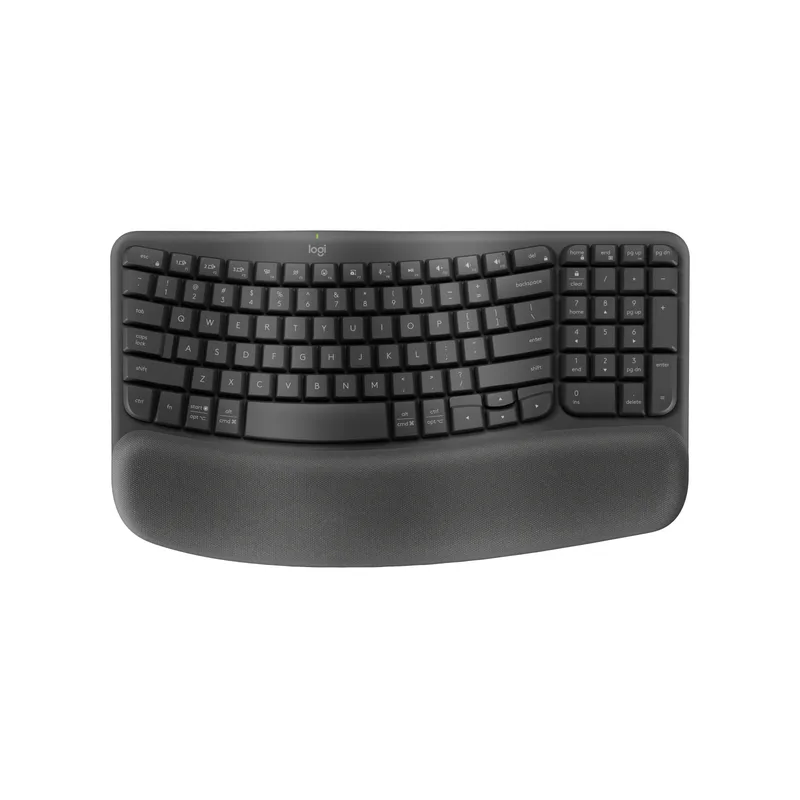
Logitech Wave Keys
Pros
- At $55-$70 (frequent sales to $52-$55), it's the most accessible entry into ergonomic keyboards — a meaningful step up from flat keyboards for RSI prevention without the learning curve of a fully split board
- The wave keycap profile places each row at a slightly different height and angle, reducing finger extension and keeping the wrist in a more neutral position compared to flat keyboards with uniform key height
- Compact layout without a numpad brings the mouse closer to the center of the desk — this reduces shoulder extension when reaching for the mouse, a frequent contributor to upper back and neck tension in all-day desk setups
- Three-year battery life is exceptional — this keyboard runs on standard AAA batteries and lasts longer between changes than any other keyboard in this roundup
- Made from 61% recycled plastic with Logitech's sustainability focus — relevant for remote workers and companies with environmental purchasing criteria
Cons
- Not a split keyboard — the wave profile reduces wrist bending but does not address shoulder width mismatch; users with broad shoulders will still type with inward-angled wrists
- No backlight — a consistent limitation of Logitech's ergonomic line, problematic for low-light work or evening typing
- Key feedback is softer and less tactile than the K860's membrane switches — some reviewers describe the travel as feeling overly light, which can cause more missed keystrokes during the adjustment period
The Wave Keys is the right starting point if you’re new to ergonomic keyboards and not ready to commit to the learning curve or cost of a split design. Its wavy keycap profile is subtle — each row sits at a slightly different height and angle — but the effect on daily wrist comfort is measurable compared to a flat keyboard.
The practical advantage is the compact layout. Removing the numpad means the mouse lives closer to your body on the desk. That shorter mouse reach reduces the shoulder abduction (outward arm rotation) that contributes to shoulder and upper back tension after long sessions. If your current keyboard has a numpad you rarely use, switching to the Wave Keys removes a persistent source of strain.
Battery life is legitimately useful: three years from two AAA batteries means you’re not managing this keyboard’s power consumption. That’s a real convenience benefit over Bluetooth mechanical keyboards that charge via USB every 1-2 weeks.
The Wave Keys lists for $69.99 but regularly drops to $55-$60 on Amazon. It’s been spotted as low as $52 during spring 2026 sales. For first-time ergonomic keyboard buyers who want to see whether the change helps before spending $120+, it’s the lowest-risk starting point.
The Wave Keys won’t satisfy users who have already adapted to a split keyboard — going back to a joined layout feels like a step backward in ergonomics.
Best for: Ergonomic keyboard beginners, budget-constrained remote workers, and anyone transitioning from a flat keyboard who wants gradual adaptation.
3. Kinesis Freestyle2 — Best Fully Split
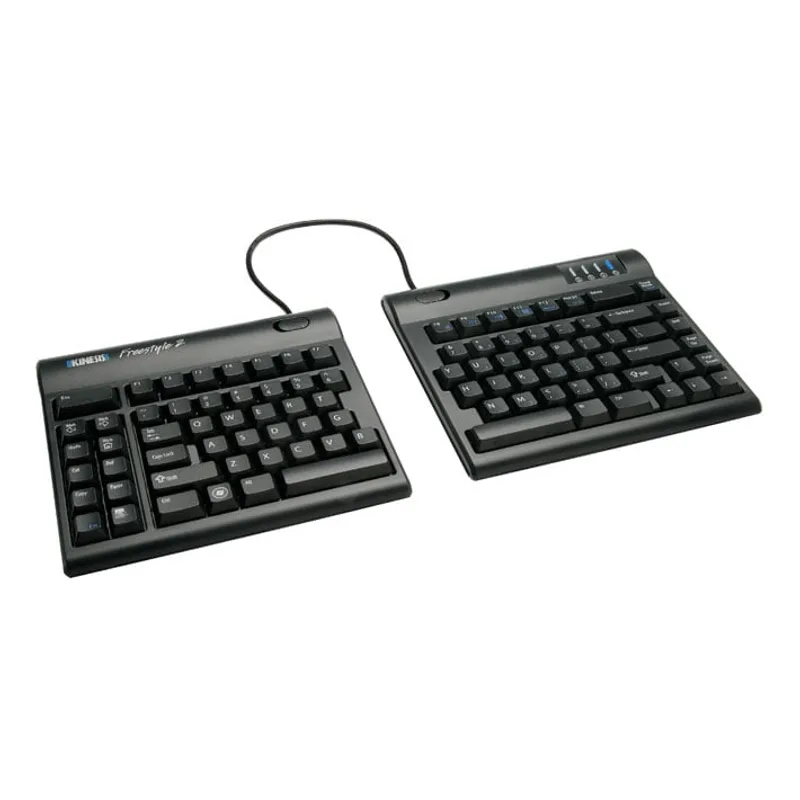
Kinesis Freestyle2
Pros
- Fully independent halves with up to 9 inches of separation allow each hand to type in its natural shoulder-width position — this is the most impactful ergonomic adjustment possible and cannot be replicated by any curved integrated keyboard
- Zero fixed tilt angle out of the box creates a neutral flat typing surface; adding the VIP3 lifters at 5°, 10°, or 15° angles lets you find the exact tent position that works for your wrist anatomy without guessing
- Modular accessory system (VIP3 lifters, palm rests, V3 lifters) means you can configure the keyboard exactly for your needs instead of accepting a fixed ergonomic position decided by the manufacturer
- Membrane key switches with 45g actuation are light enough for all-day typing without finger fatigue — noticeably less finger force required compared to heavier mechanical switches
- Available in Mac-specific layout with dedicated Mac modifier keys and keycap legends — not an afterthought Mac compatibility mode, but a properly configured Mac keyboard from Kinesis
Cons
- The VIP3 tent kit and palm rests are sold separately — to get the full ergonomic benefit, expect to spend $30-$60 more on top of the keyboard price, bringing the total to $140-$200 range
- Wired USB-A connection only in the standard version (Bluetooth version costs more) — requires a USB-A port or adapter on modern thin laptops with only USB-C
- No backlighting on any Freestyle2 variant — a consistent limitation across the entire product line
- Membrane switches have an older, mushier feel compared to the K860 or mechanical alternatives — users who need tactile switch feedback should consider the Keychron Q11 instead
The Freestyle2 does something no other keyboard in this roundup can: it lets each hand sit exactly where your shoulders are. That’s the fundamental ergonomic principle behind split keyboards — your hands should align with your shoulder joints, not each other. The K860 and Wave Keys reduce wrist bend but still require both hands to type toward a center point. The Freestyle2 eliminates that entirely.
Out of the box, both halves connect via a pivot tether. Disconnect the tether and you can separate them up to 9 inches apart (or up to 20 inches with the extended cable version). Place each half directly in front of each shoulder and your arms drop straight down from the shoulder — the most neutral upper body position achievable at a desk.
The VIP3 tent accessory adds the next ergonomic dimension: tilting each half inward so your hands angle slightly toward each other, like a handshake position. This adds wrist supination to the horizontal shoulder correction the split already provides. Together, the full Kinesis setup (Freestyle2 + VIP3 lifters + palm rests) is the most ergonomically complete membrane keyboard solution available.
The modular approach is both the strength and the cost complication. A bare Freestyle2 at $109-$139 is incomplete for most users — you’ll want the VIP3 lifters and palm rests to get the full benefit. Budget $140-$200 for the complete setup. The Kinesis website sells bundles that include the lifters and rests; the Amazon listing is the bare board.
Best for: Remote workers with existing wrist or shoulder issues who need maximum positional flexibility and the ability to fine-tune each half’s angle independently.
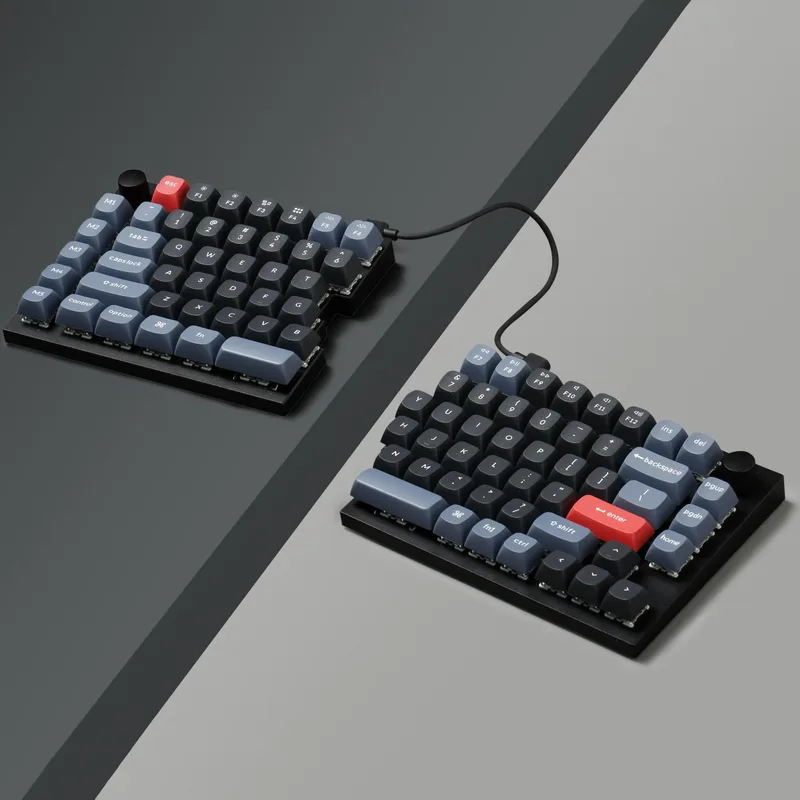
4. Keychron Q11 — Best Mechanical
Keychron Q11
Pros
- Hot-swappable PCB lets you change switches without soldering — try linear, tactile, or clicky switches without buying a new keyboard, making this the most customizable board in this roundup
- CNC machined aluminum housing has zero flex and a premium feel that no other keyboard in this roundup matches — it feels like a tool you keep for years, not a peripheral you replace
- Full QMK/VIA programmability means every key is remappable — custom layers, macros, and per-key lighting are set through firmware without proprietary software locked to a manufacturer's servers
- South-facing RGB LED placement reduces keycap legend shine-through interference, producing cleaner lighting visible under keycaps
- 5 dedicated macro keys on the left module add a programmable function row without modifying the main key layout — useful for frequently-used shortcuts, text expansion, or application switching
- The 75% split layout retains function keys, arrow keys, and page navigation in a compact footprint that fits most standard keyboards where 60% splits cannot
Cons
- No tenting support — the Q11 lies completely flat with zero adjustable tilt angle, which limits ergonomic benefit for users who need wrist supination (handshake tilt) for true neutral positioning
- Inter-half connection cable is short at approximately 8 inches — limits maximum separation to roughly shoulder width, which may be insufficient for broader users; a third-party longer cable can fix this
- No wrist rest included at $179-$205 — third-party wrist rests that match the Q11's keycap height and width require additional research and expense
- Wired-only — no wireless option for the Q11, which is a real limitation if you prefer a cable-free desk
The Q11 is for remote workers who want split ergonomics and refuse to give up mechanical switches. Every other ergonomic keyboard in this roundup uses membrane or scissor switches. The Q11’s Gateron G Pro switches — available in Red (linear) or Brown (tactile) — deliver the precise tactile feedback and audible confirmation that mechanical keyboard users rely on for accuracy and typing speed.
The hot-swap PCB is the feature that justifies the premium over other mechanical options. You can pull the included switches and install anything in the Gateron G, Kailh, or Cherry MX ecosystem without soldering. Start with linear Red switches for quiet office typing, try tactile Brown or Clicky Blue when you need more feedback, or install heavy Green switches if you prefer high-resistance actuation. No other ergonomic keyboard at this price level offers this flexibility.
The CNC aluminum housing is a quality signal that sets expectations correctly. The Q11 is heavy (4.4 lbs total) and rigid — it doesn’t slide around the desk and doesn’t flex under hard typing. For users who have owned plastic ergonomic keyboards and found them unsatisfying in feel, the Q11’s construction is a meaningful upgrade.
The limitations matter for a keyboard at this price. No tenting means the Q11 lies flat — you get shoulder-width separation but not wrist supination. No wrist rest is included. The inter-half cable is short. At $179-$205 before adding a wrist rest and potentially a longer cable, the total cost approaches $230-$250. That’s significant money for a wired keyboard with no tenting, and the Kinesis Advantage360 becomes worth comparing at that price tier.
Update (May 2026): Keychron launched the Q11 Ultra on May 8, 2026 — a wireless redesign of the Q11 with 2.4 GHz and Bluetooth connectivity between both the board and the PC, plus 8K polling rate and 300 hours of battery life. It’s $239.99 at Keychron.com. If wireless is a hard requirement for your mechanical split setup, the Q11 Ultra has it. The original Q11 remains the better value at $179-$205 for wired setups.
Best for: Mechanical keyboard users who want a split ergonomic layout with hot-swappable switches and QMK customization — and can accept the flat tilt limitation.
5. Microsoft Ergonomic Keyboard — Best Wired Budget
Microsoft Ergonomic Keyboard
Pros
- At $39-$49, it is the lowest-cost ergonomic keyboard in this roundup with a proper split layout and wrist rest — an approachable entry point for remote workers who want ergonomic positioning without a significant investment
- Scissor-switch keys have shorter travel than typical membrane keyboards, producing a crisper, more precise keystroke response than the Logitech K860 or Wave Keys membrane switches
- Integrated full-size numpad is a productivity advantage for finance, data entry, or spreadsheet-heavy workflows — most ergonomic keyboards omit the numpad to reduce reach to the mouse
- Wired USB connection requires no battery management, pairing setup, or wireless troubleshooting — plug it in and it works, which is valuable for remote workers who don't want to manage peripheral batteries
Cons
- Windows-optimized key labeling and dedicated Windows keys make it a poor choice for macOS — the special keys (Office, Emoji, Snipping Tool) do not function on Mac, and modifier key positions differ
- Wired USB-A only — no wireless option, and the cable limits flexibility for desk setups where the cable run is problematic
- Fixed chassis with no separation adjustment — like the K860, you cannot widen the split angle beyond what the fixed frame provides; insufficient for users who need more than the standard narrow splay
- No backlight — consistent with most ergonomic keyboards in this price range
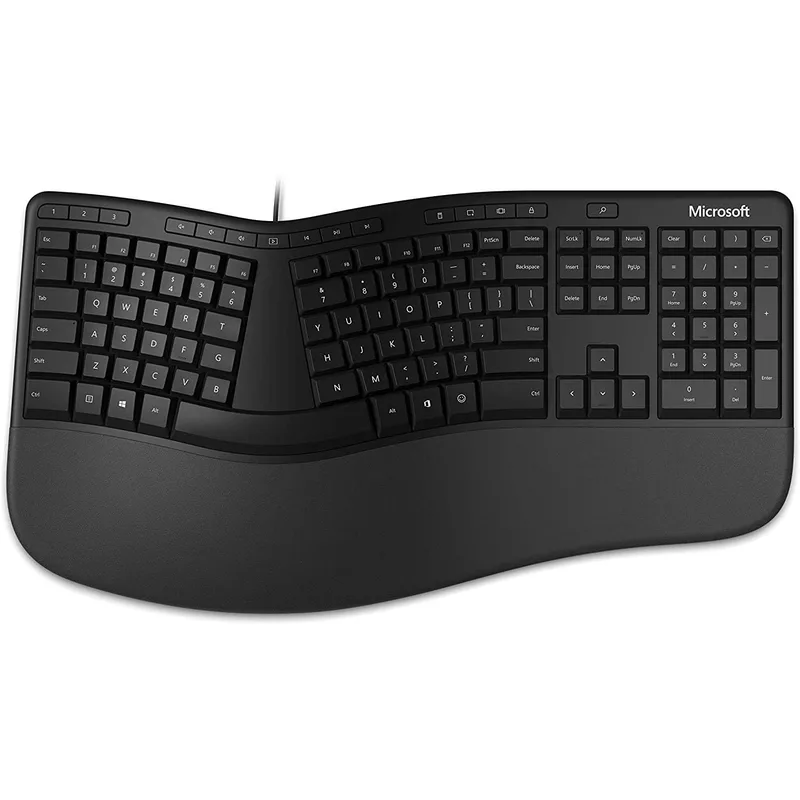
The Microsoft Ergonomic Keyboard is the upgrade path from a flat keyboard for Windows users who need wired reliability and a full numpad. At $39-$49, it’s the cheapest fully-featured ergonomic keyboard with an integrated wrist rest available on Amazon, and its scissor-switch keys have better tactile response than most keyboards at this price.
The full-size numpad is a genuine productivity feature for financial work, data entry, and spreadsheet navigation. Every other ergonomic keyboard in this roundup omits the numpad in favor of compact layout. If your workflow demands 10-key entry or you use the numpad for application shortcuts, the Microsoft keyboard is the only split-curved option under $50 that includes it.
The dedicated shortcut keys — Office, Emoji, and Windows Snipping Tool — are Windows 10/11 features that genuinely save clicks for document workers. The Snipping Tool key alone reduces the keyboard shortcut sequence for screenshots from a three-key combination to a single dedicated press.
The Windows-centric design is the primary constraint. The macOS experience is mediocre: the special keys don’t function, and the modifier key positions require adjustment or remapping. For pure Windows remote work environments, the keyboard works as intended. For Mac users, the K860 or Wave Keys are better options at comparable or slightly higher prices.
Best for: Windows-primary remote workers who need a full numpad, prefer wired connectivity, and want ergonomic improvement without spending over $50.
Buying Guide: Ergonomic Keyboards for Remote Work
Split vs. Curved: Which Matters More?
Both design types address different problems. Curved keyboards (K860, Wave Keys, Microsoft Ergonomic) reduce ulnar deviation — the sideways wrist bend toward the pinky finger. Fully split keyboards (Freestyle2, Q11) reduce shoulder adduction — the inward arm angle that happens when both hands type toward a center point.
For most desk users, ulnar deviation is the more immediately felt problem — curved keyboards produce faster comfort improvement. For users with shoulder or upper back issues, split separation addresses a structural problem that curved designs cannot fix.
Membrane vs. Mechanical Switches
Membrane switches (K860, Wave Keys, Freestyle2) are quieter and typically lighter to actuate. They’re appropriate for open offices, shared spaces, and users who don’t have strong preferences about key feedback. Mechanical switches (Q11) are louder (linear less so, tactile and clicky more so) but deliver precise feedback that improves typing accuracy for fast typists. For remote work specifically, membrane switches are the default recommendation unless you’ve already established a preference for mechanical.
What About Tenting?
Tenting tilts the keyboard inward so each half angles toward the other — simulating the “handshake” wrist position. It addresses wrist pronation (rotating the palm downward to type flat), which is the third ergonomic problem after ulnar deviation and shoulder width. Tenting is available on the Kinesis Freestyle2 via the VIP3 kit. None of the other keyboards in this roundup support tenting.
Wrist Rests: Included or Buy Separately?
The K860, Wave Keys, and Microsoft Ergonomic all include wrist rests. The Kinesis Freestyle2 and Keychron Q11 do not. A proper wrist rest that matches the keyboard’s height and key travel angle matters — generic foam wrist rests designed for flat keyboards can actually worsen posture on split keyboards. For the Freestyle2, Kinesis’s own palm rests are the correct accessory.
FAQ
Do ergonomic keyboards actually help with RSI and carpal tunnel?
Ergonomic keyboards reduce the postural stresses that contribute to repetitive strain injury over time — specifically ulnar deviation, pronation, and shoulder width mismatch. Clinical evidence supports ergonomic keyboard use for prevention and as part of RSI management. They are not a cure for existing injury, and severe or persistent symptoms should be evaluated by a physician or occupational therapist.
How long does it take to adjust to an ergonomic keyboard?
Curved keyboards (K860, Wave Keys, Microsoft Ergonomic) typically take 3-7 days to reach previous typing speed. Fully split keyboards (Freestyle2, Q11) require 2-4 weeks of adjustment — typing speed drops initially before recovering. Most users find the adjustment manageable if they commit to using the ergonomic keyboard exclusively rather than switching back and forth.
Can I use an ergonomic keyboard with a laptop?
Yes. All five keyboards in this roundup work with laptops. The wireless options (K860, Wave Keys, Freestyle2 Bluetooth) are cleaner for laptop setups. When using an ergonomic keyboard, raise the laptop screen to eye level with a stand and use the external keyboard at desk height — this eliminates the neck drop that using a laptop keyboard flat on the desk causes.
Is the Keychron Q11 worth the extra cost over the K860?
If you already use mechanical keyboards and value switch feel, yes. The Q11’s hot-swappable mechanical switches, aluminum housing, and QMK programmability justify the $60-$80 price difference over the K860 for that specific use case. For users who don’t have strong mechanical switch preferences, the K860 covers the ergonomic needs at lower cost with wireless convenience.
What is the best ergonomic keyboard for video calls specifically?
The wireless keyboards (K860, Wave Keys) are better for video call setups because they eliminate cable clutter visible on camera and allow flexible positioning relative to a webcam or ring light. The K860’s multi-device pairing also makes it easy to switch between your video call machine and a second computer during a session.
Conclusion
The Logitech ERGO K860 is the right choice for most remote workers. It addresses the most common ergonomic problems out of the box, includes a quality wrist rest, connects wirelessly, and costs less than split mechanical alternatives. The multi-device pairing and Logitech Flow software make it practical for the two-machine home office desk that has become standard for remote work.
If budget is the primary constraint, the Logitech Wave Keys at $55-$70 (with regular sales to $52-$55) provides meaningful ergonomic improvement over a flat keyboard at a fraction of the K860’s price. If you have shoulder or upper back issues that a curved keyboard can’t resolve, the Kinesis Freestyle2 with VIP3 tenting kit delivers the most complete positional correction available in a membrane keyboard. Mechanical switch users should evaluate the Keychron Q11 with clear awareness of its flat tilt limitation.
Sources:
- Engadget Best Ergonomic Keyboards 2026
- RTINGS Best Ergonomic Keyboards 2026
- Keychron Q11 Review — Tom’s Guide
- Keychron Q11 Review — PCWorld
Detailed Reviews
Logitech ERGO K860
Pros
- The integrated wrist rest is the best-in-class at this price — memory foam covered in stain-resistant fabric cradles the palm and provides genuine wrist elevation throughout an 8-hour workday without compressing or losing shape over time
- Split curved layout reduces ulnar deviation (the sideways wrist bend that causes RSI) without requiring a separate split adjustment — it works out of the box without an adjustment period for membrane keyboard users
- Logitech's Logi Bolt wireless receiver delivers a more stable connection than Bluetooth for long video calls and typing sessions — lag-free performance even with USB interference from monitors and docks
- Multi-device Easy-Switch pairing lets you type across a laptop, desktop, and tablet with one button press — practical for remote workers who use both a personal and company-issued machine at the same desk
- At $119-$130, it undercuts premium split keyboards (Kinesis, Keychron Q11) while delivering proven ergonomics that have made it the top recommendation in multiple 2026 ergonomic roundups from Engadget and PCWorld
- Logitech Flow software enables mouse cursor movement between computers on the same network — combined with the keyboard's multi-device pairing, this creates a seamless dual-computer workflow without a KVM switch
Cons
- Membrane switches have a soft, mushy tactile response that mechanical keyboard users will find unsatisfying — no mechanical switch option exists for the K860
- Not a fully split keyboard — the two halves share a fixed chassis, so you cannot separate them wider than their built-in angle, which may be insufficient for broad-shouldered users
- Backlit version is not available — the K860 has no keyboard illumination, which is a problem for low-light environments or evening work sessions
Logitech Wave Keys
Pros
- At $55-$70 (frequent sales to $52-$55), it's the most accessible entry into ergonomic keyboards — a meaningful step up from flat keyboards for RSI prevention without the learning curve of a fully split board
- The wave keycap profile places each row at a slightly different height and angle, reducing finger extension and keeping the wrist in a more neutral position compared to flat keyboards with uniform key height
- Compact layout without a numpad brings the mouse closer to the center of the desk — this reduces shoulder extension when reaching for the mouse, a frequent contributor to upper back and neck tension in all-day desk setups
- Three-year battery life is exceptional — this keyboard runs on standard AAA batteries and lasts longer between changes than any other keyboard in this roundup
- Made from 61% recycled plastic with Logitech's sustainability focus — relevant for remote workers and companies with environmental purchasing criteria
Cons
- Not a split keyboard — the wave profile reduces wrist bending but does not address shoulder width mismatch; users with broad shoulders will still type with inward-angled wrists
- No backlight — a consistent limitation of Logitech's ergonomic line, problematic for low-light work or evening typing
- Key feedback is softer and less tactile than the K860's membrane switches — some reviewers describe the travel as feeling overly light, which can cause more missed keystrokes during the adjustment period
Kinesis Freestyle2
Pros
- Fully independent halves with up to 9 inches of separation allow each hand to type in its natural shoulder-width position — this is the most impactful ergonomic adjustment possible and cannot be replicated by any curved integrated keyboard
- Zero fixed tilt angle out of the box creates a neutral flat typing surface; adding the VIP3 lifters at 5°, 10°, or 15° angles lets you find the exact tent position that works for your wrist anatomy without guessing
- Modular accessory system (VIP3 lifters, palm rests, V3 lifters) means you can configure the keyboard exactly for your needs instead of accepting a fixed ergonomic position decided by the manufacturer
- Membrane key switches with 45g actuation are light enough for all-day typing without finger fatigue — noticeably less finger force required compared to heavier mechanical switches
- Available in Mac-specific layout with dedicated Mac modifier keys and keycap legends — not an afterthought Mac compatibility mode, but a properly configured Mac keyboard from Kinesis
Cons
- The VIP3 tent kit and palm rests are sold separately — to get the full ergonomic benefit, expect to spend $30-$60 more on top of the keyboard price, bringing the total to $140-$200 range
- Wired USB-A connection only in the standard version (Bluetooth version costs more) — requires a USB-A port or adapter on modern thin laptops with only USB-C
- No backlighting on any Freestyle2 variant — a consistent limitation across the entire product line
- Membrane switches have an older, mushier feel compared to the K860 or mechanical alternatives — users who need tactile switch feedback should consider the Keychron Q11 instead
Keychron Q11
Pros
- Hot-swappable PCB lets you change switches without soldering — try linear, tactile, or clicky switches without buying a new keyboard, making this the most customizable board in this roundup
- CNC machined aluminum housing has zero flex and a premium feel that no other keyboard in this roundup matches — it feels like a tool you keep for years, not a peripheral you replace
- Full QMK/VIA programmability means every key is remappable — custom layers, macros, and per-key lighting are set through firmware without proprietary software locked to a manufacturer's servers
- South-facing RGB LED placement reduces keycap legend shine-through interference, producing cleaner lighting visible under keycaps
- 5 dedicated macro keys on the left module add a programmable function row without modifying the main key layout — useful for frequently-used shortcuts, text expansion, or application switching
- The 75% split layout retains function keys, arrow keys, and page navigation in a compact footprint that fits most standard keyboards where 60% splits cannot
Cons
- No tenting support — the Q11 lies completely flat with zero adjustable tilt angle, which limits ergonomic benefit for users who need wrist supination (handshake tilt) for true neutral positioning
- Inter-half connection cable is short at approximately 8 inches — limits maximum separation to roughly shoulder width, which may be insufficient for broader users; a third-party longer cable can fix this
- No wrist rest included at $179-$205 — third-party wrist rests that match the Q11's keycap height and width require additional research and expense
- Wired-only — no wireless option for the Q11, which is a real limitation if you prefer a cable-free desk
Microsoft Ergonomic Keyboard
Pros
- At $39-$49, it is the lowest-cost ergonomic keyboard in this roundup with a proper split layout and wrist rest — an approachable entry point for remote workers who want ergonomic positioning without a significant investment
- Scissor-switch keys have shorter travel than typical membrane keyboards, producing a crisper, more precise keystroke response than the Logitech K860 or Wave Keys membrane switches
- Integrated full-size numpad is a productivity advantage for finance, data entry, or spreadsheet-heavy workflows — most ergonomic keyboards omit the numpad to reduce reach to the mouse
- Wired USB connection requires no battery management, pairing setup, or wireless troubleshooting — plug it in and it works, which is valuable for remote workers who don't want to manage peripheral batteries
Cons
- Windows-optimized key labeling and dedicated Windows keys make it a poor choice for macOS — the special keys (Office, Emoji, Snipping Tool) do not function on Mac, and modifier key positions differ
- Wired USB-A only — no wireless option, and the cable limits flexibility for desk setups where the cable run is problematic
- Fixed chassis with no separation adjustment — like the K860, you cannot widen the split angle beyond what the fixed frame provides; insufficient for users who need more than the standard narrow splay
- No backlight — consistent with most ergonomic keyboards in this price range