Disclosure: SetupRanked earns a commission on purchases made through links on this page, at no extra cost to you.
By midday on a heavy call day, you can feel the difference. Not tired in the normal sense — more like a specific, dull cognitive fog that makes switching to focused work feel hard. That’s video call fatigue, and it has identifiable causes. Back-to-back video calls demand sustained eye contact, continuous self-monitoring, compressed social cues, and physical stillness — a combination that depletes mental energy faster than the equivalent time in person.
The practical upside: most of the fatigue comes from fixable sources. Poor scheduling, uncomfortable audio gear, harsh lighting, and self-view anxiety account for a large share of what exhausts people on calls. Fix those inputs and the fatigue follows.
These 12 tips address the root causes directly — free fixes first, gear recommendations where they matter most.
What Causes Video Call Fatigue
Video call exhaustion compounds from several sources simultaneously:
- Continuous partial attention — you’re listening, watching your own face, monitoring participant reactions, and managing your background at the same time
- Reduced non-verbal cues — reading a room over video requires more active effort than in person; the brain compensates by working harder
- Physical constriction — you stay in a narrow frame, limiting movement and posture changes that normally help regulate mental load
- Audio friction — poor microphone quality, lag, and compression artifacts force participants to work harder to understand each other
- Self-view anxiety — most platforms show your own face throughout the call; watching yourself talk for hours is cognitively costly in a way that has no in-person equivalent
Fix these inputs and the fatigue drops.
12 Tips to Reduce Video Call Fatigue
1. Batch Your Calls Into Blocks
Fragmented calls scattered across the day are more exhausting than the same number of calls grouped together. Concentrated call blocks — say, 9–11am and 2–3pm — protect the remaining hours for deep work and allow a full mental gear shift between call mode and focus mode. Ad hoc calls interrupt cognitive flow twice (when they start and when they end) even if they run short.
Block your calendar with explicit no-meeting buffers between call blocks. Set chat status to “do not disturb” during focus windows to discourage ad hoc scheduling. Most calendar apps have a default event duration setting that can automatically shorten meeting invites by 5–10 minutes — use it to build buffer time in automatically.
2. Hide Your Self-View
Every major platform has a setting to hide your own video tile while still broadcasting to others. Use it. Watching yourself talk for hours engages the same self-monitoring circuitry that makes public speaking stressful — maintaining that awareness across a full call day is a real cognitive drain.
In Zoom, right-click your video tile and select “Hide Self View.” In Google Meet, click the three-dot menu on your tile and select “Remove tile.” Teams has a “Hide my video” option under More Actions during a call. Takes 10 seconds. Results are immediate.
3. Position Your Camera at Eye Level
A camera below eye level forces you to tilt your chin down, strains your neck, and gives participants an unflattering upward angle that compounds self-view anxiety. Your webcam should sit at forehead height or slightly above, directly in front of your face.
Use a monitor riser, laptop stand, or adjustable monitor arm to reach the right position. A firm stack of books under a laptop works immediately if you don’t have a stand yet. This is free and fixes both the ergonomics and the camera angle in one adjustment.
4. Face a Light Source — Or Add One
Poor lighting creates two problems: your face is hard to read (increasing listener effort), and your camera auto-exposes for the bright background behind you (washing out your image). The fix is simple — face a light source instead of having one behind you.
Natural light from a window directly in front of you is free and effective. For rooms where window position isn’t ideal, or for calls after dark, a dedicated key light at desk height produces the biggest visible improvement per dollar of any call gear upgrade. Participants notice the difference immediately.
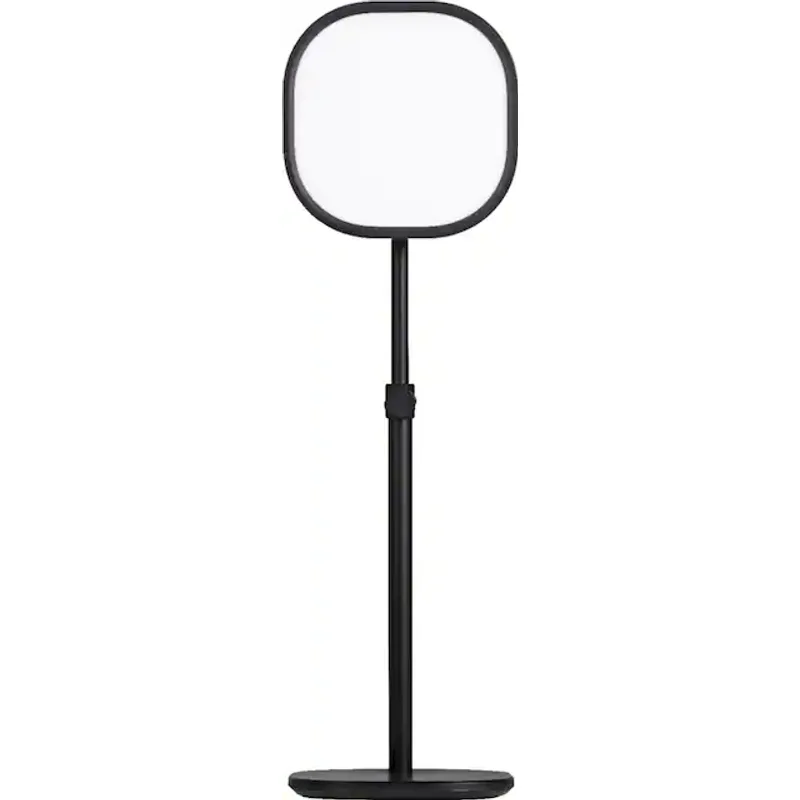
Elgato Key Light Air
Pros
- 1400 lumens at adjustable color temperature (2900K–7000K) produces a clean, flattering key light that eliminates the washed-out or shadowed appearance causing self-view anxiety — users consistently report reduced self-consciousness after switching from overhead room lighting
- Wi-Fi app allows brightness and color temperature adjustments from your phone without breaking eye contact on a call — practical for real-time corrections when window light shifts
- 2900K–7000K range covers the full workday shift from warm morning light to cool afternoon daylight, so the light can match ambient conditions across a call-heavy schedule
- Stream Deck integration enables saved lighting presets switchable with one button — useful for switching between interview-style lighting and casual standup setups
Cons
- AC power only — requires a wall outlet within reach of the desk; no USB or battery option for setups without accessible outlets near the monitor
- The gooseneck arm can drift slightly on vibration-prone desks during heavy typing — periodically re-tighten the mounting clamp to maintain position
- No physical controls — if the Wi-Fi app is unreachable (network issue, app crash), the light cannot be adjusted until connectivity is restored
5. Use a Dedicated Microphone
Laptop built-in microphones pick up keyboard noise, room echo, and fan hum — all of which force call participants to work harder to understand you. That listener effort adds up across a day of calls. A dedicated USB microphone with a cardioid polar pattern cuts room noise at the source before platform noise suppression even kicks in.
Sub-$100 options produce audio quality that participants notice immediately — no software processing required.
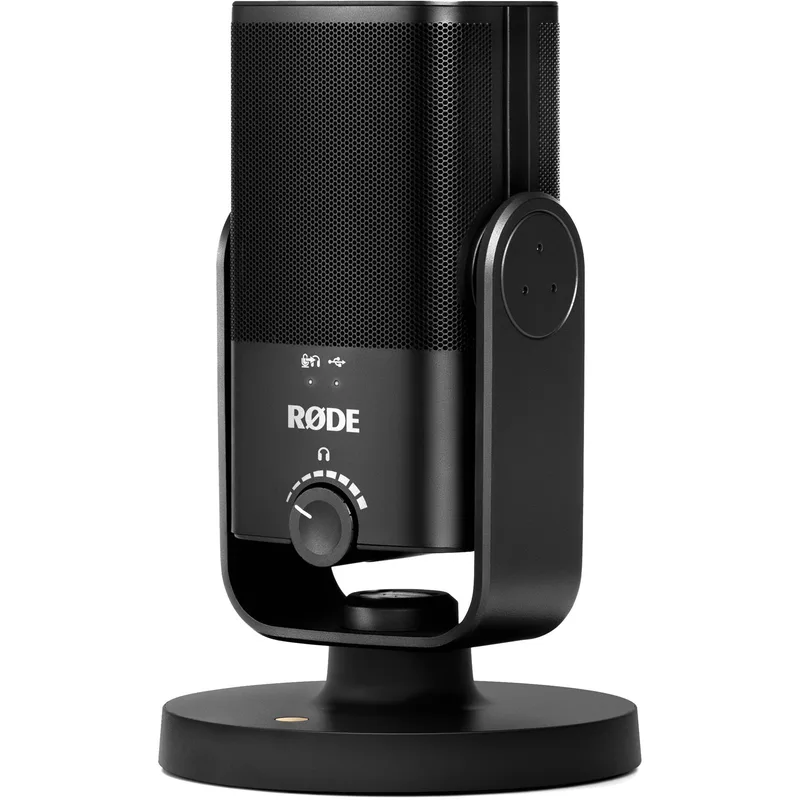
Rode NT-USB Mini
Pros
- Studio-grade condenser capsule reproduces a warm, natural voice character that call participants consistently describe as audibly superior to headset microphones and laptop built-ins — the difference is clear without any EQ or software processing
- Integrated pop shield and compact desk stand are included — out-of-box setup requires no additional accessories for a professional result on calls
- Cardioid polar pattern captures audio from in front while rejecting sound from the sides and rear — effective at reducing keyboard clicks, fan noise, and ambient room sounds
- Headphone output with zero-latency monitoring lets you hear your voice as recorded, so you can catch audio issues before a high-stakes call
Cons
- Condenser capsules capture room echo more than dynamic microphones — performs best in offices with soft furnishings; bare-walled rooms benefit from acoustic treatment before you'll get the full value
- The USB-C cable is very short (approximately 6 inches) — you may need to reposition your laptop or add a USB-C extension to reach a comfortable microphone placement
- Microphone only — no built-in speaker or headphone amplifier, so separate listening hardware is still required for call audio output
6. Rotate Between Earbuds and Headset Through the Day
The same pair of over-ear headphones for 6–8 hours causes pressure fatigue and heat buildup regardless of audio quality. Rotating between two form factors distributes the physical load: compact ANC earbuds for focused listening blocks, cushioned wireless headset for longer call stretches where audio clarity matters most.
The Sony WF-1000XM5 dropped to $199–$249 after the WF-1000XM6 launched in early 2026, making it the best-value ANC earbud for call rotations. The Jabra Evolve2 55 is purpose-built for long call days with its ventilated AirComfort cushions and 36-hour battery — and its price has come down to $219–$269, making it more accessible than when it launched.
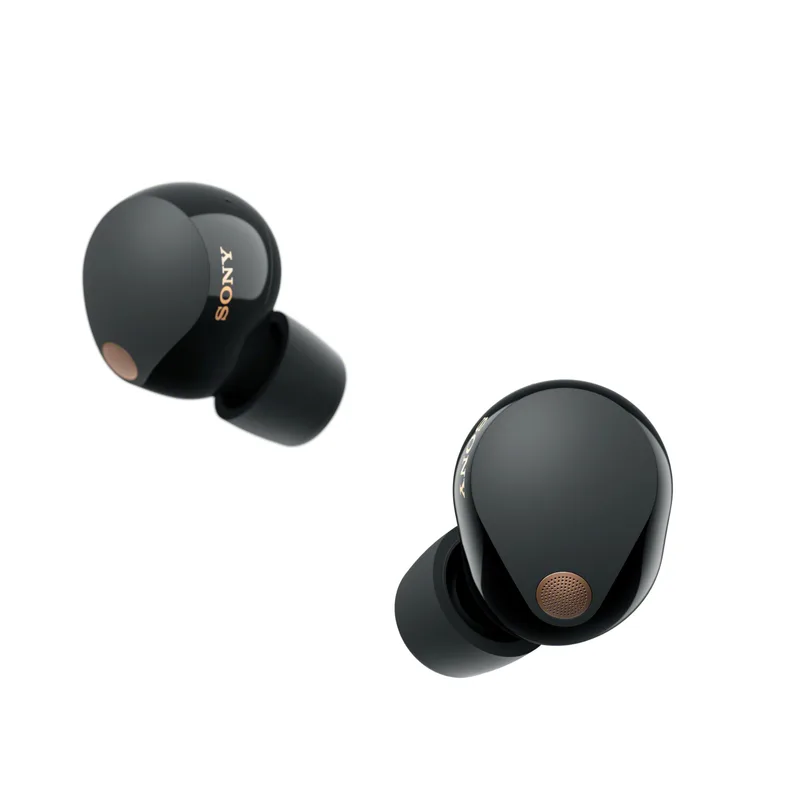
Sony WF-1000XM5
Pros
- Five-mic array with AI Voice Enhancement delivers clear call audio — background noise rejection is strong enough to hold calls in busy home environments without struggling to be heard
- ANC is class-leading for the price: reduces background noise enough to maintain focus during calls in open-plan or household environments
- 8-hour rated battery covers a full workday of calls on a single charge — the case adds 28 more hours for back-to-back travel days
- Speak-to-Chat mode pauses audio automatically when you talk to someone in the room — no more fumbling to remove an earbud for in-person interruptions mid-call
- With the WF-1000XM6 now out at $329, the XM5 has dropped to $199–$249 — making it the best-value ANC earbud for call rotations
Cons
- Ear tip fit is critical for both ANC effectiveness and call quality — the default medium tips don't work for all ear shapes, and poor fit noticeably degrades performance
- Touch controls have a learning curve before gestures feel natural — accidental triggers during adjustment are common in the first week
- No multipoint Bluetooth — switching audio between laptop and phone requires a manual disconnect/reconnect sequence that interrupts workflow
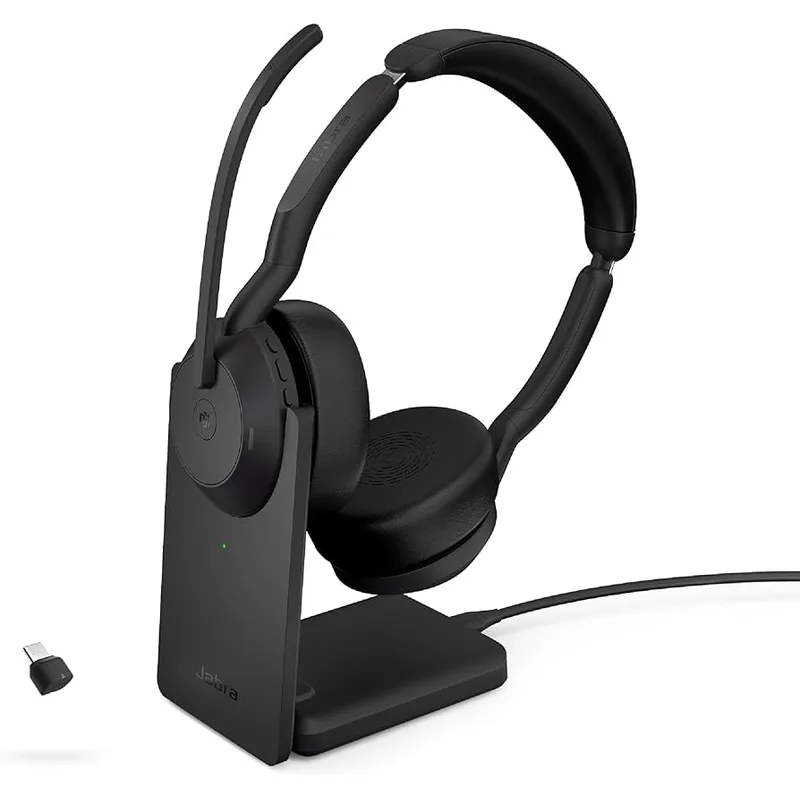
Jabra Evolve2 55
Pros
- AirComfort layered cushions use hollowed-out foam with a ventilation structure — significantly reduces the pressure and heat buildup that causes over-ear fatigue during 4+ hour call days
- Six-mic array with ANC produces call audio colleagues consistently describe as noticeably clear — reduced listener fatigue on both ends of the call
- 36-hour rated battery means a full week of heavy call days on a single charge for most remote workers — no need to put it on the charger between workdays
- USB dongle included alongside Bluetooth — maintains a rock-solid 2.4GHz wireless connection that avoids the Bluetooth dropouts some home offices experience near routers
- Certified for Microsoft Teams and Zoom with dedicated call controls on the ear cup — mute, volume, and call accept/end without touching the keyboard
Cons
- 195g weight is noticeable for users accustomed to lighter headsets, particularly during the first few weeks while the headband adjusts to your head shape
- No EQ app or per-call audio customization — the call audio profile is fixed, so users who want fine-tuned sound shaping will need to rely on platform-level settings
- USB dongle setup means the dongle stays plugged into your laptop — awkward if you hot-desk or regularly move between machines
7. Take a Deliberate Between-Call Break
A 5-minute screen-free break between calls reduces accumulated fatigue more effectively than a longer break taken after several consecutive calls. Close the laptop lid, look out a window, or walk to the kitchen. Let your eyes readjust to distance vision and your brain disengage from active listening mode before the next call starts.
The key is no screens. A 5-minute break spent on your phone scrolling social media does not provide the same cognitive reset as 5 minutes away from a screen entirely.
8. Turn Off Video for Calls That Don’t Require It
Not every call needs video. Status check-ins, quick clarifications, and informal updates with close colleagues are often more efficient as voice-only calls. Camera-off calls eliminate self-monitoring, remove the need to maintain a professional background, and allow more natural movement and posture changes.
Establish a team norm explicitly: video for client calls, new relationships, and collaborative problem-solving. Audio-only for routine internal updates. Making this explicit removes the social pressure to be on camera when it adds no value.
9. Enable Platform Noise Suppression
All major video platforms include AI-powered noise suppression that filters keyboard clicks, fan noise, HVAC hum, and background conversation. Most are off or set to low by default — which means you’re broadcasting unfiltered audio unless you’ve changed this.
In Zoom: Settings → Audio → Background Noise Suppression → “High.” In Google Meet: three-dot menu → Settings → Audio → enable “Noise cancellation.” In Teams: Settings → Devices → Noise Suppression → “High.” Free. Immediate. Do it today.
10. Consider an All-in-One Video Bar for a Clean Setup
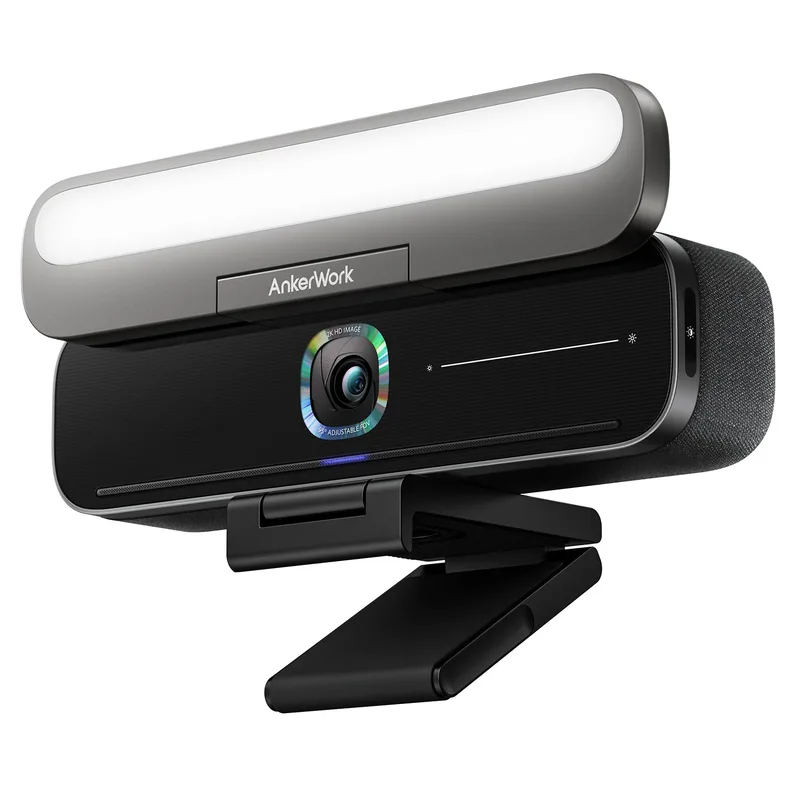
Managing separate webcam, microphone, speaker, and lighting cables adds low-grade friction to every call — adjusting one device often shifts another. An all-in-one video bar mounts to your monitor and handles all four functions from a single USB-C cable.
AnkerWork B600 Video Bar
Pros
- 4-in-1 design combines 2K webcam, adjustable LED light bar, 4-mic array, and stereo speaker in a single monitor-clip unit — eliminates the cable management complexity of running separate devices across a desk
- AI noise cancellation handles keyboard noise, HVAC, and background voices without manual configuration — particularly useful in shared living spaces
- 2K resolution captures noticeably more facial detail than standard 1080p webcams — the difference is visible in natural light and well-lit home offices
- Adjustable FOV (65°–95°) lets you switch between a wide-angle shot for multi-person rooms and a tighter frame for solo calls from the same unit
Cons
- 2K resolution falls short of 4K dedicated webcams for users who also record video content alongside calls
- Built-in speaker performance is adequate for a quiet home office but falls short of a dedicated Bluetooth speaker or headset for audio-critical listening
- LED light bar output is less powerful than a dedicated key light — works well in dim rooms but can be insufficient as a primary light source in rooms with strong ambient daylight
11. Optimize Your Background
A busy or cluttered background creates a persistent low-level cognitive load — the constant background awareness that something visible might distract participants. Small and easy to ignore, but it compounds over a call-heavy day.
A plain wall, simple bookshelf, or platform blur background fixes this. Blur backgrounds work reliably across all major platforms with minimal GPU use and eliminate the need to tidy up before every call. If you use a virtual background, choose a simple neutral room image over a branded or exotic setting — unfamiliar virtual environments are visually distracting for participants in a way that breaks focus.
12. Set a Hard Daily Stop Time for Calls
Without a defined end time, meetings expand to fill available time. A hard stop at 4pm (or whichever boundary works for your schedule) creates a predictable limit that protects recovery time and prevents a late-afternoon call block from bleeding into the evening.
Book a recurring focus block at the end of each workday to enforce the boundary. After several weeks of consistent hard stops, the cognitive shift out of call mode becomes faster and recovery time shortens.
Gear Comparison
| Product | Best For | Price | ANC |
|---|---|---|---|
| Sony WF-1000XM5 | Compact ANC earbuds, rotation use | Unavailable | Yes |
| Jabra Evolve2 55 | Full-day wireless headset, call quality | $90.44-$244.99 as of Oct 18, 2026 | Yes |
| Elgato Key Light Air | Professional call lighting | Unavailable | — |
| Rode NT-USB Mini | Dedicated desk microphone | $97.85-$103.00 as of Oct 18, 2026 | — |
| AnkerWork B600 | Simplified all-in-one solution | Unavailable | Yes (mic) |
Buying Guide: What to Prioritize
If you’re on 4+ hours of calls per day: Headset comfort and microphone quality are your highest-ROI upgrades. The Jabra Evolve2 55 or Sony WF-1000XM5 paired with a dedicated mic (Rode NT-USB Mini) addresses both ends of call fatigue — what you hear and what others hear from you.
If self-view anxiety is a persistent issue: Fix your lighting first. The Elgato Key Light Air makes a larger visible difference on-screen than a camera upgrade in most home office environments. Once your lighting is dialed in, self-view anxiety drops substantially.
If you want to simplify your desk: The AnkerWork B600 replaces three or four separate devices with one unit. The trade-off is some performance compromise on each individual function — but for users who want fewer cables and a cleaner setup, it delivers solid results from one monitor-clip unit.
If you’re just starting out: Hide your self-view, move your camera to eye level, and enable platform noise suppression. These cost nothing and reduce fatigue meaningfully on their own before you spend a dollar on gear.
FAQ
Does hiding your self-view affect what others see on the call?
No. Hiding your self-view only affects what you see on your end. Your video feed continues to broadcast normally to all other participants. The setting is designed specifically to reduce the self-monitoring load without changing your presence on the call.
What’s the single highest-impact change for most remote workers?
Camera eye level and hiding self-view consistently produce the most immediate cognitive relief — and both are free. After that, audio quality (dedicated mic or quality headset) is the next highest-impact upgrade. Poor outgoing audio is one of the most common sources of unnoticed fatigue for participants on the other end of your calls.
Can I use platform noise suppression alongside a dedicated microphone?
Yes, and the combination works well. A cardioid microphone like the Rode NT-USB Mini handles the first layer of noise rejection at the hardware level; platform noise suppression handles the residual. The result is cleaner call audio than either solution provides alone.
How long does it take to see results from these changes?
Scheduling changes (batching calls, adding between-call breaks) produce noticeable results within the first week. Physical changes — better headset cushioning, eye-level camera, improved lighting — take effect immediately on the first call after setup. Behavioral changes like consistently hiding self-view typically feel natural within 2–3 days.
Are noise-cancelling earbuds safe for all-day wear?
Generally yes, at moderate volumes. The primary comfort consideration is the physical seal — silicone ear tips are more comfortable than foam tips for most people over extended periods. If your ears feel sore after 2 hours, try a smaller tip size or rotate to an over-ear headset for the longer call blocks.
Should I upgrade to the Sony WF-1000XM6?
The WF-1000XM6 launched in February 2026 at $329.99 with improved ANC and 32-bit audio processing. It’s a genuine upgrade. But the WF-1000XM5 dropped to $199–$249 after the XM6 release and remains strong for call-focused use. The extra $80–$130 is hard to justify unless you also use the earbuds heavily for music, where the XM6’s audio improvements are more apparent.
Conclusion
Video call fatigue is a predictable consequence of sustained high-attention engagement without the physical and social cues that make in-person interaction sustainable. It’s an ergonomics problem with practical solutions.
Start with the free fixes: hide your self-view, move your camera to eye level, and enable platform noise suppression. Add a key light and dedicated mic when you’re ready to invest. For full-day, call-heavy schedules, the Jabra Evolve2 55 (now under $270) is the best dedicated headset for sustained comfort, and the Elgato Key Light Air is the best single lighting upgrade available. For a simplified desk with one cable, the AnkerWork B600 handles all four functions without major compromises.
Finish a call-heavy day with energy left. That’s the goal.
Detailed Reviews
Sony WF-1000XM5
Pros
- Five-mic array with AI Voice Enhancement delivers clear call audio — background noise rejection is strong enough to hold calls in busy home environments without struggling to be heard
- ANC is class-leading for the price: reduces background noise enough to maintain focus during calls in open-plan or household environments
- 8-hour rated battery covers a full workday of calls on a single charge — the case adds 28 more hours for back-to-back travel days
- Speak-to-Chat mode pauses audio automatically when you talk to someone in the room — no more fumbling to remove an earbud for in-person interruptions mid-call
- With the WF-1000XM6 now out at $329, the XM5 has dropped to $199–$249 — making it the best-value ANC earbud for call rotations
Cons
- Ear tip fit is critical for both ANC effectiveness and call quality — the default medium tips don't work for all ear shapes, and poor fit noticeably degrades performance
- Touch controls have a learning curve before gestures feel natural — accidental triggers during adjustment are common in the first week
- No multipoint Bluetooth — switching audio between laptop and phone requires a manual disconnect/reconnect sequence that interrupts workflow
Jabra Evolve2 55
Pros
- AirComfort layered cushions use hollowed-out foam with a ventilation structure — significantly reduces the pressure and heat buildup that causes over-ear fatigue during 4+ hour call days
- Six-mic array with ANC produces call audio colleagues consistently describe as noticeably clear — reduced listener fatigue on both ends of the call
- 36-hour rated battery means a full week of heavy call days on a single charge for most remote workers — no need to put it on the charger between workdays
- USB dongle included alongside Bluetooth — maintains a rock-solid 2.4GHz wireless connection that avoids the Bluetooth dropouts some home offices experience near routers
- Certified for Microsoft Teams and Zoom with dedicated call controls on the ear cup — mute, volume, and call accept/end without touching the keyboard
Cons
- 195g weight is noticeable for users accustomed to lighter headsets, particularly during the first few weeks while the headband adjusts to your head shape
- No EQ app or per-call audio customization — the call audio profile is fixed, so users who want fine-tuned sound shaping will need to rely on platform-level settings
- USB dongle setup means the dongle stays plugged into your laptop — awkward if you hot-desk or regularly move between machines
Elgato Key Light Air
Pros
- 1400 lumens at adjustable color temperature (2900K–7000K) produces a clean, flattering key light that eliminates the washed-out or shadowed appearance causing self-view anxiety — users consistently report reduced self-consciousness after switching from overhead room lighting
- Wi-Fi app allows brightness and color temperature adjustments from your phone without breaking eye contact on a call — practical for real-time corrections when window light shifts
- 2900K–7000K range covers the full workday shift from warm morning light to cool afternoon daylight, so the light can match ambient conditions across a call-heavy schedule
- Stream Deck integration enables saved lighting presets switchable with one button — useful for switching between interview-style lighting and casual standup setups
Cons
- AC power only — requires a wall outlet within reach of the desk; no USB or battery option for setups without accessible outlets near the monitor
- The gooseneck arm can drift slightly on vibration-prone desks during heavy typing — periodically re-tighten the mounting clamp to maintain position
- No physical controls — if the Wi-Fi app is unreachable (network issue, app crash), the light cannot be adjusted until connectivity is restored
Rode NT-USB Mini
Pros
- Studio-grade condenser capsule reproduces a warm, natural voice character that call participants consistently describe as audibly superior to headset microphones and laptop built-ins — the difference is clear without any EQ or software processing
- Integrated pop shield and compact desk stand are included — out-of-box setup requires no additional accessories for a professional result on calls
- Cardioid polar pattern captures audio from in front while rejecting sound from the sides and rear — effective at reducing keyboard clicks, fan noise, and ambient room sounds
- Headphone output with zero-latency monitoring lets you hear your voice as recorded, so you can catch audio issues before a high-stakes call
Cons
- Condenser capsules capture room echo more than dynamic microphones — performs best in offices with soft furnishings; bare-walled rooms benefit from acoustic treatment before you'll get the full value
- The USB-C cable is very short (approximately 6 inches) — you may need to reposition your laptop or add a USB-C extension to reach a comfortable microphone placement
- Microphone only — no built-in speaker or headphone amplifier, so separate listening hardware is still required for call audio output
AnkerWork B600 Video Bar
Pros
- 4-in-1 design combines 2K webcam, adjustable LED light bar, 4-mic array, and stereo speaker in a single monitor-clip unit — eliminates the cable management complexity of running separate devices across a desk
- AI noise cancellation handles keyboard noise, HVAC, and background voices without manual configuration — particularly useful in shared living spaces
- 2K resolution captures noticeably more facial detail than standard 1080p webcams — the difference is visible in natural light and well-lit home offices
- Adjustable FOV (65°–95°) lets you switch between a wide-angle shot for multi-person rooms and a tighter frame for solo calls from the same unit
Cons
- 2K resolution falls short of 4K dedicated webcams for users who also record video content alongside calls
- Built-in speaker performance is adequate for a quiet home office but falls short of a dedicated Bluetooth speaker or headset for audio-critical listening
- LED light bar output is less powerful than a dedicated key light — works well in dim rooms but can be insufficient as a primary light source in rooms with strong ambient daylight