Running two monitors from a single cable connection was complicated hardware until Thunderbolt 4 made it the standard by 2026. Now every Thunderbolt 4 dock on this list supports dual 4K@60Hz displays without adapters, active converters, or workarounds — on Windows, at least. Mac users with base M1, M2, and M3 chips have an extra wrinkle: Apple’s hardware limits those chips to one external display regardless of the dock. DisplayLink docks like the Plugable UD-6950PDH route around that limitation using software rendering, unlocking a true dual-display setup on machines that otherwise can’t do it.
The five docks below cover every use case: the most ports, the cleanest dual-HDMI design, the DisplayLink fix for older Macs, the best value on Thunderbolt 4, and the best option for Mac creative professionals who need multiple downstream Thunderbolt connections alongside their two monitors.
Comparison
| Spec | CalDigit TS4 | Kensington SD5760T | Plugable UD-6950PDH | UGREEN Revodok Max 213 | OWC 11-Port Thunderbolt Dock |
|---|---|---|---|---|---|
| Rating | 9.5/10 | 8.9/10 | 8.7/10 | 8.6/10 | 8.5/10 |
| Price | $379.99as of Oct 25, 2026 | $227.99-$237.97as of Oct 25, 2026 | $184.99-$199.99as of Oct 25, 2026 | Unavailable | Unavailable |
| Ports | 18 total | 13 total | 13 total | 13 total | 11 total |
| Connection | Thunderbolt 4 (40Gb/s) | Thunderbolt 4 (40Gb/s) | USB-C / Thunderbolt (DisplayLink) | Thunderbolt 4 (40Gb/s) | Thunderbolt 4 (40Gb/s) |
| Display Output | Dual 6K@60Hz or single 8K@30Hz | Dual 4K@60Hz via 2x HDMI 2.0 | Dual 4K@60Hz — 2x HDMI + 2x DisplayPort | Dual 4K@60Hz or single 8K display | Dual 4K@60Hz |
| Power Delivery | 98W to host laptop | 100W to host laptop | 100W to host laptop | 90W to host laptop | 96W to host laptop |
| Ethernet | 2.5GbE | 1GbE | 1GbE | 2.5GbE | 1GbE |
| USB-A | 5x (10Gb/s) | 3x (10Gb/s) | 3x (5Gb/s) | 4x (10Gb/s) | 3x (10Gb/s) + 1x USB 2.0 |
| USB-C | 3x (10Gb/s) | 1x (10Gb/s) | 1x (5Gb/s) | 2x (10Gb/s) | — |
| Thunderbolt Downstream | 3x (40Gb/s) | 1x (40Gb/s) | — | — | 3x (40Gb/s) |
| Card Slot | SD 4.0 (UHS-II) | — | — | — | SD 4.0 (UHS-II) |
| Audio | 3.5mm in + 3.5mm out | 3.5mm combo | 3.5mm combo | 3.5mm combo | 3.5mm combo |
| Card Slots | — | SD 4.0 + microSD 4.0 | SD + microSD | SD 4.0 + TF 4.0 | — |
| Driver | — | — | DisplayLink required (macOS only) | — | — |
| Cable | — | — | — | Included Thunderbolt 4 | 0.7m TB4 included |
| Check Price → | Check Price → | Check Price → | Check Price → | Check Price → |
Prices change daily — tap Check Price for the current Amazon price.
The Best Dual-Monitor Docking Stations in 2026
1. CalDigit TS4 — Best Overall
CalDigit TS4
Pros
- Dual 6K@60Hz display output is the highest resolution available on any Thunderbolt 4 dock — handles two Apple Pro Display XDR-class monitors simultaneously
- 98W power delivery is the maximum certified output for Thunderbolt 4, fast enough to charge a 16-inch MacBook Pro or power-hungry Windows laptops at full speed
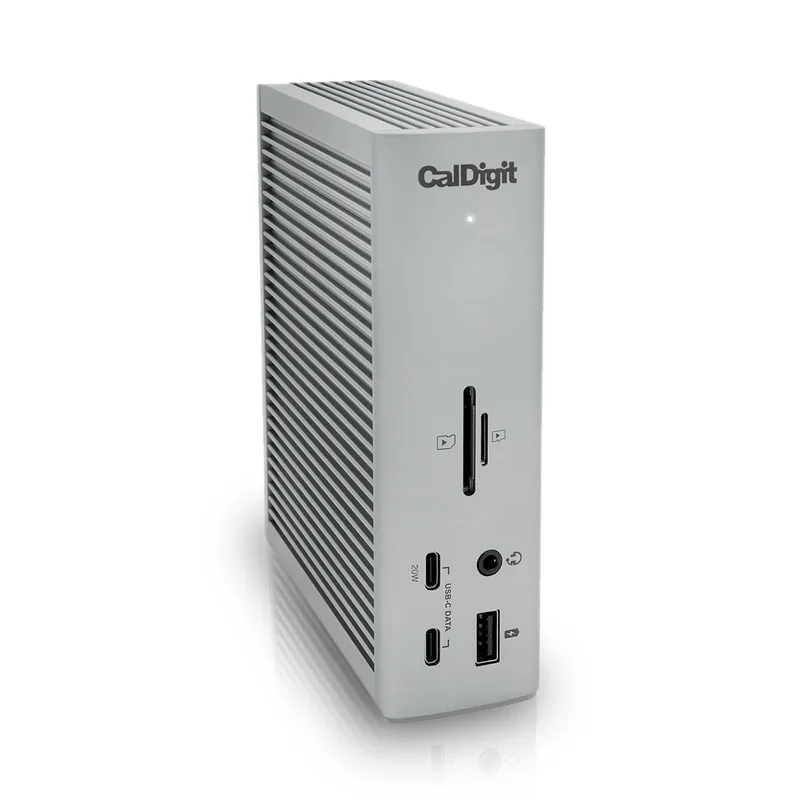
- 18 ports cover virtually every peripheral simultaneously without needing a secondary hub — three downstream TB4, five USB-A, three USB-C, 2.5GbE, SD slot, and dual audio jacks
- Works with macOS, Windows, and ChromeOS without additional drivers or software installation
- Three downstream Thunderbolt 4 ports allow daisy-chaining external NVMe enclosures, audio interfaces, or additional hubs without occupying host ports
Cons
- Larger footprint than most competitors — the upright design saves some desk space, but it is not portable and requires significant cable management behind the dock
- MSRP sits at $449.95, though street price consistently lands in the $299–$349 range — set alerts rather than paying MSRP
- Single front USB-C port means frequent hot-swap accessory users need to reach around to rear ports
The CalDigit TS4 remains the dual-monitor benchmark in 2026. No other Thunderbolt 4 dock ships with dual 6K@60Hz support, 98W charging, and 18 ports in a single unit. For Windows users, it drives two 4K monitors at 60Hz with bandwidth to spare. For Mac M1 Pro, M2 Pro, M3 Pro, and M4-series users, it unlocks dual 6K@60Hz — the full spec of two Apple Pro Display XDRs simultaneously.
The 18-port count is the practical differentiator. Three downstream Thunderbolt 4 ports, five USB-A ports, and three USB-C ports mean you can run two monitors, a keyboard, a mouse, two external drives, an audio interface, and still have ports left over. That’s a complete desk setup through one cable to your laptop.
The MSRP of $449.95 is high, but the TS4 consistently drops to $299–$349 on Amazon and hit $319 during Prime Day 2026. Set a price alert rather than paying MSRP.
Best for: MacBook Pro M1 Pro/Max or Windows users who want the most ports and the highest display resolution ceiling.
2. Kensington SD5760T — Best Clean Design
Kensington SD5760T
Pros
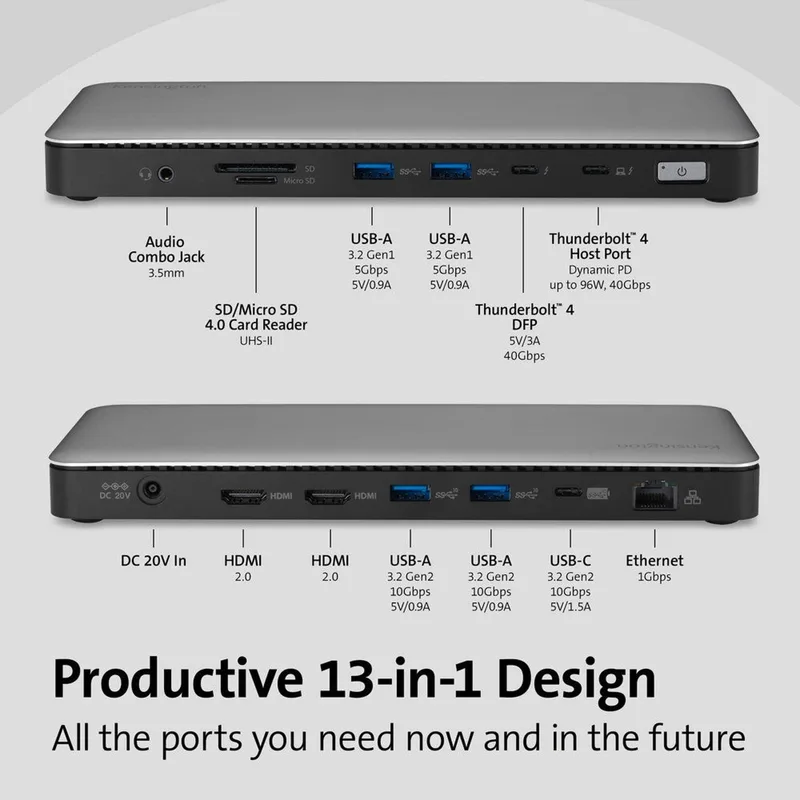
- Dual HDMI 2.0 ports make it the most plug-and-play option for home offices — two monitors connect directly without needing DisplayPort adapters or active converters
- 100W power delivery is higher than the CalDigit TS4's 98W and covers even the most demanding laptops
- Compact horizontal form factor sits flat on a desk and fits under a monitor stand — minimal desk footprint compared to vertical alternatives
- SD 4.0 and microSD 4.0 slots together handle both camera formats simultaneously — useful for photographers working with multiple card types
- Certified Thunderbolt 4 ensures compatibility with any TB4 or USB4 laptop, with no driver installation required
Cons
- Only one downstream Thunderbolt 4 port limits daisy-chaining options compared to the CalDigit TS4's three downstream ports
- 1GbE Ethernet (not 2.5GbE) — a meaningful limitation if you have a multi-gigabit internet connection or NAS on your home network
- Fewer USB-A ports than the CalDigit TS4 — heavy peripheral users may need a secondary USB hub
The Kensington SD5760T is the simplest path to a dual-monitor desk setup. Two HDMI 2.0 ports on the rear mean both monitors plug in directly — no DisplayPort cables, no active adapters, no compatibility research. Just plug in and go.
It’s the only dock in this roundup with dual HDMI outputs rather than DisplayPort or a mixed configuration. For home offices running two standard HDMI monitors (which is most home offices), that’s a genuine convenience. The 100W power delivery edges out even the CalDigit TS4 for laptop charging.
At $199–$249, it’s the most affordable Thunderbolt 4 dock here with certified dual 4K support. The tradeoff is connectivity depth: one downstream Thunderbolt 4 port versus the CalDigit’s three, and 1GbE versus 2.5GbE Ethernet. For users who primarily need two monitors and reliable charging, those limitations don’t matter.
Best for: Users who want a straightforward dual-HDMI setup without extra complexity or expense.
3. Plugable UD-6950PDH — Best for Mac M1–M3
Plugable UD-6950PDH
Pros
- DisplayLink technology unlocks dual external displays on Mac M1, M2, and M3 (base models) — Apple's hardware limits these chips to one display, but the Plugable bypasses this using software rendering
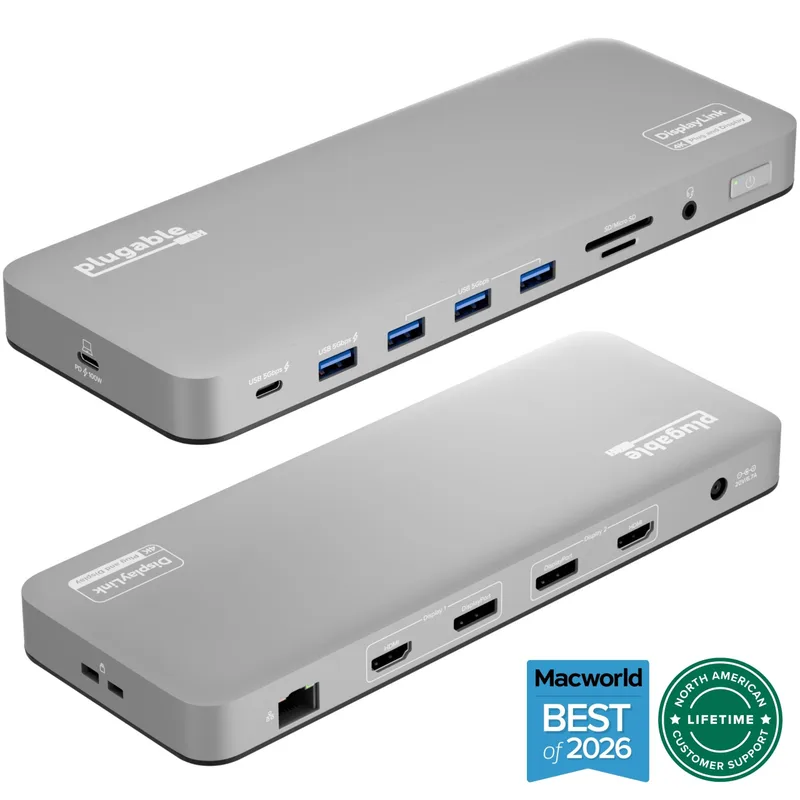
- Four display outputs (2x HDMI + 2x DisplayPort) provide maximum flexibility to match your monitor connection types without adapters
- 100W charging over USB-C supports MacBook Pro 14-inch and 16-inch at full speed
- Works with any laptop that has a USB-C or USB-A port — no Thunderbolt required, broadening compatibility to older or budget machines
- Strong owner reports of reliable dual-display operation across mixed Mac and Windows households
Cons
- DisplayLink requires a software driver on macOS — adds installation step and uses GPU resources for display rendering, which can slightly impact performance on older Macs
- USB 3.0 connection caps total bandwidth at 5Gb/s — file transfer to connected storage is significantly slower than Thunderbolt 4 options
- DisplayLink can cause minor color accuracy drift compared to native display output — not ideal for color-critical photo or video work
Base M1, M2, and M3 MacBooks are hardware-limited to a single external display. No Thunderbolt 4 dock changes that — it’s a chip-level restriction, not a software setting. The Plugable UD-6950PDH gets around it using DisplayLink, a software rendering layer that treats the additional monitor as a display device rather than a native GPU output. Install the DisplayLink manager app from the Mac App Store, plug in, and both monitors work.
The dock ships with four display outputs: two HDMI and two DisplayPort. Pick the combination that matches your monitors without buying adapters. It also charges at 100W, handles SD and microSD simultaneously, and works with any USB-C or USB-A laptop — not just Thunderbolt machines.
Owner reports confirm reliable dual-display operation across MacBook Air M1/M2/M3 and MacBook Pro M1/M2/M3 (non-Pro chips). The DisplayLink driver causes a small GPU overhead and doesn’t support HDR color modes, which matters for color-critical work but not for general office use.
Best for: Mac M1, M2, or M3 base model users who need dual monitors and can’t use native Thunderbolt output for a second display.
4. UGREEN Revodok Max 213 — Best Value TB4
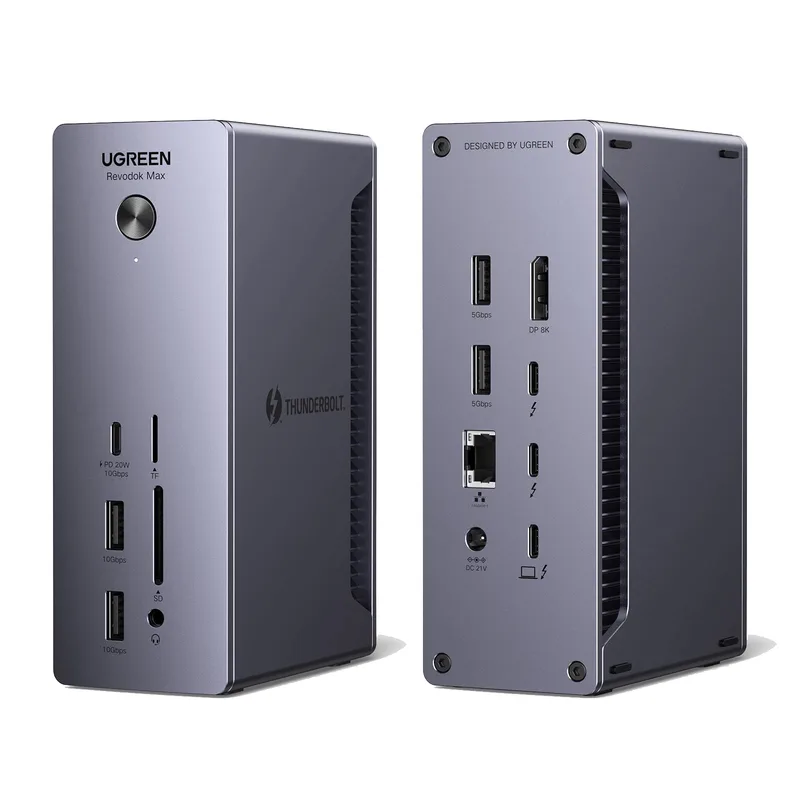
UGREEN Revodok Max 213
Pros
- 2.5GbE Ethernet at this price point is unusual — most sub-$300 Thunderbolt 4 docks include only 1GbE, making this a clear advantage for users with fast home networks or NAS setups
- Four USB-A ports (10Gb/s each) cover keyboards, mice, external drives, and USB receivers without splitting bandwidth
- Compact aluminum build feels premium and dissipates heat well — cooler operation than plastic alternatives during extended sessions
- Dual 4K@60Hz display support confirmed on both Windows (native) and Mac Pro/Max/Ultra chips
- Includes Thunderbolt 4 cable in the box — competing brands at this price often charge separately
Cons
- 90W power delivery falls short of the 98–100W on premium competitors — adequate for most laptops but may not fully charge the most power-hungry gaming laptops
- No front-facing ports — all connections are on the rear panel, which can be inconvenient for frequently swapped peripherals
- Fewer owner reviews than CalDigit or OWC — less real-world reliability data at the time of publication
UGREEN’s Revodok Max 213 is the most competitive Thunderbolt 4 dock at the $249–$299 price point. The standout feature is 2.5GbE Ethernet — most docks in this price tier ship with only 1GbE, which means the Revodok Max 213 doubles your potential wired network throughput if you have a multi-gigabit connection or a NAS on your home network.
The 13 ports cover dual 4K@60Hz displays, four 10Gb/s USB-A ports, two USB-C data ports, SD and TF card slots, and a 3.5mm audio jack. All ports are on the rear, which keeps the desk surface clean but means reaching around for drives you swap frequently.
The 90W power delivery is the only meaningful spec gap versus premium options. It charges all current MacBook Pro models efficiently, though it may not max out the fastest-charging gaming laptops. For standard remote work, it’s indistinguishable from 98–100W docks in daily use.
Best for: Windows or Mac Pro/Max users who want native Thunderbolt 4 dual-display support with 2.5GbE networking in the $249–$299 range.
5. OWC 11-Port Thunderbolt Dock — Best for Mac Creative Pros

OWC 11-Port Thunderbolt Dock
Pros
- Three downstream Thunderbolt 4 ports enable daisy-chaining pro audio interfaces, NVMe enclosures, and displays — ideal for creative professionals with complex setups
- 96W power delivery covers the full spectrum of MacBook Pro models, including the 16-inch variant
- SD 4.0 (UHS-II) card slot reads cards at up to 312MB/s — meaningful for professionals importing large RAW files regularly
- OWC's macOS-first design philosophy results in strong compatibility reports from Mac users, with minimal driver or firmware issues
- Compact compared to the CalDigit TS4 — easier to position on or under a desk without dominating the workspace
Cons
- 11 ports is the fewest in this roundup — demanding users with many peripherals may need a secondary hub for USB devices
- 1GbE Ethernet (not 2.5GbE) — a step behind the CalDigit TS4 and UGREEN Revodok Max 213 for network-heavy workflows
- Slightly less value than the UGREEN Revodok Max 213 at a similar price, primarily justified by OWC's Mac-focused ecosystem support
OWC built its Thunderbolt dock specifically for Mac workflows, and it shows. The 11-port configuration prioritizes the connections Mac pros use most: three downstream Thunderbolt 4 ports, a UHS-II SD card reader that reads at up to 312MB/s, and a focus on clean power delivery at 96W.
Three downstream TB4 ports allow daisy-chaining pro audio interfaces, NVMe enclosures, or a Thunderbolt display alongside your two USB monitors. That’s the configuration video editors and music producers typically build — the OWC handles it without secondary hubs or compromised bandwidth.
It’s more compact than the CalDigit TS4 and easier to tuck under a monitor stand or behind a desk. At $219–$249, it’s slightly more expensive than the UGREEN Revodok Max 213 for fewer total ports, but OWC’s Mac-first design and strong community support justify the premium for creative users.
Best for: Mac video editors, audio engineers, and photographers who need three downstream Thunderbolt ports and a fast SD card reader alongside two monitors.
What to Look For in a Dual-Monitor Docking Station
Native vs. DisplayLink
Native Thunderbolt 4 or USB4 display output uses your laptop’s GPU to render both monitors — zero software overhead, full color accuracy, HDR support, and minimal latency. Every dock here except the Plugable uses native output.
DisplayLink docks (the Plugable UD-6950PDH) route display output through software. The tradeoff: works on any laptop including those with one-display hardware limits (Mac M1/M2/M3 base models), but requires a driver, uses CPU/GPU for rendering, doesn’t support HDR or DCI-P3, and performs slightly worse in motion-heavy applications.
For most office work — spreadsheets, video calls, writing, coding — DisplayLink is invisible in practice. For color grading or HDR video work, use native output.
MST vs. SST
Multi-Stream Transport (MST) is how one Thunderbolt port drives two monitors. Every Thunderbolt 4 dock uses MST internally. The limitation is on Mac: Apple silicon laptops support SST (Single-Stream Transport) to each monitor, meaning they need a dedicated Thunderbolt or DisplayPort signal path per display. This is why docks with multiple downstream Thunderbolt ports — like the CalDigit TS4 and OWC dock — perform more reliably with Mac in multi-monitor configurations.
On Windows, MST is broadly supported and less constraining.
Power Delivery
For a single-cable desk setup, your dock needs to charge your laptop at a rate equal to or higher than its TGP (Total Graphics Power). Practical thresholds:
- MacBook Pro 14-inch: 96W covers it fully
- MacBook Pro 16-inch: 96W+ covers it; 140W would handle peak gaming loads but no TB4 dock reaches that
- Most Windows ultrabooks: 65–96W covers it
- Gaming laptops: 100W+ preferred; check your laptop’s max charging spec
All five docks here deliver 90–100W, which covers most remote work laptops.
Ethernet Speed
Standard 1GbE tops out at ~940Mbps real-world throughput. If you have gigabit or multi-gigabit internet — or a NAS on your home network — 2.5GbE doubles your bandwidth ceiling. The CalDigit TS4 and UGREEN Revodok Max 213 include 2.5GbE. The Kensington SD5760T, Plugable UD-6950PDH, and OWC dock top out at 1GbE.
Mac M1/M2/M3 Base Model Limitations
Base (non-Pro, non-Max, non-Ultra) Apple M1, M2, and M3 chips have a hardware limitation: one external display, regardless of what dock you use. This affects:
- MacBook Air M1, M2, M3
- MacBook Pro 13-inch M1, M2
- MacBook Pro 14-inch M3 base (8-core GPU configuration)
Workaround: Use a DisplayLink dock like the Plugable UD-6950PDH. DisplayLink bypasses the hardware limit through software rendering. M1 Pro, M1 Max, M2 Pro, M2 Max, M3 Pro, M3 Max, and all M4-series chips do not have this limitation.
FAQ
Can any Thunderbolt 4 dock drive dual monitors on a Mac?
Not all Macs. MacBook Pro M1 Pro/Max, M2 Pro/Max, M3 Pro/Max, and all M4 models support dual external monitors through any Thunderbolt 4 dock. Base M1, M2, and M3 MacBooks (Air and 13-inch Pro) are hardware-limited to one external display through native output. Use a DisplayLink dock like the Plugable UD-6950PDH to unlock dual monitors on those machines.
Do I need a Thunderbolt laptop to use these docks?
For native display output at full 4K@60Hz, a Thunderbolt 4 or USB4 laptop is required. Standard USB-C (non-Thunderbolt) connections can’t drive two 4K displays natively at 60Hz. The Plugable UD-6950PDH works with any USB-C or even USB-A laptop because it uses DisplayLink software rendering, not native GPU output — making it the universal option.
Will a dual-monitor dock work with a Dell XPS, ThinkPad, or Surface?
Yes, as long as the laptop has a Thunderbolt 4 or USB4 port. Most current Dell XPS 13/15, ThinkPad X1 Carbon, and Surface Pro 10/11 models include Thunderbolt 4. Surface Laptop Studio 2 also supports TB4. Check your specific model’s spec sheet — not all ports on the same chassis are Thunderbolt-capable.
How many monitors can I run at 4K@60Hz on a Thunderbolt 4 dock?
Thunderbolt 4 guarantees support for two 4K@60Hz monitors on any TB4-certified dock. Some docks like the CalDigit TS4 push this to dual 6K@60Hz when connected to Mac M1 Pro/Max or M2 Pro/Max. Windows machines can often run more displays when using DisplayPort MST daisy-chaining, but two 4K@60Hz is the guaranteed universal spec.
Is it worth buying a Thunderbolt 5 dock instead in 2026?
Thunderbolt 5 docks (80Gbps bandwidth, 240W charging, triple 4K display support) have become more broadly available in 2026. If you have a Thunderbolt 5-equipped laptop — current Intel Core Ultra 200H/HX or AMD Ryzen AI 300 systems include TB5 — and plan to run two high-resolution monitors or an external GPU, TB5 is worth the premium. For most dual-4K setups on existing TB4 laptops, the docks in this roundup are more cost-effective. See our Best Thunderbolt 4 Docking Stations and Best Thunderbolt 5 Docking Stations guides for comparison.
The Bottom Line
For most setups, the CalDigit TS4 is the right answer — it’s the most capable Thunderbolt 4 dock available, and its $299–$349 street price is no longer the premium it once was.
If you have two HDMI monitors and want the simplest setup possible, the Kensington SD5760T connects both without adapters and charges at 100W for $199–$249.
If you’re running a base M1, M2, or M3 MacBook, the Plugable UD-6950PDH is the only realistic path to dual monitors without buying a new laptop — the DisplayLink workaround is stable, and the $179–$219 price is reasonable for what it unlocks.
If you want native Thunderbolt 4 dual-display support with 2.5GbE networking under $300, the UGREEN Revodok Max 213 delivers it cleanly.
And for Mac creative professionals who need three downstream Thunderbolt connections for a complex studio setup, the OWC 11-Port Thunderbolt Dock earns its spot.
Check our Best USB-C Docking Stations for Remote Work if you’re using a USB-C laptop without Thunderbolt support.
Detailed Reviews
CalDigit TS4
Pros
- Dual 6K@60Hz display output is the highest resolution available on any Thunderbolt 4 dock — handles two Apple Pro Display XDR-class monitors simultaneously
- 98W power delivery is the maximum certified output for Thunderbolt 4, fast enough to charge a 16-inch MacBook Pro or power-hungry Windows laptops at full speed
- 18 ports cover virtually every peripheral simultaneously without needing a secondary hub — three downstream TB4, five USB-A, three USB-C, 2.5GbE, SD slot, and dual audio jacks
- Works with macOS, Windows, and ChromeOS without additional drivers or software installation
- Three downstream Thunderbolt 4 ports allow daisy-chaining external NVMe enclosures, audio interfaces, or additional hubs without occupying host ports
Cons
- Larger footprint than most competitors — the upright design saves some desk space, but it is not portable and requires significant cable management behind the dock
- MSRP sits at $449.95, though street price consistently lands in the $299–$349 range — set alerts rather than paying MSRP
- Single front USB-C port means frequent hot-swap accessory users need to reach around to rear ports
Kensington SD5760T
Pros
- Dual HDMI 2.0 ports make it the most plug-and-play option for home offices — two monitors connect directly without needing DisplayPort adapters or active converters
- 100W power delivery is higher than the CalDigit TS4's 98W and covers even the most demanding laptops
- Compact horizontal form factor sits flat on a desk and fits under a monitor stand — minimal desk footprint compared to vertical alternatives
- SD 4.0 and microSD 4.0 slots together handle both camera formats simultaneously — useful for photographers working with multiple card types
- Certified Thunderbolt 4 ensures compatibility with any TB4 or USB4 laptop, with no driver installation required
Cons
- Only one downstream Thunderbolt 4 port limits daisy-chaining options compared to the CalDigit TS4's three downstream ports
- 1GbE Ethernet (not 2.5GbE) — a meaningful limitation if you have a multi-gigabit internet connection or NAS on your home network
- Fewer USB-A ports than the CalDigit TS4 — heavy peripheral users may need a secondary USB hub
Plugable UD-6950PDH
Pros
- DisplayLink technology unlocks dual external displays on Mac M1, M2, and M3 (base models) — Apple's hardware limits these chips to one display, but the Plugable bypasses this using software rendering
- Four display outputs (2x HDMI + 2x DisplayPort) provide maximum flexibility to match your monitor connection types without adapters
- 100W charging over USB-C supports MacBook Pro 14-inch and 16-inch at full speed
- Works with any laptop that has a USB-C or USB-A port — no Thunderbolt required, broadening compatibility to older or budget machines
- Strong owner reports of reliable dual-display operation across mixed Mac and Windows households
Cons
- DisplayLink requires a software driver on macOS — adds installation step and uses GPU resources for display rendering, which can slightly impact performance on older Macs
- USB 3.0 connection caps total bandwidth at 5Gb/s — file transfer to connected storage is significantly slower than Thunderbolt 4 options
- DisplayLink can cause minor color accuracy drift compared to native display output — not ideal for color-critical photo or video work
UGREEN Revodok Max 213
Pros
- 2.5GbE Ethernet at this price point is unusual — most sub-$300 Thunderbolt 4 docks include only 1GbE, making this a clear advantage for users with fast home networks or NAS setups
- Four USB-A ports (10Gb/s each) cover keyboards, mice, external drives, and USB receivers without splitting bandwidth
- Compact aluminum build feels premium and dissipates heat well — cooler operation than plastic alternatives during extended sessions
- Dual 4K@60Hz display support confirmed on both Windows (native) and Mac Pro/Max/Ultra chips
- Includes Thunderbolt 4 cable in the box — competing brands at this price often charge separately
Cons
- 90W power delivery falls short of the 98–100W on premium competitors — adequate for most laptops but may not fully charge the most power-hungry gaming laptops
- No front-facing ports — all connections are on the rear panel, which can be inconvenient for frequently swapped peripherals
- Fewer owner reviews than CalDigit or OWC — less real-world reliability data at the time of publication
OWC 11-Port Thunderbolt Dock
Pros
- Three downstream Thunderbolt 4 ports enable daisy-chaining pro audio interfaces, NVMe enclosures, and displays — ideal for creative professionals with complex setups
- 96W power delivery covers the full spectrum of MacBook Pro models, including the 16-inch variant
- SD 4.0 (UHS-II) card slot reads cards at up to 312MB/s — meaningful for professionals importing large RAW files regularly
- OWC's macOS-first design philosophy results in strong compatibility reports from Mac users, with minimal driver or firmware issues
- Compact compared to the CalDigit TS4 — easier to position on or under a desk without dominating the workspace
Cons
- 11 ports is the fewest in this roundup — demanding users with many peripherals may need a secondary hub for USB devices
- 1GbE Ethernet (not 2.5GbE) — a step behind the CalDigit TS4 and UGREEN Revodok Max 213 for network-heavy workflows
- Slightly less value than the UGREEN Revodok Max 213 at a similar price, primarily justified by OWC's Mac-focused ecosystem support