The Thunderbolt 5 transition picked up speed in early 2026, and the direct result for TB4 buyers is the best pricing this category has ever seen. Docks that cost $350-$400 throughout 2026 are now selling for $180-$280 as retailers clear inventory ahead of TB5 stock. If you have a Thunderbolt 4 laptop, right now is the best time to buy.
TB4 handles everything most remote workers need: dual 4K displays at 60Hz, 40Gb/s device connections, up to 100W laptop charging, and 10Gb/s USB peripherals. The practical experience is the same as TB5 for anyone not running 8K displays or next-gen storage arrays — at a fraction of the cost.
Quick pick: The CalDigit TS4 covers nearly every setup at $340-$380. On a tighter budget, the OWC Thunderbolt Go Dock just dropped to $179-$199 and includes 2.5GbE — exceptional value right now.
Quick Comparison
| Dock | Ports | Power | Ethernet | Max Displays | Price |
|---|---|---|---|---|---|
| CalDigit TS4 | 18 | 98W | 2.5GbE | 2x 6K@60Hz | $379.99 as of Oct 18, 2026 |
| Plugable TBT4-UDZ | 16 | 100W | 2.5GbE | 4x 4K@60Hz (Win) | $249.99-$289.99 as of Oct 18, 2026 |
| OWC Thunderbolt Go Dock | 11 | 90W | 2.5GbE | 1x HDMI + 1x TB4 | Unavailable |
| Kensington SD5700T | 11 | 90W | 1GbE | 2x 4K@60Hz | $175.00-$239.97 as of Oct 18, 2026 |
| Belkin Connect Pro TB4 | 12 | 90W | 1GbE | 2x 4K@60Hz | $249-$279 |
1. CalDigit TS4 — Editor’s Pick
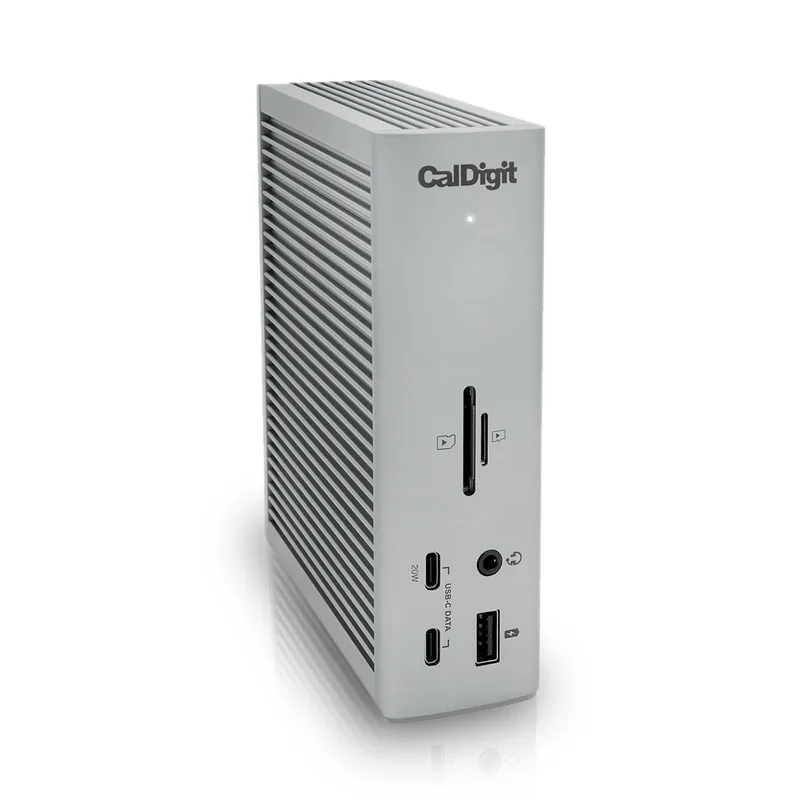
The CalDigit TS4 is the most comprehensively specced TB4 dock produced during the Thunderbolt 4 era. Eighteen ports — three downstream Thunderbolt 4, three USB-C at 10Gb/s, five USB-A at 10Gb/s, 2.5GbE Ethernet, separate audio in/out, and an SD 4.0 slot — cover every peripheral combination a remote work desk is likely to need without reaching for a secondary hub.
The 98W power delivery matters most for 16-inch MacBook Pro users and high-wattage Windows laptops. That headroom lets the TS4 charge at full speed while simultaneously running two displays and multiple USB peripherals — a scenario where lower-wattage docks throttle back.
Three downstream Thunderbolt 4 ports is the specific differentiator. Most docks give you one or two downstream TB4 ports. The TS4 gives you three. A Thunderbolt NVMe enclosure, a TB4 hub, and a second TB4 display can all run simultaneously without daisy-chaining through each other.
The 2.5GbE Ethernet is a practical win for home offices with multi-gigabit internet or a local NAS. It doubles the throughput ceiling of standard GbE adapters on large file transfers — meaningful for video editors, design teams, and anyone moving large files regularly as part of their work.
At $340-$380 today, the TS4 remains the most capable TB4 dock available. TB5 alternatives arriving in 2026 start at $399+ and require a TB5 laptop to deliver any speed benefit. For TB4 laptops, the TS4 is the better buy.
Best for: Power users who want maximum ports, the highest power delivery, and 2.5GbE networking from a single TB4 dock.
Skip if: You don’t need 18 ports — the OWC Thunderbolt Go Dock at $179-$199 covers most home office scenarios for substantially less.
2. Plugable TBT4-UDZ — Best for Multi-Monitor
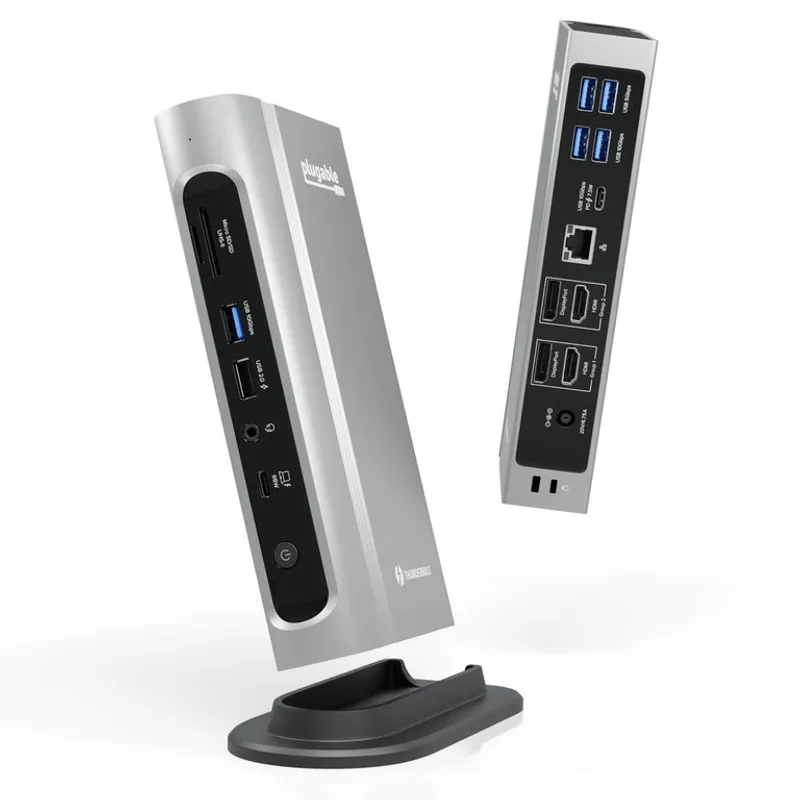
The TBT4-UDZ is the dock for Windows users who need more than two displays. Four dedicated video outputs — two HDMI 2.0 and two DisplayPort 1.4 — support quad 4K@60Hz setups on Thunderbolt 4 Windows laptops. No other dock in this roundup comes close on display count.
Mac users get two external displays, full stop. Apple silicon’s display pipeline limits you to two regardless of what the dock supports. The quad-display capability is Windows-only, so if you’re on a Mac and only need dual monitors, the TBT4-UDZ offers no multi-monitor advantage over cheaper options.
At $259-$289 (down from a $419 MSRP), the value math changed significantly. It now undercuts the CalDigit TS4 while matching it on power delivery (100W) and 2.5GbE Ethernet. The tradeoff is slightly fewer ports (16 vs 18) and the occasional firmware stability issue — display disconnects during normal work have appeared in user reviews, though Plugable has addressed many through firmware updates.
Sixteen ports include simultaneous SD and microSD slots, which matters for photographers or video editors who offload two card formats regularly.
Best for: Windows remote workers running three or four external displays from a single Thunderbolt 4 dock.
Skip if: You’re on a Mac — two external displays is your ceiling regardless. Consider the OWC or TS4 instead.
3. OWC Thunderbolt Go Dock — Best Value
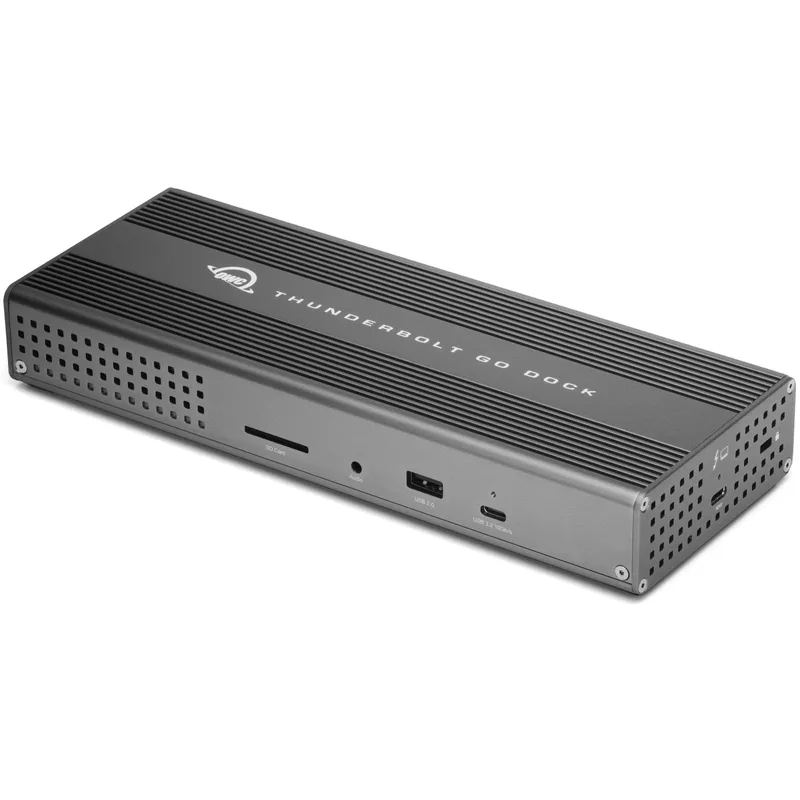
The OWC Thunderbolt Go Dock launched at $399. It shipped for $299. As of May 2026, it’s selling for $179-$199 — and that price drop changes the calculus for most buyers in this roundup.
At under $200, this dock includes 2.5GbE Ethernet, a built-in power supply (no separate brick), Thunderbolt Share support, and a premium aluminum chassis that runs cooler than anything else here. That specification package was commanding $300+ six months ago.
The built-in power supply is the cleanest desk setup win in this roundup. The dock connects to the wall via a standard IEC C13 cable (the same type as a monitor or desktop PC) and connects to your laptop with a single Thunderbolt 4 cable. No external brick on your floor, no second cable to route. For anyone prioritizing cable management, that single design decision matters more than any spec comparison.
Thunderbolt Share support enables high-speed file transfer and display sharing between two Thunderbolt-equipped computers through the dock. For Mac users running both a Mac mini and a MacBook Pro — a common configuration for remote workers who split time between home and an office — TB Share transfers files at 40Gb/s and mirrors displays without additional software. No other dock in this roundup offers this.
The 11-port count is the tradeoff. Two downstream TB4 ports, one 10Gb/s USB-C, two 10Gb/s USB-A, one HDMI 2.0, 2.5GbE, SD card, and audio cover most home office configurations. Power users connecting six or more simultaneous peripherals will want the TS4’s 18 ports.
Display outputs are the other constraint: one HDMI 2.0 port plus the two downstream TB4 ports for monitor connectivity. Dual-monitor users who need two standard HDMI connections must use a TB4-to-HDMI adapter on the second port.
Best for: Mac users who want the best value in this roundup — 2.5GbE, built-in power supply, and Thunderbolt Share for under $200.
Skip if: You have six or more peripherals to connect simultaneously, or you need two HDMI outputs without adapters.
4. Kensington SD5700T — Best Compact
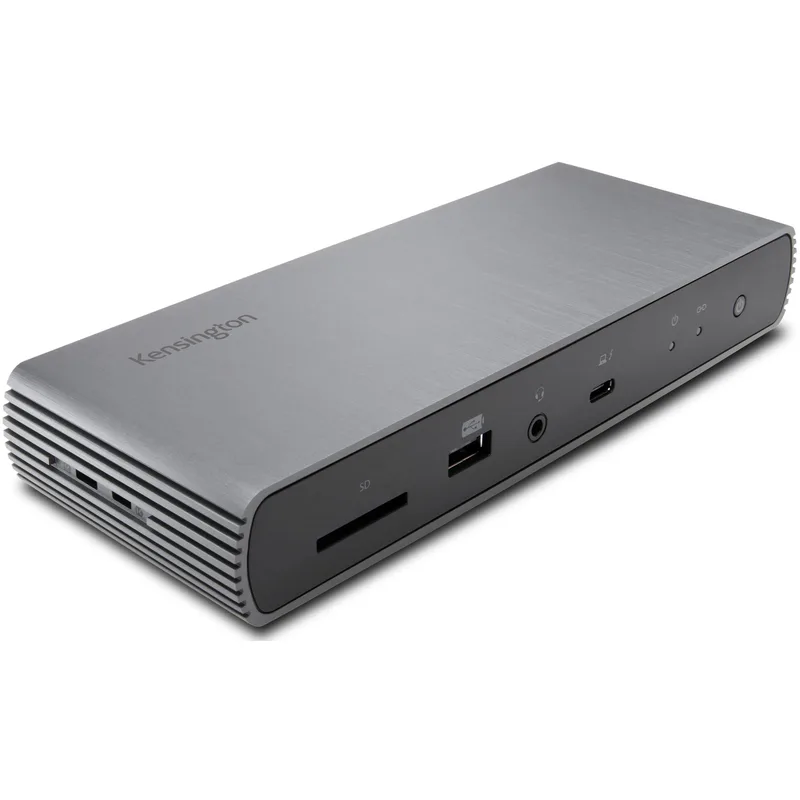
The Kensington SD5700T leads this roundup on Thunderbolt 4 port count and card reader performance. Four TB4 ports (one upstream, three downstream) and a UHS-II SD 4.0 reader reading at 312MB/s are premium specs, particularly for photographers offloading card footage as part of their daily workflow.
At $199-$289, it competes directly with the OWC Thunderbolt Go Dock but at different tradeoffs: the Kensington offers three downstream TB4 ports and a faster card reader; the OWC offers 2.5GbE Ethernet and a built-in power supply. For users who own multiple TB4 peripherals, the Kensington’s downstream port count is the deciding factor.
The physical form factor is the smallest of any dock here. It sits flat under a monitor stand, fits in a bag, and clears desk space efficiently. It’s the only dock in this roundup practical for travel.
The 1GbE Ethernet is the main gap against the OWC at a similar price. For workers with multi-gigabit internet or a local NAS, the OWC’s 2.5GbE is worth more than the Kensington’s extra downstream TB4 ports. For workers on standard 500Mbps-1Gbps connections, 1GbE is fine and the Kensington’s compact size and card reader performance win out.
Best for: Photographers who need UHS-II card speeds, users who own multiple TB4 peripherals, and anyone who wants the most portable full-featured TB4 dock.
Skip if: Your home internet exceeds 1Gbps or you regularly transfer large files over a NAS — the OWC at a similar price includes 2.5GbE.
5. Belkin Connect Pro Thunderbolt 4 — Most Reliable
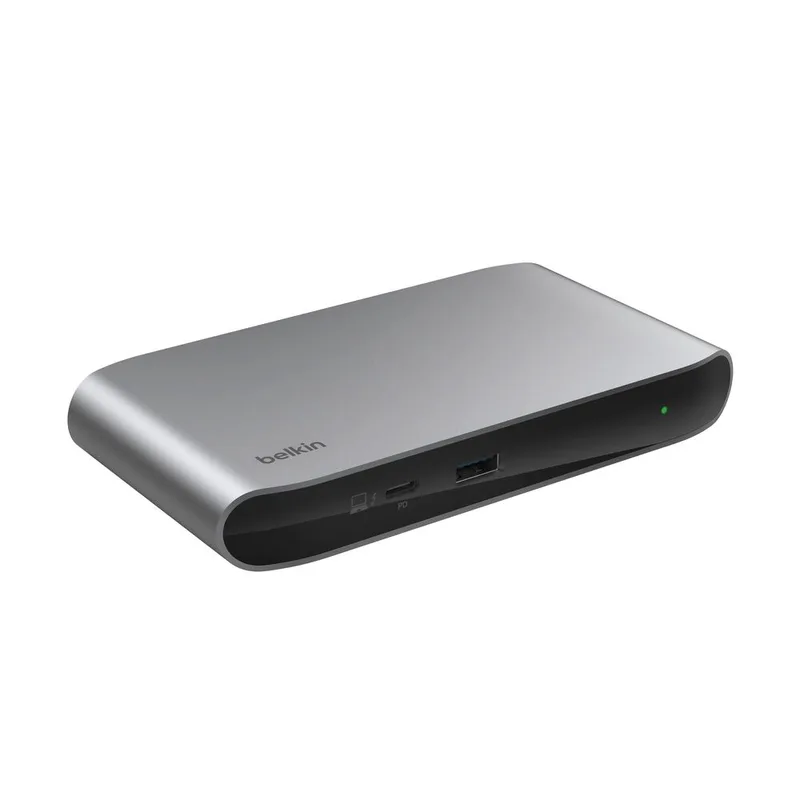
The Belkin Connect Pro now runs $249-$279, down from its $400 launch price. Its core value proposition is reliability in managed environments rather than specs per dollar.
Driver-free plug-and-play operation on both macOS and Windows is the headline. Belkin’s dock firmware tends to behave consistently across OS updates — fewer post-update display disconnects or USB enumeration issues than some third-party docks. For IT administrators managing a fleet of MacBooks or Surface devices, predictable dock behavior reduces support overhead.
The hardware is mid-tier: four Thunderbolt 4 ports, 12 ports total, 90W power delivery, 1GbE Ethernet, 5Gb/s USB-A, and an SD 3.0 reader. No category-leading numbers, but the dual-monitor remote work configuration runs without issues.
The honest comparison at this price is the OWC Thunderbolt Go Dock at $179-$199. The Belkin costs $70-$80 more while offering slower USB-A speeds, slower card reading, 1GbE instead of 2.5GbE, and a separate power brick. For individual buyers, the OWC wins on value. For IT-managed deployments where Belkin’s enterprise support track record and driver-free operation matter more than spec sheets, the premium is defensible.
Best for: IT-managed deployments, Mac-heavy enterprise teams, and Belkin ecosystem buyers who value consistent firmware behavior over raw specs.
Skip if: You’re buying for personal use — the OWC Thunderbolt Go Dock delivers more for $70-$100 less.
Buying Guide: What to Look for in a Thunderbolt 4 Dock
Port count and what actually matters
Every TB4 dock connects via one upstream Thunderbolt 4 cable. Count your current peripherals — monitors, external drives, USB devices, Ethernet, audio — then add 30% for expansion. Most home office setups need 6-10 ports comfortably. The 11-18 port options here cover nearly every configuration without a secondary hub.
Thunderbolt 4 downstream ports specifically matter if you own TB4 peripherals (NVMe enclosures, TB4 displays, TB4 hubs). For users connecting only USB devices and standard monitors, downstream TB4 count is less critical.
Power delivery requirements
Match the dock’s power delivery to your laptop’s charging wattage:
- MacBook Air (M2/M3/M4): 30-67W required — any dock here covers it
- MacBook Pro 14-inch: up to 96W — all options here qualify
- MacBook Pro 16-inch: up to 140W — only the CalDigit TS4 (98W) and Plugable TBT4-UDZ (100W) charge at near-full speed under sustained load; others charge but slower
- Most Windows ultrabooks: 65-90W — covered by every dock here
2.5GbE vs 1GbE Ethernet
2.5GbE matters if your internet plan delivers over 1Gbps, or if you regularly transfer large files over a local network (NAS, backup drives, large project files). The CalDigit TS4, Plugable TBT4-UDZ, and OWC Thunderbolt Go Dock all include 2.5GbE. The Kensington SD5700T and Belkin Connect Pro are capped at 1GbE.
For workers on 500Mbps-1Gbps internet with no NAS, 1GbE is sufficient — and the Kensington’s compact form factor or the Belkin’s enterprise track record may be worth taking.
Mac vs Windows display support
Apple silicon Macs (M1 and later) support a maximum of two external displays via a Thunderbolt dock in most configurations. The M4 base chip supports one. The Plugable TBT4-UDZ’s quad-display output only applies to Windows machines — Mac users get two external displays from any dock here.
Should you wait for Thunderbolt 5?
TB5 docks arriving in 2026 start at $399+. TB5 offers 120Gb/s bandwidth, 8K@60Hz display support, and 240W power delivery. For most remote workers running dual 4K displays, 40Gb/s storage, and 100W charging, TB4 is already sufficient. TB5 is worth considering if you have an 8K display, extremely high-bandwidth storage, or are specifically buying for a new TB5 laptop. For TB4 laptops, buy a TB4 dock at current prices rather than waiting for TB5 compatibility you can’t use.
Frequently Asked Questions
Does a Thunderbolt 4 dock work with USB-C laptops?
Yes, but performance depends on the host port’s capabilities. A USB-C (USB 3.2) laptop connected to a TB4 dock gets USB 3.2 speeds and power delivery, but not TB4’s 40Gb/s bandwidth or certified TB4 daisy-chaining. For full performance, you need a laptop with a Thunderbolt 4 (or Thunderbolt 3) port.
Can I run two 4K monitors from a Thunderbolt 4 dock with a MacBook Pro?
Yes. Every dock in this roundup supports dual 4K@60Hz displays with an Apple silicon MacBook Pro (M1 Pro or later). The M4 base chip (non-Pro, non-Max) is limited to one external display — check Apple’s display support specs for your specific chip before buying.
What’s the difference between a Thunderbolt 4 dock and a USB-C hub?
TB4 docks provide 40Gb/s bandwidth, Intel-validated power delivery, and certified TB4 port compatibility. USB-C hubs typically provide 5-10Gb/s bandwidth, limited power passthrough, and no TB4 certification. The practical difference shows up with high-resolution displays (TB4 handles dual 4K natively; many USB-C hubs struggle), fast external storage (NVMe over TB4 runs at 40Gb/s; USB-C hubs cap at 10Gb/s), and simultaneous multi-device loads.
Will a Thunderbolt 4 dock work with a Thunderbolt 5 laptop?
Yes. Thunderbolt 5 is backward compatible with TB4. A TB5 laptop connected to a TB4 dock operates at TB4 speeds (40Gb/s). You lose no TB4 functionality; you just don’t gain TB5 speeds. If you buy a TB5 laptop in 2026, your existing TB4 dock continues to work fully.
How hot do Thunderbolt 4 docks run?
TB4 docks generate meaningful heat running multiple displays and peripherals simultaneously. The CalDigit TS4 is notably warm under full load. The OWC Thunderbolt Go Dock’s built-in power supply and aluminum chassis run coolest of the options evaluated here. All five docks are passively cooled. Avoid placing them inside enclosed desk compartments without airflow.
Conclusion
The CalDigit TS4 is the best Thunderbolt 4 dock for power users who want maximum ports, 98W charging, and 2.5GbE networking in one package. At $340-$380, it covers every practical remote work scenario and remains cheaper than any current TB5 alternative.
For budget-focused buyers, the OWC Thunderbolt Go Dock at $179-$199 is the standout pick of this update. Getting 2.5GbE Ethernet, a built-in power supply, and Thunderbolt Share support for under $200 is a level of value that didn’t exist in this category six months ago.
Windows users running three or four screens should go straight to the Plugable TBT4-UDZ at $259-$289. Nothing else in this roundup delivers quad 4K@60Hz output from a single dock.
Detailed Reviews
CalDigit TS4
Pros
- 18-port count is the most on any Thunderbolt 4 dock — three downstream TB4 ports, five USB-A, and three USB-C cover virtually every peripheral simultaneously
- 98W power delivery is the highest certified output on a TB4 dock, capable of charging a 16-inch MacBook Pro or a high-wattage Windows laptop at full speed
- 2.5GbE Ethernet delivers up to 2.5Gbps wired speed — doubles throughput for remote workers with multi-gig internet connections compared to standard 1GbE docks
- Three downstream Thunderbolt 4 ports support daisy-chaining NVMe enclosures, external GPUs, and additional hubs without consuming host ports
- Compatible with macOS, Windows, and ChromeOS without additional drivers or firmware changes
Cons
- Physical footprint is the largest of any dock in this roundup — takes meaningful desk space and is not portable
- Only one front-facing USB-C port; frequent hot-swap users may want more accessible ports on the front panel
- Power adapter is large and the cable is not removable — harder to manage in tight cable setups
Plugable TBT4-UDZ
Pros
- Four dedicated video outputs (2x HDMI + 2x DisplayPort) enable quad 4K@60Hz display setups on Thunderbolt 4 Windows machines — more display flexibility than any competitor here
- 100W certified power delivery covers the full charging spec of the largest current MacBook Pro and high-wattage Windows laptops
- 2.5GbE Ethernet and simultaneous SD + microSD card slots make it practical for photographers who need both formats at once
- USB4 compatibility means it works with USB4 hosts as well as Thunderbolt 4, broadening compatibility beyond TB4-exclusive notebooks
- Price has dropped to $259-$289 from its $419 MSRP — strong value for a quad-display capable dock
Cons
- Mac users get only 2 external displays (Apple silicon limitation), making the quad-display capability Windows-only in practice
- Some stability issues reported on initial firmware — OS-level display disconnects during normal work have been documented in user reviews
- Larger and heavier than the Kensington SD5700T — desktop-only use case, not suitable for travel
OWC Thunderbolt Go Dock
Pros
- Price has dropped to $179-$199 from its $399 launch price — 2.5GbE, built-in power supply, and Thunderbolt Share at this price point is outstanding value
- Built-in power supply eliminates the external power brick entirely — one cable to the wall, one upstream Thunderbolt 4 cable to your laptop
- Thunderbolt Share compatibility enables high-speed file transfer and display sharing between two Macs — unique to OWC's Thunderbolt Share ecosystem
- Compact, premium aluminum enclosure produces minimal heat under load — the most thermally efficient design in this roundup
- 2.5GbE Ethernet at a price point where most competing docks offer only 1GbE
Cons
- Only one HDMI output — dual-display users must connect the second screen via a Thunderbolt downstream port, adding cost and complexity
- Port count of 11 is the lowest in this roundup; power users with many simultaneous peripherals will hit limits
- Thunderbolt Share is a Mac-to-Mac feature only — Windows users get no benefit from this specification
Kensington SD5700T
Pros
- Four Thunderbolt 4 ports (1 upstream + 3 downstream) — highest Thunderbolt port count in this roundup for daisy-chain peripherals
- UHS-II SD 4.0 card reader reads at up to 312MB/s — the fastest card reader slot here, useful for photographers and videographers
- Compact, low-profile design takes up minimal desk space and is the most portable full-featured dock in this roundup
- Intel Thunderbolt 4 certified — guaranteed compatibility with all certified TB4 hosts and peripherals
Cons
- 1GbE Ethernet only — the sole option here without 2.5GbE, which matters for multi-gig home internet or NAS users
- Four USB-A ports are limited to 5Gb/s (USB 3.2 Gen 1), not 10Gb/s — slower than the CalDigit TS4 and Plugable TBT4-UDZ
- No audio-in jack — 3.5mm combo port handles headset output and microphone input, but not separate in/out simultaneously
Belkin Connect Pro Thunderbolt 4
Pros
- Driver-free plug-and-play setup on both macOS and Windows — the most straightforward dock on this list for IT-managed environments
- Four Thunderbolt 4 ports provide upstream connectivity plus three downstream expansion slots for TB4 peripherals and displays
- 90W power delivery charges all current MacBook models and most Windows ultrabooks at full speed
- Consistent firmware behavior across macOS updates — fewer post-update compatibility issues than some third-party alternatives
Cons
- USB-A ports are 5Gb/s only — no 10Gb/s USB-A like the CalDigit TS4, which limits fast external SSD transfer speeds
- Standard 1GbE Ethernet, not 2.5GbE — same networking limitation as the Kensington SD5700T
- SD 3.0 card reader is slower than the UHS-II slots on the Kensington and CalDigit options
- At $249-$279, it's priced above the better-specified OWC Thunderbolt Go Dock for most home office use cases