The Anker 555 has been the default budget USB-C hub recommendation for years, and in October 2026 it still sits at the top of our hub picks. Newer docks have raised the ceiling, but most remote workers do not need a $200 Thunderbolt dock. They need one cable that gives them a monitor, a wired connection, a couple of USB ports, and a charger. This review is built from the spec sheet, manufacturer claims, and owner feedback, not bench testing, and it explains where the 555 earns its place and where it does not.
Short version: if you run one external monitor and a single laptop, the 555 is hard to beat. If you run two monitors, skip it.
Quick Comparison
| Spec | Anker 555 USB-C Hub (8-in-1) | UGREEN Revodok 7-in-1 USB-C Hub | Anker 6-in-1 USB-C Hub with Ethernet |
|---|---|---|---|
| Rating | 9.0/10 | 8.5/10 | 7.5/10 |
| Price | $35.99as of Oct 18, 2026 | $29.99as of Oct 18, 2026 | $27.99-$39.99as of Oct 18, 2026 |
| Video Output | 1x HDMI, 4K@60Hz | 1x HDMI, 4K@60Hz | 1x HDMI, 4K@30Hz |
| Power Delivery | 100W input, up to 85W pass-through | 100W pass-through | Up to 65W pass-through |
| USB-C Data | 1x, 10Gbps | 5Gbps | 1x |
| USB-A Ports | 2x, 10Gbps | 2x, 5Gbps | 2x |
| Network | Gigabit Ethernet | Gigabit Ethernet | Gigabit Ethernet |
| Card Readers | SD + microSD | SD + TF (microSD) | — |
| Warranty | 18 months | — | — |
| Size | — | — | Palm-sized |
| Check Price → | Check Price → | Check Price → |
Prices change daily — tap Check Price for the current Amazon price.
Anker 555 USB-C Hub (8-in-1): In Depth
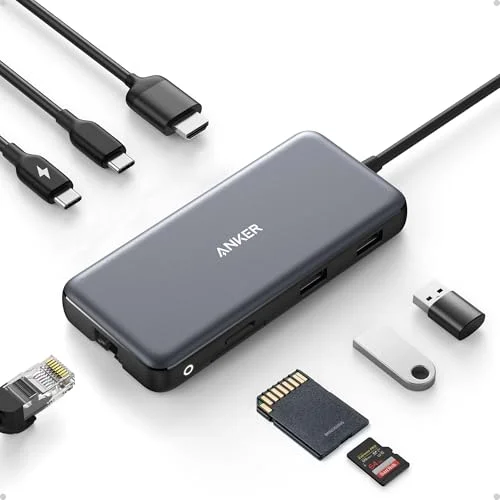
Anker 555 USB-C Hub (8-in-1)
Pros
- One attached cable handles monitor, wired network, laptop charging, and data, which keeps a travel or small-desk setup to a single connection
- 10Gbps USB-A and USB-C data ports are faster than the 5Gbps ports on many hubs at a similar price
- 85W pass-through covers most 13- to 15-inch ultrabooks and MacBook Air and Pro 14-inch models under normal office loads
- SD and microSD readers remove the need for a separate card reader
Cons
- Only one HDMI output, so a dual-monitor desk needs a different hub or dock
- The attached cable cannot be replaced if it frays at the bend
- 85W is below what a 16-inch performance laptop pulls under sustained load, so the battery can slowly drain during heavy work
Ports and Layout
The 555 packs eight functions into a slim aluminum-and-plastic body: HDMI, Gigabit Ethernet, two USB-A ports, one USB-C data port, a USB-C power input, and separate SD and microSD slots. The cable is attached and runs to your laptop, so there is nothing extra to lose in a bag.
Display
The HDMI port supports 4K at 60Hz according to Anker. That is the spec that matters most for daily work: text is noticeably smoother at 60Hz than at 30Hz, and many cheaper hubs cap at 30Hz. Your laptop still has to support 4K60 over USB-C, so check your model’s display output specs before blaming the hub.
Charging
The USB-C power input accepts up to 100W, and the hub passes up to 85W through to the laptop. For a MacBook Air, a 14-inch MacBook Pro, or a typical 13- to 15-inch Windows ultrabook, that is enough to hold the battery steady during email, calls, and browser work. Heavy sustained workloads on a 16-inch performance laptop can draw more than 85W, and in that case the battery will drain slowly. You need to supply your own charger for the power input, because the hub does not include one.
Data Speed
Both USB-A ports and the USB-C data port are rated for 10Gbps. That is useful when you are moving files to a portable SSD, and it is the main spec edge the 555 holds over the UGREEN Revodok below. A drive rated slower than 10Gbps will simply run at its own limit.
Ethernet
Gigabit Ethernet is a quiet reason to buy this class of hub. A wired connection avoids the Wi-Fi dropouts that wreck video calls and VPN sessions. If your router is the weak link, see our wired vs WiFi guide for video calls.
Who Should Skip It
Anyone who needs two external monitors, more than two USB-A ports, or a headphone jack. The 555 has one HDMI output and no audio jack. For multi-monitor desks, look at the options in our USB-C docking station roundup.
Setup Notes From Owner Reports
Owner feedback on hubs in this class tends to repeat three points. First, plug the hub into a laptop port that supports both video and power, since not every USB-C port on a laptop does. Second, use a certified charger rated for at least the wattage your laptop expects, because a weak charger shows up as slow charging rather than an error. Third, a warm chassis during long Ethernet and display sessions is normal for a compact aluminum hub, so leave it somewhere with airflow instead of burying it under papers.
The Alternatives
UGREEN Revodok 7-in-1
UGREEN Revodok 7-in-1 USB-C Hub
Pros
- 100W pass-through is the higher charging ceiling of the two
- Costs less than the Anker 555 while covering HDMI, Ethernet, and card readers
- Aluminum housing is a better fit for long sessions than an all-plastic shell
- Compact enough for a laptop sleeve pocket
Cons
- USB data ports top out at 5Gbps, half the Anker 555's speed for external drives
- Single HDMI output, same limit as the Anker
- Less brand support infrastructure than Anker if a unit fails
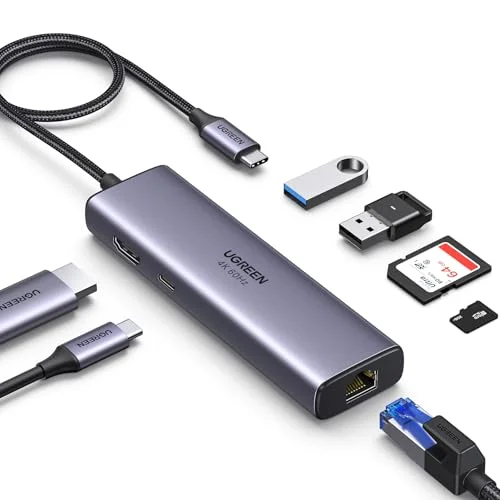
The Revodok costs less, offers a higher 100W pass-through ceiling, and adds the same HDMI and Ethernet basics. The trade is data speed: its USB ports run at 5Gbps. If you mostly plug in a mouse, keyboard, and webcam, you will not notice. If you move large files to external SSDs, the Anker 555 is the better pick.
Anker 6-in-1 USB-C Hub with Ethernet
Anker 6-in-1 USB-C Hub with Ethernet
Pros
- Smallest of the three and the easiest to carry
- Gigabit Ethernet and HDMI cover the basics of a wired video-call setup
- Lowest entry price when the lower end of its price range is available
- 65W pass-through is enough for most thin-and-light laptops
Cons
- 4K output is limited to 30Hz, which looks choppy for scrolling and fast motion
- Can run warm when pushing large file transfers while also driving a display
- No card readers
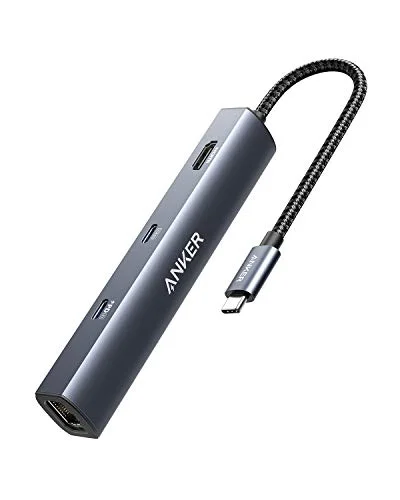
This is the smallest option, and it makes sense for a bag that already holds too much. The 4K@30Hz limit is the catch. For a document-and-email monitor it works, but I would not choose it as a main desk hub.
Buying Guide: What to Check in a USB-C Hub
- Display refresh rate. Look for 4K@60Hz if the hub will drive your main monitor.
- Pass-through wattage. Match it to your laptop’s charger rating. Under-powering shows up as a slowly draining battery.
- Data speed. 10Gbps ports matter for external SSDs. 5Gbps is fine for peripherals.
- Monitor count. Most hubs in this price range support one external display.
- Laptop compatibility. The USB-C port on your laptop must support DisplayPort Alt Mode for video output.
For more options, see our best USB hubs for remote workers and best portable docking stations. MacBook Air owners should also read the USB-C hubs for MacBook Air guide, since Apple’s base chips limit external display counts regardless of the hub.
FAQ
Does the Anker 555 support dual monitors?
No. It has a single HDMI output. Dual-monitor setups need a dock with multiple video outputs.
Does the Anker 555 come with a charger?
No. You connect your own USB-C charger to the hub’s power input, and the hub passes up to 85W through to the laptop.
Will the Anker 555 work with a MacBook?
It works with USB-C MacBooks. Anker lists compatibility with MacBook Pro and Air models, and the number of external displays is set by your Mac’s chip, not the hub.
Is the Anker 555 better than the UGREEN Revodok?
It has faster 10Gbps USB ports, while the UGREEN has a higher 100W pass-through and a lower price. For external SSD users, the Anker wins. For simple peripherals, either works.
Can I use the Ethernet port for video calls?
Yes, and it is the main reason to use a hub with Ethernet. A wired connection is more stable than Wi-Fi for calls and VPN sessions.
Conclusion
The Anker 555 remains the best budget hub for a one-monitor remote work desk: 4K60 video, fast USB ports, Ethernet, card readers, and 85W charging on one cable. Pick the UGREEN Revodok if your laptop needs the extra pass-through wattage or you want to spend less, and the Anker 6-in-1 if size matters more than refresh rate. If you need two monitors, step up to a proper dock.
Detailed Reviews
Anker 555 USB-C Hub (8-in-1)
Pros
- One attached cable handles monitor, wired network, laptop charging, and data, which keeps a travel or small-desk setup to a single connection
- 10Gbps USB-A and USB-C data ports are faster than the 5Gbps ports on many hubs at a similar price
- 85W pass-through covers most 13- to 15-inch ultrabooks and MacBook Air and Pro 14-inch models under normal office loads
- SD and microSD readers remove the need for a separate card reader
Cons
- Only one HDMI output, so a dual-monitor desk needs a different hub or dock
- The attached cable cannot be replaced if it frays at the bend
- 85W is below what a 16-inch performance laptop pulls under sustained load, so the battery can slowly drain during heavy work
UGREEN Revodok 7-in-1 USB-C Hub
Pros
- 100W pass-through is the higher charging ceiling of the two
- Costs less than the Anker 555 while covering HDMI, Ethernet, and card readers
- Aluminum housing is a better fit for long sessions than an all-plastic shell
- Compact enough for a laptop sleeve pocket
Cons
- USB data ports top out at 5Gbps, half the Anker 555's speed for external drives
- Single HDMI output, same limit as the Anker
- Less brand support infrastructure than Anker if a unit fails
Anker 6-in-1 USB-C Hub with Ethernet
Pros
- Smallest of the three and the easiest to carry
- Gigabit Ethernet and HDMI cover the basics of a wired video-call setup
- Lowest entry price when the lower end of its price range is available
- 65W pass-through is enough for most thin-and-light laptops
Cons
- 4K output is limited to 30Hz, which looks choppy for scrolling and fast motion
- Can run warm when pushing large file transfers while also driving a display
- No card readers