Hybrid meetings have a gap that a webcam and a good mic do not fill: the moment someone wants to sketch a timeline or jot a three-item action list. In a conference room that is a whiteboard. At a home desk it is usually a sticky note that nobody else can see. A whiteboard in the right spot fixes that, and it doubles as a way to keep your own priorities in front of you between calls.
We researched five boards that are in stock right now, from a 15-inch glass strip that sits under your monitor to a 36 x 24 inch glass board that goes on the wall behind you. This comparison draws on manufacturer specs and listing details, not hands-on use. The question is where each board lives: on the desk for your own notes, or in frame for the people on the call.
| Spec | VIVO White Glass 23 x 19 in Tabletop Dry Erase Board (DESK-WB23G) | MaxGear 36" x 24" Glass Whiteboard Wall Mounted | TSJ OFFICE Small Desktop Whiteboard with Drawer | Amazon Basics Magnetic Dry Erase Whiteboard, 36" x 24" | Amazon Basics Desktop Dry Erase Whiteboard with Organizer |
|---|---|---|---|---|---|
| Rating | 8.8/10 | 8.5/10 | 8.2/10 | 8.0/10 | 7.7/10 |
| Price | $69.99as of Oct 18, 2026 | $62.99as of Oct 18, 2026 | $21.48-$24.99as of Oct 18, 2026 | $36.74as of Oct 18, 2026 | $15.74as of Oct 18, 2026 |
| Board Size | 23 x 19 inches | 36 x 24 inches | — | 36 x 24 inches | — |
| Surface | Dual-sided glass | Tempered glass, frameless | Tempered glass, slope angled | Magnetic dry erase | Tempered glass |
| Base | 23 x 5.5 inch base with two accessory slots | — | — | — | — |
| Accessories | Not included | — | — | — | — |
| Backing | — | Steel, magnets included | — | — | — |
| Mounting | — | Wall mounted | — | — | — |
| Footprint | — | — | 15.8 inches wide x 7.1 inches deep | — | — |
| Storage | — | — | Drawer plus a top tray | — | — |
| Use | — | — | Sits between keyboard and monitor | — | — |
| Frame | — | — | — | Aluminum | — |
| Includes | — | — | — | 1 marker, 2 magnets, pen tray | 3 markers and 1 eraser |
| Writing Board | — | — | — | — | 15.7 x 5.4 inches |
| Overall | — | — | — | — | 15.8 x 6.8 x 1.9 inches |
| Check Price → | Check Price → | Check Price → | Check Price → | Check Price → |
Prices change daily — tap Check Price for the current Amazon price.
1. VIVO White Glass 23 x 19 in Tabletop Dry Erase Board
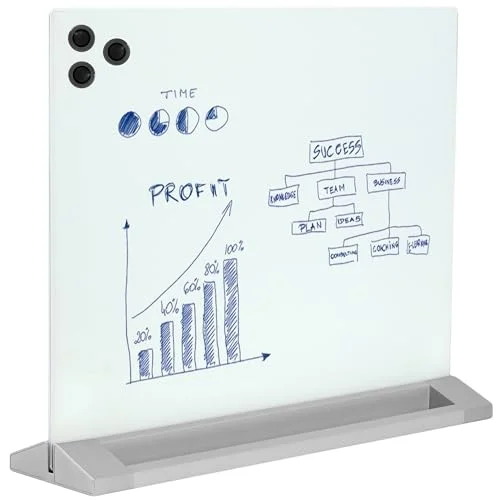
VIVO White Glass 23 x 19 in Tabletop Dry Erase Board (DESK-WB23G)
Pros
- The largest freestanding desk board here, big enough to sketch a flow or a short agenda
- Dual-sided glass surface, so one side can hold a standing list and the other a scratch pad
- Base has two slots for markers and an eraser
- Listing says it can double as a privacy divider on a shared desk
Cons
- Markers and eraser are not included
- Takes up real desk depth, so it crowds a small desk
- Priciest desk-sized option in this roundup
The VIVO is the one to buy if you want a real writing surface without drilling into a wall. At 23 x 19 inches it is large enough to sketch a quick flow or hold a meeting agenda, and the dual-sided glass lets you keep a permanent list on one side. The 23-inch base holds the board upright and has two slots for markers and an eraser, which are not included. It does eat desk depth, so measure before you place it behind a laptop.
2. MaxGear 36” x 24” Glass Whiteboard
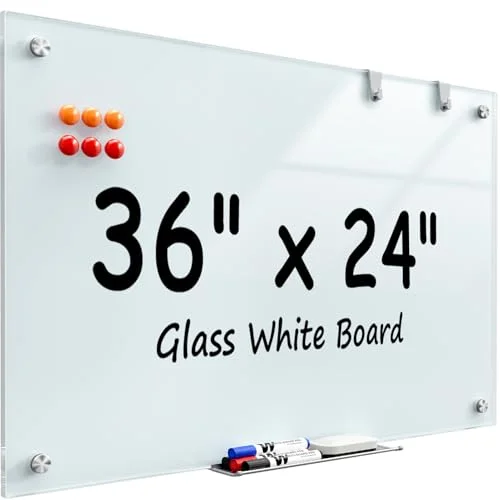
MaxGear 36" x 24" Glass Whiteboard Wall Mounted
Pros
- Frameless glass looks clean in the background of a video call
- Steel backing holds the included neodymium magnets for notes and printouts
- 36 x 24 inches gives room to work through a plan while you talk
- Listing describes a scratch-resistant, stain-resistant tempered glass surface
Cons
- Needs to be mounted on a wall, so renters should check the hardware first
- Glass can pick up reflections from a window or ring light behind the camera
- Heavier and more fragile to handle than a framed board
If you present to a camera, wall space is hard to beat. The MaxGear is frameless tempered glass with steel backing, so notes and printouts stick on with the included magnets. Mounted behind or beside your chair, it reads as a clean backdrop and gives you room to talk through a plan on screen. Watch for glare: glass reflects, so check where your window and lights sit before you mount it.
3. TSJ OFFICE Small Desktop Whiteboard with Drawer
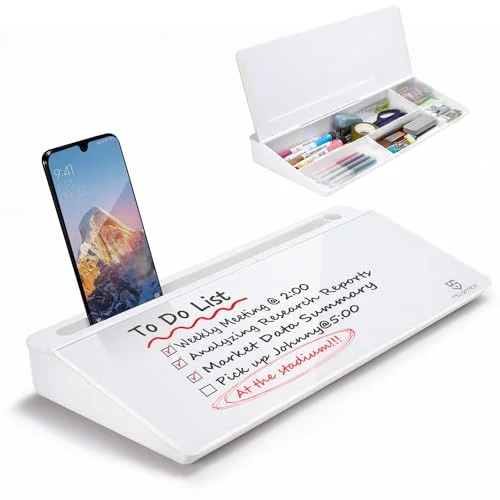
TSJ OFFICE Small Desktop Whiteboard with Drawer
Pros
- Slope-angled glass sits between keyboard and monitor, so notes stay in your eyeline
- Drawer hides markers and a magnetic eraser
- Top tray holds a phone or a notepad
- Adds a glass surface and storage without taking wall space
Cons
- Small writing area suits action items, not diagrams
- Raising your keyboard height changes typing posture for some users
- Writing is close to the desk surface, so it will not read on camera
This one is for your own eyes, not the camera. The slope-angled glass sits between the keyboard and monitor, with a drawer for markers and a top tray for a phone or notepad. It is the right pick for jotting action items during a meeting without alt-tabbing out of the call.
4. Amazon Basics Magnetic Dry Erase Whiteboard, 36” x 24”
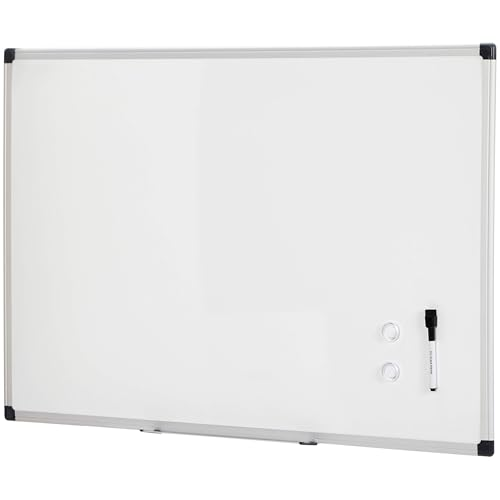
Amazon Basics Magnetic Dry Erase Whiteboard, 36" x 24"
Pros
- Same size as the glass wall board at a lower price
- Mounts vertically or horizontally with included hardware
- Comes with a marker, two magnets, and a pen tray
- Lightweight framed board is simple to hang
Cons
- Framed surface looks more office-supply than a glass board on camera
- Non-glass surfaces can hold marker shadows over time, so clean after each use
- Needs wall space and a mounting job
The Amazon Basics framed board matches the MaxGear on size and costs less. It comes with a marker, two magnets, and a pen tray, and hangs either way. The tradeoff is looks and surface care: framed boards read more like office supplies on camera, and non-glass boards need regular cleaning to stay clear.
5. Amazon Basics Desktop Dry Erase Whiteboard with Organizer
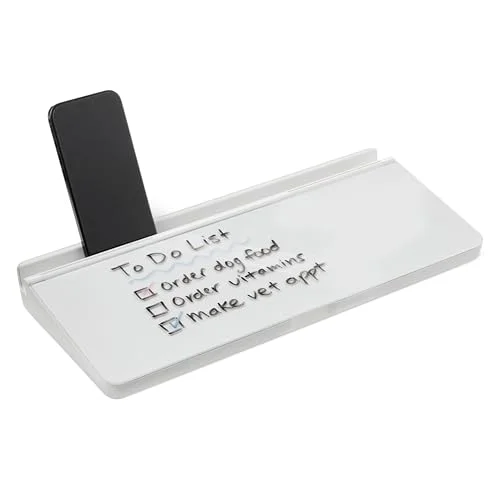
Amazon Basics Desktop Dry Erase Whiteboard with Organizer
Pros
- Lowest price in the group and it ships with 3 markers and an eraser
- Organizer underneath keeps stationery off the desk
- Non-slip feet hold it in place
- Rear slot holds a tablet or phone for a second-screen setup
Cons
- Narrow 5.4-inch writing strip fits a to-do list at best
- Listing does not describe it as magnetic
- Too small to share a sketch with the camera
This is the cheapest way to get a glass writing surface on the desk, and it ships with three markers and an eraser. The writing strip is only 5.4 inches deep, so it works for a to-do list and little else. A rear slot holds a phone or tablet.
Buying Guide
Decide who the board is for. A board for your own notes belongs on the desk, in reach and out of frame. A board for the people on the call belongs on the wall behind you or beside you, large enough that writing stays legible on a webcam.
Size. Desk strips under 16 inches wide hold lists. For sketches, look for something around 23 x 19 inches or larger. For a wall board visible on camera, 36 x 24 inches is a workable minimum.
Glass versus framed. Glass looks cleaner on camera and is easier to wipe, but it reflects light and weighs more. Framed boards are lighter and cheaper, with a more utilitarian look.
Magnetic or not. A magnetic surface lets you pin printouts and notes. Check the listing: the glass desktop strips here are not described as magnetic.
Camera placement. Put the board at shoulder height to one side of your frame, and keep glare off the surface. Our video call setup guide covers camera angle and lighting, and the ring light roundup helps if reflections are a problem.
Audio matters more than the board. If the people on the call cannot hear you, nothing on the whiteboard helps. See our speakerphone picks and echo-reduction guide.
Pairing a Board With the Rest of the Desk
A desk board competes for the same space as your monitor arm, keyboard, and desk mat. If space is tight, the keyboard-stand style board frees the most room. For a larger desk, a desk mat and a tidy cable run keep the surface clear enough for a freestanding glass board. If you are building the whole setup from scratch, our conference video bar picks pair well with a wall board that the camera can see.
How a Whiteboard Fits Into a Hybrid Meeting
Hybrid meetings split people into two groups: those in the room and those on the screen. The remote group loses the shared scribbles. A few habits close the gap without new software.
- Write big, then say it out loud. Narrate what you write so listeners who cannot see the board still follow along.
- Take a photo after the meeting. A quick phone snapshot of the board turns it into an action-item record you can paste into the meeting thread.
- Keep a standing list on a desk board. A small glass strip with three priorities for the day keeps your own work visible between calls.
- Use the wall board for the one thing that needs to be seen. A timeline, a rough diagram, a decision list. Everything else belongs in a shared document.
- Erase before you hop on camera. An old client name or a stray sketch behind you is an easy mistake. Wipe the board before every call.
Which Board Fits Which Situation
| Your situation | Our pick |
|---|---|
| Want a real writing surface without drilling | VIVO 23 x 19 glass desktop |
| Presenting to a camera from a home office wall | MaxGear 36 x 24 glass |
| Jotting action items mid-call | TSJ OFFICE keyboard-stand board |
| Large board on a tighter budget | Amazon Basics 36 x 24 framed |
| Cheapest possible glass surface on the desk | Amazon Basics desktop organizer board |
Common Mistakes
- Buying a desk strip for camera use. A 5-inch-tall writing area is unreadable at webcam resolution. If the camera needs to see it, buy a wall board.
- Ignoring glare. Glass reflects windows and ring lights. Angle the board slightly away from the light source, or move the light.
- Skipping the markers. The VIVO does not include markers or an eraser, so add them to the order. Glass boards also work best with dry-erase markers made for glass.
- Mounting too high. Anything above your head on camera looks like you are standing next to a billboard. Shoulder height reads best.
- Forgetting cleanup. Wipe marker residue off soon after writing so the surface stays clear.
Space and Safety Notes
Tempered glass is sturdy but heavy, so mount wall boards into studs or with anchors rated for the weight, and follow the maker’s hardware instructions. Freestanding desk boards should sit on a stable surface away from the desk edge, especially if you raise and lower a standing desk. Check the standing desk picks and leave room for the board to move with the desktop.
FAQ
Can people on a video call read a whiteboard? Only if it is large and well lit. A 36 x 24 inch board mounted behind you is the realistic option. Desk strips are for your own notes.
Is glass better than a framed whiteboard? Glass looks cleaner and wipes easily, but it reflects light and is heavier. Framed boards cost less and are simpler to hang.
Do I need magnets? Only if you want to pin printouts or notes. The MaxGear and the framed Amazon Basics board include magnets. The desktop glass strips are not described as magnetic.
Can I use a whiteboard on a standing desk? Yes, but keep it clear of the desk edge and make sure it does not sit in the path of monitor arms or cables as the desk rises and falls. A light keyboard-stand board is the safest choice.
What markers should I use on glass? Dry-erase markers made for glass or whiteboards work. Check each listing for what is included, since the VIVO ships without markers.
Where should I put a whiteboard for video calls? At shoulder height beside or behind you, with lights angled so they do not reflect into the lens.
Our Pick
The VIVO 23 x 19 inch glass desktop board is the best all-round choice: a real writing surface, no wall mounting, and a stand that holds markers. If you want your whiteboard visible on camera, choose the MaxGear 36 x 24 inch glass board. For note-taking in the middle of a call, the TSJ OFFICE keyboard-stand board is the one to buy.
Detailed Reviews
VIVO White Glass 23 x 19 in Tabletop Dry Erase Board (DESK-WB23G)
Pros
- The largest freestanding desk board here, big enough to sketch a flow or a short agenda
- Dual-sided glass surface, so one side can hold a standing list and the other a scratch pad
- Base has two slots for markers and an eraser
- Listing says it can double as a privacy divider on a shared desk
Cons
- Markers and eraser are not included
- Takes up real desk depth, so it crowds a small desk
- Priciest desk-sized option in this roundup
MaxGear 36" x 24" Glass Whiteboard Wall Mounted
Pros
- Frameless glass looks clean in the background of a video call
- Steel backing holds the included neodymium magnets for notes and printouts
- 36 x 24 inches gives room to work through a plan while you talk
- Listing describes a scratch-resistant, stain-resistant tempered glass surface
Cons
- Needs to be mounted on a wall, so renters should check the hardware first
- Glass can pick up reflections from a window or ring light behind the camera
- Heavier and more fragile to handle than a framed board
TSJ OFFICE Small Desktop Whiteboard with Drawer
Pros
- Slope-angled glass sits between keyboard and monitor, so notes stay in your eyeline
- Drawer hides markers and a magnetic eraser
- Top tray holds a phone or a notepad
- Adds a glass surface and storage without taking wall space
Cons
- Small writing area suits action items, not diagrams
- Raising your keyboard height changes typing posture for some users
- Writing is close to the desk surface, so it will not read on camera
Amazon Basics Magnetic Dry Erase Whiteboard, 36" x 24"
Pros
- Same size as the glass wall board at a lower price
- Mounts vertically or horizontally with included hardware
- Comes with a marker, two magnets, and a pen tray
- Lightweight framed board is simple to hang
Cons
- Framed surface looks more office-supply than a glass board on camera
- Non-glass surfaces can hold marker shadows over time, so clean after each use
- Needs wall space and a mounting job
Amazon Basics Desktop Dry Erase Whiteboard with Organizer
Pros
- Lowest price in the group and it ships with 3 markers and an eraser
- Organizer underneath keeps stationery off the desk
- Non-slip feet hold it in place
- Rear slot holds a tablet or phone for a second-screen setup
Cons
- Narrow 5.4-inch writing strip fits a to-do list at best
- Listing does not describe it as magnetic
- Too small to share a sketch with the camera