Affiliate disclosure: SetupRanked earns a commission from qualifying Amazon purchases at no extra cost to you.
Thunderbolt 5 docking stations are finally available in numbers worth comparing. Plugable published a state-of-the-market overview in Q2 2026 noting that the ecosystem had reached critical mass — CalDigit, UGREEN, OWC, Plugable, and Satechi all shipping certified TB5 docks between late 2025 and spring 2026. UGREEN’s Maxidok line hit Amazon in March 2026, and the Satechi CubeDock launched at CES 2026. This is the first year you have real choices across price tiers.
The reason to pay attention: Thunderbolt 5 delivers 120Gbps of bi-directional bandwidth — three times what Thunderbolt 4 offers. That headroom is what allows a single cable to carry dual 8K displays at 60Hz, charge a 16-inch MacBook Pro at full speed, run 10 Gigabit Ethernet, and still have bandwidth left for USB peripherals simultaneously. With Thunderbolt 4, those combinations required trade-offs. With TB5, they don’t.
If your laptop already has Thunderbolt 5 — or you’re shopping ahead of your next laptop upgrade — this roundup covers the five strongest options available on Amazon as of June 2026, verified by ASIN.
Comparison
| Spec | CalDigit TS5 Plus | Plugable TBT-UDT3 Thunderbolt 5 Dock | UGREEN Revodok Maxidok 17-in-1 Thunderbolt 5 Dock | Satechi Thunderbolt 5 CubeDock | OWC Thunderbolt 5 Dock (11-Port) |
|---|---|---|---|---|---|
| Rating | 9.3/10 | 9.0/10 | 8.9/10 | 8.7/10 | 8.6/10 |
| Price | $499.99as of Oct 18, 2026 | $299.95as of Oct 18, 2026 | $344.99-$499.99as of Oct 18, 2026 | $399.99as of Oct 18, 2026 | Unavailable |
| Ports | 20-in-1 | 11-in-1 | 17-in-1 (+ M.2 NVMe slot) | 12-in-1 (+ M.2 NVMe slot) | 11-in-1 |
| Thunderbolt 5 | 3× TB5 (host + 2 downstream, 80Gbps each) | 3× TB5 (80/120Gbps) | 2× TB5 (host + 1 downstream, 120Gbps) | 4× TB5 (1 host + 3 downstream) | 80Gbps bi-directional / 120Gbps bandwidth burst |
| Host Charging | 140W | 140W | 140W | 140W | 140W |
| Display Support | Dual 8K@60Hz | Dual 8K@60Hz (Windows) / Dual 6K@60Hz (Mac) | Single 8K / Dual 6K@60Hz | Triple 8K@60Hz (Windows) / Dual 6K@60Hz (Mac) | — |
| Video Output | 1× DisplayPort 2.1 | — | 1× DisplayPort 2.1 | — | — |
| Networking | 10GbE | 2.5GbE | 2.5GbE | 2.5GbE | 2.5GbE |
| Card Readers | SD 4.0 UHS-II, microSD 4.0 UHS-II | SD UHS-II, microSD UHS-II | — | — | SDXC, microSDXC |
| USB | 5× USB-A 10Gbps, 5× USB-C 10Gbps (dual controllers) | 3× USB-A (2× 10Gbps, 1× 5Gbps) | 3× USB-C 10Gbps, 3× USB-A 10Gbps | 2× USB-C 10Gbps, 2× USB-A 10Gbps | 3× USB-C 10Gbps, 3× USB-A 10Gbps |
| Audio | — | 3.5mm combo jack | — | — | 3.5mm stereo combo |
| Storage | — | — | M.2 NVMe PCIe Gen4 (up to 8TB), SD 3.0, microSD 3.0 | M.2 NVMe up to 8TB (6000MB/s), SD, microSD | — |
| Dimensions | — | — | 5.2 × 5.2 × 2.1 in, 1.9 lbs | 5 × 5 × 2 in | ~7.1 × 2.8 × 1.6 in |
| Check Price → | Check Price → | Check Price → | Check Price → | Check Price → |
Prices change daily — tap Check Price for the current Amazon price.
The Picks
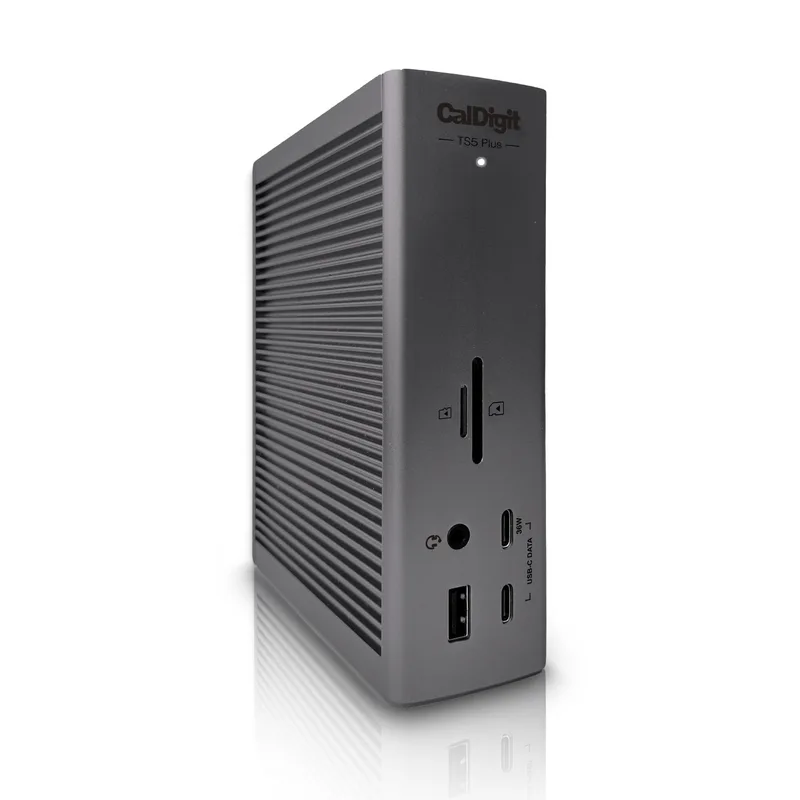
CalDigit TS5 Plus
Pros
- Dual independent USB controllers allocate separate bandwidth to five USB-A and five USB-C ports — connecting 10 USB devices simultaneously causes no throughput contention, unlike single-controller docks that bottleneck at 10Gbps shared
- 10 Gigabit Ethernet is the fastest wired networking available on any consumer TB5 dock — meaningful for transferring large files to a NAS, Synology array, or high-speed file server at home or over a direct uplink
- SD 4.0 UHS-II and microSD 4.0 UHS-II card readers on the front panel are the fastest card interfaces in this roundup — faster than SD 3.0 slots on competing docks, which matters for photographers offloading high-speed cards
- Braided 1m Thunderbolt 5 cable included — saves $30-$50 on a separate certified TB5 cable purchase and means the dock is ready to use immediately from the box
- DisplayPort 2.1 output plus two TB5 downstream ports lets users connect one monitor via DP 2.1 cable and a second via TB5 cable — eliminates the need for both monitors to support TB5 input natively
Cons
- At $479-$499, this is the most expensive dock in this roundup by a wide margin — remote workers who don't need 10GbE or more than 10 USB ports are paying for capacity they'll likely never fully use
- No built-in SSD slot — unlike the UGREEN Maxidok and Satechi CubeDock, there is no M.2 expansion bay; high-speed external storage requires a separate enclosure on the desk
- Large 330W external power brick needs its own cable management — the full desk footprint is larger than the dock itself once the PSU cable is routed
The CalDigit TS5 Plus is the dock to buy if you’re building a professional workstation around a Thunderbolt 5 laptop and need maximum connectivity without compromise. Twenty ports, 10 Gigabit Ethernet, dual independent USB controllers, SD 4.0 UHS-II card readers, and a 330W PSU driving 140W to the host laptop — this is the most capable Thunderbolt 5 dock currently available for consumers.
The dual USB controller design is the key differentiator at this price. Most docks use a single USB controller, which means all USB-A and USB-C downstream ports share a combined bandwidth pool. Under load — connecting a USB SSD, webcam, keyboard, mouse, and audio interface simultaneously — a single-controller dock can create bus congestion. The TS5 Plus splits that into two independent 10Gbps controllers, so peripheral traffic on one bank doesn’t impact the other.
The 10GbE port is the other argument for spending $479-$499 here. Users on multi-gig ISP plans, home labs with 10GbE switches, or Synology NAS arrays configured for 10GbE will saturate 2.5GbE ports on other docks in seconds. The TS5 Plus is the only dock in this roundup that won’t bottleneck a 10GbE connection.
Tradeoffs: no M.2 SSD slot (the UGREEN and Satechi include one), a large external PSU, and a price roughly $160-$200 higher than the Plugable TBT-UDT3. For users who don’t need 10GbE, the step down to the Plugable or UGREEN makes more financial sense.
Buy this if: You need 10GbE networking, the maximum USB port count, and the fastest card readers available — and your budget allows for the premium.
Skip this if: You don’t use 10GbE and would rather put those savings toward a better monitor or NAS drive.
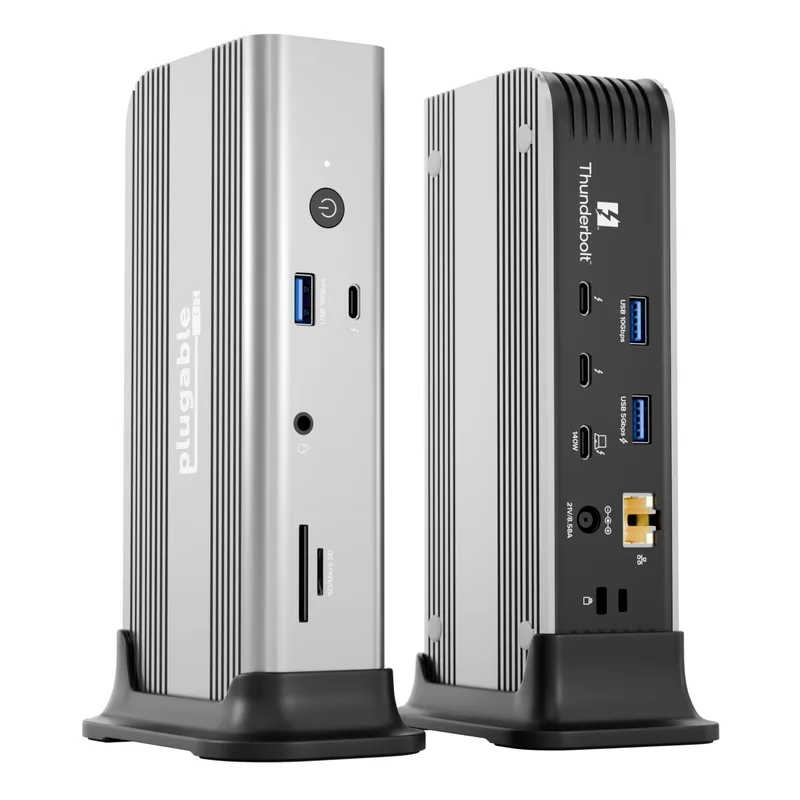
Plugable TBT-UDT3 Thunderbolt 5 Dock
Pros
- At $299-$319, the lowest entry price for a certified Thunderbolt 5 dock delivering full 140W laptop charging, dual 8K display support, and 2.5GbE networking — significantly undercuts the CalDigit TS5 Plus while covering most remote work connectivity needs
- Three Thunderbolt 5 downstream ports handle two high-resolution displays and a high-speed storage device simultaneously at 120Gbps without bandwidth contention between them
- Driverless operation on both Mac and Windows — all 11 ports activate immediately with no software or driver installation, which matters on IT-managed laptops with restricted installs
- Integrated Thunderbolt Share allows direct file transfer or a KVM-like control switch between two laptops connected through the dock — no dedicated KVM hardware required
- MacWorld Best of 2026 and PCWorld Editors' Choice recognition reflects consistent real-world performance validated across independent publications
Cons
- No dedicated HDMI or DisplayPort output — all video connections require a Thunderbolt 5 cable to the display, adding adapter cost if monitors don't have TB5 or USB4 input
- 15W downstream charging on the front USB-C port is insufficient for fast-charging smartphones — anyone who fast-charges a phone at the desk needs a secondary charger
- Eleven ports total, with only three USB-A ports — workstations running multiple USB-A peripherals (keyboard, mouse, external drive, printer) will max out quickly
The Plugable TBT-UDT3 is the strongest argument that you don’t need to spend $499 to get a capable Thunderbolt 5 dock. At $299-$319, it delivers 140W host charging, dual 8K display support via three TB5 downstream ports, 2.5GbE networking, SD and microSD UHS-II card readers, and driverless plug-and-play operation. MacWorld awarded it Best of 2026; PCWorld gave it Editors’ Choice.
What makes the TBT-UDT3 work at this price is an 11-port layout that prioritizes what remote workers actually use — three Thunderbolt 5 ports (covering displays and high-speed storage), fast card readers, Ethernet, and audio — and skips the ports that add cost without adding real utility for most people. The result is a dock that covers a standard remote work setup completely.
The Thunderbolt Share feature is genuinely useful. Connect two TB5 laptops to the dock and you get direct file transfer between them without a server or USB drive, plus a software-level KVM effect — one keyboard and mouse controls both systems through the dock. For anyone with a personal and a work laptop on the same desk, this eliminates the physical switch.
The limitations are real. No HDMI or DisplayPort outputs mean your monitor needs to accept a USB-C or Thunderbolt cable directly. The front USB-C port only charges at 15W — too slow for modern phones that fast-charge at 25W-45W. And three USB-A ports won’t be enough for desks running many USB-A-only peripherals.
Buy this if: You want maximum Thunderbolt 5 capability at the lowest price point, and your monitors accept USB-C or Thunderbolt input directly.
Skip this if: You have monitors that only accept HDMI or DisplayPort input, or you run more than three USB-A peripherals simultaneously.
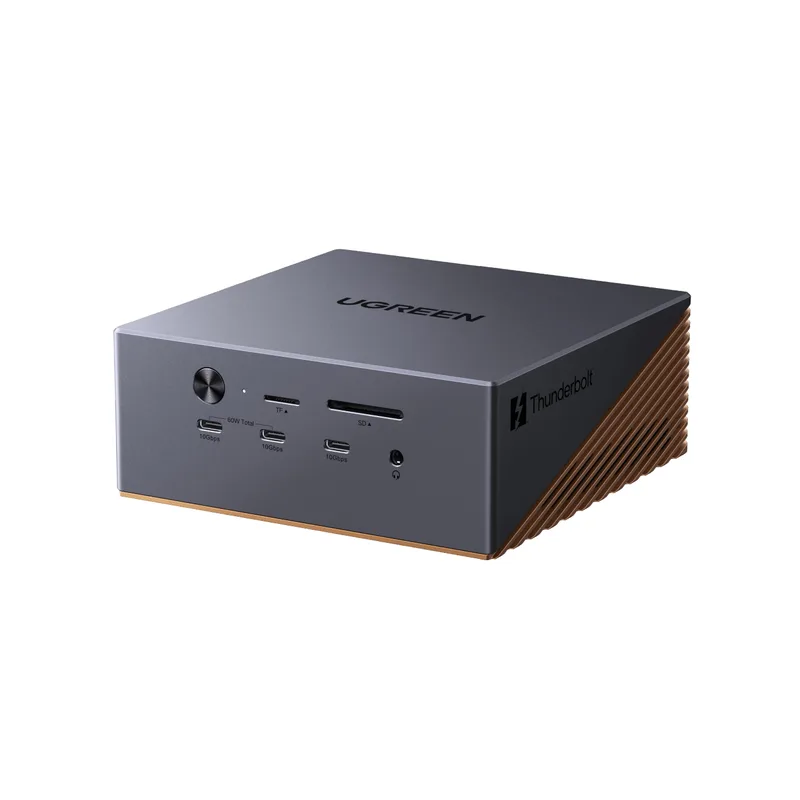
UGREEN Revodok Maxidok 17-in-1 Thunderbolt 5 Dock
Pros
- 17 ports including a dedicated DisplayPort 2.1 output is the widest port spread in this roundup — users with older HDMI or DisplayPort monitors don't need adapters, and the USB count handles a full peripheral setup
- Built-in M.2 NVMe slot (PCIe Gen4 x4, up to 8TB) turns the dock into a high-speed external SSD enclosure — eliminates a separate drive enclosure from the desk and routes storage bandwidth through the TB5 connection
- Active cooling fan combined with passive aluminum vents prevents thermal throttling under sustained 120Gbps throughput — more stable than passively cooled docks during long video ingest or large file transfers
- Launched in March 2026 at a $499.99 MSRP; currently available at $389.99-$429 — strong value for 17 ports plus M.2 expansion compared to the CalDigit TS5 Plus at nearly the same price range
- Dark grey aluminum chassis with copper accent vents is compact at 5.2 × 5.2 inches despite 17 ports — comparable desktop footprint to the Satechi CubeDock with significantly more connectivity
Cons
- At 1.9 lbs with an external PSU, this is the heaviest dock in the roundup — fine as a permanent desk fixture but less practical for a portable setup that moves between locations
- Active cooling fan is audible under heavy load — in a quiet recording environment or podcast setup, the fan noise can bleed into microphone captures at close proximity
- SD 3.0 card readers (versus SD 4.0 on the CalDigit TS5 Plus) cap card read speed below what the fastest UHS-II cards are capable of — photographers offloading high-speed memory cards will see slower transfers
The UGREEN Revodok Maxidok 17-in-1 launched in March 2026 as one of the first Thunderbolt 5 docks to combine a large port count with a built-in M.2 NVMe storage slot. At $389-$429 — below its $499.99 launch MSRP — it’s currently one of the more aggressive deals in the TB5 category.
The M.2 slot accepts PCIe Gen4 x4 NVMe SSDs up to 8TB in 2280 format. Through the Thunderbolt 5 connection, the drive reaches the full throughput the SSD’s controller supports — in practice, 5000-7000MB/s for a fast Gen4 drive. This is faster than any USB 3.2 Gen 2 external enclosure and eliminates a separate SSD enclosure from the desk. Photographers and video editors who want a fast, accessible scratch drive attached to their dock will find real value here.
The 17-port layout adds a dedicated DisplayPort 2.1 output, three USB-C (10Gbps), and three USB-A (10Gbps) ports — the widest selection in this roundup. Users with a mix of legacy and modern peripherals won’t need a separate hub. The active cooling fan keeps the dock stable under sustained load; passively cooled docks at similar port density can throttle during extended high-bandwidth operations.
The fan noise is the primary trade-off. In a quiet home office — especially one used for podcasting, voice-over work, or video calls — the fan is audible from a normal desk distance. It’s not loud enough to be disruptive in most settings, but it’s present.
Buy this if: You want the widest port selection, a built-in M.2 NVMe bay for fast external storage, and active cooling for sustained heavy workloads.
Skip this if: You work in a quiet recording environment where fan noise is unacceptable, or you only need basic USB connectivity without a storage expansion bay.
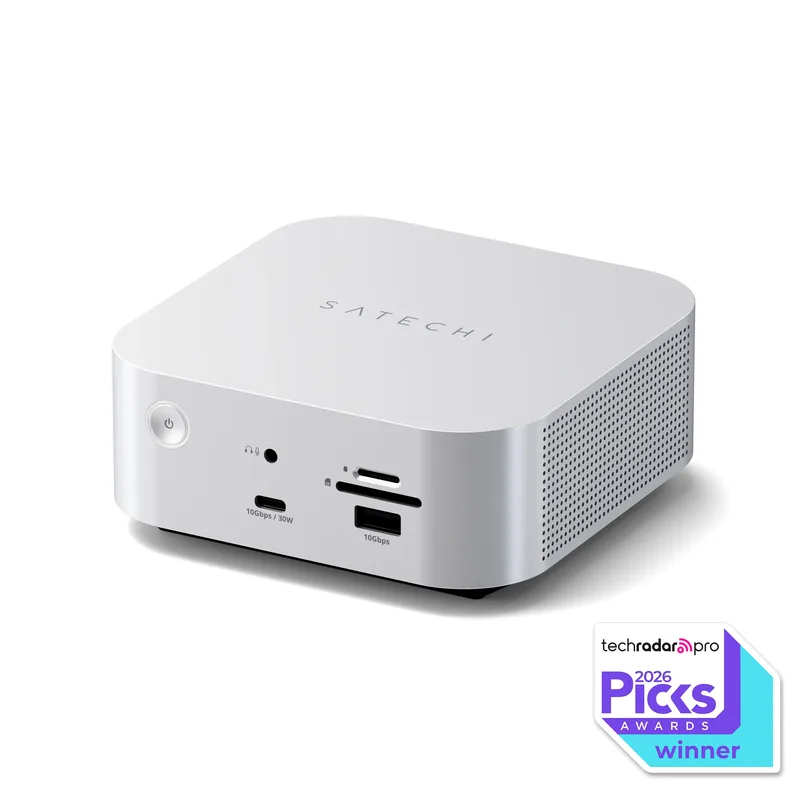
Satechi Thunderbolt 5 CubeDock
Pros
- Mac mini-identical footprint (5 × 5 × 2 inches) and silver aluminum finish sit flush with Apple hardware — matches Mac mini, Mac Studio, and MacBook Silver aesthetic without an aftermarket dock mount or arm
- Four Thunderbolt 5 ports (one host, three downstream) is the highest TB5 port count in this roundup — connects a TB5 display, two TB5 storage devices, and the host laptop simultaneously without port swapping
- Built-in M.2 NVMe enclosure reaches 6000MB/s read speed — fast enough for Lightroom catalogs, DaVinci Resolve caches, or video proxies to live on the dock's storage bay rather than the laptop's internal SSD
- 140W charging drives the 16-inch MacBook Pro at full speed — the dock doesn't throttle charge rate under simultaneous high-bandwidth load
- No driver installation required on Mac or Windows — Thunderbolt 5 certification ensures immediate plug-and-play compatibility across both platforms
Cons
- No dedicated HDMI or DisplayPort output — all display connections require Thunderbolt 5 cables, which adds $30-$50 per display for TB5-compatible cables if monitors don't include them
- M.2 NVMe SSD is not included — the storage expansion bay requires a separate SSD purchase ($50-$200 depending on capacity and speed tier)
- Compact 5 × 5 × 2 inch chassis is entirely passively cooled — under sustained maximum bandwidth, the dock runs noticeably warm and may throttle on prolonged high-load workloads compared to the active-cooled UGREEN
The Satechi CubeDock launched at CES 2026 and made a clear design choice: match the Mac mini’s footprint exactly. At 5 × 5 × 2 inches in silver aluminum, it sits directly next to — or stacked under — a Mac mini without visual conflict. That matters for users who’ve invested in a clean Apple-aesthetic desk setup.
Functionally, the CubeDock’s four Thunderbolt 5 ports (one host, three downstream) give it the highest TB5 port count in this roundup. Connect a TB5 display, a TB5 SSD enclosure, and a third TB5 peripheral simultaneously, all through a single cable to the laptop. The built-in M.2 NVMe enclosure supports SSDs up to 8TB at 6000MB/s — comparable to the UGREEN’s slot in speed, but in a form factor half the size.
The 140W charging spec covers the 16-inch MacBook Pro’s maximum charge rate. Unlike some docks that advertise 140W but deliver it inconsistently under display load, owner reports confirm the CubeDock maintains full charging speed while simultaneously driving dual high-resolution displays.
The passive cooling design is the primary concern. Five-by-five inches with no fan means the chassis relies entirely on aluminum heat dissipation. Under sustained maximum bandwidth — 120Gbps data plus dual 6K display output plus 140W charging — the dock runs warm to the touch. Sustained workloads over several hours may see more thermal variation than on the actively cooled UGREEN.
Buy this if: You’re a Mac user who wants Thunderbolt 5 connectivity with Mac mini-identical design, four TB5 ports, and built-in storage expansion.
Skip this if: You run sustained high-bandwidth workloads for hours at a time, or your desk setup isn’t Mac-centric and design match doesn’t matter.
OWC Thunderbolt 5 Dock (11-Port)
Pros
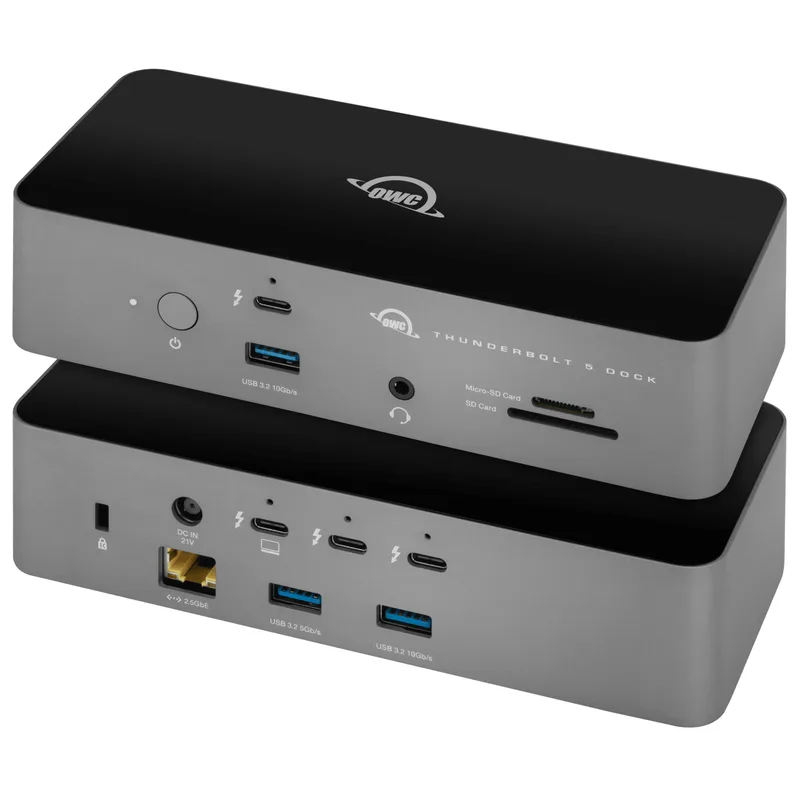
- Certified Thunderbolt 5 cable and external PSU included in the box — most competing docks at this price sell the TB5 cable separately at $30-$50 extra, so the OWC's bundled cable offsets a significant portion of its price premium over the Plugable
- Six independent USB 3.2 Gen 2 ports at 10Gbps each (three USB-C, three USB-A) give creatives and video professionals enough bandwidth to connect multiple NVMe enclosures or card readers simultaneously
- 100% USB-C compatible fallback enables connection from standard USB-C laptops without Thunderbolt 5 — useful during the transition period before most laptops ship with TB5 natively
- Compact form factor (~7 inches wide) fits behind a monitor stand or on a constrained desk without the larger footprint of 17-port docks
- OWC's award-winning support and warranty service adds practical peace of mind for a peripheral that the entire desk setup depends on
Cons
- 2.5GbE networking tops out where the CalDigit TS5 Plus offers 10GbE — video editors or NAS users regularly transferring large files over Ethernet will notice the 4× speed difference on high-bandwidth connections
- No built-in SSD expansion — unlike the UGREEN Maxidok and Satechi CubeDock, there is no M.2 slot; external storage adds another device to the desk
- No DisplayPort or HDMI output — all display connections require Thunderbolt or USB-C cables, adding adapter complexity for users with older monitors
The OWC Thunderbolt 5 Dock’s best argument is what’s in the box: a certified Thunderbolt 5 cable and the external PSU are both included. At $329-$349, it arrives fully ready to connect without an extra purchase. Every other dock in this roundup that doesn’t include a TB5 cable adds $30-$50 to the effective cost at checkout.
Eleven ports — three USB-C and three USB-A at 10Gbps each, plus card readers, 2.5GbE, and audio — covers a standard remote work desk without gaps. Photographers or video editors who need to connect multiple card readers and NVMe enclosures simultaneously will find six 10Gbps USB ports sufficient for most workflows. The compact ~7-inch form factor fits on constrained desks.
OWC’s USB-C compatibility mode is a practical consideration. The dock functions with standard USB-C laptops that don’t have Thunderbolt 5, which means buying it now for a current USB-C laptop works, and it will upgrade to full TB5 performance once a TB5 laptop replaces the current machine. No dock swap required.
The gaps: 2.5GbE networking is the ceiling — no 10GbE option — and there’s no M.2 SSD slot. For a desk that needs 10Gbps wired networking or built-in storage expansion, the CalDigit or UGREEN are better fits. For a clean, portable-friendly dock that arrives complete and ready to plug in, the OWC is consistently competent.
Buy this if: You want a complete out-of-box experience with a certified cable included, and your workflow doesn’t require 10GbE or built-in SSD expansion.
Skip this if: You need 10 Gigabit Ethernet or an M.2 SSD bay, or you want more than 11 total ports.
What to Look For in a Thunderbolt 5 Dock
Thunderbolt 5 vs. USB4 v2 — Certification Matters
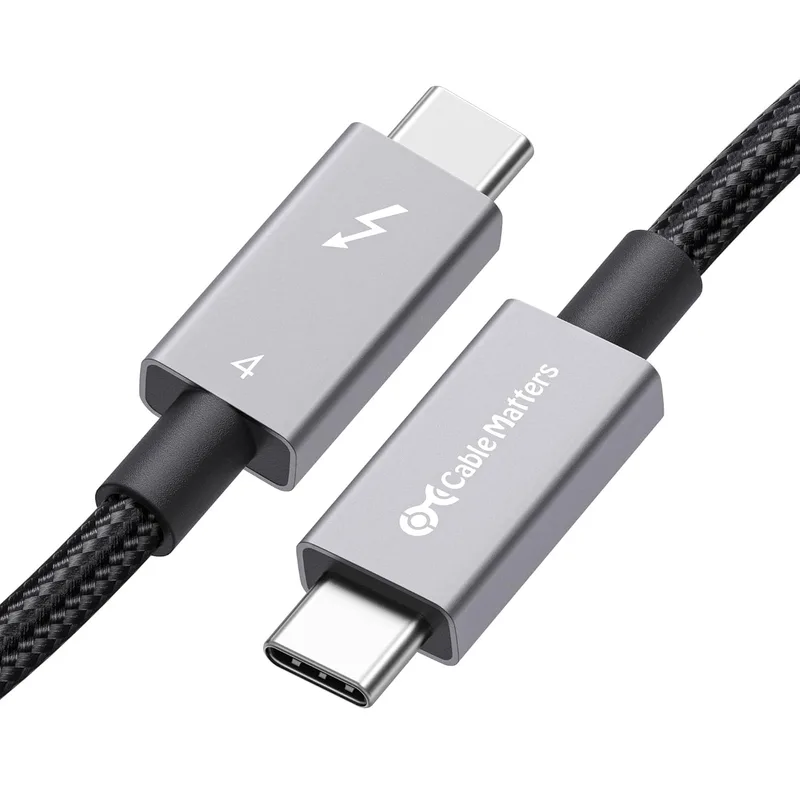
Both Thunderbolt 5 and USB4 Version 2 support 120Gbps bandwidth. The difference is certification: Intel’s Thunderbolt certification requires each dock to pass compatibility testing across a broader range of host devices and peripherals. USB4 v2 docks may work identically in practice, but Thunderbolt-certified docks carry a stronger guarantee of cross-platform, plug-and-play reliability. Every dock in this roundup is Intel Thunderbolt 5 certified.
Host Charging Wattage
All five docks deliver 140W to the host laptop. That covers the 16-inch MacBook Pro (140W), Dell XPS 15 (130W), and most modern Windows gaming and creator laptops. If your laptop uses a 240W power brick (some high-end gaming laptops), a dock won’t fully charge it under load — but 140W will still reduce drain rate.
Networking: 2.5GbE vs. 10GbE
For most home internet connections — including gigabit fiber — 2.5GbE is more than sufficient. The 2.5Gbps ceiling only becomes a bottleneck in specific scenarios: editing video from a 10GbE-capable NAS, running a local file server with a 10GbE switch, or a multi-gig ISP plan. If none of those apply, the Plugable, OWC, UGREEN, and Satechi save real money versus the CalDigit TS5 Plus’s 10GbE port.
Display Output Types
Docks with a dedicated DisplayPort 2.1 or HDMI output (CalDigit TS5 Plus, UGREEN Maxidok) connect directly to most monitors with a standard cable. Docks that use only Thunderbolt 5 ports for display output (Plugable, OWC, Satechi) require your monitor to accept a Thunderbolt or USB-C connection — or you need an active adapter. Check your monitor’s input specs before buying a display-only-TB5 dock.
Built-in SSD Expansion
Both the UGREEN Maxidok and Satechi CubeDock include M.2 NVMe slots. Through the TB5 connection, these slots reach Gen4 speeds (5000-7000MB/s) — faster than external USB 3.2 enclosures. The SSD is not included in either dock, but the slot eliminates a separate enclosure from the desk once you add a drive. For photographers and video editors, this is one of the more practical features in a dock.
Frequently Asked Questions
Does my laptop need Thunderbolt 5 to use these docks?
Your laptop needs a Thunderbolt 5 port to get TB5 bandwidth. All five docks in this roundup are backward-compatible with Thunderbolt 4, Thunderbolt 3, and USB4 — but at reduced speeds (40Gbps for TB4/TB3). Only TB5 laptops unlock the full 120Gbps. The OWC dock additionally supports standard USB-C connections at USB 3.2 speeds.
Will a Thunderbolt 5 dock work with an M4 MacBook Pro?
The M4 MacBook Pro ships with Thunderbolt 5 ports, so yes — all five docks work natively at full 120Gbps TB5 bandwidth. Connect with the included or bundled TB5 cable and the dock appears immediately in macOS without any driver or software installation. All docks in this roundup are certified for both Mac and Windows platforms.
What’s the difference between Thunderbolt 5 and Thunderbolt 4 for a dock?
Thunderbolt 4 docks max out at 40Gbps. That’s enough for a single 4K 60Hz display, standard USB peripherals, and gigabit Ethernet simultaneously — but stacks of bandwidth-hungry devices (dual 4K+ displays plus fast storage plus 10GbE) can saturate it. Thunderbolt 5’s 120Gbps removes that ceiling, enabling dual 8K displays, 10GbE networking, and fast NVMe storage to run concurrently through the same cable.
How long should a Thunderbolt 5 cable be?
Intel’s TB5 specification supports cables up to 2 meters at full 120Gbps. Beyond 2 meters, passive cables drop to 40Gbps, and active optical cables are required for longer runs at full bandwidth. Most docks include a 1-meter cable. For standard desk distances — laptop to dock on the same surface — 1 meter is sufficient.
Can I use a Thunderbolt 5 dock with a Windows laptop?
Yes. All five docks in this roundup are certified for Windows and Mac. Windows 11 with a Thunderbolt 5 laptop (Intel Core Ultra 200-series or AMD Ryzen AI 300-series) drives these docks at full bandwidth. On Windows, dual 8K display support, 140W charging, and all USB ports function without driver installation.
Conclusion
For most remote workers with a Thunderbolt 5 laptop, the Plugable TBT-UDT3 is the right call. At $299-$319, it delivers everything the standard remote work desk needs — 140W charging, dual 8K display support, 2.5GbE, SD/microSD card readers, and driverless operation — and the MacWorld/PCWorld recognition validates it against the field. It doesn’t include a TB5 cable, which adds $30-$50 at checkout, but the base dock price is still the lowest for genuine TB5 performance.
If your workflow involves 10 Gigabit Ethernet, you edit video from a NAS, or you want the maximum USB port count on one controller, the CalDigit TS5 Plus justifies the $479-$499 price. The 10GbE, dual USB controllers, and SD 4.0 card readers are genuinely faster than anything in the sub-$400 category.
For a Mac-matched desk with built-in SSD expansion, the Satechi CubeDock at $389-$419 hits a niche the others don’t address aesthetically. And if you want the widest port selection with active cooling and an SSD slot at a mid-range price, the UGREEN Maxidok 17-in-1 at $389-$429 covers the most ground per dollar.
Detailed Reviews
CalDigit TS5 Plus
Pros
- Dual independent USB controllers allocate separate bandwidth to five USB-A and five USB-C ports — connecting 10 USB devices simultaneously causes no throughput contention, unlike single-controller docks that bottleneck at 10Gbps shared
- 10 Gigabit Ethernet is the fastest wired networking available on any consumer TB5 dock — meaningful for transferring large files to a NAS, Synology array, or high-speed file server at home or over a direct uplink
- SD 4.0 UHS-II and microSD 4.0 UHS-II card readers on the front panel are the fastest card interfaces in this roundup — faster than SD 3.0 slots on competing docks, which matters for photographers offloading high-speed cards
- Braided 1m Thunderbolt 5 cable included — saves $30-$50 on a separate certified TB5 cable purchase and means the dock is ready to use immediately from the box
- DisplayPort 2.1 output plus two TB5 downstream ports lets users connect one monitor via DP 2.1 cable and a second via TB5 cable — eliminates the need for both monitors to support TB5 input natively
Cons
- At $479-$499, this is the most expensive dock in this roundup by a wide margin — remote workers who don't need 10GbE or more than 10 USB ports are paying for capacity they'll likely never fully use
- No built-in SSD slot — unlike the UGREEN Maxidok and Satechi CubeDock, there is no M.2 expansion bay; high-speed external storage requires a separate enclosure on the desk
- Large 330W external power brick needs its own cable management — the full desk footprint is larger than the dock itself once the PSU cable is routed
Plugable TBT-UDT3 Thunderbolt 5 Dock
Pros
- At $299-$319, the lowest entry price for a certified Thunderbolt 5 dock delivering full 140W laptop charging, dual 8K display support, and 2.5GbE networking — significantly undercuts the CalDigit TS5 Plus while covering most remote work connectivity needs
- Three Thunderbolt 5 downstream ports handle two high-resolution displays and a high-speed storage device simultaneously at 120Gbps without bandwidth contention between them
- Driverless operation on both Mac and Windows — all 11 ports activate immediately with no software or driver installation, which matters on IT-managed laptops with restricted installs
- Integrated Thunderbolt Share allows direct file transfer or a KVM-like control switch between two laptops connected through the dock — no dedicated KVM hardware required
- MacWorld Best of 2026 and PCWorld Editors' Choice recognition reflects consistent real-world performance validated across independent publications
Cons
- No dedicated HDMI or DisplayPort output — all video connections require a Thunderbolt 5 cable to the display, adding adapter cost if monitors don't have TB5 or USB4 input
- 15W downstream charging on the front USB-C port is insufficient for fast-charging smartphones — anyone who fast-charges a phone at the desk needs a secondary charger
- Eleven ports total, with only three USB-A ports — workstations running multiple USB-A peripherals (keyboard, mouse, external drive, printer) will max out quickly
UGREEN Revodok Maxidok 17-in-1 Thunderbolt 5 Dock
Pros
- 17 ports including a dedicated DisplayPort 2.1 output is the widest port spread in this roundup — users with older HDMI or DisplayPort monitors don't need adapters, and the USB count handles a full peripheral setup
- Built-in M.2 NVMe slot (PCIe Gen4 x4, up to 8TB) turns the dock into a high-speed external SSD enclosure — eliminates a separate drive enclosure from the desk and routes storage bandwidth through the TB5 connection
- Active cooling fan combined with passive aluminum vents prevents thermal throttling under sustained 120Gbps throughput — more stable than passively cooled docks during long video ingest or large file transfers
- Launched in March 2026 at a $499.99 MSRP; currently available at $389.99-$429 — strong value for 17 ports plus M.2 expansion compared to the CalDigit TS5 Plus at nearly the same price range
- Dark grey aluminum chassis with copper accent vents is compact at 5.2 × 5.2 inches despite 17 ports — comparable desktop footprint to the Satechi CubeDock with significantly more connectivity
Cons
- At 1.9 lbs with an external PSU, this is the heaviest dock in the roundup — fine as a permanent desk fixture but less practical for a portable setup that moves between locations
- Active cooling fan is audible under heavy load — in a quiet recording environment or podcast setup, the fan noise can bleed into microphone captures at close proximity
- SD 3.0 card readers (versus SD 4.0 on the CalDigit TS5 Plus) cap card read speed below what the fastest UHS-II cards are capable of — photographers offloading high-speed memory cards will see slower transfers
Satechi Thunderbolt 5 CubeDock
Pros
- Mac mini-identical footprint (5 × 5 × 2 inches) and silver aluminum finish sit flush with Apple hardware — matches Mac mini, Mac Studio, and MacBook Silver aesthetic without an aftermarket dock mount or arm
- Four Thunderbolt 5 ports (one host, three downstream) is the highest TB5 port count in this roundup — connects a TB5 display, two TB5 storage devices, and the host laptop simultaneously without port swapping
- Built-in M.2 NVMe enclosure reaches 6000MB/s read speed — fast enough for Lightroom catalogs, DaVinci Resolve caches, or video proxies to live on the dock's storage bay rather than the laptop's internal SSD
- 140W charging drives the 16-inch MacBook Pro at full speed — the dock doesn't throttle charge rate under simultaneous high-bandwidth load
- No driver installation required on Mac or Windows — Thunderbolt 5 certification ensures immediate plug-and-play compatibility across both platforms
Cons
- No dedicated HDMI or DisplayPort output — all display connections require Thunderbolt 5 cables, which adds $30-$50 per display for TB5-compatible cables if monitors don't include them
- M.2 NVMe SSD is not included — the storage expansion bay requires a separate SSD purchase ($50-$200 depending on capacity and speed tier)
- Compact 5 × 5 × 2 inch chassis is entirely passively cooled — under sustained maximum bandwidth, the dock runs noticeably warm and may throttle on prolonged high-load workloads compared to the active-cooled UGREEN
OWC Thunderbolt 5 Dock (11-Port)
Pros
- Certified Thunderbolt 5 cable and external PSU included in the box — most competing docks at this price sell the TB5 cable separately at $30-$50 extra, so the OWC's bundled cable offsets a significant portion of its price premium over the Plugable
- Six independent USB 3.2 Gen 2 ports at 10Gbps each (three USB-C, three USB-A) give creatives and video professionals enough bandwidth to connect multiple NVMe enclosures or card readers simultaneously
- 100% USB-C compatible fallback enables connection from standard USB-C laptops without Thunderbolt 5 — useful during the transition period before most laptops ship with TB5 natively
- Compact form factor (~7 inches wide) fits behind a monitor stand or on a constrained desk without the larger footprint of 17-port docks
- OWC's award-winning support and warranty service adds practical peace of mind for a peripheral that the entire desk setup depends on
Cons
- 2.5GbE networking tops out where the CalDigit TS5 Plus offers 10GbE — video editors or NAS users regularly transferring large files over Ethernet will notice the 4× speed difference on high-bandwidth connections
- No built-in SSD expansion — unlike the UGREEN Maxidok and Satechi CubeDock, there is no M.2 slot; external storage adds another device to the desk
- No DisplayPort or HDMI output — all display connections require Thunderbolt or USB-C cables, adding adapter complexity for users with older monitors