Backpack coverage in 2026 has leaned toward bags that do more than one job. Gear Patrol’s roundup of new 2026 bags points to Peak Design’s Travel Backpack 2-in-1, which converts from a 40L carry-on into two standalone backpacks, and a Lenovo ThinkPad bag that swaps zippers for magnets. Wirecutter’s top pick, the Troubadour Apex Backpack 4.0, runs about $279. Those are lovely bags. Most remote workers who go in two or three days a week don’t need to spend that much.
I looked at what a hybrid worker actually carries: a 14 to 16 inch laptop, a charger, a mouse, maybe a portable monitor or a dock. The five bags below are budget and mid-range picks that come with a padded laptop compartment, and I compared them on laptop fit, organization, and price using listing specs and owner feedback, not lab numbers. Peak Design’s Everyday line would be on a longer list, but the listings I checked were out of stock or had no price, so it isn’t here.
Comparison
| Spec | MATEIN Travel Laptop Backpack, 15.6 Inch | KROSER TSA Friendly Travel Laptop Backpack, 17.3 Inch XL | Taygeer Travel Laptop Backpack for Men, 15.6 Inch, 35L | Taygeer Laptop Backpack with 17.3 Inch Compartment | Osprey Axis Laptop Backpack |
|---|---|---|---|---|---|
| Rating | 8.8/10 | 8.4/10 | 8.3/10 | 8.1/10 | 8.9/10 |
| Price | $21.99as of Nov 22, 2026 | $40.79as of Nov 22, 2026 | $23.99-$29.99as of Nov 22, 2026 | Unavailable | $84.75as of Nov 22, 2026 |
| Laptop Fit | Up to 15.6 inch | Up to 17.3 inch | Up to 15.6 inch | Up to 17.3 inch | Padded laptop sleeve |
| Dimensions | 18 x 12 x 7.8 in | — | — | — | — |
| Charging | External USB port (needs your own power bank) | USB port | — | — | — |
| Tablet Sleeve | Up to 12.9 inch iPad Pro, per a third-party review | — | — | — | — |
| Material | Water-resistant polyester | — | — | — | — |
| Airport | — | TSA-friendly layout | — | Airline-approved, TSA-friendly per the listing | — |
| Security | — | RFID pockets | — | — | — |
| Finish | — | Water-repellent | — | — | — |
| Capacity | — | — | 35L | — | — |
| Travel | — | — | Airline-approved carry-on sizing per the listing | — | — |
| Bottle Pocket | — | — | Yes | — | — |
| Weight | — | — | Lightweight per the listing | — | — |
| Use Case | — | — | — | Business, travel, work essentials | College, city commutes, casual travel |
| Color Shown | — | — | — | Peacock Blue | — |
| Style | — | — | — | Carry-on daypack | — |
| Pockets | — | — | — | — | Dual water bottle pockets |
| Straps | — | — | — | — | Compression straps |
| Brand | — | — | — | — | Osprey |
| Check Price → | Check Price → | Check Price → | Check Price → | Check Price → |
Prices change daily — tap Check Price for the current Amazon price.
The Picks
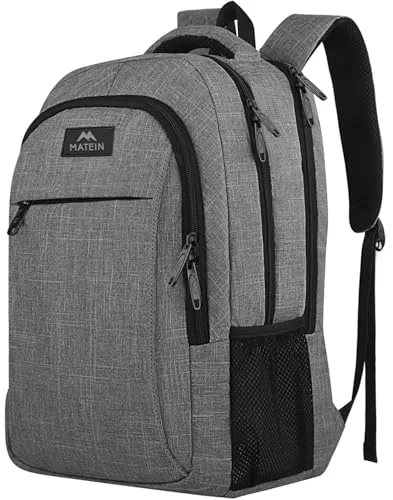
MATEIN Travel Laptop Backpack, 15.6 Inch
Pros
- Lowest price in this roundup for a bag with a padded laptop compartment
- Exterior USB port lets you run a cable from a power bank in the bag
- Listing highlights anti-theft design and a slim profile for a personal-item size
- Large owner base: the listing shows over 100,000 ratings
Cons
- The USB port is only a pass-through; it does not hold a battery
- A third-party review flagged thin lining and stitching for heavy daily use
- Mesh bottle pockets are shallow for tall bottles, per the same review
The Matein is my pick for most people because it costs about what a good USB-C cable and a mouse cost together. The compartment layout keeps the laptop separate from the rest, and the exterior USB port lets you run a cable from a power bank inside the bag. See our best USB-C power banks for something to put in it.
The tradeoff is durability. A third-party review noted thin lining and stitching, so treat it as a two-year bag, not a ten-year one.
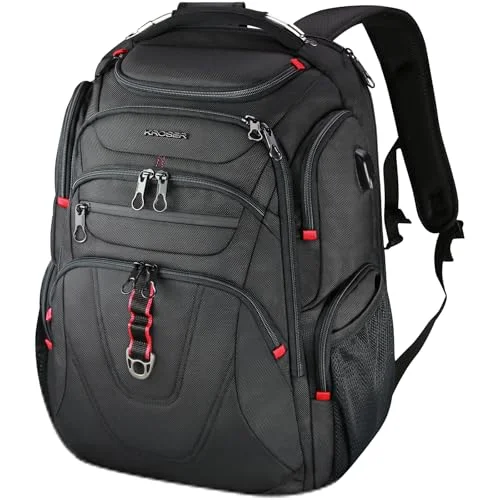
KROSER TSA Friendly Travel Laptop Backpack, 17.3 Inch XL
Pros
- Fits 17.3 inch laptops, which most budget bags do not
- TSA-friendly layout is meant to let the laptop stay in the bag at checkpoints
- RFID-blocking pockets for cards and a passport
- USB port for routing a power bank cable
Cons
- An XL bag is bulky if you carry a 13 or 14 inch laptop
- Costs more than the 15.6 inch budget picks
- USB port still needs a power bank you supply
If your work laptop is a 16 or 17 inch machine, the KROSER is the budget answer. It lists a 17.3 inch fit, a TSA-friendly layout, RFID pockets, and a USB port. On a small frame it is a lot of bag, so don’t buy it for a 13 inch ultrabook.
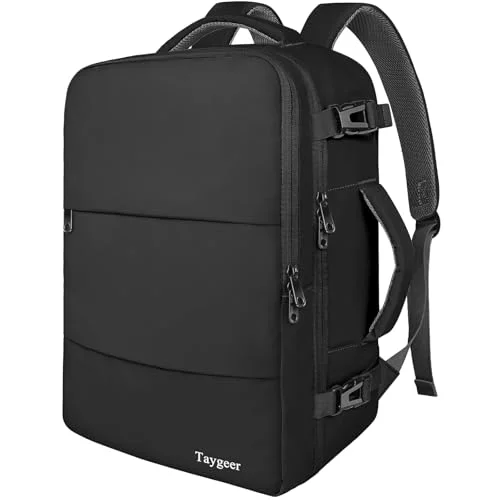
Taygeer Travel Laptop Backpack for Men, 15.6 Inch, 35L
Pros
- 35L is enough for a laptop, a change of clothes, and a charger kit
- Listing says it is airline-approved as a carry-on
- Water bottle pocket included
- Priced close to the Matein with more room
Cons
- 35L is large for a plain office commute and can look oversized on a small frame
- Fewer tech-specific pockets than a commuter-focused design
- The price varies between listings, so check the button
This one is for the hybrid worker who also flies to the occasional offsite. At 35L with a listed airline-approved carry-on size, it can hold a laptop and an overnight kit. Pair it with a travel router or a portable docking station and your hotel desk is covered.
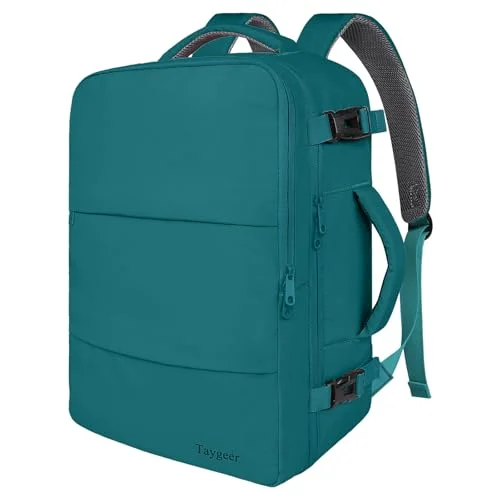
Taygeer Laptop Backpack with 17.3 Inch Compartment
Pros
- 17.3 inch compartment accommodates large work laptops
- TSA-friendly layout per the listing
- Aimed at daily work essentials rather than a student load
- Colors beyond black are available for people who dislike plain commuter bags
Cons
- Same brand and general design approach as the other Taygeer pick
- Listing gives little detail on padding thickness
- Price range across listings is wide
The second Taygeer trades some capacity for a 17.3 inch compartment and an office-friendly look. The “peacock blue” colorway is the listing I checked. It’s close to the first Taygeer in spirit, so pick between them on laptop size and how much you pack.
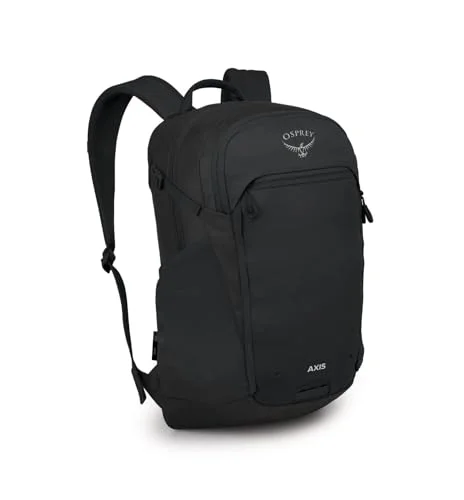
Osprey Axis Laptop Backpack
Pros
- Established outdoor-pack brand with a more serious harness than budget bags
- Dual water bottle pockets and compression straps
- Clean urban look that works in an office
- Sleeve is dedicated to the laptop rather than a shared main compartment
Cons
- Most expensive pick here
- No built-in USB port
- The price swings widely between listings
Osprey is the step up. You pay for a better-known brand, dual bottle pockets, compression straps, and a clean urban look. There is no USB port, which I don’t mind, because a power bank in a pocket does the same job. Choose this if the bag is a daily driver and you want the brand’s reputation behind it.
What a Hybrid Commute Actually Asks of a Bag
Hybrid work changes what a backpack has to do. A fully remote worker needs a bag a few times a month. A hybrid worker puts it on five mornings a fortnight or more, and it carries the same load every time: the laptop, a charger, a mouse, a headset, and often a lunch. That repetition is why strap comfort and a stable laptop pocket matter more than a long list of pockets you never use.
It also changes the failure mode. A bag that is slightly too small gets a laptop squeezed against a hard object every day. A bag that is far too large lets the laptop slide around. The best fit is a sleeve that matches your laptop closely, with the rest of the gear sitting in separate pockets so the charger brick never presses on the screen. If you also move a portable monitor or a travel dock, check the main compartment depth in the listing and leave some room. Our best portable docking stations list shows what those add to the load.
Budget Bag or Premium Bag?
The price spread in this roundup runs from about twenty dollars to about eighty. What the extra money buys is mostly brand support, harness design, and fabric. What it does not buy is a different laptop compartment: every bag here uses a padded sleeve, and none of them make your laptop safer in a hard drop on their own.
If the bag is used three days a week and replaced every two or three years, a budget pick is a fair deal. If you carry heavy gear daily or walk a long way, the better harness on the Osprey is worth considering. Either way, the spread between listings means you should compare the current price on each card before you decide.
How These Picks Were Compared
I did not run carry tests. I compared listing specs, advertised laptop fit, features, and what owners and third-party reviewers say about wear. Prices change often, and several of these swing between listings, so the price on each card is the one to trust.
Buying Guide
Match the sleeve to your laptop
Measure the laptop, not the screen size. A 16 inch MacBook needs more room than a 15.6 inch Windows ultrabook. If you carry a 17 inch machine, buy a bag that lists 17.3 inches.
Decide how much you carry
A laptop, charger, and mouse fit in anything. Add a portable monitor, a dock, and a lunch and you want 25L or more. Our best laptop stands guide covers folding stands that slip into a bag.
Treat the USB port as pass-through
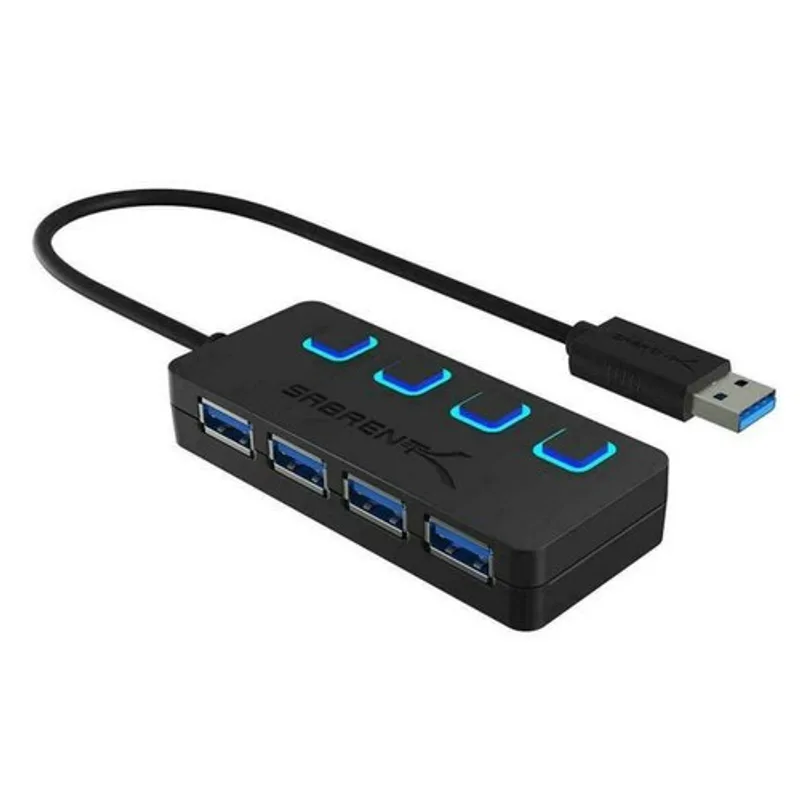
Bags with a USB port don’t contain a battery. They give you a cable end outside the bag so you can charge a phone from a power bank inside it.
Look for a flat-opening laptop compartment
If you fly, a layout that lets the laptop stay in the bag at security saves time. Check the listing for TSA-friendly wording and then follow the agent’s instructions at the checkpoint.
Check the padding and the bottom
Laptops get damaged when a bag is dropped or set down hard. A raised, padded laptop pocket keeps the machine off the floor.
Think about weather and the walk
A water-resistant finish handles a drizzle on the walk from the train. It will not protect a laptop in a downpour. If your commute is outdoors, a rain cover or a dry bag liner costs little and is far cheaper than a laptop repair. Also count the minutes you carry the bag: past 20 minutes, strap padding and a sternum or compression strap start to matter.
Keep the tech organized
Put the charger and cables in a small pouch, not loose in the bag. That keeps connectors from scratching the laptop and makes the bag faster to pack. A short USB-C cable, a compact charger, and a power bank cover most days. Our best USB-C power banks guide covers what fits in a side pocket.
Mind the weight before you load it
A backpack weighs more than it looks once the laptop, charger, and lunch are in it. Empty weight matters less than how the load sits: keep the laptop against your back, the heavy charger low, and lighter items up front. If you notice shoulder strain by the second week, the fix is usually tightening the straps and removing gear you do not use, not buying a new bag.
Plan for a second device
Many hybrid workers carry a tablet, an e-reader, or a work phone alongside the laptop. Look for a separate soft sleeve or pocket for it, so it does not share a compartment with keys and a charger. A bag with one big main compartment and no dividers will get messy within a week.
FAQ
What size backpack do I need for a 16 inch laptop?
Look for a listing that names 16 inch or 17.3 inch compatibility. A 15.6 inch pocket may be too tight for a 16 inch MacBook.
Are cheap laptop backpacks worth it?
For a few days a week in the office, yes. Budget bags show wear sooner in the stitching and lining, so expect a shorter lifespan.
Is a USB charging port safe to use?
It’s a pass-through for a power bank you put in the bag. Use a reputable power bank and don’t leave it charging a device while unattended.
Do I need a TSA-friendly backpack?
Only if you fly with a laptop often. A TSA-friendly layout is designed to let you scan the laptop in the bag, but checkpoint rules vary by airport.
Which backpack is best for a hybrid commute?
For a mostly-office day, the Matein or Osprey Axis is the practical choice. For a day that sometimes becomes a trip, the Taygeer 35L has more room.
Conclusion
The Matein is the top pick: cheap, roomy enough, and good enough for most hybrid commutes. Step up to the Osprey Axis if the bag is a daily driver, and pick the KROSER or the 17.3 inch Taygeer if your laptop is large. If you fly with a laptop, check the best portable docking stations too.
Detailed Reviews
MATEIN Travel Laptop Backpack, 15.6 Inch
Pros
- Lowest price in this roundup for a bag with a padded laptop compartment
- Exterior USB port lets you run a cable from a power bank in the bag
- Listing highlights anti-theft design and a slim profile for a personal-item size
- Large owner base: the listing shows over 100,000 ratings
Cons
- The USB port is only a pass-through; it does not hold a battery
- A third-party review flagged thin lining and stitching for heavy daily use
- Mesh bottle pockets are shallow for tall bottles, per the same review
KROSER TSA Friendly Travel Laptop Backpack, 17.3 Inch XL
Pros
- Fits 17.3 inch laptops, which most budget bags do not
- TSA-friendly layout is meant to let the laptop stay in the bag at checkpoints
- RFID-blocking pockets for cards and a passport
- USB port for routing a power bank cable
Cons
- An XL bag is bulky if you carry a 13 or 14 inch laptop
- Costs more than the 15.6 inch budget picks
- USB port still needs a power bank you supply
Taygeer Travel Laptop Backpack for Men, 15.6 Inch, 35L
Pros
- 35L is enough for a laptop, a change of clothes, and a charger kit
- Listing says it is airline-approved as a carry-on
- Water bottle pocket included
- Priced close to the Matein with more room
Cons
- 35L is large for a plain office commute and can look oversized on a small frame
- Fewer tech-specific pockets than a commuter-focused design
- The price varies between listings, so check the button
Taygeer Laptop Backpack with 17.3 Inch Compartment
Pros
- 17.3 inch compartment accommodates large work laptops
- TSA-friendly layout per the listing
- Aimed at daily work essentials rather than a student load
- Colors beyond black are available for people who dislike plain commuter bags
Cons
- Same brand and general design approach as the other Taygeer pick
- Listing gives little detail on padding thickness
- Price range across listings is wide
Osprey Axis Laptop Backpack
Pros
- Established outdoor-pack brand with a more serious harness than budget bags
- Dual water bottle pockets and compression straps
- Clean urban look that works in an office
- Sleeve is dedicated to the laptop rather than a shared main compartment
Cons
- Most expensive pick here
- No built-in USB port
- The price swings widely between listings