USB-C Power Delivery 3.1 changed what a power bank can actually do for remote workers. Single ports that used to cap out at 100W now push 140W, which is enough to fast-charge a 16-inch MacBook Pro at its full rated speed instead of trickle-charging it over hours. Flagship banks like the Anker Prime now total 300W across multiple ports, so a laptop, phone, and tablet can all charge at speed from one brick. At the same time, battery chemistry has been shifting toward safer semi-solid-state and improved lithium-polymer cells as brands respond to fire-risk recalls, and a TSA rule taking effect in May 2026 caps carry-on passengers at two portable chargers of 100Wh or less each — which is why every serious travel power bank on the market is now deliberately capped just under that line.
For a remote worker, a power bank isn’t a phone accessory anymore. It’s backup power for a home office during an outage, a way to keep working from a coffee shop or coworking space without hunting for an outlet, and insurance against a dead laptop battery on a travel day. The five picks below cover that range: a 300W flagship that can charge two laptops at once, a value pick that still hits 140W, and a slim budget option thin enough to live in a laptop sleeve.
Quick Comparison
| Power Bank | Capacity | Max Output | Recharge | Price |
|---|---|---|---|---|
| Anker Prime 300W | 26,250mAh | 300W total / 140W per port | ~60 min (250W) | $179.99-$229.99 as of Oct 18, 2026 |
| UGREEN Nexode 145W | 25,000mAh | 145W total / 140W single port | ~2 hrs (65W) | $79.99 as of Oct 18, 2026 |
| Anker 737 (PowerCore 24K) | 24,000mAh | 140W total / 140W single port | Standard | $79.99-$109.99 as of Oct 18, 2026 |
| Zendure SuperTank Polymer | 26,800mAh | 100W total / 100W single port | Standard | Unavailable |
| Baseus Blade 100W | 20,000mAh | 100W total / 100W single port | ~65W input | $89.99 as of Oct 18, 2026 |
1. Anker Prime Power Bank (26,250mAh, 300W) — Editor’s Pick
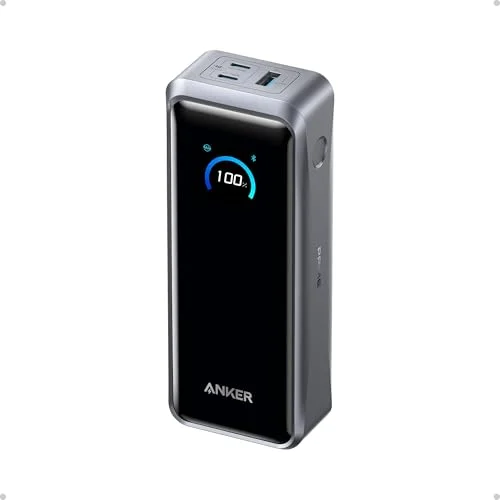
Anker Prime Power Bank (26,250mAh, 300W)
Pros
- 300W total output can run a 16-inch MacBook Pro at full 140W speed while a phone and tablet top off on the other ports simultaneously
- PowerIQ 4.0 smart power distribution automatically splits wattage across connected devices instead of forcing a flat, inefficient split
- ActiveShield 4.0 runs thermal checks roughly 10 million times a day, which matters given how much heat 300W output generates in a pack this size
- Smart display shows real-time wattage per port and remaining runtime instead of a vague percentage bar
- Recharges itself in about an hour with a compatible 250W charger, so it's ready again well before the next travel day
Cons
- The optional charging base that unlocks the full 300W mode is sold separately, which pushes the real cost higher than the sticker price
- Overkill for anyone who only needs to top off a phone — the weight and price only pay off if you're actually charging a laptop
- Highest cost per watt-hour of any pick in this roundup
The Anker Prime is the only bank in this roundup that can run two laptops at speed simultaneously. Its 300W total output splits across two USB-C ports and a USB-A port, with each USB-C port capable of hitting 140W on its own. That’s enough to fully power a 16-inch MacBook Pro while a second device — another laptop, a tablet, or a phone — charges at full speed on the remaining ports.
PowerIQ 4.0 handles the power split automatically, reading what each connected device is asking for and allocating wattage accordingly rather than dividing it evenly regardless of need. The ActiveShield 4.0 system runs roughly 10 million thermal checks per day, which is a meaningful safety margin for a pack pushing this much power through a compact housing. When the battery does run down, a compatible 250W charger tops it back up in about an hour, which is fast enough to top off between meetings.
The catch is cost. The 300W mode requires an optional charging base sold separately, and even without it, this is the most expensive bank here by a wide margin. It’s the right call for anyone who regularly charges a laptop and a second high-draw device at once — a shared home office, a two-laptop household, or frequent travel with a work laptop and a personal one. For single-device charging, one of the cheaper picks below does the job for less.
2. UGREEN Nexode 145W Power Bank (25,000mAh) — Best Value
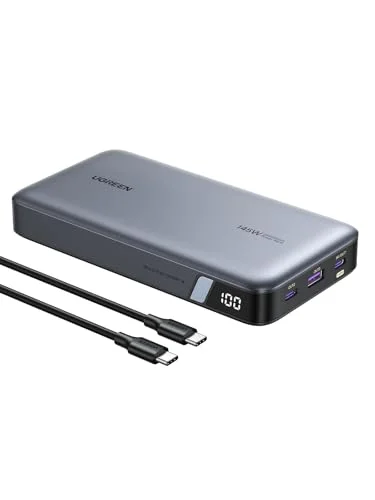
UGREEN Nexode 145W Power Bank (25,000mAh)
Pros
- 140W on a single USB-C port charges a 14-inch MacBook Pro or most Windows workstation laptops at their full rated speed
- Bright TFT display shows exact input/output wattage per port instead of a generic battery icon
- Build quality and port layout consistently draw praise in owner feedback for a bank in this price bracket
- Frequently discounted well below its list price, which makes it the strongest dollar-per-watt option that still hits 140W
Cons
- Only recharges at 65W, so topping the bank back up takes noticeably longer than the Anker Prime or Zendure options
- 300W flagship banks still out-total it if you need to fast-charge more than two devices at once
The UGREEN Nexode delivers the same 140W single-port ceiling as the pricier Anker 737, usually at a noticeably lower street price. For remote workers who need to charge one laptop at full speed and don’t need the Anker Prime’s dual-laptop capability, this is the strongest dollar-per-watt pick in the lineup.
The TFT display is a genuine upgrade over the basic LED indicators on cheaper banks — it shows exact input and output wattage per port, so you can confirm the full 140W is actually being delivered rather than guessing from a battery percentage. Owner feedback consistently calls out the build quality as solid for the price, with a port layout that’s easy to use without checking a manual.
The tradeoff is recharge speed. The Nexode only accepts 65W input, so refilling the bank itself takes close to two hours, versus roughly an hour for the Anker Prime at its higher input rate. If you’re the type who charges the bank overnight and uses it during the day, that’s a non-issue. If you need a fast turnaround between trips, factor it in.
3. Anker 737 Power Bank (PowerCore 24K) — Best All-Around
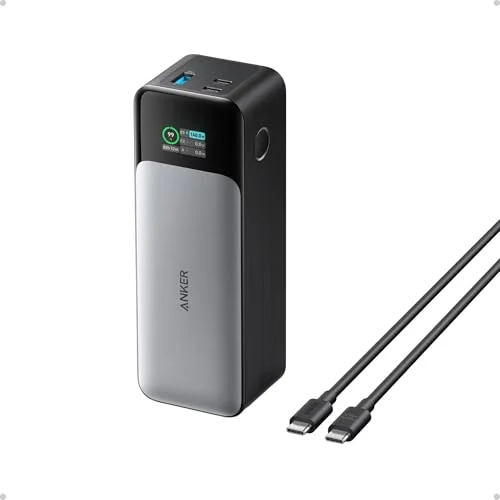
Anker 737 Power Bank (PowerCore 24K)
Pros
- 140W single-port output covers nearly every laptop on the market, including power-hungry Windows workstations
- Strong track record with a large volume of owner reviews and a high average rating for this exact model
- Smart display shows exact percentage and wattage rather than a rough LED ladder
- Handles three devices charging at once without meaningfully throttling any of them
Cons
- Noticeably heavier and bulkier than the UGREEN and Baseus options, which matters if it's riding in a bag daily
- Scattered owner reports of capacity degradation after roughly a year of heavy daily use
- No wireless charging pad, unlike some competing flagship banks
The Anker 737 has been on the market long enough to have a large volume of real owner reviews behind it, and the consensus holds up: 140W single-port output, a clear smart display, and reliable multi-device charging across three ports at once. For a remote worker who wants a single trusted bank without researching a newer, less-proven model, this is the safe default pick.
It handles a laptop on one USB-C port, a phone on the other, and a pair of earbuds or a smartwatch on USB-A, without meaningfully throttling any of them. The display shows precise wattage and percentage rather than a rough four-bar LED ladder, which makes it easy to confirm the bank is actually delivering the power your laptop is asking for.
It’s also the heaviest and bulkiest bank in this group at 630g, and there are scattered owner reports online of capacity fading after roughly a year of daily heavy use — worth knowing since a bank charging a laptop daily sees a lot more charge cycles than one topping off a phone occasionally. Anker’s warranty coverage is a reasonable hedge against that.
4. Zendure SuperTank Polymer (26,800mAh, 100W) — Most Rugged
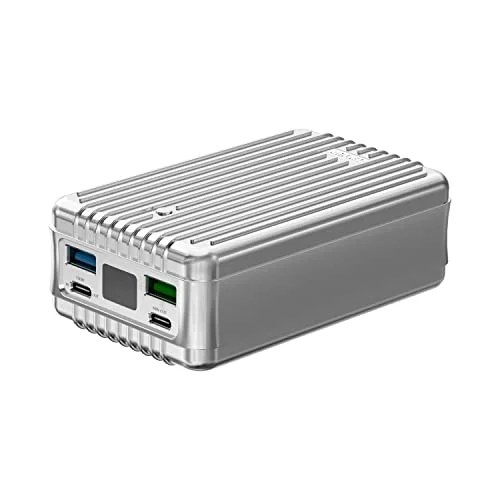
Zendure SuperTank Polymer (26,800mAh, 100W)
Pros
- 100W on the primary port is enough to run a 16-inch MacBook Pro at full charging speed
- Nine-layer safety protection circuit and a crush-proof shell make it the pick for anyone who tosses gear around in a backpack
- OLED screen breaks down power draw per port instead of showing a single combined number
- Four total ports (two USB-C, two USB-A) means it can realistically feed four devices at once
Cons
- The brick-like shape is harder to slide into a slim bag pocket than the flatter UGREEN or Baseus designs
- Port icons on the housing are small and easy to mix up at a glance
The Zendure SuperTank Polymer trades a little peak wattage for a crush-proof housing and a nine-layer safety protection circuit, which makes it the pick for anyone who tosses a bag around — commuting, coworking spaces, or travel where gear gets stacked and dropped. 100W on the primary port is still enough to charge a 16-inch MacBook Pro at its full charging speed.
The OLED display is one of the more detailed in this roundup, breaking out power draw per individual port rather than showing one combined number for the whole bank. With four total ports — two USB-C and two USB-A — it’s also the most flexible pick here for charging a mixed group of devices at once: laptop, phone, wireless earbuds case, and a smartwatch, all from one bank.
The brick-like shape is the main tradeoff. It doesn’t slide into a slim bag pocket the way the flatter UGREEN or Baseus options do, and the port icons printed on the housing are small enough that it’s easy to plug into the wrong one on a dim desk. Neither is a dealbreaker, but they’re worth knowing before buying.
5. Baseus Blade Laptop Power Bank (100W, 20,000mAh) — Best Budget
Baseus Blade Laptop Power Bank (100W, 20,000mAh)
Pros
- Slim 0.78-inch profile slides into a laptop sleeve alongside the laptop itself, which none of the bulkier picks here can do
- 100W on its main port still covers most ultrabooks and 13/14-inch laptops at full speed
- Frequently drops well below list price during Amazon coupon promotions, making it the best dollar-per-watt-hour pick when on sale
- Digital display gives a clear read on remaining charge and active output
Cons
- Charging all four ports at once drops the shared output budget significantly, well below the rated 100W
- 74Wh capacity is the smallest here, good for one laptop charge rather than two
- Case runs warm under sustained full-power load and the shell shows scratches over time
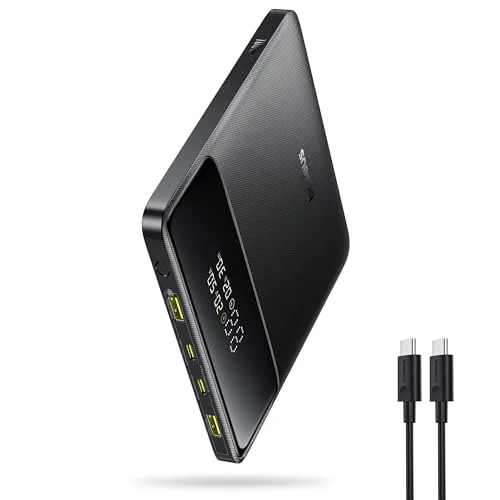
The Baseus Blade is built around one idea: a laptop power bank thin enough to actually carry every day. At 0.78 inches thick, it slides into a laptop sleeve next to the laptop itself, which none of the other four picks in this roundup can pull off. It still hits 100W on its main port, which covers most 13- and 14-inch ultrabooks at full speed.
Street price is usually $50–$70, and it ships with a carrying case and cable included rather than requiring a separate purchase. It also shows up in Amazon coupon promotions that push it lower, making it the cheapest reliable way into 100W laptop charging in this lineup when a deal is running. The digital display gives a clean read on remaining charge and active output wattage.
The real limits are capacity and multi-port output. At 20,000mAh (74Wh), it’s the smallest bank here — good for one full laptop charge rather than two — and plugging in all four ports at once drops the shared output budget well below the rated 100W. For a remote worker who mainly needs to top off one laptop during a workday out of the house, it’s a good fit. For someone regularly charging multiple devices simultaneously, step up to the UGREEN or Anker 737.
Buying Guide: How to Pick a USB-C Power Bank for Remote Work
Match Wattage to Your Laptop, Not Your Phone
Every laptop has a maximum charging wattage listed in its spec sheet or on its original power adapter. A 13-inch MacBook Air charges fine on 65W. A 16-inch MacBook Pro or a high-performance Windows workstation can pull up to 140W. Buying a 65W bank for a 140W laptop doesn’t damage anything — it just charges slowly, sometimes slower than the laptop is draining under load. Check your laptop’s actual charger wattage before buying, and match or exceed it.
Capacity vs. Portability
A bigger battery means more charges before you need an outlet, but it also means more weight in a bag. The picks in this roundup range from 20,000mAh (Baseus, thinnest and lightest) up to 26,800mAh (Zendure). If the bank is coming with you daily, weight matters more than squeezing out an extra 10% capacity. If it’s living in a bag for occasional outages or travel days, capacity matters more.
The 100Wh Line Matters for Travel
Airlines restrict portable battery capacity in carry-on luggage, and a new TSA rule taking effect in May 2026 further limits passengers to two portable chargers of 100Wh or less each. Every bank in this roundup stays under that 100Wh threshold, but it’s worth double-checking the Wh rating (not just the mAh number) printed on any power bank before flying with it — some higher-capacity banks on the market exceed the limit and aren’t allowed in carry-on bags at all.
Recharge Speed Is Easy to Overlook
A power bank’s own recharge time rarely gets mentioned on the box, but it matters if you’re using the bank daily. The Anker Prime tops back up in about an hour with a high-wattage charger; the UGREEN Nexode takes closer to two hours at its 65W input cap. If the bank needs to be ready again quickly between uses, check the input wattage, not just the output.
Port Count and Simultaneous Charging
If you only ever charge one device at a time, port count barely matters. If you’re regularly charging a laptop, a phone, and earbuds together, look at total wattage and how it’s distributed — a bank rated for 100W total but split across four ports may throttle hard once three or four devices are plugged in, which is exactly what happens on the Baseus Blade under full load. The Zendure spreads that load more evenly across its four ports, while the Anker Prime’s 300W ceiling gives the most headroom for simultaneous high-draw charging.
FAQ
Will a 140W power bank charge my laptop faster than the wall charger it came with? No faster than the wall charger’s own rated wattage, but it will match it — most 140W-capable banks in this roundup deliver the same speed as a laptop’s original 140W adapter, just from a portable, battery-backed source instead of a wall outlet.
Can I bring a 26,000mAh power bank on a plane? Yes, as long as its actual watt-hour rating is under 100Wh — capacity is regulated by Wh, not mAh. All five banks in this roundup are rated under 100Wh and printed accordingly on the device. Effective May 2026, TSA also limits carry-on passengers to two portable chargers total, so check current airline rules before a trip.
Do I need 300W, or is 100–140W enough? 100–140W covers charging one laptop at full speed, which is what most remote workers need. 300W banks like the Anker Prime matter specifically if you regularly charge two laptops, or a laptop plus another high-draw device, at the same time.
Why does my power bank charge my laptop slower than expected? Check three things: the bank’s per-port wattage rating (not just its total), the cable (a USB-C cable under 100W or without an E-Marker chip will bottleneck a higher-wattage bank), and whether another device is drawing power from the bank at the same time and splitting the available wattage.
Do these power banks work with Windows laptops, or just MacBooks? All five use standard USB-C Power Delivery, which any laptop with a USB-C charging port supports — Windows or Mac. The only thing to confirm is that your laptop’s own charging wattage doesn’t exceed what the bank can deliver.
Conclusion
The Anker Prime Power Bank earns the top spot for remote workers who need to charge more than one high-power device at once — its 300W total output and 140W per-port ceiling handle a laptop and a second device simultaneously without compromise, even if it costs more than anything else here.
For most remote workers charging a single laptop, the UGREEN Nexode 145W is the smarter buy: the same 140W single-port ceiling as the pricier Anker 737, at a lower typical price. The Anker 737 remains a safe, well-proven default if you’d rather buy the model with the longest track record. The Zendure SuperTank Polymer is the right call if the bank is riding in a bag daily and needs to survive being dropped, and the Baseus Blade is the pick for anyone who wants a laptop power bank thin enough to actually carry every day without a second thought.
Detailed Reviews
Anker Prime Power Bank (26,250mAh, 300W)
Pros
- 300W total output can run a 16-inch MacBook Pro at full 140W speed while a phone and tablet top off on the other ports simultaneously
- PowerIQ 4.0 smart power distribution automatically splits wattage across connected devices instead of forcing a flat, inefficient split
- ActiveShield 4.0 runs thermal checks roughly 10 million times a day, which matters given how much heat 300W output generates in a pack this size
- Smart display shows real-time wattage per port and remaining runtime instead of a vague percentage bar
- Recharges itself in about an hour with a compatible 250W charger, so it's ready again well before the next travel day
Cons
- The optional charging base that unlocks the full 300W mode is sold separately, which pushes the real cost higher than the sticker price
- Overkill for anyone who only needs to top off a phone — the weight and price only pay off if you're actually charging a laptop
- Highest cost per watt-hour of any pick in this roundup
UGREEN Nexode 145W Power Bank (25,000mAh)
Pros
- 140W on a single USB-C port charges a 14-inch MacBook Pro or most Windows workstation laptops at their full rated speed
- Bright TFT display shows exact input/output wattage per port instead of a generic battery icon
- Build quality and port layout consistently draw praise in owner feedback for a bank in this price bracket
- Frequently discounted well below its list price, which makes it the strongest dollar-per-watt option that still hits 140W
Cons
- Only recharges at 65W, so topping the bank back up takes noticeably longer than the Anker Prime or Zendure options
- 300W flagship banks still out-total it if you need to fast-charge more than two devices at once
Anker 737 Power Bank (PowerCore 24K)
Pros
- 140W single-port output covers nearly every laptop on the market, including power-hungry Windows workstations
- Strong track record with a large volume of owner reviews and a high average rating for this exact model
- Smart display shows exact percentage and wattage rather than a rough LED ladder
- Handles three devices charging at once without meaningfully throttling any of them
Cons
- Noticeably heavier and bulkier than the UGREEN and Baseus options, which matters if it's riding in a bag daily
- Scattered owner reports of capacity degradation after roughly a year of heavy daily use
- No wireless charging pad, unlike some competing flagship banks
Zendure SuperTank Polymer (26,800mAh, 100W)
Pros
- 100W on the primary port is enough to run a 16-inch MacBook Pro at full charging speed
- Nine-layer safety protection circuit and a crush-proof shell make it the pick for anyone who tosses gear around in a backpack
- OLED screen breaks down power draw per port instead of showing a single combined number
- Four total ports (two USB-C, two USB-A) means it can realistically feed four devices at once
Cons
- The brick-like shape is harder to slide into a slim bag pocket than the flatter UGREEN or Baseus designs
- Port icons on the housing are small and easy to mix up at a glance
Baseus Blade Laptop Power Bank (100W, 20,000mAh)
Pros
- Slim 0.78-inch profile slides into a laptop sleeve alongside the laptop itself, which none of the bulkier picks here can do
- 100W on its main port still covers most ultrabooks and 13/14-inch laptops at full speed
- Frequently drops well below list price during Amazon coupon promotions, making it the best dollar-per-watt-hour pick when on sale
- Digital display gives a clear read on remaining charge and active output
Cons
- Charging all four ports at once drops the shared output budget significantly, well below the rated 100W
- 74Wh capacity is the smallest here, good for one laptop charge rather than two
- Case runs warm under sustained full-power load and the shell shows scratches over time