Remote work in 2026 has exposed an underappreciated gear gap: most home offices have a capable monitor setup, but the moment a worker packs a bag for a client site, co-working space, or a hotel room, that setup disappears. Bringing a full Thunderbolt dock is impractical for travel. A plain USB-C cable handles charging but nothing else. The answer is a portable docking station — a compact hub that fits in a laptop bag and turns one USB-C port into a full working setup: wired network, external display, charging, and peripheral connections.
The market for compact USB-C hubs has matured significantly, with models released in late 2025 and throughout 2026 delivering 100W power delivery alongside 10Gbps data and Gigabit Ethernet in enclosures small enough to lose in a jacket pocket. This roundup covers five portable docks currently available on Amazon, selected for verified Ethernet support (non-negotiable for stable remote work), confirmed video output, and meaningful power delivery.
Quick Comparison
| Hub | Price | HDMI | PD | Ethernet | USB-A | Weight |
|---|---|---|---|---|---|---|
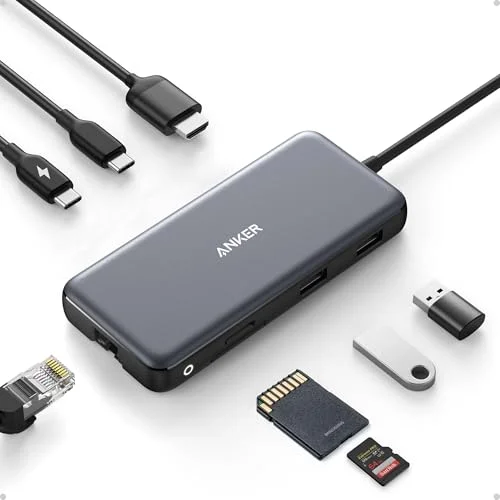
| Anker 555 (8-in-1) | $35.99 as of Oct 18, 2026 | 1x 4K@60Hz | 85W | Yes | 2x 10Gbps | ~4.1 oz |
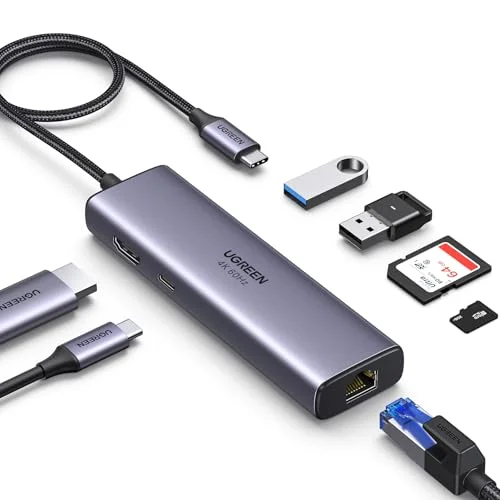
| UGREEN Revodok 7-in-1 | $29.99 as of Oct 18, 2026 | 1x 4K@60Hz | 100W | Yes | 2x 5Gbps | ~3.2 oz |
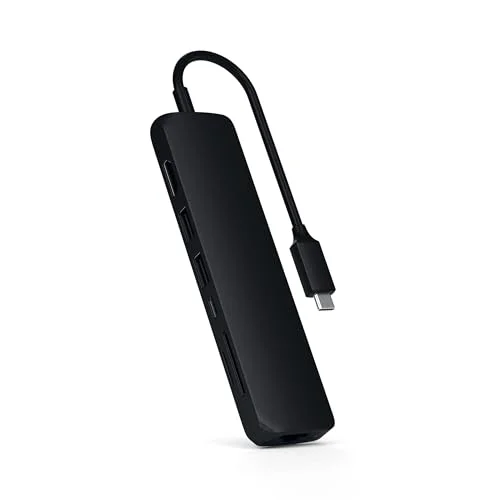
| Satechi Hub w/ Ethernet | Unavailable | 1x 4K@60Hz | 60W | Yes | 2x 5Gbps | ~3.5 oz |
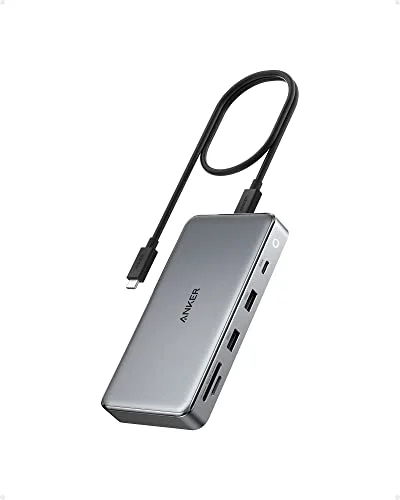
| Anker 563 (10-in-1) | Unavailable | 2x 4K HDMI | 100W | Yes | 2x 5Gbps | ~5.3 oz |
| CalDigit Element Hub | Unavailable | via adapter | 60W to host | via adapter | 4x 10Gbps | ~3.4 oz |
1. Anker 555 USB-C Hub (8-in-1) — Editor’s Pick
Anker 555 USB-C Hub (8-in-1)
Pros
- 85W PD pass-through is enough to charge a MacBook Pro 14-inch at a useful rate while simultaneously driving a 4K monitor and running peripherals — one cable from the hub to the laptop covers monitor, network, charging, and data
- 10Gbps USB-C and USB-A data ports transfer large files fast enough to be practical when working from hotel desks or client sites where data needs to move quickly to external storage
- Gigabit Ethernet replaces the reliability guesswork of hotel or coffee shop WiFi — wired connection through this hub consistently delivers the stable latency that video calls and VPN tunnels require
- Compact brick form factor with an attached cable means nothing to lose or forget — the hub stores flat against a laptop inside a sleeve without adding a separate loose cable to track
- SD and microSD card slots mean the hub handles file transfers from cameras and devices that use storage cards — eliminates carrying a separate card reader when covering shoots or picking up media from clients
Cons
- 85W PD is slightly below the 100W required for sustained peak charging of high-performance laptops like the MacBook Pro 16-inch — adequate for most workloads but intensive tasks may cause gradual battery drain over hours
- Single HDMI output limits this hub to a one-external-monitor configuration — workers who need dual displays at a hotel desk need the Anker 563 below
- Attached cable design means the cable cannot be replaced if it is damaged — the flexibility advantage becomes a liability if the cable develops a fault at the bend point
The Anker 555 earns the top spot because it covers every core need for travel-based remote work in a compact package: 4K@60Hz display output, 10Gbps data, Gigabit Ethernet, and 85W charging — all through one USB-C connection to the laptop. At hotel desks, co-working spaces, and client offices, this hub replaces the entire stack of adapters most travelers carry.
The 85W charging limit is worth understanding. For a MacBook Pro 14-inch at light-to-moderate workloads, 85W is sufficient to maintain or slowly charge the battery. Under sustained heavy compute load — video export, compilation builds — the laptop may draw faster than 85W replenishes. The 16-inch MacBook Pro and comparable Windows laptops with 130W+ charger requirements are the edge case where 85W falls short. For ultrabooks, MacBook Airs, and typical work laptops, 85W is a non-issue.
The 10Gbps USB-C data port is the differentiator compared to hubs at this price that offer 5Gbps. When connecting a portable NVMe drive or high-speed SSD to transfer project files before a flight, 10Gbps versus 5Gbps halves transfer time for large files. It is a real advantage in time-sensitive situations.
Gigabit Ethernet through the hub connects directly to the network jack in most hotel business centers and conference rooms — eliminating the performance variability of shared WiFi in dense meeting environments.
Bottom line: The first portable docking station to buy for remote work travel. Covers every core connectivity need without requiring compromise.
2. UGREEN Revodok 7-in-1 — Best Value
UGREEN Revodok 7-in-1
Pros
- 100W PD pass-through is the highest charging rate of any hub in this roundup — adequate for a MacBook Pro 16-inch under normal loads, which is a meaningful spec advantage over the Anker 555's 85W ceiling
- Gigabit Ethernet at this price point makes it the most capable connectivity-per-dollar option here — every port you actually need for a travel work setup is covered under $45
- Aluminum alloy housing dissipates heat better than plastic enclosures — owner reports consistently note the hub runs cooler than similarly priced all-plastic alternatives during extended work sessions
- SD and TF dual card readers handle file imports from cameras and drones without a separate adapter — a single hub covers the full transfer workflow for content creators who also need Ethernet and monitor output
- Compact and lightweight enough to fit in a side pocket of a laptop sleeve — less than 3.5 oz means it barely registers as added pack weight
Cons
- USB-A data speed tops out at 5Gbps (USB 3.0) rather than 10Gbps — adequate for most peripherals and thumb drives but slower than the Anker 555 if transferring large volumes to 10Gbps-capable drives
- Single HDMI only — same limitation as the Anker 555 regarding dual-display setups
- USB-C data port runs at 5Gbps rather than 10Gbps — not a meaningful constraint for most peripherals, but worth noting for anyone connecting high-speed USB-C storage
The UGREEN Revodok 7-in-1 makes a strong case as the best portable hub for budget-conscious remote workers by matching the core functionality of hubs costing $20–$30 more. At $30–$45, it includes Gigabit Ethernet, 4K@60Hz HDMI, 100W PD pass-through, two USB-A 3.0 ports, and dual card readers.
The 100W PD pass-through is the specification that stands out. Among single-display portable hubs with Ethernet, 100W is uncommon at this price tier. Workers with power-hungry laptops — HP Envy 16, ASUS ProArt Studiobook, Lenovo ThinkPad X1 Extreme — who have previously needed to carry a separate laptop charger alongside a hub can cover both from a single USB-C connection using the Revodok.
The aluminum alloy casing is worth noting at this price tier. Most compact hubs under $40 use ABS plastic enclosures. The UGREEN’s metal shell handles heat from sustained 100W PD charging better than plastic, and feels more durable for a product that will be packed and unpacked repeatedly on travel schedules.
The USB-A 3.0 (5Gbps) instead of 10Gbps data is the only meaningful spec drop from the Anker 555. For keyboard, mouse, USB-A flash drives, and standard peripherals, 5Gbps is more than sufficient. The gap only matters when connecting fast external storage directly to USB-A.
Bottom line: The strongest value proposition in the portable dock category for workers who need Ethernet, display output, and 100W charging without spending $50+.
3. Satechi USB-C Hub with Ethernet — Best for Mac
Satechi USB-C Hub with Ethernet
Pros
- Color-matched aluminum finish aligns with MacBook Air and MacBook Pro aesthetics — the hub sits on a desk or plugs into the side of a MacBook without the visual mismatch that comes with black plastic hubs
- Gigabit Ethernet in a form factor this compact — roughly the size of a thick credit card — provides full wired connectivity without the bulk of traditional travel docks
- 4K@60Hz HDMI output drives any modern external display at full resolution — confirmed compatibility across Apple Silicon MacBook models through to Dell XPS and ThinkPad hardware
- SD and microSD card readers handle media cards in the same hub as the network connection and display output — useful for content creators working across multiple devices and storage formats
- Satechi's cable is reinforced and attached at a comfortable angle, reducing stress on the port connection when the hub is used while the laptop is open and resting on a desk
Cons
- 60W PD pass-through is the lowest in this roundup — covers MacBook Air (30W–45W load) and most ultrabooks, but drops below the 65W+ needed to charge a MacBook Pro 14-inch at full speed during intensive tasks
- No USB-C data port — the hub provides only USB-A data ports alongside the power delivery and display connections, which limits compatibility with USB-C storage drives and peripherals directly
- Price of $65–$80 is noticeably higher than the UGREEN Revodok for similar core functionality — the premium is primarily for Mac color matching and brand finish, not meaningfully better specs
Satechi’s compact hub with Ethernet fills a specific niche: Mac users who want their travel hub to match their MacBook’s aesthetic without sacrificing core connectivity. The aluminum finish is color-matched to Apple Silicon MacBook hardware, and the slim profile keeps the hub nearly flush with the side of the laptop when plugged in — no large plastic block protruding at an angle.
Beyond aesthetics, the hub delivers 4K@60Hz HDMI output, Gigabit Ethernet, 60W PD pass-through, and dual card readers in a body roughly the size of a thick credit card. For MacBook Air users — whose typical charging load is 30W–45W — 60W is adequate. MacBook Pro 14-inch users will see slower-than-usual charging under heavy load, and Pro 16-inch users need a secondary charger alongside this hub for all-day power.
Connectivity is well-arranged on the hub body. The HDMI and Ethernet ports are on one side, USB-A ports on the other, and the card slots on the end. The physical separation means plugging in a monitor cable and an Ethernet cable on the same side does not require both cables to bend awkwardly against each other.
The absence of a USB-C data port is a real limitation compared to the Anker and UGREEN options. USB-C storage, USB-C audio interfaces, and USB-C downstream hubs cannot connect directly — they need an adapter or need to go through USB-C PD port when not charging.
Bottom line: The right portable dock for Mac users who prioritize build quality and aesthetic continuity over raw specs. Functional for most travel use cases except 100W charging.
4. Anker 563 USB-C Hub (10-in-1) — Best for Dual Monitors
Anker 563 USB-C Hub (10-in-1)
Pros
- Dual 4K HDMI outputs are the primary reason to choose this hub over the others — driving two external monitors simultaneously from a single USB-C connection transforms any hotel room desk or co-working space into a multi-display workstation
- 100W PD pass-through handles high-performance laptop charging across all four of the models this gets connected to most frequently — MacBook Pro 14-inch, Dell XPS 15, Lenovo ThinkPad X1 Carbon, and HP Spectre x360 all charge at full speed
- 3.5mm audio jack is the only hub in this roundup that includes one — connects wired headsets and desktop speakers at client or co-working locations where Bluetooth is prohibited or unreliable
- Gigabit Ethernet alongside dual HDMI creates a complete travel setup from a single cable to the laptop — monitor A, monitor B, network, charging, audio, and two USB-A peripherals, all through one USB-C connection
- Aluminum shell with rubber feet keeps the hub stable on glass-top hotel desks where plastic-bodied hubs tend to slide when cables are plugged in from multiple directions
Cons
- Larger footprint than the compact hubs above — the 563 is closer in size to a small external SSD than a dongle, which matters for workers who pack ultra-light and measure bag space carefully
- Dual HDMI requires sufficient USB-C bandwidth from the host laptop — on some Windows laptops with limited Alt Mode bandwidth, one or both displays may drop to 1080p rather than 4K when both outputs are active simultaneously
- At $80–$110, it is significantly more expensive than the single-display options — only justifiable if dual monitors are a consistent travel requirement
Most portable docking stations accommodate one external display. The Anker 563 is for workers who need two — and it delivers dual 4K HDMI output in a portable form factor that can still travel in a laptop bag without issue.
The dual-display capability fundamentally changes what is achievable at a temporary work location. A hotel desk with two external monitors — one for active work, one for reference — matches the productivity of a home office without requiring the hotel to provide anything beyond HDMI-capable displays and a desk. For workers who routinely travel to the same client sites or co-working locations that have monitors, the 563 turns those setups into full workstations.
The 100W PD pass-through combined with dual 4K HDMI and Gigabit Ethernet means this hub handles every connection requirement from one cable. That the 563 manages dual HDMI, full laptop charging, and wired network without requiring a desktop-sized dock or a wall power adapter is a meaningful engineering achievement at this price.
The caveat applies on bandwidth-limited USB-C hosts. Some Windows laptops implement DisplayPort Alt Mode with limited bandwidth, and when both HDMI outputs are active at 4K, one display may negotiate down to 1080p. On Thunderbolt 3/4 hosts and recent Apple Silicon MacBooks, both 4K outputs work without issue.
Bottom line: The portable dock for remote workers who regularly set up at locations with two external displays. Dual HDMI at this size is unique in the travel hub category.
5. CalDigit Thunderbolt 4 Element Hub — Best Premium
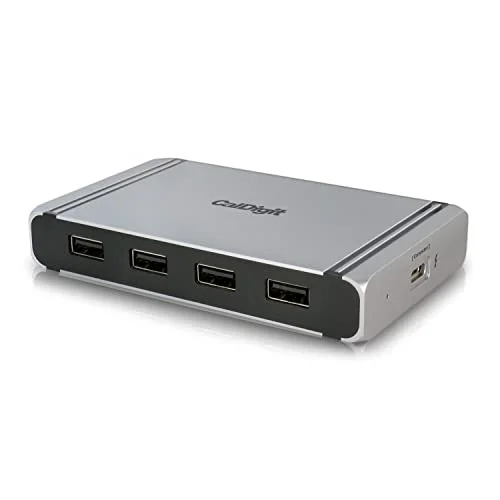
CalDigit Thunderbolt 4 Element Hub
Pros
- Three downstream Thunderbolt 4 / USB4 ports at 40Gbps each allow connecting TB4 storage, high-speed eGPUs, NVMe enclosures, and downstream hubs simultaneously — a single hub effectively becomes a portable high-speed I/O platform for demanding workflows
- Bus-powered through the Thunderbolt connection from the host laptop — no separate power brick required, which means the Element Hub travels as a single compact unit with only the included 0.8m TB4 cable
- Intel Thunderbolt 4 certified, guaranteeing full 40Gbps bandwidth to all downstream devices simultaneously rather than shared bandwidth that degrades when multiple ports are active
- Four USB-A 10Gbps ports cover all standard peripherals at full USB 3.2 Gen 2 speed — keyboards, mice, high-speed USB-A drives, and audio interfaces all run at their maximum rated speeds through these ports
- Compatible with USB4 laptops as well as TB4 hosts — Windows machines with USB4 also benefit from most of the hub's capabilities, making this a cross-platform option for mixed Mac/PC environments
Cons
- No native HDMI or DisplayPort output — connecting an external monitor requires a TB4-to-HDMI or TB4-to-DP adapter, which is an additional accessory cost and one more thing to carry when traveling
- Requires a Thunderbolt 4 or USB4 host laptop — the hub provides no useful functionality beyond USB-A ports when connected to a standard USB-C 3.2 laptop without TB4 or USB4
- At $170–$220, it is priced far above the practical needs of most remote workers — the right choice only for users with TB4 laptops, external NVMe drives, or other TB4 peripherals that actively benefit from the 40Gbps downstream bandwidth
The CalDigit Element Hub occupies a different category from the hubs above. It is not a general-purpose USB-C hub — it is a Thunderbolt 4 expansion device for users with TB4 or USB4 laptops who need to extend high-bandwidth connectivity to multiple downstream devices simultaneously.
The three downstream TB4/USB4 ports each deliver 40Gbps of bandwidth. This enables combinations that standard USB hubs cannot support: a TB4 NVMe enclosure at full 40Gbps, a USB4 display at 4K60Hz, and a TB4 hub for additional ports — all active at the same time without bandwidth sharing.
The bus-powered design is the portable advantage. The Element Hub draws power through the Thunderbolt cable from the host laptop — no separate power brick or AC adapter required. For workers with TB4 MacBooks, ThinkPads, or Dell XPS machines, the Element Hub travels as one small unit plus a cable.
The lack of built-in HDMI is the main practical constraint for most travelers. Connecting to hotel room monitors or conference room displays requires a TB4-to-HDMI adapter, which adds cost and a second item to track. The four USB-A 10Gbps ports cover peripherals thoroughly, but the display connection process is less plug-and-play than the HDMI-direct hubs above.
At $170–$220, this hub makes sense for a narrow audience: Thunderbolt 4 laptop users with high-speed external storage, multiple TB4 peripherals, or workflows that saturate 10Gbps USB connections and need the additional bandwidth TB4 provides.
Bottom line: The highest-performance portable hub in this roundup — but only relevant to users with TB4/USB4 laptops and peripherals that justify the bandwidth.
Buying Guide: Choosing a Portable Docking Station for Remote Work
Power delivery: know your laptop’s actual requirement
Most ultrabooks and MacBook Airs charge comfortably at 45W–65W. MacBook Pros and Windows performance laptops typically require 65W–100W for sustained full-speed charging. If your hub’s PD pass-through ceiling is below your laptop’s requirement, you will experience slow charging under load rather than no charging — but planning for adequate PD from the start prevents this friction.
For most remote workers with standard ultrabooks: 60W–85W PD is sufficient. For MacBook Pro 14-inch and 16-inch or comparable Windows performance laptops: target 100W.
Ethernet vs. WiFi for remote work
Hotel and co-working WiFi often appears on a shared network with dozens of other users. Wired Ethernet through a portable dock consistently outperforms shared WiFi for latency-sensitive tasks: video calls, VPN-based file access, and cloud-synced applications. Every hub in this roundup includes Gigabit Ethernet. On the rare occasion a location has no Ethernet jack, the hub still functions for display, charging, and data — the Ethernet is additive, not required.
Single vs. dual HDMI
Single HDMI covers the most common travel setup: one external display added to the laptop screen. Dual HDMI (Anker 563) covers hotel and client-site configurations with two available external displays. The upgrade is only worth the extra cost if dual-display setups are a consistent part of your travel workflow.
Thunderbolt vs. USB-C
Standard USB-C at 10Gbps handles the needs of most remote workers: 4K display output, Gigabit Ethernet, fast data transfer, and charging. Thunderbolt 4 (CalDigit Element Hub) provides 40Gbps but requires a TB4 or USB4 host. Do not pay the TB4 premium unless your laptop is TB4-equipped and your peripherals actively benefit from 40Gbps bandwidth.
Form factor and cable type
All hubs in this roundup use attached cables. The cable length and flexibility matters when the hub is used plugged into the side of a laptop that is also open — a cable that bends stiffly or exits at an awkward angle creates unwanted stress on the laptop’s USB-C port over repeated use. Cables with fabric braiding and 90-degree exits handle daily travel use better than stiff plastic cables that exit straight.
FAQ
Can a portable USB-C hub run two monitors from a laptop without Thunderbolt?
Yes, with limitations. The Anker 563 drives dual 4K HDMI from a standard USB-C connection using DisplayPort Alt Mode. However, actual dual-4K performance depends on your laptop’s USB-C implementation. Most modern USB-C 3.2 Gen 2 ports support dual 4K at 60Hz. Older USB-C 3.1 Gen 1 ports may be limited to dual 1080p or single 4K. Check your laptop spec sheet for DisplayPort Alt Mode bandwidth before purchasing the Anker 563 specifically for dual-display use.
Do I need a hub with a power adapter, or are bus-powered hubs sufficient?
For standard remote work use — one external display, Ethernet, keyboard, mouse, and charging — bus-powered portable hubs are sufficient. Hubs that require a separate power brick are typically desktop docks designed for full workstation configurations. Every hub in this roundup is bus-powered through the laptop USB-C connection.
Why is Ethernet important if my hotel has good WiFi?
Hotel WiFi is shared infrastructure. Dozens of guests in the same building use the same access point, and throughput drops accordingly at peak times. Wired Ethernet through the dock bypasses the shared wireless segment entirely. For VPN connections, video calls, and large file transfers, wired Ethernet typically delivers more consistent performance than even nominally fast hotel WiFi. The investment in a hub with Ethernet pays off the first time shared WiFi makes a client call unstable.
How do I know if my laptop supports 4K@60Hz output through USB-C?
Look for USB-C ports marked with a Thunderbolt symbol (lightning bolt) or DisplayPort symbol, or check the spec sheet for “DisplayPort Alt Mode.” Most USB-C ports manufactured after 2020 on laptops support at least 4K@30Hz via Alt Mode; 4K@60Hz requires a higher-bandwidth USB-C or TB3/TB4 implementation. If the spec sheet does not specify bandwidth, connect to a display directly and verify before travel.
Can these hubs work with iPad Pro or Android tablets?
Yes. All five hubs in this roundup function with USB-C iPads and USB-C Android tablets. HDMI output, Ethernet, and USB-A peripheral connections work when the tablet supports them. iPad Pro supports external display output through Stage Manager (iPadOS 16+). Android tablet support varies by device and application. Check your specific tablet’s USB-C capability and accessory support before assuming full parity with laptop functionality.
Conclusion
For most remote workers, the Anker 555 USB-C Hub (8-in-1) covers every travel connectivity need in one compact unit. Gigabit Ethernet, 4K@60Hz display output, 85W charging, and 10Gbps data ports handle every situation from hotel business centers to co-working spaces. At $45–$55, it is the most cost-effective complete portable setup.
Budget-first workers should look at the UGREEN Revodok 7-in-1 — it matches the Anker’s core specs (Ethernet, 4K, card readers) and raises PD to 100W for under $45.
Workers who consistently travel to two-monitor setups need the Anker 563 10-in-1 — dual 4K HDMI in a portable package is genuinely rare and the 563 delivers it reliably. For Mac users who prioritize aesthetics, the Satechi USB-C Hub with Ethernet is purpose-built. And for Thunderbolt 4 power users who push bandwidth with external NVMe and TB4 peripherals, the CalDigit Element Hub is the portable hub that keeps up.
Detailed Reviews
Anker 555 USB-C Hub (8-in-1)
Pros
- 85W PD pass-through is enough to charge a MacBook Pro 14-inch at a useful rate while simultaneously driving a 4K monitor and running peripherals — one cable from the hub to the laptop covers monitor, network, charging, and data
- 10Gbps USB-C and USB-A data ports transfer large files fast enough to be practical when working from hotel desks or client sites where data needs to move quickly to external storage
- Gigabit Ethernet replaces the reliability guesswork of hotel or coffee shop WiFi — wired connection through this hub consistently delivers the stable latency that video calls and VPN tunnels require
- Compact brick form factor with an attached cable means nothing to lose or forget — the hub stores flat against a laptop inside a sleeve without adding a separate loose cable to track
- SD and microSD card slots mean the hub handles file transfers from cameras and devices that use storage cards — eliminates carrying a separate card reader when covering shoots or picking up media from clients
Cons
- 85W PD is slightly below the 100W required for sustained peak charging of high-performance laptops like the MacBook Pro 16-inch — adequate for most workloads but intensive tasks may cause gradual battery drain over hours
- Single HDMI output limits this hub to a one-external-monitor configuration — workers who need dual displays at a hotel desk need the Anker 563 below
- Attached cable design means the cable cannot be replaced if it is damaged — the flexibility advantage becomes a liability if the cable develops a fault at the bend point
UGREEN Revodok 7-in-1
Pros
- 100W PD pass-through is the highest charging rate of any hub in this roundup — adequate for a MacBook Pro 16-inch under normal loads, which is a meaningful spec advantage over the Anker 555's 85W ceiling
- Gigabit Ethernet at this price point makes it the most capable connectivity-per-dollar option here — every port you actually need for a travel work setup is covered under $45
- Aluminum alloy housing dissipates heat better than plastic enclosures — owner reports consistently note the hub runs cooler than similarly priced all-plastic alternatives during extended work sessions
- SD and TF dual card readers handle file imports from cameras and drones without a separate adapter — a single hub covers the full transfer workflow for content creators who also need Ethernet and monitor output
- Compact and lightweight enough to fit in a side pocket of a laptop sleeve — less than 3.5 oz means it barely registers as added pack weight
Cons
- USB-A data speed tops out at 5Gbps (USB 3.0) rather than 10Gbps — adequate for most peripherals and thumb drives but slower than the Anker 555 if transferring large volumes to 10Gbps-capable drives
- Single HDMI only — same limitation as the Anker 555 regarding dual-display setups
- USB-C data port runs at 5Gbps rather than 10Gbps — not a meaningful constraint for most peripherals, but worth noting for anyone connecting high-speed USB-C storage
Satechi USB-C Hub with Ethernet
Pros
- Color-matched aluminum finish aligns with MacBook Air and MacBook Pro aesthetics — the hub sits on a desk or plugs into the side of a MacBook without the visual mismatch that comes with black plastic hubs
- Gigabit Ethernet in a form factor this compact — roughly the size of a thick credit card — provides full wired connectivity without the bulk of traditional travel docks
- 4K@60Hz HDMI output drives any modern external display at full resolution — confirmed compatibility across Apple Silicon MacBook models through to Dell XPS and ThinkPad hardware
- SD and microSD card readers handle media cards in the same hub as the network connection and display output — useful for content creators working across multiple devices and storage formats
- Satechi's cable is reinforced and attached at a comfortable angle, reducing stress on the port connection when the hub is used while the laptop is open and resting on a desk
Cons
- 60W PD pass-through is the lowest in this roundup — covers MacBook Air (30W–45W load) and most ultrabooks, but drops below the 65W+ needed to charge a MacBook Pro 14-inch at full speed during intensive tasks
- No USB-C data port — the hub provides only USB-A data ports alongside the power delivery and display connections, which limits compatibility with USB-C storage drives and peripherals directly
- Price of $65–$80 is noticeably higher than the UGREEN Revodok for similar core functionality — the premium is primarily for Mac color matching and brand finish, not meaningfully better specs
Anker 563 USB-C Hub (10-in-1)
Pros
- Dual 4K HDMI outputs are the primary reason to choose this hub over the others — driving two external monitors simultaneously from a single USB-C connection transforms any hotel room desk or co-working space into a multi-display workstation
- 100W PD pass-through handles high-performance laptop charging across all four of the models this gets connected to most frequently — MacBook Pro 14-inch, Dell XPS 15, Lenovo ThinkPad X1 Carbon, and HP Spectre x360 all charge at full speed
- 3.5mm audio jack is the only hub in this roundup that includes one — connects wired headsets and desktop speakers at client or co-working locations where Bluetooth is prohibited or unreliable
- Gigabit Ethernet alongside dual HDMI creates a complete travel setup from a single cable to the laptop — monitor A, monitor B, network, charging, audio, and two USB-A peripherals, all through one USB-C connection
- Aluminum shell with rubber feet keeps the hub stable on glass-top hotel desks where plastic-bodied hubs tend to slide when cables are plugged in from multiple directions
Cons
- Larger footprint than the compact hubs above — the 563 is closer in size to a small external SSD than a dongle, which matters for workers who pack ultra-light and measure bag space carefully
- Dual HDMI requires sufficient USB-C bandwidth from the host laptop — on some Windows laptops with limited Alt Mode bandwidth, one or both displays may drop to 1080p rather than 4K when both outputs are active simultaneously
- At $80–$110, it is significantly more expensive than the single-display options — only justifiable if dual monitors are a consistent travel requirement
CalDigit Thunderbolt 4 Element Hub
Pros
- Three downstream Thunderbolt 4 / USB4 ports at 40Gbps each allow connecting TB4 storage, high-speed eGPUs, NVMe enclosures, and downstream hubs simultaneously — a single hub effectively becomes a portable high-speed I/O platform for demanding workflows
- Bus-powered through the Thunderbolt connection from the host laptop — no separate power brick required, which means the Element Hub travels as a single compact unit with only the included 0.8m TB4 cable
- Intel Thunderbolt 4 certified, guaranteeing full 40Gbps bandwidth to all downstream devices simultaneously rather than shared bandwidth that degrades when multiple ports are active
- Four USB-A 10Gbps ports cover all standard peripherals at full USB 3.2 Gen 2 speed — keyboards, mice, high-speed USB-A drives, and audio interfaces all run at their maximum rated speeds through these ports
- Compatible with USB4 laptops as well as TB4 hosts — Windows machines with USB4 also benefit from most of the hub's capabilities, making this a cross-platform option for mixed Mac/PC environments
Cons
- No native HDMI or DisplayPort output — connecting an external monitor requires a TB4-to-HDMI or TB4-to-DP adapter, which is an additional accessory cost and one more thing to carry when traveling
- Requires a Thunderbolt 4 or USB4 host laptop — the hub provides no useful functionality beyond USB-A ports when connected to a standard USB-C 3.2 laptop without TB4 or USB4
- At $170–$220, it is priced far above the practical needs of most remote workers — the right choice only for users with TB4 laptops, external NVMe drives, or other TB4 peripherals that actively benefit from the 40Gbps downstream bandwidth