Hotel WiFi in 2026 has gotten faster, but it hasn’t gotten more trustworthy. A travel router sits between your devices and whatever network you’re connecting to, encrypting traffic at the router level so your laptop, phone, and tablet all route through your VPN without configuring each device separately. In May 2026, two Wi-Fi 7 travel routers — the GL.iNet Slate 7 and the TP-Link Roam 7 — became available at mainstream retail prices, which changes the calculus for anyone buying new hardware this year.
This guide covers five routers that remote workers actually use on the road, ranging from a $35 budget option to the current Wi-Fi 7 flagship. The focus is on what matters for work: VPN throughput, connection reliability on captive portal networks, and setup speed when you’ve just checked into a hotel and need to be on a call in 20 minutes.
Quick Comparison
| Router | Wi-Fi | WAN Port | VPN | Price |
|---|---|---|---|---|
| GL.iNet Slate 7 | Wi-Fi 7 | 2.5G | OpenVPN, WireGuard | $144.29-$159.99 as of Oct 18, 2026 |
| GL.iNet Beryl AX | Wi-Fi 6 | 2.5G | OpenVPN, WireGuard, Tor | $98.99 as of Oct 18, 2026 |
| TP-Link Roam 7 | Wi-Fi 7 | 2.5G | OpenVPN, WireGuard | $74.75-$87.99 as of Oct 18, 2026 |
| GL.iNet Opal | Wi-Fi 5 | 1G | OpenVPN, WireGuard, Tor | $39.99 as of Oct 18, 2026 |
| TP-Link TL-WR902AC | Wi-Fi 5 | 100Mbps | None built-in | $25.99-$39.99 as of Oct 18, 2026 |
1. GL.iNet Slate 7 (GL-BE3600) — Best Overall
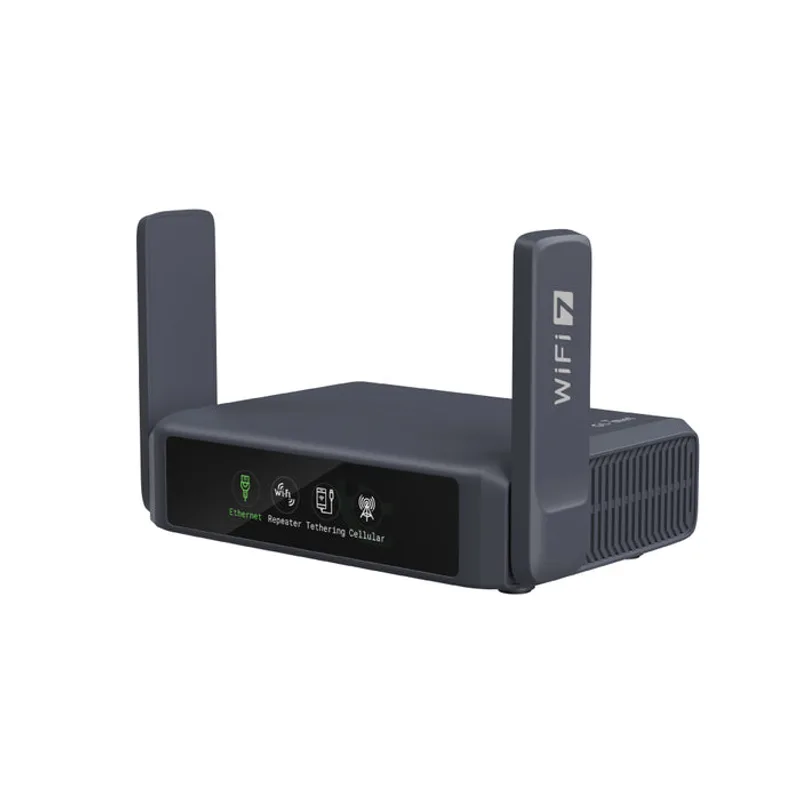
GL.iNet Slate 7 (GL-BE3600)
Pros
- Wi-Fi 7 with 2.5G Ethernet ports future-proofs the hardware — the 2882Mbps 5GHz ceiling means even a fast hotel or Airbnb gigabit connection won't bottleneck the router, and the 2.5G WAN port handles emerging ISP speeds that regular Gigabit ports can't
- Touchscreen display is genuinely useful: scan a QR code to connect to hotel WiFi, toggle VPN on and off, and monitor real-time throughput without opening the admin panel — this cuts the setup time compared to any other travel router in the category
- WireGuard VPN throughput is among the fastest of any travel router — owner reports and independent reviews note that VPN-on performance is sufficient for 4K video streaming and multi-window video conferencing, which is not true of older OpenVPN-only devices
- OpenWrt 23.05-based firmware with GL.iNet's admin panel gives full control over DNS, firewall, VPN providers, and routing without needing command-line expertise — supports 30+ commercial VPN providers out of the box
- Dual 2.5G ports allow using it as a wired-in travel workstation hub: plug the WAN side into a hotel switch or ethernet drop, and the LAN side into a laptop dock, with WiFi devices joining the same network
Cons
- At $149-$169, this is the most expensive option in the travel router category — the touchscreen and Wi-Fi 7 add real value, but a remote worker on a budget can get 90% of the functionality from the Beryl AX at nearly half the price
- No built-in battery — requires USB-C power from a wall adapter or power bank, which adds to carry weight; if your bag is already tight on power banks, this matters
- Wi-Fi 7 requires a Wi-Fi 7 client device to reach maximum speeds; laptops from 2023 or earlier on Wi-Fi 6 or 6E will connect at Wi-Fi 6 speeds, so the Wi-Fi 7 advantage is partially future-proofing
The Slate 7 is GL.iNet’s Wi-Fi 7 flagship travel router, and the touchscreen is the feature that makes it stand out from every other option in the category. Scan a hotel’s QR code, watch the router connect, and toggle WireGuard on — the whole process takes under two minutes without opening a laptop or browser.
The hardware specs are strong: BE3600 Wi-Fi 7 with dual 2.5G Ethernet ports and WireGuard throughput fast enough to sustain 4K video calls over VPN. The 2.5G dual-port design means the same hardware works as a travel router today and as a compact wired hub when you rent an Airbnb with a fast ethernet drop.
The $149-$169 price is a step up from other options here, but the combination of Wi-Fi 7, dual 2.5G ports, and a touchscreen interface is genuinely differentiated at this price. For a remote worker traveling more than a few times a year, it’s the most capable portable networking tool available.
Best for: Remote workers who travel frequently and want the fastest hardware with minimal setup friction.
2. GL.iNet Beryl AX (GL-MT3000) — Best Value
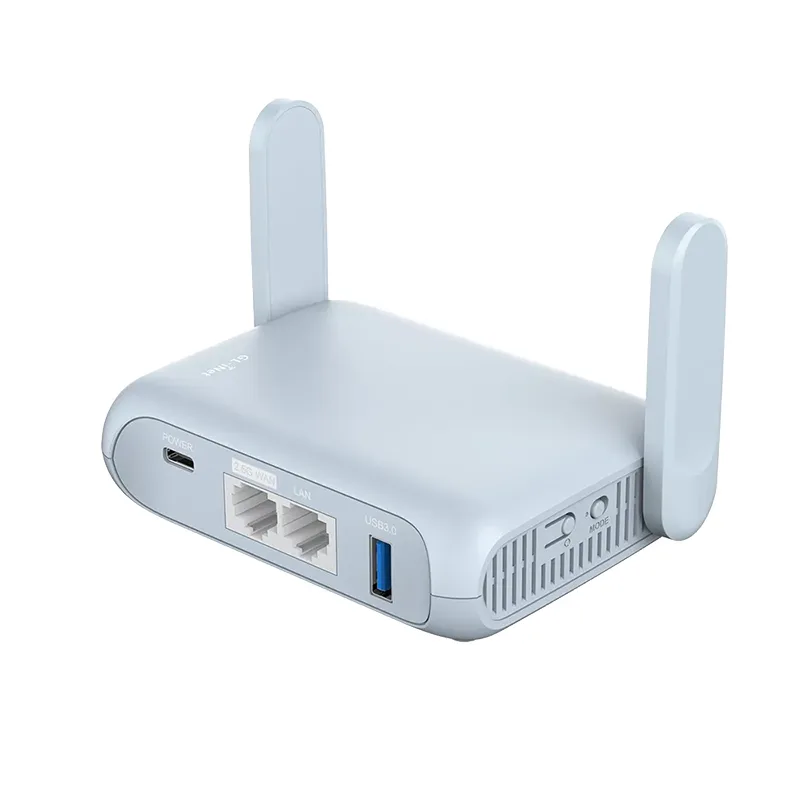
GL.iNet Beryl AX (GL-MT3000)
Pros
- Wi-Fi 6 AX3000 performance handles multi-device hotel rooms well — owner reports confirm stable simultaneous connections for a laptop, phone, tablet, and smart TV without noticeable degradation, even on hotel networks with moderate upstream bandwidth
- 2.5G WAN port is a notable spec at this price point — most travel routers in the under-$100 range use 1G WAN, but the Beryl AX can fully utilize wired connections above 1Gbps when they exist, which matters at modern co-working spaces
- WireGuard VPN performance is strong for the price — GL.iNet's implementation allows pre-configuring up to 5 WireGuard server profiles, switching between them in 2-3 clicks, which covers users with both a home server and a commercial VPN subscription
- OpenWrt with USB 3.0 port enables network-attached storage: plug in a flash drive and share files across all connected devices, or install additional packages for advanced features like ad blocking and traffic monitoring
- Proven reliability with a large user community — GL.iNet forums have active troubleshooting threads, firmware release notes, and setup guides for major VPN providers; support resources are substantially better than smaller brands
Cons
- LAN port is 1G rather than 2.5G, unlike the Slate 7 — this is rarely a bottleneck in practice (Ethernet to a single laptop is capped by the laptop's port anyway), but it limits use as a high-speed wired switch
- No touchscreen or physical display — hotel captive portal logins still require navigating the web admin panel on a laptop, which adds a few extra steps compared to the Slate 7's QR scan method
- At 113g, it's slightly heavier than the TP-Link TL-WR902AC, though still genuinely pocket-portable and most remote workers won't notice the difference
The Beryl AX is the standard recommendation in this category and has been since its release. Wi-Fi 6 AX3000 with a 2.5G WAN port in a palm-sized form factor at under $100 is still competitive in mid-2026, even with Wi-Fi 7 options now available.
The 2.5G WAN port is the key spec differentiator from cheaper Wi-Fi 6 travel routers. At a co-working space or corporate hotel with a multi-gigabit internet connection, the Beryl AX can actually use that bandwidth, where a 1G WAN router leaves speed on the table. OpenWrt with GL.iNet’s firmware layer supports 30+ VPN provider profiles, Tor routing, and network-attached storage via USB 3.0.
For most remote workers evaluating this category, the Beryl AX is the practical answer. It does 90% of what the Slate 7 does at roughly half the price. The tradeoff is no touchscreen and a 1G LAN port — neither is a real working limitation.
Best for: Remote workers who want a capable, proven travel router without paying for the Wi-Fi 7 premium.
3. TP-Link Roam 7 (TL-WR3602BE) — Best for Beginners
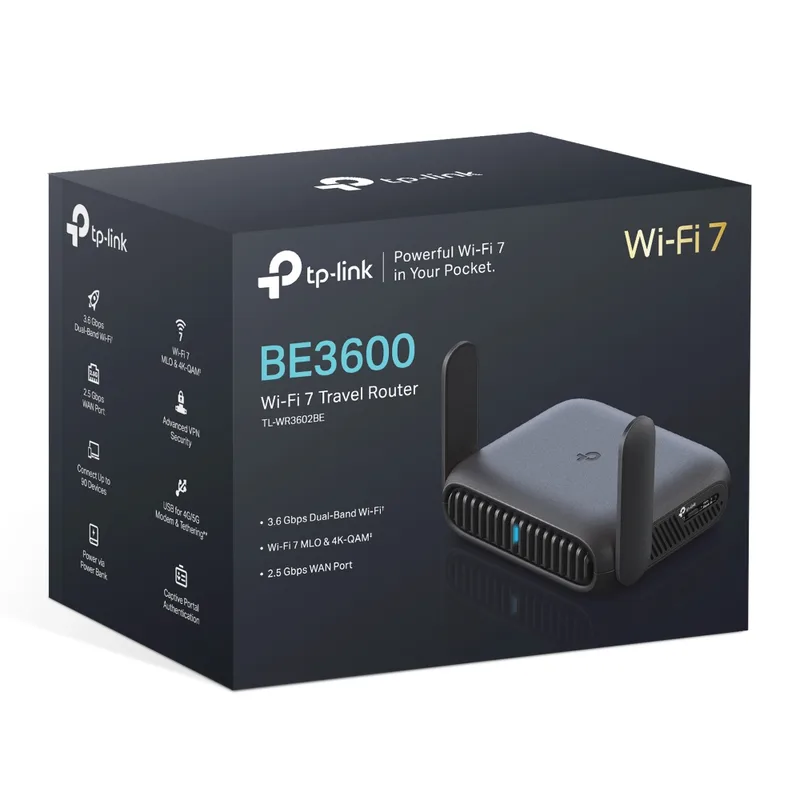
TP-Link Roam 7 (TL-WR3602BE)
Pros
- TP-Link's first Wi-Fi 7 travel router brings BE3600 speeds at roughly half the price of the GL.iNet Slate 7 — the $89-$109 street price undercuts the Slate 7 by $60+ while matching its Wi-Fi 7 spec, making it the most affordable Wi-Fi 7 travel router available in mid-2026
- TP-Link Tether app provides a polished mobile setup experience — the initial hotel WiFi connection and VPN configuration process is more guided than GL.iNet's admin panel, which benefits users who aren't comfortable with router admin interfaces
- Five operating modes (Router, Hotspot, Range Extender, Access Point, Client) in one device cover virtually every travel networking scenario without carrying multiple hardware pieces — the mode switching requires a physical button and takes under 30 seconds
- USB 3.0 port shares files and enables tethering from a USB mobile broadband adapter, which gives a cellular fallback option without buying a separate hotspot device
- TP-Link ecosystem compatibility means users already using Deco mesh at home can manage both networks from the same Tether app without context switching
Cons
- Firmware is TP-Link's proprietary system rather than OpenWrt — advanced features like Tor routing, custom DNS resolvers, and VPN policy routing require technical workarounds or third-party firmware, unlike GL.iNet devices which support these natively
- LAN port is 1G rather than 2.5G — same limitation as the Beryl AX, and a step down from the Slate 7's full 2.5G dual-port configuration
- TP-Link's commercial VPN provider integration is more limited than GL.iNet's 30+ provider list — users with less common VPN services may need to configure OpenVPN or WireGuard manually rather than using a pre-built profile
The Roam 7 is TP-Link’s entry into Wi-Fi 7 travel routers and launched at a notably aggressive $89-$109 price point. It matches the Slate 7’s Wi-Fi 7 BE3600 spec and 2.5G WAN port at a lower price, with the tradeoff being TP-Link’s proprietary firmware instead of OpenWrt.
That firmware tradeoff is real. Advanced features like Tor routing, custom DNS-over-HTTPS resolvers, or per-device VPN policy routing require OpenWrt or manual workarounds on the Roam 7. For users who just want hotel WiFi encrypted through their commercial VPN subscription, this limitation is irrelevant — the Tether app setup is faster and less intimidating than GL.iNet’s admin panel.
The TP-Link Tether app is the Roam 7’s strongest advantage for non-technical users. If GL.iNet’s admin panel feels like too much configuration overhead, the Roam 7 delivers the same Wi-Fi 7 hardware performance with a guided mobile setup process.
Best for: Remote workers already in the TP-Link ecosystem, or anyone who finds GL.iNet’s admin panel intimidating.
4. GL.iNet Opal (GL-SFT1200) — Best Budget
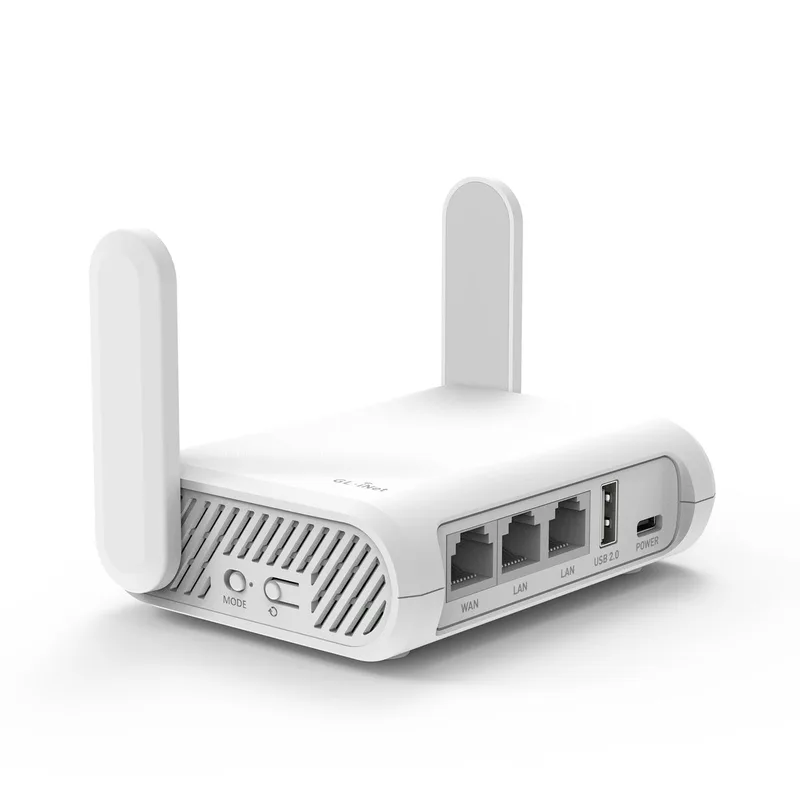
GL.iNet Opal (GL-SFT1200)
Pros
- At $29-$39, the Opal delivers the full GL.iNet OpenWrt experience — OpenVPN, WireGuard, Tor routing, and the same GL.iNet admin panel as more expensive models — at a price that makes it expendable on high-risk travel to countries with aggressive border security inspections
- Lightest option in the comparison at ~70g — slips into a jacket pocket without pulling the fabric; for travelers already managing carry weight, this distinction over heavier models is real and useful
- Tor network routing through the admin panel enables anonymized browsing without any client-side configuration — useful in restrictive network environments where privacy matters more than raw speed
- USB 3.0 port enables file sharing from a thumb drive across all connected devices — practical for transferring work files between a laptop and a phone without cloud storage
- Active OpenWrt community and GL.iNet firmware support means the hardware gets security patches and new features well beyond what its $35 price point would suggest
Cons
- Wi-Fi 5 AC1200 (867Mbps on 5GHz) is meaningfully slower than Wi-Fi 6 or Wi-Fi 7 options — on a fast connection, the wireless ceiling becomes the bottleneck; a hotel with 500Mbps internet will be capped by the Opal's wireless performance at typical distances
- 1G WAN port limits throughput on wired connections above 1Gbps — not a real-world limitation in most hotels, but a spec ceiling that the Beryl AX eliminates with its 2.5G WAN
- No display, no hardware VPN toggle button — all management through the web admin panel; users who want a quick VPN on/off without opening a browser should step up to the Slate 7
The Opal is the most economical way to get OpenWrt-based travel routing with full WireGuard and OpenVPN support. At $29-$39, it’s priced low enough to be treated as replaceable — leave it in a frequently used bag, check it with luggage on risky routes, or buy a spare.
The Wi-Fi 5 ceiling is its limitation. On a fast hotel ethernet connection, the 867Mbps 5GHz cap becomes the bottleneck before the internet connection does. For solo work — video calls, cloud file sync, browser-based work — this ceiling is rarely hit. For a family of devices or high-bandwidth media streaming, the Beryl AX is worth the extra $50-$60.
Tor network support is an underrated feature at this price point. The GL.iNet Tor routing mode encrypts and anonymizes all traffic without any per-device configuration — meaningful for travel to countries with network surveillance or restricted sites.
Best for: Budget-conscious remote workers, high-risk travelers, or anyone who wants OpenWrt capabilities without the investment.
5. TP-Link TL-WR902AC — Most Portable
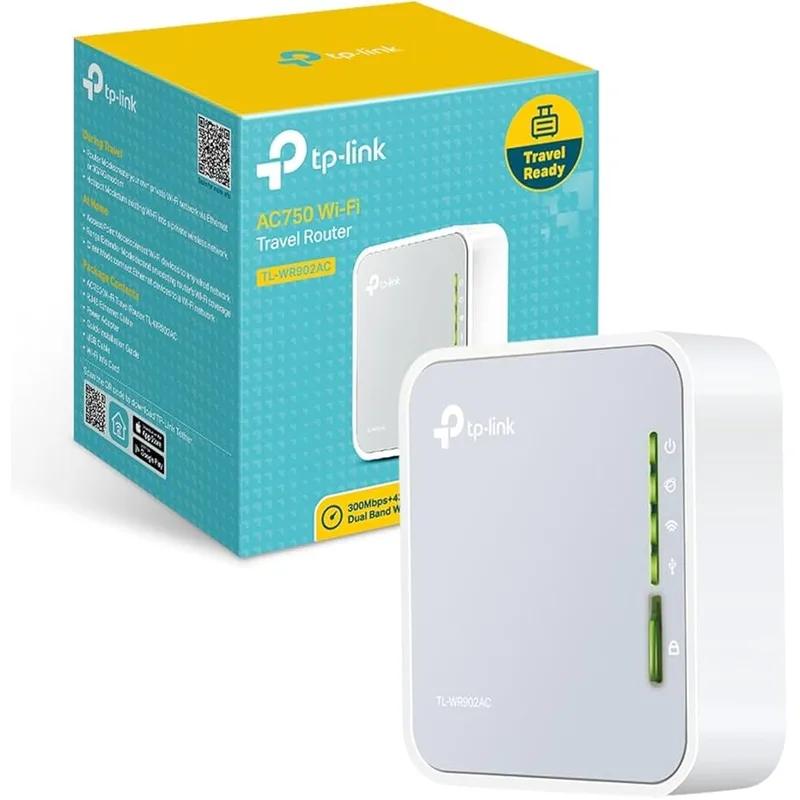
TP-Link TL-WR902AC
Pros
- Smallest and lightest router in this comparison at ~60g and credit-card footprint — the form factor is genuinely different from any other option here; it clips to a bag strap, fits in a shirt pocket, and barely registers in carry weight
- Six operating modes cover every connection scenario a traveler encounters: hotel ethernet ports, hotel wireless cloning, range extending weak signals, acting as a pure access point, and client bridge mode for Ethernet-only devices
- USB 2.0 port with built-in USB power connector means the router powers from a USB port on a laptop or power bank — no dedicated wall adapter or USB-C cable needed, which reduces the accessories count in the bag
- Extremely easy web setup for basic hotel WiFi routing — the initial configuration takes under 5 minutes for non-technical users without requiring any router admin experience
- At $39-$49, low enough to leave in a travel kit permanently without worrying about loss or damage; some remote workers keep one in each bag they use regularly
Cons
- AC750 (433Mbps on 5GHz) is substantially slower than the other options in this comparison — for users regularly transferring large files or streaming 4K, the wireless ceiling will be noticeable on any fast connection
- 100Mbps WAN/LAN port (not Gigabit) is the single largest hardware limitation — even a 200Mbps hotel ethernet connection gets capped at 100Mbps, meaning the hardware itself limits throughput below what most modern hotel ethernet provides
- No built-in VPN support — configuring a VPN requires either a client-side app on each device (which defeats the purpose of a router-level VPN) or installing third-party firmware; not suitable as the primary security tool for sensitive work
The TL-WR902AC is the reference ultra-compact travel router. Its form factor — roughly a deck of cards — is smaller than any other option here, and the USB-powered design means it runs from a laptop USB port or power bank without a wall adapter.
The 100Mbps WAN port and AC750 wireless speeds are real limitations. A hotel ethernet port delivering 200Mbps will be capped at 100Mbps by the router’s hardware. For anyone doing heavy file transfers or video conferencing on a consistent basis, this bottleneck matters.
Where the TL-WR902AC excels is the scenario where you just need hotel WiFi on one shared network without the privacy implications of connecting each device directly, or where you need to extend a weak wireless signal to a wired device. The six operating modes are genuinely flexible, and the $39-$49 price removes any hesitation about loss or wear.
Best for: Light travelers who prioritize minimum pack weight, or users who need basic WiFi sharing and don’t need VPN at the router level.
What to Look for in a Travel Router
VPN at the router level vs. per-device
The main reason to carry a travel router is encrypting all traffic through a single VPN tunnel rather than configuring a VPN on each device. This matters on hotel and café networks where traffic is visible to the network operator. GL.iNet devices (all three in this list) run OpenWrt with native WireGuard and OpenVPN support, including pre-built profiles for major providers. The TP-Link Roam 7 also supports both protocols, but through a more limited interface. The TL-WR902AC has no built-in VPN — it’s a routing-only device.
Wi-Fi standard: Wi-Fi 7 vs. Wi-Fi 6 vs. Wi-Fi 5
Wi-Fi 7 is the current standard, and both the Slate 7 and Roam 7 support it. For most hotel connections (which are often the bottleneck, not the router), Wi-Fi 6 from the Beryl AX is sufficient. Wi-Fi 5 from the Opal and TL-WR902AC is adequate for solo use but shows its ceiling when multiple devices are active simultaneously or when the upstream connection is fast.
WAN port speed
The WAN port determines how fast the router can pull data from the upstream network. Most budget travel routers use 1G WAN, which caps throughput at ~950Mbps in practice. The Beryl AX, Slate 7, and Roam 7 all use 2.5G WAN ports — meaningful at co-working spaces and corporate hotel ethernet that often exceeds 1Gbps. The TL-WR902AC’s 100Mbps WAN is the single biggest hardware limitation in this list.
Captive portal handling
Hotel and café networks often require accepting terms in a browser before granting internet access. Travel routers handle this differently: GL.iNet devices require connecting a device to the router, opening the admin panel, and navigating through to the captive portal page. The Slate 7’s touchscreen handles QR code scans directly. Some TP-Link models detect captive portals automatically and redirect. This sounds minor but becomes relevant when you’re on a 5-minute window between meetings.
Battery vs. USB-powered
None of these routers have a built-in battery — they all require USB power. The TL-WR902AC and Opal can run from any USB-A port, including a laptop’s USB port. The Beryl AX and Slate 7 use USB-C. A 10,000mAh power bank powers any of these for 8-12 hours of continuous use, which is adequate for most travel scenarios.
FAQ
Do I need a travel router if I already use a VPN on each device?
A per-device VPN app is sufficient for most use cases. A travel router adds convenience (one VPN tunnel covers all your devices) and covers devices that don’t support VPN apps natively — smart TVs, streaming sticks, game consoles, or IoT devices you’ve brought. It also creates a private network between your devices for file sharing without exposing that traffic to the hotel network.
Will a travel router work on hotel WiFi with a captive portal (the login page)?
Yes, but with extra steps. You connect the router to the hotel WiFi, then connect your laptop to the router’s network, then open a browser and complete the captive portal login. Some travel routers (including GL.iNet models) have a “captive portal passthrough” option in the admin panel that simplifies this. The Slate 7’s touchscreen makes it the fastest at handling this step.
Can I use these routers abroad, including international power outlets?
All five routers in this list are USB-powered. They run from 5V USB, which is universal — use any USB charger, power bank, or laptop USB port regardless of the local outlet standard. No voltage converters or adapter plugs are needed beyond your standard USB charger.
Which router is best for countries with internet restrictions?
GL.iNet devices (Slate 7, Beryl AX, Opal) running OpenWrt with Tor routing provide the most flexibility for restricted network environments. The Tor routing mode in the GL.iNet admin panel routes all connected device traffic through the Tor network without per-device configuration. Note that Tor reduces speed significantly — it’s suited for text-based work and browsing rather than video calls.
How much does a travel router affect speed compared to connecting directly to hotel WiFi?
On a well-configured travel router, the throughput overhead is minimal — typically less than 5% reduction on an unencrypted connection. WireGuard VPN adds slightly more overhead (5-15%) but is substantially lower-impact than OpenVPN. The main speed factor is the router’s WAN port: the 100Mbps WAN on the TL-WR902AC caps total throughput at 100Mbps regardless of the upstream connection speed.
Conclusion
For most remote workers, the GL.iNet Beryl AX is the right choice. It delivers Wi-Fi 6 performance, a 2.5G WAN port, full WireGuard and OpenVPN support, and a proven OpenWrt platform at under $100. The Beryl AX has been the reliable mid-range recommendation in this category for two years and remains the value leader in 2026.
If budget is the priority, the GL.iNet Opal gets you the same OpenWrt VPN capabilities at $29-$39 — a price that makes it genuinely disposable for high-risk travel.
If you want the best available hardware and travel frequently enough to justify the cost, the GL.iNet Slate 7 is the current benchmark. The touchscreen and dual 2.5G ports are real improvements over older hardware, and the Wi-Fi 7 spec is forward-compatible with client devices shipping through 2027 and beyond.
Detailed Reviews
GL.iNet Slate 7 (GL-BE3600)
Pros
- Wi-Fi 7 with 2.5G Ethernet ports future-proofs the hardware — the 2882Mbps 5GHz ceiling means even a fast hotel or Airbnb gigabit connection won't bottleneck the router, and the 2.5G WAN port handles emerging ISP speeds that regular Gigabit ports can't
- Touchscreen display is genuinely useful: scan a QR code to connect to hotel WiFi, toggle VPN on and off, and monitor real-time throughput without opening the admin panel — this cuts the setup time compared to any other travel router in the category
- WireGuard VPN throughput is among the fastest of any travel router — owner reports and independent reviews note that VPN-on performance is sufficient for 4K video streaming and multi-window video conferencing, which is not true of older OpenVPN-only devices
- OpenWrt 23.05-based firmware with GL.iNet's admin panel gives full control over DNS, firewall, VPN providers, and routing without needing command-line expertise — supports 30+ commercial VPN providers out of the box
- Dual 2.5G ports allow using it as a wired-in travel workstation hub: plug the WAN side into a hotel switch or ethernet drop, and the LAN side into a laptop dock, with WiFi devices joining the same network
Cons
- At $149-$169, this is the most expensive option in the travel router category — the touchscreen and Wi-Fi 7 add real value, but a remote worker on a budget can get 90% of the functionality from the Beryl AX at nearly half the price
- No built-in battery — requires USB-C power from a wall adapter or power bank, which adds to carry weight; if your bag is already tight on power banks, this matters
- Wi-Fi 7 requires a Wi-Fi 7 client device to reach maximum speeds; laptops from 2023 or earlier on Wi-Fi 6 or 6E will connect at Wi-Fi 6 speeds, so the Wi-Fi 7 advantage is partially future-proofing
GL.iNet Beryl AX (GL-MT3000)
Pros
- Wi-Fi 6 AX3000 performance handles multi-device hotel rooms well — owner reports confirm stable simultaneous connections for a laptop, phone, tablet, and smart TV without noticeable degradation, even on hotel networks with moderate upstream bandwidth
- 2.5G WAN port is a notable spec at this price point — most travel routers in the under-$100 range use 1G WAN, but the Beryl AX can fully utilize wired connections above 1Gbps when they exist, which matters at modern co-working spaces
- WireGuard VPN performance is strong for the price — GL.iNet's implementation allows pre-configuring up to 5 WireGuard server profiles, switching between them in 2-3 clicks, which covers users with both a home server and a commercial VPN subscription
- OpenWrt with USB 3.0 port enables network-attached storage: plug in a flash drive and share files across all connected devices, or install additional packages for advanced features like ad blocking and traffic monitoring
- Proven reliability with a large user community — GL.iNet forums have active troubleshooting threads, firmware release notes, and setup guides for major VPN providers; support resources are substantially better than smaller brands
Cons
- LAN port is 1G rather than 2.5G, unlike the Slate 7 — this is rarely a bottleneck in practice (Ethernet to a single laptop is capped by the laptop's port anyway), but it limits use as a high-speed wired switch
- No touchscreen or physical display — hotel captive portal logins still require navigating the web admin panel on a laptop, which adds a few extra steps compared to the Slate 7's QR scan method
- At 113g, it's slightly heavier than the TP-Link TL-WR902AC, though still genuinely pocket-portable and most remote workers won't notice the difference
TP-Link Roam 7 (TL-WR3602BE)
Pros
- TP-Link's first Wi-Fi 7 travel router brings BE3600 speeds at roughly half the price of the GL.iNet Slate 7 — the $89-$109 street price undercuts the Slate 7 by $60+ while matching its Wi-Fi 7 spec, making it the most affordable Wi-Fi 7 travel router available in mid-2026
- TP-Link Tether app provides a polished mobile setup experience — the initial hotel WiFi connection and VPN configuration process is more guided than GL.iNet's admin panel, which benefits users who aren't comfortable with router admin interfaces
- Five operating modes (Router, Hotspot, Range Extender, Access Point, Client) in one device cover virtually every travel networking scenario without carrying multiple hardware pieces — the mode switching requires a physical button and takes under 30 seconds
- USB 3.0 port shares files and enables tethering from a USB mobile broadband adapter, which gives a cellular fallback option without buying a separate hotspot device
- TP-Link ecosystem compatibility means users already using Deco mesh at home can manage both networks from the same Tether app without context switching
Cons
- Firmware is TP-Link's proprietary system rather than OpenWrt — advanced features like Tor routing, custom DNS resolvers, and VPN policy routing require technical workarounds or third-party firmware, unlike GL.iNet devices which support these natively
- LAN port is 1G rather than 2.5G — same limitation as the Beryl AX, and a step down from the Slate 7's full 2.5G dual-port configuration
- TP-Link's commercial VPN provider integration is more limited than GL.iNet's 30+ provider list — users with less common VPN services may need to configure OpenVPN or WireGuard manually rather than using a pre-built profile
GL.iNet Opal (GL-SFT1200)
Pros
- At $29-$39, the Opal delivers the full GL.iNet OpenWrt experience — OpenVPN, WireGuard, Tor routing, and the same GL.iNet admin panel as more expensive models — at a price that makes it expendable on high-risk travel to countries with aggressive border security inspections
- Lightest option in the comparison at ~70g — slips into a jacket pocket without pulling the fabric; for travelers already managing carry weight, this distinction over heavier models is real and useful
- Tor network routing through the admin panel enables anonymized browsing without any client-side configuration — useful in restrictive network environments where privacy matters more than raw speed
- USB 3.0 port enables file sharing from a thumb drive across all connected devices — practical for transferring work files between a laptop and a phone without cloud storage
- Active OpenWrt community and GL.iNet firmware support means the hardware gets security patches and new features well beyond what its $35 price point would suggest
Cons
- Wi-Fi 5 AC1200 (867Mbps on 5GHz) is meaningfully slower than Wi-Fi 6 or Wi-Fi 7 options — on a fast connection, the wireless ceiling becomes the bottleneck; a hotel with 500Mbps internet will be capped by the Opal's wireless performance at typical distances
- 1G WAN port limits throughput on wired connections above 1Gbps — not a real-world limitation in most hotels, but a spec ceiling that the Beryl AX eliminates with its 2.5G WAN
- No display, no hardware VPN toggle button — all management through the web admin panel; users who want a quick VPN on/off without opening a browser should step up to the Slate 7
TP-Link TL-WR902AC
Pros
- Smallest and lightest router in this comparison at ~60g and credit-card footprint — the form factor is genuinely different from any other option here; it clips to a bag strap, fits in a shirt pocket, and barely registers in carry weight
- Six operating modes cover every connection scenario a traveler encounters: hotel ethernet ports, hotel wireless cloning, range extending weak signals, acting as a pure access point, and client bridge mode for Ethernet-only devices
- USB 2.0 port with built-in USB power connector means the router powers from a USB port on a laptop or power bank — no dedicated wall adapter or USB-C cable needed, which reduces the accessories count in the bag
- Extremely easy web setup for basic hotel WiFi routing — the initial configuration takes under 5 minutes for non-technical users without requiring any router admin experience
- At $39-$49, low enough to leave in a travel kit permanently without worrying about loss or damage; some remote workers keep one in each bag they use regularly
Cons
- AC750 (433Mbps on 5GHz) is substantially slower than the other options in this comparison — for users regularly transferring large files or streaming 4K, the wireless ceiling will be noticeable on any fast connection
- 100Mbps WAN/LAN port (not Gigabit) is the single largest hardware limitation — even a 200Mbps hotel ethernet connection gets capped at 100Mbps, meaning the hardware itself limits throughput below what most modern hotel ethernet provides
- No built-in VPN support — configuring a VPN requires either a client-side app on each device (which defeats the purpose of a router-level VPN) or installing third-party firmware; not suitable as the primary security tool for sensitive work