The Logitech Casa Pop-Up Desk and the Roost V3 Plus both launched at CES 2026, reflecting a clear direction in the category: portable, all-in-one desk solutions for remote workers who move between locations. Laptop stands have evolved from a simple accessory into a core ergonomic tool — raising your screen to eye level eliminates the neck flexion that accumulates across eight-hour work days.
This roundup covers five laptop stands evaluated for remote work: fixed desk stands, portable travel stands, and value picks. The range spans from $20 to $90 and covers every primary use case — home office ergonomics, travel and hot-desk setups, Mac-matched aesthetics, and budget ergonomic improvements.
Quick Comparison
| Stand | Type | Weight | Height | Price |
|---|---|---|---|---|
| Roost V3 | Portable/adjustable | 6 oz | 6.5–12.5 in | $89.95 as of Oct 18, 2026 |
| Rain Design mStand | Fixed desk stand | 2.6 lbs | 5.9 in fixed | $34.00-$39.90 as of Oct 18, 2026 |
| Twelve South Curve SE | Fixed desk stand | 1.43 lbs | Fixed angle | $16.99 as of Oct 18, 2026 |
| Nexstand K2 | Portable/adjustable | 0.5 lbs | Up to 11.8 in | Unavailable |
| OMOTON Laptop Stand | Fixed desk stand | ~0.9 lbs | Fixed angle | $15.99-$16.99 as of Oct 18, 2026 |
1. Roost V3 — Editor’s Pick
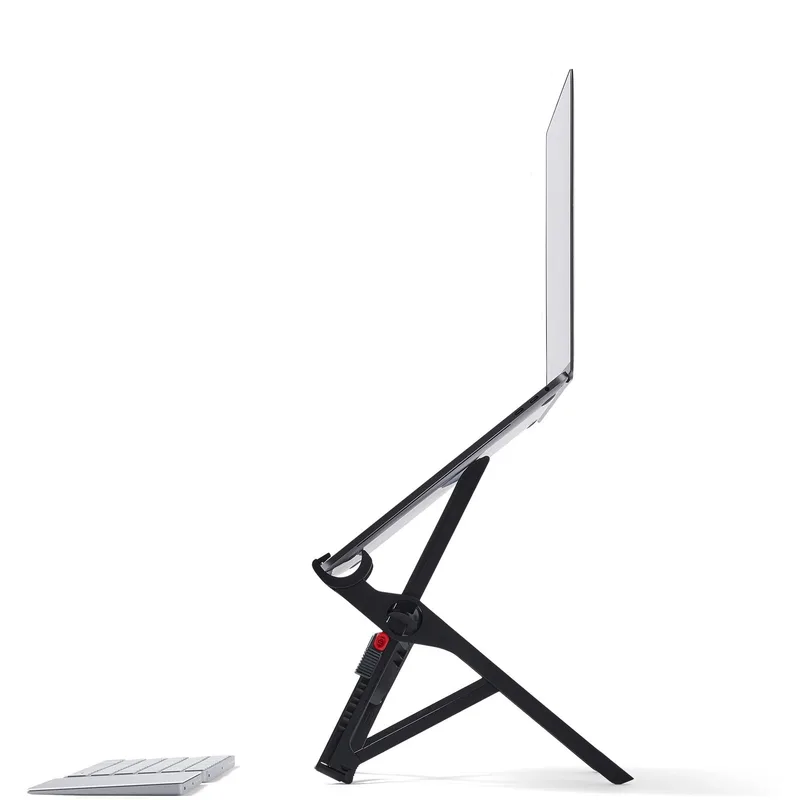
Roost V3 Laptop Stand
Pros
- At 6 oz, it is the lightest adjustable laptop stand in this roundup — lighter than most charging cables — and folds flat to 14 inches, making it a genuine carry-anywhere option rather than a stand you leave on the desk
- Stepless height adjustment spans from 6.5 to 12.5 inches of screen lift, which covers the ergonomic sweet spot for users of any height from a standard desk or standing desk
- Self-adjusting grips automatically spread to match any laptop width from 12 to 18 inches and lock without any manual tightening — the laptop seats and stays without fidgeting
- Setup in under five seconds from closed to eye level is not marketing copy; the stand opens, the arms spread, and the laptop drops in — the entire process takes less time than unlocking your computer
- The glass-filled nylon construction is rigid under load with no lateral flex or side-to-side wobble when typing; the laptop stays locked at height even during active keyboard use
Cons
- Plastic construction looks functional rather than elegant — it reads as a travel accessory rather than a premium desk accessory, which matters if your desk setup doubles as a video call background
- No USB hub, passthrough ports, or additional connectivity; it is a stand only, requiring a separate dock or hub if your workflow needs extra ports
- The $75-$90 price is difficult to justify purely on aesthetics — buyers choosing it do so for portability, not for how it looks
The Roost V3 wins the portable category by solving a problem most stands don’t attempt: a fully adjustable, rigid laptop stand that weighs six ounces and fits in any laptop bag. The self-adjusting grips open automatically as you lower the laptop and lock shut — the laptop is seated and raised to eye level before your coffee finishes brewing.
Stepless height adjustment covering 6.5 to 12.5 inches of screen lift handles standard desk height, raised conference room tables, standing desk positions, and coworking space setups with equal effectiveness. Adjusting height mid-session with the laptop seated requires only two thumb releases and a repositioning — under five seconds. For remote workers who move between locations throughout the week, this flexibility eliminates the ergonomic compromise of using a fixed-height stand at a desk that wasn’t built for your specific setup.
The glass-filled nylon construction tests more rigid than it looks. There is no noticeable flex or wobble during standard typing or touchpad use. A 13-inch MacBook or 15-inch Dell XPS seated in the grips does not move when pressure is applied from above or from the side.
Worth noting: the Roost V3 Plus (~$99-$110) launched in early 2026 with a revised quick-release height adjustment mechanism and updated colorways. If you want the newest version and don’t mind the added cost, the V3 Plus offers the same core design with faster height changes.
Best for: Remote workers who move between home, coworking spaces, and travel — anyone who needs a stand that fits in a slim bag and adjusts to any desk environment.
2. Rain Design mStand — Best Desk Stand
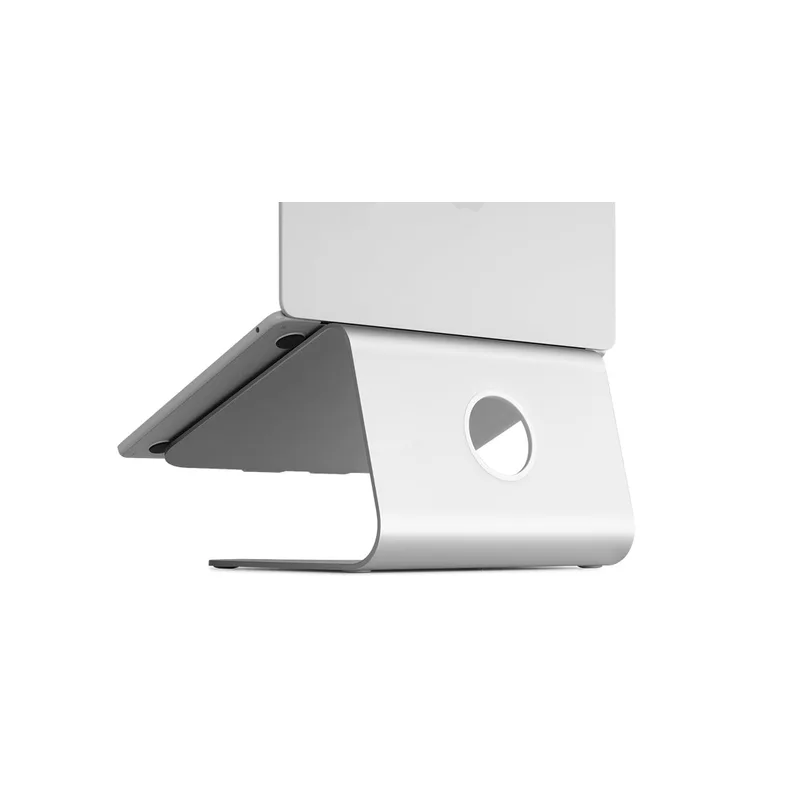
Rain Design mStand
Pros
- Cut from a single piece of anodized aluminum — there are no joints, hinges, or fasteners, which means the mStand simply cannot loosen, rattle, or shift over years of daily use
- The aluminum base acts as a passive heat sink that conducts heat away from the laptop's underside; measurably effective on MacBooks running heavy processor loads during extended video calls
- Built-in cable channel at the rear routes your power cable out of sight — the only stand in this roundup with an integrated cable management solution that actually eliminates cable clutter
- Screen elevates exactly 5.9 inches (150mm), which places most 13-15-inch screens at the ergonomic eye-level target for a standard desk height; fixed height is a non-issue if your desk height doesn't change
- Available in six colors including Space Gray, Starlight, and Midnight — color-matched options exist for every current MacBook finish, which matters for remote workers with visible desk setups on camera
Cons
- Zero height adjustment — a single fixed angle means users outside the standard sitting height range for a 73cm desk may find the screen too high or too low; this stand does not work well at standing desk heights
- Compatibility is limited to laptops up to 15 inches with a depth of 10.4 inches or less; larger or unusually proportioned laptops physically don't fit
- No portability — 2.6 lbs and no folding mechanism make this a desk-only stand; it does not belong in a bag
The mStand has been the benchmark for fixed aluminum desk stands for years and remains the reference point because nothing in the category has improved on its core concept. A single piece of anodized aluminum with no moving parts means there is nothing to loosen, calibrate, or replace. It arrives, you place the laptop, and you use it for the next five years without giving it a second thought.
The thermal management benefit is real and measurable. MacBooks running sustained workloads — long Zoom sessions with multiple browser tabs, video exports, developer builds — run cooler on the mStand than on flat desk surfaces. The aluminum platform conducts heat away from the laptop’s underside through direct contact, providing passive cooling without fans or vents.
The built-in cable channel routes your power cable through the rear of the stand and down to the desk out of sight. Paired with a monitor arm or mounted monitor above the mStand, the result is one of the cleanest-looking laptop desk setups available for under $50. That rear cable management is a feature that competing stands at similar or higher prices omit entirely.
The fixed height of 5.9 inches works perfectly at a standard 73cm desk height. It does not work at standing desk heights and does not work for users with non-standard chairs. If your desk setup is fixed and your chair height places your eye line in the right range, the mStand’s single height is simply correct and unchanging.
Best for: Home office users with a fixed desk setup who want a permanent, zero-maintenance stand that looks polished and requires no adjustment.
3. Twelve South Curve SE — Best for Mac
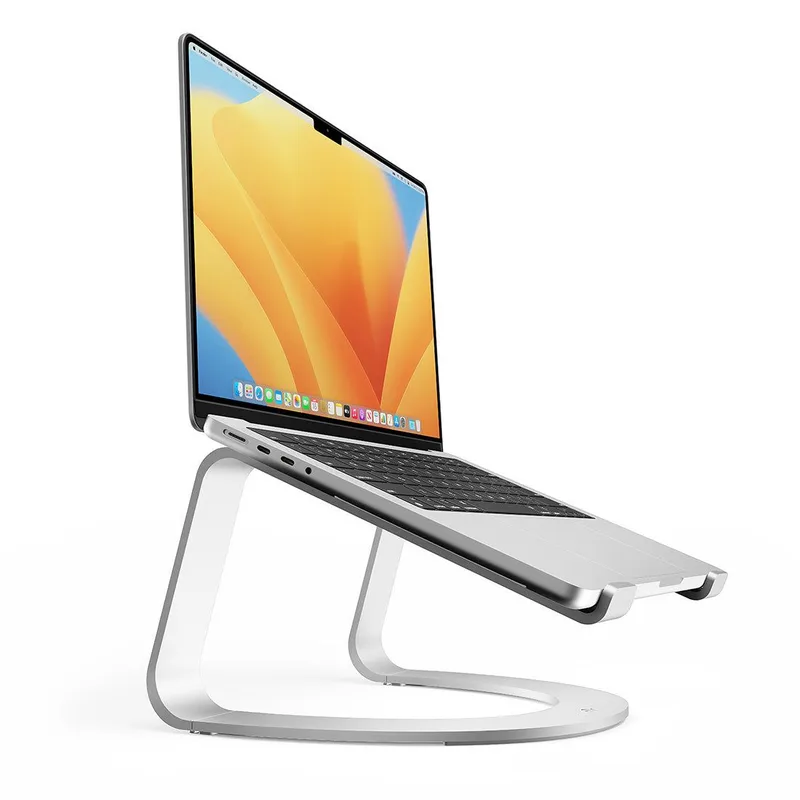
Twelve South Curve SE
Pros
- Twelve South designed the Curve series specifically around Apple product dimensions and proportions — the fit with MacBook Air and MacBook Pro is precise, with the laptop sitting flush and balanced without any overhang or tip risk
- Open back arch design with silicone pads keeps the laptop elevated with airflow underneath, addressing one of the main thermal complaints about flat-surface desk use during sustained CPU loads
- At 1.43 lbs, it is lighter than the Rain Design mStand while maintaining a near-identical desk footprint and ergonomic angle — useful if you move between workspaces in the same home
- Cable pass-through opening at the rear allows clean cable routing even without a full cable management system; a small but practically useful design detail
- Available in Silver and Space Gray to match every current MacBook Pro and MacBook Air color option; the Curve SE is the stand that disappears visually when matched to a MacBook
Cons
- Fixed height angle with no adjustability — the Curve SE is designed for standard desk sitting height and does not accommodate standing desks, couch setups, or users with non-standard ergonomic needs
- At $40, it costs slightly less than the Rain Design mStand but with a lighter aluminum build — buyers who prefer maximum material mass for stability may prefer the mStand's single-piece construction
- Officially rated to 7 lbs maximum load — this is fine for all current MacBooks and most thin-and-light laptops, but heavier 16-inch gaming or creator laptops may exceed the spec
Twelve South builds accessories designed specifically around Apple product dimensions, and the Curve SE reflects that intent. The fit with current MacBook Air and MacBook Pro models is precise — the laptop seats with balanced weight distribution across the two support arms without any tip risk or overhang. It doesn’t look like a third-party accessory sitting next to a MacBook; it looks like something Apple would sell alongside it.
The open arch design with an elevated rear contributes two practical benefits. First, air circulates under the laptop’s bottom vents rather than being trapped against a flat surface. Second, the elevated angle places the screen at the correct ergonomic height without requiring a tall platform — the arch geometry achieves ergonomic positioning with a lower total stand height than block-style stands, which reduces desk visual clutter.
At 1.43 lbs, the Curve SE is lighter than the Rain Design mStand while occupying a similar footprint. For remote workers who use multiple home workspaces — a standing desk in the morning, a dining table in the afternoon — the Curve SE is easy to relocate without it feeling like a hardware migration.
The cable pass-through at the rear handles power cable routing neatly, and the silicone pads at contact points prevent any surface marks on the laptop’s finish. The stand ships in Silver and Space Gray to match every current MacBook colorway.
Best for: Mac users with a home office or studio setup who want a stand that’s aesthetically matched to Apple hardware and ergonomically precise without paying for features they don’t need.
4. Nexstand K2 — Best Value Portable
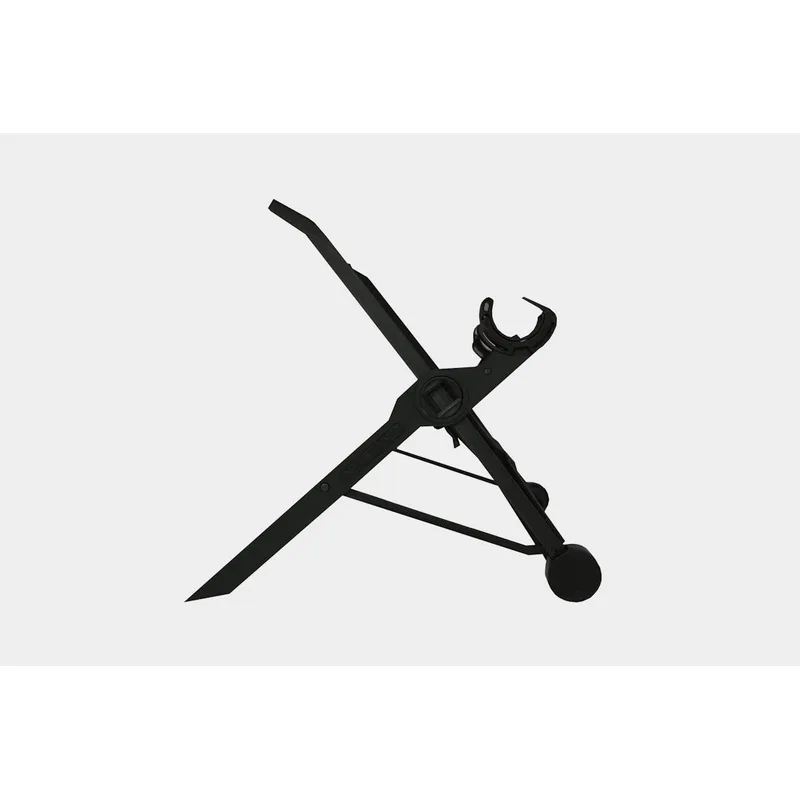
Nexstand K2
Pros
- At half a pound and foldable to roughly a ruler's thickness, the Nexstand K2 travels in a laptop sleeve without adding meaningful bulk — the only stand in this roundup that genuinely packs into a slim bag
- Multiple height adjustment positions allow you to dial in the screen height based on the chair and desk at any location, whether a coworking space, hotel desk, or kitchen table
- Rubber non-slip grips hold the laptop securely during typing with no rocking or side movement — noticeably more stable than similar budget portable stands with smooth plastic contact points
- At $30-$40, it costs less than a month of most productivity app subscriptions; the value-to-ergonomic-improvement ratio is among the highest of any desk accessory for remote workers
Cons
- ABS plastic construction is functional but shows wear marks and surface scratches more visibly than aluminum stands over time; the stand's appearance degrades with daily bag use across 12-18 months
- Height adjustment requires removing the laptop, repositioning the stand, and reseating — not a quick operation mid-session; the Roost V3 allows height adjustment with the laptop seated
- No cable management, no integrated hub, and no aesthetic appeal — the Nexstand K2 exists purely as a functional ergonomic tool, not a desk accessory
The Nexstand K2 is the right purchase for remote workers who need portable ergonomics on a budget and don’t require the premium build or seamless adjustment of the Roost V3. At half a pound and folding to roughly a pencil case’s thickness, it disappears into a laptop sleeve without adding meaningful bulk to a travel bag.
Height adjustment covers up to 30cm above the desk surface, which is higher than any other stand in this roundup and covers standing desk usage where the other portable option (Roost V3) tops out. The multiple height positions are set by repositioning the stand legs — not as smooth as the Roost’s tool-free adjustment but functional and repeatable.
Rubber grip points at all contact surfaces hold the laptop without slipping during typing. The stand doesn’t rock on flat desk surfaces, and the laptop doesn’t shift during active use. For a $30-$40 plastic stand, the stability is better than the price suggests.
The limitation is the adjustment process. Getting a different height requires removing the laptop, changing the stand configuration, and reseating. This is a one-time setup operation per location rather than a mid-session adjustment — plan the height once per desk and leave it.
Best for: Remote workers who travel frequently and need portable ergonomic correction under $40, without the premium price of the Roost V3.
5. OMOTON Laptop Stand — Best Budget
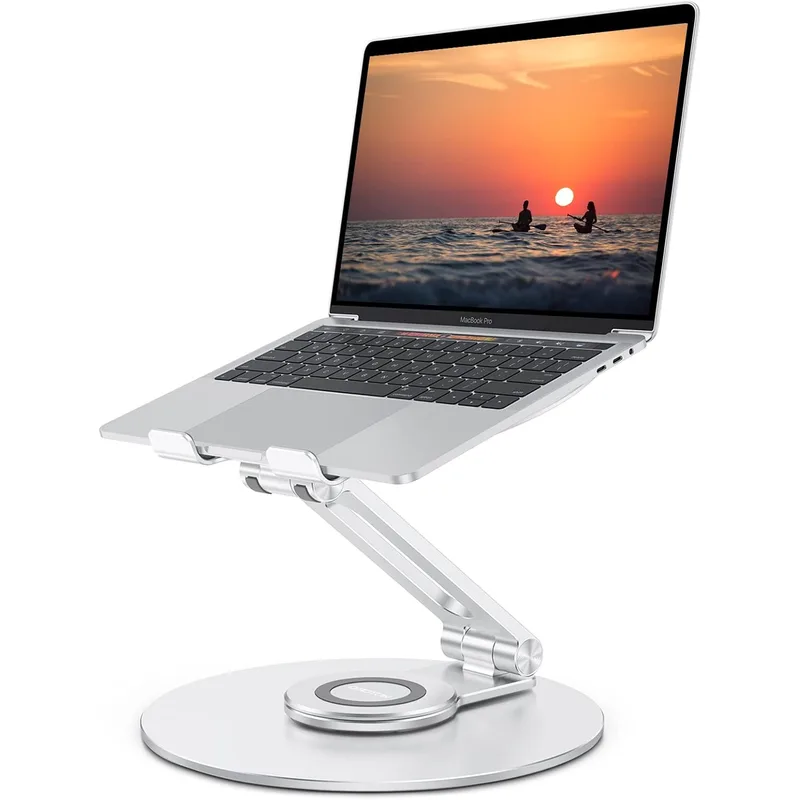
OMOTON Laptop Stand
Pros
- Aluminum alloy construction at under $28 makes this the most affordable metal laptop stand in this roundup — meaningfully more durable-feeling than plastic stands at a similar price
- Open three-arm frame allows airflow around the laptop's bottom vents, preventing the thermal throttling that occurs on solid-surface cheaper stands
- Silicone pads on all contact points protect the laptop's finish from scratches and prevent sliding during typing — a detail often omitted from budget stands
- Detachable arms allow the stand to pack flat for occasional transport or clean storage, unlike the Rain Design mStand which has no packing advantage
Cons
- Fixed ergonomic angle with no height adjustment — you get one viewing position; if that position doesn't work at your desk height, this stand doesn't work for you
- Limited to 16-inch laptops; larger or unusually deep laptops won't seat correctly on the detachable arms
- Detachable arm design is a durability question mark over multi-year use — the connection points experience repeated stress cycles that a single-piece stand like the mStand doesn't have
The OMOTON stand is the entry point for upgrading from no stand to proper ergonomics. At $20-$28, it costs less than a restaurant meal and eliminates neck flexion from looking down at a laptop screen all day. The aluminum construction at this price is the main differentiator from cheaper plastic competitors — it is more rigid, less prone to flex under load, and holds its shape better over time.
The three-arm detachable design creates an open frame that allows airflow under the laptop’s bottom panel. This matters most during prolonged video calls and CPU-intensive tasks where thermal throttling reduces performance. The silicone pads on contact points protect the laptop’s finish from scratching — a detail that some budget stands skip.
The fixed angle works at a standard desk height. It won’t adjust, won’t fold into a bag efficiently, and won’t match the aesthetics of a premium desk setup. The OMOTON exists to provide ergonomic screen height at the lowest cost in this roundup. At that goal, it succeeds directly.
Best for: Remote workers on a tight budget who need basic ergonomic screen height at a fixed home desk — a direct upgrade from no stand without a significant expense.
Buying Guide: How to Choose a Laptop Stand
Portable vs. Fixed
The core decision is whether you need to carry the stand. Fixed aluminum stands like the Rain Design mStand and Twelve South Curve SE are desk furniture — they live on your desk and don’t move. Portable stands like the Roost V3 and Nexstand K2 are designed to travel in a bag.
If you work from one desk every day, a fixed stand wins on aesthetics, stability, and simplicity. If you work from two or more locations per week, a portable stand is worth the tradeoff in build quality and appearance.
Height Adjustment
Fixed stands set the screen at one height determined by the stand’s geometry. This works perfectly if your desk height is standard (72-74cm) and your chair height places your eye line correctly. Adjustable stands let you recalibrate for different desks, chairs, and sitting postures.
The practical implication: if you have back problems, use a height-adjustable chair, or work at a standing desk for part of the day, buy an adjustable stand. The fixed stands in this roundup won’t accommodate those variables.
Screen Size Compatibility
Most stands support laptops up to 15 or 16 inches. The Roost V3 handles up to 18 inches and is the correct option for larger creator laptops like the MacBook Pro 16-inch or Dell XPS 15/17. Check the maximum size spec before purchasing if you’re using a laptop larger than 15 inches.
Aluminum vs. Plastic
Aluminum stands are heavier but more rigid, longer lasting, and better looking. Plastic stands are lighter and cheaper but show wear more quickly. For a fixed desk stand, aluminum is the correct choice. For a travel stand, plastic is unavoidable at any weight under 8 ounces.
Do You Need Integrated Connectivity?
None of the stands in this roundup have integrated USB hubs or docking capability. Some 2026 laptop stands — like the Kuxiu X53 — include built-in USB-A, USB-C, and HDMI ports. If you need additional connectivity, evaluate whether a dock with a built-in stand is a better single purchase than a stand plus a separate dock.
FAQ
Do I need an external keyboard and mouse if I use a laptop stand?
Yes. Raising the laptop screen to eye level puts the built-in keyboard too high for comfortable typing. A laptop stand is effective only when paired with an external keyboard and mouse. Budget for both when calculating the total ergonomic upgrade cost.
Will any of these stands work at a standing desk height?
The Roost V3 and Nexstand K2 both provide enough height adjustment for standing desk use. The Roost V3’s 12.5-inch maximum screen lift works at standard standing desk heights (95-110cm desk surface). The fixed stands — mStand, Curve SE, OMOTON — are designed for seated desk heights and don’t provide meaningful elevation at standing desk height.
Can I use a laptop stand with any laptop brand?
All five stands in this roundup are compatible with MacBooks, Dell, HP, Lenovo, and most other laptops within their stated size range. The only exception is the Twelve South Curve SE, which is engineered for Apple product proportions and works best with MacBook models.
Does a laptop stand damage the laptop?
No, provided the stand uses rubber or silicone contact pads (all five in this roundup do). Metal-on-metal or bare plastic contact can scratch laptop chassis over time, but padded stands have been laptop-safe for decades. Inspect the contact pads periodically and replace the stand if pads are worn through.
Is there a difference between a laptop stand and a laptop riser?
The terms are used interchangeably. “Riser” often refers to simpler block-style elevation, while “stand” implies a more engineered design with a base. For practical purposes, both terms describe the same category of product.
Conclusion
The Roost V3 is the top pick for remote workers who move between locations. It weighs 6 oz, adjusts from 6.5 to 12.5 inches, fits in any bag, and handles every desk environment encountered across a week of varied remote work. No other portable stand in this category matches the combination of weight, rigidity, and height range.
For permanent desk setups, the Rain Design mStand is the most durable and aesthetically resolved option at $40-$50. Single-piece aluminum with built-in cable management and passive heat dissipation — it’s been the reference fixed stand for years and still earns that position.
Mac users who prioritize aesthetics alongside function should look at the Twelve South Curve SE: lighter than the mStand, color-matched to Apple hardware, and equally ergonomic for a standard seated desk setup.
Budget-conscious remote workers should start with the OMOTON ($20-$28) or Nexstand K2 ($30-$40) — both provide meaningful ergonomic improvement over no stand for less than $40.
Detailed Reviews
Roost V3 Laptop Stand
Pros
- At 6 oz, it is the lightest adjustable laptop stand in this roundup — lighter than most charging cables — and folds flat to 14 inches, making it a genuine carry-anywhere option rather than a stand you leave on the desk
- Stepless height adjustment spans from 6.5 to 12.5 inches of screen lift, which covers the ergonomic sweet spot for users of any height from a standard desk or standing desk
- Self-adjusting grips automatically spread to match any laptop width from 12 to 18 inches and lock without any manual tightening — the laptop seats and stays without fidgeting
- Setup in under five seconds from closed to eye level is not marketing copy; the stand opens, the arms spread, and the laptop drops in — the entire process takes less time than unlocking your computer
- The glass-filled nylon construction is rigid under load with no lateral flex or side-to-side wobble when typing; the laptop stays locked at height even during active keyboard use
Cons
- Plastic construction looks functional rather than elegant — it reads as a travel accessory rather than a premium desk accessory, which matters if your desk setup doubles as a video call background
- No USB hub, passthrough ports, or additional connectivity; it is a stand only, requiring a separate dock or hub if your workflow needs extra ports
- The $75-$90 price is difficult to justify purely on aesthetics — buyers choosing it do so for portability, not for how it looks
Rain Design mStand
Pros
- Cut from a single piece of anodized aluminum — there are no joints, hinges, or fasteners, which means the mStand simply cannot loosen, rattle, or shift over years of daily use
- The aluminum base acts as a passive heat sink that conducts heat away from the laptop's underside; measurably effective on MacBooks running heavy processor loads during extended video calls
- Built-in cable channel at the rear routes your power cable out of sight — the only stand in this roundup with an integrated cable management solution that actually eliminates cable clutter
- Screen elevates exactly 5.9 inches (150mm), which places most 13-15-inch screens at the ergonomic eye-level target for a standard desk height; fixed height is a non-issue if your desk height doesn't change
- Available in six colors including Space Gray, Starlight, and Midnight — color-matched options exist for every current MacBook finish, which matters for remote workers with visible desk setups on camera
Cons
- Zero height adjustment — a single fixed angle means users outside the standard sitting height range for a 73cm desk may find the screen too high or too low; this stand does not work well at standing desk heights
- Compatibility is limited to laptops up to 15 inches with a depth of 10.4 inches or less; larger or unusually proportioned laptops physically don't fit
- No portability — 2.6 lbs and no folding mechanism make this a desk-only stand; it does not belong in a bag
Twelve South Curve SE
Pros
- Twelve South designed the Curve series specifically around Apple product dimensions and proportions — the fit with MacBook Air and MacBook Pro is precise, with the laptop sitting flush and balanced without any overhang or tip risk
- Open back arch design with silicone pads keeps the laptop elevated with airflow underneath, addressing one of the main thermal complaints about flat-surface desk use during sustained CPU loads
- At 1.43 lbs, it is lighter than the Rain Design mStand while maintaining a near-identical desk footprint and ergonomic angle — useful if you move between workspaces in the same home
- Cable pass-through opening at the rear allows clean cable routing even without a full cable management system; a small but practically useful design detail
- Available in Silver and Space Gray to match every current MacBook Pro and MacBook Air color option; the Curve SE is the stand that disappears visually when matched to a MacBook
Cons
- Fixed height angle with no adjustability — the Curve SE is designed for standard desk sitting height and does not accommodate standing desks, couch setups, or users with non-standard ergonomic needs
- At $40, it costs slightly less than the Rain Design mStand but with a lighter aluminum build — buyers who prefer maximum material mass for stability may prefer the mStand's single-piece construction
- Officially rated to 7 lbs maximum load — this is fine for all current MacBooks and most thin-and-light laptops, but heavier 16-inch gaming or creator laptops may exceed the spec
Nexstand K2
Pros
- At half a pound and foldable to roughly a ruler's thickness, the Nexstand K2 travels in a laptop sleeve without adding meaningful bulk — the only stand in this roundup that genuinely packs into a slim bag
- Multiple height adjustment positions allow you to dial in the screen height based on the chair and desk at any location, whether a coworking space, hotel desk, or kitchen table
- Rubber non-slip grips hold the laptop securely during typing with no rocking or side movement — noticeably more stable than similar budget portable stands with smooth plastic contact points
- At $30-$40, it costs less than a month of most productivity app subscriptions; the value-to-ergonomic-improvement ratio is among the highest of any desk accessory for remote workers
Cons
- ABS plastic construction is functional but shows wear marks and surface scratches more visibly than aluminum stands over time; the stand's appearance degrades with daily bag use across 12-18 months
- Height adjustment requires removing the laptop, repositioning the stand, and reseating — not a quick operation mid-session; the Roost V3 allows height adjustment with the laptop seated
- No cable management, no integrated hub, and no aesthetic appeal — the Nexstand K2 exists purely as a functional ergonomic tool, not a desk accessory
OMOTON Laptop Stand
Pros
- Aluminum alloy construction at under $28 makes this the most affordable metal laptop stand in this roundup — meaningfully more durable-feeling than plastic stands at a similar price
- Open three-arm frame allows airflow around the laptop's bottom vents, preventing the thermal throttling that occurs on solid-surface cheaper stands
- Silicone pads on all contact points protect the laptop's finish from scratches and prevent sliding during typing — a detail often omitted from budget stands
- Detachable arms allow the stand to pack flat for occasional transport or clean storage, unlike the Rain Design mStand which has no packing advantage
Cons
- Fixed ergonomic angle with no height adjustment — you get one viewing position; if that position doesn't work at your desk height, this stand doesn't work for you
- Limited to 16-inch laptops; larger or unusually deep laptops won't seat correctly on the detachable arms
- Detachable arm design is a durability question mark over multi-year use — the connection points experience repeated stress cycles that a single-piece stand like the mStand doesn't have