Every home office in 2026 has more plugs than the desk was designed for: a dock, a monitor, a laptop charger, a webcam, a speakerphone, and a router tucked nearby. A tray under the desktop is the cheapest way to get the power strip and the bricks off the floor, and it keeps the cable pile out of your video call background.
We researched and compared five trays that are in stock right now, using the manufacturer specs and owner feedback on each listing. The differences come down to length, mounting method, and how much weight the tray is rated to hold.
| Spec | Litwaro 25" No-Drill Cable Management Tray | VIVO Clamp-on 36" Mesh Cable Management Holder | Univivi 36-Inch No-Drill Under-Desk Cable Management Tray | Cinati Under Desk Cable Management Tray, 13.4" | VIVO Low Profile 17" Under Desk Cable Management Tray |
|---|---|---|---|---|---|
| Rating | 9.0/10 | 8.6/10 | 8.2/10 | 8.0/10 | 7.8/10 |
| Price | $29.99-$32.99as of Oct 12, 2026 | $23.09-$29.99as of Oct 12, 2026 | $37.99as of Oct 12, 2026 | $17.99-$21.99as of Oct 12, 2026 | $19.99as of Oct 12, 2026 |
| Width | 25 inches | 36 inches | — | 13.4 inches | 17 inches |
| Mounting | No-drill clamp with rubber pads | No-drill clamps | No-drill clamp or screw mount | No-drill clamp | Screw mount |
| Weight Capacity | 30 lbs | 11 lbs | — | 10 lbs | 11 lbs |
| Material | Carbon steel | Flame-resistant mesh netting | Fabric-wrapped tray | Powder-coated steel | Steel |
| Length | — | — | 36 inches | — | — |
| Compatibility | — | — | Wood, glass, or metal desktops | — | — |
| Check Price → | Check Price → | Check Price → | Check Price → | Check Price → |
Prices change daily — tap Check Price for the current Amazon price.
1. Litwaro 25” No-Drill Tray
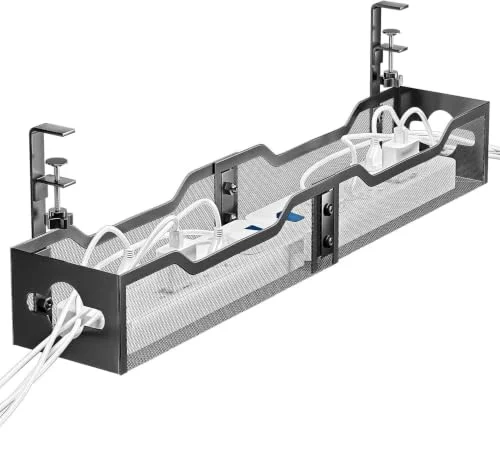
Litwaro 25" No-Drill Cable Management Tray
Pros
- The 25-inch length fits a surge protector plus a couple of power bricks without stacking
- Listed 30 lb capacity is the highest of the five trays here
- Clamp mounting means no holes in the desktop
- Rubber pads protect glass and finished desktops
Cons
- Heaviest option here, so a lightweight desk frame carries more load
- Black is the only finish
- Measure your desk edge thickness before ordering
The Litwaro is the one to buy if you have more than one brick to hide. At 25 inches it holds a power strip with room beside it, and the stated 30 lb rating gives headroom that the lighter trays here don’t. Clamp mounting works on desks you can’t drill, which covers most rentals and glass tops.
2. VIVO Clamp-on 36” Mesh Holder
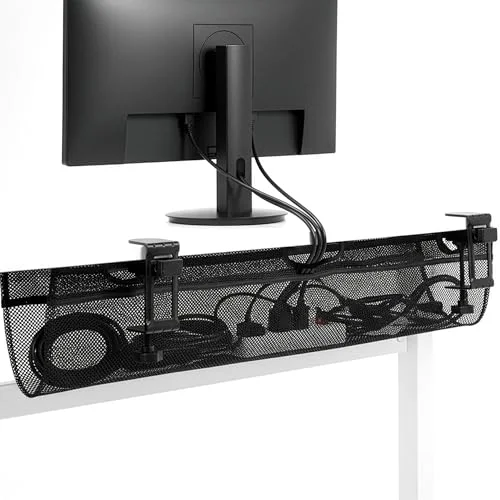
VIVO Clamp-on 36" Mesh Cable Management Holder
Pros
- Spans a full 60-inch or wider standing desk worth of cabling
- Hand-tightened clamps, no tools needed
- Open mesh lets heat escape around a power strip
- Stays light, which helps on motorized desks
Cons
- Mesh holds cables more loosely than a solid tray
- 11 lb limit is modest for a multi-brick setup
- Clamps may slip on very smooth laminate
The VIVO mesh holder is built for wide desks. Its 36-inch span keeps cabling from a standing desk’s full width in one place, and the mesh stays light. The tradeoff is containment: mesh cradles cables rather than boxing them in, so a messy bundle shows from the side.
3. Univivi 36” Fabric Tray
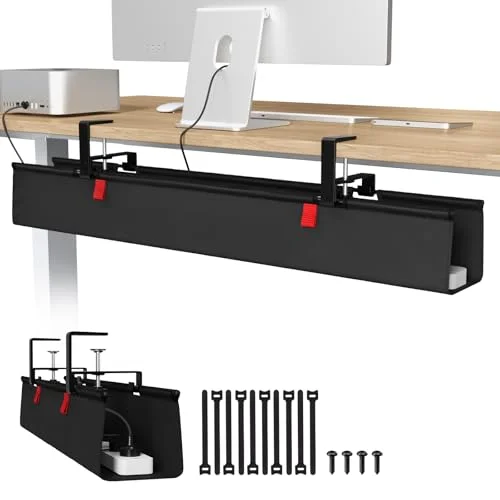
Univivi 36-Inch No-Drill Under-Desk Cable Management Tray
Pros
- Choose clamp or screw mounting depending on the desk
- 36 inches covers the cable runs of a monitor arm, dock, and power strip
- Fabric wrap looks neater than bare metal from the side
Cons
- Most expensive pick in this roundup
- Fabric can sag under a heavy power strip and several adapters
- Clamp needs clearance below, so desks with drawers underneath are a poor fit
The Univivi offers both clamp and screw mounting, which is useful if you move desks later. Owners should note that fabric can sag when loaded with a big surge protector and several adapters. It suits setups where the cable load is moderate and the desk is wide.
4. Cinati 13.4” Tray
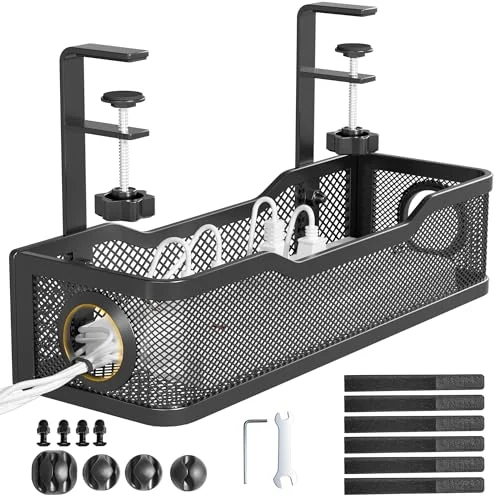
Cinati Under Desk Cable Management Tray, 13.4"
Pros
- Lowest price of the five
- Compact enough for small and corner desks
- Steel build with a powder-coated finish
Cons
- Short length fits one power strip and little else
- 10 lb limit rules out stacking bricks
For a small desk with one power strip, the Cinati does the job at the lowest price here. Don’t buy it if you plan to add a hub or a second brick later, since the 10 lb rating and short length leave no room to grow.
5. VIVO Low Profile 17” Tray
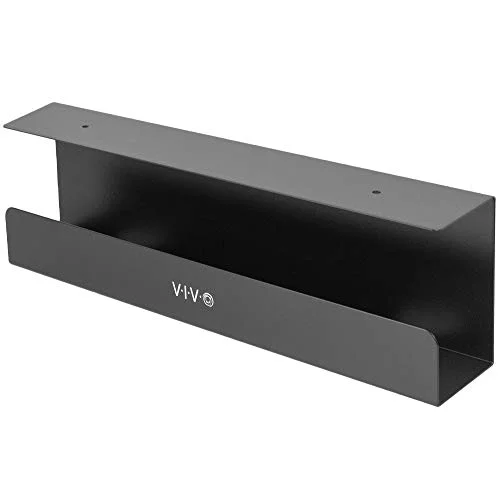
VIVO Low Profile 17" Under Desk Cable Management Tray
Pros
- Screws hold it in place permanently
- Steel build with a low profile under the desktop
- Under $20 for a tray that stays put
Cons
- Requires drilling, so it is a poor fit for rented or IKEA desks
- 17 inches may not fit a larger surge protector
- Colors limited to black and white
If the desk is yours and the setup is permanent, screw mounting is the most secure option. The VIVO 17-inch is the only drill-required pick here, and that is the main reason it ranks last: most readers want a tray they can move.
Buying Guide
Length. Measure your power strip and the longest brick, then add a few inches. Trays under 15 inches work for one strip only. A standing desk with a monitor arm and a dock usually needs 25 inches or more.
Mounting. Clamp trays go on without tools and come off without leaving marks. Screw-mount trays hold better but need a drill and a desk you’re willing to mark. If the desk has a thick frame lip or drawers directly below, check the clamp clearance first.
Weight. Add up the power strip and every brick. Listed capacities here run from 10 to 30 lbs, so a loaded setup should lean toward the higher end.
Standing desks. Leave slack in every cable so the desk can travel through its full height range. Pair the tray with the advice in our cable management guide and choose a strip from our home office power strip roundup or the USB-C power strip picks. If you are still shopping for the desk itself, see the standing desk guide.
Heat. Don’t bury a power strip in a closed box. Open mesh and trays with gaps let air move around the strip.
How to Choose by Desk Type
Motorized standing desk. The desk frame, crossbars, and control box take up room under the top, so a clamp tray needs a clear stretch of desk edge. The two 36-inch options give you the most flexibility to slide the mount away from the frame. Whatever you pick, route every cable with enough slack to follow the desk from its lowest to its highest setting, then raise and lower it once before you tidy anything.
Glass or lacquered desktop. Skip screws and look for rubber or silicone pads on the clamp faces. The Litwaro lists rubber pads on its clamps, and the Cinati and the VIVO 36-inch both clamp on without drilling.
Rented or shared desk. Clamp trays are the only sensible choice. They come off in a minute and leave the desktop as you found it. Save the screw-mount VIVO for a desk you own.
Small or corner desk. Short trays make more sense than long ones. The Cinati at 13.4 inches fits where a 25-inch tray would run into a leg, a drawer, or the wall.
Desks with drawers underneath. Clamp trays need space below the desktop edge. If a drawer unit sits directly under the surface, check the clearance listed for each tray before you buy.
Installing a Tray Without Making It Worse
A tray only helps if the cables behind it are sorted. A few habits make the difference between a tidy desk and a different kind of mess.
- Plan the layout first. Lay the power strip and each brick on the floor in the order they will sit in the tray. Decide which cables run to the monitor, which to the dock, and which to the wall.
- Mount toward the back. Keep the tray close to the rear edge of the desk so it stays out of your legs and out of sight from the front. On a standing desk, make sure it sits clear of the lifting columns.
- Load it before you tighten it. Put the power strip in place and check that the clamp or screws sit on solid ground. A loaded tray pulls on its mount more than an empty one.
- Bundle runs with ties. Velcro-style ties are easier to reopen than zip ties when you add a device later. Our cable management guide covers sleeves, clips, and raceways that work with a tray.
- Leave a loop. Give each cable a slack loop before it enters the tray so plugging and unplugging doesn’t tug the strip.
- Test the motion. If you have a standing desk, run it through its whole height range slowly while watching every cable.
Common Mistakes
- Buying the shortest tray. A tray that only just fits your power strip leaves no space for adapters, so the bricks end up dangling anyway. Add a few inches of margin.
- Ignoring the load. The listed capacity is the manufacturer’s figure. A surge protector, a dock power supply, and a monitor adapter add up quickly.
- Boxing in the power strip. Closed enclosures trap heat. Open mesh and trays with gaps allow airflow around the strip.
- Mounting over the frame. On standing desks the clamp can foul the crossbar. Measure from the desk edge to the frame before you order.
- Forgetting the wall cable. The one thick cable from tray to outlet is the most visible one. A raceway or sleeve along the wall or leg finishes the job.
Trays vs. Other Cable Fixes
A tray hides hardware, but it isn’t the only tool. Sleeves bundle several cables into one line and work well along legs. Adhesive clips keep a single cable from sliding off the desk edge. Raceways hide runs along walls and baseboards. Cable boxes enclose a power strip entirely, at the cost of heat buildup. For most home offices, the best result is a tray for the strip and bricks, plus a sleeve or raceway for the vertical run to the outlet. If your main problem is the strip itself, compare options in our power strip roundup.
Which Tray Fits Which Setup
| Your setup | Our pick |
|---|---|
| Standing desk with dock, monitor arm, and several bricks | Litwaro 25” |
| 60-inch or wider desk, light cable load | VIVO 36” mesh |
| Ultrawide monitor desk where you want a tidy look | Univivi 36” |
| Small desk with one power strip | Cinati 13.4” |
| Desk you own and won’t move | VIVO 17” |
FAQ
Do I need to drill into my desk? Not with four of the five. The Litwaro, VIVO 36-inch mesh, Cinati, and Univivi (in clamp mode) all mount without drilling. Only the VIVO 17-inch requires screws.
Will a tray work on a standing desk? Yes, as long as you leave slack in your cables so the desk can move through its full range. Longer trays suit standing desks because the frame and legs often limit where a clamp can sit.
Can I put a surge protector in a cable tray? Yes, that is the main use. Check the weight rating and keep airflow around the strip, which is why open mesh and trays with gaps are a reasonable choice.
How long a tray do I need? Pick a tray at least a few inches longer than your power strip. For a strip plus several adapters, 25 inches or more gives space to lay things out end to end.
Our Pick
The Litwaro 25-inch tray is the best all-round choice: it has the highest rated capacity, a length that fits a real home office setup, and tool-free mounting. Choose the VIVO 36-inch mesh holder for a wide standing desk, and the Cinati if you just need the cheapest way to lift one power strip off the floor.
Detailed Reviews
Litwaro 25" No-Drill Cable Management Tray
Pros
- The 25-inch length fits a surge protector plus a couple of power bricks without stacking
- Listed 30 lb capacity is the highest of the five trays here
- Clamp mounting means no holes in the desktop
- Rubber pads protect glass and finished desktops
Cons
- Heaviest option here, so a lightweight desk frame carries more load
- Black is the only finish
- Measure your desk edge thickness before ordering
VIVO Clamp-on 36" Mesh Cable Management Holder
Pros
- Spans a full 60-inch or wider standing desk worth of cabling
- Hand-tightened clamps, no tools needed
- Open mesh lets heat escape around a power strip
- Stays light, which helps on motorized desks
Cons
- Mesh holds cables more loosely than a solid tray
- 11 lb limit is modest for a multi-brick setup
- Clamps may slip on very smooth laminate
Univivi 36-Inch No-Drill Under-Desk Cable Management Tray
Pros
- Choose clamp or screw mounting depending on the desk
- 36 inches covers the cable runs of a monitor arm, dock, and power strip
- Fabric wrap looks neater than bare metal from the side
Cons
- Most expensive pick in this roundup
- Fabric can sag under a heavy power strip and several adapters
- Clamp needs clearance below, so desks with drawers underneath are a poor fit
Cinati Under Desk Cable Management Tray, 13.4"
Pros
- Lowest price of the five
- Compact enough for small and corner desks
- Steel build with a powder-coated finish
Cons
- Short length fits one power strip and little else
- 10 lb limit rules out stacking bricks
VIVO Low Profile 17" Under Desk Cable Management Tray
Pros
- Screws hold it in place permanently
- Steel build with a low profile under the desktop
- Under $20 for a tray that stays put
Cons
- Requires drilling, so it is a poor fit for rented or IKEA desks
- 17 inches may not fit a larger surge protector
- Colors limited to black and white