The Ubiquiti UniFi Dream Machine SE is the gateway that home-office power users end up asking about once a mesh kit stops being enough. It is also easy to misread: the UDM-SE is a router, switch, and security console, not a Wi-Fi system. This review is built from the spec sheet, manufacturer claims, and owner feedback, not bench testing. It covers who gets real value from the box and who should buy a mesh kit instead.
Short version: buy it if you want VLANs, intrusion prevention, PoE, and a wired backbone. Skip it if you want a router that “just works” with a phone app.
Quick Comparison
| Spec | Ubiquiti UniFi Dream Machine Special Edition (UDM-SE) | TP-Link Deco XE75 Pro | Amazon eero Pro 6E |
|---|---|---|---|
| Rating | 8.5/10 | 8.5/10 | 7.5/10 |
| Price | $499.99-$538.00as of Oct 20, 2026 | $119.97as of Oct 20, 2026 | $349.99as of Oct 20, 2026 |
| Model | UDM-SE | — | — |
| Processor | 1.7 GHz quad-core | — | — |
| WAN | 10G SFP+ and 2.5GbE RJ45 (dual WAN) | — | — |
| LAN | 8x GbE RJ45 (6 PoE, 2 PoE+) plus 1x 10G SFP+ | — | — |
| PoE Budget | 180W | — | — |
| IDS/IPS Throughput | 3.5 Gbps (manufacturer claim) | — | — |
| Storage | 128 GB internal for network video recorder | — | — |
| Wi-Fi | None built in (needs separate access points) | — | — |
| WiFi Standard | — | WiFi 6E, tri-band | WiFi 6E, tri-band |
| Coverage | — | Up to 2,900 sq ft (single unit) | — |
| Security | — | TP-Link HomeShield | — |
| WAN/LAN | — | 2.5 Gbps port | — |
| Max Internet Plan | — | — | Up to 2.5 Gbps |
| Management | — | — | eero app |
| Type | — | — | Mesh system |
| Check Price → | Check Price → | Check Price → |
Prices change daily — tap Check Price for the current Amazon price.
Ubiquiti UniFi Dream Machine SE: In Depth
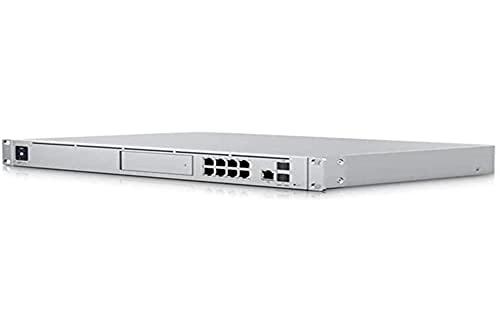
Ubiquiti UniFi Dream Machine Special Edition (UDM-SE)
Pros
- IDS/IPS, VLANs, and firewall rules run natively in the UniFi Network app, which gives a home office real segmentation between work laptops, IoT gadgets, and guests
- Built-in PoE switch powers access points and cameras from one box, so there are no separate injectors or power bricks
- Dual WAN lets you fail over to a second connection, such as a 5G or cable backup, when the primary line drops
- 128 GB of internal storage handles UniFi Protect camera recordings without a separate recorder
Cons
- No Wi-Fi radio, so you must buy at least one UniFi access point on top of the $500 gateway price
- The learning curve is steep compared with a mesh app, and misconfigured VLANs can lock devices off the network
- Overkill for a one-person office with a laptop, a phone, and a printer
Ports and Hardware
According to the spec sheet, the UDM-SE has a 1.7 GHz quad-core processor, a 10G SFP+ and a 2.5GbE RJ45 port for dual WAN, eight Gigabit RJ45 LAN ports (six PoE and two PoE+), and a 10G SFP+ LAN port. A 1.3-inch color touchscreen shows live network stats. Bluetooth handles initial setup through the UniFi app.
Security
Ubiquiti lists 3.5 Gbps of IDS/IPS throughput. For a home office that means intrusion detection and prevention can run on a multi-gig connection without throttling it, which is the usual weak point of consumer routers that advertise “security” but slow down when it is enabled. Pair it with our home office network security guide for the rest of the stack, including a hardware key and VPN.
Segmentation
The feature that justifies the price for remote workers is VLAN support. You can put a work laptop on its own network, keep smart plugs and cameras on another, and give guests a third. If your employer’s VPN client is picky, or you simply do not trust a cheap IoT camera next to your work machine, this is the fix. Owners report that the learning curve is real, so plan an afternoon for setup.
PoE and Cameras
The 180W PoE budget runs access points and cameras from the gateway itself. If you need more ports or power, see our PoE switch roundup. The 128 GB internal storage supports a network video recorder, so UniFi cameras can record without extra hardware.
The Catch: No Wi-Fi
The UDM-SE does not broadcast Wi-Fi on its own. You need to add UniFi access points, which raises the real cost well above the $500 sticker. If you want a single box that does Wi-Fi too, that is a different product class, and the cheaper routes are covered in our router roundup.
Who Should Buy the UDM-SE
The best fit is a remote worker who already runs, or plans to run, wired Ethernet through the house. Think of a dedicated office with a work laptop, a NAS, a few IP cameras, and a pile of smart-home gadgets you would rather keep off the same network as your employer’s VPN traffic. In that setup the UDM-SE replaces the router, the PoE switch, and the camera recorder, which trims the number of power bricks and the number of apps you manage. The money case gets stronger if you also plan to add UniFi access points over PoE, because one console then controls every part of the network.
Who Should Skip It
Skip it if your home office is a laptop, a phone, and a printer in a small apartment. You would pay for 10G ports, a 180W PoE budget, and a camera recorder you will never use, and you would still need to buy an access point for Wi-Fi. A mesh system such as the Deco XE75 Pro below solves that problem for far less. Also skip it if nobody in the house wants to learn firewall rules. A gateway you are afraid to touch is a worse purchase than a simple router you can manage from your phone.
Setup Expectations
Plan the network on paper before you plug anything in: which devices go on the work VLAN, which on the IoT VLAN, and which on the guest network. Owner feedback on prosumer gateways repeats the same warning, which is to change one setting at a time so you can undo a mistake without resetting the whole console. Keep your ISP modem in bridge or pass-through mode if it supports it, and back up the UniFi configuration once the network is stable.
The Alternatives
TP-Link Deco XE75 Pro
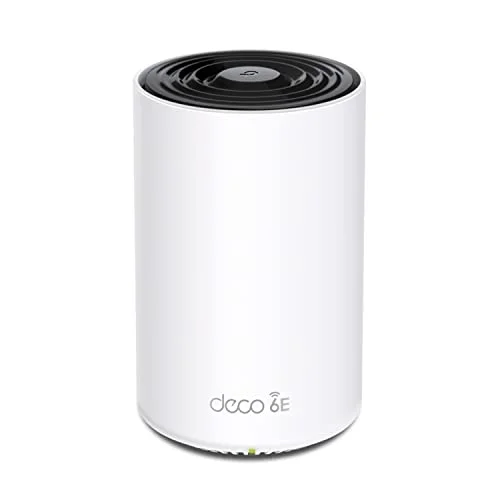
TP-Link Deco XE75 Pro
Pros
- Wi-Fi and routing in one box at a fraction of the UDM-SE plus access point cost
- HomeShield's core scan and malicious-site blocking work without a subscription
- Add more Deco units later to cover a bigger space
- App setup takes minutes with no networking background
Cons
- The advanced HomeShield tier requires a paid subscription
- No PoE ports or VLAN-level control for work and IoT separation
- A single unit covers under 3,000 sq ft, so larger homes need a multi-pack
For most one-person offices this is the better buy. It handles Wi-Fi 6E and routing in one unit, includes a 2.5 Gbps port, and costs a fraction of the UDM-SE. You give up VLANs and PoE. Compare it with other systems in our mesh WiFi roundup.
Amazon eero Pro 6E
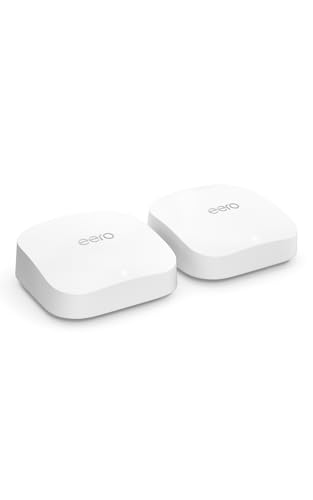
Amazon eero Pro 6E
Pros
- Simplest setup of the three, handled entirely in the eero app
- Supports internet plans up to 2.5 Gbps
- Mesh expansion with additional eero units
Cons
- Costs far more than the TP-Link Deco XE75 Pro for similar Wi-Fi capability
- Its best security features sit behind a paid subscription
- Little control over firewall rules or network segmentation
The eero wins on setup simplicity and loses on price and control. At $349.99 it costs nearly three times the Deco for similar Wi-Fi capability. See our eero vs Netgear Orbi comparison if mesh is the direction you are leaning.
Buying Guide: Prosumer Gateway or Mesh?
- Do you need VLANs? If you want work and IoT devices on separate networks, a gateway like the UDM-SE is the right tool. If not, mesh is enough.
- Do you have wired runs? UniFi shines when access points connect over Ethernet and PoE.
- Budget for access points. Add at least one UniFi access point to the gateway price.
- Tolerance for tinkering. UniFi rewards patience. Mesh apps reward people who want to set it and forget it.
- Internet speed. Dual 10G and 2.5G WAN ports only matter with a multi-gig plan or a second connection.
For a wired-first approach to stable calls, read our wired vs WiFi guide for video calls.
FAQ
Does the UniFi Dream Machine SE have Wi-Fi?
No. It is a gateway, switch, and controller. You need separate UniFi access points for wireless coverage.
Is the UDM-SE worth it for a home office?
Only if you want VLAN segmentation, IDS/IPS, PoE, or a UniFi camera system. For a basic office, a mesh system costs far less.
Does IDS/IPS on the UDM-SE need a subscription?
Per the guide linked above, the security engine runs through the free UniFi Network app with no added subscription.
Can the UDM-SE run a backup internet connection?
Yes. It has dual WAN ports, a 10G SFP+ and a 2.5GbE RJ45, so you can fail over to a second line.
How hard is UniFi to set up?
Initial setup runs through the UniFi app over Bluetooth in minutes, but VLANs and firewall rules take more time than a mesh app.
Conclusion
The Dream Machine SE is the right gateway for a remote worker who wants segmentation, intrusion prevention, and PoE in one box, and is willing to add access points and learn the UniFi app. For everyone else, the TP-Link Deco XE75 Pro is the better pick at a much lower price, and the eero Pro 6E is the choice only if setup simplicity outranks everything else.
Detailed Reviews
Ubiquiti UniFi Dream Machine Special Edition (UDM-SE)
Pros
- IDS/IPS, VLANs, and firewall rules run natively in the UniFi Network app, which gives a home office real segmentation between work laptops, IoT gadgets, and guests
- Built-in PoE switch powers access points and cameras from one box, so there are no separate injectors or power bricks
- Dual WAN lets you fail over to a second connection, such as a 5G or cable backup, when the primary line drops
- 128 GB of internal storage handles UniFi Protect camera recordings without a separate recorder
Cons
- No Wi-Fi radio, so you must buy at least one UniFi access point on top of the $500 gateway price
- The learning curve is steep compared with a mesh app, and misconfigured VLANs can lock devices off the network
- Overkill for a one-person office with a laptop, a phone, and a printer
TP-Link Deco XE75 Pro
Pros
- Wi-Fi and routing in one box at a fraction of the UDM-SE plus access point cost
- HomeShield's core scan and malicious-site blocking work without a subscription
- Add more Deco units later to cover a bigger space
- App setup takes minutes with no networking background
Cons
- The advanced HomeShield tier requires a paid subscription
- No PoE ports or VLAN-level control for work and IoT separation
- A single unit covers under 3,000 sq ft, so larger homes need a multi-pack
Amazon eero Pro 6E
Pros
- Simplest setup of the three, handled entirely in the eero app
- Supports internet plans up to 2.5 Gbps
- Mesh expansion with additional eero units
Cons
- Costs far more than the TP-Link Deco XE75 Pro for similar Wi-Fi capability
- Its best security features sit behind a paid subscription
- Little control over firewall rules or network segmentation