Consumer DOCSIS 4.0 modems still aren’t sitting on store shelves as of late 2026 — manufacturers like Hitron, ARRIS, and NETGEAR have all confirmed follow-up models are coming, but none have shipped at retail yet. That means DOCSIS 3.1 remains the modem to actually buy this year, and it’s a good one: it covers essentially every residential cable tier available today, including multi-gig plans, with room to spare. Meanwhile Xfinity and Cox continue charging around $15 a month for a rented gateway — $180 a year for hardware that costs $110-$280 to own outright and lasts 5+ years.
Buying your own modem is one of the highest-ROI moves in a home office setup. It’s a one-time purchase, it’s fully compatible with the big cable ISPs, and it typically pays for itself within 6-12 months of no longer paying rental fees.
Quick Picks
| Spec | Motorola MB8611 | ARRIS SURFboard S33 | NETGEAR CM1200 | Motorola MB8600 | NETGEAR CM2000 |
|---|---|---|---|---|---|
| Rating | 9.1/10 | 8.8/10 | 8.6/10 | 8.4/10 | 8.5/10 |
| Price | $99.00as of Oct 18, 2026 | $115.31-$199.00as of Oct 18, 2026 | $54.26-$154.86as of Oct 18, 2026 | $50.00-$209.98as of Oct 18, 2026 | $74.99-$287.99as of Oct 18, 2026 |
| DOCSIS Version | DOCSIS 3.1 | DOCSIS 3.1 | DOCSIS 3.1 | DOCSIS 3.1 | DOCSIS 3.1 |
| Channel Bonding | 32x8 | 32x8 | 32x8 | 32x8 | 32x8 |
| Ethernet Port | 1x 2.5 Gbps | 2.5 Gbps + 1 Gbps | — | 1x Gigabit | 2.5 Gbps |
| Max Plan Speed | Up to 1.2 Gbps | Up to 2.5 Gbps | Up to 2 Gbps (with link aggregation) | Up to 1 Gbps | Up to 2.5 Gbps |
| WiFi | None (modem only) | None (modem only) | None (modem only) | None (modem only) | None (modem only) |
| ISP Compatibility | Xfinity, Cox, Spectrum | Xfinity, Cox, Spectrum | Xfinity, Cox, Spectrum | Xfinity, Cox, Spectrum | Xfinity, Cox, Spectrum |
| Warranty | 2 Year | 2 Year | 2 Year | 2 Year | 2 Year |
| Ethernet Ports | — | — | 4x Gigabit (2 can link-aggregate to 2 Gbps) | — | — |
| OFDM/OFDMA Channels | — | — | — | — | 2x2 |
| Check Price → | Check Price → | Check Price → | Check Price → | Check Price → |
Prices change daily — tap Check Price for the current Amazon price.
The Picks
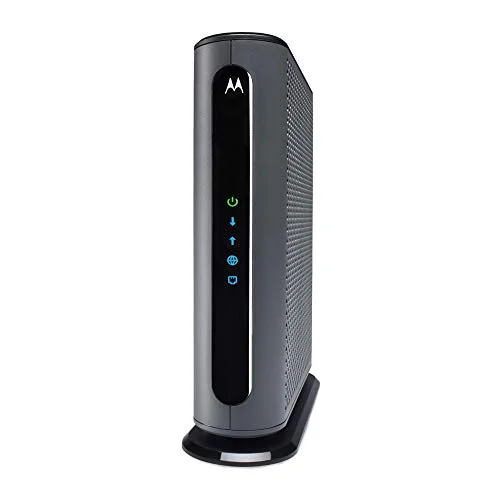
Motorola MB8611
Pros
- 2.5 Gbps port handles gigabit plans with headroom for a future upgrade
- Roughly 30,000+ Amazon ratings averaging 4.3 stars — the most proven pick here
- Pays for itself in under a year versus a $15/month rental fee
- Straightforward activation on Xfinity, Cox, and Spectrum
Cons
- A minority of owners report units overheating or failing after 6-12 months
- Xfinity's own activation portal can be slow to recognize the device
- Single Ethernet port means you need a router or switch downstream
The MB8611 is the modem most remote workers should just buy. It’s DOCSIS 3.1, it has a 2.5 Gbps port for headroom beyond a standard gigabit plan, and it has the deepest track record of any modem in this lineup — tens of thousands of ratings averaging 4.3 stars. Activation on Xfinity, Cox, and Spectrum is generally quick, and owner reports consistently describe stable connections with real speed gains over rented gateway hardware.
The one thing to watch for: a small but consistent minority of owners report the unit overheating or failing after six months to a year of use. Keep it in an open, ventilated spot rather than tucked into a closed cabinet, and register the 2-year warranty in case you hit that failure window.
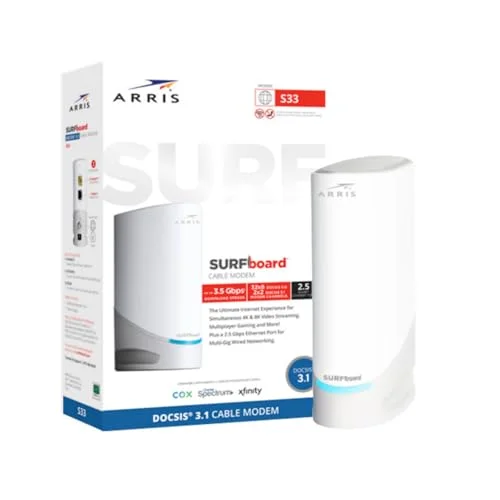
ARRIS SURFboard S33
Pros
- Two Ethernet ports (2.5 Gbps and 1 Gbps) instead of the usual single port
- Rated for multi-gig cable plans up to 2.5 Gbps
- Consistent uptime reports with no recurring drop complaints
- Metal internals keep temperatures down under sustained load
Cons
- SURFboard Central companion app is clunky and often unnecessary
- No benefit unless your cable plan actually exceeds 1 Gbps
- Plastic housing shows scratches and scuffs quickly
The SURFboard S33 is the pick if your cable plan actually exceeds 1 Gbps. It’s the only modem in this lineup besides the CM2000 with a true multi-gig 2.5 Gbps port, and it adds a second gigabit port most competitors skip entirely — useful if you want to wire two devices directly without an extra switch.
Owners report consistent uptime with few complaints about drops, which matters more for video calls than raw throughput does. The SURFboard Central app is the weak point here; most people never need to open it, since the modem otherwise works without any ongoing configuration.
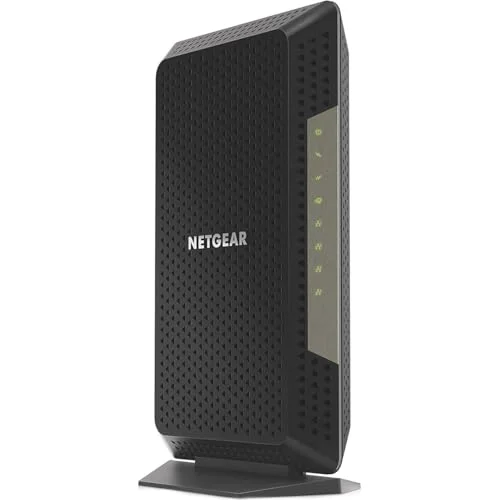
NETGEAR CM1200
Pros
- Four Ethernet ports instead of one — useful if you don't already own a switch
- Link aggregation on two ports gets close to 2 Gbps without a multi-gig port
- Real-world speed tests show it holding near-gigabit throughput reliably
- Saves roughly $168 a year compared to a typical ISP gateway rental fee
Cons
- Costs more than a basic single-port gigabit modem for ports most people won't use
- Link aggregation requires a router that also supports it — check before buying
- No advantage over cheaper options if your plan is under 1 Gbps
The CM1200 is the value pick for anyone who doesn’t already own an Ethernet switch. Four gigabit ports mean you can wire a desktop, a NAS, and a couple of other devices directly into the modem without buying separate networking gear. Two of those ports support link aggregation, which gets you close to 2 Gbps of combined throughput if your router also supports it.
Real-world speed tests hold up well, with throughput staying close to advertised gigabit numbers rather than the noticeable drop-off some budget modems show under load. It costs more than a single-port modem, but if you were going to buy a switch anyway, the math works out close to even.
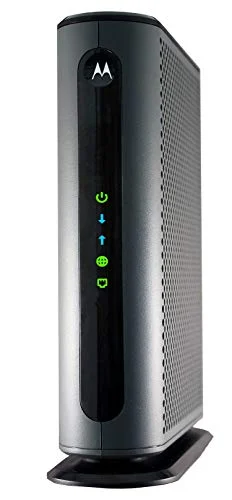
Motorola MB8600
Pros
- Lowest price of any DOCSIS 3.1 modem in this lineup
- Covers any cable plan up to a full gigabit without issue
- Compact size fits easily on a shelf or behind a monitor
- Motorola's activation process is well-documented across major ISPs
Cons
- Single gigabit port caps out below the multi-gig options above
- No headroom if you upgrade to a 2 Gbps plan later
- Basic LED indicators only — no companion app for diagnostics
The MB8600 is the modem to buy if you just want to stop paying a rental fee without spending much. It’s still DOCSIS 3.1 — not a step down in cable standard, just in port capability — and it covers any cable plan up to a full gigabit without any compromise in reliability. Motorola’s activation instructions are clear and well-tested across the major ISPs.
The tradeoff is headroom. A single gigabit port means there’s no runway if you upgrade to a 2 Gbps cable tier later, so this is the right buy only if you’re confident your plan will stay at or below 1 Gbps for the next few years.
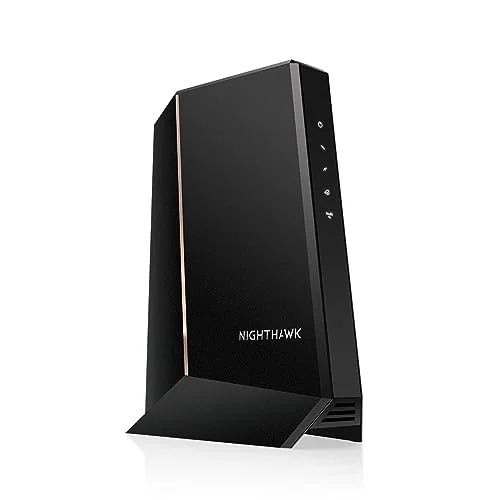
NETGEAR CM2000
Pros
- Highest throughput ceiling in this roundup for top-tier cable plans
- 2x2 OFDMA channels add stability under heavy simultaneous traffic
- Consistently positive reliability reports from owners on multi-gig tiers
- NETGEAR's support documentation is thorough for troubleshooting activation
Cons
- Most expensive option here — hard to justify below a 1 Gbps plan
- Overkill for a typical remote work setup with normal video call bandwidth needs
- Premium price narrows the payback window versus renting
The CM2000 is for one specific situation: you’re already subscribed to a multi-gig cable plan (1.5 Gbps or higher) and want to actually use all of it. The 2.5 Gbps port and 2x2 OFDMA channel support give it the highest throughput ceiling of anything in this roundup, and owners on top-tier plans report it holding that speed reliably.
At nearly double the price of the MB8611, it’s not worth buying unless your plan justifies it. A typical remote work day — video calls, cloud syncing, streaming — doesn’t come close to saturating a gigabit connection, let alone 2.5 Gbps, so most people are better served by a cheaper option on this list.
Cable Modem Buying Guide
Check Your ISP’s Approved Device List First
Xfinity, Cox, and Spectrum all publish lists of modems approved for activation on their network. Every modem in this roundup is broadly compatible with all three, but ISPs update these lists periodically. A quick search for “[your ISP] approved modems” before buying avoids any activation headache.
DOCSIS 3.1 Is Still the Right Standard in 2026
DOCSIS 4.0 modems are not yet sold at retail. DOCSIS 3.1 handles every residential cable tier currently offered by major ISPs, including multi-gig plans up to roughly 2.5-3 Gbps depending on channel bonding. There’s no reason to wait for DOCSIS 4.0 hardware that doesn’t exist yet — buy 3.1 now and upgrade when the next generation actually ships.
Match the Modem to Your Plan, Not the Other Way Around
Check your current internet plan’s advertised speed before choosing a modem. If you’re on a standard gigabit plan, a single-port modem like the MB8611 or MB8600 covers it completely. Multi-gig ports only matter if your plan exceeds 1 Gbps — paying extra for a 2.5 Gbps port on a gigabit plan gets you nothing.
Modem vs Gateway
A modem only connects your home network to your ISP — it does not provide WiFi. Every product in this roundup is modem-only, which means you’ll need a separate router (or your own mesh WiFi system) to distribute the connection. Gateways combine both functions in one box, but they cost more to replace as a unit if either the modem or the WiFi hardware needs upgrading.
Calculate Your Break-Even Point
Most ISPs charge $13-$15 a month to rent a gateway, or $156-$180 a year. Every modem in this roundup costs less than 12-18 months of rental fees, and modems typically last 5+ years before needing replacement. Buying is the better financial decision for almost every remote worker paying a monthly equipment fee.
Setting Up Your Own Modem
The physical setup is the easy part: unplug the coax cable from your current gateway, plug it into the new modem, connect the modem to your router (or directly to your computer temporarily), and power it on. The part that trips people up is activation — your ISP needs to associate the new modem’s MAC address with your account before it’ll pull an internet connection.
Most ISPs handle this through a self-service flow now. Xfinity has the “Xfinity” app and a web-based activation page. Cox and Spectrum have similar self-activation portals. Have your account number and the modem’s MAC address (printed on a label on the bottom or back) ready before you start. If self-activation fails or hangs, a phone call to support usually resolves it in a few minutes — this is a common enough request that reps handle it quickly.
One detail worth knowing: some ISPs briefly need your old rental gateway offline before the new modem can activate, since both devices can’t be registered as active at once. Power down the rental unit first, then power on your new modem to avoid a conflict during provisioning.
Should You Wait for DOCSIS 4.0?
Not unless your remote work setup genuinely needs symmetrical multi-gig upload speeds today, which almost none do. Consumer DOCSIS 4.0 hardware hasn’t launched at any retailer as of this writing, and even once it does, early units will likely carry a premium price with limited ISP support while networks catch up. DOCSIS 3.1 modems bought now will keep working fine after DOCSIS 4.0 launches — ISPs aren’t going to strand 3.1 customers overnight, since the vast majority of their subscriber base will still be on 3.1-compatible plans for years. Buy for the connection you have today, not the one you might upgrade to eventually.
FAQ
Q: Will buying my own modem save me money? A: Yes, in nearly every case. ISP rental fees run $156-$180 a year. Every modem here costs less than that within the first year and continues saving money for as long as it lasts — typically 5 or more years.
Q: Do I need to call my ISP to activate a new modem? A: Usually yes, at least the first time. Most ISPs require you to either call, use their app, or visit an online activation page to register the modem’s MAC address on your account. Motorola and NETGEAR both provide step-by-step activation guides for the major ISPs in the box and online.
Q: Can I use any of these modems with fiber internet? A: No. These are cable modems built for DOCSIS-based cable internet (Xfinity, Cox, Spectrum, and similar providers). Fiber internet uses an ONT (optical network terminal) provided by your ISP, not a cable modem — this roundup doesn’t apply if you have fiber-to-the-home service.
Q: What happens if my modem fails? A: All five modems carry a 2-year manufacturer warranty. If a modem fails outside that window, replacement costs are still generally lower than a year or two of rental fees, so ownership remains the better long-term option.
Q: Do I need a multi-gig port if I work from home? A: Only if your internet plan itself exceeds 1 Gbps. Video calls, cloud file syncing, and typical remote work traffic use a small fraction of gigabit bandwidth. A single-port DOCSIS 3.1 modem like the MB8611 or MB8600 is enough for the vast majority of home offices.
The Bottom Line
For most remote workers, the Motorola MB8611 is the right call — proven reliability, a 2.5 Gbps port for headroom, and a track record backed by tens of thousands of owners. If your cable plan already runs above 1 Gbps, step up to the ARRIS SURFboard S33 or the NETGEAR CM2000 depending on how much port flexibility you need. And if you just want out of the rental fee cycle as cheaply as possible, the Motorola MB8600 gets the job done without any compromise on the DOCSIS standard.
Whichever one you pick, the math is the same: stop renting, buy once, and save over $150 a year starting almost immediately.
Detailed Reviews
Motorola MB8611
Pros
- 2.5 Gbps port handles gigabit plans with headroom for a future upgrade
- Roughly 30,000+ Amazon ratings averaging 4.3 stars — the most proven pick here
- Pays for itself in under a year versus a $15/month rental fee
- Straightforward activation on Xfinity, Cox, and Spectrum
Cons
- A minority of owners report units overheating or failing after 6-12 months
- Xfinity's own activation portal can be slow to recognize the device
- Single Ethernet port means you need a router or switch downstream
ARRIS SURFboard S33
Pros
- Two Ethernet ports (2.5 Gbps and 1 Gbps) instead of the usual single port
- Rated for multi-gig cable plans up to 2.5 Gbps
- Consistent uptime reports with no recurring drop complaints
- Metal internals keep temperatures down under sustained load
Cons
- SURFboard Central companion app is clunky and often unnecessary
- No benefit unless your cable plan actually exceeds 1 Gbps
- Plastic housing shows scratches and scuffs quickly
NETGEAR CM1200
Pros
- Four Ethernet ports instead of one — useful if you don't already own a switch
- Link aggregation on two ports gets close to 2 Gbps without a multi-gig port
- Real-world speed tests show it holding near-gigabit throughput reliably
- Saves roughly $168 a year compared to a typical ISP gateway rental fee
Cons
- Costs more than a basic single-port gigabit modem for ports most people won't use
- Link aggregation requires a router that also supports it — check before buying
- No advantage over cheaper options if your plan is under 1 Gbps
Motorola MB8600
Pros
- Lowest price of any DOCSIS 3.1 modem in this lineup
- Covers any cable plan up to a full gigabit without issue
- Compact size fits easily on a shelf or behind a monitor
- Motorola's activation process is well-documented across major ISPs
Cons
- Single gigabit port caps out below the multi-gig options above
- No headroom if you upgrade to a 2 Gbps plan later
- Basic LED indicators only — no companion app for diagnostics
NETGEAR CM2000
Pros
- Highest throughput ceiling in this roundup for top-tier cable plans
- 2x2 OFDMA channels add stability under heavy simultaneous traffic
- Consistently positive reliability reports from owners on multi-gig tiers
- NETGEAR's support documentation is thorough for troubleshooting activation
Cons
- Most expensive option here — hard to justify below a 1 Gbps plan
- Overkill for a typical remote work setup with normal video call bandwidth needs
- Premium price narrows the payback window versus renting