Zoom, Microsoft Teams, and Google Meet all ship AI-based noise and echo suppression by default in 2026, and callers still hear echo constantly. That’s because software can clean up a marginal signal, but it can’t undo a physical feedback loop between your speakers and your microphone, and it can’t absorb sound bouncing off a bare wall behind your desk. Those are acoustic problems, not processing problems, and they need a hardware fix.
Krisp and similar third-party tools have gotten genuinely good — Krisp’s 2026 model claims to suppress over 20,000 distinct noise types with well under 10ms of latency. That’s real, and it helps with background noise. It’s a weaker tool against echo specifically, because the echo you’re hearing on a call is usually your own speaker output looping back into your own mic in real time, faster than any software layer can cleanly cancel without clipping your voice.
Quick pick: If you want the fastest fix, stop using your laptop speakers and switch to a headset — the Poly Voyager Focus 2 UC ($249) or the budget Jabra Evolve2 40 SE ($99) both eliminate acoustic echo by design. Need to stay on speakers for a group call? The Anker PowerConf S500 has real hardware echo cancellation built in, and the Anker PowerConf S330 gets you most of the way there for $56.
Quick Picks
| Spec | Poly Voyager Focus 2 UC | Anker PowerConf S500 | Shure MV7+ | Jabra Evolve2 40 SE | Anker PowerConf S330 | Blue Yeti USB Microphone | Neewer NB-35 Microphone Boom Arm | JBER Acoustic Foam Panels (12-Pack) |
|---|---|---|---|---|---|---|---|---|
| Rating | 9.3/10 | 9.1/10 | 9.4/10 | 8.7/10 | 8.8/10 | 8.0/10 | 8.5/10 | 8.2/10 |
| Price | $123.75-$159.98as of Oct 25, 2026 | Check price | $269.77-$299.00as of Oct 25, 2026 | $108.44-$179.95as of Oct 25, 2026 | $99.99as of Oct 25, 2026 | $72.79-$99.99as of Oct 25, 2026 | Unavailable | $21.99as of Oct 25, 2026 |
| Connection | Bluetooth 5.0 + USB dongle | USB-C + Bluetooth 5.3 | USB-C + XLR | Wired USB-C/USB-A | Wired USB-C | USB-A | — | — |
| Design | Closed-back over-ear, hybrid ANC | — | — | On-ear, passive isolation | — | — | — | — |
| Battery | Up to 19 hours talk time | Up to 24 hours | — | — | — | — | — | — |
| Certified | Microsoft Teams + Zoom | Zoom Rooms, Google Meet | — | Microsoft Teams, UC platforms | — | — | — | — |
| Boom Mic | Noise-canceling, wind-resistant | — | — | — | — | — | — | — |
| Microphones | — | 6-mic array, 3-meter pickup radius | — | 3-mic call array | 4-mic 360-degree array | — | — | — |
| Echo Cancellation | — | Hardware AEC + AI noise cancellation | — | — | Built-in AEC + smart voice enhancement | — | — | — |
| Capsule | — | — | Dynamic, cardioid | — | — | Condenser, 4 selectable patterns | — | — |
| Onboard DSP | — | — | Auto Level, limiter, noise gate | — | — | — | — | — |
| Monitoring | — | — | Zero-latency headphone jack | — | — | Zero-latency 3.5mm headphone jack | — | — |
| Setup | — | — | — | — | Plug-and-play, no app required | — | — | — |
| Software | — | — | — | — | — | Blue VO!CE app | — | — |
| Reach | — | — | — | — | — | — | 31.5 inches | — |
| Load Capacity | — | — | — | — | — | — | About 3.3 lbs | — |
| Mount | — | — | — | — | — | — | Table clamp, universal 3/8"-5/8" thread | — |
| Material | — | — | — | — | — | — | All-steel construction | High-density polyurethane foam |
| Pack Size | — | — | — | — | — | — | — | 12 panels, 12 x 12 x 1 inch |
| Install | — | — | — | — | — | — | — | Self-adhesive |
| Coverage | — | — | — | — | — | — | — | About 12 sq ft per pack |
| Check Price → | Check Price → | Check Price → | Check Price → | Check Price → | Check Price → | Check Price → | Check Price → |
Prices change daily — tap Check Price for the current Amazon price.
What Actually Causes Echo on Video Calls
Echo on a call has one of two root causes, and the fix is different for each:
Acoustic feedback. Your microphone is picking up your own speakers playing back the other person’s voice, and sending that audio back to them a fraction of a second later. This is why the other person hears themselves — it’s the single most common cause of echo, and it happens almost every time someone runs a call on laptop speakers with the volume up.
Room reflections. Your microphone is picking up your own voice bouncing off hard walls, windows, or a bare desk, layered slightly out of phase with the direct signal. This sounds less like a classic echo and more like you’re speaking in a stairwell or an empty room.
Both problems are fixable. Acoustic feedback is solved by breaking the physical loop between your speaker and your mic — headphones, a headset, or a speakerphone with real hardware echo cancellation. Room reflections are solved by changing the room or the mic, not the software.
Fix 1: Switch From Speakers to a Headset
This is the fix that works every time, because it removes the feedback loop entirely. If sound never leaves a speaker into open air, your microphone can’t pick it back up. Headphones alone help; a headset with a boom mic close to your mouth helps more, because it also reduces how much gain you need, which reduces how much room noise gets picked up along with your voice.
Poly Voyager Focus 2 UC — Editor’s Pick
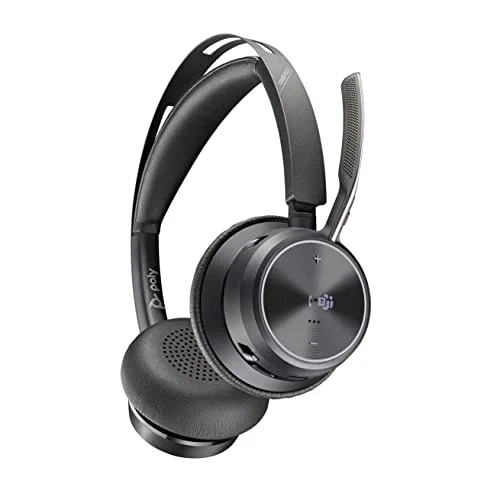
Poly Voyager Focus 2 UC
Pros
- Closed-back cups seal your ears so speaker audio never reaches the mic — this kills acoustic echo before it starts, not after
- Hybrid ANC blocks room noise for you, not just for the people you're calling
- Up to 19-hour battery covers a full day of back-to-back calls without a midday charge
- UC certification for Teams and Zoom means it works correctly without manual audio configuration
Cons
- Full retail price is steep for a single accessory, though it regularly discounts $80-$100 off
- Bluetooth-only unless you buy the USB dongle bundle — no analog wired fallback
- Charging stand is sold separately on the base package
The closed-back design is the reason this solves echo completely rather than partially — the ear cups seal, so the caller’s voice plays only into your ears and never leaks out into the room where your mic could catch it. Hybrid ANC handles the noise the mic still hears from you. At $249, it’s an investment, but for anyone on video calls most of the day, it removes the single most common echo source permanently.
Best for: Remote workers on calls several hours a day who want one purchase that ends the problem. Skip if you’re on occasional calls — the Jabra option below covers the same core fix for less.
Jabra Evolve2 40 SE — Best Budget Headset
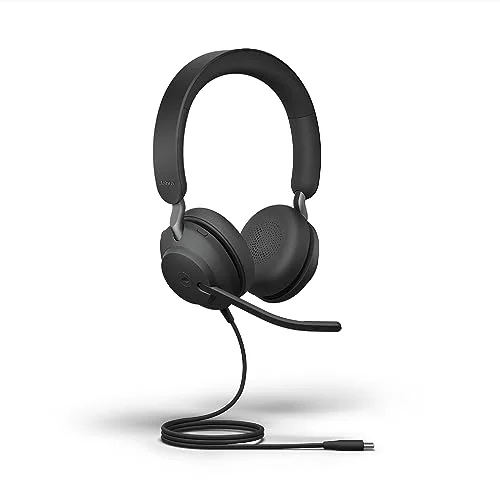
Jabra Evolve2 40 SE
Pros
- Wired connection means no Bluetooth codec switching or dropouts mid-call
- 3-microphone array actively separates your voice from background sound
- Certified for Teams and UC platforms out of the box
- Costs less than half of most premium ANC headsets while still solving the core echo problem
Cons
- No active noise cancellation, only passive isolation from the ear cushions
- Wired-only limits how far you can move from your desk during a call
- Fewer comfort upgrades than Jabra's wireless Evolve2 65/85 line
Same underlying fix — headphones break the feedback loop — at less than half the price. The wired USB-C connection avoids the Bluetooth codec switching that sometimes muddies call audio, and the three-mic array does a reasonable job of separating your voice from typing or background chatter. No active noise cancellation here, just passive isolation from the ear cushions, which is a fair tradeoff at $99.
Best for: Budget-conscious buyers who just need the echo problem solved without extra features. Skip if you also want noise cancellation from ambient room sound.
Fix 2: If You Need Speakers, Use One With Real Echo Cancellation
Some calls don’t work with a headset — a group huddle around one laptop, a room with multiple people dialing into the same meeting. In that case, the fix isn’t avoiding speakers, it’s using a speakerphone built with hardware acoustic echo cancellation (AEC), which digitally subtracts its own speaker output from what the mic picks up before it ever gets sent to the call.
Anker PowerConf S500 — Best Premium Speakerphone
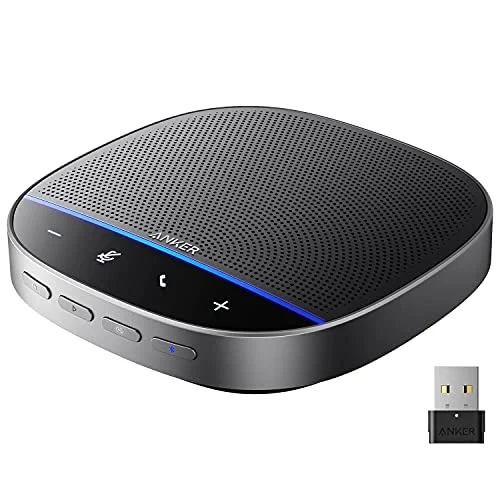
Anker PowerConf S500
Pros
- Hardware AEC cancels the sound its own speaker outputs before the mic can pick it back up — that's the actual fix for echo, not just a reduction
- Six-mic array with a 3-meter pickup radius covers a full desk or small conference table
- Works over USB-C or Bluetooth, so it pairs with a laptop or a phone without extra cables
- 24-hour battery survives a full day of meetings unplugged
Cons
- Costs more than most people expect to pay for a speakerphone
- Bluetooth pairing with multiple saved devices is reported as occasionally glitchy
- Overkill for solo calls — the price only makes sense for group or hosted calls
The six-mic array and hardware AEC are built for exactly this scenario — several people around a desk, one shared speaker, zero echo back to the other side of the call. It’s Zoom Rooms and Google Meet certified, works over USB-C or Bluetooth, and the 24-hour battery means it’s not tethered to an outlet during a long meeting day.
Best for: Small conference rooms, shared desks, or anyone who regularly hosts group calls from a single device. Skip if you’re the only person on the call — a headset solves the same problem for far less.
Anker PowerConf S330 — Best Budget Speakerphone
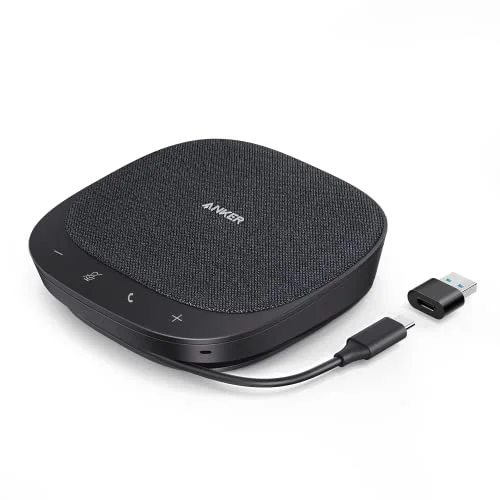
Anker PowerConf S330
Pros
- Real hardware AEC at a fraction of the S500's price — most home offices don't need six mics and Bluetooth
- 4-mic array gives full 360-degree coverage for a solo desk or small huddle
- Plug-and-play USB-C with zero drivers or app setup
- Small and light enough to keep in a laptop bag for hybrid work
Cons
- Wired only — no Bluetooth or standalone battery
- Speaker output is noticeably less powerful than the S500's
- Fixed USB-C cable length restricts how far it can sit from your laptop
The same core fix — real hardware AEC, not just software noise suppression — at a quarter of the S500’s price. It’s wired-only and the speaker output is noticeably less powerful, but for one person who occasionally wants to step away from headphones, that’s not much of a tradeoff. Plug-and-play over USB-C, no app or setup required.
Best for: Solo remote workers who want speaker-based calls without echo, on a budget. Skip if you regularly host multi-person calls — the S500’s range and mic array handle that better.
Fix 3: Pick a Directional Mic and Position It Correctly
If you’re using a desk microphone instead of a headset, two things determine how much room echo it picks up: the mic’s polar pattern and how far it sits from your mouth. A dynamic mic set to cardioid, positioned close, rejects far more room sound than an omnidirectional condenser sitting eighteen inches away.
Shure MV7+ — Best Directional Mic

Shure MV7+
Pros
- Dynamic capsule only picks up what's close and loud — it naturally rejects the room reflections that make condenser mics sound echoey
- Auto Level Mode keeps gain in a safe range automatically, so you're never forced to overboost a mic that then picks up more room sound
- USB-C now, XLR later — the mic doesn't become obsolete if you add an audio interface
- LED touch panel gives instant visual mute confirmation mid-call
Cons
- The most expensive single mic in this guide
- Needs closer mic-to-mouth distance than a condenser to sound its best
- Proprietary-length USB-C cable — buy a spare early if you plan to move the mic around
Dynamic capsules only respond to sound that’s close and loud, which means room reflections — the kind of echo that comes from hard floors and bare walls — mostly don’t register at all. Auto Level Mode keeps your gain steady without you needing to boost it manually, which matters because boosting gain on any mic also boosts the room noise riding along with your voice. It’s the most effective single mic upgrade in this guide for someone dealing with reflection-based echo in an untreated room.
Best for: Untreated rooms, hard floors, and anyone who wants the most forgiving mic on this list. Skip if budget is the priority — the Blue Yeti below is a fraction of the price.
Blue Yeti USB Microphone — Budget Alternative
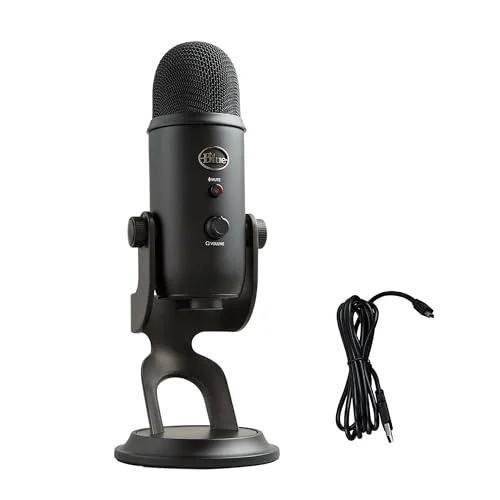
Blue Yeti USB Microphone
Pros
- Four pickup patterns (cardioid, omni, bidirectional, stereo) give more flexibility than any other mic in this guide
- Zero-latency headphone monitoring lets you hear exactly what callers hear, echo included, in real time
- Physical mute button with an LED indicator
- Works without installing drivers on Mac or Windows
Cons
- Condenser capsule is more sensitive to room reflections than a dynamic mic like the Shure MV7+ — set it to cardioid and keep it close, or it reintroduces the echo you're trying to fix
- Large footprint takes up real desk space
- USB-A connector is an aging standard on newer laptops
A genuinely capable mic for $90, but worth a caveat specific to this guide: it’s a condenser, not a dynamic mic, so it’s more sensitive to room reflections than the Shure MV7+ above. Set it to cardioid (not omnidirectional), keep it within eight to ten inches of your mouth, and it performs well. Left in omni mode across the room, it will reintroduce the exact echo problem you’re trying to fix.
Best for: Budget buyers in a reasonably treated room. Skip if your space is echoey and you can’t add foam panels — the dynamic Shure MV7+ is more forgiving.
Neewer NB-35 Microphone Boom Arm — Best Mic Positioning Fix
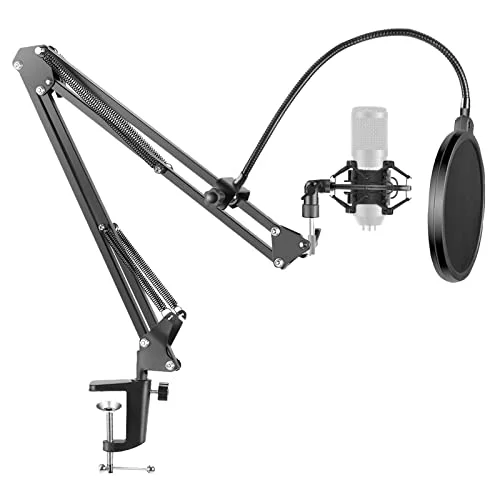
Neewer NB-35 Microphone Boom Arm
Pros
- Positions your mic 4-6 inches from your mouth at a fixed, repeatable distance instead of guessing on a desk stand
- Consistent close positioning means less gain, which means less room echo bleeding into the signal
- Frees up desk space by lifting the mic off the surface entirely
- Fits most USB and XLR mics, including the Shure MV7+ and Blue Yeti, with a universal thread adapter
Cons
- Springs can creak or thump if you bump the desk, unless the mic also sits on its own shock mount
- Rated for about 3.3 lbs, so check your mic's weight before mounting a heavier model
- Requires a desk edge thin enough for the included C-clamp
Positioning fixes more echo problems than people expect. A boom arm holds your mic at a consistent 4-6 inches from your mouth instead of the farther, inconsistent distance most desk stands allow, which means less gain, less room noise, and less reflected echo riding along with your voice. At $20, it’s the cheapest fix in this entire guide and it works with almost any USB or XLR mic via a universal thread adapter.
Best for: Anyone running a desk mic who hasn’t addressed positioning yet — often a bigger issue than the mic itself. Skip if you’re already using a headset, where positioning is fixed by design.
Fix 4: Treat the Room, Not Just the Gear
No mic or headset fixes a room that’s actively working against it. Hard floors, bare walls, and windows all reflect sound directly back at your microphone, layered with your direct voice just enough out of phase to sound like echo or reverb.
JBER Acoustic Foam Panels — Best Room Treatment
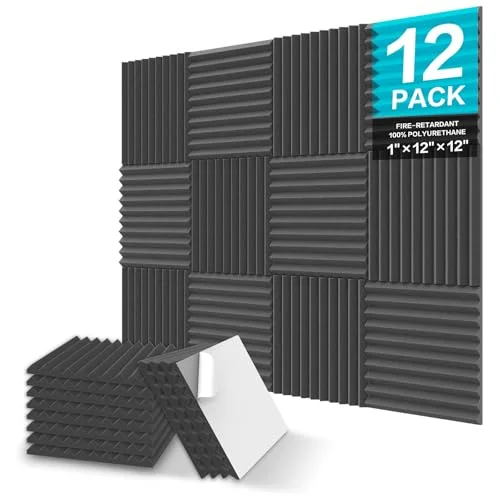
JBER Acoustic Foam Panels (12-Pack)
Pros
- Wedge-cut foam absorbs the mid- and high-frequency reflections off hard walls that cause most room echo
- Self-adhesive backing means no tools or drilling to install
- Fire-resistant foam is a safer choice than a DIY foam-and-glue setup
- One pack behind your desk and beside your monitor covers the two reflection points that matter most for a mic
Cons
- Foam absorbs reflections, not low-frequency rumble like HVAC hum — it won't fix every noise problem
- Adhesive can pull paint or drywall texture off when removed later
- Looks like a home studio, not office decor — mount it behind your camera view if that matters
Twelve self-adhesive foam wedges are enough to treat the two reflection points that matter most for a desk mic: the wall directly behind you and the wall or window beside your monitor. It won’t touch low-frequency noise like HVAC rumble, and it will pull some paint off when removed, but for the mid- and high-frequency reflections that cause most room echo, it’s a $22 fix that outperforms mic upgrades costing several times more.
Best for: Anyone hearing reverb or “stairwell” echo rather than the classic speaker feedback loop. Skip if your room already has carpet, curtains, and soft furniture — you may not need it.
Fix 5: Software and Platform Settings
Once the hardware side is handled, a few software settings close the remaining gap:
Zoom: Settings → Audio → enable “Suppress background noise” at High, and enable “Suppress intermittent background noise.” Zoom’s built-in AI Companion audio processing also includes an echo cancellation toggle under advanced audio settings — leave it on unless you’re using dedicated hardware AEC, in which case running both occasionally over-processes and clips.
Microsoft Teams: Settings → Devices → Noise suppression. Teams applies its speech-trained AI model automatically, and it’s genuinely effective against ambient noise. It does not fix acoustic feedback from speakers — that’s a hardware-only problem, which is the whole point of this guide.
Google Meet: Three-dot menu → Settings → Audio, during a call. Meet reads your system default input, so confirm your external mic or headset is selected as the system default before joining, not just inside the app.
Krisp and third-party tools: These layer on top of any platform and add noise suppression Zoom, Teams, and Meet don’t fully cover — keyboard clicks, HVAC hum, a barking dog. Treat them as a supplement to fixing the acoustic source, not a replacement for it. No software layer fully substitutes for breaking a physical feedback loop.
Step-by-Step: Diagnose Your Echo in Under 5 Minutes
- Ask the other person what they’re hearing. “You’re echoing” (they hear their own voice back) points to acoustic feedback from your speakers. “It sounds like you’re in a hallway” points to room reflections.
- If it’s feedback: Put on headphones. If the echo stops immediately, that confirms it and a headset (Fix 1) or an AEC speakerphone (Fix 2) solves it permanently.
- If it’s room reflections: Move your mic closer to your mouth and switch it to cardioid if it has pattern options. If that improves it substantially, positioning and mic choice (Fix 3) are your main levers.
- If neither fully fixes it: Add room treatment (Fix 4). A single pack of foam panels behind your desk resolves most remaining reflection issues.
- Layer software last. Enable your platform’s built-in noise suppression and, if needed, a tool like Krisp — after the hardware and room fixes, not instead of them.
Buying Guide: What to Prioritize
Start with the feedback loop. If you’re on laptop speakers, switching to any headphones or headset fixes the majority of echo complaints immediately, before you spend money on anything else.
Match the fix to the call type. Solo calls favor a headset. Group calls around one device favor a speakerphone with hardware AEC — software noise suppression alone won’t cancel a real acoustic loop in a shared room.
Dynamic mics forgive bad rooms; condensers don’t. If you can’t treat your room acoustically, a dynamic mic like the Shure MV7+ tolerates hard floors and bare walls far better than a condenser like the Blue Yeti.
Positioning is free or nearly free. Before buying new hardware, move your existing mic closer to your mouth and set it to cardioid if possible. A $20 boom arm often does more for echo than a $200 mic upgrade.
Treat the room once you’ve covered the gear. Foam panels are cheap and solve the reflection problem that no amount of mic quality can talk its way around.
FAQ
Why does my caller hear me but I don’t hear an echo myself? Because the loop happens on your end — your speakers play their audio, your mic picks it back up, and it’s sent back to them. You won’t hear it on your own screen; only the other person does. Ask directly if you’re unsure you’re the source.
Does turning down my speaker volume fix echo? It reduces it but doesn’t eliminate it, because your mic can still pick up quieter speaker audio if it’s close enough or sensitive enough. Headphones remove the loop entirely instead of just weakening it.
Will noise-cancelling headphones without a mic help with echo? No — echo cancellation is about your microphone, not your ears. Regular headphones do stop the feedback loop from your speakers, but you’ll still need a decent built-in or external mic for callers to hear you clearly.
Is a $20 boom arm really as useful as it sounds for echo? For reflection-based echo specifically, yes. Distance from the mic to your mouth directly affects how much gain you need, and gain amplifies everything the mic hears, including room reflections. Positioning is one of the most overlooked and cheapest fixes available.
Can I use both a speakerphone with AEC and a separate microphone? You can, but it usually isn’t necessary — modern AEC speakerphones like the Anker PowerConf S500 include both the speaker and a capable mic array in one unit. Adding a second standalone mic is only worth it if you need broadcast-quality audio for content beyond calls.
Conclusion
Most video call echo comes down to one of two fixable problems: your mic hearing your own speakers, or your mic hearing your room. For the first, nothing beats switching to a headset — the Poly Voyager Focus 2 UC if you’re on calls most of the day, the Jabra Evolve2 40 SE if budget matters more. For group calls that need speakers, the Anker PowerConf S500 and its budget sibling the Anker PowerConf S330 both use real hardware echo cancellation instead of hoping software catches up. And if the room itself is the problem, a $20 boom arm and a $22 pack of foam panels solve more than most people expect before they ever need to buy a new mic.
Detailed Reviews
Poly Voyager Focus 2 UC
Pros
- Closed-back cups seal your ears so speaker audio never reaches the mic — this kills acoustic echo before it starts, not after
- Hybrid ANC blocks room noise for you, not just for the people you're calling
- Up to 19-hour battery covers a full day of back-to-back calls without a midday charge
- UC certification for Teams and Zoom means it works correctly without manual audio configuration
Cons
- Full retail price is steep for a single accessory, though it regularly discounts $80-$100 off
- Bluetooth-only unless you buy the USB dongle bundle — no analog wired fallback
- Charging stand is sold separately on the base package
Anker PowerConf S500
Pros
- Hardware AEC cancels the sound its own speaker outputs before the mic can pick it back up — that's the actual fix for echo, not just a reduction
- Six-mic array with a 3-meter pickup radius covers a full desk or small conference table
- Works over USB-C or Bluetooth, so it pairs with a laptop or a phone without extra cables
- 24-hour battery survives a full day of meetings unplugged
Cons
- Costs more than most people expect to pay for a speakerphone
- Bluetooth pairing with multiple saved devices is reported as occasionally glitchy
- Overkill for solo calls — the price only makes sense for group or hosted calls
Shure MV7+
Pros
- Dynamic capsule only picks up what's close and loud — it naturally rejects the room reflections that make condenser mics sound echoey
- Auto Level Mode keeps gain in a safe range automatically, so you're never forced to overboost a mic that then picks up more room sound
- USB-C now, XLR later — the mic doesn't become obsolete if you add an audio interface
- LED touch panel gives instant visual mute confirmation mid-call
Cons
- The most expensive single mic in this guide
- Needs closer mic-to-mouth distance than a condenser to sound its best
- Proprietary-length USB-C cable — buy a spare early if you plan to move the mic around
Jabra Evolve2 40 SE
Pros
- Wired connection means no Bluetooth codec switching or dropouts mid-call
- 3-microphone array actively separates your voice from background sound
- Certified for Teams and UC platforms out of the box
- Costs less than half of most premium ANC headsets while still solving the core echo problem
Cons
- No active noise cancellation, only passive isolation from the ear cushions
- Wired-only limits how far you can move from your desk during a call
- Fewer comfort upgrades than Jabra's wireless Evolve2 65/85 line
Anker PowerConf S330
Pros
- Real hardware AEC at a fraction of the S500's price — most home offices don't need six mics and Bluetooth
- 4-mic array gives full 360-degree coverage for a solo desk or small huddle
- Plug-and-play USB-C with zero drivers or app setup
- Small and light enough to keep in a laptop bag for hybrid work
Cons
- Wired only — no Bluetooth or standalone battery
- Speaker output is noticeably less powerful than the S500's
- Fixed USB-C cable length restricts how far it can sit from your laptop
Blue Yeti USB Microphone
Pros
- Four pickup patterns (cardioid, omni, bidirectional, stereo) give more flexibility than any other mic in this guide
- Zero-latency headphone monitoring lets you hear exactly what callers hear, echo included, in real time
- Physical mute button with an LED indicator
- Works without installing drivers on Mac or Windows
Cons
- Condenser capsule is more sensitive to room reflections than a dynamic mic like the Shure MV7+ — set it to cardioid and keep it close, or it reintroduces the echo you're trying to fix
- Large footprint takes up real desk space
- USB-A connector is an aging standard on newer laptops
Neewer NB-35 Microphone Boom Arm
Pros
- Positions your mic 4-6 inches from your mouth at a fixed, repeatable distance instead of guessing on a desk stand
- Consistent close positioning means less gain, which means less room echo bleeding into the signal
- Frees up desk space by lifting the mic off the surface entirely
- Fits most USB and XLR mics, including the Shure MV7+ and Blue Yeti, with a universal thread adapter
Cons
- Springs can creak or thump if you bump the desk, unless the mic also sits on its own shock mount
- Rated for about 3.3 lbs, so check your mic's weight before mounting a heavier model
- Requires a desk edge thin enough for the included C-clamp
JBER Acoustic Foam Panels (12-Pack)
Pros
- Wedge-cut foam absorbs the mid- and high-frequency reflections off hard walls that cause most room echo
- Self-adhesive backing means no tools or drilling to install
- Fire-resistant foam is a safer choice than a DIY foam-and-glue setup
- One pack behind your desk and beside your monitor covers the two reflection points that matter most for a mic
Cons
- Foam absorbs reflections, not low-frequency rumble like HVAC hum — it won't fix every noise problem
- Adhesive can pull paint or drywall texture off when removed later
- Looks like a home studio, not office decor — mount it behind your camera view if that matters