Affiliate disclosure: SetupRanked earns a commission from qualifying Amazon purchases at no extra cost to you.
The dead zone problem is still very much alive in 2026. TP-Link’s new RE655BE, the first mainstream WiFi 7 extender, launched earlier this year and confirmed that most homes still need a range extension solution — even with newer routers. If you’re renting, can’t rewire, or simply don’t want to spend $400-$600 on a full mesh system, a WiFi 6 extender drops into your existing network for $60-$110 and fixes the problem without touching your router.
The difference between a good extender and a frustrating one comes down to three factors: whether you run it in access point mode or repeater mode, where you place it relative to the dead zone, and whether it integrates with your existing router’s ecosystem. A $90 extender in the right position, using wired backhaul, outperforms a $250 mesh node in the wrong spot running wirelessly. This guide covers all three factors in the buying section below.
These five picks cover the current WiFi 6 extender market from $59 budget options to $109 AX3000 performers. Every unit here ships with a Gigabit LAN port, supports access point mode, and is available on Amazon with in-stock availability confirmed as of July 2026.
Comparison
| Spec | TP-Link AX3000 WiFi 6 Extender (RE715X) | Netgear EAX20 WiFi 6 Mesh Extender | TP-Link AX1800 WiFi 6 Extender (RE605X) | TP-Link AX3000 WiFi 6 Extender (RE700X) | ASUS RP-AX58 AX3000 WiFi 6 Extender |
|---|---|---|---|---|---|
| Rating | 9.2/10 | 8.8/10 | 8.5/10 | 8.7/10 | 8.6/10 |
| Price | $71.49-$109.99as of Oct 18, 2026 | $62.90-$149.99as of Oct 18, 2026 | $39.99-$92.95as of Oct 18, 2026 | $64.38-$87.90as of Oct 18, 2026 | $54.99-$70.88as of Oct 18, 2026 |
| WiFi Standard | WiFi 6 (802.11ax) | WiFi 6 (802.11ax) | WiFi 6 (802.11ax) | WiFi 6 (802.11ax) | WiFi 6 (802.11ax) |
| Dual-Band Speed | AX3000 (574 + 2402 Mbps) | AX1800 (600 + 1200 Mbps) | AX1800 (574 + 1201 Mbps) | AX3000 (574 + 2402 Mbps) | AX3000 (574 + 2402 Mbps) |
| Coverage | Up to 2,400 sq. ft. | Up to 1,500 sq. ft. | Up to 1,500 sq. ft. | Up to 2,000 sq. ft. | Up to 2,200 sq. ft. |
| Device Capacity | 64 devices | 20+ devices | 30 devices | 64 devices | 40 devices |
| LAN Port | 1× Gigabit Ethernet | — | 1× Gigabit Ethernet | 1× Gigabit Ethernet | 1× Gigabit Ethernet |
| Mesh Compatibility | OneMesh, EasyMesh | — | OneMesh | OneMesh | AiMesh |
| WiFi 6 Features | OFDMA, MU-MIMO, Beamforming | — | OFDMA, Beamforming | OFDMA, MU-MIMO, Beamforming | — |
| Form Factor | Wall-plug with antennas | Desktop (AC adapter) | Wall-plug | Wall-plug, no external antennas | — |
| LAN Ports | — | 4× Gigabit Ethernet | — | — | — |
| Processor | — | 1.5 GHz dual-core | — | — | — |
| Smart Roaming | — | Yes | — | — | — |
| 5 GHz Channel Width | — | — | — | — | 160MHz capable |
| Dimensions | — | — | — | — | 5.9 × 2.8 × 3.4 in. |
| Check Price → | Check Price → | Check Price → | Check Price → | Check Price → |
Prices change daily — tap Check Price for the current Amazon price.
The Picks
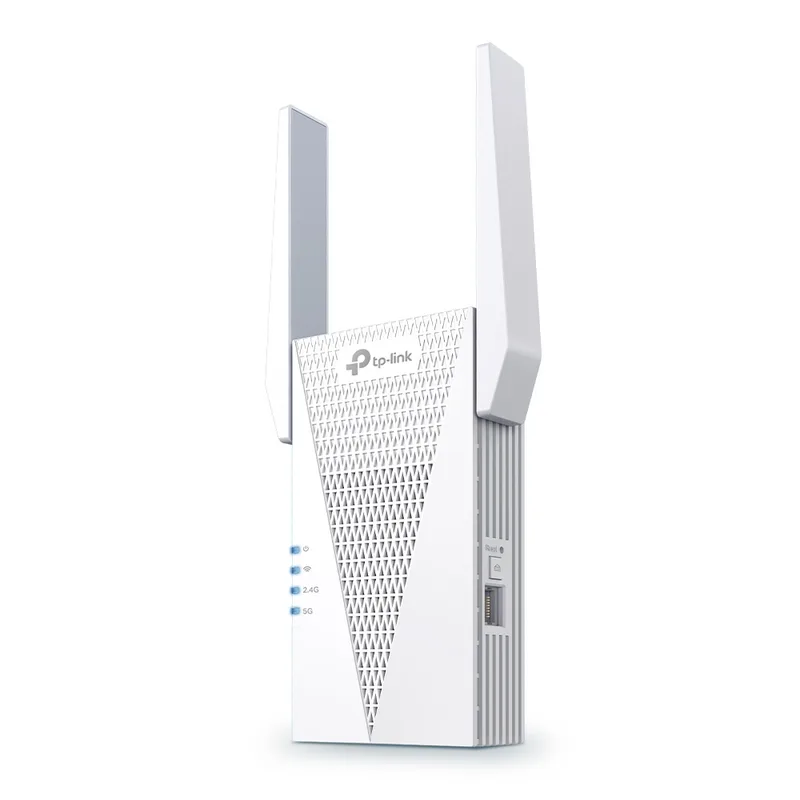
TP-Link AX3000 WiFi 6 Extender (RE715X)
Pros
- AX3000 speeds with 2,400 sq. ft. coverage outperform AX1800 competitors for large floorplans — signal reaches attached garages, detached home offices, and multi-story dead zones that lower-tier extenders consistently miss
- EasyMesh compatibility integrates with any router that supports the Wi-Fi Alliance's EasyMesh standard, not just TP-Link hardware — useful for Netgear or ASUS router owners who want unified network management
- OFDMA and MU-MIMO reduce congestion when multiple devices are active simultaneously — video calls, file uploads, and smart devices share bandwidth without one activity starving the others
- Gigabit LAN port enables wired backhaul or access point mode — run Ethernet from your router to this unit and remove the throughput penalty that wireless repeater mode imposes
- PCMag Editor's Choice recognition confirms real-world performance holds in actual homes rather than only under ideal lab conditions
Cons
- Wireless repeater mode cuts available bandwidth roughly in half for the extended zone — a 400 Mbps connection at the router drops to around 200 Mbps at the extender without a wired backhaul cable
- External antennas require a wall outlet placement that does not block adjacent outlets — less flexible than compact plug-in units with no protruding parts
- No 6 GHz band — WiFi 7 and tri-band mesh systems route backhaul on a dedicated 6 GHz channel that this unit cannot access
The RE715X earns the top spot because it covers more ground — 2,400 sq. ft. — than any other WiFi 6 extender in this price range, while still fitting into a wall outlet. The AX3000 rating translates to 2,402 Mbps on 5 GHz and 574 Mbps on 2.4 GHz. In practical terms, the extended 5 GHz signal delivers 150-250 Mbps of usable throughput for devices in the dead zone when running wirelessly. That’s enough for simultaneous 4K streams, video calls, and file uploads without bottlenecking any single task.
The EasyMesh certification is the detail that sets this apart from TP-Link-specific OneMesh. EasyMesh is a Wi-Fi Alliance standard supported by multiple router brands — Netgear, ASUS, and some ISP routers. If your router is EasyMesh-capable, the RE715X can integrate as a mesh node rather than a separate network, giving you seamless roaming with no SSID switching. If your router doesn’t support EasyMesh, it still functions as a standard repeater with manual SSID management.
Access point mode with a wired Ethernet run from the router eliminates the half-speed penalty of wireless repeating. If you can run a single Ethernet cable from your router to the location closest to the dead zone, the RE715X becomes a full access point delivering close to full router speeds in that location.
Buy this if: You have a large home, want the broadest router compatibility, or can run an Ethernet cable for access point mode.
Skip this if: You’re covering a small apartment dead zone and the RE605X at $59-79 covers the distance.
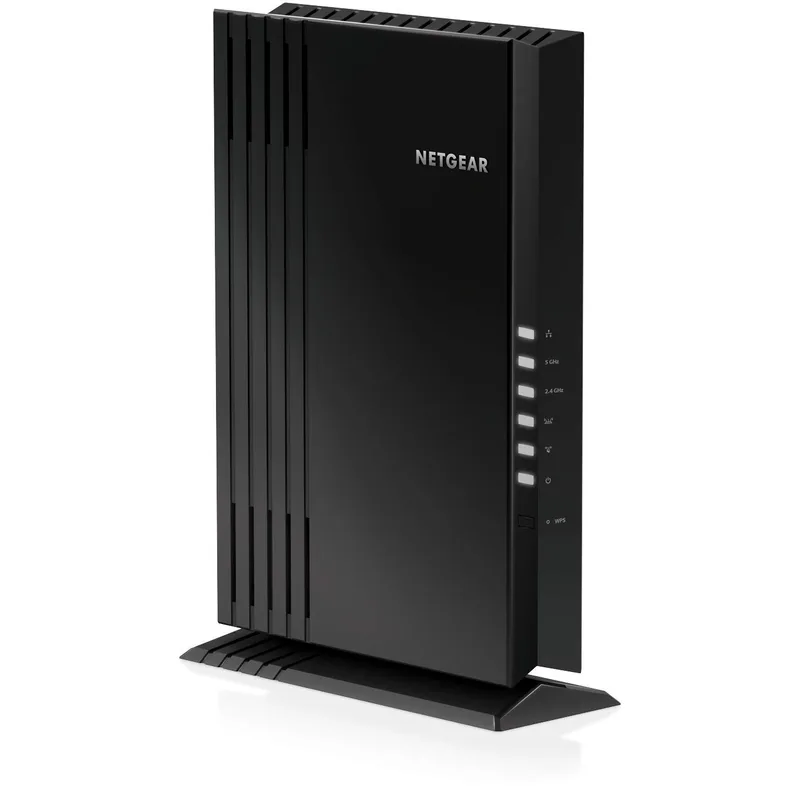
Netgear EAX20 WiFi 6 Mesh Extender
Pros
- Four Gigabit LAN ports function as a built-in switch — a home office with a desktop PC, NAS drive, smart TV, and Ethernet-only device can all run wired connections without buying a separate switch
- Desktop form factor positions the unit on a shelf or desk rather than in a wall outlet — no outlet conflicts, easier to place in the optimal signal location within the room
- 1.5 GHz dual-core processor delivers consistent throughput: independent benchmarks confirm 398 Mbps on wireless and 609 Mbps wired at short range, faster than most single-core competitors
- Smart Roaming handles device handoff when a phone or laptop moves between router and extender zones — connections stay active without requiring manual network switching
- WiFi 6 AX1800 with 4 streams handles 20+ simultaneous devices reliably; the dual-core processor maintains consistent speeds under concurrent load
Cons
- Requires its own outlet and power adapter — the desktop form factor does not plug directly into the wall like compact units, adding a cable to manage
- AX1800 speed ceiling is lower than AX3000 options in this roundup — homes exceeding 1,500 sq. ft. or with heavy multi-device loads will benefit from the RE715X or RE700X
- Larger physical footprint than wall-plug units — requires a flat surface for placement and adds cable management compared to devices that disappear into an outlet
The EAX20 is the only extender in this roundup with four Gigabit LAN ports, which changes the use case entirely. Instead of placing it at a wall outlet and connecting one wired device, you can set it on a desk in the dead zone and wire up a full workstation: desktop PC, NAS drive, smart TV, and a VoIP phone — all connected wired, with the extender handling the wireless hop back to the router. For a home office that runs several wired devices but can’t reach the router with Ethernet, this is more useful than a unit with a single LAN port.
The desktop form factor has a secondary advantage: placement flexibility. Wall-plug extenders are constrained to outlet locations, which aren’t always the ideal signal position. The EAX20 sits on a shelf, desk, or entertainment console wherever the signal is strongest — then cables run from it to the devices that need wired connections.
The 1.5 GHz dual-core processor is meaningfully faster than the single-core chips in budget extenders. Benchmark data from network hardware review sites shows 398 Mbps wirelessly and 609 Mbps wired at short range — performance that holds under concurrent load rather than dropping as more devices connect.
The AX1800 ceiling is the trade-off. At 1,500 sq. ft. coverage maximum, this handles most apartments and mid-sized homes, but falls short of the 2,000-2,400 sq. ft. the AX3000 units reach. If your dead zone is far from the router, position matters more than specs — the EAX20 needs to be within the router’s usable range to work well.
Buy this if: You need multiple wired connections in the dead zone, or prefer desktop placement over wall outlets.
Skip this if: Your dead zone is more than 50 feet from the nearest outlet where you’d place the extender.
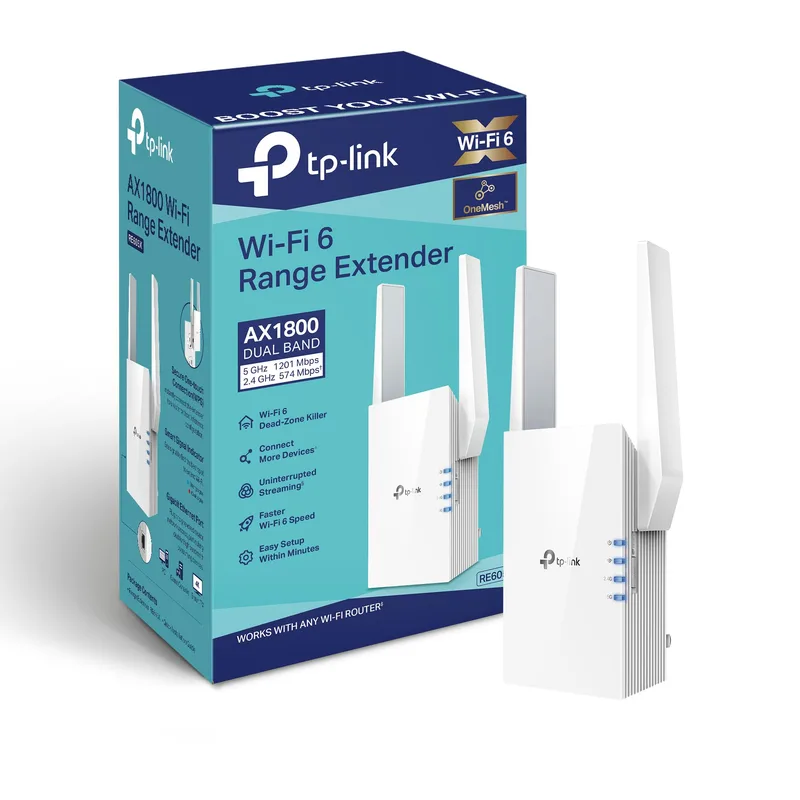
TP-Link AX1800 WiFi 6 Extender (RE605X)
Pros
- WiFi 6 AX1800 at $59-79 is the clearest value in this roundup — the step up from WiFi 5 AC1200 extenders costs roughly $20-30 more but delivers measurably better performance in congested environments
- OneMesh integration with TP-Link routers creates a unified single-SSID network with automatic device handoff — no more manually switching networks when moving between rooms
- 30-device capacity covers the typical home office count: laptop, phone, tablet, smart TV, smart speakers, IoT sensors, and wired devices through the Gigabit LAN port
- Wall-plug form factor minimizes footprint — plugs directly into any outlet and positions antennas for signal distribution without requiring a flat surface or power adapter
- Access point mode allows full wired installation — connect via Ethernet from the router to eliminate the wireless repeater bandwidth penalty entirely
Cons
- AX1800 speed limits headroom in high-bandwidth scenarios — 4K streaming, large file transfers, and multiple simultaneous video calls can approach the extended band ceiling faster than AX3000 options
- Single Gigabit LAN port restricts wired connections — a home office with multiple wired devices needs a downstream Ethernet switch
- OneMesh is TP-Link router-specific — Netgear, ASUS, and ISP router users get repeater mode only, without the unified network integration OneMesh provides
The RE605X occupies the most logical value position in the WiFi 6 extender market: AX1800 performance at $59-79, with the same Gigabit LAN port and OneMesh compatibility found in more expensive TP-Link units. If your dead zone is in a medium-sized home and you’re upgrading from a WiFi 5 AC1200 extender or no extender at all, the performance improvement is significant enough to justify the cost without jumping to AX3000 pricing.
WiFi 6’s OFDMA technology is particularly relevant in home office environments where multiple devices transmit simultaneously. OFDMA divides each channel into sub-channels, allowing the extender to serve multiple devices in the same transmission rather than switching between them sequentially. In practical terms, this means a video call, a file backup, and a streaming device coexist more reliably than on WiFi 5 hardware.
For TP-Link router owners, OneMesh integration removes the most frustrating aspect of traditional extenders: the separate network SSID. Instead of your phone connecting to “HomeNetwork-EXT” when in the bedroom and “HomeNetwork” in the living room — and then losing connection during the transition — OneMesh presents a single SSID and handles device handoff invisibly.
The single LAN port is the main limitation. If you need wired connections for multiple devices in the dead zone, a downstream switch costs $15-25 and solves the problem. If you need wired connections for four or more devices and want to avoid that extra hardware, the Netgear EAX20’s built-in four-port switch is the cleaner solution.
Buy this if: You have a TP-Link router and want unified OneMesh coverage, or need reliable WiFi 6 coverage for a medium-sized home on a budget.
Skip this if: You need multiple wired connections in the extended zone, or your home exceeds 1,500 sq. ft. of dead space.
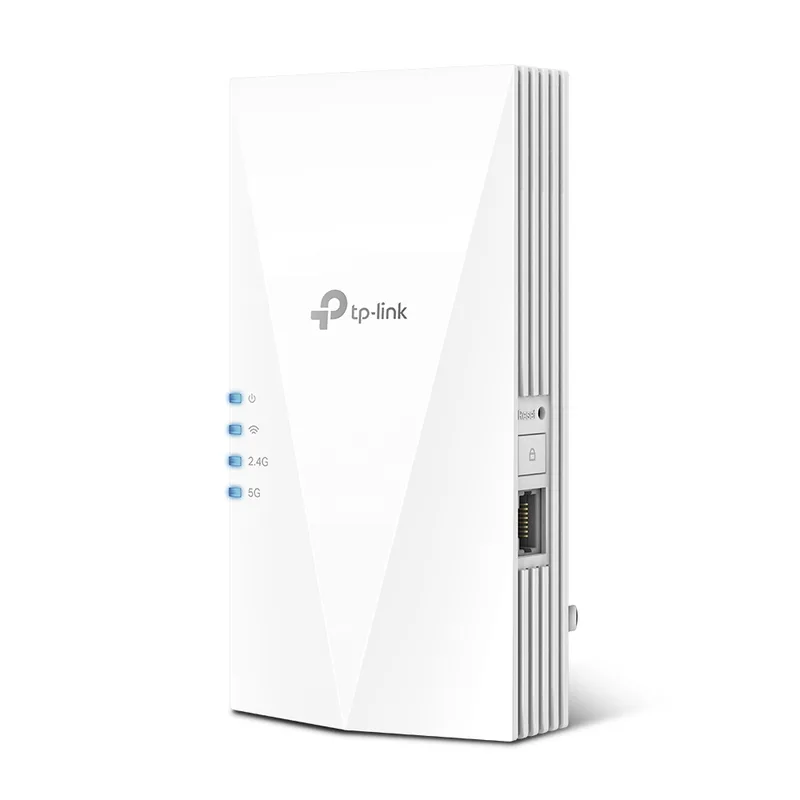
TP-Link AX3000 WiFi 6 Extender (RE700X)
Pros
- AX3000 speeds in a compact wall-plug body with no external antennas — fits flush into any outlet without protruding awkwardly or blocking adjacent plugs
- 2,000 sq. ft. coverage reaches outer corners of most single-family homes from a central placement — enough range for the majority of home office dead zone scenarios
- OFDMA and MU-MIMO handle 64 simultaneous devices without throughput collapse — more headroom than the EAX20 or RE605X for dense device environments
- OneMesh with TP-Link routers provides unified single-SSID coverage and automatic device handoff between router and extender zones
- Gigabit LAN port adds wired device or access point capability — connect a desktop PC directly for speeds that bypass the wireless repeater penalty
Cons
- Internal antenna design trades raw range for compact size — the RE715X covers 2,400 sq. ft. versus 2,000 sq. ft. here; the 400 sq. ft. gap matters for larger homes
- OneMesh requires a TP-Link router — Netgear, ASUS, and other router brands get repeater mode without unified network integration
- Single LAN port — homes with multiple wired devices need a downstream Ethernet switch, same limitation as the RE605X
The RE700X makes the case that external antennas are optional at AX3000 performance levels. The compact body — no protruding antennas, no blocked adjacent outlet — fits into any wall position without the outlet-blocking issue that affects the RE715X. Coverage reaches 2,000 sq. ft., which is enough for all but the largest single-family homes without requiring precise antenna aiming.
The specs are nearly identical to the RE715X: AX3000 dual-band, OFDMA, MU-MIMO, Beamforming, 64-device capacity, and a Gigabit LAN port. The practical difference is 400 sq. ft. of coverage range and the absence of adjustable external antennas. For homes under 2,000 sq. ft., the RE700X often makes more sense than the RE715X — lower profile, similar performance, and a smaller footprint at the outlet.
The OneMesh limitation applies here as well: TP-Link router users get seamless roaming and unified SSID, while Netgear and ASUS users run standard repeater mode with a separate network name. This is a consistent trade-off across TP-Link’s lineup that only the EasyMesh-capable RE715X partially addresses.
For home offices where the wall outlet position is tight — near furniture, behind a desk, in a hallway with a crowded outlet strip — the RE700X’s compact form factor removes the positioning headaches that the RE715X’s external antennas create.
Buy this if: You have a TP-Link router and want AX3000 coverage in a compact form without external antennas.
Skip this if: Your dead zone exceeds 2,000 sq. ft. from the nearest placement point, or you don’t have a TP-Link router.
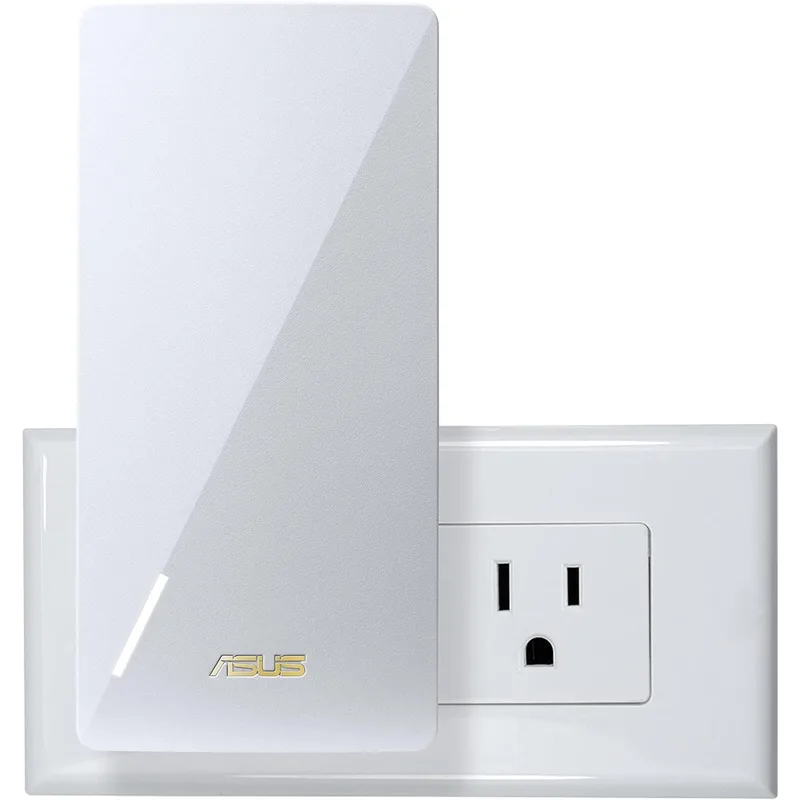
ASUS RP-AX58 AX3000 WiFi 6 Extender
Pros
- AiMesh integration turns this into a genuine mesh node with an ASUS AiMesh router — device handoff, unified SSID, and centralized app management rather than the disjointed experience of a standard repeater
- Works with any router in extender mode — ASUS users get full mesh integration; non-ASUS users still get AX3000 WiFi 6 coverage without replacing their existing router
- 160MHz channel width on the 5 GHz band doubles throughput versus 80MHz operation — relevant for newer laptops and phones that support 160MHz channels on WiFi 6
- 2,200 sq. ft. coverage at AX3000 speeds covers most large apartments and medium-sized homes from a single unit — comparable range to the RE715X at a similar price
- Compact wall-plug design with a Gigabit LAN port matches the convenience of TP-Link units while integrating into the ASUS ecosystem when paired with compatible routers
Cons
- Full AiMesh integration requires an ASUS router — non-ASUS users miss seamless roaming, unified SSID management, and centralized app control
- Fixed non-removable antennas cannot be aimed toward a specific dead zone the way the RE715X's external antennas can be manually directed
- AiMesh pairing occasionally requires a router firmware update before the extender connects correctly — an extra troubleshooting step that non-technical users may find frustrating
The ASUS RP-AX58 is the pick for ASUS router owners who want more than standard repeater functionality. When paired with an ASUS AiMesh-capable router, this unit joins the network as a mesh node: single SSID, automatic device handoff, centralized management through the ASUS app, and aggregated network statistics. The difference between a mesh node and a repeater isn’t subtle — a mesh node eliminates the SSID switching, signal handoff delays, and separate network management that make traditional extenders frustrating over time.
For non-ASUS router owners, the RP-AX58 works as a standard AX3000 WiFi 6 extender. Coverage reaches 2,200 sq. ft., the 5 GHz band supports 160MHz channel width for additional throughput with compatible client devices, and the Gigabit LAN port enables wired device connections or access point operation. These specs are competitive with the RE715X and RE700X at a similar price point.
The 160MHz channel width is worth highlighting for home office use. Laptops and phones released since 2022 commonly support 160MHz channels on WiFi 6, which doubles throughput versus the 80MHz operation that most extenders use by default. On a 160MHz channel, a WiFi 6 client connecting to the RP-AX58 can achieve closer to 1,000-1,200 Mbps theoretical throughput versus 400-600 Mbps on 80MHz — useful for large file transfers and 4K video streaming over the extended network.
Buy this if: You have an ASUS AiMesh router and want to add a proper mesh node rather than a bolt-on extender.
Skip this if: You have a non-ASUS router and don’t need AiMesh — the RE715X’s EasyMesh compatibility gives broader router integration at the same price.
Buying Guide: What Actually Matters for a Home Office
Access Point Mode vs. Repeater Mode
This is the single most important decision. Repeater mode — what most extenders use by default — wirelessly relays the router signal, which cuts available throughput roughly in half. An 800 Mbps connection at the router becomes ~350-400 Mbps at the extender. For video calls and document work, this is fine. For large file transfers, remote desktop connections with latency sensitivity, or households with many simultaneous users, the half-speed penalty accumulates.
Access point mode eliminates the penalty by replacing the wireless link with a wired Ethernet cable between the router and extender. The extender becomes a wired node that broadcasts its own WiFi signal at full router speeds. If your home has existing Ethernet runs in the walls, or if you can run a single cable through a doorway or along a baseboard, access point mode is always worth the effort. Every extender in this roundup supports it.
Placement Strategy
The most common extender mistake is placing the unit at the edge of the dead zone — where the router signal is already weak. At that position, the extender receives a poor input signal and amplifies it poorly.
The correct position is halfway between the router and the dead zone, where the extender still receives a strong router signal (-60 dBm or better). The extender then rebroadcasts a fresh, strong signal into the previously weak area. Most smartphone WiFi analyzer apps (NetSpot, WiFi Analyzer) display signal strength in dBm and help identify the right placement point.
For multi-story homes, extenders placed on the middle floor consistently outperform units placed in the basement or top floor. The signal propagates vertically through floors better from a central position.
Backhaul Bands and Dedicated Wireless Backhaul
Entry-level dual-band extenders share the same radio for both the router uplink (backhaul) and the device connections (fronthaul). When the extender is actively serving devices, it splits available bandwidth between both functions — another source of throughput reduction in addition to the half-speed repeater penalty.
Higher-end tri-band extenders use a dedicated radio for backhaul, which isolates device connections from the router communication. None of the five picks here are tri-band — at $60-110, tri-band units typically start at $150-200. If bandwidth reduction in the extended zone is a critical concern, the access point mode wired backhaul approach is more cost-effective than buying a tri-band extender.
App Management and Network Integration
TP-Link’s Tether app manages all five TP-Link units in this roundup consistently. ASUS’s app handles the RP-AX58. Netgear’s Nighthawk app or Orbi app manages the EAX20 depending on your router ecosystem.
The key metric is whether the extender creates a single unified SSID or a separate network. OneMesh (TP-Link routers) and AiMesh (ASUS routers) create unified networks. EasyMesh achieves this across brands when both router and extender support the standard. Standard repeater mode always creates a separate network — “YourNetwork-EXT” — requiring manual device management.
For home office use, unified SSID matters more than it sounds. A laptop that automatically reconnects to the strongest access point without user intervention is meaningfully less disruptive during calls and presentations than one that requires manual network selection when changing rooms.
Extender vs. Mesh System
WiFi extenders are the right choice for:
- Renters who cannot run Ethernet or install hardware
- Homes with a single dead zone rather than whole-home coverage gaps
- Anyone who wants a sub-$100 fix without replacing a router that otherwise works well
A mesh system makes more sense when:
- More than 30-40% of your home’s area has weak signal
- You need coverage for outdoor areas or a detached structure
- You’re already planning to replace an aging router
The extenders in this roundup won’t outperform a purpose-built mesh system in seamless roaming or backhaul efficiency. They cost $60-110 instead of $200-600, require no router replacement, and take 10 minutes to set up.
FAQ
Do WiFi extenders slow down internet speed?
In repeater mode, yes — typically by 30-50% for devices connected to the extended network, because the extender uses the same radio to communicate with the router and with your devices simultaneously. Access point mode eliminates this penalty by using a wired Ethernet connection as the backhaul. All five extenders in this roundup support access point mode through a Gigabit LAN port.
How far from the router should I place a WiFi extender?
Place it where your router signal measures -60 dBm or stronger — roughly halfway between the router and the dead zone, while still within reliable router signal range. Most smartphone WiFi analyzer apps show signal strength in real time as you walk through the house. Avoid placing the extender where your phone already shows weak signal; that’s too far from the router for reliable extension.
Can a WiFi extender work with any router?
Every extender in this roundup works with any WiFi router in standard repeater mode. Mesh integration features are router-specific: OneMesh requires a TP-Link router, AiMesh requires an ASUS router, and EasyMesh (supported by the RE715X) works with any EasyMesh-certified router. Check your router’s specification sheet for EasyMesh support before purchasing if unified SSID is a priority.
What is the difference between a WiFi extender and a mesh system?
A WiFi extender connects to your existing router and rebroadcasts its signal into a weak area. A mesh system replaces your router with a set of coordinated nodes that share a common network backbone and hand off devices seamlessly as they move through the home. Mesh systems provide better seamless roaming, consistent backhaul performance, and centralized management. Extenders cost less, require no router replacement, and take minutes to set up — the right choice for a single dead zone fix.
Is WiFi 6 worth it for a home office extender in 2026?
Yes. WiFi 6 (802.11ax) improves performance over WiFi 5 in specific ways that matter for home office use: OFDMA handles multiple simultaneous device transmissions more efficiently, reducing congestion when video calls, backups, and streaming all run at once. MU-MIMO serves multiple devices concurrently rather than sequentially. Target Wake Time reduces battery drain on smartphones and IoT devices. The cost premium over WiFi 5 AC1200 extenders has shrunk to $20-30 in 2026, making the upgrade straightforward at any of the price points in this roundup.
Conclusion
The TP-Link RE715X is the pick for most home offices: AX3000 coverage at 2,400 sq. ft., PCMag Editor’s Choice validation, EasyMesh compatibility for broader router integration, and access point mode for wired backhaul. At $89-109, it solves the dead zone problem without requiring a router replacement or a mesh system investment.
For ASUS router owners, the RP-AX58 adds AiMesh integration for genuine mesh node behavior at $79-99. For home offices with multiple wired devices in the dead zone, the Netgear EAX20’s four-port built-in switch eliminates the need for a downstream Ethernet switch. For smaller apartments or budgets under $80, the RE605X delivers reliable WiFi 6 coverage at the lowest price in the roundup.
Regardless of which unit you choose, place it in the strongest signal location you can reach — halfway between the router and the dead zone, at -60 dBm or better — and use access point mode with a wired Ethernet run if at all possible. The hardware choice matters less than the placement and mode.
Detailed Reviews
TP-Link AX3000 WiFi 6 Extender (RE715X)
Pros
- AX3000 speeds with 2,400 sq. ft. coverage outperform AX1800 competitors for large floorplans — signal reaches attached garages, detached home offices, and multi-story dead zones that lower-tier extenders consistently miss
- EasyMesh compatibility integrates with any router that supports the Wi-Fi Alliance's EasyMesh standard, not just TP-Link hardware — useful for Netgear or ASUS router owners who want unified network management
- OFDMA and MU-MIMO reduce congestion when multiple devices are active simultaneously — video calls, file uploads, and smart devices share bandwidth without one activity starving the others
- Gigabit LAN port enables wired backhaul or access point mode — run Ethernet from your router to this unit and remove the throughput penalty that wireless repeater mode imposes
- PCMag Editor's Choice recognition confirms real-world performance holds in actual homes rather than only under ideal lab conditions
Cons
- Wireless repeater mode cuts available bandwidth roughly in half for the extended zone — a 400 Mbps connection at the router drops to around 200 Mbps at the extender without a wired backhaul cable
- External antennas require a wall outlet placement that does not block adjacent outlets — less flexible than compact plug-in units with no protruding parts
- No 6 GHz band — WiFi 7 and tri-band mesh systems route backhaul on a dedicated 6 GHz channel that this unit cannot access
Netgear EAX20 WiFi 6 Mesh Extender
Pros
- Four Gigabit LAN ports function as a built-in switch — a home office with a desktop PC, NAS drive, smart TV, and Ethernet-only device can all run wired connections without buying a separate switch
- Desktop form factor positions the unit on a shelf or desk rather than in a wall outlet — no outlet conflicts, easier to place in the optimal signal location within the room
- 1.5 GHz dual-core processor delivers consistent throughput: independent benchmarks confirm 398 Mbps on wireless and 609 Mbps wired at short range, faster than most single-core competitors
- Smart Roaming handles device handoff when a phone or laptop moves between router and extender zones — connections stay active without requiring manual network switching
- WiFi 6 AX1800 with 4 streams handles 20+ simultaneous devices reliably; the dual-core processor maintains consistent speeds under concurrent load
Cons
- Requires its own outlet and power adapter — the desktop form factor does not plug directly into the wall like compact units, adding a cable to manage
- AX1800 speed ceiling is lower than AX3000 options in this roundup — homes exceeding 1,500 sq. ft. or with heavy multi-device loads will benefit from the RE715X or RE700X
- Larger physical footprint than wall-plug units — requires a flat surface for placement and adds cable management compared to devices that disappear into an outlet
TP-Link AX1800 WiFi 6 Extender (RE605X)
Pros
- WiFi 6 AX1800 at $59-79 is the clearest value in this roundup — the step up from WiFi 5 AC1200 extenders costs roughly $20-30 more but delivers measurably better performance in congested environments
- OneMesh integration with TP-Link routers creates a unified single-SSID network with automatic device handoff — no more manually switching networks when moving between rooms
- 30-device capacity covers the typical home office count: laptop, phone, tablet, smart TV, smart speakers, IoT sensors, and wired devices through the Gigabit LAN port
- Wall-plug form factor minimizes footprint — plugs directly into any outlet and positions antennas for signal distribution without requiring a flat surface or power adapter
- Access point mode allows full wired installation — connect via Ethernet from the router to eliminate the wireless repeater bandwidth penalty entirely
Cons
- AX1800 speed limits headroom in high-bandwidth scenarios — 4K streaming, large file transfers, and multiple simultaneous video calls can approach the extended band ceiling faster than AX3000 options
- Single Gigabit LAN port restricts wired connections — a home office with multiple wired devices needs a downstream Ethernet switch
- OneMesh is TP-Link router-specific — Netgear, ASUS, and ISP router users get repeater mode only, without the unified network integration OneMesh provides
TP-Link AX3000 WiFi 6 Extender (RE700X)
Pros
- AX3000 speeds in a compact wall-plug body with no external antennas — fits flush into any outlet without protruding awkwardly or blocking adjacent plugs
- 2,000 sq. ft. coverage reaches outer corners of most single-family homes from a central placement — enough range for the majority of home office dead zone scenarios
- OFDMA and MU-MIMO handle 64 simultaneous devices without throughput collapse — more headroom than the EAX20 or RE605X for dense device environments
- OneMesh with TP-Link routers provides unified single-SSID coverage and automatic device handoff between router and extender zones
- Gigabit LAN port adds wired device or access point capability — connect a desktop PC directly for speeds that bypass the wireless repeater penalty
Cons
- Internal antenna design trades raw range for compact size — the RE715X covers 2,400 sq. ft. versus 2,000 sq. ft. here; the 400 sq. ft. gap matters for larger homes
- OneMesh requires a TP-Link router — Netgear, ASUS, and other router brands get repeater mode without unified network integration
- Single LAN port — homes with multiple wired devices need a downstream Ethernet switch, same limitation as the RE605X
ASUS RP-AX58 AX3000 WiFi 6 Extender
Pros
- AiMesh integration turns this into a genuine mesh node with an ASUS AiMesh router — device handoff, unified SSID, and centralized app management rather than the disjointed experience of a standard repeater
- Works with any router in extender mode — ASUS users get full mesh integration; non-ASUS users still get AX3000 WiFi 6 coverage without replacing their existing router
- 160MHz channel width on the 5 GHz band doubles throughput versus 80MHz operation — relevant for newer laptops and phones that support 160MHz channels on WiFi 6
- 2,200 sq. ft. coverage at AX3000 speeds covers most large apartments and medium-sized homes from a single unit — comparable range to the RE715X at a similar price
- Compact wall-plug design with a Gigabit LAN port matches the convenience of TP-Link units while integrating into the ASUS ecosystem when paired with compatible routers
Cons
- Full AiMesh integration requires an ASUS router — non-ASUS users miss seamless roaming, unified SSID management, and centralized app control
- Fixed non-removable antennas cannot be aimed toward a specific dead zone the way the RE715X's external antennas can be manually directed
- AiMesh pairing occasionally requires a router firmware update before the extender connects correctly — an extra troubleshooting step that non-technical users may find frustrating