A dropped connection mid-call is annoying. A NAS that loses power mid-write, or a router that reboots into a bad state during a video call, is worse. Most home office buying guides for 2026 still point to the same two workhorses — CyberPower’s CP1500PFCLCD and APC’s BX1500M — as the default picks for protecting a desktop, router, and NAS through a short outage, and neither has been discontinued or replaced this year. What’s shifted is that pure sine wave output, once a premium feature, is now standard on mid-range units instead of reserved for enterprise gear.
A UPS does two separate jobs: it filters surges and brownouts so bad power never reaches your gear, and it keeps critical devices running long enough to save work or shut down cleanly when the power actually cuts out. Not every device on your desk needs both. A monitor can just go dark — a NAS mid-write cannot.
Quickest answer: The CyberPower CP1500PFCLCD ($239.95) is the best all-around pick for a desktop-plus-networking setup. The APC BX1500M ($189.99) is the better choice if a NAS and router are what you’re actually protecting — its 68-minute runtime at low load beats every other unit here. The APC BE425M ($62.50) is the right call if you only need to keep a router and modem alive.
Quick Comparison
| UPS | Price | Capacity | Best For | Rating |
|---|---|---|---|---|
| CyberPower CP1500PFCLCD | $239.95 as of Oct 18, 2026 | 1500VA/1000W | Desktop + networking gear | 9.0/10 |
| APC BX1500M | $169.99-$189.99 as of Oct 18, 2026 | 1500VA/900W | NAS and routers (long runtime) | 8.8/10 |
| APC BR1500MS2 | $259.99-$299.99 as of Oct 18, 2026 | 1500VA/900W | Home server, premium features | 8.6/10 |
| CyberPower CP850PFCLCD | $169.95 as of Oct 18, 2026 | 850VA/510W | Compact desktop setups | 8.3/10 |
| APC BE425M | $62.50 as of Oct 18, 2026 | 425VA/255W | Router and modem only | 7.8/10 |
The 5 Best UPS Battery Backups for Home Offices
1. CyberPower CP1500PFCLCD — Editor’s Pick
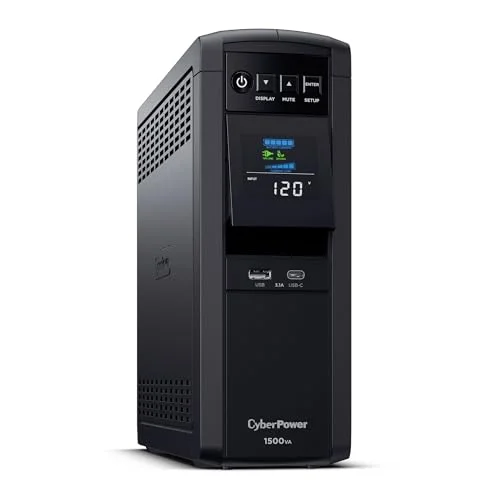
This is the unit most current buying guides land on for a home office that includes a desktop or a workstation, and the reasoning holds up. It puts out pure sine wave power, which matters because active PFC power supplies — standard in most PCs built in the last several years — can run hot, buzz, or shut down entirely on a stepped-wave UPS. Twelve outlets is enough to spread a monitor, dock, and networking gear across battery-backed and surge-only plugs without running out of room.
The color LCD panel tilts, which sounds minor until you’ve tried reading a fixed display on a unit sitting on the floor under a desk. Runtime is the tradeoff every UPS in this capacity class shares: expect roughly 10 minutes at half load and closer to 2.5 minutes at full load, so this protects against a save-and-shutdown window, not an extended outage. At $239.95 it costs more than APC’s comparable 1500VA unit, but the three-year warranty covering the battery itself — not just electronics — closes most of that gap.
2. APC BX1500M — Best for NAS & Routers
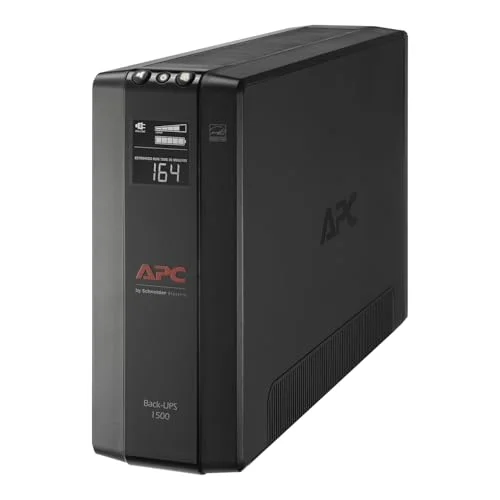
If the actual goal is keeping a NAS and router alive through a blip rather than protecting a full desktop, the BX1500M is the better buy despite ranking below the CyberPower unit overall. Its 68-minute runtime at a 100W load is the standout number here — that’s the kind of load a NAS, modem, and router draw together, and 68 minutes covers almost any outage short of a multi-hour grid failure.
The 789-joule surge rating and network dataline protection are the other reason it’s worth a look specifically for networking gear: it guards the Ethernet jack itself, which protects against surges riding in on a cable line, not just the power cord. The battery is user-replaceable under part APCRBC124, so the whole unit doesn’t get thrown out when the battery ages out in a few years. The tradeoff is a 900W ceiling and standby (not pure sine wave) topology — check your PC’s power supply spec before assuming this covers a full workstation too.
3. APC BR1500MS2 — Best Premium Pick
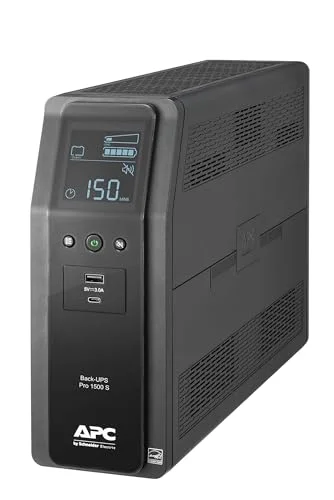
The Back-UPS Pro line sits above APC’s base Back-UPS models with stronger surge and voltage regulation circuitry, and the BR1500MS2 is the current pure sine wave option in that lineup with USB-C charging built in — a combination that’s still uncommon at this outlet count. It’s UL and Energy Star certified, which is worth checking for anyone planning to run it continuously behind a home server rather than just during outages.
At $299.99 it’s the priciest unit on this list by a wide margin, and it’s genuinely overkill if all you’re protecting is a router and modem — the BE425M handles that job for a quarter of the price. This one earns its spot when the setup includes a home server or NAS running around the clock and the extra certification and charging ports matter.
4. CyberPower CP850PFCLCD — Best Compact Pick
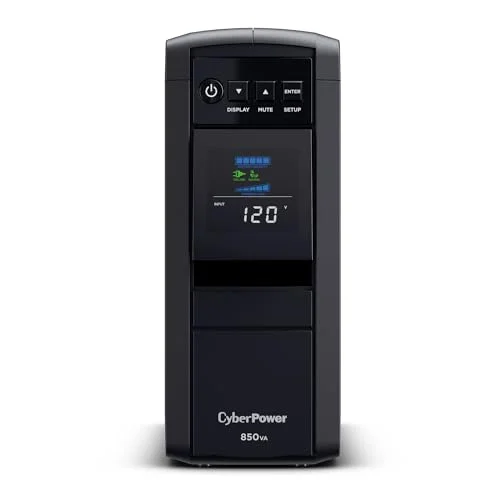
Not every home office needs 1500VA of capacity. The CP850PFCLCD delivers the same pure sine wave output as its bigger CyberPower sibling, in a smaller mini-tower body, for $169.95 — a real savings if a single desktop plus a modem and router is the actual load. Ten outlets with automatic voltage regulation cover that setup without crowding.
The 510W ceiling is the line to watch: a full desktop workstation running multiple monitors and peripherals will draw past what this unit can sustain during an outage, and runtime at any given load trails the 1500VA options above. For a simpler single-PC setup, though, it’s the better value than paying for capacity that goes unused.
5. APC BE425M — Best Budget Buy
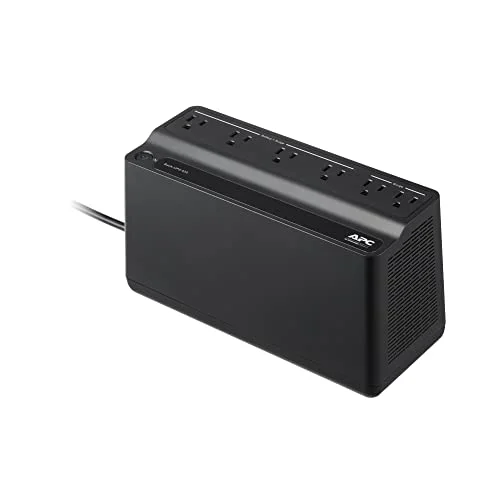
Sometimes the only thing that actually needs to survive a power blip is the router and modem — losing a video call because the internet drops is worse than the PC itself losing power gracefully. The BE425M is built for exactly that job: compact, wall-mountable behind a desk or shelf, and cheap enough at $62.50 that buying two — one for networking gear, one elsewhere — is reasonable.
Fifteen minutes of runtime at a 100W load covers the short blips that cause most router reboots. The catch is capacity: 255W and only 3 of its 6 outlets are battery-backed, so this isn’t a substitute for a real desktop UPS. It carries the same 3-year warranty and $75,000 equipment guarantee as APC’s pricier units, which is a better protection tier than the low price suggests.
Buying Guide: Choosing the Right UPS for a Home Office
Match capacity to what you’re actually protecting. A router and modem draw a fraction of what a desktop workstation does. Buying a 1500VA unit to protect a $60 router wastes money; running a full PC off a 425VA unit will trip it instantly. Check the wattage of what’s plugged in, not just the VA rating on the box.
Pure sine wave matters for PCs, not for routers. Active PFC power supplies in modern desktops and NAS units can run rough or shut down on stepped-wave (standby) UPS output. Routers, modems, and simple electronics don’t care. Spend the extra money on pure sine wave only for gear that actually needs it.
Runtime at your real load, not the marketing number. A UPS rated for “10 minutes” is usually measured at half load — check the runtime at the load you’ll actually draw, since it drops fast as wattage climbs.
A NAS needs enough runtime to complete a write, not just survive a blip. If protecting network storage is the goal, prioritize runtime at a low, steady load over raw capacity — that’s what the BX1500M’s 68-minute number is built for.
Replace the battery, not the whole unit. Most of the UPS models here use a user-replaceable battery. Check the part number before buying if long-term cost matters — a $30-$50 battery swap every 3-5 years is cheaper than a new UPS.
Surge protection alone isn’t a UPS. A surge protector strip stops spikes but does nothing when the power actually cuts. If a device can’t tolerate an abrupt shutdown — a NAS, a server, anything mid-write — it needs battery backup, not just a surge strip.
Frequently Asked Questions
Do I need a UPS if I already have a surge protector?
Yes, for anything that can’t handle an abrupt power loss. A surge protector only stops spikes — it does nothing when power cuts out completely. A UPS keeps devices running long enough to save work or shut down cleanly, which a surge strip can’t do.
How long will a UPS actually keep my devices running?
It depends entirely on the load. A 1500VA unit might run a NAS and router for over an hour but only cover a full desktop for a few minutes. Check the runtime-at-load numbers for your specific gear rather than assuming the headline VA rating tells the whole story.
Does my PC need pure sine wave output?
If it has an active PFC power supply — standard on most desktops built in the last several years — yes. A stepped-wave UPS can cause the power supply to run hot, buzz, or shut down unexpectedly on battery power. Routers, modems, and older electronics generally don’t need it.
Can I plug a laser printer into a UPS?
Check the wattage first. Laser printers draw a large surge when heating up, and cheaper UPS units can’t handle that load — it’s usually safer to put a printer on the surge-only outlets rather than the battery-backed ones.
How often does the battery need replacing?
Most UPS batteries last 3-5 years depending on how often they cycle through outages. Every unit on this list uses a replaceable battery pack rather than requiring a full replacement, which keeps the long-term cost down.
Bottom Line
For most home offices running a desktop alongside networking gear, the CyberPower CP1500PFCLCD at $239.95 is the right default — pure sine wave output, enough outlets to cover a full desk, and a warranty that includes the battery. If protecting a NAS or router specifically is the priority, the APC BX1500M at $189.99 is the better fit thanks to its 68-minute runtime at low load. And if a router and modem are genuinely all that need to survive an outage, the APC BE425M at $62.50 does that job without paying for capacity you won’t use.
Detailed Reviews
CyberPower CP1500PFCLCD
Pros
- Pure sine wave output is safe for active PFC power supplies in modern PCs and NAS units, unlike stepped-wave UPS models
- 12 outlets give enough separation to spread battery-backed and surge-only devices across a full desk setup
- Color LCD panel tilts for visibility whether the unit sits on the floor or under a desk
- Three-year warranty covers the battery itself, not just the electronics
- $500,000 connected equipment guarantee backs anything plugged into it
Cons
- Runtime drops fast under full load — expect a few minutes at 1000W, not enough for extended outages
- Mini-tower footprint takes up more floor or shelf space than a slim UPS
- Costs more than APC's equivalent 1500VA models
APC BX1500M
Pros
- 68-minute runtime at a 100W load is enough to keep a NAS, router, and modem powered through most short outages
- 789-joule surge rating adds real protection against nearby lightning strikes, not just brownouts
- Network dataline protection guards Ethernet-connected gear, which most competing UPS models skip
- Battery is user-replaceable, so the whole unit doesn't get tossed when the battery ages out after a few years
- Automatic voltage regulation handles brownouts without switching to battery, extending battery lifespan
Cons
- 900W output ceiling means it's undersized for a full gaming PC or workstation under sustained full load
- Standby topology instead of pure sine wave — fine for NAS and routers, worth checking against a PC's power supply spec
- Larger and heavier than the compact options on this list, better suited to sitting on the floor near a router
APC BR1500MS2
Pros
- Pure sine wave output plus USB-C charging is a rare combination at this outlet count
- Back-UPS Pro line carries stronger surge and voltage regulation circuitry than APC's base Back-UPS models
- UL and Energy Star certified, which matters for anyone running it continuously behind a home server
- LCD display gives at-a-glance battery health and load percentage
- 10 outlets split cleanly between battery-backed and surge-only, similar to the BX1500M
Cons
- Highest price on this list by a wide margin
- Overkill for a setup that's just a router and modem — better matched to a full desktop-plus-NAS setup
- Larger unit that needs dedicated floor or shelf space
CyberPower CP850PFCLCD
Pros
- Pure sine wave output at a lower capacity and lower price than the 1500VA options above
- Mini-tower form factor is noticeably smaller than the 1500VA units, easier to tuck under a desk
- 10 outlets with AVR cover a PC, monitor, and networking gear without running out of plugs
- LCD status panel matches the higher-end CyberPower models at a lower price point
- Good middle ground for a single desktop plus modem and router, without paying for capacity most home offices won't use
Cons
- 510W ceiling rules out powering a full desktop workstation with multiple monitors through an outage
- Shorter runtime than the 1500VA models at any given load
- Same mini-tower footprint as the larger CyberPower unit despite the lower capacity
APC BE425M
Pros
- Cheapest genuinely useful UPS on this list, built specifically for a router and modem rather than a full desktop
- Compact, wall-mountable design tucks behind a desk or shelf instead of taking up floor space
- 15-minute runtime at a 100W load is enough to ride out most brief blips without a router reboot
- 3-year warranty plus a $75,000 connected equipment guarantee, same protection tier as APC's pricier units
- Low enough cost that it's reasonable to buy two — one for the router, one for a separate device
Cons
- 255W ceiling means it can't power a desktop PC or a NAS with spinning drives — router and modem only
- Standby topology, not pure sine wave — a non-issue for networking gear, but not a PC-grade UPS
- Only 6 outlets, and just 3 of them are battery-backed