OWC used NAB 2026 to announce the Express 4M2 Ultra, the first certified Thunderbolt 5 enclosure, pushing four-drive RAID speeds past 6,600 MB/s. That’s a preview of where the category is headed, but it’s not what most remote workers need to buy right now. Thunderbolt 5 hosts are still rare outside the newest MacBook Pros and a handful of high-end Windows laptops, and Thunderbolt 4 / USB4 enclosures at 40Gb/s already move data faster than almost any workflow outside professional video editing can use. The single-drive enclosures below are the practical purchase in 2026 — bring your own M.2 NVMe SSD, plug into any Thunderbolt 3, Thunderbolt 4, or USB4 port, and get near-SSD-internal speeds in a pocketable case.
An enclosure is different from a prebuilt portable SSD: you supply the M.2 NVMe drive, which means you control the capacity, control the cost per gigabyte, and can repurpose a drive pulled from an old laptop upgrade instead of buying storage twice. The tradeoff is that fit and chipset quality vary a lot between brands — some enclosures choke on double-sided drives, and some cheap chipsets don’t actually sustain their rated speed under a real transfer.
Quick Picks
| Spec | OWC Express 1M2 (Enclosure Only) | Satechi USB4 NVMe SSD Pro Enclosure | ORICO 40Gbps NVMe Enclosure (CNM2) | Cable Matters 40Gbps Foldable USB4 Enclosure | UGREEN 40Gbps NVMe Enclosure with Anti-Drop Cover |
|---|---|---|---|---|---|
| Rating | 9.2/10 | 8.9/10 | 8.6/10 | 8.4/10 | 8.3/10 |
| Price | $88.99as of Oct 11, 2026 | $64.99-$99.99as of Oct 11, 2026 | $75.99-$79.99as of Oct 11, 2026 | $42.85-$69.99as of Oct 11, 2026 | $64.99-$89.99as of Oct 11, 2026 |
| Interface | USB4 / Thunderbolt-compatible, 40Gb/s | USB4 / Thunderbolt 4/3, 40Gb/s | USB4 / Thunderbolt 4/3, 40Gb/s | USB4 / Thunderbolt 4/5 compatible, 40Gb/s | USB4 / Thunderbolt 4/3, 40Gb/s |
| Max Drive Capacity | Up to 8TB | Up to 16TB | Up to 8TB | Single-sided M.2 SSDs only | Up to 8TB |
| Supported Sizes | M.2 2230, 2242, 2280 (M-Key NVMe) | M.2 2230, 2242, 2260, 2280 | M.2 2230, 2242, 2260, 2280 (M-Key) | M.2 2230, 2242, 2260, 2280 (M/B+M Key) | M.2 2230, 2242, 2260, 2280 (M/B+M Key) |
| Rated Speed | Up to 3,836 MB/s | Up to 3,840 MB/s | Read 3,500 MB/s / Write 2,800 MB/s | Read 3,800 MB/s / Write 3,600 MB/s | ~3,600 MB/s read/write |
| Cooling | Passive aluminum heat sink (fanless) | Passive aluminum with thermal pads | Built-in cooling fan | Auto speed-adjusting fan | PWM turbo fan + aluminum shell |
| Power | Bus-powered | Bus-powered | Bus-powered | Bus-powered | Bus-powered |
| Warranty | 1 year | — | — | — | — |
| Build | — | Aluminum + polycarbonate | — | — | — |
| Chipset | — | — | Dual-chip (Thunderbolt + USB 3.2 fallback) | — | — |
| Design | — | — | — | Foldable aluminum shell | — |
| Protection | — | — | — | — | Silicone anti-drop sleeve |
| Check Price → | Check Price → | Check Price → | Check Price → | Check Price → |
Prices change daily — tap Check Price for the current Amazon price.
The Picks
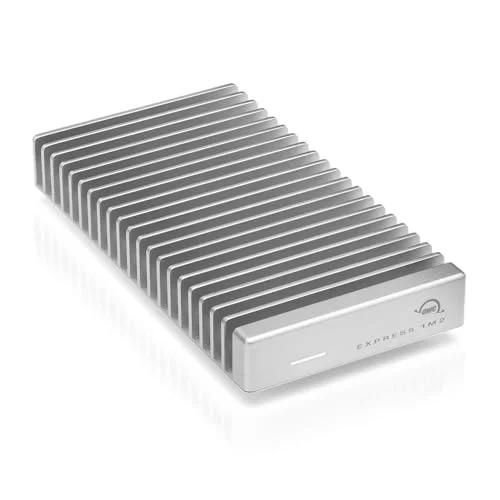
OWC Express 1M2 (Enclosure Only)
Pros
- OWC's aluminum housing dissipates heat passively — no fan noise during sustained transfers
- Rated up to 3,836 MB/s is near the practical ceiling for a single-drive 40Gb/s enclosure
- Bus-powered design needs no separate power brick, so it travels light in a laptop bag
- Works identically on Mac (via Thunderbolt) and Windows/USB4 PCs without driver installs
Cons
- No cooling fan means speeds can taper on very large sustained transfers as the aluminum shell heats up
- 8TB drive ceiling is lower than the Satechi's 16TB support for anyone consolidating a large media archive
- No bundled carrying pouch, unlike some competitors' included accessories
The OWC Express 1M2 is the enclosure to buy if you don’t want to think about it again. It’s fanless — the entire aluminum body acts as the heat sink — so there’s zero operating noise, which matters if it’s sitting next to a desk mic during calls. Rated speed tops out at 3,836 MB/s, and OWC’s reputation for firmware stability and Mac compatibility (it just mounts, no utility required) makes it the safest default pick for both platforms.
The catch is capacity: OWC caps supported drives at 8TB, and 2260-length drives aren’t supported (2230, 2242, and 2280 are). For nearly everyone that’s not a real limit, since 8TB of NVMe storage covers most bring-your-own use cases at a reasonable price per gigabyte.
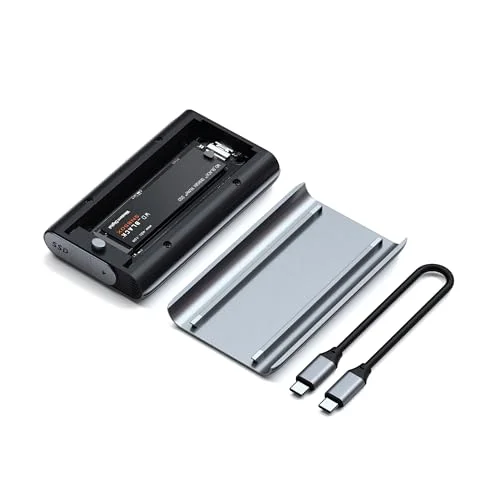
Satechi USB4 NVMe SSD Pro Enclosure
Pros
- 16TB drive support is the highest capacity ceiling of any enclosure in this lineup
- Tool-free installation with thermal pads pre-applied — no separate heatsink kit to buy
- Backward compatible down to USB 2.0, so it still functions at reduced speed on older ports
- Aluminum-and-polycarbonate shell keeps weight down for a travel-focused build
Cons
- Costs more than the OWC Express 1M2 for a marginal real-world speed difference
- No active cooling fan, so heavy sustained workloads run warmer than the ORICO or UGREEN
- Satechi's support documentation lists a narrower set of validated NVMe drives than some rivals
The Satechi USB4 NVMe SSD Pro Enclosure is the pick for anyone consolidating a large personal archive — it’s rated to accept drives up to 16TB, double the ceiling of every other enclosure here. Like the OWC, it’s passively cooled with pre-applied thermal pads instead of a fan, and it supports the full range of M.2 lengths (2230 through 2280), which the OWC doesn’t quite match.
The tradeoff is price relative to real-world speed: at $99.99 it costs more than the OWC for a rated speed that’s effectively identical (3,840 MB/s vs. 3,836 MB/s). Buy this one specifically for the 16TB support — otherwise the OWC is the better value at a similar rated speed.
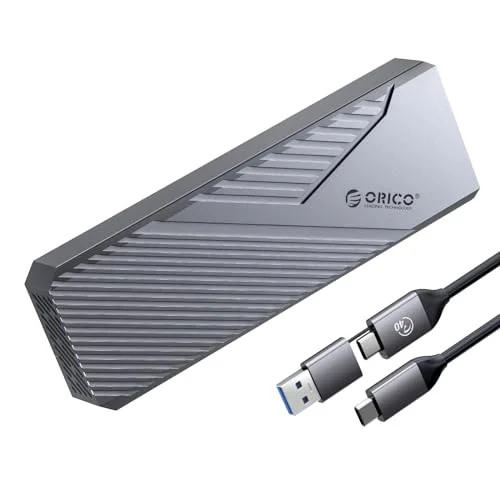
ORICO 40Gbps NVMe Enclosure (CNM2)
Pros
- Built-in fan keeps transfer speeds more consistent than fanless competitors during long backups
- Dual-chip design falls back cleanly to USB 3.2 speeds on older ports instead of failing to connect
- Bundled 2-in-1 cable and cooling accessories add value at a mid-range price
- Tool-free M-Key installation takes under a minute
Cons
- Rated write speed (2,800 MB/s) trails the OWC and Satechi's numbers
- Active fan adds a faint hum under load that fanless enclosures don't have
- Aluminum shell runs noticeably warm near the fan vent during extended transfers
The ORICO CNM2 is the fan-cooled option, and that matters more than it sounds. Fanless enclosures can throttle during very long sustained transfers — a multi-hour backup or a large video project copy — as heat builds in the aluminum shell with nowhere to go. ORICO’s built-in fan keeps the chipset cooler and holds speed more consistently across a long transfer, at the cost of a faint hum you’ll notice in a quiet room.
Its dual-chip design is a genuine practical advantage: plug it into an older USB 3.2 laptop port and it falls back cleanly to 10Gb/s instead of failing to connect, which some single-chip Thunderbolt-only enclosures don’t handle gracefully. Rated write speed (2,800 MB/s) is the lowest of the three premium options here, so it’s the pick for reliability and backward compatibility over raw peak throughput.
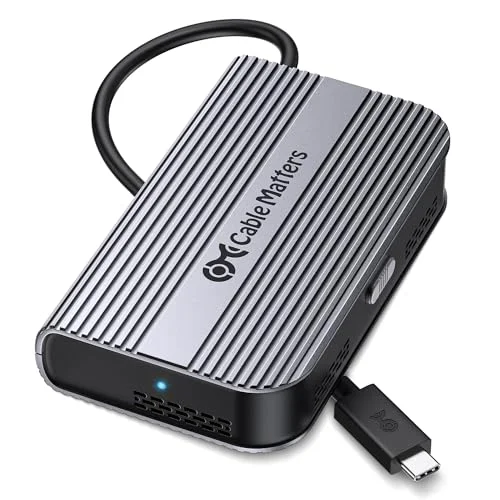
Cable Matters 40Gbps Foldable USB4 Enclosure
Pros
- Lowest price in this roundup while still hitting full 40Gb/s rated speeds
- Auto-adjusting fan only spins up under load, staying near-silent for everyday file access
- Thunderbolt 5 host compatibility means it keeps working as laptops upgrade past Thunderbolt 4
- Foldable design collapses flatter than rigid enclosures for backpack storage
Cons
- Single-sided M.2 support only — thick double-sided drives like the WD Black SN850X or Crucial T700 don't fit
- Rated write speed depends on pairing with a fast enough SSD; a budget drive won't hit the ceiling
- Newer product with a shorter owner track record than the OWC or Satechi enclosures
The Cable Matters enclosure is the budget pick, and at $45.11 it’s genuinely competitive on paper — rated 3,800 MB/s read and 3,600 MB/s write, which matches or beats the pricier options above. The auto-adjusting fan only spins up under sustained load, so day-to-day file access stays quiet.
The real limitation is physical: this enclosure only fits single-sided M.2 drives. Several popular high-capacity NVMe SSDs — the WD Black SN850X in 4TB/8TB, Sabrent’s Rocket 4 Plus in 2TB/4TB, and the Crucial T700 — are double-sided and won’t physically fit inside. Check your specific drive’s datasheet for “single-sided” or “double-sided” before buying this one; it’s the single most common return reason for enclosures in this price bracket.
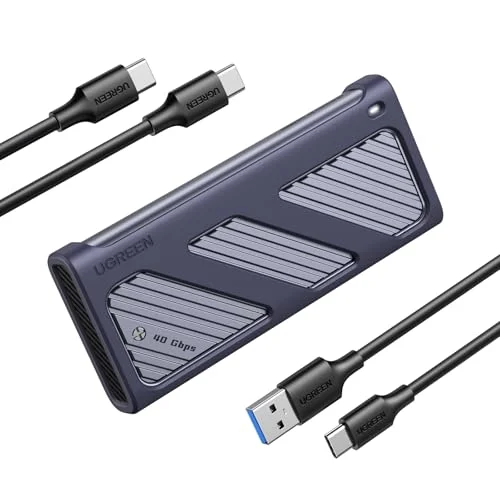
UGREEN 40Gbps NVMe Enclosure with Anti-Drop Cover
Pros
- Included silicone protective sleeve absorbs drops that would dent a bare aluminum enclosure
- PWM fan automatically ramps speed to match thermal load instead of running constantly
- ASM2464PD controller chip is a widely validated chipset for 40Gb/s enclosures
- Priced below the Satechi and OWC while matching their real-world transfer speeds
Cons
- Anti-drop sleeve adds bulk compared to the slimmer OWC or Cable Matters designs
- 8TB capacity ceiling matches the ORICO but falls short of the Satechi's 16TB support
- Price fluctuates more than competitors — worth checking current pricing before buying
The UGREEN enclosure splits the difference between the OWC’s simplicity and the ORICO’s active cooling, and adds a feature none of the others have: a silicone anti-drop sleeve around the aluminum shell. For a bring-your-own-drive enclosure that’s actually going into a bag daily — client sites, coworking spaces, travel — that physical protection is worth more than a few extra hundred MB/s.
It uses the ASM2464PD controller, the same well-validated chipset found in a number of reputable 40Gb/s enclosures, so speed and compatibility are proven rather than a gamble on an unfamiliar chip. Price does fluctuate more than the other picks here, so check the current number against the OWC and Satechi before deciding — at the low end of its range it undercuts both.
Buying Guide: Choosing a Thunderbolt 4 / USB4 NVMe Enclosure
Single-sided vs. double-sided M.2 drives
This is the fit issue that trips up more buyers than any spec on the box. M.2 NVMe SSDs are either single-sided (memory chips on one side of the board) or double-sided (chips on both sides, usually higher-capacity drives). A single-sided-only enclosure like the Cable Matters pick physically cannot close around a double-sided drive. Before buying any enclosure, check your specific SSD model’s spec sheet — manufacturers list this explicitly, and it’s the first thing to verify, before price or speed.
Fanless vs. fan-cooled
Fanless enclosures (OWC, Satechi) are silent and simpler, and they’re fine for typical remote work file transfers — documents, project archives, the occasional large video export. Fan-cooled enclosures (ORICO, UGREEN) hold their rated speed better across very long, sustained transfers because the chipset and drive don’t accumulate as much heat. If your use case is regularly moving 100GB+ in one sitting, the fan is worth the minor noise. If it’s occasional smaller transfers, fanless is the quieter, simpler choice.
Thunderbolt vs. USB4 hosts
Every enclosure in this roundup works across Thunderbolt 3, Thunderbolt 4, and USB4 host ports at the full 40Gb/s rate — they’re built around chipsets that don’t distinguish between the standards at this speed tier. What does matter is your host laptop’s actual port: check whether it’s labeled Thunderbolt or USB4/USB-C, and confirm it supports 40Gb/s specifically (some USB-C ports on budget laptops top out at USB 3.2’s 10Gb/s or 20Gb/s, which will bottleneck any of these enclosures regardless of the drive inside).
Matching enclosure speed to your drive
A 40Gb/s enclosure is only as fast as the NVMe SSD installed in it. A drive rated for 7,000 MB/s in an internal PCIe Gen 4 slot will still cap around 3,800–3,900 MB/s in any of these enclosures, since that’s the practical ceiling of the 40Gb/s interface itself. Buying a premium Gen 4 drive for one of these enclosures gets you closer to that ceiling; a budget Gen 3 drive rated around 2,000–2,500 MB/s won’t benefit from the enclosure’s full rated speed at all.
Should you wait for Thunderbolt 5?
Not unless you already own a Thunderbolt 5 laptop. OWC’s Express 4M2 Ultra and similar announcements point to where multi-drive RAID enclosures are headed, but single-drive Thunderbolt 5 enclosures aren’t yet common at retail, and Thunderbolt 5 host ports remain limited to the newest premium laptops. A 40Gb/s enclosure bought today keeps working at full speed once you eventually upgrade hosts — Thunderbolt 5 ports are backward compatible with Thunderbolt 4 and USB4 devices.
FAQ
Q: Can I put any NVMe SSD in these enclosures? A: Any M-Key PCIe NVMe SSD in a size the enclosure supports (2230/2242/2260/2280) will fit electrically. The one hard blocker is physical thickness — single-sided-only enclosures like the Cable Matters pick reject double-sided drives regardless of size or capacity. SATA-based M.2 drives (B-Key or B+M-Key without NVMe support) won’t work in any of these; they’re built for NVMe only.
Q: Does USB4 work as well as Thunderbolt for these enclosures? A: Yes, for the enclosures in this roundup. All five use controller chipsets that run at 40Gb/s over either standard, so a USB4 laptop port and a Thunderbolt 4 port deliver identical real-world performance with any of these products.
Q: Do I need the fan-cooled models, or is fanless enough? A: Fanless is enough for typical remote work file transfers. Choose a fan-cooled model (ORICO, UGREEN) if you regularly move very large files in single, long sessions — video project archives, full system backups — where sustained heat buildup would otherwise throttle a fanless enclosure.
Q: Will a 40Gb/s enclosure actually saturate my drive’s rated speed? A: Only up to the interface’s practical ceiling of roughly 3,800–3,900 MB/s. A high-end PCIe Gen 4 drive rated at 7,000 MB/s internally will still cap around that number in any of these enclosures — the enclosure, not the drive, becomes the bottleneck at that point.
Q: Is it worth waiting for Thunderbolt 5 enclosures? A: Only if you already own a Thunderbolt 5 laptop. Otherwise a Thunderbolt 4 / USB4 enclosure bought today will keep working at full speed after a future host upgrade, since Thunderbolt 5 is backward compatible with these standards.
The Bottom Line
For most remote workers building a bring-your-own-drive external SSD, the OWC Express 1M2 is the right default — fanless, proven, and rated close to the practical ceiling of the 40Gb/s standard. Anyone consolidating a large personal archive should look at the Satechi USB4 NVMe SSD Pro Enclosure for its 16TB drive ceiling instead. If your workflow involves regular multi-hour transfers, the ORICO CNM2’s active cooling holds speed more consistently than a fanless design. On a budget, the Cable Matters enclosure delivers real 40Gb/s performance for under $50 — just confirm your drive is single-sided first. And for daily travel between locations, the UGREEN’s anti-drop sleeve is the one piece of physical protection none of the others include.
Detailed Reviews
OWC Express 1M2 (Enclosure Only)
Pros
- OWC's aluminum housing dissipates heat passively — no fan noise during sustained transfers
- Rated up to 3,836 MB/s is near the practical ceiling for a single-drive 40Gb/s enclosure
- Bus-powered design needs no separate power brick, so it travels light in a laptop bag
- Works identically on Mac (via Thunderbolt) and Windows/USB4 PCs without driver installs
Cons
- No cooling fan means speeds can taper on very large sustained transfers as the aluminum shell heats up
- 8TB drive ceiling is lower than the Satechi's 16TB support for anyone consolidating a large media archive
- No bundled carrying pouch, unlike some competitors' included accessories
Satechi USB4 NVMe SSD Pro Enclosure
Pros
- 16TB drive support is the highest capacity ceiling of any enclosure in this lineup
- Tool-free installation with thermal pads pre-applied — no separate heatsink kit to buy
- Backward compatible down to USB 2.0, so it still functions at reduced speed on older ports
- Aluminum-and-polycarbonate shell keeps weight down for a travel-focused build
Cons
- Costs more than the OWC Express 1M2 for a marginal real-world speed difference
- No active cooling fan, so heavy sustained workloads run warmer than the ORICO or UGREEN
- Satechi's support documentation lists a narrower set of validated NVMe drives than some rivals
ORICO 40Gbps NVMe Enclosure (CNM2)
Pros
- Built-in fan keeps transfer speeds more consistent than fanless competitors during long backups
- Dual-chip design falls back cleanly to USB 3.2 speeds on older ports instead of failing to connect
- Bundled 2-in-1 cable and cooling accessories add value at a mid-range price
- Tool-free M-Key installation takes under a minute
Cons
- Rated write speed (2,800 MB/s) trails the OWC and Satechi's numbers
- Active fan adds a faint hum under load that fanless enclosures don't have
- Aluminum shell runs noticeably warm near the fan vent during extended transfers
Cable Matters 40Gbps Foldable USB4 Enclosure
Pros
- Lowest price in this roundup while still hitting full 40Gb/s rated speeds
- Auto-adjusting fan only spins up under load, staying near-silent for everyday file access
- Thunderbolt 5 host compatibility means it keeps working as laptops upgrade past Thunderbolt 4
- Foldable design collapses flatter than rigid enclosures for backpack storage
Cons
- Single-sided M.2 support only — thick double-sided drives like the WD Black SN850X or Crucial T700 don't fit
- Rated write speed depends on pairing with a fast enough SSD; a budget drive won't hit the ceiling
- Newer product with a shorter owner track record than the OWC or Satechi enclosures
UGREEN 40Gbps NVMe Enclosure with Anti-Drop Cover
Pros
- Included silicone protective sleeve absorbs drops that would dent a bare aluminum enclosure
- PWM fan automatically ramps speed to match thermal load instead of running constantly
- ASM2464PD controller chip is a widely validated chipset for 40Gb/s enclosures
- Priced below the Satechi and OWC while matching their real-world transfer speeds
Cons
- Anti-drop sleeve adds bulk compared to the slimmer OWC or Cable Matters designs
- 8TB capacity ceiling matches the ORICO but falls short of the Satechi's 16TB support
- Price fluctuates more than competitors — worth checking current pricing before buying