WiFi 7 routers crossed a meaningful threshold in 2026: the TP-Link Archer BE550 Pro and similar mid-range models now ship with 10G WAN ports at under $300, meaning the router itself is no longer the bottleneck on multi-gigabit fiber plans. For remote workers who upgraded to fiber in the past two years, this changes the upgrade calculus — you no longer need a $700 premium router to terminate a 2.5G or 5G fiber connection cleanly.
Fiber internet eliminates the coaxial signal degradation and shared-bandwidth congestion of cable infrastructure. But the router you connect to the ONT (optical network terminal) determines how much of that bandwidth actually reaches your devices. A router with a 1G WAN port caps your throughput at 1Gbps regardless of the plan tier you are paying for.
This roundup covers five routers from $99 to $699, selected for fiber compatibility, WiFi 7 performance, and practical home office use. Coverage spans budgets from entry-level gigabit to multi-gig 10G connections.
Every product here has a verified live Amazon listing. Selections are based on manufacturer specifications, patterns across owner feedback, and research into the 2026 WiFi 7 router market.
Quick Comparison
| Router | Price | WiFi Standard | WAN Port | Best For |
|---|---|---|---|---|
| TP-Link Archer BE550 Pro | $183.99-$299.99 as of Oct 18, 2026 | WiFi 7 BE9700 | 10G | Best overall value + multi-gig |
| ASUS RT-BE88U | $207.99-$319.99 as of Oct 18, 2026 | WiFi 7 (7.2 Gbps) | 2× 10G | Wired workstations + NAS |
| TP-Link Archer BE550 | $199 | WiFi 7 BE9300 | 2.5G | Best value on 1G fiber |
| Netgear RS700S | $383.36-$599.00 as of Oct 18, 2026 | WiFi 7 BE19000 | 10G | Highest throughput + coverage |
| ASUS RT-BE58U | $89.99-$129.99 as of Oct 18, 2026 | WiFi 7 BE3600 | 2.5G | Best budget WiFi 7 |
1. TP-Link Archer BE550 Pro — Best Overall
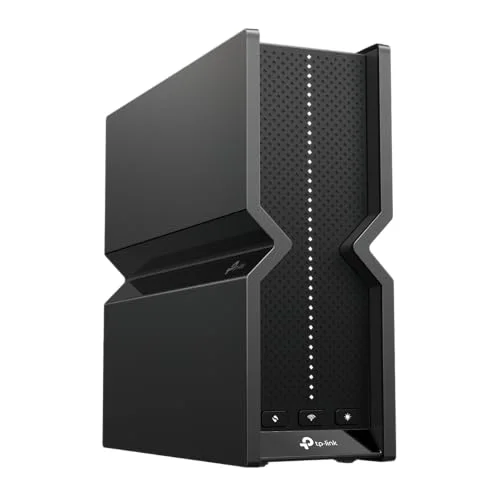
TP-Link Archer BE550 Pro WiFi 7 Router
Pros
- 10G WAN port handles multi-gig fiber plans up to 10Gbps without becoming a bottleneck — the only router in this roundup at under $300 with a true 10G WAN
- Tri-band WiFi 7 with 9.7 Gbps aggregate throughput covers the 2.4GHz, 5GHz, and 6GHz bands simultaneously — the 6GHz band is largely free of interference from older devices
- MLO (Multi-Link Operation) allows compatible WiFi 7 devices to send and receive data across multiple bands simultaneously, lowering latency and increasing effective throughput compared to WiFi 6E
- Four 2.5G LAN ports mean wired connections to desktop workstations, NAS devices, or smart switches all run at full 2.5Gbps — no wired bottlenecks on a gigabit fiber plan
- Easy-Mesh compatibility lets you add TP-Link Deco or other Archer nodes later without replacing the primary router — useful for larger homes where a single router cannot cover all rooms
- HomeShield provides basic parental controls and IoT network segmentation out of the box; advanced features require a subscription but the core functionality is free
Cons
- Newer product (late 2025 release) means long-term reliability data is less established than the Archer BE550 — owner feedback is positive but the sample size is smaller
- HomeShield advanced features (content filtering, antivirus, QoS scheduling) require a paid subscription after the trial period; base parental controls remain free
- At $229–$299, it costs more than the Archer BE550 — buyers on standard 1Gbps fiber who do not anticipate upgrading to multi-gig plans in the next 2–3 years may find the 10G WAN overkill
The Archer BE550 Pro is the router that makes the most sense for fiber internet subscribers in 2026. It combines a 10G WAN port — necessary to avoid throttling on multi-gig fiber plans — with tri-band WiFi 7 at a price that was only possible from premium routers a year ago.
The 10G WAN port is the defining feature. Most routers sold at $199–$249 cap the WAN connection at 2.5Gbps. The BE550 Pro’s 10G WAN means buyers who upgrade from 1Gbps to a 2.5G, 5G, or 10G fiber plan do not need to replace the router. The hardware supports the full range of currently available consumer fiber tiers.
Four 2.5G LAN ports provide wired connectivity that matches or exceeds most Ethernet infrastructure in homes built before 2020. A NAS, a desktop workstation, a smart switch, and a second wired device can all run at full 2.5G simultaneously without bandwidth contention.
MLO (Multi-Link Operation) is WiFi 7’s most significant protocol improvement over WiFi 6E. It allows client devices to maintain simultaneous connections across two or three bands, using whichever band has lower latency and higher available throughput at any moment. For video calls, this translates to more consistent latency even when other devices are streaming in the background.
The tri-band design (2.4GHz, 5GHz, 6GHz) adds the 6GHz band, which has far less interference from neighboring networks than 2.4GHz and 5GHz. Laptops, tablets, and phones that support WiFi 7 or WiFi 6E will connect to 6GHz by default when in range.
HomeShield’s core features — basic parental controls, IoT network segmentation, and a bandwidth monitor — are free. Advanced content filtering and scheduled QoS require a subscription. For users who do not need parental controls, the free tier covers everything relevant.
Bottom line: The most complete router for fiber internet buyers who want multi-gig WAN readiness, tri-band WiFi 7, and room to grow — without spending premium router money.
2. ASUS RT-BE88U — Best for Wired Workstations
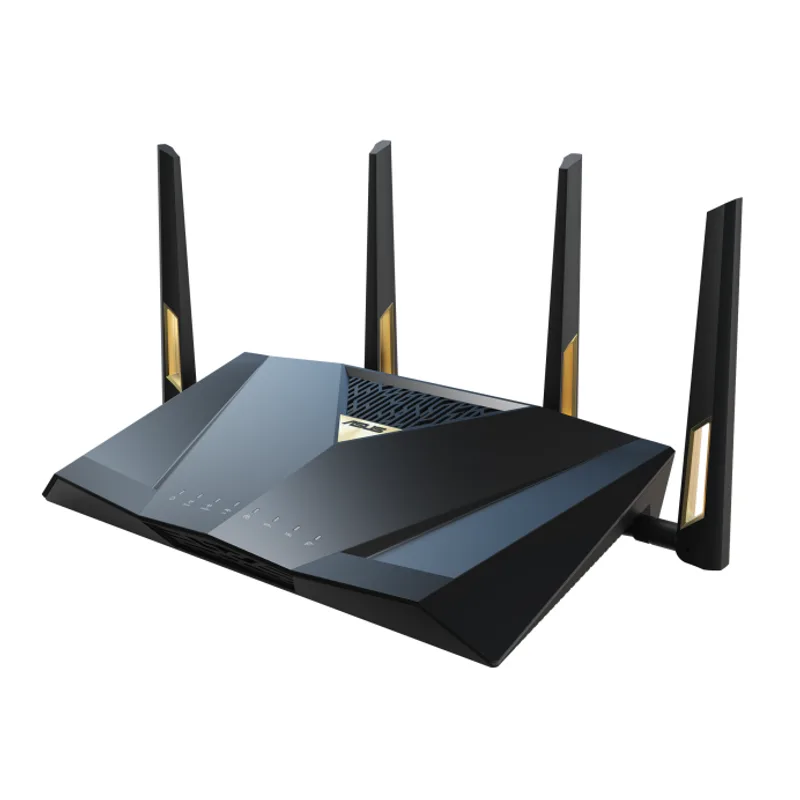
ASUS RT-BE88U WiFi 7 Router
Pros
- Two 10G ports — one SFP+ and one 10G RJ45 — give you simultaneous 10G WAN from fiber and a 10G wired uplink to a NAS or managed switch, a configuration no other router in this roundup can match at this price
- 34 Gbps total wired throughput capacity means the RT-BE88U can terminate a 10G fiber connection while still running full-speed wired links to NAS arrays, workstations, and network switches without bandwidth contention
- AiProtection Pro (powered by Trend Micro) provides commercial-grade network security scanning with malicious site blocking — particularly relevant for home offices handling sensitive client data
- AiMesh support allows the RT-BE88U to serve as the primary node in a multi-unit mesh network, adding ASUS nodes for extended coverage without losing the router's wired port capacity
- AI Intrusion Detection monitors LAN traffic for anomalous patterns — useful for home offices with multiple IoT devices where lateral movement between segments is a real concern
Cons
- Dual-band WiFi 7 means no 6GHz band — the RT-BE88U misses the relatively interference-free 6GHz spectrum that tri-band alternatives like the Archer BE550 Pro and RS700S include
- At $279–$335, it is the second most expensive router in this roundup; the wired port configuration justifies the price for users with NAS arrays or wired workstations, but pure WiFi users are paying for features they will not use
- Setup complexity is higher than TP-Link — the ASUS interface exposes more advanced settings which is valuable for power users but can be overwhelming for buyers upgrading from an ISP gateway
The RT-BE88U is built for a specific use case: home offices with significant wired infrastructure. Two 10G ports — one SFP+ for fiber media converters and one 10G RJ45 for a NAS or managed switch — give this router a wired capacity that no other device in this roundup can match.
The SFP+ port is particularly relevant for buyers using a fiber ONT with an SFP+ cage rather than an RJ45 WAN connection. Many ISPs deploying XGS-PON or 10G GPON infrastructure provide ONTs with SFP+ output. The RT-BE88U connects directly without a media converter.
The 34 Gbps total wired throughput capacity means simultaneous 10G WAN, 10G NAS uplink, and four 2.5G device connections can all run at wire speed without internal bandwidth contention. For home setups running Plex media servers, Synology or QNAP NAS arrays, or virtualization workloads over the network, that internal bandwidth matters.
AiProtection Pro (Trend Micro) runs on the router hardware and does not require a subscription. It scans DNS queries, blocks access to known malicious domains, and provides intrusion detection based on Trend Micro’s threat database. For home offices handling sensitive data, this is a meaningful security layer that does not require installing endpoint software on individual devices.
The dual-band WiFi 7 spec — 2.4GHz and 5GHz without 6GHz — is the RT-BE88U’s primary wireless tradeoff. Users in dense apartment environments where 5GHz spectrum is congested will find the tri-band Archer BE550 Pro or RS700S more effective for wireless performance. The RT-BE88U’s value proposition is its wired capabilities, not its wireless spec.
Bottom line: The pick for home offices with NAS arrays, wired workstations, or fiber ONTs using SFP+ connections — the wired port configuration is unmatched at this price.
3. TP-Link Archer BE550 — Best Value
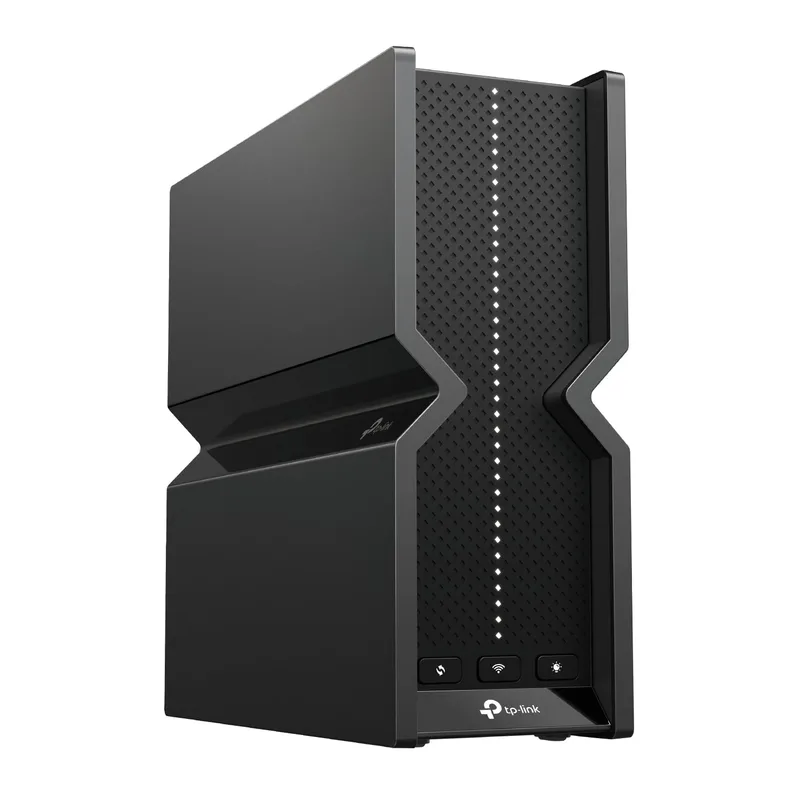
TP-Link Archer BE550 WiFi 7 Router
Pros
- All ports are 2.5G — six LAN ports plus the WAN port all run at 2.5Gbps, meaning a standard 1Gbps or 2.5Gbps fiber plan will never hit a wired bottleneck
- Tri-band WiFi 7 at $199 is the best price-to-performance ratio in this roundup — the BE9300 spec delivers 9.2 Gbps aggregate wireless throughput at a price that undercuts most WiFi 6E routers from prior years
- MLO support lets WiFi 7 client devices aggregate multiple bands, reducing latency on video calls and collaboration tools — owner reports consistently note Zoom and Teams call quality improvements over WiFi 6 routers
- Easy-Mesh compatibility provides a clear upgrade path: add a Deco node or second Archer router later if coverage needs to expand without replacing the primary unit
- More LAN ports than most routers at this price — six 2.5G ports accommodate wired desk setups, smart TVs, gaming consoles, and a NAS without requiring a separate switch
Cons
- 2.5G WAN port caps throughput at 2.5Gbps — buyers on 5Gbps or 10Gbps multi-gig fiber plans will need the Archer BE550 Pro's 10G WAN to avoid a bottleneck at the router itself
- HomeShield advanced features require a subscription; the base router lacks some security features available free on ASUS routers with AiProtection
- At 2,000 sq ft coverage, it may require a mesh extender node in homes larger than ~2,500 sq ft or homes with multiple floors and concrete walls
The Archer BE550 is the straightforward answer for remote workers on standard 1Gbps fiber who want WiFi 7 without spending more than $200. Tri-band WiFi 7, six 2.5G ports, MLO, and Easy-Mesh compatibility at $199.99 is a genuinely competitive offer.
The six 2.5G ports are unusual at this price. Most $199 routers give you four 1G LAN ports and one WAN port. The Archer BE550 runs every port at 2.5G — the WAN for the fiber connection, six LAN ports for wired devices. A gigabit fiber connection terminated through the 2.5G WAN port leaves headroom for the ISP to upgrade tier without a router swap.
Tri-band WiFi 7 means simultaneous coverage on 2.4GHz, 5GHz, and 6GHz. Devices that support WiFi 7 — the latest MacBooks, recent Android flagships, and some Windows laptops from 2024 onward — will connect to the 6GHz band when in range and benefit from MLO’s multi-band aggregation.
Owner reports across home office and small business use consistently note stable multi-day uptimes without reboots, which matters more for remote work than peak throughput numbers. Rebooting a router mid-call ends the call.
The 2.5G WAN limit is the BE550’s main constraint. Buyers on 2.5Gbps fiber or planning to upgrade to a higher-speed tier will hit the ceiling at the WAN port. If that scenario is plausible in the next two to three years, the BE550 Pro’s 10G WAN at $30–$100 more is the better long-term buy.
Bottom line: The strongest value option for 1Gbps or 2.5Gbps fiber, with six 2.5G ports and tri-band WiFi 7 at $199 — more port capacity than routers that cost significantly more.
4. Netgear Nighthawk RS700S — Best Premium
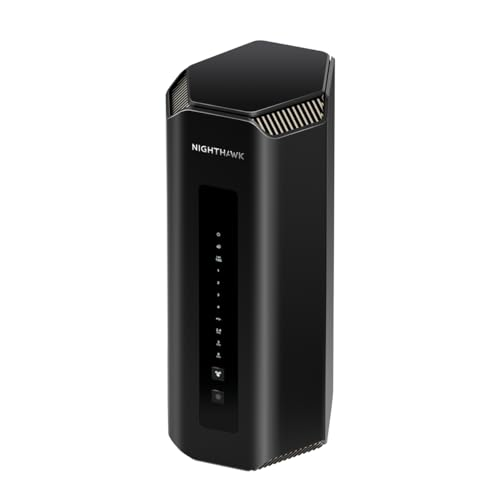
Netgear Nighthawk RS700S WiFi 7 Router
Pros
- BE19000 is the highest WiFi 7 throughput tier in this roundup at up to 19 Gbps aggregate — ideal for large homes with many simultaneous high-bandwidth users including 4K/8K video streams, cloud gaming, and video conferencing
- 10G WAN port pairs with the maximum WiFi throughput class to avoid any single-device bottleneck on 10Gbps fiber or multi-gig symmetrical plans
- Covers up to 3,500 sq ft — more than enough for most large homes without requiring a mesh node, reducing network topology complexity
- Netgear Armor (Bitdefender) provides one year of commercial endpoint security scanning, malware blocking, and vulnerability detection as part of the purchase — a meaningful inclusion at this price tier
- 320 MHz channels in the 6GHz band deliver the maximum channel width the WiFi 7 standard allows, providing the highest per-device throughput to laptops, phones, and tablets that support the spec
Cons
- At $599–$699, it is the most expensive router in this roundup by a significant margin — the performance premium over the Archer BE550 Pro is real but the price gap is substantial
- Netgear Armor requires an annual subscription after the first year (~$99/year) — buyers who do not renew lose the security features that partially justify the purchase price
- Physical footprint is large — the RS700S with its external antennas occupies meaningful desk or shelf space; the vertical stand helps but it is not a discreet device
The RS700S is Netgear’s current flagship WiFi 7 router, and the BE19000 spec — 19 Gbps aggregate WiFi throughput — is the highest in this roundup. For large homes with 30+ connected devices and multiple simultaneous high-bandwidth streams, the RS700S has more headroom than the mid-range alternatives.
The 10G WAN port handles 10Gbps symmetric fiber cleanly. Combined with 19 Gbps wireless capacity and 320MHz channel width in the 6GHz band, the RS700S is the only router in this roundup that can saturate a 10Gbps fiber plan on the wireless side without any single device becoming a bottleneck.
The 3,500 sq ft coverage estimate is generous — real-world coverage in homes with interior walls will be lower, but the RS700S reliably covers homes where mid-range routers require a mesh extender. Buyers in 3,000+ sq ft homes with offices on different floors report consistent signal throughout compared to $200–$300 routers that require extending.
Netgear Armor (Bitdefender) is included for one year and adds router-level malware protection, vulnerability scanning, and intrusion detection. The service is $99/year after the trial, which is a recurring cost to factor into the total ownership price.
The price is the central issue. At $599–$699, the RS700S costs roughly three times the Archer BE550 and twice the RT-BE88U. For a 1Gbps or 2.5Gbps fiber plan in a home under 2,500 sq ft with a moderate device count, the performance premium does not translate into a meaningfully better daily experience for video calls, file transfers, or general browsing. The RS700S makes sense for large homes with multi-gig fiber and many high-bandwidth users — everyone else is paying for headroom they will not exercise.
Bottom line: The right router for large homes on 10G fiber with many simultaneous users — but the price premium over mid-range WiFi 7 options is hard to justify for typical remote work setups.
5. ASUS RT-BE58U — Best Budget
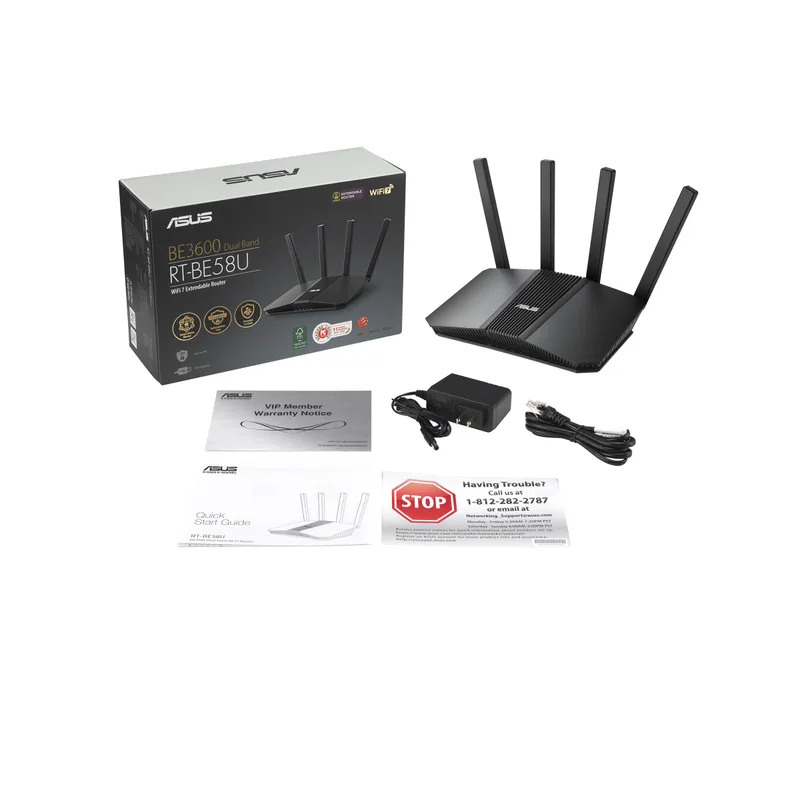
ASUS RT-BE58U WiFi 7 Router
Pros
- The most affordable WiFi 7 router in this roundup — at $99–$149, the RT-BE58U brings MLO, AiMesh, and commercial-grade security (AiProtection Pro) to a price that most budget WiFi 6 routers occupied two years ago
- AiProtection Pro is free for the device lifetime — unlike TP-Link's HomeShield, ASUS does not charge a subscription for the Trend Micro-powered security scanning, malware blocking, and parental controls
- Dual-WAN support allows connecting two ISP lines simultaneously for load balancing or failover — valuable for home offices where internet uptime is critical; no other router in this roundup offers this at a comparable price
- 2.5G WAN port handles standard gigabit fiber cleanly and supports up to 2.5Gbps for buyers on lower-tier multi-gig plans
- AiMesh compatibility means the RT-BE58U can expand into a mesh network with other ASUS routers if coverage needs grow without replacing the primary hardware
Cons
- Dual-band without 6GHz — the RT-BE58U lacks the relatively uncrowded 6GHz band, which means all WiFi clients share 2.4GHz and 5GHz spectrum; dense apartment environments with many neighboring WiFi networks will see more congestion than on tri-band alternatives
- Four 1G LAN ports cap wired downstream speeds at 1Gbps per device — the single 2.5G port is WAN-side only, meaning wired workstations max out at 1Gbps even on a 2.5G fiber plan
- 3.6 Gbps aggregate WiFi throughput is the lowest of any router in this roundup — adequate for 1Gbps fiber and moderate household WiFi loads, but a bottleneck for 2.5G+ plans with many concurrent devices
The RT-BE58U is the most affordable path to WiFi 7 in 2026, and it brings meaningful features that budget routers historically omitted: MLO, AiMesh support, dual-WAN failover, and AiProtection Pro security — all without a subscription.
The free lifetime AiProtection Pro is the standout differentiator versus the TP-Link options in this roundup. TP-Link’s HomeShield requires a subscription for advanced features. ASUS includes Trend Micro-powered DNS filtering, malicious site blocking, and parental controls at no ongoing cost. For buyers who want network-level security without managing individual device antivirus, that matters.
Dual-WAN support is unusual at this price. You can connect two separate internet connections — a fiber line and a 4G/5G backup, for example — and configure the router to fail over automatically if one goes down. For home offices where internet outages cost billable hours, that redundancy is meaningful without requiring a separate enterprise failover device.
The 2.5G WAN port handles standard gigabit fiber and most residential 2.5Gbps plans. The four 1G LAN ports are the main hardware limitation: wired workstations, NAS arrays, and network switches max out at 1Gbps even if the fiber connection is faster. Buyers who regularly move large files over the network — video editors, developers working with large codebases on remote volumes — will notice this ceiling.
Dual-band without 6GHz means the RT-BE58U competes for spectrum on 2.4GHz and 5GHz, which are more congested in dense residential environments than 6GHz. In a house with consistent signal and few neighboring networks, this is not a practical issue. In a dense apartment building, it is.
Bottom line: The best entry point for buyers who want WiFi 7 and free network security on a budget — the dual-WAN failover and AiProtection Pro make it unusually capable for the price, despite the 1G LAN port limitation.
Buying Guide: Matching Your Router to Your Fiber Plan
Match the WAN Port to Your Internet Tier
This is the most important spec to check before buying. Your router’s WAN port speed caps how much of your fiber connection actually reaches your network.
| Fiber Plan Speed | Minimum WAN Port | Recommended |
|---|---|---|
| 500 Mbps – 1 Gbps | 1G WAN | 2.5G WAN (future-proof) |
| 1.2 – 2.5 Gbps | 2.5G WAN | 2.5G WAN minimum |
| 2.5 – 5 Gbps | 5G or 10G WAN | 10G WAN (BE550 Pro, RS700S) |
| 5 – 10 Gbps | 10G WAN | 10G WAN required |
If you have standard 1Gbps fiber and are satisfied with it, the Archer BE550 (2.5G WAN) or RT-BE58U (2.5G WAN) cover you with room to grow. If your ISP offers multi-gig upgrades and you anticipate upgrading, the BE550 Pro’s 10G WAN avoids a router replacement later.
WiFi 7 vs. WiFi 6E: Is the Upgrade Worth It?
WiFi 7 (802.11be) adds Multi-Link Operation, 320MHz channel width, and 4K-QAM encoding over WiFi 6E. In practice, the most noticeable improvement is MLO — the ability to maintain connections across multiple bands simultaneously.
For video calls, MLO reduces latency spikes. When a streaming device saturates the 5GHz band, a laptop on a WiFi 7 call can route packets through the 6GHz band instead, preventing the call from degrading. That kind of automatic load balancing was not possible on WiFi 6E.
If your devices are still WiFi 6 or 6E, a WiFi 7 router will still benefit them on non-MLO bands. But the full benefit of MLO requires WiFi 7 client devices.
ONT Connection Type: RJ45 vs. SFP+
Most fiber ONTs provide a standard 1G or 2.5G RJ45 WAN output. If your ONT provides a 10G connection, check whether it uses RJ45 or SFP+.
ISPs deploying XGS-PON or multi-gig GPON sometimes provide ONTs with SFP+ output. The ASUS RT-BE88U is the only router in this roundup with an SFP+ port. If your ONT is RJ45, any 10G-WAN router works. If it is SFP+, the RT-BE88U connects directly while other routers require a media converter.
QoS for Video Calls
All five routers in this roundup support Quality of Service (QoS) settings that prioritize specific traffic types. For remote workers, the most useful configuration is prioritizing video conferencing traffic (Zoom, Teams, Google Meet) over background downloads and streaming.
ASUS routers use Adaptive QoS, which automatically classifies traffic. TP-Link’s HomeShield includes bandwidth monitoring and basic QoS. Netgear’s interface allows manual priority rules. Setting video conferencing to highest priority prevents a large file download or a household streaming session from degrading call quality.
FAQ
Q: Do I need WiFi 7 for fiber internet to work properly?
No. A WiFi 6 or WiFi 6E router will function fine on fiber. WiFi 7 adds MLO (lower latency under load) and 320MHz channel width (higher per-device throughput), but neither is required for standard gigabit fiber to deliver its full speed to wired or wireless devices. If your devices are already WiFi 6 or 6E, a WiFi 6E router is still a reasonable choice. WiFi 7 becomes worth prioritizing when you have WiFi 7 client devices or are buying a router intended to last 5+ years.
Q: My fiber provider gave me a router/gateway. Should I replace it?
ISP-provided gateways are almost always slower, less configurable, and less secure than dedicated third-party routers. They typically have 1G WAN ports, no MLO, limited QoS controls, and basic parental controls. Replacing the ISP gateway with one of the routers in this roundup — or putting the ISP gateway in bridge mode and connecting a third-party router behind it — results in faster WiFi throughput, lower latency, and better traffic management. Most ISPs support bridge mode upon request.
Q: What is the difference between the Archer BE550 and the Archer BE550 Pro?
The primary difference is the WAN port. The Archer BE550 has a 2.5G WAN port; the BE550 Pro has a 10G WAN port. The Pro also uses the BE9700 spec (9.7 Gbps aggregate) versus the BE550’s BE9300 (9.2 Gbps), a minor wireless difference. The meaningful distinction is the WAN port: the BE550 caps throughput at 2.5Gbps while the BE550 Pro handles up to 10Gbps fiber. If your plan is 1Gbps or 2.5Gbps, the standard BE550 is sufficient. If you have or anticipate a faster plan, the Pro is worth the price difference.
Q: Can any of these routers replace a separate network switch?
The ASUS RT-BE88U (4× 2.5G + 4× 1G) and TP-Link Archer BE550 (6× 2.5G) have enough ports for most home offices without an external switch. The RT-BE58U has only four 1G LAN ports, which is limiting for setups with multiple wired devices. If you have more than five or six wired devices, a 2.5G or 10G managed switch downstream of the router is more practical than a router with more built-in ports.
Q: Does the router placement relative to the ONT matter?
Yes. The router should connect to the ONT via the shortest possible Ethernet run. Cat 6 supports 1Gbps at 100 meters and 10Gbps at 55 meters. Cat 6A supports 10Gbps at 100 meters. If your fiber ONT is in a basement or closet and your router is on a different floor, a Cat 6A cable ensures the 10G WAN link performs at spec. Cat 5e is limited to 1Gbps — using it with a 10G WAN port router will cap the connection at 1G.
Conclusion
For most remote workers on standard 1Gbps fiber, the TP-Link Archer BE550 at $199 is the pragmatic pick: tri-band WiFi 7, six 2.5G ports, and solid reliability at a price that does not require justification.
For buyers who have multi-gig fiber or expect to upgrade within two years, the TP-Link Archer BE550 Pro at $229–$299 is the better investment. The 10G WAN port means the router remains the right hardware through a 2.5G, 5G, or 10G fiber upgrade without replacement.
The ASUS RT-BE88U is the right router for home offices with NAS arrays, wired workstations, or SFP+ fiber ONTs — its wired port configuration is genuinely uncommon at $280–$335.
The Netgear RS700S is purpose-built for large homes with heavy device counts and multi-gig fiber budgets. If the coverage area and throughput headroom match your situation, it delivers them. If not, mid-range WiFi 7 options do the same job for less.
The ASUS RT-BE58U is the right entry point for buyers who want WiFi 7 and free network security at under $150 — the dual-WAN failover adds genuine value for home offices where uptime matters.
Detailed Reviews
TP-Link Archer BE550 Pro WiFi 7 Router
Pros
- 10G WAN port handles multi-gig fiber plans up to 10Gbps without becoming a bottleneck — the only router in this roundup at under $300 with a true 10G WAN
- Tri-band WiFi 7 with 9.7 Gbps aggregate throughput covers the 2.4GHz, 5GHz, and 6GHz bands simultaneously — the 6GHz band is largely free of interference from older devices
- MLO (Multi-Link Operation) allows compatible WiFi 7 devices to send and receive data across multiple bands simultaneously, lowering latency and increasing effective throughput compared to WiFi 6E
- Four 2.5G LAN ports mean wired connections to desktop workstations, NAS devices, or smart switches all run at full 2.5Gbps — no wired bottlenecks on a gigabit fiber plan
- Easy-Mesh compatibility lets you add TP-Link Deco or other Archer nodes later without replacing the primary router — useful for larger homes where a single router cannot cover all rooms
- HomeShield provides basic parental controls and IoT network segmentation out of the box; advanced features require a subscription but the core functionality is free
Cons
- Newer product (late 2025 release) means long-term reliability data is less established than the Archer BE550 — owner feedback is positive but the sample size is smaller
- HomeShield advanced features (content filtering, antivirus, QoS scheduling) require a paid subscription after the trial period; base parental controls remain free
- At $229–$299, it costs more than the Archer BE550 — buyers on standard 1Gbps fiber who do not anticipate upgrading to multi-gig plans in the next 2–3 years may find the 10G WAN overkill
ASUS RT-BE88U WiFi 7 Router
Pros
- Two 10G ports — one SFP+ and one 10G RJ45 — give you simultaneous 10G WAN from fiber and a 10G wired uplink to a NAS or managed switch, a configuration no other router in this roundup can match at this price
- 34 Gbps total wired throughput capacity means the RT-BE88U can terminate a 10G fiber connection while still running full-speed wired links to NAS arrays, workstations, and network switches without bandwidth contention
- AiProtection Pro (powered by Trend Micro) provides commercial-grade network security scanning with malicious site blocking — particularly relevant for home offices handling sensitive client data
- AiMesh support allows the RT-BE88U to serve as the primary node in a multi-unit mesh network, adding ASUS nodes for extended coverage without losing the router's wired port capacity
- AI Intrusion Detection monitors LAN traffic for anomalous patterns — useful for home offices with multiple IoT devices where lateral movement between segments is a real concern
Cons
- Dual-band WiFi 7 means no 6GHz band — the RT-BE88U misses the relatively interference-free 6GHz spectrum that tri-band alternatives like the Archer BE550 Pro and RS700S include
- At $279–$335, it is the second most expensive router in this roundup; the wired port configuration justifies the price for users with NAS arrays or wired workstations, but pure WiFi users are paying for features they will not use
- Setup complexity is higher than TP-Link — the ASUS interface exposes more advanced settings which is valuable for power users but can be overwhelming for buyers upgrading from an ISP gateway
TP-Link Archer BE550 WiFi 7 Router
Pros
- All ports are 2.5G — six LAN ports plus the WAN port all run at 2.5Gbps, meaning a standard 1Gbps or 2.5Gbps fiber plan will never hit a wired bottleneck
- Tri-band WiFi 7 at $199 is the best price-to-performance ratio in this roundup — the BE9300 spec delivers 9.2 Gbps aggregate wireless throughput at a price that undercuts most WiFi 6E routers from prior years
- MLO support lets WiFi 7 client devices aggregate multiple bands, reducing latency on video calls and collaboration tools — owner reports consistently note Zoom and Teams call quality improvements over WiFi 6 routers
- Easy-Mesh compatibility provides a clear upgrade path: add a Deco node or second Archer router later if coverage needs to expand without replacing the primary unit
- More LAN ports than most routers at this price — six 2.5G ports accommodate wired desk setups, smart TVs, gaming consoles, and a NAS without requiring a separate switch
Cons
- 2.5G WAN port caps throughput at 2.5Gbps — buyers on 5Gbps or 10Gbps multi-gig fiber plans will need the Archer BE550 Pro's 10G WAN to avoid a bottleneck at the router itself
- HomeShield advanced features require a subscription; the base router lacks some security features available free on ASUS routers with AiProtection
- At 2,000 sq ft coverage, it may require a mesh extender node in homes larger than ~2,500 sq ft or homes with multiple floors and concrete walls
Netgear Nighthawk RS700S WiFi 7 Router
Pros
- BE19000 is the highest WiFi 7 throughput tier in this roundup at up to 19 Gbps aggregate — ideal for large homes with many simultaneous high-bandwidth users including 4K/8K video streams, cloud gaming, and video conferencing
- 10G WAN port pairs with the maximum WiFi throughput class to avoid any single-device bottleneck on 10Gbps fiber or multi-gig symmetrical plans
- Covers up to 3,500 sq ft — more than enough for most large homes without requiring a mesh node, reducing network topology complexity
- Netgear Armor (Bitdefender) provides one year of commercial endpoint security scanning, malware blocking, and vulnerability detection as part of the purchase — a meaningful inclusion at this price tier
- 320 MHz channels in the 6GHz band deliver the maximum channel width the WiFi 7 standard allows, providing the highest per-device throughput to laptops, phones, and tablets that support the spec
Cons
- At $599–$699, it is the most expensive router in this roundup by a significant margin — the performance premium over the Archer BE550 Pro is real but the price gap is substantial
- Netgear Armor requires an annual subscription after the first year (~$99/year) — buyers who do not renew lose the security features that partially justify the purchase price
- Physical footprint is large — the RS700S with its external antennas occupies meaningful desk or shelf space; the vertical stand helps but it is not a discreet device
ASUS RT-BE58U WiFi 7 Router
Pros
- The most affordable WiFi 7 router in this roundup — at $99–$149, the RT-BE58U brings MLO, AiMesh, and commercial-grade security (AiProtection Pro) to a price that most budget WiFi 6 routers occupied two years ago
- AiProtection Pro is free for the device lifetime — unlike TP-Link's HomeShield, ASUS does not charge a subscription for the Trend Micro-powered security scanning, malware blocking, and parental controls
- Dual-WAN support allows connecting two ISP lines simultaneously for load balancing or failover — valuable for home offices where internet uptime is critical; no other router in this roundup offers this at a comparable price
- 2.5G WAN port handles standard gigabit fiber cleanly and supports up to 2.5Gbps for buyers on lower-tier multi-gig plans
- AiMesh compatibility means the RT-BE58U can expand into a mesh network with other ASUS routers if coverage needs grow without replacing the primary hardware
Cons
- Dual-band without 6GHz — the RT-BE58U lacks the relatively uncrowded 6GHz band, which means all WiFi clients share 2.4GHz and 5GHz spectrum; dense apartment environments with many neighboring WiFi networks will see more congestion than on tri-band alternatives
- Four 1G LAN ports cap wired downstream speeds at 1Gbps per device — the single 2.5G port is WAN-side only, meaning wired workstations max out at 1Gbps even on a 2.5G fiber plan
- 3.6 Gbps aggregate WiFi throughput is the lowest of any router in this roundup — adequate for 1Gbps fiber and moderate household WiFi loads, but a bottleneck for 2.5G+ plans with many concurrent devices