If you’re still routing everything through WiFi for work, you’re leaving performance and reliability on the table. In early 2026, TP-Link released cheaper 10GbE desktop switches and dropped prices across its switch lineup — a sign that faster wired networking is becoming genuinely affordable for home offices. Even a standard gigabit switch under $25 can transform a workday by eliminating the packet loss, jitter, and random drops that plague WiFi during peak hours.
An Ethernet switch is the device that lets you connect multiple wired devices — desktop, laptop, NAS, printer, smart display — to a single router port. They’re simple, silent, and solve problems that no WiFi upgrade can fully address. Most home routers ship with 4 LAN ports; a $20 switch expands that to 12 without any configuration.
Comparison
| Spec | TP-Link TL-SG105 | TP-Link TL-SG108 | NETGEAR GS308 | NETGEAR GS308E | TP-Link TL-SG108-M2 |
|---|---|---|---|---|---|
| Rating | 8.3/10 | 8.7/10 | 8.5/10 | 8.6/10 | 9.0/10 |
| Price | $12.64-$14.99as of Oct 18, 2026 | $18.12-$19.99as of Oct 18, 2026 | $14.89-$18.99as of Oct 18, 2026 | $59.00as of Oct 18, 2026 | Unavailable |
| Ports | 5x Gigabit Ethernet | 8x Gigabit Ethernet | 8x Gigabit Ethernet | 8x Gigabit Ethernet | 8x 2.5G Multi-Gigabit Ethernet |
| Switching Capacity | 10 Gbps | 16 Gbps | 16 Gbps | 16 Gbps | 40 Gbps |
| Speed | 1000 Mbps per port | 1000 Mbps per port | 1000 Mbps per port | 1000 Mbps per port | 2500 Mbps per port |
| Management | Unmanaged | Unmanaged | Unmanaged | Smart Managed (web GUI) | Unmanaged |
| Design | Desktop / Wall-Mount | Desktop / Wall-Mount | Desktop / Wall-Mount | Desktop / Wall-Mount | Desktop / Wall-Mount |
| Fanless | Yes | Yes | Yes | Yes | Yes |
| Dimensions | 4.0 x 2.7 x 1.0 in | 6.3 x 3.5 x 1.1 in | 6.3 x 4.0 x 1.1 in | — | — |
| Warranty | Lifetime | Lifetime | ProSAFE Lifetime | 5 Year | Lifetime |
| VLANs | — | — | — | Yes (802.1Q) | — |
| QoS | — | — | — | Yes (802.1p) | — |
| Compatible Cables | — | — | — | — | Cat5e / Cat6 / Cat6a |
| Check Price → | Check Price → | Check Price → | Check Price → | Check Price → |
Prices change daily — tap Check Price for the current Amazon price.
The Picks
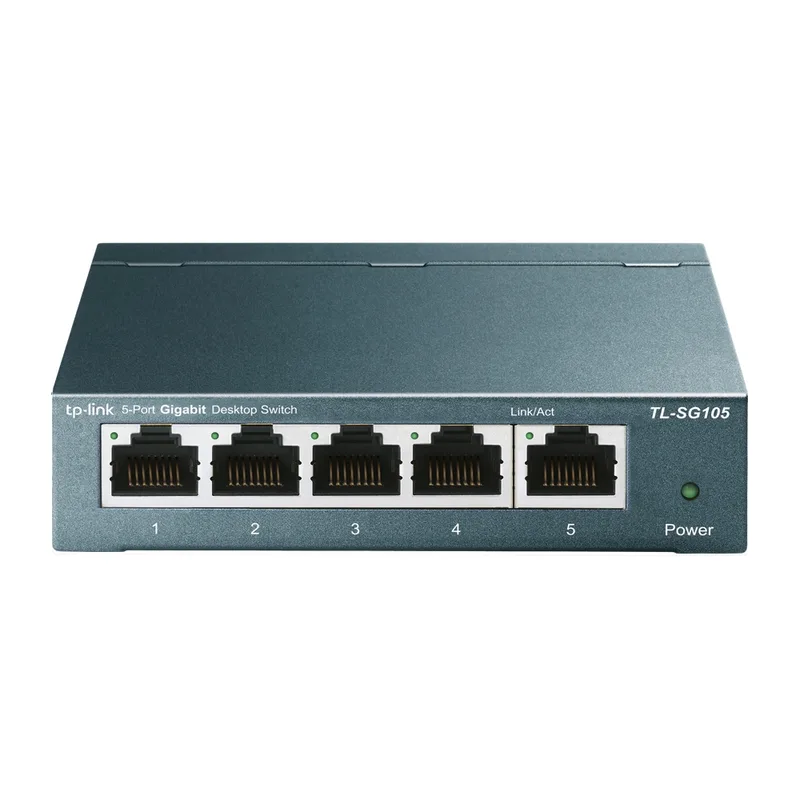
TP-Link TL-SG105
Pros
- Five ports handle a desk with monitor, NAS, printer, and two computers cleanly
- Completely silent fanless design — no noise in a quiet office
- Metal casing is durable and dissipates heat passively
- Lifetime warranty from TP-Link at this price point is exceptional value
Cons
- Five ports fill up fast if you have more than a few wired devices
- No VLAN or QoS features — strictly plug-and-play
- No power LED indicator to confirm the switch is active
The TL-SG105 is the right switch for most compact home offices. Five gigabit ports cover a typical desk: laptop + USB-C dock, desktop, NAS or external drive server, printer, and a spare. The metal chassis runs warm but never hot, the fanless design is truly silent, and setup takes about 90 seconds — plug in power, run cables. That’s it. At under $18, it’s one of the most cost-effective purchases in home networking, and TP-Link’s lifetime warranty means you buy it once.
Where it falls short: if you already have more than four wired devices, the fifth port goes to the router and you’re immediately at capacity. Most remote workers find they need more ports within six months of going wired, so consider the eight-port TL-SG108 instead if you anticipate adding a NAS, printer, or second monitor with USB-C hub.
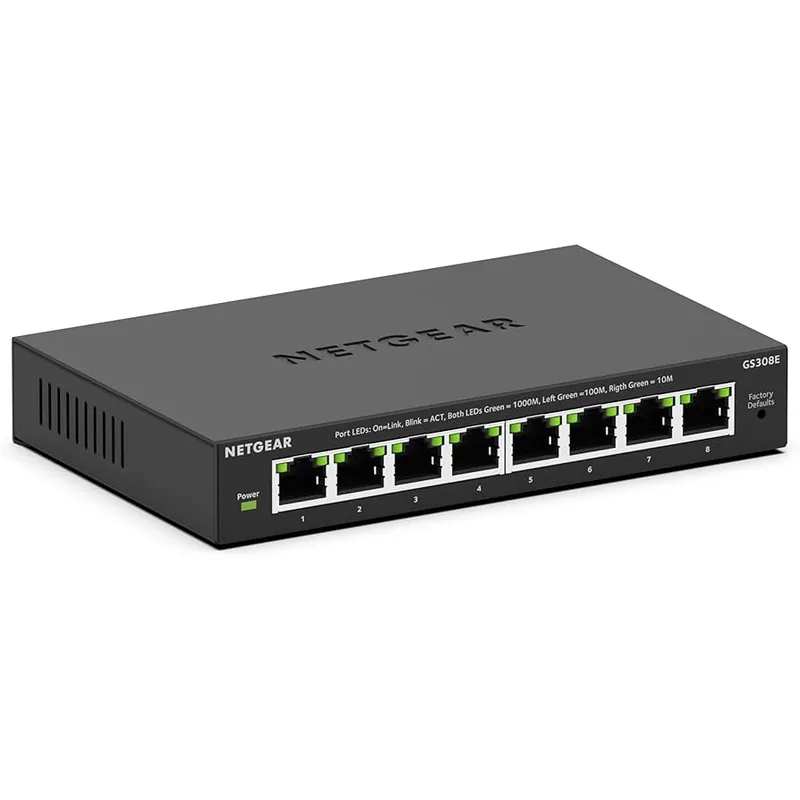
TP-Link TL-SG108
Pros
- Eight ports at under $20 is the best value in gigabit switching right now
- Fanless and completely silent — sits on a desk without adding any noise
- Plug-and-play with zero configuration needed
- Metal housing stays cool even when all eight ports are in use
Cons
- No management features — cannot assign VLANs or prioritize traffic
- LED indicators show activity but no port speed confirmation
- Not rack-mountable without a separate shelf or adapter
The TL-SG108 is the switch to buy for most remote workers. Eight ports cover every realistic home office configuration — two computers, a NAS, smart monitor, printer, smart TV in the office, and still have ports to spare. The price is absurdly low for what you get: a proper metal-bodied, fanless, gigabit switch with a lifetime warranty.
The zero-configuration approach is exactly right for this price tier. You plug it in and it works. Every port auto-detects speed and duplex, traffic flows without any setup, and the shielded ports resist electromagnetic interference from nearby power cables. The only thing missing is management features, but at this price and for most home office use cases, you don’t need them.
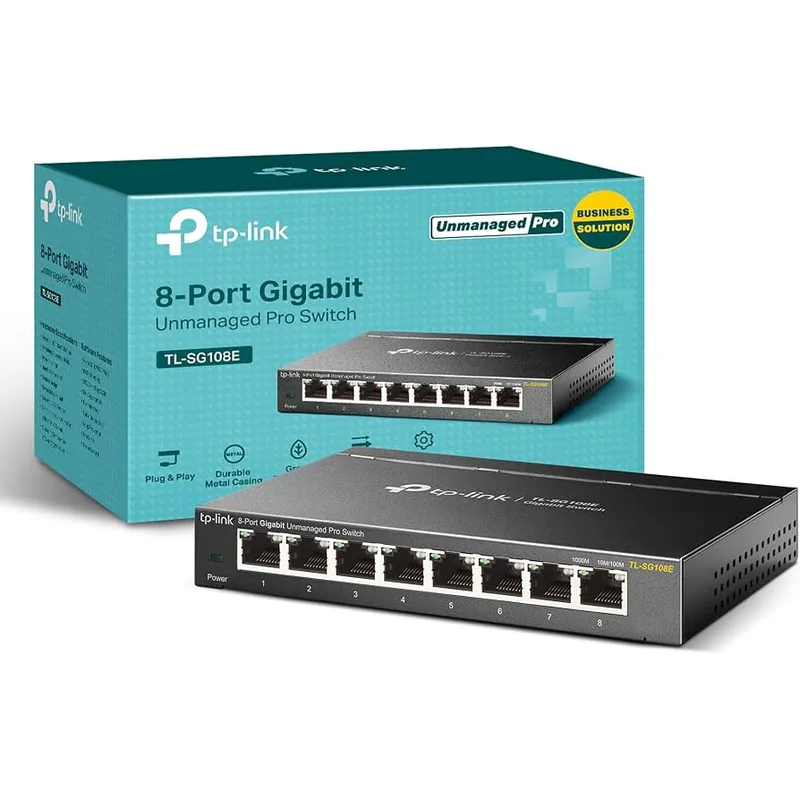
NETGEAR GS308
Pros
- ProSAFE lifetime warranty gives confidence in long-term reliability
- Silent fanless operation with a low-profile design that fits any desk
- Green Ethernet technology reduces power draw when ports are idle
- NETGEAR brand has strong driver support and community troubleshooting resources
Cons
- Slightly higher price than the equivalent TP-Link TL-SG108 for similar specs
- Power adapter is external — adds a cable to manage compared to some rivals
- No wall-mount hardware included in the box
The GS308 is NETGEAR’s answer to the TL-SG108 — eight gigabit ports, fanless, plug-and-play, and a lifetime ProSAFE warranty. Performance is identical to the TP-Link: full non-blocking gigabit throughput across all ports simultaneously. The Green Ethernet feature cuts power draw measurably when ports are idle or connected to low-activity devices.
The reason to choose the GS308 over the TP-Link is brand familiarity. If you run a NETGEAR router or access point, using a NETGEAR switch keeps your support ecosystem consistent. Some users also report the GS308’s build quality feels slightly more premium, with a heavier case. The trade-off is price: it typically runs $3-5 more than the equivalent TP-Link switch for essentially the same specs.
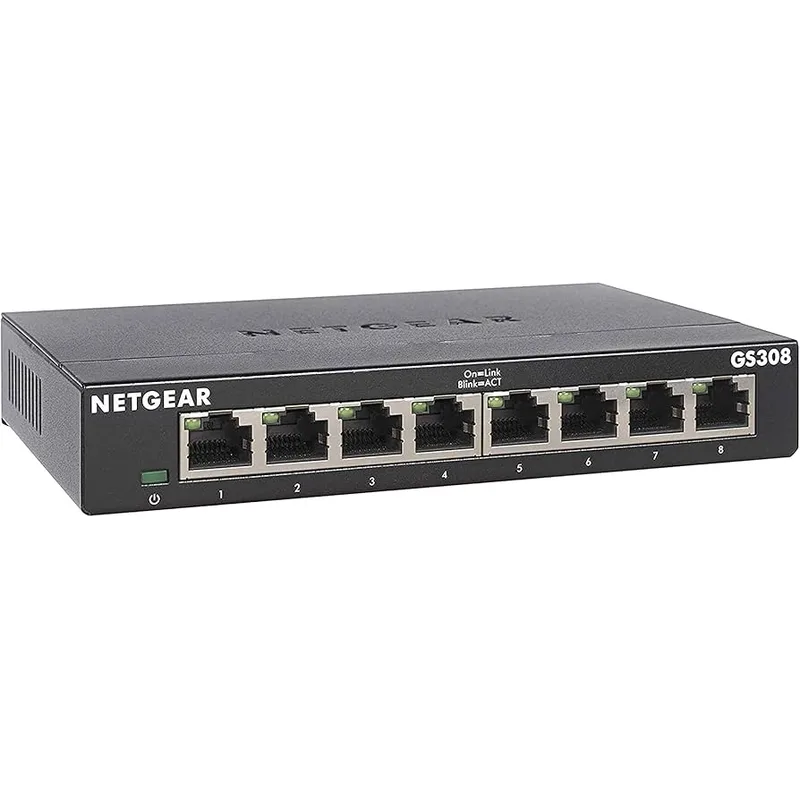
NETGEAR GS308E
Pros
- Web-based management GUI unlocks VLAN and QoS without enterprise complexity
- 802.1p QoS can prioritize video call traffic over file downloads on the network
- Cable health diagnostics help identify damaged Ethernet runs without extra tools
- Only marginally more expensive than unmanaged alternatives but significantly more capable
Cons
- Web interface requires initial IP configuration — not as instant as plug-and-play
- Only a 5-year warranty versus lifetime on most unmanaged competitors
- QoS configuration can be confusing for users without networking background
The GS308E occupies a genuinely useful middle ground. It’s slightly more expensive than a basic unmanaged switch, but it gives you the two features that actually matter for remote work: VLAN support for separating work traffic from personal devices, and 802.1p QoS for prioritizing video call packets over background downloads.
Setting it up requires a browser and a few minutes — it’s not instant plug-and-play — but the web interface is clear and well-documented. Once configured, the switch handles everything automatically. If you share your network with family members running Netflix during your Zoom calls, the QoS settings here genuinely improve call stability. The cable health diagnostics are also useful for diagnosing why a specific port is underperforming.
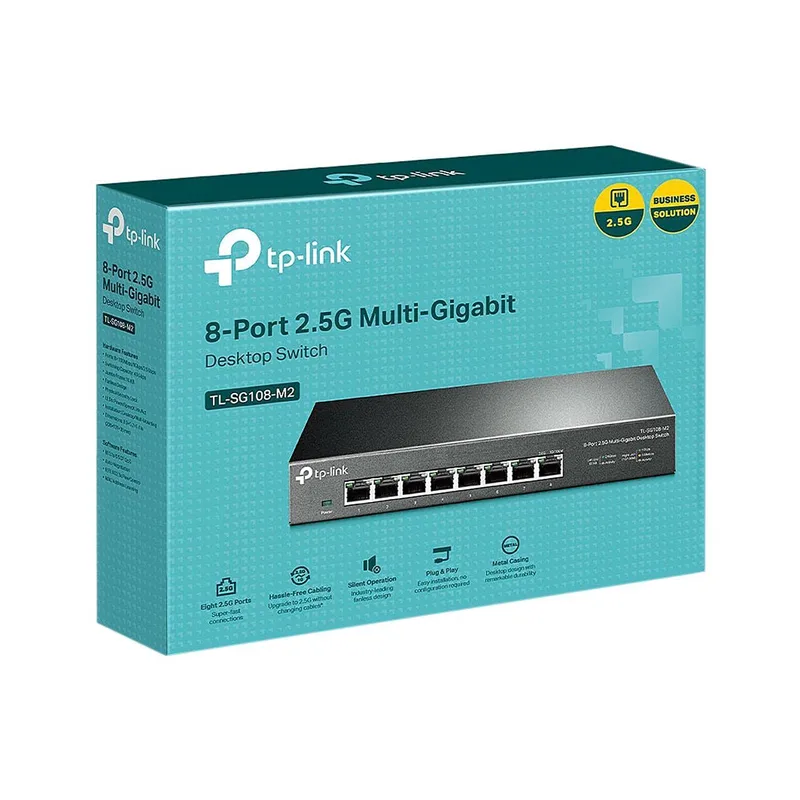
TP-Link TL-SG108-M2
Pros
- 2.5G ports are 2.5x faster than standard gigabit over existing Cat5e cables
- Eliminates the bottleneck between a 2.5G router and NAS or fast PC
- Fanless and completely silent despite the higher bandwidth
- Future-proofs the home office network for the next 5-7 years
Cons
- Significant price jump over standard gigabit switches
- Speed advantage only realized if other devices also support 2.5G
- 2.5G NICs are still not universal in older desktops and laptops
The TL-SG108-M2 is for home offices where gigabit is already a bottleneck. If you move large files between a 2.5G-capable NAS and a modern laptop with a 2.5G NIC, transfers that took 10 minutes on gigabit finish in 4 minutes on 2.5G. This switch makes that possible over existing Cat5e cabling — no rewiring needed.
The 2.5G advantage is real but requires compatible endpoints. If your devices are gigabit-only, you’re paying a $100 premium for no gain. The right buyers for this switch are: anyone with a multi-Gig router who wants the full speed between router and wired devices, NAS users who move large video files or backups regularly, and anyone future-proofing a home office build for the next 5+ years.
Ethernet Switch Buying Guide
Do You Actually Need a Switch?
If your router has enough LAN ports for all your devices, you don’t need a switch. Most home routers have 4 LAN ports. If you’re maxed out or running more than 3 wired devices, a switch expands those ports at a fraction of the cost of a new router.
Unmanaged vs Smart vs Managed
Unmanaged (TL-SG105, TL-SG108, GS308): Plug in, works immediately. No configuration. Right for 95% of home offices.
Smart/Easy-Managed (GS308E): Web browser configuration available. Unlocks VLANs and QoS. Right for users who share a network with others and want to separate or prioritize traffic.
Fully Managed (enterprise gear): CLI and full SNMP management. Overkill for any home office.
How Many Ports?
Count your current wired devices, then add 2-3 for growth. A NAS, a secondary desktop, a network printer, and an IP camera can fill eight ports faster than expected. Start with 8 ports unless your desk is genuinely minimal.
Gigabit vs 2.5G
For most remote workers in 2026, standard gigabit (1 Gbps) is still the right choice. The only scenarios where 2.5G pays off:
- You have a 2.5G router and want full bandwidth to wired devices
- You transfer large files between a NAS and a computer daily
- You’re building a new home office from scratch and want longevity
PoE Switches
If you’re adding wired security cameras, access points, or VoIP phones to your network, consider a PoE (Power over Ethernet) switch. PoE delivers power through the Ethernet cable, eliminating separate power adapters for each device. The TP-Link TL-SG108PE (4 PoE+ ports) is worth a look if you need this.
Cables Matter
A switch upgrade is wasted without decent cabling. Cat5e supports gigabit and 2.5G up to 100 meters. Cat6 or Cat6a is preferable for 2.5G and required for anything faster. Flat Ethernet cables are useful for routing under carpets or behind door frames without damage.
FAQ
Q: Will a switch improve my video call quality? A: It depends on why your calls are dropping. If WiFi instability is the cause — and it usually is — switching to wired Ethernet through a switch will eliminate that variable entirely. Wired connections provide consistent latency, which matters more than raw speed for video calls.
Q: Do I need to configure anything on a basic switch? A: No. Unmanaged switches like the TL-SG105, TL-SG108, and GS308 are plug-and-play. Connect power, plug in cables, and they work. No software, no login, no setup wizard.
Q: Can I daisy-chain switches? (Connect one switch to another) A: Yes, but it introduces an extra network hop. For home office use, it’s fine — you won’t notice the latency impact. Run the second switch off one port of the first, then connect devices to the second switch normally.
Q: What’s the difference between a switch and a hub? A: Hubs are obsolete hardware that broadcast all traffic to all ports simultaneously, reducing effective bandwidth as devices are added. Switches send traffic only to the intended port. Every device listed here is a switch — avoid any product marketed as a “hub” for networking purposes.
Q: My router only has 100 Mbps LAN ports. Will a gigabit switch speed things up? A: No. The switch can’t exceed the speed of its upstream router port. If your router’s LAN ports are 100 Mbps, traffic between devices on the switch can still run at gigabit locally (good for NAS transfers), but traffic going to the internet is capped at 100 Mbps. In this case, upgrading your router is the better investment.
The Bottom Line
For most remote workers, the TP-Link TL-SG108 is the correct answer. Eight ports, gigabit speed, fanless operation, lifetime warranty, and a price under $22. It’s been the most sensible home office switch for three years and nothing has changed that.
If you need a minimal 5-port option for a simpler desk, the TL-SG105 saves a few dollars without sacrificing anything. If you want QoS and VLAN for a shared home network, step up to the NETGEAR GS308E. And if you’re future-proofing with a 2.5G router or NAS, the TL-SG108-M2 is the right investment.
Wired is better than wireless for work. A $20 switch is one of the highest-ROI purchases in a home office setup.
Detailed Reviews
TP-Link TL-SG105
Pros
- Five ports handle a desk with monitor, NAS, printer, and two computers cleanly
- Completely silent fanless design — no noise in a quiet office
- Metal casing is durable and dissipates heat passively
- Lifetime warranty from TP-Link at this price point is exceptional value
Cons
- Five ports fill up fast if you have more than a few wired devices
- No VLAN or QoS features — strictly plug-and-play
- No power LED indicator to confirm the switch is active
TP-Link TL-SG108
Pros
- Eight ports at under $20 is the best value in gigabit switching right now
- Fanless and completely silent — sits on a desk without adding any noise
- Plug-and-play with zero configuration needed
- Metal housing stays cool even when all eight ports are in use
Cons
- No management features — cannot assign VLANs or prioritize traffic
- LED indicators show activity but no port speed confirmation
- Not rack-mountable without a separate shelf or adapter
NETGEAR GS308
Pros
- ProSAFE lifetime warranty gives confidence in long-term reliability
- Silent fanless operation with a low-profile design that fits any desk
- Green Ethernet technology reduces power draw when ports are idle
- NETGEAR brand has strong driver support and community troubleshooting resources
Cons
- Slightly higher price than the equivalent TP-Link TL-SG108 for similar specs
- Power adapter is external — adds a cable to manage compared to some rivals
- No wall-mount hardware included in the box
NETGEAR GS308E
Pros
- Web-based management GUI unlocks VLAN and QoS without enterprise complexity
- 802.1p QoS can prioritize video call traffic over file downloads on the network
- Cable health diagnostics help identify damaged Ethernet runs without extra tools
- Only marginally more expensive than unmanaged alternatives but significantly more capable
Cons
- Web interface requires initial IP configuration — not as instant as plug-and-play
- Only a 5-year warranty versus lifetime on most unmanaged competitors
- QoS configuration can be confusing for users without networking background
TP-Link TL-SG108-M2
Pros
- 2.5G ports are 2.5x faster than standard gigabit over existing Cat5e cables
- Eliminates the bottleneck between a 2.5G router and NAS or fast PC
- Fanless and completely silent despite the higher bandwidth
- Future-proofs the home office network for the next 5-7 years
Cons
- Significant price jump over standard gigabit switches
- Speed advantage only realized if other devices also support 2.5G
- 2.5G NICs are still not universal in older desktops and laptops