At CES 2026, Anker unveiled the Nano Power Strip — a desk-clamp unit with USB-C ports delivering up to 70W each. The announcement confirmed what remote workers already knew: the old power strip formula of twelve AC outlets and two USB-A ports is obsolete. USB-C Power Delivery is now the primary charging standard for laptops, monitors, tablets, and phones. A power strip without meaningful USB-C PD output is a step backward.
This roundup covers five desk power strips with USB-C PD that are currently available on Amazon in 2026. Selection criteria: confirmed USB-C Power Delivery output, verified Amazon listings, and genuine surge protection ratings. Products are ranked by overall utility for a standard remote work desk — not by spec sheet numbers alone.
Quick Comparison
| Power Strip | Price | AC Outlets | USB-C PD | Surge | Desk Mount |
|---|---|---|---|---|---|
| Anker 9-in-1 | $33.99-$39.99 as of Oct 18, 2026 | 3 | 4 ports / 100W | 300J | No |
| Anker Prime 140W | $63.99-$79.99 as of Oct 18, 2026 | 2 | 2 ports / 140W | —* | No |
| TESSAN Desk Clamp | Unavailable | 5 | 2 ports / 20W ea | 2100J | Yes |
| Jgstkcity 65W | $44.61-$49.99 as of Oct 18, 2026 | 3 | 4 ports / 65W | 1200J | Yes |
| TESSAN PD 20W | $37.49 as of Oct 18, 2026 | 9 | 2 ports / 20W ea | 1050J | Optional |
*Anker Prime uses ActiveShield 2.0 intelligent protection rather than a traditional joule rating.
1. Anker 9-in-1 Desktop Charger — Editor’s Pick
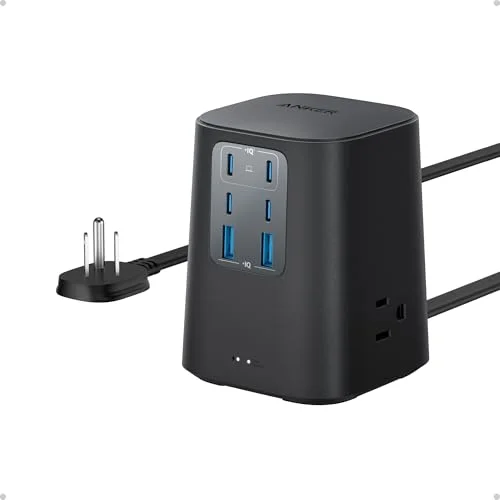
Anker 9-in-1 Desktop Charger
Pros
- 100W USB-C Power Delivery shared across 4 ports handles a MacBook Pro at full speed alongside phones and tablets simultaneously — a single cable from this unit replaces three or four individual wall chargers that were previously spread across multiple outlets
- 300J surge protection defends connected equipment from voltage spikes — while not rated as high as traditional heavy-duty surge protectors, it covers typical home office risk from power grid fluctuations and brief outages
- 5-foot flat plug design sits flush against the wall, eliminating the 2–3 inch gap that standard right-angle plugs leave behind furniture and desks — fits tightly against baseboards without the unit hanging at an angle
- Nine ports in a compact footprint replaces a standard 6-outlet power strip plus a separate USB charging brick, consolidating two pieces of hardware into one without adding desk clutter
- GAN technology keeps the unit cool under sustained multi-device load compared to transformer-based designs — owner reports note no noticeable heat even when all 9 ports are active
Cons
- 300J surge protection is on the lower end of the spectrum — offices with older wiring or frequent power fluctuations should look at the TESSAN models below, which offer 2100J ratings for the same price tier
- No desk mounting option — the unit sits on the desk surface; users who prefer cable-management via under-desk or edge mounting need the TESSAN or Jgstkcity clamp models
- No smart display to show real-time wattage output — the Anker Prime 140W model below includes this feature if live power monitoring matters
The Anker 9-in-1 wins as the best all-around desk power strip for remote workers because it solves the two actual problems on most home office desks: not enough AC outlets, and not enough USB-C charging ports. Three AC outlets handle the monitor, speaker, and one peripheral. Four USB-C ports running up to 100W total handle the laptop, phone, tablet, and wireless earbuds. No separate wall charger required.
The 100W USB-C total sounds like a lot until you map it out. A MacBook Pro drawing 67W, an iPhone at 20W, and AirPods at 5W brings the combined draw to 92W — well within the rated output. The power delivery negotiates automatically with each device, so plugging in a phone does not suddenly drop laptop charging speed below usable.
The flat plug is the detail most reviews understate. Standard right-angle plugs push furniture out from the wall by 2–3 inches to accommodate the plug body. The flat plug design in the 9-in-1 eliminates that gap, which matters for corner desk setups where every inch of floor clearance counts.
At $35–$40, this unit replaces a $15 power strip plus a $25–$40 GaN wall charger. The consolidated cable management alone justifies the price for anyone who has wrestled with two separate units tucked behind a standing desk.
Bottom line: The first power strip to buy for a remote work desk if you have never owned one with USB-C PD built in.
2. Anker Prime 140W 6-in-1 — Best Premium
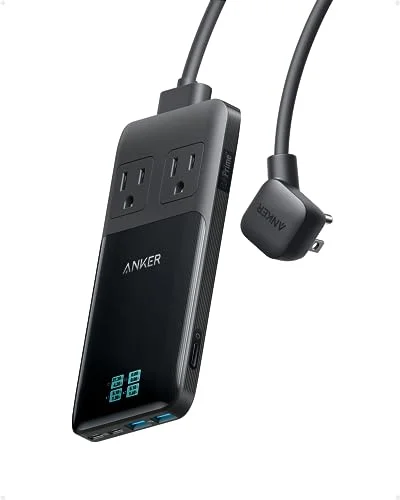
Anker Prime 140W 6-in-1 Charging Station
Pros
- Smart display shows real-time total wattage draw across all connected devices — useful for home office power auditing and identifying which devices are drawing more than expected from a shared circuit
- ActiveShield 2.0 monitors temperature over 3 million times per day and adjusts power output to protect against overheating, which is a meaningful safety advantage over standard power strips in the same price range
- 0.7-inch thickness is the slimmest desktop charging station in this roundup — slides easily between monitor stands, under laptop risers, or along a cable management tray without occupying vertical desk space
- Detachable 5-foot cord means you can replace the cord if it is damaged without replacing the entire unit, and can swap in a shorter cord for wall-mount setups where a 5-foot run is excessive
- $200,000 connected equipment guarantee covers connected devices for damage from power surges — an actual insurance policy on the equipment you plug in, not just a marketing claim about protection
Cons
- Only 2 AC outlets versus 3 on the Anker 9-in-1 — if you need to power a monitor, a desktop speaker, and a desk lamp from one unit, the limited AC count is a real constraint
- Price of $60–$80 is the highest in this roundup — for most remote workers who just need to charge more devices cleanly, the Anker 9-in-1 at $35–$40 covers the same core use case
- No desk mounting — like the Anker 9-in-1, this sits on the desk surface rather than clamping to the edge; users focused on cable management will prefer the TESSAN or Jgstkcity below
The Anker Prime 140W sits in a different category than the other units here. It is built for workers who want to actually know what is happening with their power usage — the onboard smart display shows real-time total wattage draw, which sounds like a gimmick until you discover that one of your “idle” devices is drawing 18W continuously.
The 0.7-inch thickness is the thinnest desktop charging station currently on the market. It slides under a monitor stand without lifting the stand, fits inside cable management channels, and rests flat on the desk without creating a vertical obstacle that items slide off of. If desk aesthetics matter enough to have a cable management strategy at all, the Prime 140W fits that setup.
The detachable cord deserves mention. Every power strip cord eventually gets damaged — kinked at the plug end from being routed tight around furniture legs, or frayed from being repeatedly repositioned. When a standard power strip cord fails, you replace the whole unit. The Prime’s detachable cord means you replace only the cord.
The tradeoff for all of this is the price ($60–$80) and only 2 AC outlets. If your desk needs three or more AC connections — which is common the moment you add desktop speakers to a monitor-plus-laptop setup — the Anker 9-in-1 or TESSAN Desk Clamp serves better.
Bottom line: Worth the premium for workers who want smart power monitoring and the slimmest desktop footprint available.
3. TESSAN Desk Clamp Power Strip — Best Desk Mount
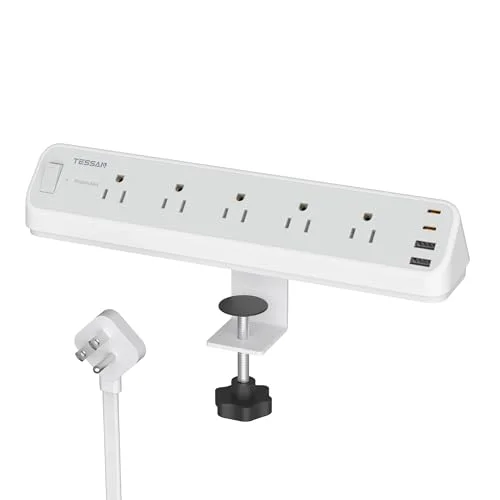
TESSAN Desk Clamp Power Strip
Pros
- 2100J surge protection is seven times the joule rating of the Anker 9-in-1 — a meaningful difference for home offices with older wiring, shared circuits, or equipment connected to line-level audio gear and NAS drives that are sensitive to power transients
- Desk clamp mounts directly to the desk edge without screws or adhesive — gets the power strip off the floor or off the desk surface entirely, reducing cord runs and keeping the workspace visually clean
- 5 AC outlets is the highest count in this roundup — enough simultaneous connections for a monitor, desktop speakers, a desk lamp, a laptop charger brick, and a peripheral hub without using a second strip
- 6-foot cord gives more routing flexibility than the 5-foot options in the Anker lineup — most home office desks are positioned at least 4 feet from the nearest wall outlet, and the extra foot prevents the cord from running taut
- Fits desk edges up to 2 inches thick — compatible with most standing desks, traditional desks, and workbench surfaces without modification
Cons
- USB-C PD output is capped at 20W per port — sufficient for phones, earbuds, and tablets, but not for USB-C laptop charging (which requires at least 45W for ultrabooks and 65W+ for performance laptops). A separate dedicated laptop charger would still be needed
- Clamp bracket adds bulk to the desk edge — on narrow desks or desks where the edge is also used for clip-on lights or monitor arms, the clamp occupies mounting real estate that may already be claimed
- No GAN technology — the transformer-based design runs slightly warmer than GAN units like the Anker 9-in-1 under sustained load
The TESSAN Desk Clamp solves a problem the Anker 9-in-1 does not address: where to put the power strip when there is no flat surface available, or when you simply do not want another object on the desk. The clamp bracket locks onto desk edges up to 2 inches thick without any tools — squeeze the clamp, position it on the edge, release. The entire power strip hangs below the desk surface or mounts at the back edge, depending on placement preference.
The 2100J surge protection is the highest joule rating in this roundup by a significant margin. Surge joule ratings measure the energy a protector can absorb before it is overwhelmed. The difference between 300J (Anker 9-in-1) and 2100J (this TESSAN) is meaningful for any home office with connected equipment that is expensive to replace — NAS drives, external SSDs, audio interfaces, or professional monitors. For a standard setup with a laptop and a display, 300J is likely adequate. For anything more sensitive, 2100J provides a real buffer.
The 5-outlet AC count is the strongest argument for this unit. Most standing desk setups include a monitor with an AC adapter, a laptop charger brick (for non-USB-C machines), desktop speakers, a desk lamp, and a USB hub with its own power supply. That is five AC connections before accounting for phone charging. This TESSAN covers all five from a single strip.
The USB-C PD at 20W per port is the limitation. It handles phone and tablet charging correctly, but it is not a laptop charging solution. Workers whose laptops charge via USB-C PD need 45W minimum (65W+ for performance machines). If USB-C laptop charging is the priority, look at the Jgstkcity 65W below instead.
Bottom line: The best choice for workers who prioritize AC outlet count, surge protection, and cable-clean desk mounting over USB-C wattage.
4. Jgstkcity 65W Desk Clamp — Best for Laptop USB-C Charging
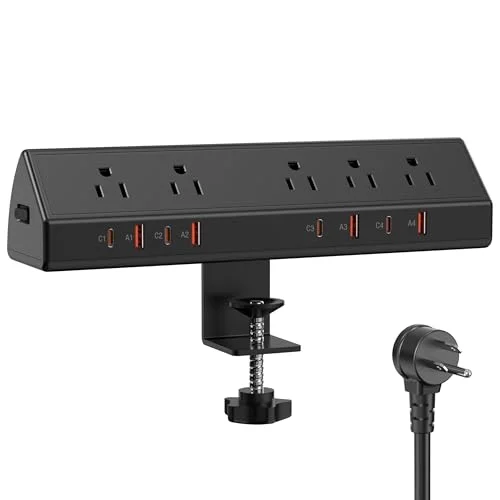
Jgstkcity 65W Desk Clamp Power Strip
Pros
- PD 45W USB-C port covers ultrabook charging at a useful pace — a MacBook Air, Dell XPS 13, or Lenovo ThinkPad X1 Carbon will charge from 0% to 100% in under 2.5 hours from a 45W PD source, which is reasonable for desk use
- Four USB-C ports total — the highest USB-C port count of any desk-mounting model in this roundup, appropriate for dual-USB-C-laptop setups or a single laptop plus multiple USB-C-powered peripherals like monitors, hubs, and webcams
- Widely spaced AC outlets accommodate large power adapter bricks without blocking adjacent outlets — a design detail most budget power strips ignore, resulting in adapters that block two or three outlets simultaneously
- ETL Listed certification confirms the unit passed independent electrical safety testing — an important baseline for any device plugged into a home office circuit with significant equipment attached
- Desk edge mount keeps all cabling contained at the work surface level — eliminates the cable drop from desk to floor that contributes most of the visible cable clutter in home office photos
Cons
- 65W total USB-C output is shared across all four USB-C ports — if both a laptop (45W) and a phone (20W) are charging simultaneously, the combined 65W draws at full capacity, leaving no USB-C headroom for additional devices
- Only 3 AC outlets versus 5 on the TESSAN Desk Clamp — if AC outlet count is the primary requirement, the TESSAN provides more
- 1200J surge protection is lower than the TESSAN Desk Clamp's 2100J — adequate for standard equipment but not the top choice for high-value recording gear or NAS drives
- Jgstkcity is a smaller brand with a shorter product history than Anker or TESSAN — owner report sample size is smaller, which makes long-term reliability data less predictable
The Jgstkcity 65W exists for a specific setup: a desk where the primary device is a USB-C laptop and the existing power strip already handles AC outlets adequately. If you are adding USB-C PD charging to a desk that already has AC coverage, the Jgstkcity clamps onto the edge and adds four USB-C ports — including a 45W port for laptop charging — without requiring any AC outlet real estate.
The 45W USB-C PD port is the functional differentiator from the TESSAN Desk Clamp. A PD 45W source charges a MacBook Air, Dell XPS 13, or HP Spectre x360 at a useful rate. The TESSAN’s 20W per port tops out at tablet and phone speeds. If you have a USB-C laptop, that 25W difference is not marginal.
Widely spaced AC outlets are worth mentioning specifically because most budget power strips ignore this. A standard 3-outlet strip where the outlets are clustered together leaves only one outlet usable when a standard wall adapter is plugged in — the brick body blocks both adjacent outlets. The Jgstkcity’s outlet spacing accommodates full-size adapter bricks without this problem.
The ETL certification is the baseline to look for on any power strip. ETL Listed means an independent laboratory tested the unit against UL electrical safety standards — not the manufacturer’s internal QC. Without ETL or UL listing, there is no third-party verification that the surge protection circuitry or wiring meets safety standards.
Bottom line: Specifically for workers whose laptop charges via USB-C and who want desk edge mounting with a meaningful PD wattage, not just phone-charging USB-C.
5. TESSAN Surge Protector Power Strip PD 20W — Best Budget
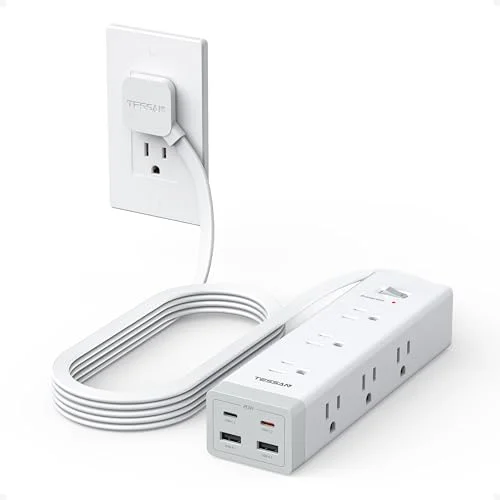
TESSAN Surge Protector Power Strip PD 20W
Pros
- Nine AC outlets is the most of any model in this roundup — covers a full home office setup including monitor, PC, desktop speakers, desk lamp, phone charger, printer, and external drive hub without needing a second strip
- Sub-$30 price point is the most affordable entry in the roundup — appropriate for workers who primarily need AC outlets and only need USB-C PD for phone-speed charging rather than laptop charging
- Ultra-thin flat plug sits flush to the wall or baseboard — does not protrude or block adjacent outlets in a wall plate, which is a common problem with standard thick-body power strip plugs
- Wall or desk mountable design allows the unit to be secured to the underside of a desk or wall panel, getting it fully off the floor and out of sight — compatible with most cable management setups
- TESSAN's established manufacturing track record provides more reliability history than budget alternatives from newer brands — owner reports across thousands of units show consistent long-term performance
Cons
- 1050J surge protection is the lowest rating in this roundup — adequate for standard computers and peripherals but not appropriate for high-value equipment like NAS drives, audio interfaces, or video production gear
- USB-C PD limited to 20W per port — covers phones and tablets but cannot charge laptops at any useful speed; this model is a traditional power strip with added phone-speed USB-C, not a laptop charging solution
- No desk clamp or edge-mount bracket — requires a separate mounting solution or adhesive strip to attach under a desk; it comes with mounting holes but not the hardware to use them on solid wood or laminate desk tops
The TESSAN PD 20W earns the best budget pick not because it is the cheapest power strip available, but because it gives you the most AC outlets plus USB-C PD in one unit at the lowest price. Nine AC outlets covers every standard home office peripheral simultaneously. The two USB-C ports at PD 20W handle phone and tablet charging. Total cost: $20–$30.
For workers who already have a USB-C GaN wall charger for their laptop and just need an outlet strip that also charges a phone without a separate adapter, this unit checks every requirement without overpaying for features they do not use.
The ultra-thin flat plug is the other practical point. Traditional power strip plugs stick out 2–3 inches from the outlet, which forces furniture to be positioned accordingly. The flat plug sits flush against the wall plate, reclaiming that space. On a built-in desk against a wall, the flat plug is frequently the only design that physically fits the available gap.
The 1050J surge protection is the lowest in this roundup, and the USB-C PD at 20W per port does not cover laptop charging. This is the right pick for a secondary strip on a traditional desk that already has a laptop charger, not a replacement for one.
Bottom line: The correct pick when the goal is maximum AC outlets plus USB-C phone charging at the lowest price — not USB-C laptop power.
Buying Guide: USB-C PD Power Strips for Home Offices
How much PD wattage do you actually need?
The answer depends entirely on what you are charging via USB-C:
- Phones and earbuds: 18W–20W is sufficient. Any model here covers this.
- Tablets (iPad, Android): 20W–30W keeps up with typical tablet usage.
- Ultrabooks (MacBook Air, XPS 13, ThinkPad X1): Minimum 45W for useful charging. Only the Jgstkcity 65W and Anker Prime 140W in this roundup reach this threshold.
- Performance laptops (MacBook Pro 14/16, Razer Blade, gaming notebooks): 65W–100W for full-speed charging. The Anker 9-in-1 (100W total across 4 ports) and Anker Prime (up to 100W per port) cover these devices — provided only one laptop is connected at a time.
Surge protection joule ratings: what matters
Joule ratings measure the total surge energy a protector can absorb before the varistors (the protection components) fail. Higher is better. What the ratings mean in practice:
- 300–600J: Adequate for environments with stable power and standard consumer equipment. The risk is from direct lightning strikes on the grid, which most office parks and suburban homes rarely experience.
- 1000–1500J: Better for home offices with sensitive peripherals — audio interfaces, NAS devices, professional monitors — where a single voltage spike could corrupt data or damage components.
- 2000J+: Appropriate for production environments or older buildings where power quality varies. The TESSAN Desk Clamp’s 2100J rating covers this tier.
Desk mounting versus surface placement
Desk-clamp models (TESSAN Desk Clamp, Jgstkcity 65W) solve the visible cable problem by keeping the power strip at desk height and eliminating the floor-to-desk cable run. The tradeoff is that the clamp bracket takes up edge space that might already be used by monitor arm C-clamps or clip-on lights.
Surface models (Anker 9-in-1, Anker Prime) are easier to relocate and do not compete for edge real estate, but they add an object to the desk surface and require a cable run from wherever the outlet is located on the floor or wall.
Outlet spacing: often overlooked
When a power adapter brick is wider than the outlet spacing allows, it blocks adjacent outlets. On a 3-outlet strip with standard spacing, a single wall adapter can block all three outlets at once. Verify the outlet spacing before buying if you have large adapter bricks — the Jgstkcity 65W’s wide spacing is specifically designed to avoid this problem.
FAQ
Can a USB-C PD power strip replace my laptop charger? Only if the USB-C PD output matches or exceeds your laptop’s minimum charging wattage. Most ultrabooks (MacBook Air, Dell XPS 13, HP Spectre) charge adequately at 45W PD. Performance laptops (MacBook Pro 16, gaming notebooks) may require 65W–100W PD. Of the models in this roundup, the Jgstkcity 65W (45W port), Anker 9-in-1 (100W total), and Anker Prime 140W (up to 100W per port) are the options to consider. The TESSAN models at 20W per port will not charge most laptops at a usable rate.
What is the difference between USB-C PD and standard USB-C? Standard USB-C at 5W is the base spec — enough to trickle-charge a phone overnight. USB-C Power Delivery (PD) uses the USB-PD protocol to negotiate higher voltages and currents with compatible devices, enabling 20W, 45W, 65W, or 100W+ charging from the same connector. All the USB-C ports in this roundup support PD at the wattages listed in their specs.
Do surge protectors wear out? Yes. Surge protection is consumed each time the unit absorbs a voltage spike. A 2100J protector that has absorbed several large surges has less remaining capacity than a new unit. Most quality surge protectors include a protected indicator light that goes dark when the protection components have been depleted — the unit continues to pass power through, but with no surge protection remaining. Replace it when the indicator goes dark.
Is ETL Listed the same as UL Listed? ETL and UL are both NRTL (Nationally Recognized Testing Laboratory) certifications recognized by OSHA, and both indicate that the product passed independent electrical safety testing. UL is more broadly recognized by name, but an ETL-listed product has met equivalent safety standards. Both are acceptable certifications for home office equipment.
How many watts does a home office draw? A typical remote worker setup — one 27-inch monitor (40W), a laptop (65W adapter), desktop speakers (20W), a desk lamp (10W), and a phone charger (20W) — draws around 155W combined. A 15A / 1875W power strip handles this with significant headroom. The only scenario where the power rating on these strips becomes relevant is adding a space heater (1500W) or other high-draw appliances to the same circuit, which should be avoided regardless of the strip’s rating.
Conclusion
For most home office setups in 2026, the Anker 9-in-1 Desktop Charger is the correct first choice. It covers the most common remote work scenario — one laptop charging via USB-C, plus AC outlets for monitor and peripherals, plus ports for phone and earbuds — in a compact flat-plug form factor at $35–$40.
If your laptop charges via USB-C and you want desk edge mounting, the Jgstkcity 65W adds the minimum 45W PD output a USB-C laptop needs in a clamp-mount form that keeps the desk surface clear.
For workers who want the best surge protection and the most AC outlets from an edge-mounted unit, the TESSAN Desk Clamp (2100J, 5 outlets) is the practical pick despite its lower USB-C PD output.
The Anker Prime 140W is the premium option — buy it if the smart display and 0.7-inch slim profile are worth the price difference over the 9-in-1.
The TESSAN PD 20W handles situations where nine AC outlets and USB-C phone charging cover everything required, and the budget ceiling is $30.
The underlying principle for all of them: buy for the USB-C PD wattage your laptop actually needs, not the wattage that sounds most impressive on a spec sheet.
Detailed Reviews
Anker 9-in-1 Desktop Charger
Pros
- 100W USB-C Power Delivery shared across 4 ports handles a MacBook Pro at full speed alongside phones and tablets simultaneously — a single cable from this unit replaces three or four individual wall chargers that were previously spread across multiple outlets
- 300J surge protection defends connected equipment from voltage spikes — while not rated as high as traditional heavy-duty surge protectors, it covers typical home office risk from power grid fluctuations and brief outages
- 5-foot flat plug design sits flush against the wall, eliminating the 2–3 inch gap that standard right-angle plugs leave behind furniture and desks — fits tightly against baseboards without the unit hanging at an angle
- Nine ports in a compact footprint replaces a standard 6-outlet power strip plus a separate USB charging brick, consolidating two pieces of hardware into one without adding desk clutter
- GAN technology keeps the unit cool under sustained multi-device load compared to transformer-based designs — owner reports note no noticeable heat even when all 9 ports are active
Cons
- 300J surge protection is on the lower end of the spectrum — offices with older wiring or frequent power fluctuations should look at the TESSAN models below, which offer 2100J ratings for the same price tier
- No desk mounting option — the unit sits on the desk surface; users who prefer cable-management via under-desk or edge mounting need the TESSAN or Jgstkcity clamp models
- No smart display to show real-time wattage output — the Anker Prime 140W model below includes this feature if live power monitoring matters
Anker Prime 140W 6-in-1 Charging Station
Pros
- Smart display shows real-time total wattage draw across all connected devices — useful for home office power auditing and identifying which devices are drawing more than expected from a shared circuit
- ActiveShield 2.0 monitors temperature over 3 million times per day and adjusts power output to protect against overheating, which is a meaningful safety advantage over standard power strips in the same price range
- 0.7-inch thickness is the slimmest desktop charging station in this roundup — slides easily between monitor stands, under laptop risers, or along a cable management tray without occupying vertical desk space
- Detachable 5-foot cord means you can replace the cord if it is damaged without replacing the entire unit, and can swap in a shorter cord for wall-mount setups where a 5-foot run is excessive
- $200,000 connected equipment guarantee covers connected devices for damage from power surges — an actual insurance policy on the equipment you plug in, not just a marketing claim about protection
Cons
- Only 2 AC outlets versus 3 on the Anker 9-in-1 — if you need to power a monitor, a desktop speaker, and a desk lamp from one unit, the limited AC count is a real constraint
- Price of $60–$80 is the highest in this roundup — for most remote workers who just need to charge more devices cleanly, the Anker 9-in-1 at $35–$40 covers the same core use case
- No desk mounting — like the Anker 9-in-1, this sits on the desk surface rather than clamping to the edge; users focused on cable management will prefer the TESSAN or Jgstkcity below
TESSAN Desk Clamp Power Strip
Pros
- 2100J surge protection is seven times the joule rating of the Anker 9-in-1 — a meaningful difference for home offices with older wiring, shared circuits, or equipment connected to line-level audio gear and NAS drives that are sensitive to power transients
- Desk clamp mounts directly to the desk edge without screws or adhesive — gets the power strip off the floor or off the desk surface entirely, reducing cord runs and keeping the workspace visually clean
- 5 AC outlets is the highest count in this roundup — enough simultaneous connections for a monitor, desktop speakers, a desk lamp, a laptop charger brick, and a peripheral hub without using a second strip
- 6-foot cord gives more routing flexibility than the 5-foot options in the Anker lineup — most home office desks are positioned at least 4 feet from the nearest wall outlet, and the extra foot prevents the cord from running taut
- Fits desk edges up to 2 inches thick — compatible with most standing desks, traditional desks, and workbench surfaces without modification
Cons
- USB-C PD output is capped at 20W per port — sufficient for phones, earbuds, and tablets, but not for USB-C laptop charging (which requires at least 45W for ultrabooks and 65W+ for performance laptops). A separate dedicated laptop charger would still be needed
- Clamp bracket adds bulk to the desk edge — on narrow desks or desks where the edge is also used for clip-on lights or monitor arms, the clamp occupies mounting real estate that may already be claimed
- No GAN technology — the transformer-based design runs slightly warmer than GAN units like the Anker 9-in-1 under sustained load
Jgstkcity 65W Desk Clamp Power Strip
Pros
- PD 45W USB-C port covers ultrabook charging at a useful pace — a MacBook Air, Dell XPS 13, or Lenovo ThinkPad X1 Carbon will charge from 0% to 100% in under 2.5 hours from a 45W PD source, which is reasonable for desk use
- Four USB-C ports total — the highest USB-C port count of any desk-mounting model in this roundup, appropriate for dual-USB-C-laptop setups or a single laptop plus multiple USB-C-powered peripherals like monitors, hubs, and webcams
- Widely spaced AC outlets accommodate large power adapter bricks without blocking adjacent outlets — a design detail most budget power strips ignore, resulting in adapters that block two or three outlets simultaneously
- ETL Listed certification confirms the unit passed independent electrical safety testing — an important baseline for any device plugged into a home office circuit with significant equipment attached
- Desk edge mount keeps all cabling contained at the work surface level — eliminates the cable drop from desk to floor that contributes most of the visible cable clutter in home office photos
Cons
- 65W total USB-C output is shared across all four USB-C ports — if both a laptop (45W) and a phone (20W) are charging simultaneously, the combined 65W draws at full capacity, leaving no USB-C headroom for additional devices
- Only 3 AC outlets versus 5 on the TESSAN Desk Clamp — if AC outlet count is the primary requirement, the TESSAN provides more
- 1200J surge protection is lower than the TESSAN Desk Clamp's 2100J — adequate for standard equipment but not the top choice for high-value recording gear or NAS drives
- Jgstkcity is a smaller brand with a shorter product history than Anker or TESSAN — owner report sample size is smaller, which makes long-term reliability data less predictable
TESSAN Surge Protector Power Strip PD 20W
Pros
- Nine AC outlets is the most of any model in this roundup — covers a full home office setup including monitor, PC, desktop speakers, desk lamp, phone charger, printer, and external drive hub without needing a second strip
- Sub-$30 price point is the most affordable entry in the roundup — appropriate for workers who primarily need AC outlets and only need USB-C PD for phone-speed charging rather than laptop charging
- Ultra-thin flat plug sits flush to the wall or baseboard — does not protrude or block adjacent outlets in a wall plate, which is a common problem with standard thick-body power strip plugs
- Wall or desk mountable design allows the unit to be secured to the underside of a desk or wall panel, getting it fully off the floor and out of sight — compatible with most cable management setups
- TESSAN's established manufacturing track record provides more reliability history than budget alternatives from newer brands — owner reports across thousands of units show consistent long-term performance
Cons
- 1050J surge protection is the lowest rating in this roundup — adequate for standard computers and peripherals but not appropriate for high-value equipment like NAS drives, audio interfaces, or video production gear
- USB-C PD limited to 20W per port — covers phones and tablets but cannot charge laptops at any useful speed; this model is a traditional power strip with added phone-speed USB-C, not a laptop charging solution
- No desk clamp or edge-mount bracket — requires a separate mounting solution or adhesive strip to attach under a desk; it comes with mounting holes but not the hardware to use them on solid wood or laminate desk tops