WiFi 7 routers have gone mainstream in 2026, but WiFi 6E hardware hasn’t gone anywhere — it’s gotten cheaper. Routers that launched at $500-700 a few years ago are now regularly discounted to half that, and the 6GHz band they unlocked is still the least congested spectrum available on a home network. For remote workers deciding whether to chase the newest standard or buy proven WiFi 6E hardware at a discount, that price drop changes the math.
This roundup covers five WiFi 6E routers spanning tri-band and quad-band designs, from budget-friendly single-office setups to power-user configurations with dual multi-gig ports. All five give you access to the 6GHz band, which matters more for consistent video call quality than raw throughput numbers — 6GHz has far fewer neighboring networks competing for airtime than the crowded 2.4GHz and 5GHz bands most routers have relied on for two decades.
Every product here has a verified live Amazon listing. Selections are based on manufacturer specifications, patterns across owner feedback, and research into the current WiFi 6E router market.
Quick Comparison
| Router | Price | Bands | Max Throughput | Best For |
|---|---|---|---|---|
| TP-Link Archer AXE300 | $242.88-$295.99 as of Oct 18, 2026 | Quad-band | 16 Gbps | Best overall value |
| ASUS ROG Rapture GT-AXE16000 | $427.49 as of Oct 18, 2026 | Quad-band | 16 Gbps | Power users + gaming |
| Netgear Nighthawk RAXE500 | $179.27-$468.67 as of Oct 18, 2026 | Tri-band | 10.8 Gbps | Large homes, 60 devices |
| Netgear Nighthawk RAXE300 | $115.00-$229.99 as of Oct 18, 2026 | Tri-band | 7.8 Gbps | Best value |
| TP-Link Archer AXE75 | $82.86-$119.99 as of Oct 18, 2026 | Tri-band | 5.4 Gbps | Best budget |
1. TP-Link Archer AXE300 — Best Overall
TP-Link Archer AXE300
Pros
- Two dedicated multi-gig ports (10G and 2.5G) mean this router can terminate a fast fiber WAN connection on one port while running a 10G wired uplink to a NAS or workstation on the other — unusual flexibility below $400
- Quad-band design splits the 5GHz spectrum into two separate radios, reducing contention when many devices connect at once — a real advantage over tri-band routers in homes with 15+ connected devices
- 16 Gbps aggregate throughput is among the highest of any WiFi 6E router still sold new, giving this router more theoretical headroom than most WiFi 7 routers in the same price range
- Built-in VPN client support lets you route all network traffic through a VPN service at the router level, rather than configuring VPN software on every individual device
- Amazon and Best Buy pricing has settled well below the original $600 list price, making this quad-band flagship a genuine value pick rather than a premium purchase
Cons
- WiFi 6E, not WiFi 7 — buyers with new WiFi 7 devices will not get MLO (Multi-Link Operation) support, which is exclusive to the newer standard
- The companion app and web interface expose a large number of settings; buyers who just want a plug-and-play router will find the initial setup less streamlined than TP-Link's simpler Archer models
- This is an older flagship (released in 2022) — TP-Link's own newer WiFi 7 lineup at similar prices offers a clearer upgrade path for buyers planning to keep a router 4-5 years
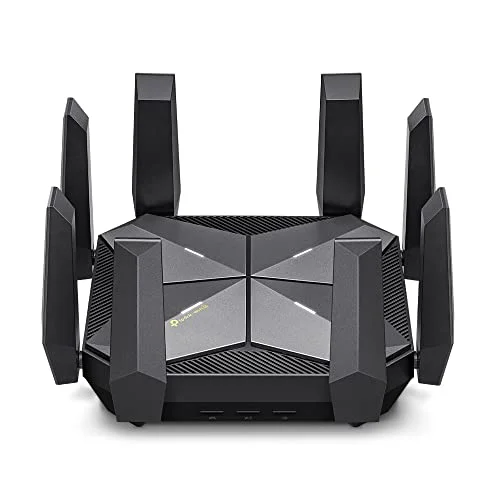
The Archer AXE300 is a quad-band flagship that has aged into a genuine bargain. It launched at $600 with a 16 Gbps aggregate throughput spec that still holds up against most current WiFi 7 routers, and street pricing has settled well below that original number.
The quad-band design is the standout feature. Instead of one 5GHz radio serving every 5GHz-capable device, the AXE300 splits 5GHz traffic across two separate radios, plus a dedicated 6GHz radio and the standard 2.4GHz band. In a household with a dozen or more connected devices, that separation reduces the contention that slows down video calls when someone else is streaming or gaming nearby.
Two multi-gig ports — one 10G and one 2.5G — give this router unusual flexibility for a sub-$400 device. You can terminate a multi-gig fiber WAN on one port while running a 10G wired connection to a NAS or workstation on the other, a configuration that typically requires spending significantly more.
Built-in VPN client support routes all network traffic through a VPN service at the router level, which is a meaningful convenience for remote workers who would otherwise need to configure VPN software separately on every laptop, phone, and tablet in the house.
The tradeoff is that this is WiFi 6E, not WiFi 7 — there’s no MLO support for the newer generation of client devices. For most home offices, that’s a reasonable compromise given the price.
Bottom line: The best-value pick for buyers who want flagship WiFi 6E specs, dual multi-gig ports, and quad-band spectrum separation without flagship pricing.
2. ASUS ROG Rapture GT-AXE16000 — Best for Power Users
ASUS ROG Rapture GT-AXE16000
Pros
- Dual 10G and 2.5G ports plus a dedicated gaming port with triple-level acceleration make this the router to reach for if video calls compete for bandwidth with large uploads, cloud backups, or gaming traffic on the same network
- AiMesh support means the GT-AXE16000 can serve as the primary node in a larger mesh network later, without replacing the hardware if a home office is in a detached space or a far corner of the house
- AiProtection is free for the life of the device — ASUS does not charge an ongoing subscription for the Trend Micro-powered malware blocking and intrusion detection that ships on the router
- Instant Guard turns the router into a personal VPN server, letting you securely access your home network's devices and files remotely without paying for a third-party VPN service
- Quad-band spectrum splitting reduces the chance that a single congested band slows down video calls when smart home devices, laptops, and phones are all connected simultaneously
Cons
- This is a gaming-first router — the RGB lighting, external antenna array, and angular design take up more desk or shelf space than a purely functional home office router
- List price is $699, and even at typical street pricing this remains one of the pricier WiFi 6E options in this roundup; buyers who do not need the gaming-specific features are paying for hardware they will not use
- The ROG Gaming Center software surfaces gaming-oriented dashboards and settings that add complexity for buyers who just want a fast, reliable home office connection
The GT-AXE16000 shares the same 16 Gbps quad-band spec as the Archer AXE300, but ASUS built it around gaming and power-user features that matter for home offices where the network handles more than browsing and video calls.
AiMesh support is the practical differentiator for growing home offices. If your desk is in a converted garage, a basement, or a far corner of the house, the GT-AXE16000 can act as the primary node in a larger mesh network later without needing to be replaced — you add an ASUS mesh node rather than swap the whole system.
Instant Guard turns the router itself into a personal VPN server, letting you remotely and securely reach devices on your home network without paying for a separate VPN service. Combined with AiProtection — free for the life of the device, unlike some competitors’ subscription security add-ons — this router leans toward buyers who want more network control without ongoing costs.
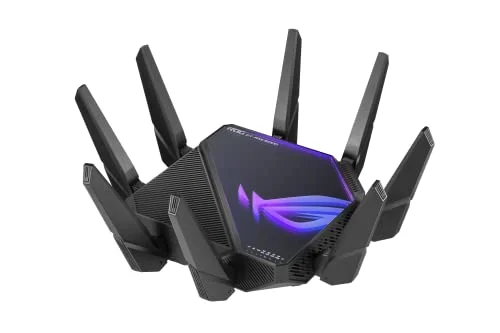
The dedicated gaming port and triple-level acceleration are the reason this router looks the way it does, with an angular chassis and external antennas that take up more space than a purely functional design. If bandwidth needs to be split between video calls and gaming or large uploads happening simultaneously, that acceleration is a genuine advantage. If not, you’re paying for hardware you won’t use.
Bottom line: The right pick for home offices sharing bandwidth with gaming or heavy upload traffic, or for buyers who want a clear mesh expansion path without replacing the primary router.
3. Netgear Nighthawk RAXE500 — Best for Large Homes
Netgear Nighthawk RAXE500
Pros
- 12-stream design and a rated coverage of up to 3,500 sq ft make this the router in this roundup best suited to larger homes where the office is on a different floor or far from the rest of the house
- Support for 60 connected devices covers the reality of a modern smart home — laptops, phones, smart plugs, cameras, and streaming devices all connected at once without the router struggling to keep up
- Tri-band design with a dedicated 6GHz radio keeps home office traffic separated from 2.4GHz and 5GHz congestion caused by smart home devices and neighboring networks
- Netgear's Nighthawk app has a straightforward setup flow and clear device management screens, which owner feedback consistently rates as easier to navigate than ASUS's more technical interface
- Netgear Armor security subscription (sold separately) can be added for owners who want ongoing malware and vulnerability scanning beyond the router's built-in protections
Cons
- Gigabit-only ports across the board — there is no 2.5G or 10G WAN or LAN port, so a multi-gig fiber plan above 1Gbps will bottleneck at the router regardless of the 10.8 Gbps wireless spec
- At $379-$449, this is a premium price for a router with only gigabit wired ports — buyers prioritizing wired multi-gig speeds get more for the money from the TP-Link Archer AXE300
- Physical footprint with the vertical stand and external antenna design takes up meaningful shelf space compared to compact router designs
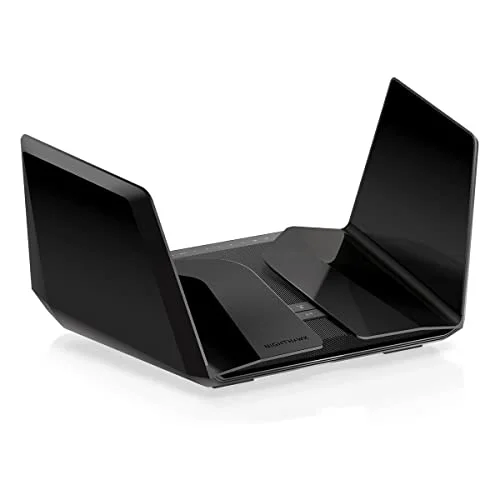
The RAXE500 trades quad-band spectrum splitting for raw coverage. Its 12-stream tri-band design is rated for up to 3,500 sq ft and 60 connected devices, the highest device count in this roundup, making it the pick for larger homes or households with a heavy smart-device load.
That 60-device rating reflects the reality of a modern home network: laptops, phones, smart plugs, security cameras, streaming devices, and IoT gadgets all connected simultaneously. A router rated for fewer devices can start dropping connections or slowing down as that count climbs; the RAXE500 has more headroom before that happens.
The dedicated 6GHz radio keeps home office traffic on a band that’s largely free of interference from older devices and neighboring networks, which matters more for consistent video call quality than the aggregate throughput number suggests.
Netgear’s Nighthawk app is consistently rated by owners as one of the easier interfaces to navigate for setup and device management, a real consideration for buyers who don’t want to spend an evening in a technical settings menu.
The limitation is wired speed: every port on the RAXE500 is Gigabit, with no 2.5G or 10G option. On a standard 1Gbps fiber or cable plan that’s not a bottleneck, but buyers on faster tiers or with local NAS transfer needs will hit that ceiling immediately.
Bottom line: The best choice for larger homes or device-dense households that need coverage and capacity more than multi-gig wired ports.
4. Netgear Nighthawk RAXE300 — Best Value
Netgear Nighthawk RAXE300
Pros
- Tri-band WiFi 6E with a dedicated 6GHz radio at a mid-range price makes this the router for buyers who want the interference-free 6GHz band without paying flagship prices for streams and ports they will not use
- Coverage rated up to 2,500 sq ft and 40 devices covers a typical single-family home office setup without needing a mesh extender in most layouts
- The compact vertical design takes up less shelf space than the RAXE500 or the quad-band ASUS and TP-Link flagships in this roundup
- Netgear's app and setup process remain consistent across the Nighthawk lineup, so buyers upgrading from a smaller Netgear router face no learning curve
- Regularly discounted well below its original list price, making it one of the more accessible ways to get a dedicated 6GHz band on a home network
Cons
- Gigabit-only ports mean no multi-gig WAN or LAN support — fine for standard 1Gbps fiber or cable plans, but a hard ceiling for any faster tier
- 8-stream count and 7.8 Gbps aggregate throughput are meaningfully lower than the RAXE500 or the quad-band routers in this roundup — adequate for a typical household but not built for very device-dense homes
- No AiMesh or Easy-Mesh equivalent for whole-home expansion beyond Netgear's own mesh ecosystem, which requires matching hardware to extend coverage
The RAXE300 is the mid-tier pick for buyers who want a dedicated 6GHz band without paying flagship prices for stream counts and ports they won’t use. Its 8-stream tri-band design and 2,500 sq ft coverage rating cover a typical single-family home office comfortably.
The value proposition here is straightforward: tri-band WiFi 6E, including the uncongested 6GHz radio, at a price that regularly drops well below the router’s original list price. For a household with a normal device count — a handful of laptops, phones, and smart home devices — the RAXE300 delivers what the RAXE500 does at nearly half the cost.
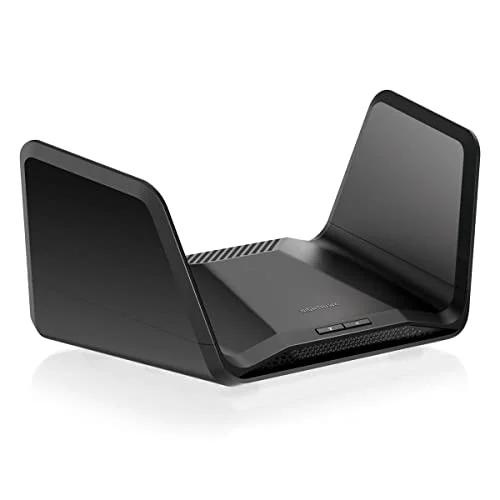
The compact vertical design also takes up less shelf or desk space than the larger flagship routers in this roundup, worth noting for anyone setting this up in a tight home office.
The tradeoffs are the same gigabit-only ports as the RAXE500, plus lower stream count and throughput ceiling. For a single home office with typical device counts, neither limitation shows up in daily use. For a device-dense household or anyone planning wired NAS transfers, the ceiling arrives sooner.
Bottom line: The router for buyers who want the 6GHz band and tri-band separation at the best price-to-capability ratio in this roundup.
5. TP-Link Archer AXE75 — Best Budget
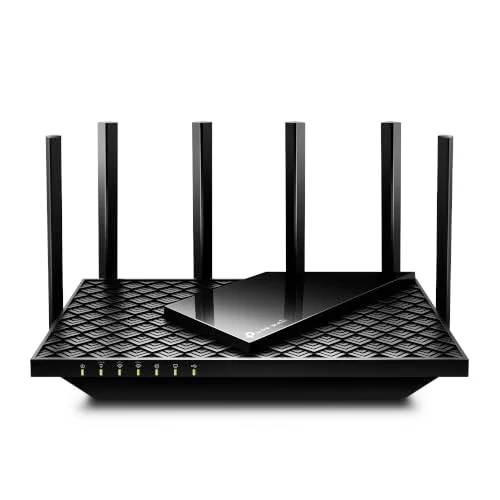
TP-Link Archer AXE75
Pros
- Named a PCMag Editors' Choice pick, the AXE75 is the most-recommended entry point into WiFi 6E and the 6GHz band among budget-tier routers
- 160MHz channel width on the 6GHz band delivers meaningfully higher per-device throughput than routers that only support 80MHz channels at this price point
- OneMesh compatibility lets you add a compatible TP-Link extender or mesh node later without replacing the router, giving a clear upgrade path if coverage needs grow
- Quad-core processor keeps the router responsive under load with multiple simultaneous connections, avoiding the lag some budget routers show when several devices stream or video call at once
- Consistently the cheapest way into tri-band WiFi 6E in this roundup, with frequent Amazon discounts pushing it further below its already accessible list price
Cons
- 5.4 Gbps aggregate throughput is the lowest in this roundup by a wide margin — sufficient for a single home office with a handful of devices, but not built for device-dense households
- Gigabit-only ports cap wired speeds at 1Gbps, a ceiling shared with the other budget and mid-range routers here but worth noting for anyone planning a multi-gig fiber upgrade
- No dedicated gaming or wired-workstation features — this is a straightforward router, not one built for buyers with NAS arrays or latency-sensitive gaming setups
The AXE75 is the cheapest way into WiFi 6E in this roundup, and it earned a PCMag Editors’ Choice recognition for doing the basics well rather than cutting corners that show up immediately in daily use.
Tri-band WiFi 6E with 160MHz channel width on the 6GHz band is the standout spec at this price — many budget routers cap 6GHz channels at 80MHz, effectively halving the per-device throughput advantage the band offers. The AXE75 doesn’t make that compromise.
A quad-core processor keeps the router responsive under simultaneous connections, which matters more than the raw throughput number for most home offices — the router staying snappy while a video call, a background sync, and a couple of phones are all connected is a bigger day-to-day factor than a spec sheet Gbps figure.
OneMesh compatibility gives buyers a clear upgrade path: add a compatible extender or mesh node later if coverage becomes an issue, rather than needing to replace the router outright.
The tradeoffs are the ones you’d expect at this price: the lowest aggregate throughput in this roundup, gigabit-only ports, and no gaming or wired-workstation-specific features. For a single-person home office without heavy device density, none of that matters much in practice.
Bottom line: The right starting point for buyers who want the 6GHz band’s interference advantages without spending flagship money.
Buying Guide: Tri-Band vs. Quad-Band, and Whether WiFi 6E Still Makes Sense
Tri-Band vs. Quad-Band: What the Extra Radio Actually Buys You
A tri-band router (like the RAXE500 and RAXE300) runs one radio each for 2.4GHz, 5GHz, and 6GHz. A quad-band router (like the Archer AXE300 and GT-AXE16000) splits the 5GHz band into two separate radios, so devices connecting on 5GHz aren’t all sharing the same spectrum.
The practical difference shows up in device-dense homes. A household with a dozen or more connected devices — several laptops, phones, smart home gadgets, and streaming devices — will see less contention on a quad-band router because 5GHz traffic is split across two radios instead of one. A single-office household with a handful of devices is less likely to notice the difference day to day.
Is WiFi 6E Still Worth Buying Now That WiFi 7 Is Mainstream?
WiFi 7 adds Multi-Link Operation (MLO), letting compatible client devices maintain connections across multiple bands simultaneously for lower latency under load. That’s a real improvement, but it only benefits you if your laptop, phone, or tablet also supports WiFi 7 — and as of 2026, most devices in active use are still WiFi 6 or 6E.
WiFi 6E routers give every device — old or new — access to the uncongested 6GHz band, which is the single biggest practical upgrade over WiFi 5 or early WiFi 6 hardware. If your devices aren’t WiFi 7-capable yet, a discounted WiFi 6E flagship like the Archer AXE300 delivers most of the real-world benefit of a WiFi 7 router at a fraction of the price.
Matching Stream Count and Coverage to Your Home
Stream count and coverage ratings are marketing-adjacent numbers, but they’re not meaningless. A 12-stream router rated for 3,500 sq ft (RAXE500) is built for a larger home or a device-heavy household. An 8-stream router rated for 2,500 sq ft (RAXE300) is proportioned for a typical single-family home. Buying more stream count than your home and device count need doesn’t hurt, but it also doesn’t help — the money is better spent on wired port speed or mesh expansion if your home’s layout needs it.
When Gigabit Ports Are (and Aren’t) a Bottleneck
If your internet plan is 1Gbps or slower, gigabit-only wired ports on the RAXE500, RAXE300, or AXE75 are not a bottleneck — your internet speed is the limiting factor either way. If you have or plan to upgrade to a multi-gig fiber plan (2.5Gbps or faster), only the Archer AXE300 in this roundup has the multi-gig ports to avoid the router itself becoming the ceiling.
FAQ
Q: Should I buy a WiFi 6E router in 2026, or wait and buy WiFi 7?
If your budget favors a discounted WiFi 6E flagship over an entry-level WiFi 7 router at a similar price, the WiFi 6E option is usually the better buy — you get more stream count, more ports, and often a lower price for hardware that still gives every device access to the 6GHz band. WiFi 7’s main advantage, MLO, only helps if your client devices also support WiFi 7, which most currently in-use hardware doesn’t yet.
Q: What’s the real difference between quad-band and tri-band routers?
A quad-band router adds a second 5GHz radio, splitting 5GHz-connected devices across two channels instead of one. This matters most in homes with many simultaneously connected devices. If your household has a handful of devices, a tri-band router at a lower price delivers essentially the same day-to-day experience.
Q: Do I need a 10G or 2.5G port if my internet plan is only 1Gbps?
No. A multi-gig WAN port only matters if your internet plan exceeds 1Gbps. On a standard gigabit plan, a router with gigabit-only ports (like the RAXE500, RAXE300, or AXE75) will not bottleneck your connection. Multi-gig ports become relevant if you upgrade to a 2.5Gbps+ fiber plan or want fast wired transfers to a local NAS.
Q: How many devices can these routers realistically handle?
Netgear rates the RAXE500 for 60 devices and the RAXE300 for 40 devices — those numbers reflect testing under typical household conditions with a mix of active and idle connections. In practice, a modern smart home with security cameras, smart plugs, streaming devices, and multiple people’s laptops and phones can approach 30-40 connected devices without anyone noticing a slowdown on any of these routers, assuming typical (not simultaneous heavy) usage.
Q: Can I add a mesh extender to any of these routers later?
The ASUS GT-AXE16000 supports AiMesh, and the TP-Link Archer AXE75 supports OneMesh — both let you add a compatible mesh node later without replacing the primary router. The Archer AXE300 and both Netgear routers in this roundup rely on their respective standalone coverage ratings; extending them typically means adding another unit from the same ecosystem, though this is less seamless than a purpose-built mesh system.
Conclusion
For most home offices, the TP-Link Archer AXE300 at $299-$399 is the strongest buy in this roundup: quad-band spectrum separation, dual multi-gig ports, and a 16 Gbps spec at a price that has fallen well below what flagship WiFi 6E hardware used to cost.
Buyers who share bandwidth with gaming or want a clearer mesh expansion path should look at the ASUS ROG Rapture GT-AXE16000 — the AiMesh support and free lifetime security are genuine advantages if the gaming-oriented design and higher price aren’t a dealbreaker.
Larger homes or device-dense households are better served by the Netgear Nighthawk RAXE500, whose 60-device rating and 3,500 sq ft coverage outpace everything else here, gigabit-only ports aside.
For a typical single-family home office on a budget, the Netgear Nighthawk RAXE300 delivers tri-band WiFi 6E and the 6GHz band at the best price-to-capability ratio, while the TP-Link Archer AXE75 is the right starting point for buyers who want the 6GHz advantage without spending much at all.
Detailed Reviews
TP-Link Archer AXE300
Pros
- Two dedicated multi-gig ports (10G and 2.5G) mean this router can terminate a fast fiber WAN connection on one port while running a 10G wired uplink to a NAS or workstation on the other — unusual flexibility below $400
- Quad-band design splits the 5GHz spectrum into two separate radios, reducing contention when many devices connect at once — a real advantage over tri-band routers in homes with 15+ connected devices
- 16 Gbps aggregate throughput is among the highest of any WiFi 6E router still sold new, giving this router more theoretical headroom than most WiFi 7 routers in the same price range
- Built-in VPN client support lets you route all network traffic through a VPN service at the router level, rather than configuring VPN software on every individual device
- Amazon and Best Buy pricing has settled well below the original $600 list price, making this quad-band flagship a genuine value pick rather than a premium purchase
Cons
- WiFi 6E, not WiFi 7 — buyers with new WiFi 7 devices will not get MLO (Multi-Link Operation) support, which is exclusive to the newer standard
- The companion app and web interface expose a large number of settings; buyers who just want a plug-and-play router will find the initial setup less streamlined than TP-Link's simpler Archer models
- This is an older flagship (released in 2022) — TP-Link's own newer WiFi 7 lineup at similar prices offers a clearer upgrade path for buyers planning to keep a router 4-5 years
ASUS ROG Rapture GT-AXE16000
Pros
- Dual 10G and 2.5G ports plus a dedicated gaming port with triple-level acceleration make this the router to reach for if video calls compete for bandwidth with large uploads, cloud backups, or gaming traffic on the same network
- AiMesh support means the GT-AXE16000 can serve as the primary node in a larger mesh network later, without replacing the hardware if a home office is in a detached space or a far corner of the house
- AiProtection is free for the life of the device — ASUS does not charge an ongoing subscription for the Trend Micro-powered malware blocking and intrusion detection that ships on the router
- Instant Guard turns the router into a personal VPN server, letting you securely access your home network's devices and files remotely without paying for a third-party VPN service
- Quad-band spectrum splitting reduces the chance that a single congested band slows down video calls when smart home devices, laptops, and phones are all connected simultaneously
Cons
- This is a gaming-first router — the RGB lighting, external antenna array, and angular design take up more desk or shelf space than a purely functional home office router
- List price is $699, and even at typical street pricing this remains one of the pricier WiFi 6E options in this roundup; buyers who do not need the gaming-specific features are paying for hardware they will not use
- The ROG Gaming Center software surfaces gaming-oriented dashboards and settings that add complexity for buyers who just want a fast, reliable home office connection
Netgear Nighthawk RAXE500
Pros
- 12-stream design and a rated coverage of up to 3,500 sq ft make this the router in this roundup best suited to larger homes where the office is on a different floor or far from the rest of the house
- Support for 60 connected devices covers the reality of a modern smart home — laptops, phones, smart plugs, cameras, and streaming devices all connected at once without the router struggling to keep up
- Tri-band design with a dedicated 6GHz radio keeps home office traffic separated from 2.4GHz and 5GHz congestion caused by smart home devices and neighboring networks
- Netgear's Nighthawk app has a straightforward setup flow and clear device management screens, which owner feedback consistently rates as easier to navigate than ASUS's more technical interface
- Netgear Armor security subscription (sold separately) can be added for owners who want ongoing malware and vulnerability scanning beyond the router's built-in protections
Cons
- Gigabit-only ports across the board — there is no 2.5G or 10G WAN or LAN port, so a multi-gig fiber plan above 1Gbps will bottleneck at the router regardless of the 10.8 Gbps wireless spec
- At $379-$449, this is a premium price for a router with only gigabit wired ports — buyers prioritizing wired multi-gig speeds get more for the money from the TP-Link Archer AXE300
- Physical footprint with the vertical stand and external antenna design takes up meaningful shelf space compared to compact router designs
Netgear Nighthawk RAXE300
Pros
- Tri-band WiFi 6E with a dedicated 6GHz radio at a mid-range price makes this the router for buyers who want the interference-free 6GHz band without paying flagship prices for streams and ports they will not use
- Coverage rated up to 2,500 sq ft and 40 devices covers a typical single-family home office setup without needing a mesh extender in most layouts
- The compact vertical design takes up less shelf space than the RAXE500 or the quad-band ASUS and TP-Link flagships in this roundup
- Netgear's app and setup process remain consistent across the Nighthawk lineup, so buyers upgrading from a smaller Netgear router face no learning curve
- Regularly discounted well below its original list price, making it one of the more accessible ways to get a dedicated 6GHz band on a home network
Cons
- Gigabit-only ports mean no multi-gig WAN or LAN support — fine for standard 1Gbps fiber or cable plans, but a hard ceiling for any faster tier
- 8-stream count and 7.8 Gbps aggregate throughput are meaningfully lower than the RAXE500 or the quad-band routers in this roundup — adequate for a typical household but not built for very device-dense homes
- No AiMesh or Easy-Mesh equivalent for whole-home expansion beyond Netgear's own mesh ecosystem, which requires matching hardware to extend coverage
TP-Link Archer AXE75
Pros
- Named a PCMag Editors' Choice pick, the AXE75 is the most-recommended entry point into WiFi 6E and the 6GHz band among budget-tier routers
- 160MHz channel width on the 6GHz band delivers meaningfully higher per-device throughput than routers that only support 80MHz channels at this price point
- OneMesh compatibility lets you add a compatible TP-Link extender or mesh node later without replacing the router, giving a clear upgrade path if coverage needs grow
- Quad-core processor keeps the router responsive under load with multiple simultaneous connections, avoiding the lag some budget routers show when several devices stream or video call at once
- Consistently the cheapest way into tri-band WiFi 6E in this roundup, with frequent Amazon discounts pushing it further below its already accessible list price
Cons
- 5.4 Gbps aggregate throughput is the lowest in this roundup by a wide margin — sufficient for a single home office with a handful of devices, but not built for device-dense households
- Gigabit-only ports cap wired speeds at 1Gbps, a ceiling shared with the other budget and mid-range routers here but worth noting for anyone planning a multi-gig fiber upgrade
- No dedicated gaming or wired-workstation features — this is a straightforward router, not one built for buyers with NAS arrays or latency-sensitive gaming setups