Monitor arm reviews published this year keep landing on the same short list of names — Ergotron’s LX arm as the desk-mount benchmark, WALI’s gas spring mounts as the value pick for going to the wall — and the live pricing check for this roundup confirms all five mounts below are currently in stock on Amazon. That’s worth calling out because wall and desk VESA mounts turn over stock more than most desk gear; verify availability before you order rather than trusting an old bookmark.
A VESA mount solves a different problem than a monitor stand or riser: instead of raising your screen on the desk surface, it clamps to the desk edge or bolts to the wall and gets the monitor’s base entirely out of your way. That matters most on a small desk, a standing desk where a fixed-height riser doesn’t track with sit-stand transitions, or a wall-mounted single-monitor setup where reclaiming desk depth is the whole point.
Quick pick: For the sturdiest build and the widest range of motion, the Ergotron LX Single Monitor Arm is the one to buy if the desk-clamp price doesn’t bother you. On a budget or for a first wall mount, the WALI Single Monitor Wall Mount (GSWM001) covers the same core job for a fraction of the cost. Running two monitors off the wall instead of a desk arm calls for the WALI Dual Monitor Wall Mount.
Quick Picks
| Spec | Ergotron LX Single Monitor Arm, VESA Desk Mount | WALI Single Monitor Wall Mount, Full Motion (GSWM001) | WALI Dual Monitor Wall Mount (GSWM002) | VIVO Single Ultrawide Wall Mount (MOUNT-VW01M) | Mounting Dream MD2468 Monitor Wall Mount |
|---|---|---|---|---|---|
| Rating | 9.3/10 | 8.9/10 | 8.5/10 | 8.6/10 | 8.0/10 |
| Price | $169.99-$199.99as of Oct 11, 2026 | $20.99-$36.99as of Oct 11, 2026 | $43.49-$49.99as of Oct 11, 2026 | $19.99as of Oct 11, 2026 | $17.99-$21.99as of Oct 11, 2026 |
| Mount Type | Desk clamp or grommet (C-clamp and grommet base included) | Wall mount, brick or wood stud hardware included | Wall mount, brick or wood stud hardware included | Wall mount, low profile | Wall mount, low profile articulating |
| VESA Pattern | 75x75mm or 100x100mm | 75x75mm or 100x100mm | 75x75mm or 100x100mm | Up to 100x100mm | 50x50mm, 75x75mm, or 100x100mm |
| Weight Capacity | 7-25 lbs | Up to 22 lbs | Up to 22 lbs per arm | Up to 44 lbs | Up to 33 lbs |
| Max Monitor Size | Up to 34 inches, including curved and ultrawide | — | — | — | — |
| Motion | 75° tilt, 360° pan, full rotation | +70°/-45° tilt, +90°/-90° swivel, 360° rotation | +75°/-45° tilt, +90°/-90° swivel, 360° rotation per arm | +5°/-12° tilt, +45°/-45° swivel, +3°/-3° screen leveling | 15° tilt up/down, 40° swivel left/right |
| Cable Management | Internal routing through the arm | — | — | — | — |
| Fits | — | 17-34 inch screens | 17-32 inch screens, two monitors | Ultrawide screens up to 49 inches | 10-26 inch screens |
| Extension | — | Up to 19.3 inches, gas spring arm | Up to 17 inches per arm, gas spring | 10.5 inches | — |
| Wall Clearance | — | — | — | — | 2.4 inches |
| Check Price → | Check Price → | Check Price → | Check Price → | Check Price → |
Prices change daily — tap Check Price for the current Amazon price.
1. Ergotron LX Single Monitor Arm, VESA Desk Mount — Editor’s Pick
Ergotron LX Single Monitor Arm, VESA Desk Mount
Pros
- Passed Ergotron's own 10,000-cycle motion test, and it's held a 4.6-star average across more than 2,000 Amazon ratings for over a decade as the default home office desk arm
- Two fully rotating joints give 75° tilt and 360° pan, enough range to swing into portrait mode for reading long documents or reviewing code
- Cables route entirely inside the arm and exit at the desk clamp, so nothing dangles across the desk
- 7-25 lb weight range and support up to 34 inches covers a compact 24-inch monitor and a large ultrawide on the same arm
Cons
- Priced well above every wall mount in this roundup — polished aluminum construction runs roughly $170-$200, more than double the WALI wall mounts below
- Polished aluminum shows fingerprints noticeably, and the arm sits bulkier than slimmer low-profile mounts
- This is a desk clamp mount, not a wall mount, so it still needs usable desk edge space to install
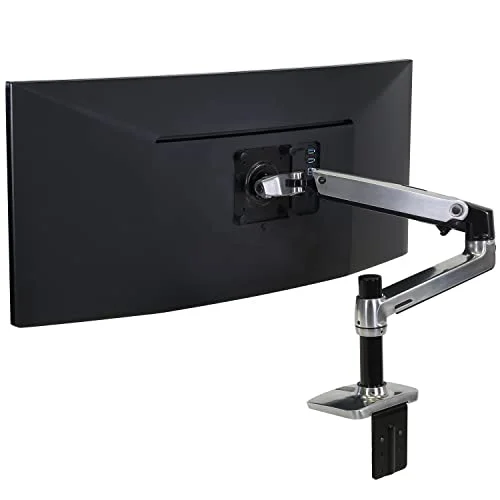
The LX has been the office standard desk arm for over a decade, and the spec sheet explains why: it passed Ergotron’s own 10,000-cycle motion test, and owner ratings back that up with a 4.6-star average across more than 2,000 Amazon reviews. Two fully rotating joints give it 75° of tilt and a full 360° of pan, enough range to rotate a monitor into portrait mode for reading documentation or swing it aside entirely when you need the desk clear.
Cable routing is handled inside the arm itself, so wires exit at the desk clamp instead of hanging loose across the desk — a detail that matters more once you’ve lived with a mount that doesn’t do this. The 7-25 lb weight range and support for screens up to 34 inches means the same arm handles a compact 24-inch monitor or a large curved ultrawide.
The tradeoff is price: at $170-$200, it costs more than double any wall mount in this roundup, and the polished aluminum finish shows fingerprints. It’s also a desk clamp mount, not a wall mount, so it still needs a few inches of usable desk edge to install. For anyone who wants the most tested, most flexible option and doesn’t mind paying for it, this is still the one to buy.
2. WALI Single Monitor Wall Mount, Full Motion (GSWM001) — Best Value
WALI Single Monitor Wall Mount, Full Motion (GSWM001)
Pros
- Gas spring arm extends roughly 19 inches off the wall and retracts flat, clearing the same desk space a $170 arm does for a fraction of the price
- Spring tension is adjustable, so a light 17-inch monitor and a heavier 34-inch screen can both be balanced without drifting
- 360° rotation switches between landscape and portrait without taking the monitor off the mount
- Ships with hardware for both brick and wood-stud walls, plus a detachable VESA plate that stays attached to the monitor when it's removed
Cons
- 22 lb capacity covers most 17-34 inch monitors but rules out heavier professional-grade displays
- Requires drilling into a wall stud or masonry — renters without landlord approval should use a desk arm instead
- Full-motion gas spring arms show more wobble at full extension than a fixed wall mount, noticeable if you type on a nearby mechanical keyboard
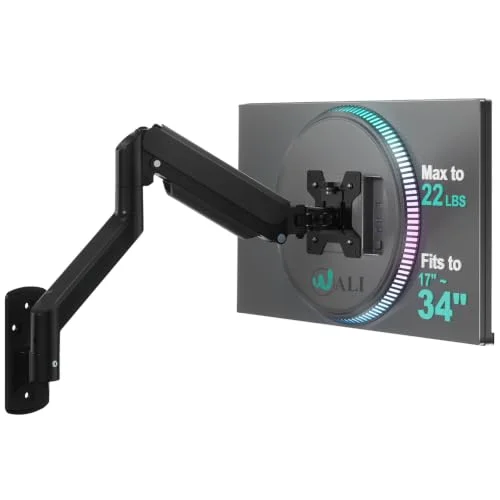
This is the wall-mount equivalent of the Ergotron LX at roughly a fifth of the price. The gas spring arm extends about 19 inches off the wall and folds flat when retracted, clearing the same desk space a much more expensive arm does. Spring tension is adjustable, so it holds a light 17-inch monitor and a heavier 34-inch screen without one end drifting up or down over time.
360° rotation lets the screen switch between landscape and portrait without removing it from the mount, and the box includes hardware for both brick and wood-stud walls, plus a detachable VESA plate that stays bolted to the monitor when you eventually take it down.
The 22 lb weight limit covers most 17-34 inch monitors but not heavier professional displays, and installation means drilling into a stud or masonry — a dealbreaker for renters without landlord sign-off. Full-motion gas spring arms also flex slightly more at full extension than a fixed mount, noticeable if your desk sits close to the wall and you type hard on a mechanical keyboard. For most home offices, it’s still the best dollar-for-dollar way to get a monitor off the desk.
3. WALI Dual Monitor Wall Mount (GSWM002) — Best for Dual Monitors
WALI Dual Monitor Wall Mount (GSWM002)
Pros
- Two independently adjustable gas spring arms let each monitor sit at its own height and angle instead of forcing a matched symmetric setup
- 22 lb capacity per arm covers a pair of 27-32 inch monitors, not just smaller screens
- Frees the entire desk surface for a dual-monitor setup that would otherwise need two separate stands or arms
- Same brick and wood-stud hardware as the single-arm WALI mount below, plus the same multi-year track record on Amazon
Cons
- Costs roughly double the single-arm WALI mount, which adds up if only one monitor actually needs wall mounting
- Two independent arms mean two separate installation and alignment steps — expect more setup time than a single mount
- Like the single-arm version, it requires a wall stud or masonry anchor, not ideal for renters
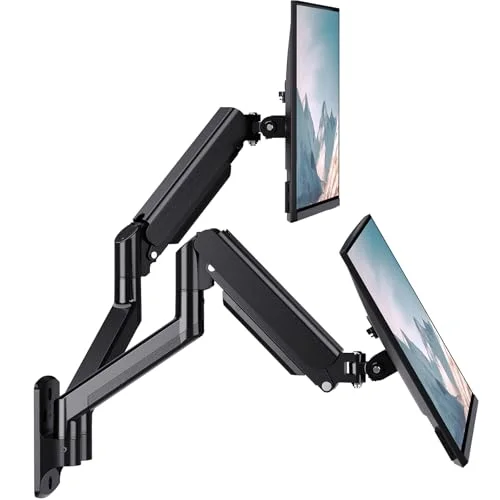
The dual-arm version of the WALI mount above solves a specific problem: getting two monitors off the desk without buying two separate single mounts or a bulkier dual desk arm. Each arm adjusts independently, so the two screens don’t have to sit at a matched height and angle — useful if one monitor is your primary display and the other is angled off to the side for reference material.
Weight capacity holds at 22 lbs per arm, enough for a pair of 27-32 inch monitors rather than just smaller screens, and it uses the same brick and wood-stud hardware as the single-arm WALI mount.
It costs roughly double the single-arm version, which only makes sense if both monitors are actually going on the wall, and two independent arms mean two full installation and alignment passes instead of one. Like every wall mount here, it also needs a stud or masonry anchor. For a genuine dual-monitor wall setup, it’s the more sensible buy over two single mounts bought separately.
4. VIVO Single Ultrawide Wall Mount (MOUNT-VW01M) — Best for Ultrawide Monitors
VIVO Single Ultrawide Wall Mount (MOUNT-VW01M)
Pros
- 44 lb weight capacity is the highest in this roundup, built specifically for heavy 49-inch ultrawide and super-ultrawide panels
- Collapses flat against the wall when not extended, useful in a small home office where a full-motion arm would stick out
- Screen-leveling adjustment (+3°/-3°) fixes a monitor that hangs slightly crooked after mounting, a detail cheaper mounts skip
- High-grade steel construction holds a wide, top-heavy panel without sagging over time
Cons
- Tilt and swivel range is noticeably narrower than the WALI gas spring mounts — built for a mostly fixed forward viewing position, not frequent repositioning
- Only rated for 100x100mm VESA, so a monitor with a 200x200mm pattern needs a separate adapter plate
- Owner feedback flags the included mounting screws as the weakest part of the kit — worth upgrading the hardware at install
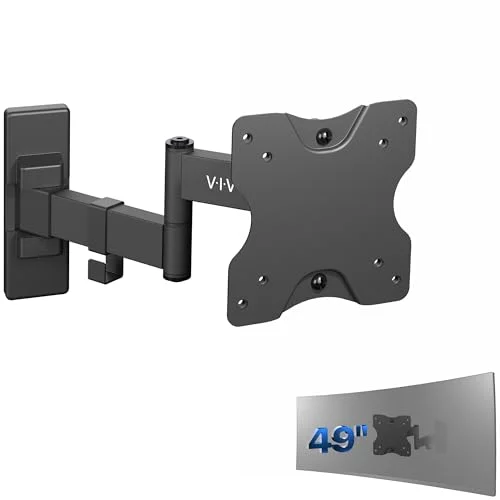
Most wall mounts top out around 27-34 inches; this one is built for the 49-inch ultrawide and super-ultrawide panels that other mounts on this list aren’t rated to hold. The 44 lb weight capacity is the highest in this roundup, and high-grade steel construction keeps a wide, top-heavy panel from sagging at the mount point over time.
It collapses flat against the wall when not extended, which matters more on a large ultrawide than it sounds — a full-motion arm sticking 19 inches off the wall with a 49-inch screen on the end is a lot of leverage. A +3°/-3° screen-leveling adjustment also fixes a monitor that hangs slightly crooked after installation, a step cheaper mounts skip entirely.
The tradeoff is range of motion: tilt and swivel are noticeably tighter than the WALI gas spring mounts, so this is built for a mostly fixed, forward-facing position rather than frequent repositioning. It’s also only rated for 100x100mm VESA, so an ultrawide with a 200x200mm pattern needs a separate adapter plate, and owner feedback flags the included screws as the weakest part of the kit — worth upgrading at install. For anyone specifically wall-mounting a large ultrawide, it’s still the clearest fit on this list.
5. Mounting Dream MD2468 Monitor Wall Mount — Best Budget
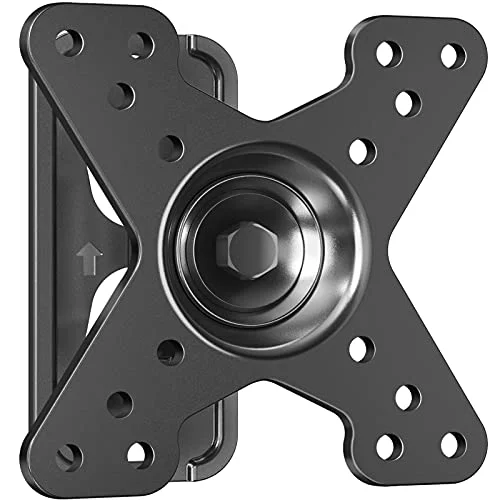
Mounting Dream MD2468 Monitor Wall Mount
Pros
- Cheapest mount in this roundup at roughly $22, with tilt and swivel adjustment that flat fixed mounts at a similar price skip entirely
- 2.4-inch wall clearance keeps a small monitor sitting nearly flush, closer to wall art than a bulky bracket
- 33 lb capacity is generous for the small 10-26 inch screens this mount is actually sized for
- Bracket supports both landscape and portrait mounting orientation
Cons
- 26-inch maximum screen size rules it out for larger displays — most dual-monitor home office setups won't fit
- Installation needs a full toolkit (drill, stud finder, socket wrench) and is easier with a second person holding the monitor steady
- Swivel and tilt range is modest next to the WALI gas spring mounts, better suited to a mostly fixed viewing position
At roughly $22, this is the cheapest mount in this roundup, and it doesn’t cut the one feature that matters most for a small monitor: it still tilts and swivels instead of locking the screen in one fixed position the way some flat mounts at this price do. The 2.4-inch wall clearance keeps a small monitor sitting nearly flush against the wall, closer to a framed piece of art than a bracket sticking out of the room.
The 33 lb weight rating is generous for the screens this mount is actually built for, and the bracket supports both landscape and portrait orientation.
The catch is size: at a 26-inch maximum, it’s meant for a small secondary monitor or a compact single-screen desk, not the larger displays common in most home office setups. Installation calls for a full toolkit — drill, stud finder, socket wrench — and goes faster with a second person holding the monitor steady while you align it. Tilt and swivel range is also modest next to the WALI gas spring mounts. For a small monitor on a tight budget, it’s the straightforward choice.
Buying Guide: How to Pick a VESA Monitor Mount
Check Your Monitor’s VESA Pattern First
Nearly every modern monitor has VESA mounting holes on the back, but the pattern varies — 75x75mm and 100x100mm cover most 17-34 inch monitors, while larger ultrawide and 4K panels sometimes use 100x100mm or a larger 200x200mm pattern. Check your monitor’s spec sheet before buying; a mismatch means an adapter plate or a returned mount.
Wall Mount vs. Desk Arm
A wall mount like the WALI or VIVO options here needs a stud or masonry wall and permanent drilling, but it fully clears the desk surface and works well for a fixed monitor position. A desk arm like the Ergotron LX clamps to the desk edge instead — no drilling, and it’s easy to move to a new desk later, but it still occupies a few inches of desk space at the clamp point. Renters without wall-drilling approval should default to a desk arm.
Weight Capacity Needs Headroom
Match the mount’s rated capacity to your actual monitor weight, not just its screen size — a 34-inch curved monitor can weigh noticeably more than a flat panel of the same size. The VIVO ultrawide mount’s 44 lb rating and the WALI mounts’ 22 lb rating both have some headroom built in, but check your monitor’s listed weight against the spec sheet before assuming any mount will hold it safely.
Range of Motion Depends on How Often You Reposition
A gas spring mount like the WALI options offers real tilt, swivel, and height adjustment for a desk where the viewing angle changes throughout the day — sitting versus standing, or sharing a screen with someone next to you. A more fixed mount like the VIVO ultrawide or Mounting Dream MD2468 offers less range but a more stable, simpler installation if your monitor position rarely changes once it’s set.
Cable Management Isn’t Automatic
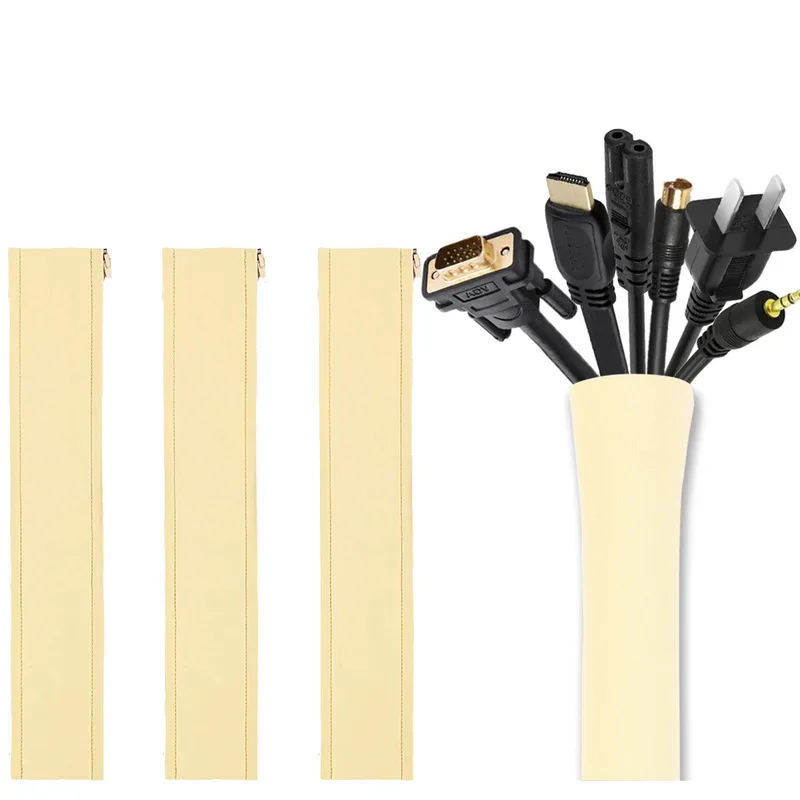
Only the Ergotron LX routes cables fully inside the arm in this roundup. Wall mounts generally leave cables exposed along the arm or wall, so budget for a cable sleeve or adhesive clips if a clean look matters — a detail that’s easy to overlook until the mount is already installed.
FAQ
Do I need to know my monitor’s VESA pattern before buying a mount? Yes. Check the back of your monitor or its spec sheet for the VESA hole spacing — most home office monitors use 75x75mm or 100x100mm, which every mount in this roundup supports, but larger displays sometimes use a bigger pattern that needs an adapter plate.
Can I wall-mount a monitor without drilling into a stud? Not safely for most monitors. Drywall anchors alone aren’t rated for the weight of a monitor and gas spring arm combined — all the wall mounts in this roundup are designed to anchor into a wood stud or masonry wall. If you can’t drill into a stud, a desk clamp arm like the Ergotron LX is the better option.
Is a desk arm or a wall mount better for a standing desk? A desk arm, in most cases. A wall-mounted monitor stays at a fixed height, so it won’t track your desk as you move between sitting and standing. A desk arm clamped to the desk surface moves with the desk itself.
Why does the Ergotron LX cost so much more than the WALI wall mounts? It’s a different mount type with a different track record — a desk clamp arm rated for 10,000 motion cycles, sold at a price point that reflects over a decade as the office-standard arm. The WALI mounts deliver similar core functionality at a fraction of the price if you don’t need the Ergotron’s specific build quality or desk-clamp format.
Can two single monitors share one dual-arm mount instead of two separate mounts? Yes — that’s the specific case the WALI Dual Monitor Wall Mount is built for. Each arm adjusts independently, so it’s generally simpler and less expensive than buying two single-arm mounts and installing them separately.
Conclusion
The Ergotron LX Single Monitor Arm is the strongest all-around pick in this roundup — the motion-cycle testing, cable routing, and decade-long track record justify the price if a desk clamp fits your setup. For most home offices going to the wall for the first time, the WALI Single Monitor Wall Mount delivers nearly the same core functionality — gas spring adjustability, solid weight capacity, brick or wood-stud hardware — for a fraction of the cost. Running two monitors off the wall calls for the WALI Dual Monitor Wall Mount over buying two single mounts separately, a 49-inch ultrawide needs the VIVO mount’s 44 lb capacity, and a small secondary monitor on a tight budget is well served by the Mounting Dream MD2468. Whichever you pick, confirm your monitor’s VESA pattern and weight against the mount’s rating before you drill.
Detailed Reviews
Ergotron LX Single Monitor Arm, VESA Desk Mount
Pros
- Passed Ergotron's own 10,000-cycle motion test, and it's held a 4.6-star average across more than 2,000 Amazon ratings for over a decade as the default home office desk arm
- Two fully rotating joints give 75° tilt and 360° pan, enough range to swing into portrait mode for reading long documents or reviewing code
- Cables route entirely inside the arm and exit at the desk clamp, so nothing dangles across the desk
- 7-25 lb weight range and support up to 34 inches covers a compact 24-inch monitor and a large ultrawide on the same arm
Cons
- Priced well above every wall mount in this roundup — polished aluminum construction runs roughly $170-$200, more than double the WALI wall mounts below
- Polished aluminum shows fingerprints noticeably, and the arm sits bulkier than slimmer low-profile mounts
- This is a desk clamp mount, not a wall mount, so it still needs usable desk edge space to install
WALI Single Monitor Wall Mount, Full Motion (GSWM001)
Pros
- Gas spring arm extends roughly 19 inches off the wall and retracts flat, clearing the same desk space a $170 arm does for a fraction of the price
- Spring tension is adjustable, so a light 17-inch monitor and a heavier 34-inch screen can both be balanced without drifting
- 360° rotation switches between landscape and portrait without taking the monitor off the mount
- Ships with hardware for both brick and wood-stud walls, plus a detachable VESA plate that stays attached to the monitor when it's removed
Cons
- 22 lb capacity covers most 17-34 inch monitors but rules out heavier professional-grade displays
- Requires drilling into a wall stud or masonry — renters without landlord approval should use a desk arm instead
- Full-motion gas spring arms show more wobble at full extension than a fixed wall mount, noticeable if you type on a nearby mechanical keyboard
WALI Dual Monitor Wall Mount (GSWM002)
Pros
- Two independently adjustable gas spring arms let each monitor sit at its own height and angle instead of forcing a matched symmetric setup
- 22 lb capacity per arm covers a pair of 27-32 inch monitors, not just smaller screens
- Frees the entire desk surface for a dual-monitor setup that would otherwise need two separate stands or arms
- Same brick and wood-stud hardware as the single-arm WALI mount below, plus the same multi-year track record on Amazon
Cons
- Costs roughly double the single-arm WALI mount, which adds up if only one monitor actually needs wall mounting
- Two independent arms mean two separate installation and alignment steps — expect more setup time than a single mount
- Like the single-arm version, it requires a wall stud or masonry anchor, not ideal for renters
VIVO Single Ultrawide Wall Mount (MOUNT-VW01M)
Pros
- 44 lb weight capacity is the highest in this roundup, built specifically for heavy 49-inch ultrawide and super-ultrawide panels
- Collapses flat against the wall when not extended, useful in a small home office where a full-motion arm would stick out
- Screen-leveling adjustment (+3°/-3°) fixes a monitor that hangs slightly crooked after mounting, a detail cheaper mounts skip
- High-grade steel construction holds a wide, top-heavy panel without sagging over time
Cons
- Tilt and swivel range is noticeably narrower than the WALI gas spring mounts — built for a mostly fixed forward viewing position, not frequent repositioning
- Only rated for 100x100mm VESA, so a monitor with a 200x200mm pattern needs a separate adapter plate
- Owner feedback flags the included mounting screws as the weakest part of the kit — worth upgrading the hardware at install
Mounting Dream MD2468 Monitor Wall Mount
Pros
- Cheapest mount in this roundup at roughly $22, with tilt and swivel adjustment that flat fixed mounts at a similar price skip entirely
- 2.4-inch wall clearance keeps a small monitor sitting nearly flush, closer to wall art than a bulky bracket
- 33 lb capacity is generous for the small 10-26 inch screens this mount is actually sized for
- Bracket supports both landscape and portrait mounting orientation
Cons
- 26-inch maximum screen size rules it out for larger displays — most dual-monitor home office setups won't fit
- Installation needs a full toolkit (drill, stud finder, socket wrench) and is easier with a second person holding the monitor steady
- Swivel and tilt range is modest next to the WALI gas spring mounts, better suited to a mostly fixed viewing position