Your video call background matters. Your camera matters. But nothing determines how you look on a call more than lighting. A remote worker with a decent laptop camera and good lighting looks dramatically more professional than one with an expensive webcam and a window behind them or overhead fluorescents casting harsh shadows under their eyes.
Quick picks: For frequent calls where appearance matters, the Elgato Ring Light ($199) gives you the most control. On a tighter budget, the Elgato Key Light Air ($129) produces equally professional results in a smaller footprint. For occasional calls, the UBeesize 10-inch ($36) is a solid starter upgrade.
Ring lights and panel lights solve a specific problem: they put controlled, even light directly on your face, eliminate shadows, and let you adjust color temperature to match your environment. This roundup covers five options — from a professional desk-clamp ring light to a budget USB model — all focused on what remote workers actually need from call lighting.
What to Look for in Video Call Lighting
Even, shadow-free light. Ring lights and panel lights are designed to wrap light around the face and minimize harsh shadows. Both work well; panel lights tend to produce slightly softer output because of diffusion panels.
Color temperature control. The color of your light needs to match your room. Office-white fluorescents (4000–5000K), warm home lighting (2700–3000K), and daylight from windows (5500–6500K) all require different settings. A light that lets you dial from warm to cool gives you consistency across every call environment.
Brightness. A light needs enough output to compete with ambient room light and any background illumination. For most home offices, 1000–2500 lumens of adjustable output is sufficient.
Mount compatibility. Some lights clamp to a desk edge. Others freestand on a provided tripod. Some clip to your monitor bezel. Consider your desk setup before buying — a clamp that doesn’t fit your desk edge, or a stand that needs floor space you don’t have, creates problems from day one.
Compact profile. A light that takes over your desk or dominates your background on camera defeats the purpose of a clean setup.
The Best Ring Lights for Video Calls in 2026
1. Elgato Ring Light — Editor’s Pick
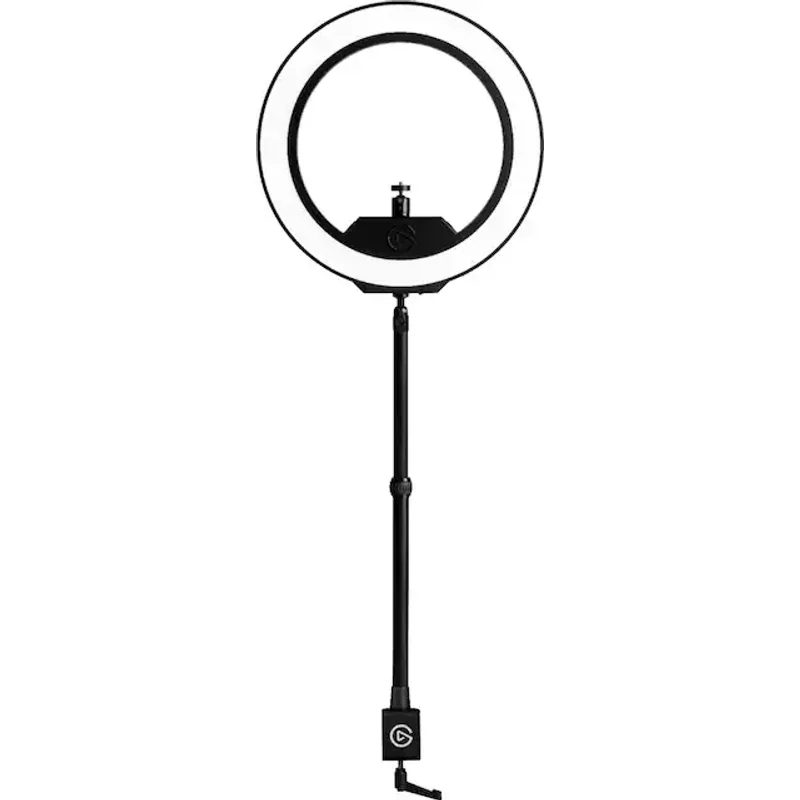
The Elgato Ring Light is built specifically for professional creators and remote workers who want precise, repeatable control over their lighting. The 2500-lumen output is strong enough to compete with daylight from windows — a common problem in home offices with south-facing desks — and the 2900K–7000K color temperature range covers every room lighting scenario.
Where it separates from cheaper options is control. It connects to the Elgato Control Center app on Mac, PC, iOS, and Android, letting you adjust brightness and color temperature from a keyboard shortcut or a Stream Deck button. For anyone who switches between calls in different lighting conditions throughout the day, this makes a real practical difference. No fumbling with physical dials mid-call.
The desk clamp mount and ball joint give you precise positioning control. The ring light can be angled to illuminate your face without creating a visible reflection in glasses — a common complaint with cheaper lights positioned directly at eye level.
The desk clamp is the main limitation to flag. If your desk has a thick edge, a glass top, or limited overhang depth, fitting the clamp can be awkward. It needs a solid surface to grip, and some thinner desks won’t hold it securely. For anyone with a traditional desk and a sturdy edge, this isn’t an issue.
At $199, it’s the most expensive option here. Justified for frequent video calls or complex home office lighting that needs active management throughout the day.
2. Elgato Key Light Air — Best Value
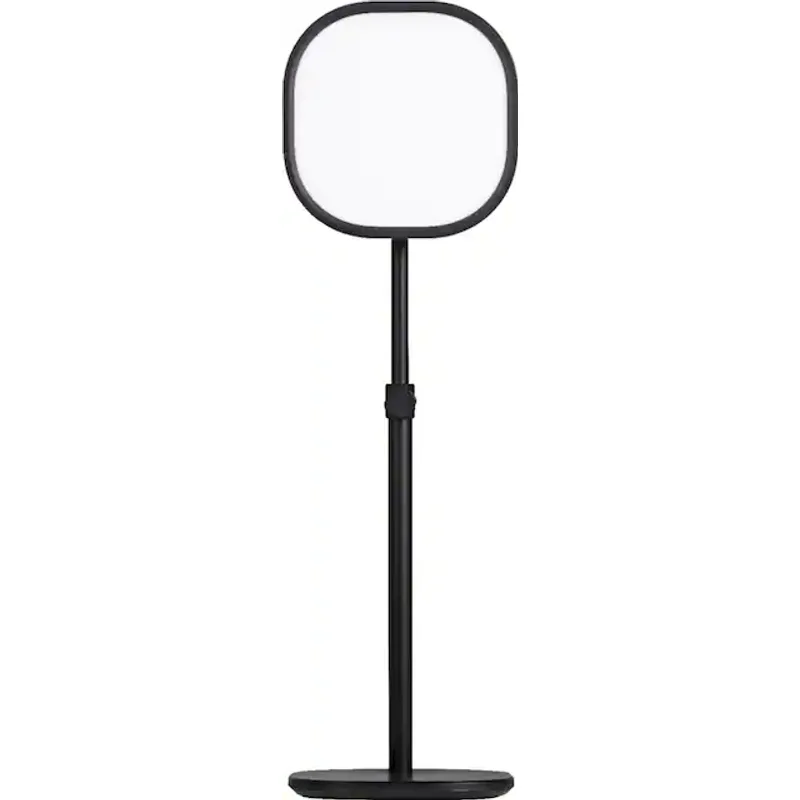
The Key Light Air is a panel light rather than a ring light, and for video calls, that distinction matters. Panel lights produce softer, more diffused illumination than ring lights because the light source is spread across a larger rectangular surface. This tends to look more natural on camera — more like a large window than a circular point source.
With 1400 lumens and the same 2900K–7000K color temperature range as the full Ring Light, the Key Light Air covers most home office scenarios. It connects via Wi-Fi for app control, sits on a freestanding desk base, and takes up considerably less space than a full ring light setup.
The freestanding base is both a strength and a limitation. You don’t need a clampable desk edge, which makes it more portable and flexible. But the base takes up desk real estate, and you’ll need to position it carefully to avoid it getting knocked over or cluttering your workspace.
For remote workers who want professional-grade video call lighting without the footprint or price of the full Ring Light, the Key Light Air at $129 is the strongest balance point in this roundup. It pairs well with any standard webcam and significantly improves call appearance compared to ambient ceiling lighting alone.
3. Neewer 18-Inch Ring Light Kit — Best Large Format
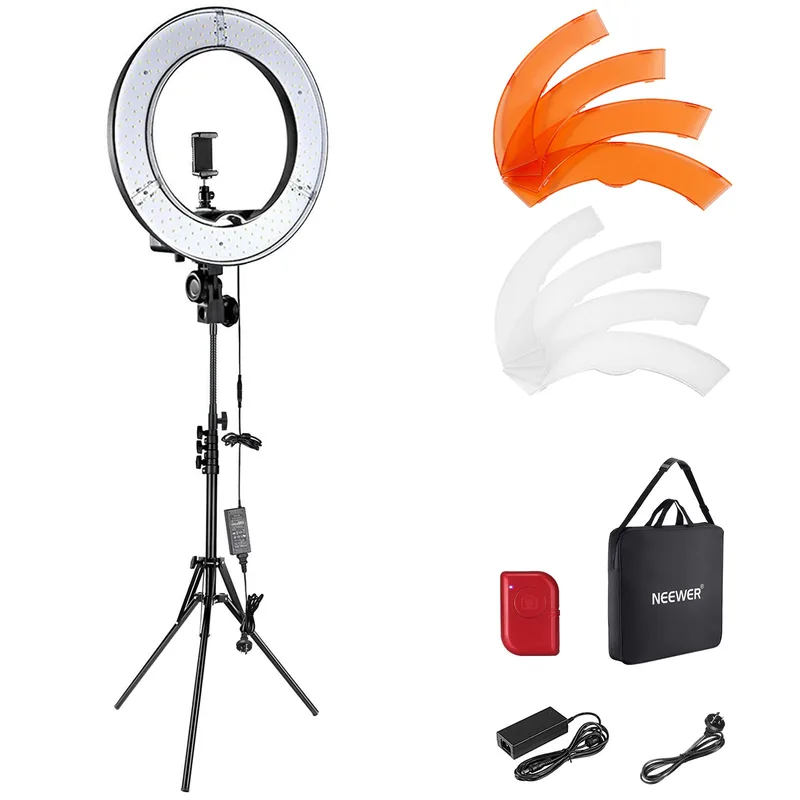
The Neewer 18-inch kit is a full-size ring light that has been a reliable standard in content creation for years. The 18-inch diameter is the largest in this roundup, and that size translates directly to more even, flattering illumination across the face and upper body than a 10 or 12-inch ring can produce.
The included floor stand places it at standing height in front of your desk. For home offices with limited floor space, this can be a challenge — the light and stand need about two feet of clear floor in front of your seated position. For those with room, the large-diameter setup produces the most even shadow-free illumination in this comparison, particularly for wider video call frames where the camera captures more than a tight face shot.
The trade-off is simplicity. The Neewer uses a dial dimmer and switches between only 3200K and 5600K color temperatures. There’s no smooth transition between warm and cool, and there’s no app control. For offices where you pick a setting in the morning and leave it all day, this is a minor limitation. For offices with changing ambient light, a continuously adjustable option serves better.
At $59, the Neewer 18-inch kit delivers professional-quality illumination at the lowest cost per lumen in this roundup. The included accessories — stand, phone holder, color filters, carry bag — add real value at this price point.
4. Lume Cube Edge-Lit Desktop Ring Light — Best Compact
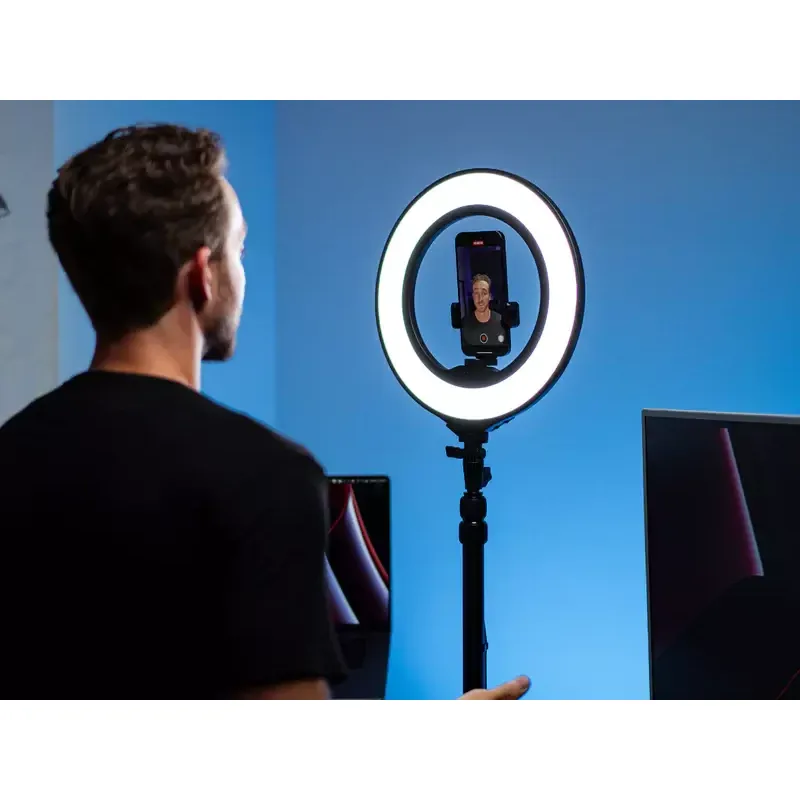
The Lume Cube 12-inch edge-lit ring light takes a different technical approach from standard ring lights. The edge-lit design means LEDs around the outer ring project light inward through an internal diffusion panel, producing an exceptionally soft and even output compared to standard LED ring arrays. The 2700K–7500K range is the widest in this roundup — wider even than the Elgato Ring Light — covering everything from warm indoor light to bright overcast daylight.
What makes the Lume Cube particularly practical for desk use is USB-C power. It plugs into any USB-C port — laptop, hub, or wall charger — rather than requiring an AC outlet. For home offices where outlets are limited or desk cable management is tight, this matters. The light can sit on a desk clamp or a tripod stand, giving placement flexibility that a freestanding base doesn’t offer.
At 12 inches diameter and $89, it sits between the budget UBeesize and the premium Elgato options in both size and price. It won’t overcome strong backlighting the way the Elgato Ring Light can, but for typical home office environments with moderate ambient light, it produces clean, flattering video call illumination in a compact package.
5. UBeesize 10-Inch Ring Light — Best Budget
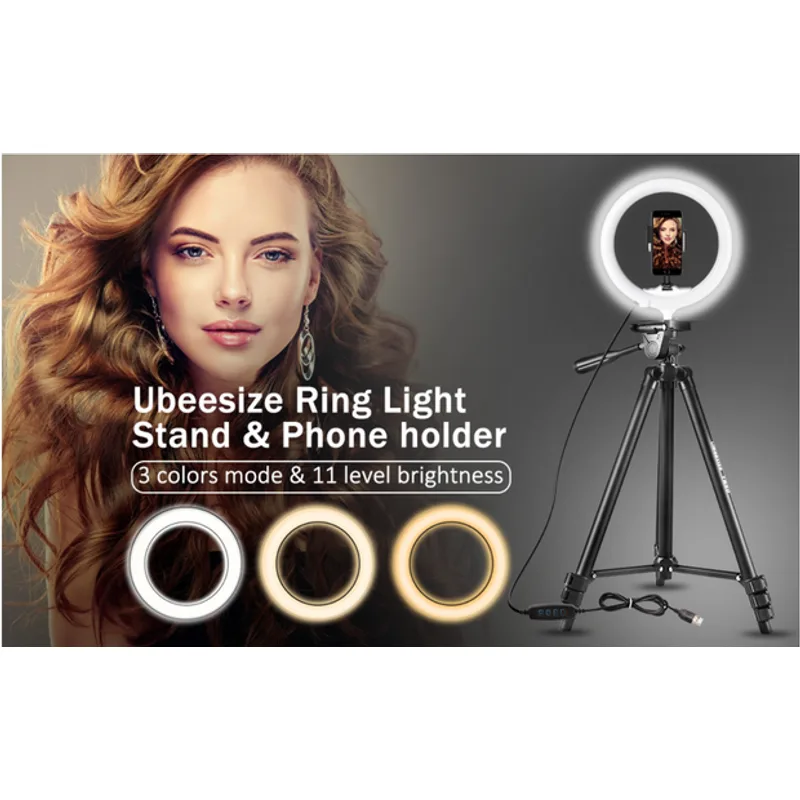
For remote workers on occasional calls who don’t want to invest heavily in lighting equipment, the UBeesize 10-inch ring light at $36 delivers a real upgrade from ambient ceiling light at minimal cost.
USB powered and including a phone holder and adjustable tripod, the UBeesize covers the basics. Three color temperature modes (warm, natural, cool) and 11 brightness levels give reasonable flexibility for a sub-$40 light.
The limitations are real. The 10-inch diameter produces visible shadow gradients compared to an 18-inch ring or a panel light. The stand and adjustment mechanisms feel budget-grade — they hold position, but don’t inspire confidence for daily adjustment over years of use. And if your room is bright or has strong ambient light, the output may not be enough to fully compensate.
But compared to no dedicated lighting, it makes a noticeable positive difference on camera. For anyone working from a kitchen table on occasional calls, or looking for a first upgrade away from ceiling-only lighting, this is a sensible starting point before committing to something more substantial.
Comparison Table
| Light | Size | Color Temp Range | Brightness | Mount Type | App Control | Price |
|---|---|---|---|---|---|---|
| Elgato Ring Light | 17” ring | 2900K–7000K | 2500 lumens | Desk clamp | Yes | Unavailable |
| Elgato Key Light Air | Panel | 2900K–7000K | 1400 lumens | Desk base | Yes (Wi-Fi) | Unavailable |
| Neewer 18” Kit | 18” ring | 3200K / 5600K | 55W | Floor stand | No | $96.04 as of Oct 18, 2026 |
| Lume Cube 12” Edge-Lit | 12” ring | 2700K–7500K | 960 lux | Clamp or stand | No | Unavailable |
| UBeesize 10” | 10” ring | Warm/Natural/Cool | 11 levels | Desk tripod | No | $20.81-$22.85 as of Oct 18, 2026 |
Which Ring Light Is Right for You?
Daily video calls, full-time remote work: The Elgato Ring Light ($199) or Key Light Air ($129). App control and color accuracy separate them from everything below. Get the Ring Light if you need maximum brightness or have a challenging lighting environment. Get the Key Light Air if you want softer panel output and have desk space for a freestanding base.
Large illumination area on a budget: The Neewer 18-inch kit ($59). The largest ring in this comparison at the second-lowest price. It needs floor space, but delivers professional-quality coverage for the cost.
Compact USB-C powered setup: The Lume Cube 12-inch edge-lit ($89). Best light quality for its size, no AC outlet required, and the widest color temperature range in the roundup.
Occasional calls, first lighting upgrade: The UBeesize 10-inch ($36). Under $40 and provides an immediate improvement over overhead-only lighting. A sensible starting point.
Frequently Asked Questions
Do I need a ring light specifically, or can I use any lamp for video calls?
Any well-positioned light improves video calls, but ring lights and panel lights are designed to wrap light evenly around the face and minimize harsh shadows. A standard lamp positioned to the side creates a half-lit effect that looks less professional than a ring light placed at eye level in front of you. For calls where appearance matters, dedicated video call lighting produces consistently better results.
Where should I position my ring light for video calls?
Place your ring light directly in front of you, at approximately eye level, behind your camera or monitor. You should be looking toward the light source. If the light is positioned above and slightly in front, it produces a more flattering downward-angle illumination. Avoid placing the light to the side or behind you — side lighting creates half-shadows, and back lighting makes you appear as a silhouette.
What color temperature should I use for video calls?
Match your light’s color temperature to your room. For offices lit by cool-white LED bulbs or fluorescent lights, set your ring light between 4000K–5500K. For warmer home environments with incandescent or warm LED bulbs, 3000K–4000K looks more natural. During the day with daylight from windows, 5500K–6500K matches the ambient light. Most adjustable ring lights let you preview and set this in real time.
Does a ring light create a visible reflection in glasses?
Ring lights can produce a circular reflection visible in eyeglass lenses when positioned directly at eye level. To minimize this, angle the ring light slightly above eye level so the light shines down toward your face at roughly 10–15 degrees, or angle the glasses slightly downward. Panel lights like the Elgato Key Light Air tend to produce less noticeable lens reflections than circular ring lights because the light source shape is less distinctive.
Can a ring light work without an app?
Yes. The Neewer, Lume Cube, and UBeesize all operate via physical controls only. The Elgato Ring Light and Key Light Air use optional app control, but both also have physical buttons on the unit. App control is a convenience feature, not a requirement. For a simple set-it-and-leave-it lighting setup, non-app options work fine.
Is a panel light or ring light better for video calls?
Both work well for video calls. Panel lights like the Elgato Key Light Air produce slightly softer, more diffused illumination because the light source is rectangular rather than circular — this tends to look more like natural window light on camera. Ring lights produce slightly more directional light and can create a distinctive ring reflection in the eyes. For most remote workers, the quality difference is minor; brightness, color temperature range, and mount compatibility matter more than the shape of the light source.
Detailed Reviews
Elgato Ring Light
Pros
- App and Stream Deck control for instant color temp adjustments during calls
- 2500 lumens is bright enough to override harsh window backlighting
- Ball mount allows precise angle adjustment for even facial lighting
- Wide 2900K–7000K color temp range matches most room lighting scenarios
Cons
- Premium price compared to simpler ring light options
- Desk clamp requires a sturdy edge — not ideal for thin or small desks
- No freestanding option — must clamp to a desk or monitor arm
Elgato Key Light Air
Pros
- Panel design produces softer, more even light than a ring light for video calls
- Wi-Fi connected for quick adjustments without touching the light
- Compact footprint takes less desk space than a full ring light
- 80 premium OSRAM LEDs produce consistent, accurate color
Cons
- 1400 lumens is less powerful than the full Elgato Ring Light
- Freestanding base needs to be positioned carefully to avoid desk clutter
- May not fully compensate for strong direct sunlight behind you
Neewer 18-Inch Ring Light Kit
Pros
- Large 18-inch diameter provides very even, flattering face lighting
- Includes stand, phone holder, color filters, and carry bag
- Lower cost entry point to professional-quality ring light illumination
- Wide enough to light a full face and upper body for calls
Cons
- Two-tone color temp (3200K/5600K) — no smooth transition between tones
- Requires floor or desk stand space — larger footprint than compact options
- Phone holder and stand accessories are basic quality
Lume Cube Edge-Lit Desktop Ring Light (12-inch)
Pros
- USB-C powered — plugs into laptop or USB-C hub without AC outlet
- Wide 2700K–7500K color range covers warm indoor and daylight settings
- Edge-lit design produces exceptionally soft, even light output
- Compact 12-inch size fits on most desks without dominating the space
Cons
- 960 lux is less powerful than larger or AC-powered options
- Manual dial control only — no app or smart integration
- Smaller diameter produces slightly less uniform coverage than 17–18 inch options
UBeesize 10-Inch Selfie Ring Light
Pros
- Under $40 makes it the most accessible entry point in this comparison
- USB powered — works from any USB-A port or USB charger
- Includes phone holder and adjustable tripod stand
- Three color modes cover most home lighting environments
Cons
- 10-inch diameter produces noticeably less even lighting than 16–18 inch options
- Budget build quality shows in the stand and adjustment mechanisms
- Limited brightness output for large or brightly-lit rooms