Video call load hasn’t gone anywhere in 2026 — most remote and hybrid workers are still on back-to-back Zoom and Teams calls most of the day, and a growing share of them are done stacking a separate webcam on top of a monitor. Built-in webcam monitors solved a real annoyance: no more USB webcam clipped to the top bezel, no separate mic picking up keyboard clatter, no camera sitting below eye level on a laptop lid. The category has matured enough this year that even budget picks now clear a real bar — Zoom or Teams certification, a mic array with noise cancellation, and a camera good enough that colleagues stop asking you to turn your camera on because it looks bad.
The honest tradeoff is resolution. A dedicated 4K webcam like Logitech’s Brio still beats every camera in this roundup for pure image quality, and a great external mic beats any monitor’s built-in array. What you’re buying here is convenience: one panel, one cable, no separate camera to align, and a desk that looks less like a recording booth. This roundup covers five current monitors with integrated webcams, from a 4K flagship to a $200 budget pick, all with verified live Amazon listings.
Every product here has a verified live Amazon listing. Selections are based on manufacturer specifications, patterns across owner feedback, and research into the current video conferencing monitor market.
| Spec | Dell UltraSharp U3223QZ | Dell P2724DEB | HP E24m G4 | Lenovo ThinkVision T24mv-30 | ASUS BE24ECSNK |
|---|---|---|---|---|---|
| Rating | 9.1/10 | 8.7/10 | 8.3/10 | 8.1/10 | 7.9/10 |
| Price | Unavailable | $533.03as of Oct 18, 2026 | $284.99-$379.69as of Oct 18, 2026 | Unavailable | $278.99as of Oct 18, 2026 |
| Panel Size | 31.5 inches | 27 inches | 23.8 inches | 23.8 inches | 23.8 inches |
| Resolution | 3840x2160 (4K UHD) | 2560x1440 (QHD) | 1920x1080 (Full HD) | 1920x1080 (Full HD) | 1920x1080 (Full HD) |
| Webcam | 4K HDR, Sony STARVIS sensor, pop-up with auto-frame | 2K QHD, Sony STARVIS sensor, auto-framing | 5MP, pop-up with independent tilt, Windows Hello support | 5MP IR camera, Windows Hello facial recognition | 2MP, adjustable, Zoom Certified |
| Microphone | Dual-array with echo cancellation | Dual-array with echo cancellation | Dual array | Built-in array | AI noise-canceling array |
| Speakers | 2x 14W | 2x 5W | Front-firing stereo | 2x 5W | Built-in stereo |
| Panel Type | IPS Black | IPS | IPS | IPS | IPS |
| Ports | USB-C 90W PD, Thunderbolt, DisplayPort, HDMI, RJ45 Ethernet, USB hub | USB-C, DisplayPort, HDMI, RJ45 Ethernet, USB-A hub, daisy chain | USB-C 65W PD, HDMI, USB hub | USB-C 90W PD, HDMI, DisplayPort, USB hub | USB-C, HDMI, DisplayPort with daisy chain, RJ45 Ethernet, USB hub |
| Warranty | 3-year Advanced Exchange | 3-year Advanced Exchange | 3-year limited | 3-year limited | 3-year limited |
| Refresh Rate | — | — | 75Hz | 75Hz | — |
| Check Price → | Check Price → | Check Price → | Check Price → | Check Price → |
Prices change daily — tap Check Price for the current Amazon price.
1. Dell UltraSharp U3223QZ — Best Overall
Dell UltraSharp U3223QZ
Pros
- The 4K webcam with a Sony STARVIS sensor is the sharpest built-in camera in this roundup, noticeably ahead of the 2MP and 5MP sensors on the cheaper options here
- IPS Black panel contrast makes this a genuinely good monitor for daily work, not just a webcam bolted onto a screen
- One USB-C cable carries video, 90W laptop charging, camera, mic, and speakers, so a laptop docks with a single connection
- Dual 14W speakers and echo-canceling dual-array mics are strong enough that most owners skip a separate headset for solo calls
Cons
- The most expensive monitor in this roundup by a wide margin
- 60Hz refresh rate, so it's built for productivity and calls, not gaming or motion-heavy content
- Large 31.5-inch footprint needs real desk depth to sit at a comfortable distance
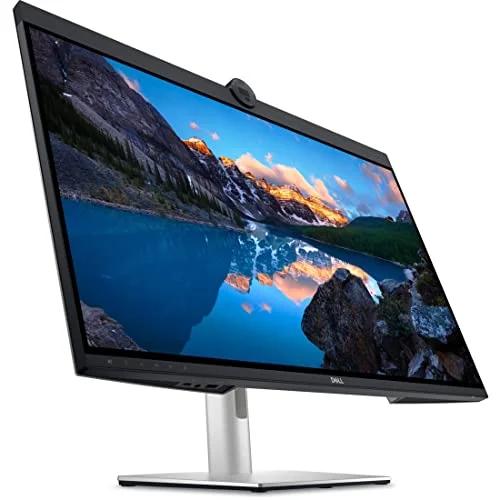
The U3223QZ is the pick if you want a monitor that’s excellent on its own merits and happens to have the best built-in webcam on the market. The 4K HDR camera uses a Sony STARVIS sensor — the same sensor family found in dedicated security and low-light cameras — and it shows: image quality is sharper and handles dim home offices better than any other camera in this roundup, all of which top out at 5MP or lower.
That camera sits on top of a genuinely strong IPS Black panel with the deep contrast Dell’s UltraSharp line is known for, so this isn’t a compromise monitor you tolerate for the webcam. Dual 14W speakers and echo-canceling dual-array mics are loud and clear enough that most owners report skipping a headset entirely for one-on-one calls.
Single-cable docking is the other reason this lands at the top: USB-C carries 4K video, 90W of laptop charging, camera, mic, and speaker signal simultaneously. The tradeoffs are price — this is by far the most expensive monitor here — and its 60Hz refresh rate, which is a non-issue for calls and office work but rules it out if you also want a dual-purpose gaming display.
Bottom line: The best all-in-one video call monitor available if the price fits your budget — the sharpest webcam and the strongest panel in this roundup, together.
2. Dell P2724DEB — Best QHD Value
Dell P2724DEB
Pros
- 2K QHD webcam sensor is a clear step up from the 1080p cameras on the ASUS and HP picks here, without paying 4K prices
- Certified for both Microsoft Teams and Zoom, so the camera, mic, and speaker combo is verified to work cleanly in either app
- AI auto-framing keeps you centered on camera without manual repositioning between calls
- RJ45 Ethernet pass-through and daisy-chain support make single-cable desk setups straightforward
Cons
- QHD resolution and 60Hz refresh mean it's built for calls and general work, not color-critical or high-motion tasks
- 5W speakers are noticeably quieter than the Dell U3223QZ's 14W pair — fine for calls, thin for music
- No Thunderbolt, only USB-C with DisplayPort Alt Mode
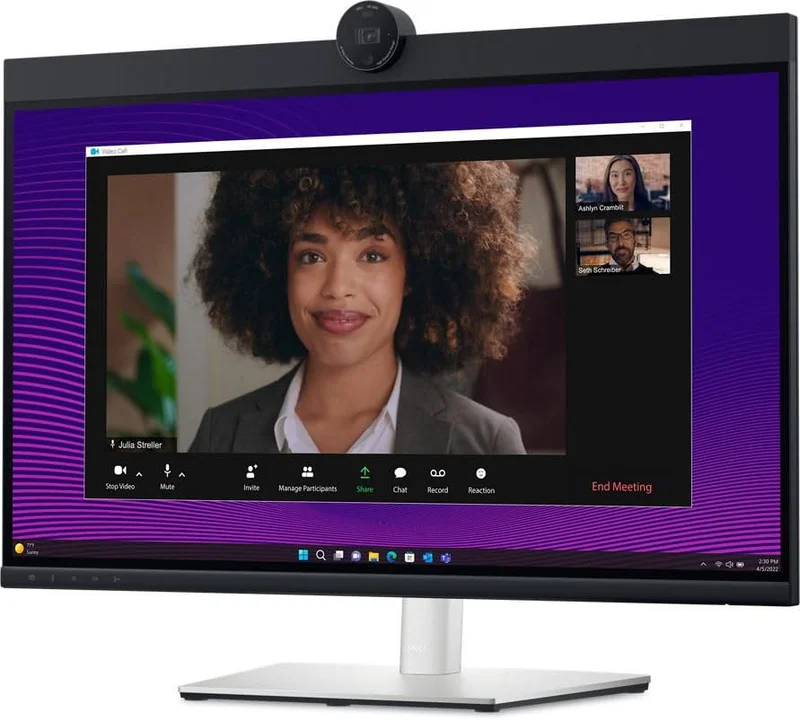
The P2724DEB is the sweet spot for most remote workers: a real resolution upgrade over the 1080p monitors in this roundup, a webcam sharp enough to notice, and a price well under half of the 4K Dell above it. Its 2K QHD webcam uses the same Sony STARVIS sensor family as the flagship U3223QZ, just at a lower resolution, and it’s a clear step up from the 2MP and 5MP cameras on the cheaper picks here.
It’s certified for both Microsoft Teams and Zoom, which matters more than it sounds — certification means Dell has verified the camera, mic, and speaker combination actually performs well inside those specific apps, not just that the hardware is technically compatible. AI auto-framing keeps you centered in frame automatically, useful if you shift around during long calls.
RJ45 Ethernet and daisy-chain support round out a monitor built for a proper single-cable desk setup. The compromises are modest: 5W speakers are noticeably quieter than the flagship’s 14W pair, and there’s no Thunderbolt, just USB-C with DisplayPort Alt Mode.
Bottom line: The best balance of resolution, webcam quality, and price in this roundup — the one to buy if you’re not sure which pick you need.
3. HP E24m G4 — Best Mid-Range
HP E24m G4
Pros
- 5MP webcam sensor outresolves the 2MP cameras on cheaper 1080p conferencing monitors, and independent tilt lets you angle the camera without moving the whole stand
- Pop-up camera design means you can physically drop the lens out of view for privacy without a lens cap or software toggle
- Windows Hello facial recognition login works through the built-in camera, a feature none of the cheaper picks here offer
- 75Hz refresh rate is a small but real upgrade in everyday scrolling smoothness over the 60Hz panels in this roundup
Cons
- 1080p resolution only — the panel itself is the weakest point, not the webcam
- 65W USB-C charging may not fully power larger 16-inch laptops under sustained load
- No Ethernet port, so a wired network connection needs a separate adapter
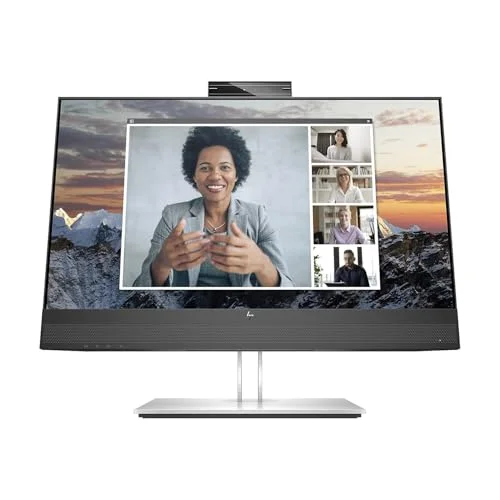
The E24m G4 makes its case with the webcam rather than the panel. Its 5MP sensor outresolves the 2MP camera on the ASUS budget pick, and the pop-up design with independent tilt means you can angle the camera precisely — or physically drop it below the bezel for privacy, without relying on a lens cap or a software toggle that can fail to actually cut the feed.
Windows Hello support is a real differentiator here: the camera doubles as a facial-recognition login, a feature the cheaper ASUS pick skips entirely. A 75Hz refresh rate is a minor but noticeable upgrade in everyday scrolling and window-dragging smoothness over the 60Hz panels elsewhere in this roundup.
The panel itself is the weak point — 1080p only, same as the budget and Windows Hello picks below it — and 65W USB-C charging may not fully power a larger 16-inch laptop under sustained load. There’s no Ethernet port, so a wired connection needs a separate adapter.
Bottom line: A strong middle option if a sharper webcam and Windows Hello login matter more to you than panel resolution.
4. Lenovo ThinkVision T24mv-30 — Best for Windows Hello
Lenovo ThinkVision T24mv-30
Pros
- IR camera sensor is built specifically for Windows Hello, and owner feedback consistently rates the facial-recognition login as fast and reliable
- 90W USB-C power delivery is the strongest charging spec of any 1080p monitor in this roundup, enough for most 15-16 inch work laptops
- 5W speakers and a built-in mic array handle solo video calls without a headset for most users
- DisplayPort output alongside USB-C makes it easy to add a second monitor later
Cons
- 1080p resolution at this price is a tougher sell than the Dell P2724DEB's QHD panel one tier up
- No RJ45 Ethernet port built in
- Camera resolution is tuned for Windows Hello recognition more than video call sharpness — fine, not exceptional, on Zoom or Teams
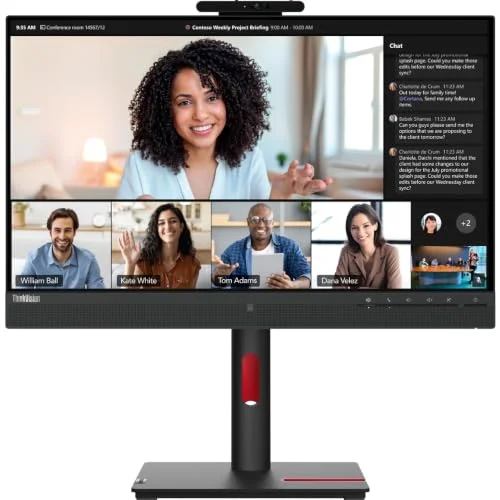
The T24mv-30’s camera is built around a specific job: fast, reliable Windows Hello facial recognition, not maximum video call sharpness. Its 5MP IR sensor is purpose-built for that, and owner feedback consistently rates the login experience as quick and dependable — genuinely useful if you’re logging into a work laptop dozens of times a day.
It backs that up with the strongest charging spec of any 1080p monitor in this roundup: 90W over USB-C, enough for most 15- to 16-inch work laptops where the HP and ASUS picks’ lower wattage might come up short. Built-in 5W speakers and a mic array handle solo calls without a headset for most users.
The resolution tradeoff is the same one facing every 1080p monitor here, and at this price it’s a tougher sell than the Dell P2724DEB’s QHD panel one tier up. There’s no RJ45 Ethernet port, and while the camera is fine for Zoom or Teams, it’s tuned for recognition accuracy over video sharpness.
Bottom line: Worth choosing specifically for fast, reliable Windows Hello login — for camera sharpness alone, the HP E24m G4 or Dell P2724DEB are stronger picks.
5. ASUS BE24ECSNK — Best Budget
ASUS BE24ECSNK
Pros
- The cheapest monitor in this roundup by a wide margin, and still Zoom Certified for guaranteed compatibility
- RJ45 Ethernet pass-through is unusual at this price and matches ports normally found on pricier conferencing monitors
- AI noise-canceling microphone strips background noise well enough that owners report skipping a headset mic for calls
- Full ergonomic stand with tilt, swivel, pivot, and height adjustment, not a fixed-tilt budget stand
Cons
- 2MP webcam is the lowest resolution in this roundup — usable for calls, visibly softer than the 5MP and 4K cameras above it
- USB-C power delivery specs are modest; check your laptop's charging needs before counting on it as your only cable
- 1080p resolution and a basic IPS panel are built for function over color accuracy
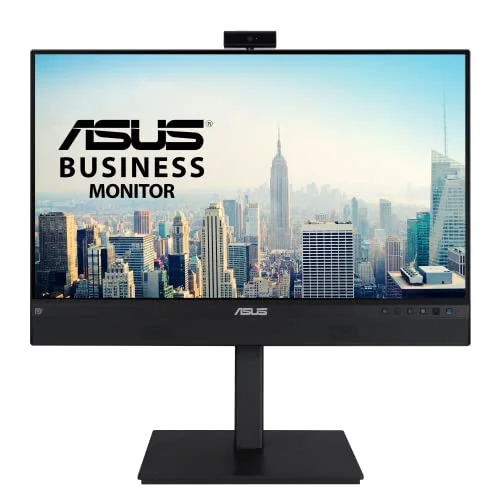
The BE24ECSNK is the entry point into this category, and it doesn’t skip the basics that matter: it’s officially Zoom Certified, which guarantees the camera, mic, and speaker combination has been tested to work cleanly in that app specifically. An AI noise-canceling microphone strips out background noise well enough that owners report leaving their headset mic off for calls.
RJ45 Ethernet pass-through is a genuine surprise at this price — it’s a port usually reserved for pricier conferencing monitors — and the full ergonomic stand tilts, swivels, pivots, and adjusts height rather than locking you into a fixed angle.
The compromise is the camera: at 2MP, it’s the lowest resolution sensor in this roundup, visibly softer than the 5MP and 4K cameras on the pricier picks. USB-C power delivery specs are modest, so check them against your laptop’s actual charging needs before treating this as your only cable.
Bottom line: The right choice if a functional, certified webcam monitor at the lowest possible price matters more than camera sharpness.
Buying Guide: What Actually Matters in a Webcam Monitor
Webcam Resolution and Sensor Quality
Megapixel count is a starting point, not the full picture. The Dell U3223QZ’s 4K Sony STARVIS sensor and the P2724DEB’s 2K version of the same sensor family both handle low light noticeably better than the 2MP and standard 5MP cameras on the cheaper picks in this roundup — sensor size and low-light processing matter as much as raw resolution for how you actually look on a call.
Zoom and Microsoft Teams Certification
Certification means the manufacturer has tested the camera, microphone, and speaker combination specifically inside that app, not just that the hardware technically works. It’s a meaningful signal that the whole audio-video chain has been validated together, rather than three separate components that happen to be bundled into one monitor.
Microphone and Speaker Quality
A dual-array microphone with echo cancellation, like the Dell picks in this roundup use, does a better job isolating your voice from room echo and keyboard noise than a single built-in mic. Speaker wattage varies more than you’d expect — the Dell U3223QZ’s 14W pair is loud enough to replace desk speakers, while the 5W pairs on cheaper monitors are built for call audio only.
Pop-Up vs. Fixed Webcams, and Privacy
A pop-up camera you can physically push down, like the HP E24m G4’s, gives you a hardware guarantee of privacy that a software mute toggle doesn’t. Fixed cameras, like the ones on the Dell and Lenovo picks here, typically rely on a physical shutter or software-level disable instead — check which your pick uses if a hardware cutoff matters to you.
Windows Hello and Facial Recognition
Only monitors with an IR-capable camera sensor, like the Lenovo ThinkVision T24mv-30 and HP E24m G4 in this roundup, support Windows Hello facial recognition login. It’s a genuine convenience if you unlock your laptop frequently throughout the day, but it’s not available on every webcam monitor — check the spec sheet specifically for IR or Windows Hello support rather than assuming any built-in camera includes it.
FAQ
Is a monitor’s built-in webcam as good as a dedicated external webcam?
Not quite, at the high end. A dedicated 4K webcam from a brand focused purely on cameras still edges out even the sharpest built-in option here. What a built-in webcam monitor buys you is convenience — one cable, no separate camera to align, and a cleaner desk — at a quality level that’s genuinely good enough for daily video calls.
Do I need a 4K webcam, or is 1080p enough for video calls?
For most video calls, a good 1080p or 2K sensor is enough — call quality is capped by your internet upload speed and the receiving app’s compression more than by camera resolution alone. A 4K sensor like the Dell U3223QZ’s shows its advantage most clearly in low light and in how much detail survives compression, not in raw sharpness on a good connection.
What does Zoom or Microsoft Teams certification actually guarantee?
It means the manufacturer tested the camera, microphone, and speakers together specifically inside that app and confirmed they work reliably — automatic recognition, consistent audio levels, and no driver conflicts. It’s not required for the hardware to work at all, but it’s a real signal of tested reliability rather than marketing language.
Can I use these monitors’ webcams with a Mac as well as a Windows PC?
Yes — the camera, mic, and speakers on every monitor in this roundup connect over standard USB, so they work as a generic UVC webcam and audio device on macOS. Windows Hello facial recognition on the Lenovo and HP picks is Windows-only and won’t function on a Mac.
Should I turn off the monitor’s webcam when I’m not on a call?
If your pick has a physical pop-up or shutter, like the HP E24m G4, use it — a hardware cutoff is more reliable than trusting an app’s camera indicator light. For monitors without a physical shutter, check your operating system’s camera privacy settings to disable access when you’re not actively on a call.
Conclusion
For most remote workers, the Dell P2724DEB at $420-$480 is the strongest buy in this roundup — a real QHD resolution upgrade, a webcam sensor from the same family as Dell’s flagship, and Teams/Zoom certification without four-figure pricing.
Buyers who want the best camera and panel available, and don’t mind paying for it, should look at the Dell UltraSharp U3223QZ — its 4K webcam and IPS Black contrast are the strongest combination here. Anyone who logs into their laptop dozens of times a day gets real value from the Lenovo ThinkVision T24mv-30’s Windows Hello camera, and the HP E24m G4 is the pick if a sharp 5MP webcam and a physical privacy shutter matter more than panel resolution.
On the tightest budget, the ASUS BE24ECSNK is Zoom Certified and still includes RJ45 Ethernet and a full ergonomic stand — genuine features other monitors charge more for, even if its 2MP camera is the softest in this roundup.
Detailed Reviews
Dell UltraSharp U3223QZ
Pros
- The 4K webcam with a Sony STARVIS sensor is the sharpest built-in camera in this roundup, noticeably ahead of the 2MP and 5MP sensors on the cheaper options here
- IPS Black panel contrast makes this a genuinely good monitor for daily work, not just a webcam bolted onto a screen
- One USB-C cable carries video, 90W laptop charging, camera, mic, and speakers, so a laptop docks with a single connection
- Dual 14W speakers and echo-canceling dual-array mics are strong enough that most owners skip a separate headset for solo calls
Cons
- The most expensive monitor in this roundup by a wide margin
- 60Hz refresh rate, so it's built for productivity and calls, not gaming or motion-heavy content
- Large 31.5-inch footprint needs real desk depth to sit at a comfortable distance
Dell P2724DEB
Pros
- 2K QHD webcam sensor is a clear step up from the 1080p cameras on the ASUS and HP picks here, without paying 4K prices
- Certified for both Microsoft Teams and Zoom, so the camera, mic, and speaker combo is verified to work cleanly in either app
- AI auto-framing keeps you centered on camera without manual repositioning between calls
- RJ45 Ethernet pass-through and daisy-chain support make single-cable desk setups straightforward
Cons
- QHD resolution and 60Hz refresh mean it's built for calls and general work, not color-critical or high-motion tasks
- 5W speakers are noticeably quieter than the Dell U3223QZ's 14W pair — fine for calls, thin for music
- No Thunderbolt, only USB-C with DisplayPort Alt Mode
HP E24m G4
Pros
- 5MP webcam sensor outresolves the 2MP cameras on cheaper 1080p conferencing monitors, and independent tilt lets you angle the camera without moving the whole stand
- Pop-up camera design means you can physically drop the lens out of view for privacy without a lens cap or software toggle
- Windows Hello facial recognition login works through the built-in camera, a feature none of the cheaper picks here offer
- 75Hz refresh rate is a small but real upgrade in everyday scrolling smoothness over the 60Hz panels in this roundup
Cons
- 1080p resolution only — the panel itself is the weakest point, not the webcam
- 65W USB-C charging may not fully power larger 16-inch laptops under sustained load
- No Ethernet port, so a wired network connection needs a separate adapter
Lenovo ThinkVision T24mv-30
Pros
- IR camera sensor is built specifically for Windows Hello, and owner feedback consistently rates the facial-recognition login as fast and reliable
- 90W USB-C power delivery is the strongest charging spec of any 1080p monitor in this roundup, enough for most 15-16 inch work laptops
- 5W speakers and a built-in mic array handle solo video calls without a headset for most users
- DisplayPort output alongside USB-C makes it easy to add a second monitor later
Cons
- 1080p resolution at this price is a tougher sell than the Dell P2724DEB's QHD panel one tier up
- No RJ45 Ethernet port built in
- Camera resolution is tuned for Windows Hello recognition more than video call sharpness — fine, not exceptional, on Zoom or Teams
ASUS BE24ECSNK
Pros
- The cheapest monitor in this roundup by a wide margin, and still Zoom Certified for guaranteed compatibility
- RJ45 Ethernet pass-through is unusual at this price and matches ports normally found on pricier conferencing monitors
- AI noise-canceling microphone strips background noise well enough that owners report skipping a headset mic for calls
- Full ergonomic stand with tilt, swivel, pivot, and height adjustment, not a fixed-tilt budget stand
Cons
- 2MP webcam is the lowest resolution in this roundup — usable for calls, visibly softer than the 5MP and 4K cameras above it
- USB-C power delivery specs are modest; check your laptop's charging needs before counting on it as your only cable
- 1080p resolution and a basic IPS panel are built for function over color accuracy