The Elgato Wave:3 MK.2 arrived in late 2025 with a custom DSP chip co-developed with LEWITT Audio — the first consumer USB condenser to run broadcast-grade compression, EQ, and noise reduction directly on the mic hardware rather than in software. That launch signals a market shift: USB condenser microphones are no longer just “better than your laptop mic.” The best ones now deliver studio processing without a studio.
For remote workers who want to sound professional on video calls without buying an audio interface, XLR cable, and dedicated preamp, a USB condenser is the direct path. This roundup covers five options from $49 to $169, ranked for voice quality, ease of setup, and reliability for daily video meetings.
Every product here has a verified live Amazon listing. Selections are based on manufacturer specifications, patterns across owner feedback, and editorial research into the 2026 USB condenser market.
Quick Comparison
| Microphone | Price | Polar Pattern | Sample Rate | Best For |
|---|---|---|---|---|
| Elgato Wave:3 MK.2 | $115.02-$134.99 as of Oct 18, 2026 | Cardioid | 24-bit DSP | Overall quality + DSP |
| Rode NT-USB Mini | $97.85-$103.00 as of Oct 18, 2026 | Cardioid | 24-bit/48kHz | Compact footprint |
| AT2020USB-X | $141.14-$158.00 as of Oct 18, 2026 | Cardioid | 24-bit/96kHz | Highest vocal clarity |
| Blue Yeti | $76.23-$98.99 as of Oct 18, 2026 | 4 patterns | 16-bit/48kHz | Multi-pattern flexibility |
| HyperX SoloCast | Unavailable | Cardioid | 16-bit/48kHz | Best budget USB-C |
1. Elgato Wave:3 MK.2 — Best Overall
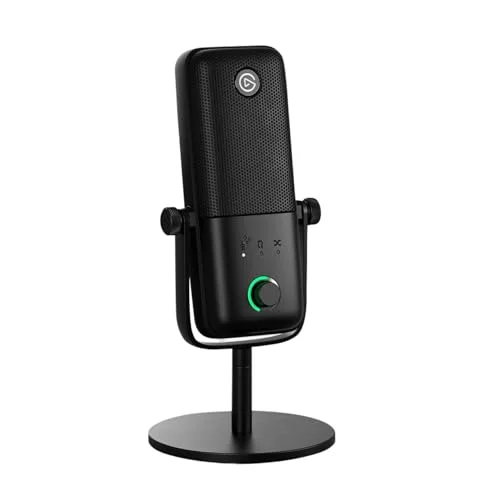
Elgato Wave:3 MK.2 USB Condenser Microphone
Pros
- Wave FX Processor runs five DSP effects — low-cut, expander, compressor, EQ, and voice enhancer — directly on the mic hardware with zero added latency, so your Zoom call sounds processed even without touching the Wave Link app
- Clipguard 2.0 uses a second, quieter secondary capsule to catch any peaks that exceed 130dB SPL — sudden loud sounds like a door slam or desk knock never distort the recording, making it more robust than software-only clip prevention
- Auto Gain calibration sets input sensitivity automatically when you speak into the mic for a few seconds — removes the guesswork of gain staging for users who are not audio engineers
- Multifunction dial controls headphone volume, mic gain, or blend between mic and PC audio depending on the mode — one physical control replaces what would otherwise require three separate software adjustments
- Wave Link app manages up to nine independent audio channels including game audio, music, and communications on separate faders — the most capable software ecosystem in this category by a significant margin
- USB-C connection is compatible with modern laptops and docking stations without an adapter
Cons
- Frequency response starts at 70Hz rather than the 20Hz low end of the AT2020USB-X — captures slightly less of the chest resonance in voices, though this is audible mainly in A/B testing rather than typical video calls
- Wave Link software adds real value but requires a Mac or Windows installation — the mic functions as a standard audio device without it, but some of the DSP preset control requires the desktop app
- At $169.99 it is the most expensive USB condenser in this roundup — the premium is justified by the DSP hardware, but budget-constrained buyers have strong alternatives at $99–$129
The Wave:3 MK.2 is a meaningful hardware update to an already well-regarded mic. The original Wave:3 was a solid USB condenser; the MK.2 adds a co-developed DSP chip with LEWITT Audio that runs real processing — low-cut filter, expander, compressor, two-band EQ, and a voice enhancer — directly on the mic. Zero software required. The processing runs at zero added latency.
The practical impact on video calls is notable. The onboard compressor evens out level differences between your normal speaking voice and louder moments like laughing or emphasizing a point. The low-cut removes room rumble and HVAC noise below 80Hz. The result is a more consistent, polished sound on every call without configuring anything in Zoom or Teams.
Clipguard 2.0 is worth calling out separately. The mic uses a secondary, quieter capsule running in parallel. If your voice peaks past 130dB SPL — a loud cough, a sudden exclamation — the secondary capsule catches it clean while the primary capsule clips. In practice, loud transients never distort the recording.
Auto Gain calibration is the other standout. Speak into the mic for a few seconds, and the Wave:3 MK.2 sets its own input sensitivity. For workers who have never staged gain on a microphone, that eliminates one of the most common setup mistakes.
Bottom line: The best USB condenser for remote workers who want studio-quality processing without configuring audio software.
2. Rode NT-USB Mini — Best Compact
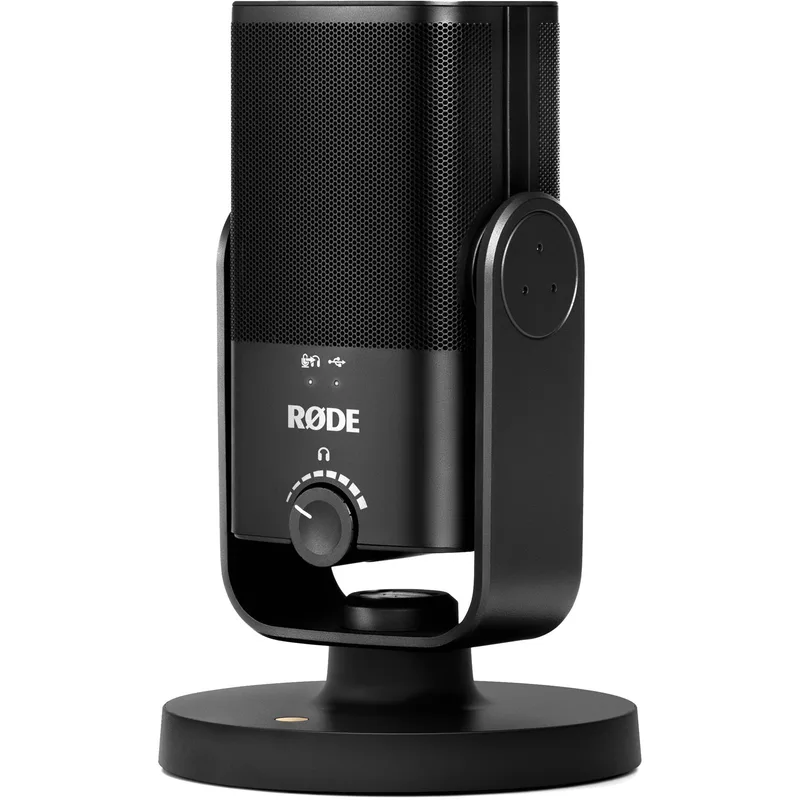
Rode NT-USB Mini USB Condenser Microphone
Pros
- Built-in pop filter is integrated directly into the capsule housing — the result is a mic that produces clean, plosive-free audio straight out of the box without purchasing a separate windscreen or foam shield
- Detachable magnetic stand is compact enough to leave on a desk permanently without occupying much real estate — the footprint is smaller than most USB condensers with separate stands
- Zero-latency headphone monitoring lets you hear your own voice in real time without software delay — a practical feature for anyone doing voiceover work or podcast recording where precise monitoring matters
- Rode Central app provides EQ and compression controls beyond what the hardware alone delivers — the combination of compact hardware and capable software makes this a genuinely professional setup at $99
- USB-C output with a 24-bit audio path gives this mic a resolution advantage over older USB-A condensers at the same price, and the cable connects directly to USB-C ports on modern laptops
Cons
- 48kHz maximum sample rate is lower than the 96kHz offered by the AT2020USB-X at a similar price — the practical difference for voice recording on video calls is minimal, but it matters if you also record music or want headroom for future use
- No onboard gain control — monitoring mix and headphone volume adjustments require Rode Central or system audio settings, which is slower to access mid-call than a physical dial
- Magnetic stand is lightweight by design, so the mic can tip on uneven desk surfaces; users who type aggressively near the mic report occasional movement
The Rode NT-USB Mini is the smallest full-featured USB condenser in this roundup. The capsule, pop filter, and stand are a single integrated unit. You take it out of the box, plug in a USB-C cable, and it works.
The built-in pop filter does real work. Plosive sounds — the burst of air from “p” and “b” consonants — are the most common audio problem on video calls. The NT-USB Mini’s integrated design reduces them without the user having to buy and position a separate windscreen. Owner reports confirm this performs noticeably better than bare-capsule mics of similar size.
Zero-latency headphone monitoring is included via a 3.5mm jack. You can hear yourself as the mic captures you, without software delay. Most USB condensers in this price range omit that feature. The Rode NT-USB Mini includes it, along with a hardware dial for adjusting the mix between mic monitoring and computer audio.
Rode Central app adds EQ and compression controls to extend what the hardware alone provides. For a $99 setup on Zoom calls, the NT-USB Mini sounds convincingly close to more expensive options.
Bottom line: The best choice for workers with limited desk space who want a plug-and-play setup without separate accessories.
3. Audio-Technica AT2020USB-X — Best for Vocal Clarity
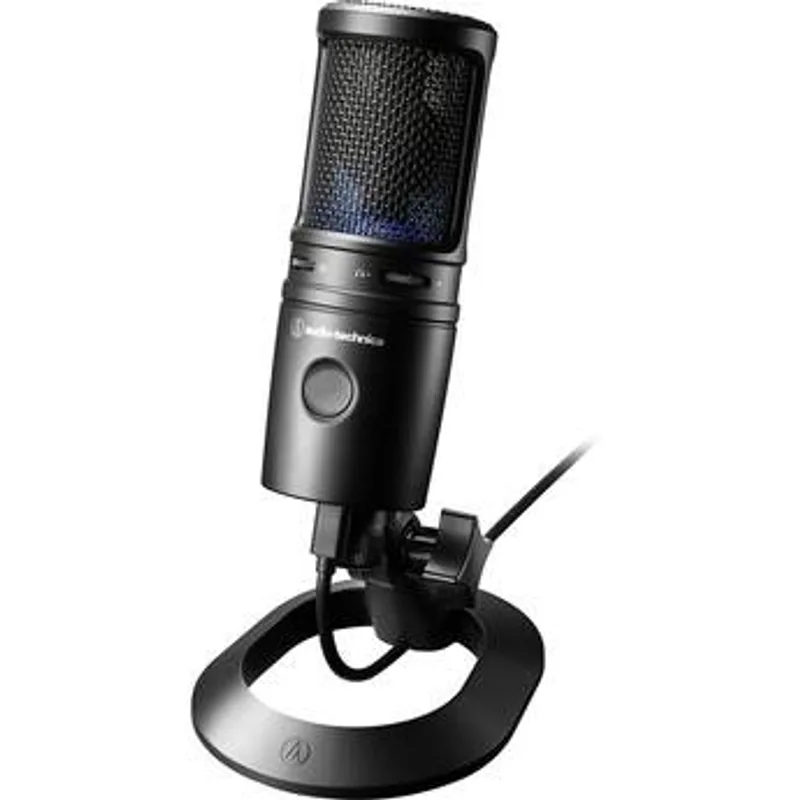
Audio-Technica AT2020USB-X Cardioid Condenser Microphone
Pros
- 20Hz–20kHz frequency response captures the full range of human voice including the lowest chest resonance and highest consonant frequencies — the AT2020USB-X reproduces voice with more depth and clarity than condensers with narrower low-end response
- 24-bit/96kHz sample rate is the highest resolution of any mic in this roundup — relevant for users who record voiceovers, narration, or podcast content alongside video calls, since higher sample rates give more flexibility in post-processing
- Mute button with LED indicator provides one-touch silence without touching the host application — the LED makes mute status visible at a glance, which is more reliable than reading the small on-screen indicator in Zoom or Teams
- USB-C output connects to modern laptops, monitors with USB-C passthrough, and docking stations without needing an adapter — the AT2020USB-X is the current-generation replacement for the USB-A AT2020USB+
- Audio-Technica's AT2020 capsule design has a long track record in professional studio work — the USB-X brings that same capsule to a plug-and-play USB format without requiring an audio interface
Cons
- No headphone monitoring port — unlike the Rode NT-USB Mini and Blue Yeti, the AT2020USB-X does not include a 3.5mm jack for real-time voice monitoring; this is a meaningful omission for podcasters and voiceover artists
- No onboard volume or gain control — all sensitivity adjustments go through system audio settings or the host application, which is slower than a physical dial during live calls
- The included desk stand positions the mic close to the desk surface, which can pick up keyboard vibrations; a boom arm or shock mount improves isolation but adds $20–$40 to the total cost
The AT2020USB-X is Audio-Technica’s current-generation USB condenser, updated from the AT2020USB+ with a USB-C connection and mute button. The AT2020 capsule has a long history in professional recording studios — the USB-X brings that same capsule to a plug-and-play format without requiring an audio interface.
The frequency response runs 20Hz to 20kHz, the widest range in this roundup. That low-end extension captures the chest resonance of voices that lighter condensers with narrower low-frequency response miss. The result is a fuller, more natural-sounding vocal character on recordings and calls.
The 24-bit/96kHz sample rate is the highest in this roundup. For video call audio, that resolution is far beyond what compressed conference call codecs transmit — but it matters for users who also use the same mic for podcast recording, voiceover narration, or video production where higher-resolution files have editing headroom.
The dedicated mute button with LED status indicator is practically useful. The LED ring makes mute status visible without checking the software interface, which matters on calls with lots of back-and-forth.
The AT2020USB-X does not include a headphone monitoring port, which is a meaningful omission at this price compared to the Blue Yeti and NT-USB Mini. If real-time monitoring is required, the Blue Yeti is the better choice. If vocal clarity is the priority, the AT2020USB-X is the pick.
Bottom line: The strongest option for vocal recording quality and frequency range, at the cost of omitting headphone monitoring.
4. Logitech Blue Yeti — Best Multi-Pattern
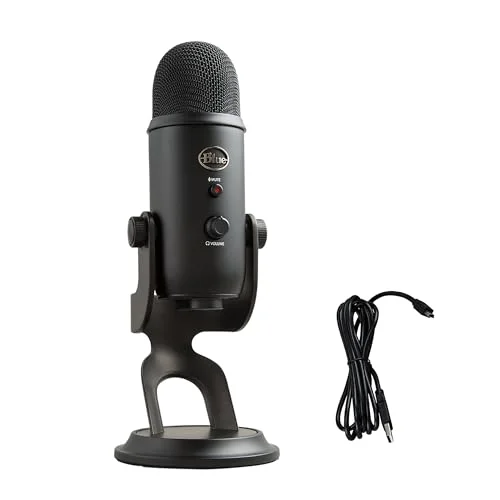
Logitech Blue Yeti USB Microphone
Pros
- Four switchable polar patterns in a single mic — cardioid for solo calls, omnidirectional for group desk meetings, bidirectional for two-person interviews, and stereo for instrument capture — no other mic in this roundup matches that flexibility at this price
- Gain dial, mute button, and headphone volume control are all on the mic body — three separate hardware controls that cover the most common in-call adjustments without touching any software
- Zero-latency headphone monitoring with a 3.5mm port lets you hear yourself while recording — the only mic in this roundup besides the Rode NT-USB Mini with this feature
- One of the most widely-reviewed USB microphones on Amazon with tens of thousands of ratings — the volume of owner feedback makes compatibility and reliability patterns more predictable than newer products with fewer reviews
- Frequency response extends to 20Hz, capturing low vocal frequencies that some condensers with narrower response miss — the result is a warmer, fuller vocal sound on video calls
Cons
- USB-A output requires an adapter on USB-C-only laptops — the Blue Yeti pre-dates the USB-C transition and has not been updated to USB-C output; this is a practical inconvenience on modern thin-and-light laptops
- 16-bit / 48kHz sample rate is lower resolution than the 24-bit options in this roundup — the difference is most audible in professional podcast or voiceover work; for video calls, it is indistinguishable
- The mic is physically large — the full-size body and included stand occupy more desk real estate than compact alternatives like the Rode NT-USB Mini; users with crowded desks may find it intrusive
The Blue Yeti remains the most flexible USB condenser in this roundup by polar pattern count. Four patterns — cardioid, bidirectional, omnidirectional, and stereo — are switchable directly on the mic body. No other product here offers that range at this price.
For remote workers, the pattern flexibility matters in specific scenarios. Solo calls from a home office: cardioid. Group meeting with colleagues gathered around the same desk: omnidirectional. Two-person podcast or interview: bidirectional picks up both speakers while rejecting the sides. The Blue Yeti handles all three without swapping hardware.
Three onboard hardware controls — a gain dial, a mute button, and a headphone volume knob — cover the most common in-call adjustments without opening any software settings. The mute button with indicator light works the same way as the AT2020USB-X’s. The gain dial is faster for real-time sensitivity adjustments than navigating OS audio panels.
The main practical downside in 2026 is the USB-A output. The Blue Yeti was designed before USB-C became standard, and the cable terminates in USB-A. On modern thin-and-light laptops with USB-C-only ports, an adapter is required. The Rode NT-USB Mini, AT2020USB-X, HyperX SoloCast, and Wave:3 MK.2 all use USB-C natively.
Bottom line: The strongest choice for users who need multiple polar patterns in one device, and the only mic in this roundup with both onboard gain control and headphone monitoring.
5. HyperX SoloCast — Best Budget
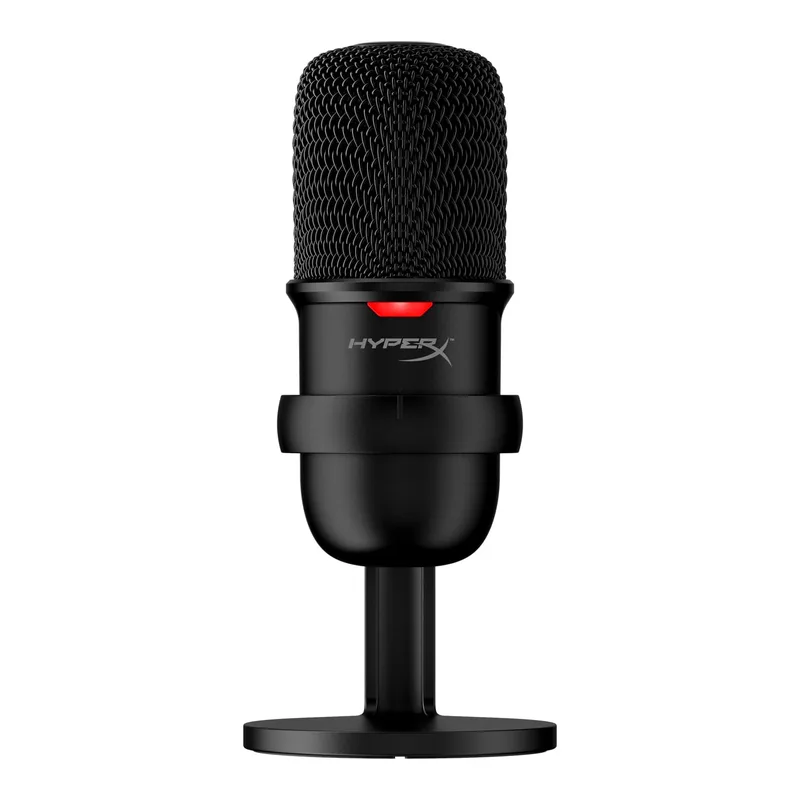
HyperX SoloCast USB Condenser Microphone
Pros
- Tap-to-mute sensor requires only a touch to silence the mic — faster and more natural than clicking a software mute button, and the LED ring confirms mute status so you never accidentally speak into a silenced mic
- USB-C output at under $60 makes the SoloCast the most affordable USB-C condenser in this roundup — it connects to modern laptops and USB-C hubs without adapters
- Flexible pivot stand allows angle adjustment without additional hardware — the mic can be tilted to point directly at your mouth regardless of desk height, and the 1/4-20 thread accepts standard boom arms if you want to upgrade later
- Cardioid polar pattern rejects noise from the sides and rear — owner reports consistently note it outperforms laptop microphones on Zoom and Teams calls in terms of background noise rejection
- Compatible with PC, Mac, PS4, and PS5 — works across all major operating systems and the PlayStation consoles popular for streaming, making it a flexible choice for users who split between work calls and personal content
Cons
- No headphone monitoring port — the SoloCast is input-only; real-time voice monitoring requires software solutions, not hardware
- No gain control on the body — input sensitivity requires OS-level or application-level adjustment; acceptable for video calls, limiting for recording work
- 16-bit/48kHz sample rate is on the lower end for a condenser at this price — adequate for voice calls and standard content, but the AT2020USB-X offers 24-bit/96kHz at a $70–$90 premium if audio quality is the priority
The HyperX SoloCast is the most affordable USB-C condenser in this roundup at $49–$59, and it handles the basics well. Cardioid polar pattern, plug-and-play USB-C, and a tap-to-mute sensor that is genuinely faster to operate than clicking a software button.
The tap-to-mute mechanism is the SoloCast’s standout feature relative to its price. Touch the top of the mic once to mute; touch again to unmute. The LED ring confirms status at a glance. For workers in households with background noise — a partner, kids, pets — that fast mute access makes a meaningful difference mid-call.
The pivot stand is more functional than most budget mic stands. It allows angle adjustment, and the 1/4-20 thread at the base accepts standard boom arms if the user wants to upgrade the stand later without replacing the mic itself.
Owner feedback across gaming and home office uses consistently notes the SoloCast sounds significantly better than laptop microphones on video calls. The cardioid pattern rejects keyboard noise and room ambience from the sides and rear.
The SoloCast does not include headphone monitoring, onboard gain control, or the higher sample rates of mid-range options. It is a focused product for one use case: a reliable, USB-C condenser for video calls at the lowest practical price in this category.
Bottom line: The pick for remote workers on a tight budget who want USB-C output and tap-to-mute in a compact package.
Buying Guide: What to Look for in a USB Condenser for Remote Work
Polar Pattern
Cardioid is the correct default for solo remote work. It captures what is directly in front of the capsule and rejects sound from the sides and rear. A bidirectional or omnidirectional pattern in a home office or noisy environment will pick up background sounds that cardioid rejects.
If you regularly host group calls with multiple participants at the same desk, omnidirectional becomes useful. The Blue Yeti is the only mic in this roundup offering both.
USB-A vs. USB-C
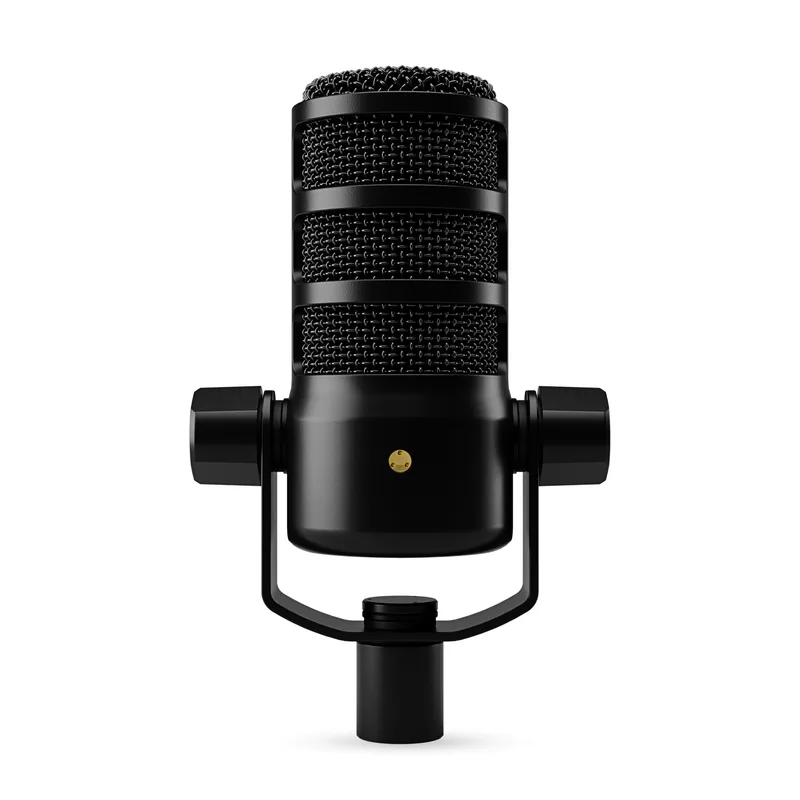
The Blue Yeti is USB-A. The remaining four mics in this roundup use USB-C. Modern laptops from 2022 onward often have USB-C-only ports. Check your laptop’s ports before purchasing to avoid needing a hub or adapter.
Onboard Controls vs. Software
Hardware controls — gain dial, mute button, headphone volume — are faster to operate than opening OS audio settings or the Zoom interface mid-call. The Blue Yeti has the most onboard controls in this roundup. The HyperX SoloCast has tap-to-mute only. The AT2020USB-X has mute only. Consider how often you make adjustments during live calls.
Headphone Monitoring
Zero-latency headphone monitoring — hearing your own voice through the mic in real time — matters for podcasters, voiceover artists, and anyone who needs to verify mic placement before a recording. For standard video calls, it is less essential. The Blue Yeti and Rode NT-USB Mini both include 3.5mm monitoring jacks. The AT2020USB-X and HyperX SoloCast do not.
Sample Rate
24-bit/96kHz (AT2020USB-X) captures more audio detail than 16-bit/48kHz (Blue Yeti, HyperX SoloCast). For video calls, both are compressed by the platform codec to the point where the difference is inaudible. For podcast recording and voiceover, 24-bit gives more editing headroom. If the mic serves both purposes, 24-bit is worth the extra cost.
DSP vs. Raw Audio
The Elgato Wave:3 MK.2 is the only mic in this roundup with onboard DSP processing. Its built-in compressor, EQ, and noise reduction run on the mic hardware with zero software dependency. All other mics deliver raw audio that software (Zoom, Teams, NVIDIA RTX Voice, Krisp) then optionally processes. If you want the best sound on calls without configuring software, the Wave:3 MK.2’s onboard DSP is a meaningful advantage.
FAQ
Do I need a condenser microphone for video calls, or is dynamic better?
Condensers are more sensitive than dynamic mics, which makes them better at capturing voice detail at conversational distances and without requiring you to position the mic close to your mouth. For a fixed desk setup where you are 6–12 inches from the mic, condensers produce more natural-sounding voice. Dynamic mics reject background noise more aggressively, which makes them better in acoustically harsh environments — but they require closer mic placement to compensate for lower sensitivity.
Do USB condenser mics require phantom power?
No. USB condenser microphones draw power from the USB connection itself. Phantom power (48V) is required for XLR condenser microphones when connected through an audio interface. USB condensers handle power internally — plug in and the mic works.
What is the difference between the AT2020USB-X and the older AT2020USB+?
The AT2020USB-X replaces the USB-A output of the AT2020USB+ with USB-C, adds a mute button with LED indicator, and updates to a sturdier desk stand. The core AT2020 capsule is the same. The AT2020USB+ is discontinued; if you see it available, the AT2020USB-X is the current replacement at a similar price.
Will a USB condenser microphone work on Zoom, Teams, and Google Meet without drivers?
Yes. Every USB condenser in this roundup presents to the operating system as a standard USB audio device. No drivers or additional software are required for basic operation in any video conferencing application on Mac or Windows. The software apps from each manufacturer — Wave Link, Rode Central — add optional controls but are not required for the mic to function.
Can I use a USB condenser with an iPad or iPhone for mobile remote work?
The USB-C mics in this roundup (Wave:3 MK.2, NT-USB Mini, AT2020USB-X, HyperX SoloCast) can connect to iPads with USB-C ports using a compatible cable. iPhone users need a USB-C to Lightning adapter or USB-C cable depending on the model. Compatibility varies by app — Zoom on iPad supports USB audio input; confirm your specific app supports external USB audio before purchasing.
Conclusion
The Elgato Wave:3 MK.2 is the top pick for most remote workers. The onboard DSP processing — compressor, EQ, Clipguard 2.0 — delivers a polished sound on video calls without requiring users to configure audio software. At $169.99, it costs more than the alternatives, but the hardware-level processing is a genuine differentiator.
For buyers who want serious vocal clarity at less cost, the Audio-Technica AT2020USB-X at $129–$149 captures the widest frequency range in this roundup with 24-bit/96kHz resolution. The Rode NT-USB Mini at $99–$109 is the best compact option for constrained desk setups. The Blue Yeti at $79–$99 remains the strongest choice for multi-pattern flexibility and onboard controls. And the HyperX SoloCast at $49–$59 delivers USB-C output with tap-to-mute at the lowest price in this category.
For a complete home office audio setup, a condenser microphone pairs well with a good pair of headphones or a speakerphone to avoid echo on calls — both covered in separate roundups on this site.
Detailed Reviews
Elgato Wave:3 MK.2 USB Condenser Microphone
Pros
- Wave FX Processor runs five DSP effects — low-cut, expander, compressor, EQ, and voice enhancer — directly on the mic hardware with zero added latency, so your Zoom call sounds processed even without touching the Wave Link app
- Clipguard 2.0 uses a second, quieter secondary capsule to catch any peaks that exceed 130dB SPL — sudden loud sounds like a door slam or desk knock never distort the recording, making it more robust than software-only clip prevention
- Auto Gain calibration sets input sensitivity automatically when you speak into the mic for a few seconds — removes the guesswork of gain staging for users who are not audio engineers
- Multifunction dial controls headphone volume, mic gain, or blend between mic and PC audio depending on the mode — one physical control replaces what would otherwise require three separate software adjustments
- Wave Link app manages up to nine independent audio channels including game audio, music, and communications on separate faders — the most capable software ecosystem in this category by a significant margin
- USB-C connection is compatible with modern laptops and docking stations without an adapter
Cons
- Frequency response starts at 70Hz rather than the 20Hz low end of the AT2020USB-X — captures slightly less of the chest resonance in voices, though this is audible mainly in A/B testing rather than typical video calls
- Wave Link software adds real value but requires a Mac or Windows installation — the mic functions as a standard audio device without it, but some of the DSP preset control requires the desktop app
- At $169.99 it is the most expensive USB condenser in this roundup — the premium is justified by the DSP hardware, but budget-constrained buyers have strong alternatives at $99–$129
Rode NT-USB Mini USB Condenser Microphone
Pros
- Built-in pop filter is integrated directly into the capsule housing — the result is a mic that produces clean, plosive-free audio straight out of the box without purchasing a separate windscreen or foam shield
- Detachable magnetic stand is compact enough to leave on a desk permanently without occupying much real estate — the footprint is smaller than most USB condensers with separate stands
- Zero-latency headphone monitoring lets you hear your own voice in real time without software delay — a practical feature for anyone doing voiceover work or podcast recording where precise monitoring matters
- Rode Central app provides EQ and compression controls beyond what the hardware alone delivers — the combination of compact hardware and capable software makes this a genuinely professional setup at $99
- USB-C output with a 24-bit audio path gives this mic a resolution advantage over older USB-A condensers at the same price, and the cable connects directly to USB-C ports on modern laptops
Cons
- 48kHz maximum sample rate is lower than the 96kHz offered by the AT2020USB-X at a similar price — the practical difference for voice recording on video calls is minimal, but it matters if you also record music or want headroom for future use
- No onboard gain control — monitoring mix and headphone volume adjustments require Rode Central or system audio settings, which is slower to access mid-call than a physical dial
- Magnetic stand is lightweight by design, so the mic can tip on uneven desk surfaces; users who type aggressively near the mic report occasional movement
Audio-Technica AT2020USB-X Cardioid Condenser Microphone
Pros
- 20Hz–20kHz frequency response captures the full range of human voice including the lowest chest resonance and highest consonant frequencies — the AT2020USB-X reproduces voice with more depth and clarity than condensers with narrower low-end response
- 24-bit/96kHz sample rate is the highest resolution of any mic in this roundup — relevant for users who record voiceovers, narration, or podcast content alongside video calls, since higher sample rates give more flexibility in post-processing
- Mute button with LED indicator provides one-touch silence without touching the host application — the LED makes mute status visible at a glance, which is more reliable than reading the small on-screen indicator in Zoom or Teams
- USB-C output connects to modern laptops, monitors with USB-C passthrough, and docking stations without needing an adapter — the AT2020USB-X is the current-generation replacement for the USB-A AT2020USB+
- Audio-Technica's AT2020 capsule design has a long track record in professional studio work — the USB-X brings that same capsule to a plug-and-play USB format without requiring an audio interface
Cons
- No headphone monitoring port — unlike the Rode NT-USB Mini and Blue Yeti, the AT2020USB-X does not include a 3.5mm jack for real-time voice monitoring; this is a meaningful omission for podcasters and voiceover artists
- No onboard volume or gain control — all sensitivity adjustments go through system audio settings or the host application, which is slower than a physical dial during live calls
- The included desk stand positions the mic close to the desk surface, which can pick up keyboard vibrations; a boom arm or shock mount improves isolation but adds $20–$40 to the total cost
Logitech Blue Yeti USB Microphone
Pros
- Four switchable polar patterns in a single mic — cardioid for solo calls, omnidirectional for group desk meetings, bidirectional for two-person interviews, and stereo for instrument capture — no other mic in this roundup matches that flexibility at this price
- Gain dial, mute button, and headphone volume control are all on the mic body — three separate hardware controls that cover the most common in-call adjustments without touching any software
- Zero-latency headphone monitoring with a 3.5mm port lets you hear yourself while recording — the only mic in this roundup besides the Rode NT-USB Mini with this feature
- One of the most widely-reviewed USB microphones on Amazon with tens of thousands of ratings — the volume of owner feedback makes compatibility and reliability patterns more predictable than newer products with fewer reviews
- Frequency response extends to 20Hz, capturing low vocal frequencies that some condensers with narrower response miss — the result is a warmer, fuller vocal sound on video calls
Cons
- USB-A output requires an adapter on USB-C-only laptops — the Blue Yeti pre-dates the USB-C transition and has not been updated to USB-C output; this is a practical inconvenience on modern thin-and-light laptops
- 16-bit / 48kHz sample rate is lower resolution than the 24-bit options in this roundup — the difference is most audible in professional podcast or voiceover work; for video calls, it is indistinguishable
- The mic is physically large — the full-size body and included stand occupy more desk real estate than compact alternatives like the Rode NT-USB Mini; users with crowded desks may find it intrusive
HyperX SoloCast USB Condenser Microphone
Pros
- Tap-to-mute sensor requires only a touch to silence the mic — faster and more natural than clicking a software mute button, and the LED ring confirms mute status so you never accidentally speak into a silenced mic
- USB-C output at under $60 makes the SoloCast the most affordable USB-C condenser in this roundup — it connects to modern laptops and USB-C hubs without adapters
- Flexible pivot stand allows angle adjustment without additional hardware — the mic can be tilted to point directly at your mouth regardless of desk height, and the 1/4-20 thread accepts standard boom arms if you want to upgrade later
- Cardioid polar pattern rejects noise from the sides and rear — owner reports consistently note it outperforms laptop microphones on Zoom and Teams calls in terms of background noise rejection
- Compatible with PC, Mac, PS4, and PS5 — works across all major operating systems and the PlayStation consoles popular for streaming, making it a flexible choice for users who split between work calls and personal content
Cons
- No headphone monitoring port — the SoloCast is input-only; real-time voice monitoring requires software solutions, not hardware
- No gain control on the body — input sensitivity requires OS-level or application-level adjustment; acceptable for video calls, limiting for recording work
- 16-bit/48kHz sample rate is on the lower end for a condenser at this price — adequate for voice calls and standard content, but the AT2020USB-X offers 24-bit/96kHz at a $70–$90 premium if audio quality is the priority