BenQ’s RD-series programming monitors — launched with the original RD280U and followed by the 120Hz RD280UG — introduced a product category that did not exist before 2025: monitors built from the ground up for developers, not repurposed from gaming or creative panels. The 3:2 aspect ratio adds 400 vertical pixels over a standard 4K 16:9 display at the same width. A Nano Matte coating handles the office lighting problem that standard anti-glare coatings partially solve. Discrete Coding Modes adjust tone curves for syntax-highlighted text. That launch set a new baseline for what a programming monitor can do, and the competition responded with faster refresh rates, higher USB-C power delivery, and wider color coverage at aggressive prices.
For remote workers writing code all day, the monitor is the most-used piece of hardware on the desk. A 4K display at 27 inches delivers 163 pixels per inch — the threshold where text renders without visible pixel structure at normal desk distances. Every monitor in this roundup hits that density. The differences come down to screen format, USB-C charging capability, refresh rate, and color accuracy.
Five monitors are covered here, from a $239 budget pick to a $549-$599 dedicated developer display. Selections are based on manufacturer specifications, patterns from owner feedback on Amazon, and editorial research into the 2026 4K monitor market. Every product has a verified live Amazon listing.
Quick Comparison
| Monitor | Price | Refresh Rate | USB-C PD | Best For |
|---|---|---|---|---|
| BenQ RD280U | $469.99-$549.99 as of Oct 18, 2026 | 60Hz | 90W | Dedicated dev panel, 3:2 ratio |
| Dell S2725QS | $263.19-$279.99 as of Oct 18, 2026 | 120Hz | None | Best budget 4K |
| ASUS ProArt PA279CRV | $348.10-$399.00 as of Oct 18, 2026 | 60Hz | 96W | Color accuracy + Mac |
| LG 27UP850K-W | $267.80-$349.99 as of Oct 18, 2026 | 60Hz | 90W | MacBook single-cable dock |
| Dell S2725QC | $310.60-$342.69 as of Oct 18, 2026 | 120Hz | 65W | 120Hz + USB-C combo |
1. BenQ RD280U — Best Overall
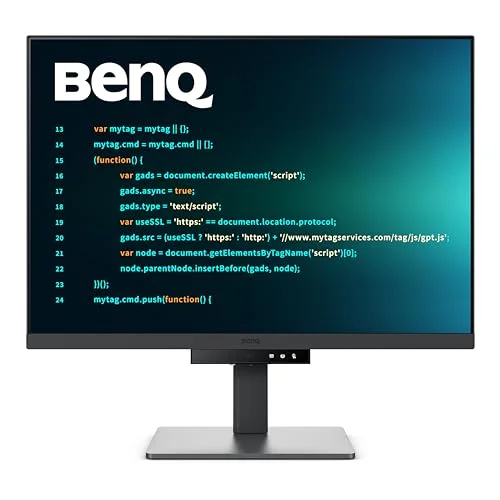
BenQ RD280U 28.2" 4K Programming Monitor
Pros
- 3:2 aspect ratio adds approximately 400 extra vertical pixels compared to a 16:9 4K panel at the same width — in practice that is roughly 20-30 more visible lines of code in an editor without scrolling, a meaningful gain for reading long functions and deep call stacks
- Nano Matte coating uses a finer surface texture than standard anti-glare coatings — eliminates overhead light reflections without the image-softening that standard matte finishes introduce, so the display stays sharp and readable under typical office lighting
- Coding Modes switch the tone curve between a light version that sharpens syntax highlighting on bright IDE themes and a dark version that increases contrast in dark themes like VS Code Default Dark+ — a dedicated Coding HotKey button on the bezel cycles between modes without opening any software
- MoonHalo ambient backlight surrounds the panel with indirect illumination that reduces the perceived contrast between a bright display and a dark room — owner reports consistently note reduced eye fatigue during long evening coding sessions compared to monitors without bias lighting
- 90W USB-C Power Delivery charges most laptops at full rated speed through a single cable — the built-in KVM switch allows sharing keyboard and mouse between two connected computers, eliminating a separate KVM device from the desk
Cons
- 60Hz refresh rate is standard for productivity monitors but lower than the 120Hz offered by the Dell S2725QS and S2725QC in this roundup — for code editing the difference is invisible, but developers who also game on the same display will notice it
- 28.2 inches requires more desk depth than a 27-inch panel — the recommended viewing distance for 4K+ at this size is approximately 24-30 inches, so owners with shallow desks should verify they have adequate room
- At $549-$599 it is the most expensive monitor in this roundup — the 3:2 ratio and Coding Modes justify the premium for developers, but users who do not write code for extended daily sessions will find better value in the Dell or LG options
The RD280U is the only monitor in this roundup designed specifically for code. The 3:2 aspect ratio is the primary differentiator: at 3840×2560, the panel packs 400 more vertical pixels than a standard 4K 16:9 display at the same width. At typical developer scaling, that translates to around 20-30 additional visible lines in a code editor — enough to see a full function, its return statement, and the function below it simultaneously without scrolling.
The Nano Matte coating addresses a problem that standard anti-glare coatings only partially solve. Standard matte finishes scatter reflections but also soften the image slightly — text becomes marginally less sharp at high pixel densities. Glossy coatings keep text sharp but reflect overhead lights directly into the panel. BenQ’s Nano Matte uses a finer surface texture that eliminates the reflections without the clarity loss. Owner feedback consistently describes the panel as readable under ceiling lights that wash out other monitors.
Coding Modes are a hardware-level tone curve adjustment accessed via the bezel button. Light Coding Mode increases contrast on bright IDE themes — WebStorm, IntelliJ IDEA light mode, Xcode. Dark Coding Mode adjusts the response in the shadow range where color-coded syntax lives on dark themes like VS Code Default Dark+, Monokai, and Dracula. The switch is hardware-level, not software-dependent.
The MoonHalo ambient backlight rings the back of the panel with indirect illumination that reduces the brightness differential between the display and a dark room. BenQ’s B.I. Gen2 sensor dims it automatically to match ambient light. For developers who code into evening hours, it reduces the eye strain that comes from a bright rectangle in a dark environment. The KVM switch adds the ability to share a keyboard and mouse between two connected computers — practical for developers running a personal laptop alongside a work machine.
Bottom line: The monitor built for programming. If screen real estate and eye-comfort during long coding sessions are the priority, the 3:2 ratio and Coding Modes deliver advantages no 16:9 panel in this roundup matches.
2. Dell S2725QS — Best Budget
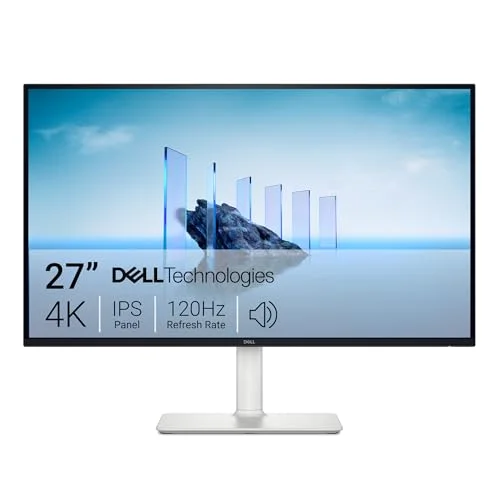
Dell S2725QS 27" 4K 120Hz Monitor
Pros
- 120Hz at 4K resolution at this price is rare — scrolling through long files is noticeably smoother than 60Hz panels, and the higher refresh rate also benefits developers who use the monitor for casual gaming without buying a second display
- 163 pixels per inch renders code fonts as sharply as monitors at twice the price — syntax highlighting, docstrings, line numbers, and inline comments all resolve cleanly at normal viewing distances without subpixel aliasing
- Height-adjustable, tilt, swivel, and pivot stand ships with the monitor — portrait rotation allows reading long vertical documents like API specs, GitHub pull requests, and JIRA tickets more efficiently than landscape orientation
- 99% sRGB coverage is sufficient for web development where CSS colors need to match the intended design — color accuracy at this price exceeds what the category typically delivers
- AMD FreeSync Premium support provides variable refresh rate across its full range — relevant for developers who run GPU-accelerated tools or game on the same monitor with AMD hardware
Cons
- No USB-C Power Delivery — the monitor accepts USB-C for display signal but does not charge laptops; developers on MacBook or Dell XPS hardware will need a separate charger or docking station alongside it
- 350-nit brightness is adequate for standard office environments but can wash out in bright rooms near windows — users in sunlit workspaces should account for this in placement
- No built-in USB hub — adding wired peripherals beyond what plugs directly into the laptop requires a separate USB hub
The S2725QS combines 4K resolution, 120Hz refresh rate, and 99% sRGB color coverage for under $280. Until recently, 4K at 120Hz required a significant budget premium. Dell’s current-generation S27 series changed that: the same pixel density as monitors at twice the price, with a refresh rate upgrade that matters for more than gaming.
120Hz makes a practical difference for code navigation. Scrolling through long files, flipping between editor panes, and tracking animated terminal output are all noticeably smoother at 120Hz than 60Hz. It is not the kind of improvement that reads well in a spec sheet but becomes immediately obvious once you go back to a 60Hz monitor.
The 163 PPI pixel density renders syntax highlighting, docstrings, and comment text as cleanly as any monitor in this roundup. At the same physical size, a 1440p panel runs 109 PPI — the difference in text clarity is visible, particularly in small font weights and muted-color comment text.
The stand is more capable than the price suggests. Height adjustment, tilt, swivel, and portrait pivot all ship in the box. Portrait mode at 4K is genuinely useful for reading long vertical documents: GitHub PR diffs, API documentation, JIRA boards, and Confluence pages all benefit from more vertical than horizontal real estate.
The primary limitation is connectivity. The S2725QS accepts USB-C for display input but does not charge through it. For desktop workstation users or anyone with a separate laptop charger, that is irrelevant. For MacBook and USB-C laptop users who want a single-cable setup, the Dell S2725QC adds 65W PD at a modest price premium.
Bottom line: The strongest value case in this roundup. Compromises on USB-C charging and lacks developer-specific features, but delivers identical pixel density to the $549 BenQ at 120Hz for under $280.
3. ASUS ProArt PA279CRV — Best Color Accuracy
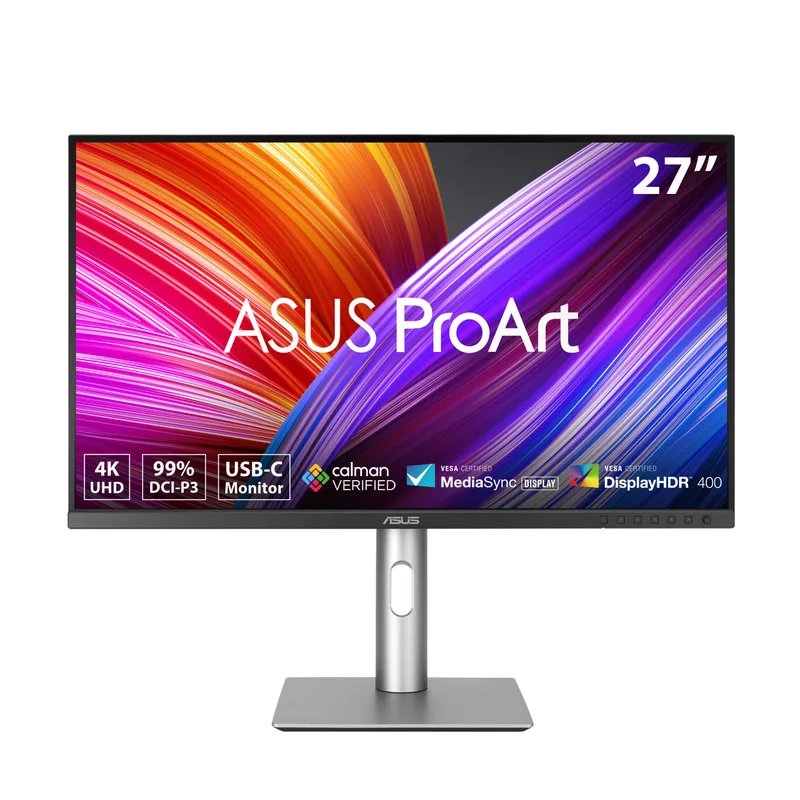
ASUS ProArt PA279CRV 27" 4K USB-C Monitor
Pros
- 96W USB-C Power Delivery is the highest in this roundup — charges the MacBook Pro 14-inch and Dell XPS 15 at their full rated speed through a single cable, which 65W monitors cannot match under sustained CPU load
- Calman Verified factory calibration delivers a measured Delta E below 2 — CSS colors, design mockups, and UI assets display as the designer intended rather than shifted by the panel's uncalibrated response, which matters for front-end developers doing design review
- 99% DCI-P3 and 99% Adobe RGB coverage handles wide-gamut color spaces used in modern web and app design — most monitors in this price range cover sRGB only, and P3-targeted CSS colors shift noticeably on narrower-gamut panels
- DisplayPort daisy-chain support allows connecting a second monitor through the first — developers running dual-monitor setups can route DisplayPort through the PA279CRV and eliminate one cable running to the laptop
- Each unit ships with a factory calibration report documenting its measured accuracy — provides confidence for buyers purchasing remotely without the ability to evaluate the panel in person
Cons
- 60Hz refresh rate does not match the 120Hz of the Dell S2725QS and S2725QC — for code editors and terminal work this is invisible, but it is a real limitation for video review or gaming on the same display
- Price ranges from $349 during promotions to $469 at MSRP — buyers should track pricing with a price alert rather than purchasing at MSRP when the same monitor regularly sells for $100 less
- No ambient backlight or Coding Mode features — purely a high-accuracy panel without the developer-specific ergonomic additions found on the BenQ RD280U
The PA279CRV is for developers whose workflow intersects with design. Calman Verified factory calibration confirms each unit leaves the production line with measured Delta E below 2 — meaning the color the monitor displays is within 2 Delta E units of the intended value. That level of calibration is typically found on monitors costing significantly more.
For front-end developers, the practical effect is that CSS colors display as intended. A panel with uncalibrated color response or narrow gamut coverage introduces a systematic shift between what the developer sees and what the design specifies. The PA279CRV eliminates that variable.
99% DCI-P3 and 99% Adobe RGB coverage extends beyond what sRGB-only panels display. Modern web design increasingly targets wide-gamut color — P3 is the native color space of Apple displays and is increasingly targeted in web CSS. On a sRGB-only monitor, P3 colors compress to the narrower gamut and shift. The PA279CRV renders them correctly.
The 96W USB-C Power Delivery is the highest in this roundup. It charges the MacBook Pro 14-inch at its full 96W rated speed — the 65W ceiling of the Dell S2725QC charges the same laptop, but at a reduced rate under sustained CPU load where the laptop is drawing more than 65W. For developers who run compilation tasks, Docker builds, or other intensive workloads, the 96W margin prevents battery depletion during the workday.
DisplayPort daisy-chaining allows passing display signal to a second monitor through the first. For dual-monitor setups, that reduces cabling between the desk and the laptop.
Bottom line: The pick for front-end developers, UI reviewers, and anyone whose work requires accurate color rendering alongside code. The 96W PD and Calman Verified calibration justify the price premium over the Dell options.
4. LG 27UP850K-W — Best for MacBook
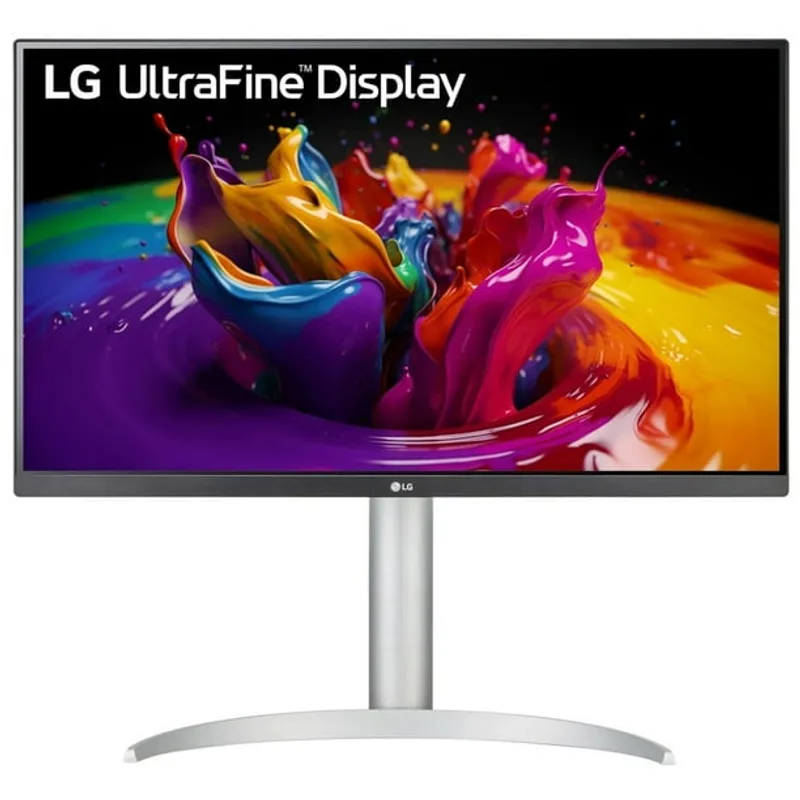
LG 27UP850K-W 27" 4K UltraFine USB-C Monitor
Pros
- 90W USB-C Power Delivery allows the MacBook Pro 14-inch and most 15-inch Windows laptops to charge at full rated speed through a single cable — the monitor functions as a single-cable dock combining display output and power delivery
- DisplayHDR 400 certification improves the perceived contrast on dark coding themes — VS Code Default Dark+, Dracula, and Catppuccin Mocha render with deeper blacks and more visible contrast in the shadow range where muted syntax colors live
- Built-in speakers handle video calls and background audio without adding a speaker to the desk — a practical simplification for remote workers managing a compact setup
- Ergonomic stand adjusts height, tilt, pivot, and swivel — portrait rotation works well for reading long vertical documents, API documentation, or reviewing extended pull request diffs
- DCI-P3 95% color coverage renders wide-gamut web content accurately — CSS colors in P3 space, which Safari and Chrome increasingly target, display as intended rather than shifted toward sRGB
Cons
- 60Hz refresh rate is the standard for productivity monitors at this price — developers who want 120Hz scroll smoothness need to step up to the Dell S2725QS or S2725QC
- DisplayHDR 400 is the entry-level HDR tier — the brightness ceiling and local dimming are not comparable to higher-tier HDR; the improvement over SDR is real but modest
- Price fluctuates between $259 on sale and $379 at regular retail — purchasing at MSRP without checking current price history overpays by a significant margin; use a price tracker before buying
The 27UP850K-W is LG’s current-generation UltraFine 4K monitor with 90W USB-C Power Delivery — designed around the single-cable laptop use case. One USB-C cable delivers 4K display output at 60Hz and charges the MacBook Pro 14-inch at its full rated speed simultaneously. No separate power adapter on the desk. No second cable running to the laptop.
DisplayHDR 400 certification adds contrast over standard SDR panels in a way that matters for dark-theme coding environments. Dark coding themes render with deeper blacks — the muted syntax colors in comments and strings that can look flat on SDR panels become more distinct when HDR contrast is available. The improvement is not dramatic, but it is a consistent step up from standard SDR for developers spending most of the day in dark-theme editors.
DCI-P3 95% coverage handles P3-targeted web content correctly. As more UI design targets the wide-gamut P3 color space, a monitor that covers 95% of P3 renders those colors closer to intent than one covering only sRGB. For developers reviewing UI alongside code, this reduces the color difference between what the developer sees and what the design team intended.
The built-in speakers reduce desk complexity for remote workers. Video calls and background audio run through the monitor without an external speaker. They are not high-fidelity, but they are substantially cleaner than laptop speakers and adequate for all-day video meeting use.
Portrait pivot is available on the stand, which allows rotating to vertical for extended reading sessions — API documentation, pull request review, and technical specs read more efficiently in portrait orientation at 4K than in landscape.
Bottom line: The cleanest single-cable 4K monitor for MacBook users. 90W PD eliminates the separate charger from the desk; the ergonomic stand and DisplayHDR 400 add daily-use value at a lower price than the ASUS ProArt.
5. Dell S2725QC — Best USB-C Hub
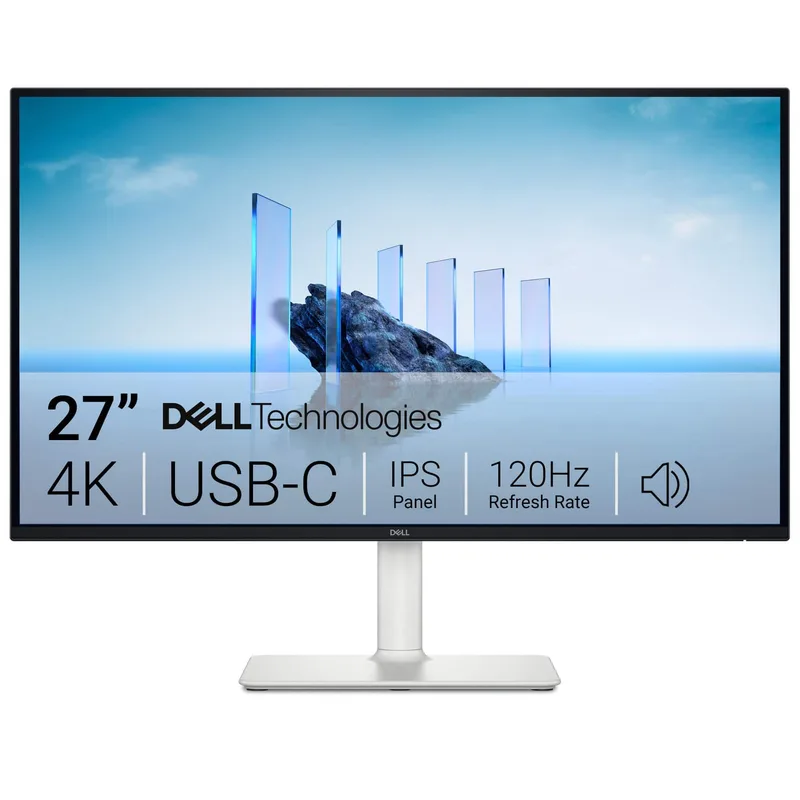
Dell S2725QC 27" 4K 120Hz USB-C Monitor
Pros
- 120Hz and 65W USB-C Power Delivery in the same monitor — the S2725QC is the only display in this roundup that delivers both simultaneously, making it the most practical all-in-one choice for developers with a single monitor
- 163 PPI pixel density renders fonts as sharply as monitors at twice the price — code, terminal output, and documentation all resolve cleanly at standard display scaling
- HDMI 2.1 inputs support 4K at 120Hz — works at full resolution and refresh rate with desktop PCs, gaming consoles, and any device with HDMI 2.1 output, not just USB-C laptops
- 4ms response time in Extreme mode is the sharpest in this roundup — reduces motion blur in fast-moving content, relevant for developers doing game development testing, 3D preview work, or casual gaming on the same display
- AMD FreeSync Premium variable refresh rate adapts frame rate to GPU output without tearing — benefits developers running GPU-accelerated creative tools alongside code editors on AMD hardware
Cons
- 65W USB-C power delivery is lower than the 90W LG and 96W ASUS — handles MacBook Air M3 and Dell XPS 13 at full speed, but MacBook Pro 14 and 16 may charge at a reduced rate under sustained load
- No USB-A hub ports for wired peripherals — connects USB-C upstream but lacks downstream USB-A ports; a separate hub is needed to connect multiple peripherals through the monitor
- At similar price points to the LG 27UP850K-W, the trade-off is 120Hz vs 90W PD — the right choice depends entirely on whether refresh rate or charging wattage matters more for the specific laptop in use
The S2725QC is the S2725QS with USB-C Power Delivery added. The panel, resolution, and 120Hz refresh rate are identical to the S2725QS — the upgrade is 65W PD through USB-C and HDMI 2.1 connectivity on the display inputs. For developers who want 120Hz and single-cable laptop charging in one monitor, the S2725QC is the only option in this roundup that provides both.
HDMI 2.1 ports support 4K at 120Hz through HDMI as well as through USB-C and DisplayPort. For developers who connect a desktop PC or gaming console alongside a laptop, both devices can run at full resolution and refresh rate without a resolution or speed penalty.
The 4ms response time in Extreme mode is the sharpest in this roundup. For code editors and terminal work, response time is irrelevant — text does not move fast enough to benefit. For developers doing game development testing, Unity or Unreal previews, or 3D visualization work on the same monitor, the lower response time reduces motion blur in fast-moving scenes.
The 65W USB-C PD ceiling is the meaningful constraint. It charges MacBook Air M3 (30W typical, 70W peak) and Dell XPS 13 (45W) at full speed. MacBook Pro 14 and 16, Dell XPS 15, and other power-hungry laptops draw more than 65W under sustained load — the battery will maintain or charge slowly during light work, but may deplete during intensive compilation or sustained CPU+GPU workloads. Developers on those machines who want full charging speed should consider the LG 27UP850K-W (90W) or ASUS PA279CRV (96W).
Bottom line: The best option for developers who want both 120Hz refresh rate and USB-C charging from one monitor. The 65W PD is the key trade-off versus the LG and ASUS options — the right choice depends on whether 120Hz or higher wattage matters more for the specific laptop.
Buying Guide: What Matters for a Programming Monitor
Pixel Density Over Refresh Rate
For code, resolution beats frame rate. A 4K panel at 27 inches runs 163 PPI — the threshold where text renders without visible pixel structure at arm’s length. A 1440p panel at the same size runs 109 PPI — the difference is visible in fine font weights, small type sizes, and the muted syntax colors used for comments and strings. Every monitor in this roundup is 4K. For text-heavy work, that matters more than going from 60Hz to 120Hz.
Screen Format: 16:9 vs 3:2
The BenQ RD280U’s 3:2 format is the only format designed for code. 400 more vertical pixels at the same width means more code visible without scrolling. For developers who work in tall, narrow editor windows alongside multiple terminal panes, that vertical real estate is directly useful. For developers who use wide editor layouts with sidebars and split views, 16:9’s wider format suits the workflow better.
USB-C Power Delivery
For laptop users, USB-C PD turns the monitor into a partial docking station:
- 65W (Dell S2725QC): Handles 13-inch laptops and MacBook Air fully; charges larger laptops slowly under load
- 90W (LG 27UP850K-W, BenQ RD280U): Covers MacBook Pro 14-inch and most 15-inch Windows laptops at full speed
- 96W (ASUS ProArt PA279CRV): The widest coverage — charges the most demanding laptops at full rated speed
Desktop users can ignore PD wattage entirely.
Panel Coating
Standard matte anti-glare coatings reduce reflections but soften image clarity slightly — a trade-off that is noticeable on high-PPI panels where text sharpness is the point. The BenQ RD280U’s Nano Matte coating handles this better than standard coatings. For anyone working near overhead lights or windows, the coating difference is worth the premium. For controlled lighting environments, standard matte is fine.
Color Accuracy
99% sRGB is adequate for backend developers, data engineers, and anyone whose work does not involve reviewing visual design. If the workflow includes CSS color values, UI mockup review, or image editing alongside code, the ASUS PA279CRV’s Calman Verified calibration and 99% DCI-P3 coverage are meaningfully more accurate than sRGB-only panels.
FAQ
What size monitor is best for programming — 27 or 32 inches?
27 inches at 4K is the preferred size for most programming setups. 163 PPI gives sharp text at typical desk distances of 24-30 inches. 32 inches at 4K drops to approximately 137 PPI — still good, but text is slightly less crisp, and the larger panel requires more desk depth to keep the corners in comfortable focus. For single-window or split two-pane work, 27 inches is the sharper choice. For simultaneously viewing three or four split panes plus a sidebar, 32 inches has more raw real estate.
Is 4K actually better than 1440p for coding?
For programming, yes. Code is dense text. 4K at 27 inches runs 163 PPI versus 109 PPI for 1440p at the same size. The difference is visible in fine font weights, small-point sizes, and syntax-highlighted comments in muted colors. The higher pixel density also allows running at 100% scaling — no system scaling needed — which means every UI element is pixel-perfect rather than scaled by the OS. 1440p is a strong choice for gaming where the GPU load matters; 4K is sharper for text-heavy work.
Should I prioritize refresh rate or USB-C PD for a programming monitor?
For most remote workers, USB-C Power Delivery is more practically useful. Laptop charging through the monitor eliminates one cable and one adapter from the desk. The 60Hz-to-120Hz upgrade is invisible in code editors — the improvement only shows up in fast-moving content like games or video. Exception: if the monitor is also used for gaming or intensive video work, 120Hz is worth prioritizing.
Does the BenQ RD280U’s 3:2 aspect ratio cause problems with video calls or full-screen apps?
No practical compatibility issues. Video conferencing applications run in windowed mode alongside the editor on most professional setups — full-screen calls are uncommon in practice. Full-screen video content displays with thin letterboxing at the sides. The vertical real estate gained in every other use case — code, documentation, terminals, email — outweighs the minor visual trade-off in full-screen video.
Is a 4K monitor worth it for a MacBook Air M3 setup?
Yes. The MacBook Air M3 outputs 4K at up to 60Hz over USB-C. All monitors in this roundup are compatible. The ASUS ProArt PA279CRV and LG 27UP850K-W connect through a single USB-C cable that also charges the MacBook, which is the cleanest setup. The Dell S2725QC adds 120Hz at 65W PD — the Air charges fine at 65W since its peak draw is lower than Pro models.
Conclusion
The BenQ RD280U is the pick for developers who write code for most of their working day. The 3:2 format, Nano Matte coating, and hardware Coding Modes are practical differentiators — not marketing features. The additional vertical pixels, the reflection-free panel, and the lighting-adjusted tone curves all address real problems that 16:9 monitors handle less specifically.
For developers who want 4K without spending over $280, the Dell S2725QS delivers the same pixel density at 120Hz with a full-featured ergonomic stand. It is the strongest value pick in this roundup.
The ASUS ProArt PA279CRV is the choice for front-end developers, UI reviewers, and anyone whose workflow crosses into design — the 99% DCI-P3 coverage and Calman Verified calibration produce measurably accurate color that sRGB-only panels cannot match.
For MacBook users who want the simplest single-cable 4K setup, the LG 27UP850K-W’s 90W USB-C PD and DisplayHDR 400 deliver daily-use value at a price below the ASUS.
For developers who want both 120Hz and USB-C charging in one monitor, the Dell S2725QC is the only option in this roundup that provides both — with the understanding that its 65W PD is a ceiling that larger laptops will bump against under load.
A well-matched monitor is the most used tool in a developer’s remote setup. Any of these five will deliver 4K text clarity for years. Pick the right trade-offs for the laptop, lighting, and workflow — and the monitor earns its place on the desk every day.
Detailed Reviews
BenQ RD280U 28.2" 4K Programming Monitor
Pros
- 3:2 aspect ratio adds approximately 400 extra vertical pixels compared to a 16:9 4K panel at the same width — in practice that is roughly 20-30 more visible lines of code in an editor without scrolling, a meaningful gain for reading long functions and deep call stacks
- Nano Matte coating uses a finer surface texture than standard anti-glare coatings — eliminates overhead light reflections without the image-softening that standard matte finishes introduce, so the display stays sharp and readable under typical office lighting
- Coding Modes switch the tone curve between a light version that sharpens syntax highlighting on bright IDE themes and a dark version that increases contrast in dark themes like VS Code Default Dark+ — a dedicated Coding HotKey button on the bezel cycles between modes without opening any software
- MoonHalo ambient backlight surrounds the panel with indirect illumination that reduces the perceived contrast between a bright display and a dark room — owner reports consistently note reduced eye fatigue during long evening coding sessions compared to monitors without bias lighting
- 90W USB-C Power Delivery charges most laptops at full rated speed through a single cable — the built-in KVM switch allows sharing keyboard and mouse between two connected computers, eliminating a separate KVM device from the desk
Cons
- 60Hz refresh rate is standard for productivity monitors but lower than the 120Hz offered by the Dell S2725QS and S2725QC in this roundup — for code editing the difference is invisible, but developers who also game on the same display will notice it
- 28.2 inches requires more desk depth than a 27-inch panel — the recommended viewing distance for 4K+ at this size is approximately 24-30 inches, so owners with shallow desks should verify they have adequate room
- At $549-$599 it is the most expensive monitor in this roundup — the 3:2 ratio and Coding Modes justify the premium for developers, but users who do not write code for extended daily sessions will find better value in the Dell or LG options
Dell S2725QS 27" 4K 120Hz Monitor
Pros
- 120Hz at 4K resolution at this price is rare — scrolling through long files is noticeably smoother than 60Hz panels, and the higher refresh rate also benefits developers who use the monitor for casual gaming without buying a second display
- 163 pixels per inch renders code fonts as sharply as monitors at twice the price — syntax highlighting, docstrings, line numbers, and inline comments all resolve cleanly at normal viewing distances without subpixel aliasing
- Height-adjustable, tilt, swivel, and pivot stand ships with the monitor — portrait rotation allows reading long vertical documents like API specs, GitHub pull requests, and JIRA tickets more efficiently than landscape orientation
- 99% sRGB coverage is sufficient for web development where CSS colors need to match the intended design — color accuracy at this price exceeds what the category typically delivers
- AMD FreeSync Premium support provides variable refresh rate across its full range — relevant for developers who run GPU-accelerated tools or game on the same monitor with AMD hardware
Cons
- No USB-C Power Delivery — the monitor accepts USB-C for display signal but does not charge laptops; developers on MacBook or Dell XPS hardware will need a separate charger or docking station alongside it
- 350-nit brightness is adequate for standard office environments but can wash out in bright rooms near windows — users in sunlit workspaces should account for this in placement
- No built-in USB hub — adding wired peripherals beyond what plugs directly into the laptop requires a separate USB hub
ASUS ProArt PA279CRV 27" 4K USB-C Monitor
Pros
- 96W USB-C Power Delivery is the highest in this roundup — charges the MacBook Pro 14-inch and Dell XPS 15 at their full rated speed through a single cable, which 65W monitors cannot match under sustained CPU load
- Calman Verified factory calibration delivers a measured Delta E below 2 — CSS colors, design mockups, and UI assets display as the designer intended rather than shifted by the panel's uncalibrated response, which matters for front-end developers doing design review
- 99% DCI-P3 and 99% Adobe RGB coverage handles wide-gamut color spaces used in modern web and app design — most monitors in this price range cover sRGB only, and P3-targeted CSS colors shift noticeably on narrower-gamut panels
- DisplayPort daisy-chain support allows connecting a second monitor through the first — developers running dual-monitor setups can route DisplayPort through the PA279CRV and eliminate one cable running to the laptop
- Each unit ships with a factory calibration report documenting its measured accuracy — provides confidence for buyers purchasing remotely without the ability to evaluate the panel in person
Cons
- 60Hz refresh rate does not match the 120Hz of the Dell S2725QS and S2725QC — for code editors and terminal work this is invisible, but it is a real limitation for video review or gaming on the same display
- Price ranges from $349 during promotions to $469 at MSRP — buyers should track pricing with a price alert rather than purchasing at MSRP when the same monitor regularly sells for $100 less
- No ambient backlight or Coding Mode features — purely a high-accuracy panel without the developer-specific ergonomic additions found on the BenQ RD280U
LG 27UP850K-W 27" 4K UltraFine USB-C Monitor
Pros
- 90W USB-C Power Delivery allows the MacBook Pro 14-inch and most 15-inch Windows laptops to charge at full rated speed through a single cable — the monitor functions as a single-cable dock combining display output and power delivery
- DisplayHDR 400 certification improves the perceived contrast on dark coding themes — VS Code Default Dark+, Dracula, and Catppuccin Mocha render with deeper blacks and more visible contrast in the shadow range where muted syntax colors live
- Built-in speakers handle video calls and background audio without adding a speaker to the desk — a practical simplification for remote workers managing a compact setup
- Ergonomic stand adjusts height, tilt, pivot, and swivel — portrait rotation works well for reading long vertical documents, API documentation, or reviewing extended pull request diffs
- DCI-P3 95% color coverage renders wide-gamut web content accurately — CSS colors in P3 space, which Safari and Chrome increasingly target, display as intended rather than shifted toward sRGB
Cons
- 60Hz refresh rate is the standard for productivity monitors at this price — developers who want 120Hz scroll smoothness need to step up to the Dell S2725QS or S2725QC
- DisplayHDR 400 is the entry-level HDR tier — the brightness ceiling and local dimming are not comparable to higher-tier HDR; the improvement over SDR is real but modest
- Price fluctuates between $259 on sale and $379 at regular retail — purchasing at MSRP without checking current price history overpays by a significant margin; use a price tracker before buying
Dell S2725QC 27" 4K 120Hz USB-C Monitor
Pros
- 120Hz and 65W USB-C Power Delivery in the same monitor — the S2725QC is the only display in this roundup that delivers both simultaneously, making it the most practical all-in-one choice for developers with a single monitor
- 163 PPI pixel density renders fonts as sharply as monitors at twice the price — code, terminal output, and documentation all resolve cleanly at standard display scaling
- HDMI 2.1 inputs support 4K at 120Hz — works at full resolution and refresh rate with desktop PCs, gaming consoles, and any device with HDMI 2.1 output, not just USB-C laptops
- 4ms response time in Extreme mode is the sharpest in this roundup — reduces motion blur in fast-moving content, relevant for developers doing game development testing, 3D preview work, or casual gaming on the same display
- AMD FreeSync Premium variable refresh rate adapts frame rate to GPU output without tearing — benefits developers running GPU-accelerated creative tools alongside code editors on AMD hardware
Cons
- 65W USB-C power delivery is lower than the 90W LG and 96W ASUS — handles MacBook Air M3 and Dell XPS 13 at full speed, but MacBook Pro 14 and 16 may charge at a reduced rate under sustained load
- No USB-A hub ports for wired peripherals — connects USB-C upstream but lacks downstream USB-A ports; a separate hub is needed to connect multiple peripherals through the monitor
- At similar price points to the LG 27UP850K-W, the trade-off is 120Hz vs 90W PD — the right choice depends entirely on whether refresh rate or charging wattage matters more for the specific laptop in use