| Spec | TP-Link Archer AX55 | ASUS RT-AX55 | TP-Link Archer BE550 | ASUS RT-BE88U |
|---|---|---|---|---|
| Rating | 7.5/10 | 8.0/10 | 8.2/10 | 8.7/10 |
| Price | $110 | $120 | $199 | $289 |
| WiFi Standard | WiFi 6 (802.11ax) | WiFi 6 (802.11ax) | WiFi 7 (802.11be) | WiFi 7 (802.11be) |
| Speed Class | AX3000 (574 + 2402 Mbps) | AX1800 (300 + 1201 Mbps) | BE9300 (688 + 2882 + 5765 Mbps) | Dual-band WiFi 7 |
| Bands | Dual-band (2.4GHz + 5GHz) | Dual-band (2.4GHz + 5GHz) | Tri-band (2.4GHz + 5GHz + 6GHz) | Dual-band (5GHz + 6GHz with MLO) |
| LAN Ports | 4x Gigabit Ethernet | 4x Gigabit Ethernet | 4x 2.5G Ethernet | 4x 2.5G + 4x 1G Ethernet |
| WAN Port | 1x Gigabit Ethernet | 1x Gigabit Ethernet | 1x 2.5G Ethernet | — |
| USB | USB 3.0 | None | USB 3.0 | USB 3.0 + USB 2.0 |
| Security | HomeShield (basic free, Pro paid) | AiProtection (subscription-free lifetime) | HomeShield | AiProtection Pro (lifetime, Trend Micro) |
| Mesh | EasyMesh compatible | AiMesh compatible | EasyMesh compatible | AiMesh compatible |
| WAN/LAN | — | — | — | 2x 10G + 1x SFP+ (flexible) |
This page contains affiliate links. If you buy through them, we may earn a commission at no extra cost to you.
The FCC’s March 2026 ban on all foreign-made router imports changed the calculus here. The ban affects every major brand — TP-Link, ASUS, Netgear, Eero, and others — but the brands aren’t in equal positions afterward. Netgear and Eero secured conditional approvals to continue US sales through October 2027. TP-Link has not. ASUS has not either, though ASUS has a cleaner security track record and remains available through existing inventory. This guide tells you exactly which brand makes sense for your home office in mid-2026 and which products to buy at each price point.
Quick picks:
- $110 budget WiFi 6: TP-Link Archer AX55 — best raw specs per dollar
- $120 security-first WiFi 6: ASUS RT-AX55 — lifetime AiProtection, no subscription
- $199 WiFi 7 value: TP-Link Archer BE550 — tri-band 6GHz, full 2.5G ports
- $289 WiFi 7 performance: ASUS RT-BE88U — 10G ports, deepest firmware, best security track record
Quick Comparison
| TP-Link Archer AX55 | ASUS RT-AX55 | TP-Link Archer BE550 | ASUS RT-BE88U | |
|---|---|---|---|---|
| WiFi Standard | WiFi 6 (AX3000) | WiFi 6 (AX1800) | WiFi 7 (BE9300) | WiFi 7 |
| Price | ~$110 | ~$120 | ~$199 | ~$289 |
| Security | HomeShield (paid pro) | AiProtection (free lifetime) | HomeShield (paid pro) | AiProtection Pro (free lifetime) |
| Multi-Gig Ports | No | No | Yes (2.5G) | Yes (10G + 2.5G) |
| Firmware Depth | App-first | Browser + App | App-first | Full web UI + App |
| FCC Conditional Approval | No | No | No | No |
| Best For | Price buyers | Security-conscious users | WiFi 7 on a budget | Power users |
The Core Difference Between These Brands
TP-Link and ASUS compete hard on specs but diverge on two things that matter most for a home office: security philosophy and firmware depth.
TP-Link prices aggressively. The Archer AX55 delivers AX3000 speeds and a USB 3.0 port at $110 — a configuration that costs $10-20 more from comparable ASUS routers. The tradeoff: TP-Link’s HomeShield security features are gated behind a $55/year subscription for the full suite, and TP-Link’s accumulated CVE record (1,166 over the past decade) is the worst among major router brands. Critically, TP-Link has not received a conditional FCC approval, while Netgear and Eero have — adding real supply chain uncertainty beyond just security concerns.
ASUS charges more but ships every router with lifetime AiProtection (enterprise-grade Trend Micro threat detection) at no extra cost. The AsusWRT firmware has a browser-based interface with granular controls — VLAN support, dual WAN, advanced QoS, OpenVPN/WireGuard — that TP-Link simply doesn’t expose. ASUS is also affected by the FCC import ban, but its cleaner security record and stronger firmware platform make it the more defensible long-term purchase.
The short version: TP-Link saves money upfront. ASUS costs more but delivers more firmware functionality and a cleaner security track record.
Budget WiFi 6: TP-Link Archer AX55
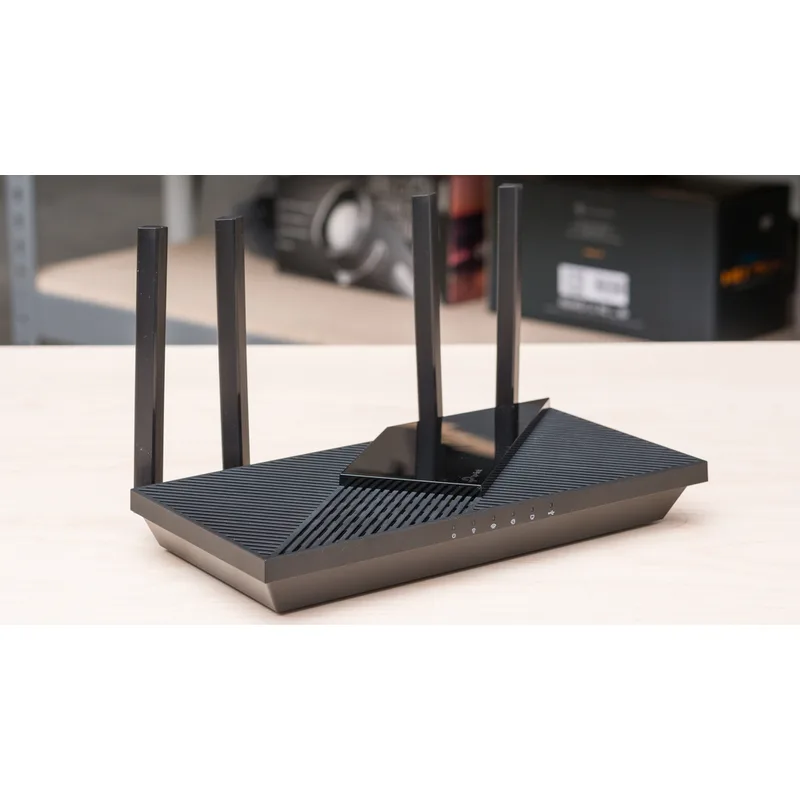
TP-Link Archer AX55
Pros
- AX3000 speeds in the sub-$120 range — solid WiFi 6 performance with full Gigabit ports
- USB 3.0 port for basic NAS or printer sharing across your home network
- EasyMesh compatibility lets you expand coverage with additional TP-Link nodes
- Simple Tether app setup takes under 10 minutes
Cons
- HomeShield security requires a paid subscription for advanced features
- No multi-gig WAN or LAN — capped at 1 Gbps even with a faster ISP plan
- TP-Link has not received FCC conditional approval to continue US sales unlike Netgear and Eero
The Archer AX55 is a capable router at $110. AX3000 dual-band covers a standard home office without dead zones, EasyMesh works reliably if you need to add a satellite node, and the USB 3.0 port handles a USB drive or printer shared across your network. Setup through the Tether app takes less time than most routers in this range.
The security picture is the honest asterisk. Basic HomeShield covers firmware protection and a simple firewall. Intrusion detection, malware filtering, and detailed analytics — the features that actually matter — require HomeShield Pro at $55/year or bundled with newer TP-Link hardware. Over three years of ownership, you’re either paying extra or running without protection ASUS includes free.
For a secondary connection or a simple home network handling no sensitive work data, the AX55 is a reasonable $110 buy. For a primary remote work router where you’re VPN-ing into corporate infrastructure, the security question deserves real consideration.
Budget WiFi 6: ASUS RT-AX55
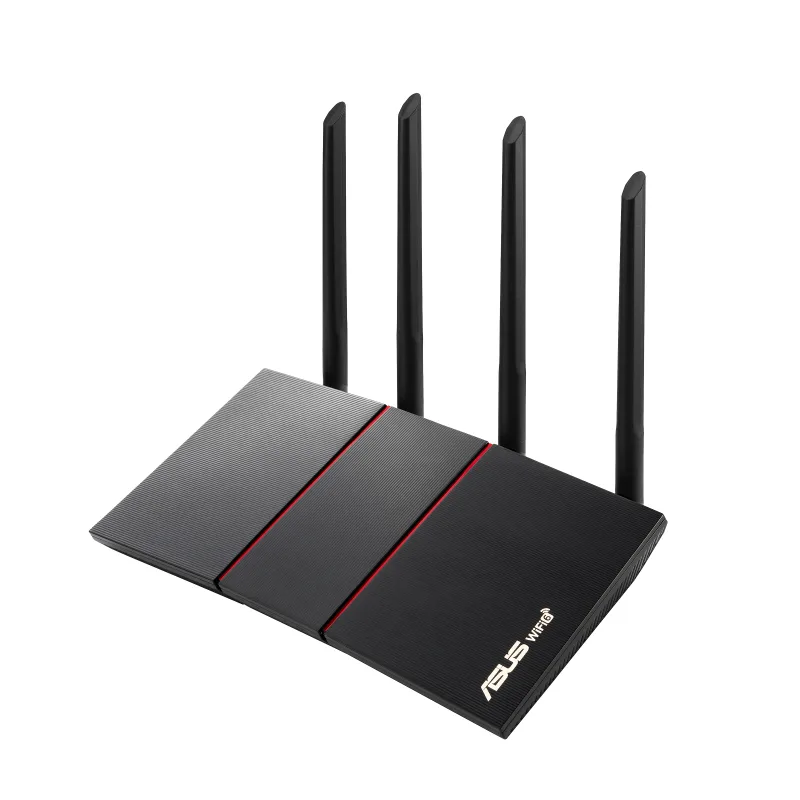
ASUS RT-AX55
Pros
- Lifetime AiProtection security (powered by Trend Micro) — no subscription required ever
- AiMesh support lets you add any ASUS router as a node without buying a separate kit
- AsusWRT firmware with advanced settings accessible via full browser interface
- Parental controls with time scheduling and content filtering built in
Cons
- AX1800 class is slower than the TP-Link AX3000 at a similar price point
- No USB port — no NAS or printer sharing capability
- Setup app is less intuitive than TP-Link Tether for first-time users
The RT-AX55 costs $10 more and delivers less raw speed — AX1800 versus the TP-Link’s AX3000. That’s a real difference on paper. In a home office context, most remote workers cap out well below 1200 Mbps on the 5GHz band, so the practical gap narrows considerably.
What the RT-AX55 gives you that the AX55 doesn’t: AiProtection for life, at no charge. Trend Micro’s commercial threat intelligence database sits behind every DNS query your network makes. Malicious sites get blocked before they load. New device detection alerts you when something unexpected joins. None of this requires a subscription — ever.
AsusWRT adds another layer of long-term value. A split tunnel VPN, a guest network with isolated bandwidth, a DDNS configuration — it’s all in the browser interface. TP-Link’s Tether app doesn’t expose these settings at all.
For one router you want to install and forget for the next four years, the RT-AX55 is the smarter $120 buy.
WiFi 7 Value: TP-Link Archer BE550
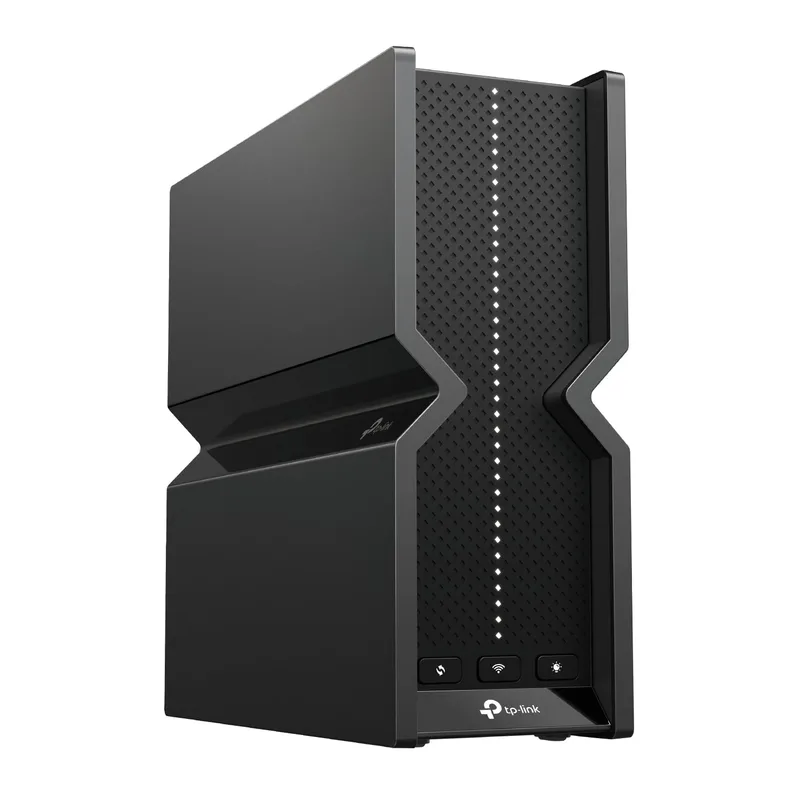
TP-Link Archer BE550
Pros
- Full 2.5G port suite — every port is multi-gig, not just the WAN
- Tri-band with 6GHz delivers the fastest low-latency band for a dedicated office connection
- MLO (Multi-Link Operation) bonds multiple bands for lower latency on WiFi 7 devices
- Strong WiFi 7 value — tri-band 6GHz at $199 undercuts most competitors significantly
Cons
- HomeShield Pro subscription needed for full parental controls and security analytics
- TP-Link has no FCC conditional approval; future US availability remains uncertain
- Configuration is app-only — no full browser-based UI like ASUS provides
The Archer BE550 is the most compelling WiFi 7 value case in mid-2026. At $199, it brings tri-band WiFi 7 with a 6GHz band and a full suite of 2.5G ports — every single port on the router, WAN included, runs at 2.5 Gbps. Most routers at this price still ship one multi-gig port and call it done.
MLO (Multi-Link Operation) is the headline WiFi 7 feature. The router bonds the 5GHz and 6GHz bands simultaneously for compatible client devices, which translates to lower latency and more consistent throughput rather than just higher peak speeds. For video calls and VoIP, which depend on latency more than bandwidth, MLO matters.
The configuration limitation is real: the Archer BE550 is managed entirely through the Tether app. No web interface for browser-based configuration. Setting up a WireGuard VPN server, inspecting traffic logs, or configuring static routes requires burying through the app or going without. Power users will find this limiting.
At $199 for tri-band WiFi 7 with full 2.5G ports, the BE550 is the best raw value in this comparison if firmware depth isn’t your priority.
WiFi 7 Performance: ASUS RT-BE88U
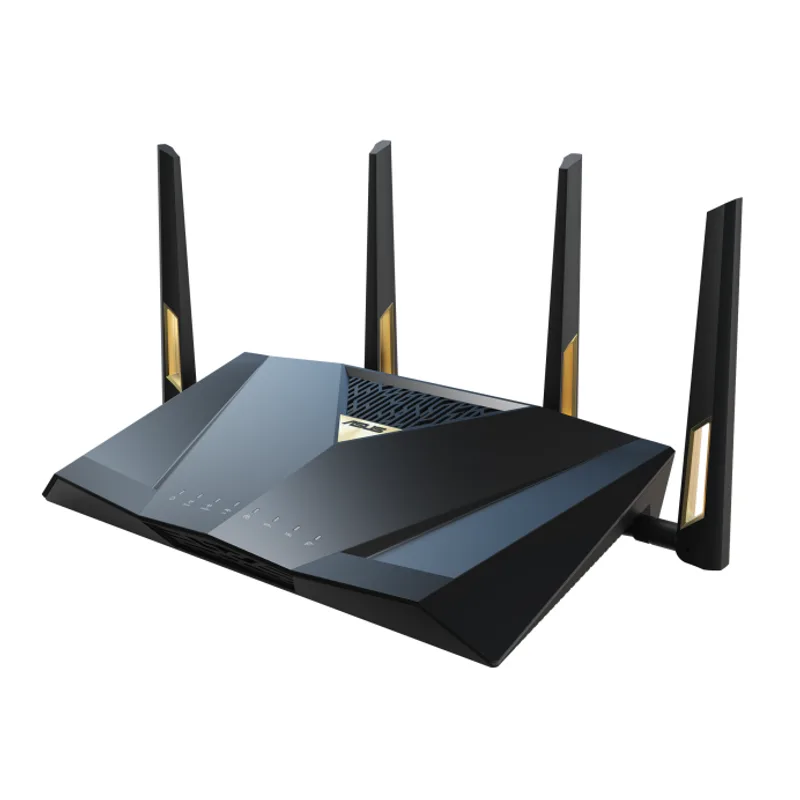
ASUS RT-BE88U
Pros
- Dual 10G ports and SFP+ provide connectivity headroom most routers lack entirely
- AiProtection Pro lifetime security — enterprise-grade threat protection at no ongoing cost
- AsusWRT 5.0 with the deepest customization of any consumer router firmware
- MLO combines bands at the hardware level for the lowest WiFi 7 latency available
- VPN Fusion runs a VPN and standard traffic simultaneously on separate interfaces
Cons
- At $289, costs significantly more than the TP-Link BE550 for comparable WiFi 7 coverage
- Dual-band design removes the dedicated backhaul advantage in multi-node mesh setups
- AsusWRT depth can overwhelm users who just want to plug in and forget
The RT-BE88U is the router you buy when you want everything. Two 10G ports, one SFP+ (flexible for fiber or 10G copper), four 2.5G ports, four 1G ports — the wired connectivity alone exceeds most small business switches. At $289 (down from its $349 launch price), it’s reached a more reasonable position in the market.
AiProtection Pro comes lifetime on every RT-BE88U. VPN Fusion runs a commercial VPN and your regular traffic simultaneously on separate logical interfaces — no need to disable VPN to reach local devices. AsusWRT 5.0 is the deepest consumer router firmware available, covering VLAN tagging, custom DDNS, and detailed per-device traffic analytics.
The dual-band design is the one genuine limitation. The Archer BE550 dedicates the 6GHz channel as a clean backhaul for mesh nodes. The RT-BE88U uses MLO to combine the 5GHz and 6GHz bands on a single radio, which delivers lower latency on the direct connection but removes the dedicated backhaul advantage in multi-node setups.
For a dense home office with wired switches, NAS storage, and 10G network needs, the RT-BE88U is the right call.
The 2026 FCC Ban: What Both Brands Are Facing
The FCC’s March 23, 2026 ruling banned new imports of all foreign-made consumer routers — this isn’t just a TP-Link issue. ASUS, Netgear, Eero, Linksys, and nearly every other major brand fell under the same restriction, driven by a White House security review citing severe infrastructure risks from imported networking hardware.
The situation differs across brands, though:
- Netgear and Eero secured conditional approvals to continue importing and selling new models through October 2027
- TP-Link has not received a conditional approval as of May 2026
- ASUS has not received a conditional approval either, but existing inventory is available and software updates are permitted through March 2027
The practical read for remote workers:
- Consumer home use, no corporate VPN: Both TP-Link and ASUS work fine on existing inventory. Keep firmware updated.
- VPN into work infrastructure: ASUS is the safer call — better CVE track record and deeper firmware controls for monitoring what’s on your network.
- Government contractors or regulated industries: Avoid both for new purchases. Eero and Netgear have conditional approvals and are cleaner options for compliance-sensitive environments.
Buying Guide: TP-Link vs ASUS
Pick TP-Link if:
- Budget is the primary constraint
- You want WiFi 7 with 6GHz and full 2.5G ports under $200
- Your home network is simple — no VLAN, no complex VPN needs
- You’re comfortable managing via smartphone app
Pick ASUS if:
- You want lifetime security features without an annual subscription
- You need browser-based firmware access for advanced configurations
- You’re running a VPN into corporate infrastructure
- You want a platform with deeper long-term firmware support and third-party customization
The honest summary: TP-Link wins on specs per dollar. ASUS wins on firmware depth, security features included in the box, and a stronger CVE track record. For most remote workers doing video calls and cloud apps, both work fine on existing inventory. For anything involving corporate VPN or sensitive client data, the ASUS security advantage is worth the price premium.
FAQ
Is TP-Link still safe to use in 2026?
Existing TP-Link hardware is legal to own and use. The FCC ban targets new imports, not existing equipment, and software updates are permitted through March 2027. That said, TP-Link’s CVE history is objectively worse than ASUS, and the lack of a conditional approval adds supply chain uncertainty. Keep firmware updated regardless of brand.
Does ASUS AiProtection cost anything?
No. AiProtection (and AiProtection Pro on newer models) is included for the lifetime of the router with no subscription required. It runs Trend Micro’s commercial threat database and updates automatically at no ongoing cost.
What’s the real-world difference between AX1800 and AX3000?
In typical home office use — one person on a laptop 20-30 feet from the router — the difference is minimal. Both exceed what most remote workers need for video calls and cloud apps. AX3000 matters if you have multiple heavy devices pulling large files simultaneously.
Is WiFi 7 worth it for a home office in 2026?
If your ISP plan is 500 Mbps or below, WiFi 6 is sufficient. If you have a multi-gig ISP plan, WiFi 7 hardware with 2.5G+ ports is worth it — the bottleneck becomes the wired ports before the wireless. The TP-Link BE550 at $199 is the most sensible entry point.
Can I mix TP-Link and ASUS routers in a mesh setup?
No. TP-Link EasyMesh nodes only work with other TP-Link EasyMesh hardware. ASUS AiMesh nodes only work with AiMesh-compatible ASUS routers. The two ecosystems don’t interoperate.
Which brand has better long-term firmware support?
ASUS. AsusWRT receives active updates and has a thriving third-party community (Merlin firmware). TP-Link’s Tether app receives updates but the app-only model limits what power users can configure. For a router you want to manage deeply five years from now, ASUS is the better bet.
Verdict
For most home office buyers, this decision comes down to how much you value security and firmware flexibility versus upfront cost.
Best overall for remote work: ASUS RT-AX55 at $120 — lifetime security, solid WiFi 6, and AsusWRT’s browser interface at a $10 premium over the TP-Link alternative. Install it and stop thinking about it.
Best value WiFi 7: TP-Link Archer BE550 at $199 — tri-band, full 2.5G ports, and MLO under $200 is hard to beat if you’re upgrading to WiFi 7 on a budget.
Best performance: ASUS RT-BE88U at $289 for power users who need multi-gig wired ports, deep firmware access, and the strongest security track record in consumer networking.
For more on home networking, see our Best WiFi 7 Routers for Home Office and Best Home Office Networking Setup Guide.
Detailed Reviews
TP-Link Archer AX55
Pros
- AX3000 speeds in the sub-$120 range — solid WiFi 6 performance with full Gigabit ports
- USB 3.0 port for basic NAS or printer sharing across your home network
- EasyMesh compatibility lets you expand coverage with additional TP-Link nodes
- Simple Tether app setup takes under 10 minutes
Cons
- HomeShield security requires a paid subscription for advanced features
- No multi-gig WAN or LAN — capped at 1 Gbps even with a faster ISP plan
- TP-Link has not received FCC conditional approval to continue US sales unlike Netgear and Eero
ASUS RT-AX55
Pros
- Lifetime AiProtection security (powered by Trend Micro) — no subscription required ever
- AiMesh support lets you add any ASUS router as a node without buying a separate kit
- AsusWRT firmware with advanced settings accessible via full browser interface
- Parental controls with time scheduling and content filtering built in
Cons
- AX1800 class is slower than the TP-Link AX3000 at a similar price point
- No USB port — no NAS or printer sharing capability
- Setup app is less intuitive than TP-Link Tether for first-time users
TP-Link Archer BE550
Pros
- Full 2.5G port suite — every port is multi-gig, not just the WAN
- Tri-band with 6GHz delivers the fastest low-latency band for a dedicated office connection
- MLO (Multi-Link Operation) bonds multiple bands for lower latency on WiFi 7 devices
- Strong WiFi 7 value — tri-band 6GHz at $199 undercuts most competitors significantly
Cons
- HomeShield Pro subscription needed for full parental controls and security analytics
- TP-Link has no FCC conditional approval; future US availability remains uncertain
- Configuration is app-only — no full browser-based UI like ASUS provides
ASUS RT-BE88U
Pros
- Dual 10G ports and SFP+ provide connectivity headroom most routers lack entirely
- AiProtection Pro lifetime security — enterprise-grade threat protection at no ongoing cost
- AsusWRT 5.0 with the deepest customization of any consumer router firmware
- MLO combines bands at the hardware level for the lowest WiFi 7 latency available
- VPN Fusion runs a VPN and standard traffic simultaneously on separate interfaces
Cons
- At $289, costs significantly more than the TP-Link BE550 for comparable WiFi 7 coverage
- Dual-band design removes the dedicated backhaul advantage in multi-node mesh setups
- AsusWRT depth can overwhelm users who just want to plug in and forget