Wi-Fi 7 went mainstream in 2026. TP-Link debuted two new 802.11be routers at CES 2026, ASUS demonstrated early Wi-Fi 8 hardware — signaling that Wi-Fi 7 is the current established standard — and prices across the category dropped substantially from their 2026 launch levels. What cost $700 at launch now sits closer to $500 for flagship tri-band models. The question for remote workers is no longer “is Wi-Fi 7 ready?” but “does Wi-Fi 7 actually improve my work setup, and which router is worth buying?”
The honest answer: for most remote workers with a 1 Gbps or slower ISP connection, Wi-Fi 7’s headline speed numbers are irrelevant. What matters are the reliability improvements — specifically Multi-Link Operation (MLO), which lets devices connect across multiple bands simultaneously, reducing dropped video calls during network congestion. That improvement is real and measurable in dense home environments. The 6 GHz band also clears congestion that plagues 2.4 GHz and 5 GHz in apartment buildings and neighborhoods with dozens of competing networks.
Quick picks: The ASUS RT-BE96U is the strongest all-around choice for remote workers who want built-in VPN, free lifetime security, and dual 10G ports without paying a recurring subscription. For pure throughput and the best raw speed benchmarks, the Netgear Nighthawk RS700S consistently tops independent tests. If budget is a constraint, the ASUS RT-BE86U at $249–$299 brings the same VPN suite and security features to a dual-band Wi-Fi 7 router that outperforms most Wi-Fi 6E options.
Quick Comparison
| Spec | ASUS RT-BE96U | Netgear Nighthawk RS700S | TP-Link Archer BE800 | Amazon eero Max 7 | ASUS RT-BE86U |
|---|---|---|---|---|---|
| Rating | 9.2/10 | 9.0/10 | 8.8/10 | 8.2/10 | 8.4/10 |
| Price | $302.24-$494.99as of Oct 18, 2026 | $383.36-$599.00as of Oct 18, 2026 | $310.35-$351.99as of Oct 18, 2026 | $599.99as of Oct 18, 2026 | $194.00-$249.99as of Oct 18, 2026 |
| Standard | Wi-Fi 7 (802.11be) Tri-Band BE19000 | Wi-Fi 7 (802.11be) Tri-Band BE19000 | Wi-Fi 7 (802.11be) Tri-Band BE19000 | Wi-Fi 7 (802.11be) Tri-Band | Wi-Fi 7 (802.11be) Dual-Band BE6800 |
| Bands | 2.4 GHz + 5 GHz + 6 GHz | 2.4 GHz + 5 GHz + 6 GHz | 2.4 GHz + 5 GHz + 6 GHz | 2.4 GHz + 5 GHz + 6 GHz | 2.4 GHz + 5 GHz |
| Max Speed | 19,000 Mbps combined | 19,000 Mbps combined | 19,000 Mbps combined | 9.4 Gbps wired / 4.3 Gbps wireless | 6,800 Mbps combined |
| Ports | Dual 10G + 4x 1G LAN | 1x 10G WAN + 4x 1G LAN | 2x 10G + 4x 2.5G LAN | 2x 10G per node | 1x 10G + 4x 2.5G LAN |
| Processor | 2.6 GHz quad-core | — | — | — | 2.6 GHz quad-core |
| RAM | 2 GB | — | — | — | — |
| Coverage | Up to 3,000 sq ft | Up to 3,500 sq ft | Up to 3,000 sq ft | Up to 2,500 sq ft per node | Up to 2,500 sq ft |
| VPN | OpenVPN, WireGuard, IPSec, PPTP (free) | — | OpenVPN, WireGuard (built-in) | — | OpenVPN, WireGuard, IPSec, PPTP (free) |
| Security | AiProtection (subscription-free, lifetime) | 1-year Netgear Armor included | HomeShield (basic free, Pro subscription) | — | AiProtection (subscription-free, lifetime) |
| Mesh | — | Orbi compatible (with additional purchase) | — | Native eero mesh ecosystem | — |
| Antennas | — | — | 8 high-performance external | — | — |
| Management | — | — | — | eero app (iOS/Android) | — |
| Check Price → | Check Price → | Check Price → | Check Price → | Check Price → |
Prices change daily — tap Check Price for the current Amazon price.
The Picks
1. ASUS RT-BE96U — Best Overall
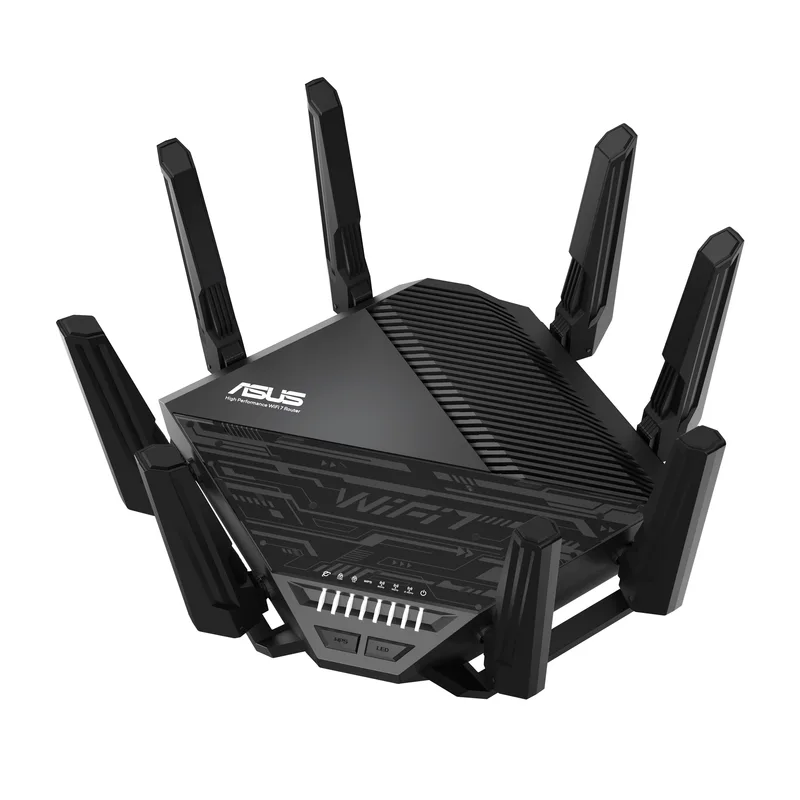
ASUS RT-BE96U
Pros
- Dual 10G ports handle multi-gigabit ISP plans and fast NAS connections simultaneously
- Full VPN suite (WireGuard, OpenVPN, IPSec) built in at no subscription cost
- Subscription-free AiProtection security powered by Trend Micro
- MLO (Multi-Link Operation) reduces latency on video calls and cloud sync
- AiMesh support for expanding coverage across additional ASUS nodes
- 2 GB RAM and quad-core processor handle 200+ simultaneous connections without slowdown
Cons
- At $549–$649, it is the most expensive standalone router in this roundup
- Physical footprint is large — requires significant desk or shelf space
- Advanced features have a steeper learning curve than app-based routers
The RT-BE96U earns its top position through a combination that competitors haven’t matched: dual 10G ports, the full ASUS VPN suite at no extra cost, and subscription-free AiProtection security — all in a single router. For remote workers, this matters more than raw speed numbers.
The VPN implementation is the key differentiator. Most routers at this price require a cloud service or third-party subscription to run a VPN server. The RT-BE96U runs OpenVPN, WireGuard, IPSec, and PPTP as native server options from the router itself. Remote workers who need to securely access home network resources while traveling — NAS drives, local servers, home lab equipment — can configure this without a monthly fee. WireGuard in particular delivers low-latency tunneling that is noticeably faster than OpenVPN for the same connection.
The dual 10G ports solve a real home office problem: if you have a 2.5 Gbps or 10 Gbps ISP connection (increasingly common in 2026), and a NAS drive or 10G switch, a single-port router forces you to choose which connection gets the fast port. The RT-BE96U removes that constraint.
MLO performance is strong on the 6 GHz band. For video calls and cloud sync, the practical benefit is reduced packet loss during network peaks — not dramatically higher download speeds. Managed expectations here: Wi-Fi 7’s speed gains matter most for local file transfers and 8K streaming, not for a Zoom call that tops out at a few Mbps.
AiMesh support lets you add additional ASUS access points or routers to extend coverage without replacing this unit. The 3,000 sq ft single-node coverage is sufficient for most home offices, but the option to expand is there.
Who should buy this: Remote workers who need built-in VPN, run a NAS or local server, and want to avoid ongoing security subscription fees. Also the right call for anyone on a multi-gigabit ISP plan.
Who should skip this: Users who want simple app-based management and don’t need advanced routing features. The ASUS web interface is powerful but requires more configuration than app-first competitors like eero.
2. Netgear Nighthawk RS700S — Best for Speed
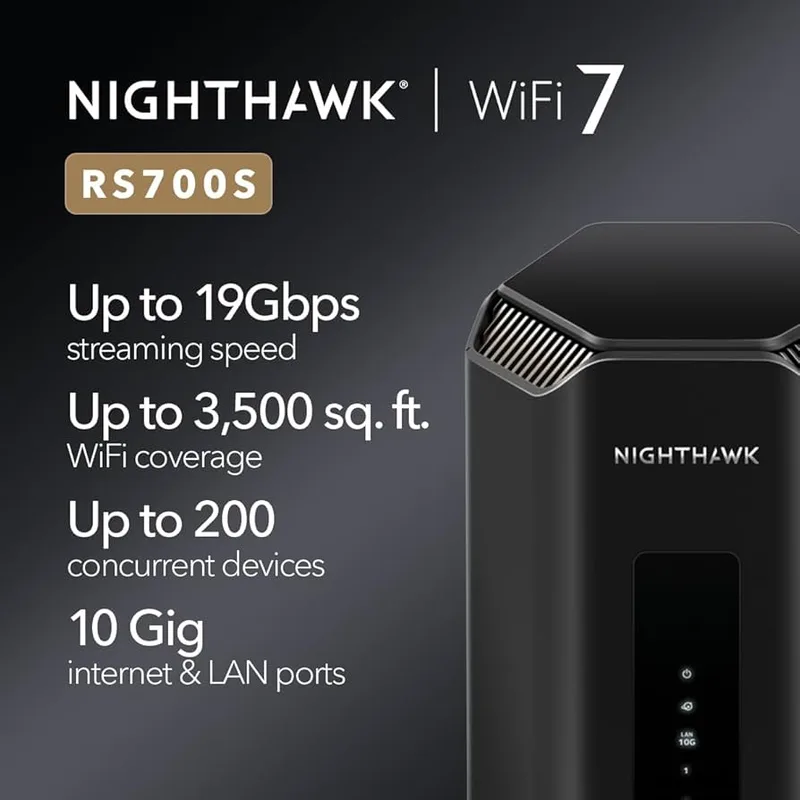
Netgear Nighthawk RS700S
Pros
- Consistently ranks at the top of speed benchmarks across multiple independent reviews
- 3,500 sq ft coverage is the largest of any standalone router in this roundup
- 10G WAN port ready for multi-gigabit ISP connections
- Includes 1 year of Netgear Armor security at no extra charge
- Clean, app-based management with Nighthawk app
Cons
- Netgear Armor security subscription required after the first year ($100/year)
- LAN ports are 1G only — not ideal for local NAS or 10G switch connections
- No built-in WireGuard or OpenVPN server — VPN requires third-party setup
The RS700S consistently ranks at or near the top of independent speed benchmarks for single-router Wi-Fi 7 performance. Tom’s Hardware and BroadbandNow both rate it as a top performer for raw throughput, particularly on the 6 GHz band where 320 MHz channels deliver the biggest Wi-Fi 7 advantage.
The 3,500 sq ft coverage rating is the highest of any standalone router in this comparison — not a guarantee of full-signal coverage in every room, but a meaningful advantage for larger homes, split-level layouts, or setups where the router can’t be centrally located. Coverage in practice depends heavily on construction materials and router placement, but the RS700S starts with a higher baseline.
The 10G WAN port is future-ready: if your ISP offers multi-gigabit service, the RS700S can actually use it. The included one-year Netgear Armor subscription adds decent malware protection and device management. The catch: Armor costs around $100 per year after the first year, which adds up. Remote workers who don’t need active threat monitoring can ignore Armor after year one and the router continues to function normally.
The Nighthawk app provides cleaner, more accessible management than the ASUS interface for users who aren’t comfortable with router administration panels. Device priority, guest network management, and parental controls are all available through the app without requiring the browser-based admin console.
The LAN port limitation is worth flagging: four 1G LAN ports mean local wired connections top out at 1 Gbps. For a workstation connected via Ethernet, that’s fine. For a NAS that can handle 2.5G or 10G connections, you’re leaving speed on the table compared to the ASUS RT-BE96U or TP-Link BE800.
Who should buy this: Remote workers who prioritize raw Wi-Fi speed and coverage range over advanced router features. Also a good choice for users who need app-based management without a complex setup process.
Who should skip this: Workers who run a local NAS or 10G switch — the 1G LAN ports are a real limitation. Also, anyone who wants built-in VPN server functionality.
3. TP-Link Archer BE800 — Best Value
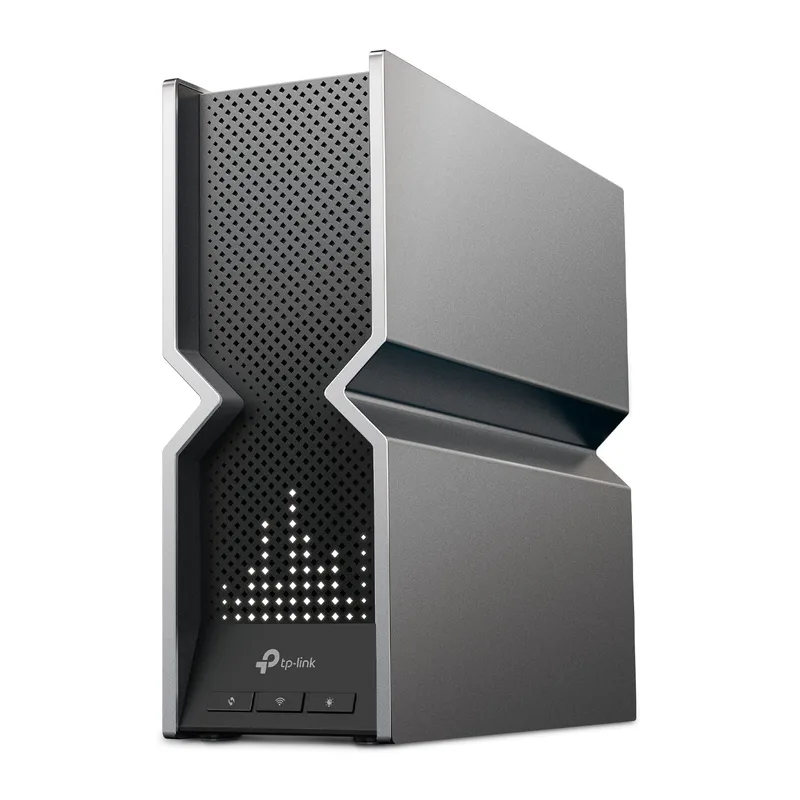
TP-Link Archer BE800
Pros
- Best port selection in this roundup — dual 10G plus four 2.5G LAN ports
- Built-in LED display shows real-time network status at a glance
- Full BE19000 tri-band performance at $100–$200 less than competing flagship routers
- OpenVPN and WireGuard server built in at no extra cost
- EasyMesh compatible for expanding the network without replacing the router
Cons
- HomeShield Pro security features require a paid subscription ($55/year)
- 8 external antennas make it the most visually imposing router in this roundup
- Firmware updates have been slower than ASUS's release cadence historically
The BE800 matches the ASUS RT-BE96U and Netgear RS700S on Wi-Fi 7 standard (BE19000 tri-band) while undercutting them on price by $100–$200. The port selection — dual 10G plus four 2.5G LAN ports — actually exceeds either competitor and makes the BE800 the right call for home offices with demanding wired infrastructure.
Four 2.5G LAN ports means workstations, NAS drives, and managed switches all get faster-than-1G wired connections simultaneously. In a home office running a server, a desktop, a NAS, and a Raspberry Pi, that matters. The ASUS RT-BE96U’s four ports are 1G; the Netgear RS700S’s are also 1G. The BE800 gives you 2.5G on all four.
The built-in LED status display is a useful addition for diagnosing connection issues without opening the app. A quick look confirms whether the WAN link is up, what bands are active, and overall system status. Small detail, practically useful.
OpenVPN and WireGuard are built in as server options, free. HomeShield provides basic network protection without a subscription; advanced features (content filtering, malware blocking per device, detailed analytics) require HomeShield Pro at around $55 per year. That’s cheaper than Netgear Armor and covers most of what remote workers actually need.
EasyMesh compatibility means adding a TP-Link mesh satellite extends the network without replacing the BE800. The eight external antennas are the one aesthetic drawback — the router is visually prominent and requires more clearance than competitors with internal antennas.
Who should buy this: Remote workers who want BE19000 tri-band performance with the best wired port selection in this price range. Also the right choice for anyone running a NAS or managed switch alongside wireless clients.
Who should skip this: Users who want the cleanest possible desk setup — eight antennas are not subtle. Also, anyone on the ASUS ecosystem who wants AiMesh interoperability.
4. Amazon eero Max 7 — Easiest Setup
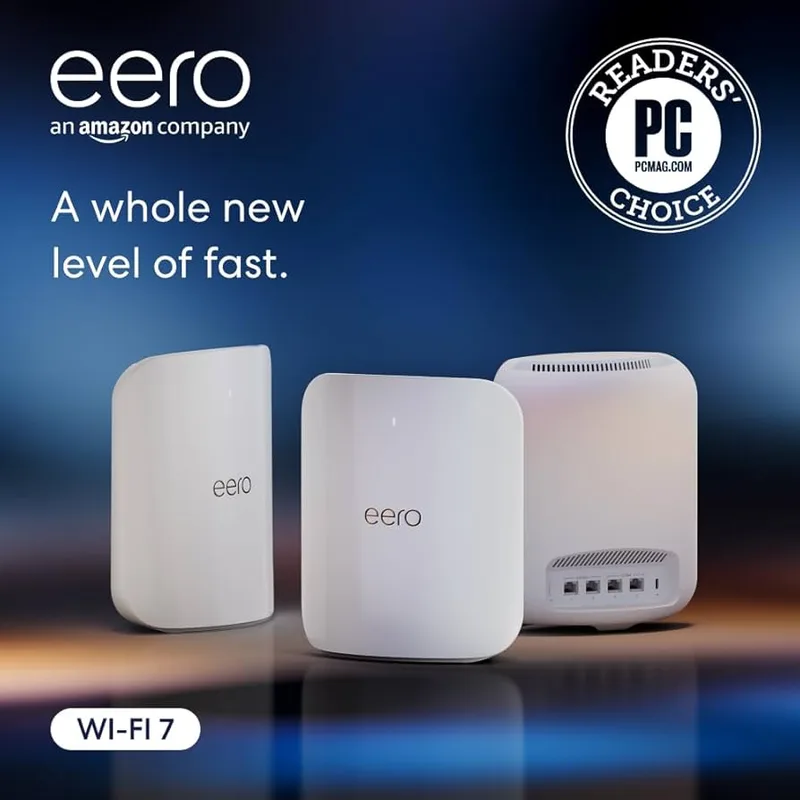
Amazon eero Max 7
Pros
- Fastest mesh setup of any router in this roundup — app-guided, typically under 10 minutes
- Two 10G ports per node support wired backhaul for full-speed inter-node connections
- Automatic firmware updates ensure security patches without manual intervention
- Integrates natively with Alexa for hands-free network management
- Strong multi-node mesh performance for larger homes or multi-room setups
Cons
- eero Plus subscription ($10/month) required for advanced security, content filters, and ad blocking
- Closed ecosystem — no custom DNS, no third-party firmware, no advanced routing features
- No built-in VPN server — remote workers needing VPN must use a separate solution
- Per-node cost adds up quickly for multi-node deployments
The eero Max 7 is the easiest Wi-Fi 7 router to set up and manage in this roundup — by a wide margin. The eero app guides through the initial configuration in under 10 minutes, automatic firmware updates handle security patches without any manual action, and the ongoing management interface is clean enough that non-technical users can handle device priority, guest access, and network segmentation without consulting documentation.
The hardware is genuinely good: two 10G ports per node support wired backhaul, which makes the eero Max 7 system one of the better performers for multi-node mesh deployments. Connect nodes via Ethernet for full-speed backhaul, and you get fast, consistent coverage across a larger home without the wireless backhaul overhead that degrades multi-node mesh performance.
Where the eero Max 7 draws legitimate criticism is its closed ecosystem. There is no custom DNS support, no third-party firmware option, no built-in VPN server, and limited advanced routing controls. Remote workers who need a VPN server running on the router — to access home resources while traveling, or to satisfy employer security requirements — have no option on the eero platform. A separate VPN solution is required.
The eero Plus subscription ($10/month or $100/year) gates the features that other routers include free: DNS-based ad blocking, content filters, threat detection. The base eero Max 7 without Plus provides solid mesh Wi-Fi coverage but minimal advanced security tooling. For remote workers whose primary need is reliable, fast wireless coverage across a large home — not advanced routing — eero Max 7 delivers.
Per-node cost is high. A two-node deployment covers most homes but starts at around $900. The ASUS RT-BE96U at $600 covers 3,000 sq ft on its own. For straightforward single-router deployments, eero’s pricing is harder to justify.
Who should buy this: Remote workers in larger homes who prioritize simple management and rock-solid mesh performance over advanced features. Also households where non-technical family members share management responsibilities.
Who should skip this: Workers who need built-in VPN, custom DNS, or advanced routing controls. Also single-router deployments — standalone routers offer better value at this price point.
5. ASUS RT-BE86U — Best Mid-Range
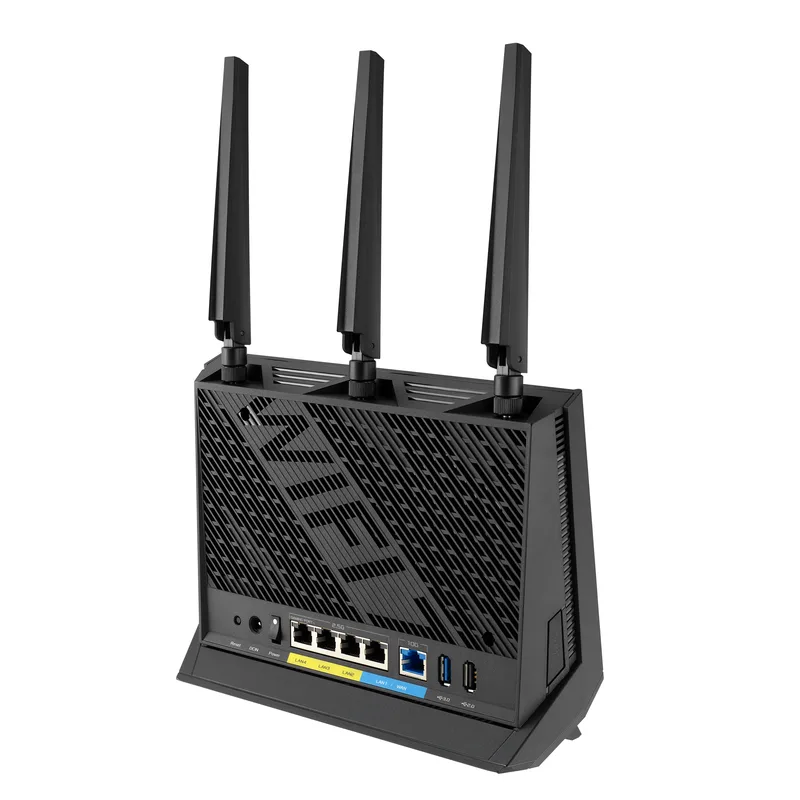
ASUS RT-BE86U
Pros
- Same VPN suite and AiProtection as the RT-BE96U flagship, at a significantly lower price
- 1x 10G + 4x 2.5G port combination handles NAS connections and multi-gig LAN
- MLO and 4096-QAM deliver genuine Wi-Fi 7 performance gains over Wi-Fi 6E on the 5 GHz band
- AiMesh compatible — can be paired with other ASUS nodes for expanded coverage
- Compact footprint relative to competing flagship routers
Cons
- No 6 GHz band — misses out on 320 MHz channels and maximum Wi-Fi 7 throughput
- Dual-band means less flexibility for simultaneously segregating IoT and work devices
- 6 GHz is where Wi-Fi 7's biggest speed improvements live — you give that up here
The RT-BE86U is the entry point for remote workers who want genuine Wi-Fi 7 performance without the flagship price tag. At $249–$299, it delivers the complete ASUS feature set — WireGuard, OpenVPN, IPSec VPN server; subscription-free AiProtection; AiMesh compatibility; MLO — on a dual-band Wi-Fi 7 platform.
The trade-off is the missing 6 GHz band. Wi-Fi 7’s most significant speed gains come from 320 MHz channels on the 6 GHz band, which the RT-BE86U does not support. MLO is supported across 2.4 GHz and 5 GHz, and 4096-QAM improves throughput over Wi-Fi 6E on the 5 GHz band, but the ceiling is lower. Reviewers at Tom’s Hardware and Dong Knows Tech both noted that the dual-band configuration limits the RT-BE86U’s long-term headroom compared to tri-band alternatives.
For a home office in a building with high Wi-Fi congestion — where 2.4 GHz and 5 GHz bands are heavily occupied by neighbors — the RT-BE86U does not provide the 6 GHz escape lane that tri-band Wi-Fi 7 routers offer. In a low-congestion environment like a suburban home or rural location, this matters far less.
What the RT-BE86U does well is wired connectivity: one 10G port plus four 2.5G LAN ports exceeds the port selection of the Netgear RS700S at nearly half the price. For a NAS-connected home office with multi-gig wired needs, the port spec is competitive with routers twice its cost.
Who should buy this: Budget-conscious remote workers in low-congestion environments who want ASUS’s full VPN and security suite without paying for features they won’t use. Also a strong choice for anyone upgrading from Wi-Fi 5 or older Wi-Fi 6 routers.
Who should skip this: Remote workers in apartments or dense neighborhoods where 6 GHz band access meaningfully reduces congestion. Also anyone planning to stream 8K or transfer large local files wirelessly.
Wi-Fi 7 Buying Guide for Remote Workers
Is Wi-Fi 7 Actually Worth Upgrading To?
For most remote workers on a 1 Gbps ISP connection, Wi-Fi 7’s headline speeds are irrelevant — your ISP speed is the bottleneck, not your router. What Wi-Fi 7 does deliver that matters for remote work:
MLO (Multi-Link Operation): Devices connect across multiple bands simultaneously. In practice, this reduces the packet loss and jitter that cause video calls to pixelate or audio to cut out during network congestion peaks. If you work in a home with multiple heavy internet users — streaming, gaming, large uploads — MLO reduces the interference they create for your calls.
6 GHz band access: The 6 GHz band has far less congestion than 2.4 GHz and 5 GHz in most locations. If you live in an apartment building or dense neighborhood where neighboring networks are visible on Wi-Fi scans, adding 6 GHz access reduces the noise floor your router works against. This is a real, practical benefit.
Better congestion handling: Wi-Fi 7 improves OFDMA efficiency, meaning the router handles many simultaneous device connections more gracefully. For a home office with 30–50 connected devices (phones, tablets, smart home sensors, laptops, cameras), Wi-Fi 7 manages the load better than Wi-Fi 6E under similar conditions.
If you’re on Wi-Fi 5 (802.11ac) or early Wi-Fi 6, upgrading to Wi-Fi 7 is a meaningful improvement. If you’re already on Wi-Fi 6E with a quality router, the improvement is incremental — most remote workers won’t notice a difference on calls.
Port Selection Matters More Than Speed
Remote workers are more likely to benefit from a 2.5G LAN port than from 19 Gbps wireless throughput they’ll never reach. If you have a NAS drive, a gaming PC, or a managed Ethernet switch in your home office, make sure the router has 2.5G or 10G LAN ports. The TP-Link BE800 and ASUS RT-BE86U both include multiple 2.5G LAN ports; the Netgear RS700S tops out at 1G LAN.
VPN Server Support
Remote workers who travel or access home resources remotely need a router-level VPN server. Built-in WireGuard or OpenVPN server support — free, on the router — is available on the ASUS RT-BE96U, RT-BE86U, and TP-Link BE800. The Netgear RS700S and Amazon eero Max 7 do not include this capability without a third-party workaround.
Security Subscription Models
| Router | Security Cost |
|---|---|
| ASUS RT-BE96U | Free (AiProtection, lifetime) |
| ASUS RT-BE86U | Free (AiProtection, lifetime) |
| TP-Link BE800 | Free basic / ~$55/year Pro |
| Netgear RS700S | 1 year free / ~$100/year after |
| Amazon eero Max 7 | ~$100/year (eero Plus) |
ASUS’s subscription-free security model is the most cost-effective over a multi-year ownership horizon. A $100/year subscription over four years adds $400 to the effective cost of a router.
Coverage and Mesh Expansion
A single tri-band Wi-Fi 7 router handles most home offices up to 3,000–3,500 sq ft. For larger homes, older construction with thick walls, or multi-floor setups, a mesh system with wired backhaul provides more reliable whole-home coverage than extending a single router’s range.
AiMesh (ASUS), EasyMesh (TP-Link), and the eero platform are all mesh-compatible. ASUS AiMesh and TP-Link EasyMesh work across product lines; eero requires eero hardware throughout.
Frequently Asked Questions
Does Wi-Fi 7 make video calls better? For most remote workers, the improvement is modest — video calls use relatively little bandwidth. The meaningful benefit comes from MLO, which reduces dropped frames and audio glitches during network congestion. If your home has multiple heavy internet users during call hours, Wi-Fi 7’s congestion handling is a real improvement over Wi-Fi 6 or 6E.
Do I need a Wi-Fi 7 router if my ISP only provides 500 Mbps? The router won’t let you exceed your ISP’s speed, so the headline 19 Gbps figures don’t apply. But Wi-Fi 7’s 6 GHz band access, MLO, and improved congestion handling still provide real benefits in high-interference environments. If you’re upgrading from Wi-Fi 5, the improvement is substantial.
Are Wi-Fi 7 routers backward compatible with my older devices? Yes. Wi-Fi 7 routers support Wi-Fi 4, 5, 6, and 6E devices. Older devices connect normally on 2.4 GHz or 5 GHz bands. Only devices with Wi-Fi 7 radios use the 6 GHz band and MLO features.
Which router is best for working from home with a VPN? The ASUS RT-BE96U is the strongest choice for VPN functionality — it includes WireGuard, OpenVPN, IPSec, and PPTP as built-in server options at no additional cost. The ASUS RT-BE86U provides the same VPN suite at a lower price if the 6 GHz band is not a priority.
How much should I spend on a Wi-Fi 7 router for a home office? The ASUS RT-BE86U at $249–$299 covers the needs of most remote workers: reliable coverage, Wi-Fi 7 performance improvements, full VPN support, and subscription-free security. Spending more makes sense if you have a multi-gigabit ISP connection, a NAS requiring a 10G port, or a larger home that needs tri-band coverage expansion.
The Bottom Line
For remote workers evaluating Wi-Fi 7 in 2026, the ASUS RT-BE96U is the strongest all-around choice: dual 10G ports, a complete free VPN suite, and subscription-free lifetime security make it the most cost-effective option over a multi-year ownership period. The Netgear Nighthawk RS700S wins on raw speed and coverage range if those are the primary priorities. The TP-Link Archer BE800 offers BE19000 tri-band performance with the best wired port selection at a lower price than either ASUS or Netgear flagship.
For most home offices — one or two workers, a 1 Gbps ISP, standard suburban square footage — the ASUS RT-BE86U at $249–$299 delivers genuine Wi-Fi 7 improvements without paying a premium for the 6 GHz band. The VPN features and free AiProtection alone justify the upgrade over a typical ISP-provided router.
Detailed Reviews
ASUS RT-BE96U
Pros
- Dual 10G ports handle multi-gigabit ISP plans and fast NAS connections simultaneously
- Full VPN suite (WireGuard, OpenVPN, IPSec) built in at no subscription cost
- Subscription-free AiProtection security powered by Trend Micro
- MLO (Multi-Link Operation) reduces latency on video calls and cloud sync
- AiMesh support for expanding coverage across additional ASUS nodes
- 2 GB RAM and quad-core processor handle 200+ simultaneous connections without slowdown
Cons
- At $549–$649, it is the most expensive standalone router in this roundup
- Physical footprint is large — requires significant desk or shelf space
- Advanced features have a steeper learning curve than app-based routers
Netgear Nighthawk RS700S
Pros
- Consistently ranks at the top of speed benchmarks across multiple independent reviews
- 3,500 sq ft coverage is the largest of any standalone router in this roundup
- 10G WAN port ready for multi-gigabit ISP connections
- Includes 1 year of Netgear Armor security at no extra charge
- Clean, app-based management with Nighthawk app
Cons
- Netgear Armor security subscription required after the first year ($100/year)
- LAN ports are 1G only — not ideal for local NAS or 10G switch connections
- No built-in WireGuard or OpenVPN server — VPN requires third-party setup
TP-Link Archer BE800
Pros
- Best port selection in this roundup — dual 10G plus four 2.5G LAN ports
- Built-in LED display shows real-time network status at a glance
- Full BE19000 tri-band performance at $100–$200 less than competing flagship routers
- OpenVPN and WireGuard server built in at no extra cost
- EasyMesh compatible for expanding the network without replacing the router
Cons
- HomeShield Pro security features require a paid subscription ($55/year)
- 8 external antennas make it the most visually imposing router in this roundup
- Firmware updates have been slower than ASUS's release cadence historically
Amazon eero Max 7
Pros
- Fastest mesh setup of any router in this roundup — app-guided, typically under 10 minutes
- Two 10G ports per node support wired backhaul for full-speed inter-node connections
- Automatic firmware updates ensure security patches without manual intervention
- Integrates natively with Alexa for hands-free network management
- Strong multi-node mesh performance for larger homes or multi-room setups
Cons
- eero Plus subscription ($10/month) required for advanced security, content filters, and ad blocking
- Closed ecosystem — no custom DNS, no third-party firmware, no advanced routing features
- No built-in VPN server — remote workers needing VPN must use a separate solution
- Per-node cost adds up quickly for multi-node deployments
ASUS RT-BE86U
Pros
- Same VPN suite and AiProtection as the RT-BE96U flagship, at a significantly lower price
- 1x 10G + 4x 2.5G port combination handles NAS connections and multi-gig LAN
- MLO and 4096-QAM deliver genuine Wi-Fi 7 performance gains over Wi-Fi 6E on the 5 GHz band
- AiMesh compatible — can be paired with other ASUS nodes for expanded coverage
- Compact footprint relative to competing flagship routers
Cons
- No 6 GHz band — misses out on 320 MHz channels and maximum Wi-Fi 7 throughput
- Dual-band means less flexibility for simultaneously segregating IoT and work devices
- 6 GHz is where Wi-Fi 7's biggest speed improvements live — you give that up here