HP’s printer division has been in the news for the wrong reasons in 2026. Multiple lawsuits and a wave of user complaints this year target HP’s Instant Ink and HP+ programs, which can restrict a printer’s print and scan functions if a subscription lapses, a card expires, or the printer detects a non-HP cartridge — the kind of remote lockout that doesn’t happen with a laser printer or an ink-tank model. That controversy shaped this roundup: instead of defaulting to the most familiar brand, it covers a genuine mix of laser, ink-tank, and subscription-based options so you know exactly what you’re trading off before you buy.
A multifunction printer for home office use has to do three things reliably: print sharp documents fast, scan without fighting the software, and not become a recurring bill you didn’t sign up for. The five printers below cover that range — from a color laser built for volume to an ink-tank model that pays for itself in avoided cartridge costs.
Quick pick: For most home offices, the HP Color LaserJet Pro MFP 3301fdw is the one to buy — it’s fast, the output quality holds up for client-facing documents, and it’s not tied to a subscription. If ink cost is your main concern, the Epson EcoTank ET-3950 cuts your per-page cost by roughly 95% over time. On a tight budget, the HP OfficeJet Pro 9125e is cheap and capable, but only if you’re comfortable with HP+ enrollment.
Quick Picks
| Spec | HP Color LaserJet Pro MFP 3301fdw | Epson EcoTank ET-3950 | Canon MegaTank MAXIFY GX4020 | Brother MFC-L3720CDW | HP OfficeJet Pro 9125e |
|---|---|---|---|---|---|
| Rating | 8.8/10 | 8.7/10 | 8.4/10 | 8.2/10 | 7.4/10 |
| Price | $309 | $399 | $415 | $429 | $229 |
| Type | Color laser | Ink tank (cartridge-free) | Ink tank (cartridge-free) | Color laser | Inkjet |
| Print Speed | 26 ppm color and mono | 18 ppm black, 9 ppm color | 18 ipm black, 13 ipm color | 19 ppm | 22 ppm black, 18 ppm color |
| Resolution | Up to 1200x1200 dpi | 4800x1200 dpi | 600x1200 dpi print, 1200x2400 dpi scan | — | 1200x1200 dpi black, up to 4800x1200 dpi color |
| Scanner | 50-sheet single-pass ADF plus flatbed | 30-page ADF plus flatbed | ADF plus flatbed, includes fax | 50-sheet single-pass ADF plus flatbed | ADF with true duplex scanning and copying |
| Duplex | Automatic two-sided printing | Automatic two-sided printing | Automatic two-sided printing | Automatic duplex printing (scanning is single-sided per pass) | Automatic two-sided printing and scanning |
| Connectivity | Wi-Fi, Ethernet, USB | Wi-Fi, Ethernet, USB | Wi-Fi, Ethernet, USB | Wi-Fi, USB (no Ethernet port) | Wi-Fi, Ethernet, USB |
| Duty Cycle | 40,000 pages per month | — | — | — | 25,000 pages per month |
| Included Ink | — | Bottles rated for roughly 6,600 mono and 5,500 color pages | — | — | — |
| Ink Yield | — | — | Up to 6,000 mono and 14,000 color pages per fill | — | — |
| Scan Speed | — | — | — | 29 ipm black, 22 ipm color | — |
| Display | — | — | — | 3.5-inch touchscreen | — |
| Check Price → | Check Price → | Check Price → | Check Price → | Check Price → |
Prices change daily — tap Check Price for the current Amazon price.
1. HP Color LaserJet Pro MFP 3301fdw — Best Overall
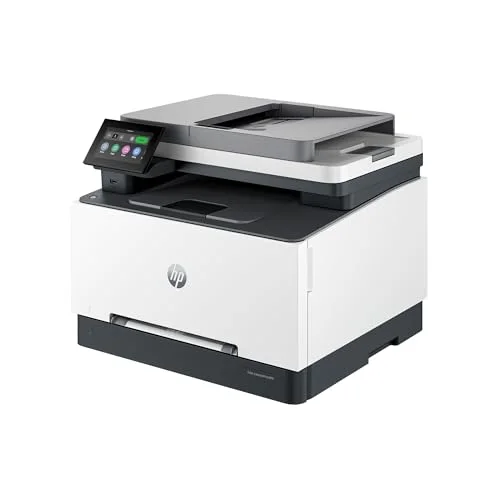
HP Color LaserJet Pro MFP 3301fdw
Pros
- 26 ppm print speed is fast enough that a stack of invoices or contracts doesn't turn into a coffee-break wait
- Sharp, consistent text and color output that holds up for reports and client-facing documents, not just internal drafts
- Toner ships pre-installed in the box, so it's printing within minutes of unboxing instead of hunting for starter cartridges
- 40,000-page monthly duty cycle gives real headroom for a busy household office, well past what an inkjet in this price range can handle
- Accepts high-yield toner cartridges, which lowers the cost per page as volume goes up
Cons
- List price runs high for a laser MFP in this class, and toner still costs roughly 17 cents a color page even with high-yield cartridges
- Scanning from the mobile app caps out at 300 dpi — getting the full 1200 dpi resolution requires scanning from a computer
- Like most current HP laser printers, it ships with Dynamic Security firmware that can flag or block non-HP toner chips, so bargain third-party toner is a gamble
This is the printer to buy if your home office produces a steady stream of documents rather than the occasional page. At 26 ppm for both color and mono, it clears a stack of contracts or reports faster than any inkjet in this roundup, and the print quality is sharp enough for client-facing work, not just internal drafts. Toner ships pre-installed, so it’s usable within minutes of unboxing, and the 40,000-page monthly duty cycle leaves real room to grow.
The tradeoffs are cost-related. The list price runs high for a midrange laser MFP, and even with high-yield cartridges, color pages cost around 17 cents each to print — noticeably more than the ink-tank options below. It also ships with HP’s Dynamic Security firmware, which is a separate system from HP+ but has the same practical effect: it can flag or block non-HP toner chips, so the cheapest third-party toner online is a real gamble.
For a home office that treats the printer as a workhorse rather than an occasional-use device, the speed and output quality make this the strongest all-around pick here.
2. Epson EcoTank ET-3950 — Best for Low Running Costs
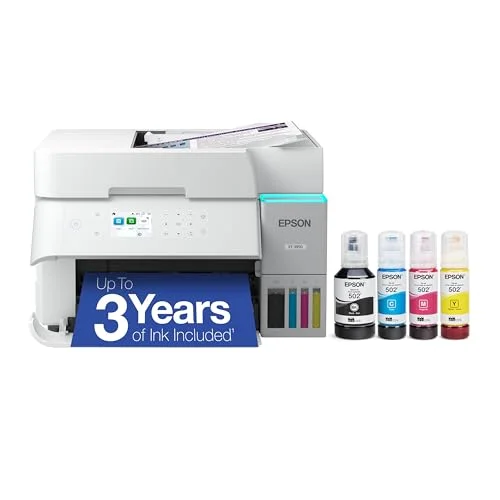
Epson EcoTank ET-3950
Pros
- Refillable ink tanks cut cost per page by around 95% compared to cartridge inkjets, which matters fast if you print more than a few pages a week
- The included ink bottles are rated to last most home offices a year or more before the first refill
- 250-sheet paper tray means fewer refill trips than most all-in-ones in this price range
- Quiet operation compared to laser printers, which is a real factor if the printer sits near a video call setup
- PrecisionCore printhead is a permanent, sealed component Epson says is built to last the printer's lifetime, unlike cartridge-based printheads that degrade
Cons
- Upfront price is high for an inkjet — you're paying for years of cheap ink up front instead of a subscription
- Duplex scanning through the ADF is noticeably slower than single-pass rivals since it has to flip and re-scan each page
- Some owners report the paper tray and top cover feel flimsier than the printer's price would suggest
- Color-heavy or photo printing burns through tank ink noticeably faster than plain text documents
The EcoTank’s pitch is simple: pay more upfront, spend far less over the printer’s life. The refillable ink tanks cut cost per page by roughly 95% compared to a standard cartridge inkjet, and the included ink bottles are rated to cover most home offices for a year or more before a refill is needed. A 250-sheet paper tray also means fewer trips to reload than most all-in-ones at this price.
It’s quieter than the laser printers here, which is worth something if it sits within earshot of a video call. The tradeoff shows up in duplex scanning — because the ADF has to flip and re-scan each page, two-sided scans take noticeably longer than on printers with true duplex scanning. A few owners also note the paper tray and top cover feel less sturdy than the price suggests, and color-heavy printing burns through tank ink faster than plain text.
If your printing volume justifies the upfront cost, this is the pick that saves the most money over two or three years.
3. Canon MegaTank MAXIFY GX4020 — Best High-Capacity Ink Tank
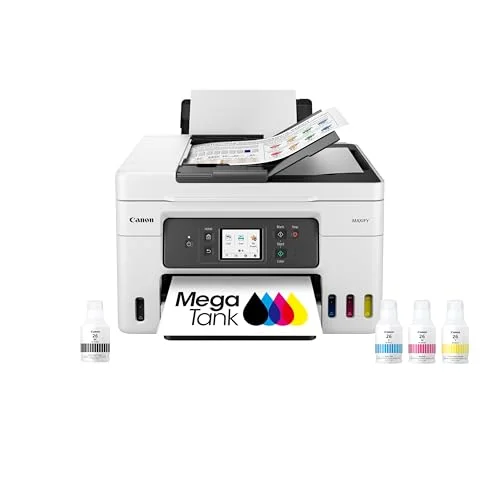
Canon MegaTank MAXIFY GX4020
Pros
- Up to 14,000 color pages per ink fill is the highest yield of any printer in this roundup, useful for anyone printing color proofs or marketing materials regularly
- 350 sheets of combined paper capacity across the front cassette and rear tray means fewer interruptions to reload
- Bright, consistent print quality across varied media, including card stock, not just plain paper
- No subscription or cartridge lock-in — it's an ink-tank system with no equivalent to HP's Instant Ink program
Cons
- 13-18 ipm print speed is slow next to the laser options in this roundup, especially for color pages
- Priced close to the Epson EcoTank above despite lower rated page yield
- Photo print quality is described by reviewers as noticeably behind Canon's dedicated photo printers
- Canon's companion scanning app has been called fussy to set up compared to Epson's and Brother's
Canon’s MegaTank line (still labeled MAXIFY on some listings) leans into ink capacity: up to 14,000 color pages per fill is the highest yield of any printer in this roundup, which matters if your home office prints color proofs, flyers, or marketing materials with any regularity. Combined with 350 sheets of paper capacity across its two trays, it’s built to go longer between refills and reloads than anything else here — and like the Epson above, there’s no subscription or cartridge lock-in to worry about.
What it gives up is speed. At 13-18 ipm, it’s noticeably slower than the laser printers in this roundup, especially on color pages, and photo print quality trails Canon’s dedicated photo printers. The companion scanning app has also drawn complaints for being fussier to set up than Epson’s or Brother’s equivalents.
For color-heavy printing without a subscription attached, this is the one to buy — just don’t expect laser-printer speed.
4. Brother MFC-L3720CDW — Best for Simple, Reliable Printing
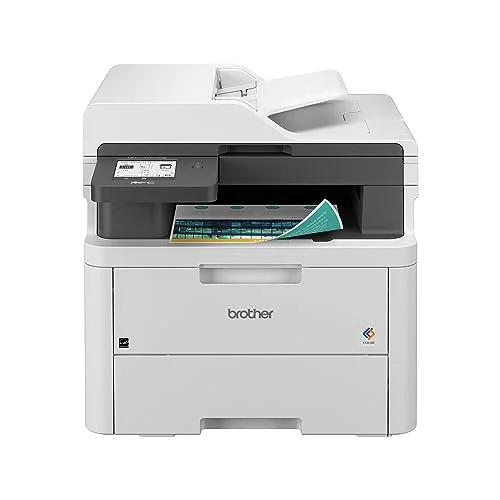
Brother MFC-L3720CDW
Pros
- Sturdy build quality that owners describe as feeling more durable than its price class suggests
- Scanner is genuinely fast, outpacing the printer's own 19 ppm print engine
- Wi-Fi setup through Brother's mobile app is straightforward, even for a first laser printer
- Lower cost per page for toner than the HP LaserJet above, which adds up over a year of regular printing
- No subscription requirement of any kind — Brother's optional Refresh Subscription for auto-replenished toner is opt-in, not required to use the printer
Cons
- No Ethernet port, which matters if your home office network relies on a wired connection for reliability
- The ADF only scans one side per pass, so duplex copying or scanning means manually flipping pages
- Doesn't accept Brother's most economical toner cartridges, which narrows the long-term savings compared to other Brother models
Brother’s laser MFPs have a reputation for just working, and this one holds to it. Owners describe the build quality as sturdier than its price class suggests, and the scanner is fast enough to outpace the printer’s own 19 ppm engine. Setup over Wi-Fi through Brother’s app is straightforward, and toner costs less per page than the HP LaserJet above. There’s also no subscription of any kind attached — Brother’s optional Refresh Subscription for auto-replenished toner is opt-in, not required.
The compromises are narrower but real. There’s no Ethernet port, so it’s Wi-Fi or USB only, which matters if your home network leans on wired connections for reliability. The ADF also only scans one side per pass, meaning duplex copying or scanning requires manually flipping the stack halfway through.
For a straightforward laser printer with no subscription strings attached, this is a safe, low-drama choice.
5. HP OfficeJet Pro 9125e — Best Budget
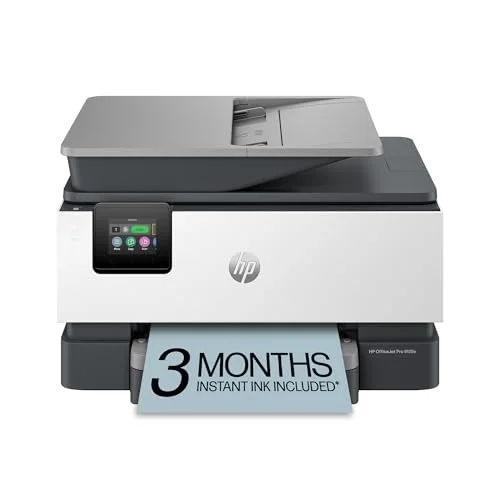
HP OfficeJet Pro 9125e
Pros
- One of the faster inkjet all-in-ones in its price range, with print speeds that compete with entry-level laser printers
- True duplex ADF scanning and copying — the only printer in this roundup that scans both sides of a page automatically
- Frequently discounted well below its roughly $300 list price, which is where the real value shows up
- Strong text quality for everyday reports and invoices
Cons
- Requires enrolling in HP's HP+ program to unlock full functionality, which ties the printer to an internet-connected HP account
- HP has faced 2026 lawsuits and widespread user complaints over Instant Ink subscribers getting print and scan features restricted after a lapsed subscription or a card expiration — read the HP+ terms before buying if that's a dealbreaker
- Owners report a loud cartridge-alignment noise when the printer wakes from idle
- Paper trays feel flimsier than the HP LaserJet above, and paper jams come up repeatedly in owner reviews
- Ink costs climb quickly once you're off the free Instant Ink trial period
On specs alone, the 9125e punches above its price: 22 ppm print speed that competes with entry-level lasers, and it’s the only printer in this roundup with true duplex ADF scanning, meaning it actually scans both sides of a page automatically instead of requiring a manual flip. It’s also frequently discounted well below its roughly $300 list price, which is where its real value shows up.
The catch is HP+. This printer requires enrolling in HP’s HP+ program to unlock its full feature set, tying it to an internet-connected HP account. That’s the exact program at the center of 2026’s lawsuits and user complaints over Instant Ink subscribers finding their print and scan functions restricted after a lapsed subscription, an expired card, or a detected non-HP cartridge. Owners also report a loud cartridge-alignment noise on wake and flimsier paper trays than the LaserJet above, with paper jams coming up repeatedly in reviews.
If the price is right and you’re fine staying enrolled in HP+, this is a genuinely capable budget pick. If subscription lock-in is a dealbreaker, the Brother or Canon above are the safer buys.
Buying Guide: How to Pick a Home Office Multifunction Printer
Laser vs. Ink Tank vs. Cartridge Inkjet
Laser printers like the HP LaserJet and Brother MFC-L3720CDW print fastest and handle the highest volume, which makes them the better fit for a busy home office. Ink-tank printers like the Epson EcoTank and Canon MegaTank cost more upfront but bring the lowest cost per page over time, especially if you print in color regularly. Cartridge-based inkjets like the HP OfficeJet Pro cost less to buy but more to run — and increasingly come bundled with a subscription program worth reading closely before you buy.
Understand What a Subscription Program Actually Requires
HP+ and Instant Ink aren’t the same thing as an optional loyalty program. On HP+ printers, declining enrollment can limit what the printer does out of the box, and 2026’s wave of lawsuits centers on subscribers losing print or scan access when a subscription lapses or a non-HP cartridge is detected. If you’d rather own a printer outright with no ongoing account tied to it, the laser and ink-tank picks in this roundup avoid that model entirely.
Duplex Printing and Duplex Scanning Are Different Features
Every printer in this roundup prints on both sides of the page automatically. Fewer of them scan both sides automatically — only the HP OfficeJet Pro 9125e does true duplex scanning here. If you regularly digitize double-sided paperwork, that’s worth weighing against its HP+ requirement.
Match Duty Cycle to Actual Volume
A printer’s monthly duty cycle is its rated ceiling, not its comfortable running pace — real-world volume should sit well under it. The HP LaserJet’s 40,000-page duty cycle and the HP OfficeJet’s 25,000-page rating both have plenty of headroom for typical home office use; the ink-tank models are rated more around ink yield than page-volume ceilings, since running out of ink happens well before hardware wear does.
A Printer Isn’t the Only Piece of a Paperless-Leaning Setup
If your home office is trying to cut down on physical paper rather than print more of it, a dedicated document scanner is worth a look alongside — or instead of — a multifunction printer, especially for one-time digitizing projects like old tax records.
FAQ
Do I need a laser printer or is ink tank good enough for a home office? It depends on volume and color use. Laser printers print faster and handle higher monthly volume, which suits a busy office. Ink-tank printers cost less per page in color, which suits offices that print a lot of color pages but don’t need laser speed.
Is HP+ mandatory on every HP printer? No — it’s specific to HP’s “e” and ”+” branded models, including the HP OfficeJet Pro 9125e in this roundup. The HP LaserJet Pro MFP 3301fdw here does not require HP+, though it does use HP’s separate Dynamic Security firmware, which can still restrict non-HP toner.
Can I use third-party ink or toner in these printers? On the HP models, doing so risks a Dynamic Security or HP+ restriction depending on the model. Brother’s and the ink-tank models from Epson and Canon don’t carry that same restriction, though third-party ink can still affect print quality or void warranty coverage.
Why don’t all of these printers scan both sides of a page automatically? True duplex scanning requires a more complex scanner mechanism, and manufacturers often reserve it for higher-tier models. Only the HP OfficeJet Pro 9125e in this roundup includes it — the rest require manually flipping pages for double-sided scans.
Which printer here has the lowest total cost of ownership? Over two to three years of moderate use, the Epson EcoTank ET-3950 or Canon MegaTank GX4020 typically come out cheapest per page thanks to their ink-tank systems, even though both cost more to buy than the HP OfficeJet Pro upfront.
Conclusion
The HP Color LaserJet Pro MFP 3301fdw is the strongest all-around pick in this roundup — fast, sharp output, and no subscription attached, just a Dynamic Security caveat worth knowing about before buying third-party toner. If minimizing ink cost over time matters more than upfront price, the Epson EcoTank ET-3950 or Canon MegaTank GX4020 both avoid subscriptions entirely while cutting per-page costs. The HP OfficeJet Pro 9125e is the cheapest way in, but only worth it if you’re genuinely comfortable staying enrolled in HP+ given 2026’s ongoing complaints about that program. Whichever you pick, read the fine print on ink and toner requirements before you buy — it matters more with printers than with almost any other home office gear.
Detailed Reviews
HP Color LaserJet Pro MFP 3301fdw
Pros
- 26 ppm print speed is fast enough that a stack of invoices or contracts doesn't turn into a coffee-break wait
- Sharp, consistent text and color output that holds up for reports and client-facing documents, not just internal drafts
- Toner ships pre-installed in the box, so it's printing within minutes of unboxing instead of hunting for starter cartridges
- 40,000-page monthly duty cycle gives real headroom for a busy household office, well past what an inkjet in this price range can handle
- Accepts high-yield toner cartridges, which lowers the cost per page as volume goes up
Cons
- List price runs high for a laser MFP in this class, and toner still costs roughly 17 cents a color page even with high-yield cartridges
- Scanning from the mobile app caps out at 300 dpi — getting the full 1200 dpi resolution requires scanning from a computer
- Like most current HP laser printers, it ships with Dynamic Security firmware that can flag or block non-HP toner chips, so bargain third-party toner is a gamble
Epson EcoTank ET-3950
Pros
- Refillable ink tanks cut cost per page by around 95% compared to cartridge inkjets, which matters fast if you print more than a few pages a week
- The included ink bottles are rated to last most home offices a year or more before the first refill
- 250-sheet paper tray means fewer refill trips than most all-in-ones in this price range
- Quiet operation compared to laser printers, which is a real factor if the printer sits near a video call setup
- PrecisionCore printhead is a permanent, sealed component Epson says is built to last the printer's lifetime, unlike cartridge-based printheads that degrade
Cons
- Upfront price is high for an inkjet — you're paying for years of cheap ink up front instead of a subscription
- Duplex scanning through the ADF is noticeably slower than single-pass rivals since it has to flip and re-scan each page
- Some owners report the paper tray and top cover feel flimsier than the printer's price would suggest
- Color-heavy or photo printing burns through tank ink noticeably faster than plain text documents
Canon MegaTank MAXIFY GX4020
Pros
- Up to 14,000 color pages per ink fill is the highest yield of any printer in this roundup, useful for anyone printing color proofs or marketing materials regularly
- 350 sheets of combined paper capacity across the front cassette and rear tray means fewer interruptions to reload
- Bright, consistent print quality across varied media, including card stock, not just plain paper
- No subscription or cartridge lock-in — it's an ink-tank system with no equivalent to HP's Instant Ink program
Cons
- 13-18 ipm print speed is slow next to the laser options in this roundup, especially for color pages
- Priced close to the Epson EcoTank above despite lower rated page yield
- Photo print quality is described by reviewers as noticeably behind Canon's dedicated photo printers
- Canon's companion scanning app has been called fussy to set up compared to Epson's and Brother's
Brother MFC-L3720CDW
Pros
- Sturdy build quality that owners describe as feeling more durable than its price class suggests
- Scanner is genuinely fast, outpacing the printer's own 19 ppm print engine
- Wi-Fi setup through Brother's mobile app is straightforward, even for a first laser printer
- Lower cost per page for toner than the HP LaserJet above, which adds up over a year of regular printing
- No subscription requirement of any kind — Brother's optional Refresh Subscription for auto-replenished toner is opt-in, not required to use the printer
Cons
- No Ethernet port, which matters if your home office network relies on a wired connection for reliability
- The ADF only scans one side per pass, so duplex copying or scanning means manually flipping pages
- Doesn't accept Brother's most economical toner cartridges, which narrows the long-term savings compared to other Brother models
HP OfficeJet Pro 9125e
Pros
- One of the faster inkjet all-in-ones in its price range, with print speeds that compete with entry-level laser printers
- True duplex ADF scanning and copying — the only printer in this roundup that scans both sides of a page automatically
- Frequently discounted well below its roughly $300 list price, which is where the real value shows up
- Strong text quality for everyday reports and invoices
Cons
- Requires enrolling in HP's HP+ program to unlock full functionality, which ties the printer to an internet-connected HP account
- HP has faced 2026 lawsuits and widespread user complaints over Instant Ink subscribers getting print and scan features restricted after a lapsed subscription or a card expiration — read the HP+ terms before buying if that's a dealbreaker
- Owners report a loud cartridge-alignment noise when the printer wakes from idle
- Paper trays feel flimsier than the HP LaserJet above, and paper jams come up repeatedly in owner reviews
- Ink costs climb quickly once you're off the free Instant Ink trial period