The document scanner market just went through its biggest shake-up in years. Ricoh — which bought Fujitsu’s scanner business in 2022 — officially discontinued the ScanSnap iX1600 in 2026 and replaced it with the ScanSnap iX2500, a faster, Wi-Fi 6-equipped model with a bigger touchscreen. If you’ve been holding off on a ScanSnap because the iX1600 was the long-standing recommendation everywhere, that recommendation has changed. Separately, Epson’s RapidReceipt RR-600W picked up a 2026 Good Housekeeping Cleaning Award for cutting paper clutter, which is a good sign if receipts and expense tracking are your main paper problem rather than contracts and letters.
A document scanner earns its desk space differently than most home office gear. It’s not something you use constantly — it’s something that turns a growing pile of tax paperwork, medical records, and old receipts into searchable PDFs in one sitting, then sits quietly until the next pile builds up. The five scanners below cover that range, from a business-grade flagship to a compact model that fits on a desk with no spare room.
Quick Comparison
| Scanner | Scan Speed | ADF Capacity | Best For | Price |
|---|---|---|---|---|
| Ricoh ScanSnap iX2500 | 45 ppm duplex | 100 sheets | Overall performance | $459 |
| Epson WorkForce ES-580W | 35 ppm duplex | 100 sheets | Business documents | $399 |
| Epson RapidReceipt RR-600W | 35 ppm duplex | 100 sheets | Receipts & expenses | $379 |
| Canon imageFORMULA R40 | 40 ppm simplex | 60 sheets | Budget/value | $279 |
| Brother ADS-1700W | 25 ppm duplex | 20 sheets | Small desks | $299 |
1. Ricoh ScanSnap iX2500 — Editor’s Pick
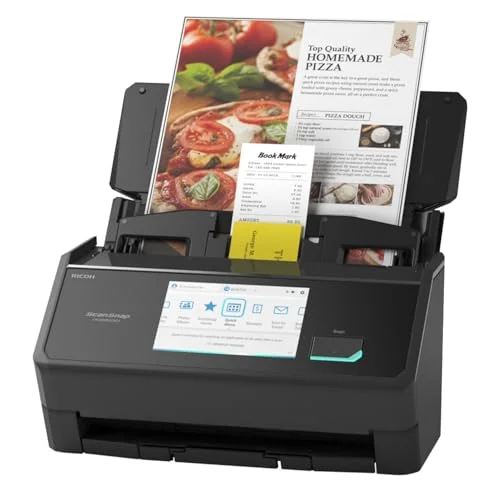
Ricoh ScanSnap iX2500
Pros
- 45 ppm duplex scanning is the fastest in this roundup, and the 100-sheet ADF means fewer trips back to reload a stack of mixed paperwork
- The 5-inch touchscreen is a real upgrade over the smaller displays on every other scanner here, with one-tap profile shortcuts for common destinations
- Skew-detection and dust-detection borrowed from Ricoh's business-line scanners catch alignment problems automatically instead of producing a crooked PDF you have to redo
- Removable receipt guide attachment handles small, thin paper without a separate scanner
Cons
- The most expensive scanner in this roundup by a wide margin
- Wi-Fi 6 and Bluetooth are new to this generation, so third-party workflow guides and community troubleshooting are thinner than for the long-running iX1600 it replaces
- Overkill if you're only scanning a handful of pages a week
The ScanSnap iX2500 is Ricoh’s replacement for the iX1600, and it’s a meaningful upgrade rather than a rebrand with a new sticker. Duplex scanning jumps to 45 ppm (90 images per minute), the touchscreen grows from 4.3 to 5 inches, and the ADF holds up to 100 sheets — double what the outgoing model handled unattended. Skew-detection and dust-detection technology carried over from Ricoh’s costlier business scanners catch alignment and cleanliness problems automatically, so you’re less likely to end up with a crooked or spotted PDF you have to redo.
The removable receipt guide attachment is a nice touch for anyone who wants one scanner to handle both a stack of letter-size documents and a handful of thin receipts without switching machines. Wi-Fi 6 and Bluetooth 5.2 bring the connectivity up to current standards, which matters if the scanner is going to live on a home network with other modern devices.
The catch is price — this is the most expensive scanner in the roundup, and it’s new enough that the deep well of ScanSnap community guides and troubleshooting threads built up around the iX1600 over its multi-year run hasn’t fully transferred yet. If you want the fastest, most capable desktop scanner here and don’t mind paying for it, this is the pick. If your paper volume is lighter, one of the cheaper options below does the job for less.
2. Epson WorkForce ES-580W — Best for Business Documents
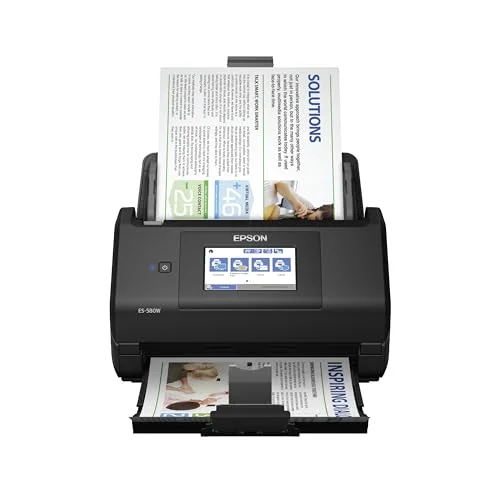
Epson WorkForce ES-580W
Pros
- 100-sheet ADF and single-pass duplex scanning chew through mixed batches of invoices, contracts, and letter-size paperwork without babysitting
- Wireless scanning straight to a phone, tablet, or cloud folder (Dropbox, Google Drive, OneDrive, Evernote) without opening a computer first
- 240-inch long-document mode handles bank statements and fan-fold printouts that jam shorter-feed scanners
- 4.3-inch touchscreen makes it easy to pick a scan destination without installing desktop software first
Cons
- Owner reports mention occasional paper jams with worn or curled paper stock
- Not built for delicate photos or receipts — stick to standard letter-weight documents
- Bundled Epson software feels dated next to the ScanSnap and receipt-focused apps
The ES-580W is built for mixed batches of business paperwork — invoices, signed contracts, multi-page letters — and it handles them well. A 100-sheet ADF paired with single-pass duplex scanning at 35 ppm means you can load a thick stack and walk away, and the 240-inch long-document mode covers oddities like bank statements or fan-fold printouts that shorter-feed scanners choke on.
Wireless scanning straight to a phone, tablet, or a cloud folder (Dropbox, Google Drive, OneDrive, Evernote all supported) means you don’t need a computer running to get a document digitized and filed. The 4.3-inch touchscreen makes picking a destination straightforward without digging through desktop software first.
Owner reports mention occasional jams with older or curled paper stock, and this isn’t the scanner to reach for if you’re digitizing photos or receipts rather than standard documents — Epson has a dedicated model for that (see below). For a home office that mainly deals in letter-size business paperwork, it’s a solid, fast workhorse.
3. Epson RapidReceipt RR-600W — Best for Receipts
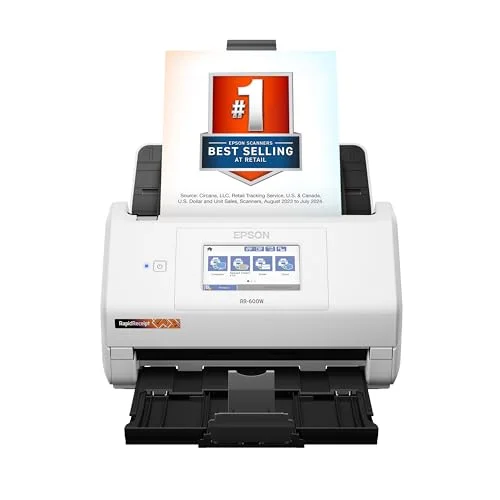
Epson RapidReceipt RR-600W
Pros
- Included receipt management software auto-extracts vendor, date, and totals with no subscription required, which matters for anyone tracking expenses without QuickBooks
- Handles documents as small as 2x2 inches, so crumpled gas station receipts and business cards scan cleanly alongside full-size paperwork
- Scan-to-USB from the touchscreen works without a computer connected at all
- Won a 2026 Good Housekeeping Cleaning Award for helping cut paper clutter, a rare bit of outside recognition for a scanner in this category
Cons
- Same 35 ppm speed as the pricier ES-580W, so you're mainly paying for the receipt-specific software, not extra hardware performance
- Bundled bonus software (business card app, PDF editor) is more clutter than value for most home offices
The RapidReceipt shares its core hardware — 35 ppm duplex, 100-sheet ADF, 4.3-inch touchscreen — with the WorkForce ES-580W above, but it’s tuned specifically for expense tracking. The bundled receipt management software auto-extracts vendor names, dates, and totals with no subscription fee, and the scanner accepts documents as small as 2x2 inches, so a crumpled gas station receipt scans as cleanly as a full sheet of paper.
That receipt-first design paid off in outside recognition this year: the RR-600W was named a winner in Good Housekeeping’s 2026 Cleaning Awards specifically for helping cut paper clutter. Scan-to-USB from the touchscreen also works with no computer connected, which is handy for archiving a batch of receipts at the end of a trip.
Since the hardware specs match the ES-580W almost exactly, you’re really paying for the receipt-focused software here, not extra scanning performance. If expense tracking and receipts are your main paper problem, that software is worth it. If you mainly scan contracts and letters, the ES-580W is the better fit at a similar price.
4. Canon imageFORMULA R40 — Best Value
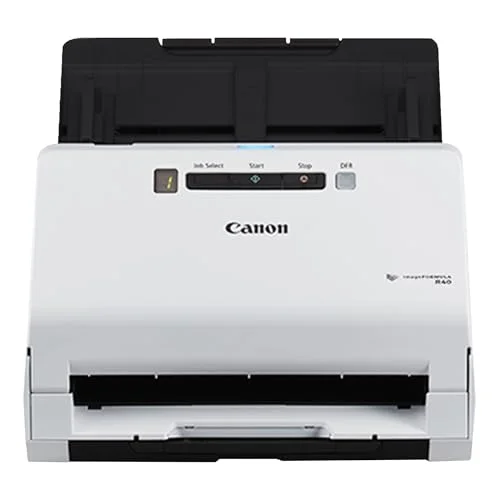
Canon imageFORMULA R40
Pros
- Independent lab testing clocked duplex grayscale scans faster than Canon's own rated speed, which is unusual for a budget-tier scanner
- 60-sheet ADF and a 4,000-page daily duty cycle are enough for a genuinely busy home office, not just occasional filing
- Lowest price of any scanner in this roundup with a full ADF and duplex scanning
- Simple driver and software setup that doesn't require an account or cloud sign-in to start scanning
Cons
- Color scan speed drops noticeably at higher resolutions — fine for text documents, slower for photo-heavy scanning
- No touchscreen; scan destinations are set from the connected computer, not the scanner itself
- No wireless scanning — USB connection to a computer only
The R40 is the cheapest scanner here that still delivers a real ADF and duplex scanning, and independent lab testing has actually clocked its duplex grayscale speed faster than Canon’s own rated numbers — a rare case of a budget scanner beating its spec sheet instead of falling short of it. The 60-sheet ADF and 4,000-page daily duty cycle are enough for a genuinely busy home office, not just occasional filing.
Setup is refreshingly simple: install the driver, and you’re scanning, with no cloud account or app sign-in required to get started. That simplicity comes with the tradeoffs you’d expect at this price — there’s no touchscreen, so scan destinations are set from the connected computer, and there’s no wireless scanning at all, just a USB connection.
Color scans slow down noticeably at higher resolutions, so this is better suited to black-and-white text documents than photo-heavy scanning. For a home office mostly digitizing tax paperwork, statements, and correspondence on a budget, it’s the best dollar-for-dollar pick in this roundup.
5. Brother ADS-1700W — Best Compact
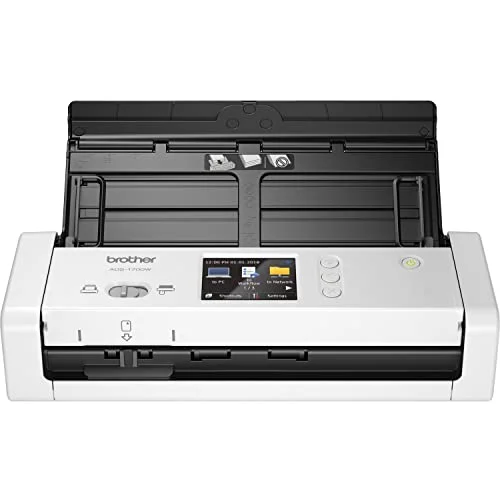
Brother ADS-1700W
Pros
- Smallest footprint in this roundup, small enough for a corner of a desk that has no room for a full-size scanner
- Single-pass duplex and Wi-Fi at this size and price is still a rare combination
- Scans directly to cloud services, email, FTP, or a USB flash drive from the touchscreen without a computer
- Handles business cards and receipts cleanly alongside standard paper
Cons
- 20-sheet ADF means frequent reloading for anything beyond a handful of pages at a time
- Only connects to Wi-Fi networks that broadcast their name — no way to join a hidden network from the built-in screen
- Some on-screen touch targets are small enough to mis-tap
The ADS-1700W solves a different problem than the other four scanners here: desk space. At 3.1 lb with a small footprint, it fits into a corner of a desk that has no room for a full-size scanner, while still managing single-pass duplex scanning and Wi-Fi — a combination that’s genuinely rare at this size and price. The 2.8-inch color touchscreen lets you scan straight to cloud services, email, FTP, or a USB flash drive without a computer involved.
It also handles business cards and receipts cleanly alongside standard documents, which makes it more versatile than its small size suggests. The tradeoffs are the ones you’d expect from a compact design: the ADF only holds 20 sheets, so anything beyond a handful of pages means frequent reloading, and it will only join Wi-Fi networks that broadcast their name — there’s no way to connect to a hidden network from the built-in screen.
For a small home desk where a full-size scanner simply won’t fit, this is the pick. For higher-volume scanning, step up to the Epson or Canon options above.
Buying Guide: How to Pick a Document Scanner for Home Office Use
Duplex vs. Simplex Matters More Than Top Speed
A scanner rated at 40 ppm simplex (one side per pass) isn’t actually faster than one rated at 35 ppm duplex (both sides in a single pass) once you’re scanning two-sided documents — the duplex model finishes a double-sided stack in half the passes. Check whether the ppm rating on any scanner you’re considering is simplex or duplex before comparing numbers directly.
ADF Capacity Determines How Hands-Off Scanning Actually Is
A 20-sheet feeder (Brother ADS-1700W) means reloading every minute or two on a big job. A 100-sheet feeder (Ricoh, both Epson models) means you can load a thick stack of mixed paperwork and walk away. If you’re doing a one-time purge of years of accumulated paperwork, ADF capacity matters more than almost anything else on the spec sheet.
Touchscreen and Wireless Scanning Aren’t Just Conveniences
A scanner with a built-in touchscreen and Wi-Fi can scan directly to a phone, cloud folder, or USB drive without a computer turned on. That matters more than it sounds like it would — it means the scanner can live anywhere in the house with power and Wi-Fi, not just tethered next to a desktop computer.
Match the Scanner to Your Paper, Not Just Your Volume
A high-speed business scanner like the ES-580W is overkill — and not even well-suited — for someone whose real problem is a shoebox of crumpled receipts. The RapidReceipt RR-600W’s small-document handling and receipt-extraction software solves that specific problem better than a faster, more expensive scanner would.
Software Matters as Much as Hardware
Every scanner here comes with bundled software for OCR, PDF creation, and cloud routing, but the quality varies widely. ScanSnap’s software ecosystem has the longest track record; Epson’s RapidReceipt software is purpose-built for expense categorization; Canon and Brother lean on simpler, more generic scan utilities. If a specific workflow — QuickBooks export, cloud-only filing, OCR search — matters to you, check that the bundled software actually supports it before buying.
FAQ
Is the ScanSnap iX1600 still worth buying if I find one on sale? Ricoh has officially discontinued the iX1600 and replaced it with the faster iX2500, though firmware support for existing units continues for now. If you can only find a used or clearance iX1600, it will still work, but the iX2500 is the current model with full manufacturer support and a larger touchscreen.
Do I need a duplex scanner if most of my documents are single-sided? No — if you’re mainly scanning single-sided pages like receipts or printed forms, a simplex-focused scanner like the Canon R40 at its rated speeds handles that fine. Duplex scanning only pays off when a meaningful share of your paperwork is printed on both sides.
Can any of these scanners handle photos, not just documents? The RapidReceipt RR-600W and ScanSnap iX2500 both handle small and irregular items (including some photos) better than the business-focused ES-580W or R40, thanks to their more flexible document-size handling. None of these five is a dedicated photo scanner — if photo digitization is your main goal, look at a flatbed or photo-specific scanner instead.
Is a document scanner still worth buying when phone scanning apps exist? For a handful of pages, a phone app is fine. For digitizing years of paperwork, a dedicated scanner with an automatic document feeder is dramatically faster and more consistent — you’re not manually photographing and cropping each page, and duplex models capture both sides in one pass.
How long should a document scanner last? These are built around daily duty cycles rather than a fixed lifespan — the Canon R40, for example, is rated for 4,000 pages a day. For typical home office use (a batch of scanning every week or two rather than daily high-volume runs), any of these five should hold up for years under normal use.
Conclusion
The Ricoh ScanSnap iX2500 is the top pick for a home office that wants the fastest, most capable scanner available right now — it’s the direct successor to the long-recommended iX1600, with a bigger touchscreen and a higher-capacity feeder to match its higher price. If your paperwork is mostly business documents and contracts, the Epson WorkForce ES-580W covers that at a lower cost. For anyone whose real paper problem is receipts and expense tracking, the Epson RapidReceipt RR-600W’s software makes it worth the switch. Budget-conscious buyers should look at the Canon imageFORMULA R40, and anyone short on desk space should go with the compact Brother ADS-1700W.
Detailed Reviews
Ricoh ScanSnap iX2500
Pros
- 45 ppm duplex scanning is the fastest in this roundup, and the 100-sheet ADF means fewer trips back to reload a stack of mixed paperwork
- The 5-inch touchscreen is a real upgrade over the smaller displays on every other scanner here, with one-tap profile shortcuts for common destinations
- Skew-detection and dust-detection borrowed from Ricoh's business-line scanners catch alignment problems automatically instead of producing a crooked PDF you have to redo
- Removable receipt guide attachment handles small, thin paper without a separate scanner
Cons
- The most expensive scanner in this roundup by a wide margin
- Wi-Fi 6 and Bluetooth are new to this generation, so third-party workflow guides and community troubleshooting are thinner than for the long-running iX1600 it replaces
- Overkill if you're only scanning a handful of pages a week
Epson WorkForce ES-580W
Pros
- 100-sheet ADF and single-pass duplex scanning chew through mixed batches of invoices, contracts, and letter-size paperwork without babysitting
- Wireless scanning straight to a phone, tablet, or cloud folder (Dropbox, Google Drive, OneDrive, Evernote) without opening a computer first
- 240-inch long-document mode handles bank statements and fan-fold printouts that jam shorter-feed scanners
- 4.3-inch touchscreen makes it easy to pick a scan destination without installing desktop software first
Cons
- Owner reports mention occasional paper jams with worn or curled paper stock
- Not built for delicate photos or receipts — stick to standard letter-weight documents
- Bundled Epson software feels dated next to the ScanSnap and receipt-focused apps
Epson RapidReceipt RR-600W
Pros
- Included receipt management software auto-extracts vendor, date, and totals with no subscription required, which matters for anyone tracking expenses without QuickBooks
- Handles documents as small as 2x2 inches, so crumpled gas station receipts and business cards scan cleanly alongside full-size paperwork
- Scan-to-USB from the touchscreen works without a computer connected at all
- Won a 2026 Good Housekeeping Cleaning Award for helping cut paper clutter, a rare bit of outside recognition for a scanner in this category
Cons
- Same 35 ppm speed as the pricier ES-580W, so you're mainly paying for the receipt-specific software, not extra hardware performance
- Bundled bonus software (business card app, PDF editor) is more clutter than value for most home offices
Canon imageFORMULA R40
Pros
- Independent lab testing clocked duplex grayscale scans faster than Canon's own rated speed, which is unusual for a budget-tier scanner
- 60-sheet ADF and a 4,000-page daily duty cycle are enough for a genuinely busy home office, not just occasional filing
- Lowest price of any scanner in this roundup with a full ADF and duplex scanning
- Simple driver and software setup that doesn't require an account or cloud sign-in to start scanning
Cons
- Color scan speed drops noticeably at higher resolutions — fine for text documents, slower for photo-heavy scanning
- No touchscreen; scan destinations are set from the connected computer, not the scanner itself
- No wireless scanning — USB connection to a computer only
Brother ADS-1700W
Pros
- Smallest footprint in this roundup, small enough for a corner of a desk that has no room for a full-size scanner
- Single-pass duplex and Wi-Fi at this size and price is still a rare combination
- Scans directly to cloud services, email, FTP, or a USB flash drive from the touchscreen without a computer
- Handles business cards and receipts cleanly alongside standard paper
Cons
- 20-sheet ADF means frequent reloading for anything beyond a handful of pages at a time
- Only connects to Wi-Fi networks that broadcast their name — no way to join a hidden network from the built-in screen
- Some on-screen touch targets are small enough to mis-tap