Affiliate disclosure: SetupRanked earns a commission from qualifying Amazon purchases at no extra cost to you.
Three minutes into a client call, they glance behind you and ask: “Is that your charging cable in the background?” That split-second is why cable management matters — not aesthetics for its own sake, but because a tangle of cables in a video call frame signals something about how you work.
A properly managed desk does several things at once. It looks clean on camera. It reduces daily friction — fewer cables to snag when moving a monitor, faster cleanup, less visual noise during long work sessions. And it makes future upgrades easier, because cables that are organized are cables that are easy to change.
The five products below cover every zone of a typical remote work desk. None requires an electrician or a full weekend project. Most can be installed or deployed in under 30 minutes.
Quick picks: For a permanent desk you own, the Scandinavian Hub Under-Desk Cable Tray ($29) is the most impactful single purchase. For a rental or desk you can’t drill, start with the Bluelounge CableBox ($25) and JOTO sleeves — no tools, no modifications, significant improvement.
What You’re Actually Dealing With
A typical remote work desk generates 8–12 cables:
- Laptop power cable
- Monitor power cable (one or two)
- Monitor video cable (HDMI or DisplayPort)
- USB-C dock cable
- Ethernet cable
- Keyboard and mouse USB cables (if wired)
- Webcam USB cable
- Headset USB cable or charging cable
- Phone charging cable
- Power strip cable to wall outlet
Unmanaged, these form a dense tangle behind and around the desk. Managed well, they disappear entirely from view.
The three main approaches each address a different zone of the problem:
Under-desk trays handle the bulk — the power strip, excess cable slack, and cable runs that travel along the underside of the desk. This is the foundation.
Cable sleeves and raceways bundle and route cables along visible surfaces — the desk edge, down the leg, along a wall. They turn a dozen individual cables into a single organized line.
Cable ties bind individual cables together at their source, preventing the loose coils and tangles that form naturally where cables cross or pile.
A fully managed desk uses all three. A basic first step uses just one.
What to Look for Before Buying
Installation method. Under-desk trays require drilling. J-channel raceways use self-adhesive backing. Sleeves and ties need no installation at all. For renters or setups that change frequently, no-drill solutions are the starting point.
Capacity. A cable tray needs to hold your power strip and all cable slack without overflowing. A sleeve needs to fit the number of cables running along that path. Check dimensions against your actual setup before buying.
Reusability. Adhesive solutions may not survive repositioning cleanly. Reusable ties and metal trays adapt easily to setup changes — new monitor, new dock, new laptop. If your setup evolves regularly, favor reusable over permanent.
Visibility. Under-desk solutions are invisible. Anything mounted on a wall or desk edge will be seen. Match the color and material to your setup — a white PVC raceway on a black desk draws more attention than the cable it was hiding.
Best Cable Management Solutions for Remote Work in 2026
1. Scandinavian Hub Under-Desk Cable Tray — Editor’s Pick
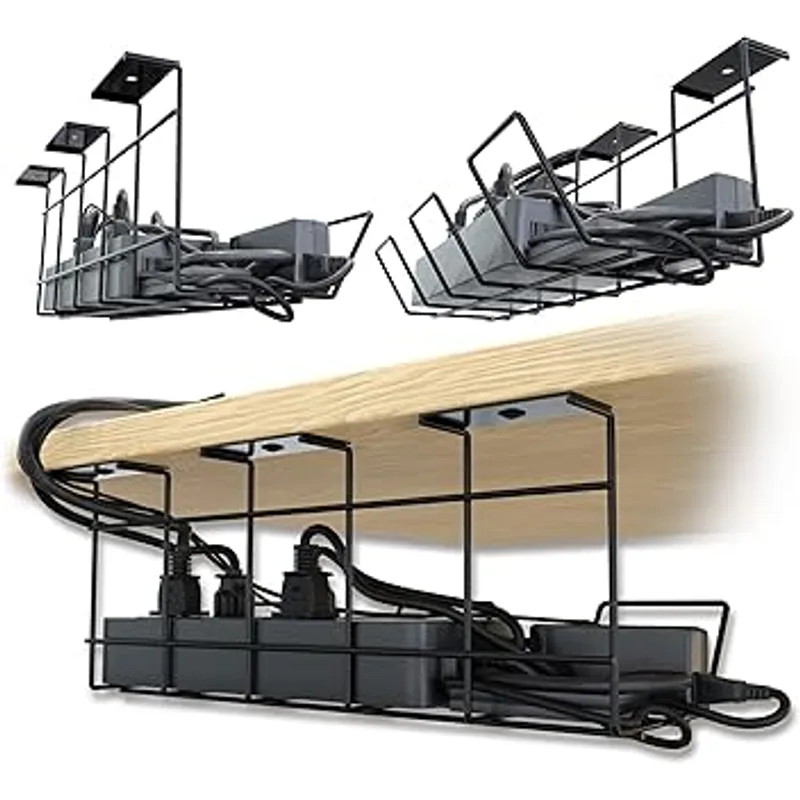
The Scandinavian Hub under-desk tray is the single highest-impact cable management product for a permanent home office desk. Mount it beneath the desk surface, place your power strip inside, tuck the excess cable slack alongside it, and everything disappears.
The set of two 17-inch powder-coated steel trays covers most standard desk widths. Steel construction means the trays hold a full 6-outlet power strip plus the weight of multiple heavy cables without flexing or sagging — a problem with cheaper plastic versions. The open mesh design is intentional: it keeps air flowing around the power strip and charging bricks, which generate meaningful heat during extended use.
Installation requires drilling four small holes into the desk underside — two per tray. The included hardware handles the mounting once the holes are drilled. Budget about 20 minutes for the full install. The matte black finish is visually neutral from below; once the cables are loaded in, the trays practically disappear.
The combination of a power strip sitting inside the tray and all cable slack bundled alongside it means the desk surface is clean from every angle, and the floor below the desk is clear too.
Buy this if: You own your desk and want a clean setup that stays clean permanently. This is the correct under-desk solution for any desk you plan to keep for more than a year.
Skip this if: You rent, can’t drill, or move your setup frequently. For no-modification setups, the Bluelounge CableBox handles the power strip problem without any installation.
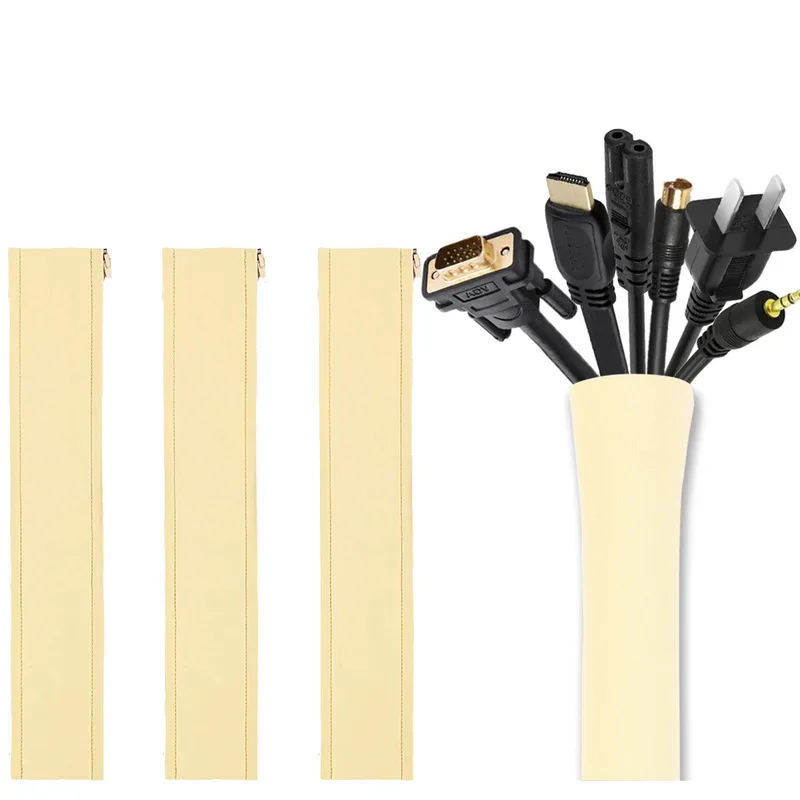
2. JOTO Cable Management Sleeves — Best Budget
JOTO sleeves are the most versatile cable management tool for active cable runs — the cables that travel along visible surfaces from the desk to the wall or between devices.
At $12 for four neoprene sleeves (each 19–20 inches long, with a full-length zipper), these cover multiple cable paths on a single desk. Bundle the cables running from your monitor cluster to the back edge. Bundle the vertical run down the desk leg. Each sleeve transforms 4–8 individual cables into a single smooth line.
The zipper design makes future changes straightforward. Unzip, add or remove a cable, re-zip. No cutting or rewrapping. For remote workers who periodically swap monitors, upgrade docks, or add peripherals, this flexibility is genuinely useful in practice.
Sleeves work best paired with adhesive cable clips (sold separately) that hold the sleeve against the desk surface or leg. Without clips, sleeves shift with cable movement. With clips, the bundled cables follow a fixed, clean path.
Buy this if: You want a no-drill, low-cost starting point for visible cable runs. Four sleeves handle most desk setups and leave you with spares.
Skip this if: You need to hide cables completely from camera view. Sleeves bundle cables but don’t conceal the sleeve itself — it’s visible on the desk surface. Pair with an under-desk tray to keep sleeves out of the camera frame.
3. Bluelounge CableBox — Best for Renters
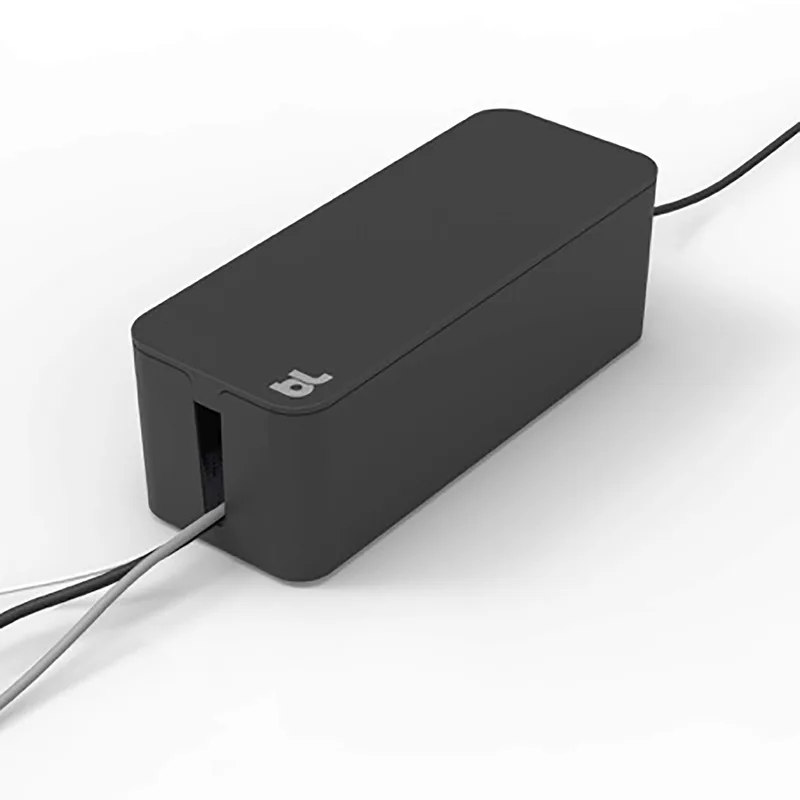
The Bluelounge CableBox solves the power strip problem without drilling anything. Place your power strip inside, route cables in and out through the openings on both ends, snap the lid closed. From the outside, you see a clean box with neat cable runs instead of a tangle around an exposed strip.
The freestanding ABS plastic enclosure sits on the floor, on a shelf beneath the desk, or on the desk surface. No installation, no adhesive, no tools. For renters or workers who want to avoid desk modifications, this is the practical alternative to the Scandinavian Hub tray.
The CableBox has two opening channels — one on each end — that accommodate multiple cables entering and exiting without creating a cable funnel. The snap-on lid removes completely for access, so you can plug and unplug devices without removing the box.
One caveat: the CableBox reduces airflow around the power strip. For a standard remote work desk — laptop charger, monitor, dock, phone charger — it stays within safe operating temperatures. Running a gaming PC or multiple high-wattage devices from the same strip is a different situation; that load generates more heat than the enclosed box is designed to manage.
Buy this if: You rent, share a workspace, or want zero modifications to the desk. The CableBox is also a good choice for a secondary desk or a shared meeting room where the setup changes frequently.
Skip this if: You run high-wattage equipment from the same power strip, or if your power strip is larger than the standard 6-outlet footprint. The CableBox dimensions fit most standard strips, but measure first.
4. EVEO J Channel Cable Raceway — Best for Wall Routing
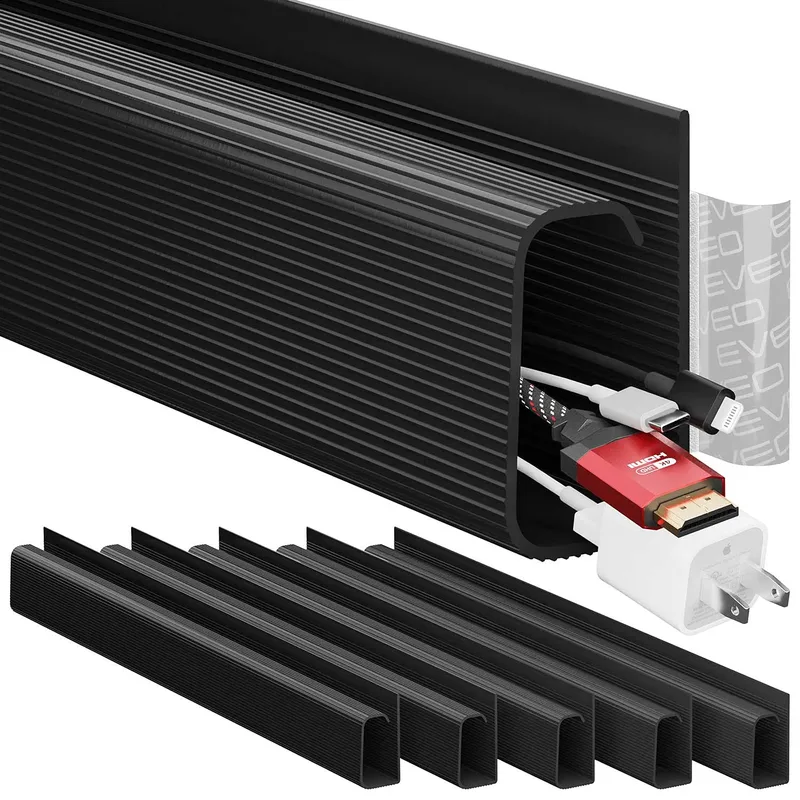
The EVEO J-channel raceway is the right tool for routing cables along wall and desk surfaces where sleeves are too bulky. Six 16-inch PVC channels snap together end-to-end to form continuous 96-inch runs; cables sit inside the open channel and a cover snaps over them, creating a flat track against whatever surface it’s mounted on.
The self-adhesive backing peels and sticks to any smooth surface: the back of a desk, a wall from desk height to floor outlet, or down a desk leg. No drilling. The total 96 inches covers a floor-to-desk vertical run plus a horizontal desk edge run — which handles the two most visible cable problems in a typical home office background.
The white PVC finish blends with white walls and lighter desks. For dark setups — black desks, dark walls — EVEO also makes black versions of the same product.
This raceway solves the single most visible cable problem in remote work video call backgrounds: the vertical cable run from desk to wall outlet. Cables hanging loose down the back of a desk are visible behind you during calls. A raceway attached to the back of the desk leg eliminates that.
Buy this if: You have a vertical cable run from desk to wall outlet that’s visible on camera, or cable runs along a wall that you want to contain cleanly without drilling.
Skip this if: Your cables are thick or heavily insulated. The 1-inch channel width handles standard cable diameters but can’t accommodate large power cables or cable bundles that are already sleeved.
5. VELCRO Brand ONE-WRAP Cable Ties — Best Starter
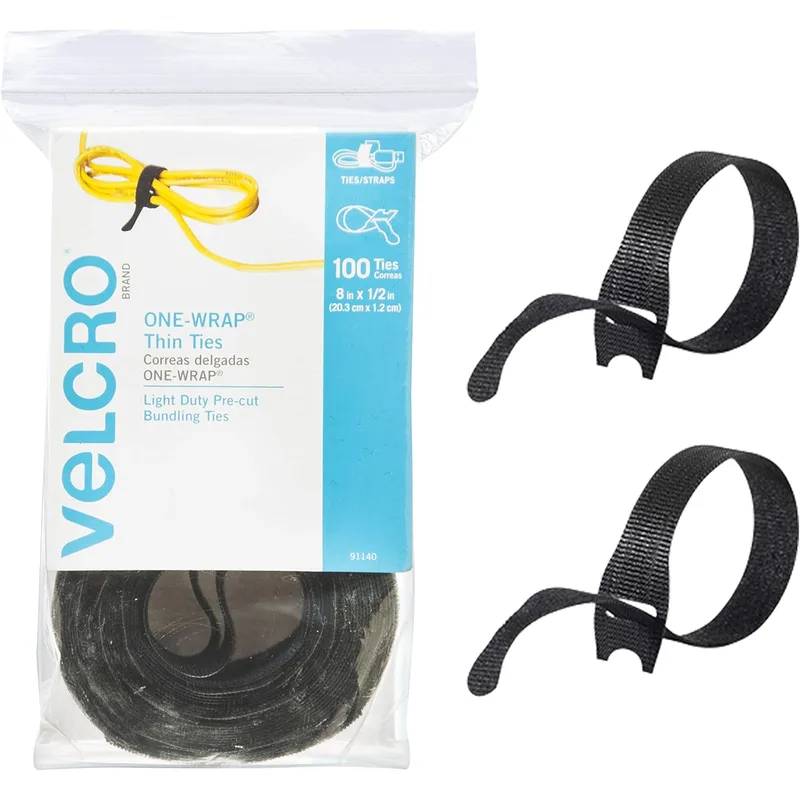
VELCRO ONE-WRAP ties are the first step in any cable management project — not the final one. They bundle cables and manage slack before routing solutions come into play. Zip ties accomplish the same thing but are permanent and can damage cable insulation if overtightened. VELCRO ties are reusable, adjustable, and gentle.
Use them behind the monitor to bundle the HDMI, USB-C, and power cables together before they enter a sleeve. Use them along the desk edge to bind cables into a single run before they reach the raceway. Use them inside the under-desk tray to keep cables from piling and shifting after installation.
A 100-pack at $14 covers a full desk setup — typically 20–30 ties — with plenty to spare for future changes. The 8-inch length works for bundling 3–8 cables together; wider bundles may need two ties side by side.
The limitation is straightforward: VELCRO ties organize cables but don’t hide them. A desk managed only with ties looks tidier up close, but the cables are still visible. They’re the foundation layer — useful on their own, but most effective as prep work before adding sleeves, raceways, or a tray.
Buy this if: You want an immediate, no-commitment improvement for under $15, or you’re preparing cables before adding a routing solution. Every managed desk setup uses these.
Skip this if: You need a complete visual solution on camera. Ties alone don’t conceal cables from view — add a sleeve or raceway to finish the job.
Cable Management Comparison Table
| Solution | Type | Installation | Best For | Renter-Safe | Price | Rating |
|---|---|---|---|---|---|---|
| Scandinavian Hub Tray | Under-desk tray | Screw mount | Hiding power strip + bulk | No | Unavailable | 9.0 |
| JOTO Cable Sleeves | Bundling sleeve | No install | Active cable runs | Yes | $9.99 as of Oct 18, 2026 | 8.6 |
| Bluelounge CableBox | Enclosure | Freestanding | Hiding power strip | Yes | Unavailable | 8.4 |
| EVEO J-Channel | Surface raceway | Self-adhesive | Wall and desk routing | Yes | $20.00 as of Oct 18, 2026 | 8.5 |
| VELCRO ONE-WRAP Ties | Cable ties | No install | Bundling at the source | Yes | $15.89 as of Oct 18, 2026 | 8.2 |
Recommended Combination for a Full Desk Overhaul
For a complete cable management overhaul on a remote work desk, use three products together:
- VELCRO ties to bundle cables individually and manage slack at each device connection point
- JOTO sleeves to group bundled cables along their run from the back of the desk to the tray
- Scandinavian Hub tray to hold the power strip and all cable tails underneath the desk
This combination addresses all three zones: at the source (ties), in transit (sleeves), and at the terminus (tray). Total cost is roughly $55 — less than a single premium cable management kit from specialty brands — and the result is a desk with no visible cable clutter at the back, sides, or power connections.
For renters, swap the Scandinavian Hub tray for the Bluelounge CableBox ($25) and add the EVEO raceway ($19) for the wall run. Total cost stays under $60 with no permanent modifications to the desk or wall.
To complement a clean cable setup, a power strip with better organization options can help reduce adapter bulk inside the tray.
FAQ
Does cable management actually make a difference for video calls?
Yes, visibly. A desk with trailing cables communicates disorganization to everyone on the call, even subconsciously. A managed desk looks deliberate and professional on camera — which matters for client calls, job interviews conducted remotely, and any meeting where visual presentation affects perception. The vertical cable run down the back of the desk leg is the single most visible problem; fixing that alone makes a meaningful difference.
What’s the easiest cable management solution with no installation at all?
JOTO cable sleeves require zero installation — bundle cables without attaching to any surface. The Bluelounge CableBox also requires no installation, just placement. Combine both with VELCRO ties for a significant improvement without a drill or any adhesive. These three products cover the power strip problem, the active cable run problem, and the slack management problem without modifying anything.
Can I install an under-desk cable tray on a standing desk?
Yes. Most standing desks have accessible undersides that accept the same screw installation as static desks. The critical step: make sure cables running to the tray have enough slack to accommodate the height change. Standing desks typically travel 18–24 inches in height range. Adding 2–3 feet of slack before bundling into the tray covers the travel without pulling cables taut at standing height.
How do I manage cables on a rental desk without drilling?
Use the self-adhesive EVEO J-channel raceway for wall and desk-edge routing, JOTO sleeves for cable bundling along the desk surface, and the Bluelounge CableBox for the power strip. All three are no-drill. Adhesive raceway channels can leave minor residue on some surfaces when removed; test on a small hidden area first if the landlord might inspect closely.
What makes cables look messy even after organizing them?
Usually one of three things: excess cable length (buying shorter cables for short runs eliminates coiled slack), cable bundles hanging loose vertically from desk to floor (a J-channel raceway or clip attached to the desk leg solves this), or cables fanning out at device connection points rather than being bundled (VELCRO ties). The vertical run is the most common overlooked culprit — fix that first and most of the visible mess resolves.
Do I need all five products or just one?
One product makes a noticeable improvement. Two or three solve the problem properly. The most common starting point is VELCRO ties plus either the JOTO sleeves or the Scandinavian Hub tray — depending on whether drilling is an option. Start with the zone that’s most visible in your video call background and add from there.
The Bottom Line
The Scandinavian Hub Under-Desk Cable Tray is the best overall purchase for any desk you own. Mount it once, load in the power strip and cable slack, and the desk stays clean without ongoing effort.
For renters or anyone who can’t modify the desk, the Bluelounge CableBox handles the biggest visual problem — the exposed power strip — with no installation at all. Pair it with JOTO sleeves for the cable runs and VELCRO ties for bundling, and you’ve handled the full desk for under $55.
The EVEO J-channel raceway is the specialized tool for the vertical wall run — the cable path most visible during video calls. If that’s your primary issue, $19 of raceway solves it cleanly.
Start with whatever is most visible during your calls. One product in is already a significant improvement.
Detailed Reviews
Scandinavian Hub Under-Desk Cable Tray (Set of 2)
Pros
- Steel construction holds a full power strip plus all cables reliably
- Set of two 17-inch trays covers most standard desk widths
- Maximizes airflow around power strips to prevent overheating
- Matte black finish disappears under the desk visually
- Open mesh design visible from below still looks intentional
Cons
- Requires drilling into the underside of the desk for installation
- Not ideal for renters or setups that change frequently
- Installation takes 15–20 minutes and requires a drill
JOTO 4-Pack Cable Management Sleeves
Pros
- No installation — zip cables together and route along desk edge
- Four sleeves per pack handle a full desk's cable runs
- Zipper design makes it easy to add or remove cables later
- Inexpensive enough to use in multiples across the desk
Cons
- Requires separate adhesive clips to hold sleeves against desk surfaces
- Neoprene material can feel warm in high-density cable setups
- Doesn't conceal the sleeve itself — just bundles cables inside it
Bluelounge CableBox
Pros
- Hides power strip and cable bulk completely from view
- Freestanding — no installation required, works for renters
- Openings on both ends route cables in and out cleanly
- Clean appearance whether placed on the desk or on the floor
Cons
- Power strip must fit within the enclosure dimensions
- Enclosed box can trap heat with high-wattage devices
- Freestanding design means it can shift if bumped
EVEO J Channel Cable Raceway (6-Pack)
Pros
- Self-adhesive installation — no drilling required
- 96 inches total length covers the average desk-to-wall cable run
- Routes cables along desk edges and down to floor outlets cleanly
- White finish blends with white walls and most desk surfaces
Cons
- White color only — visible on dark desks or walls
- Adhesive can leave residue on some surfaces when removed
- Channels are narrow — won't fit thick power cables easily
VELCRO Brand ONE-WRAP Cable Ties (100-Pack)
Pros
- 100 ties covers every cable in a full desk setup with spares
- Reusable — adjust, remove, and reapply without damage to cables
- Gentle on cable insulation compared to zip ties
- Inexpensive enough to use generously throughout the setup
Cons
- Does not hide cables — bundles and organizes but leaves cables visible
- Individual ties can loosen over time with frequent reuse
- Requires separate routing solution to fully conceal cables