Home office workers running $2,000 monitors and $300 docks on a $12 power strip from ten years ago is more common than it should be. In 2026, surge protection awareness has grown — partly because modern remote setups pack more expensive electronics into a single outlet strip than ever before, and partly because whole-home electrical surges from grid fluctuations and lightning strikes have a higher target value when they hit a desk running a MacBook, external monitor, dock, NAS, and speakers simultaneously.
The real question isn’t whether you need surge protection. You do. The question is what joule rating and feature set actually matters for a home office, and whether the flat plug, cord length, and USB charging port lineup matches how your desk is set up.
Quick answer: The Anker 351 ($22–$28) handles most home offices — 12 outlets, USB-C fast charging, flat plug. If your setup includes a router or cable modem and you want network port protection, the Tripp Lite TLP1208SAT ($40–$55) is the only pick on this list with Ethernet (RJ45) protection. For maximum joule rating at a reasonable price, the Belkin BE112230-08 offers 3,940 Joules and a $300,000 equipment warranty.
What to Look For in a Home Office Power Strip
Joule rating. The joule rating measures how much energy a surge protector can absorb before it fails. For a desk running a monitor, laptop, and dock, 1,500 Joules is a minimum — 2,000+ is better for long-term use. All five options on this list clear 2,000 Joules.
Outlet count and spacing. 12 outlets sounds like enough until you plug in four wall-wart adapters that each block two slots. Count your actual devices plus two spares: monitor, dock, desktop/laptop charger, desk lamp, speakers, phone charger, and typically 2–3 more. Wide-spaced outlets matter as much as the count.
Flat plug design. Standard 90° plugs on extension cords allow the strip to sit close against the wall or furniture. If your desk is against a wall or you have tight clearance behind it, a flat plug prevents the power strip from sticking out awkwardly or getting pinched.
USB-C fast charging port. A 20W USB-C port on the power strip eliminates one charger brick from the outlet count. For iPhone 15/16 users, it charges 0–50% in about 30 minutes. Worth it if you want to reduce clutter.
Network port protection. Phone jacks (RJ11), coaxial ports, and Ethernet jacks (RJ45) carry surge risk from the telephone or cable network — separate from your electrical circuit. A surge traveling through your cable modem connection can take out everything attached to that modem. If you’re running wired Ethernet from a cable modem or have a landline, network port protection on the strip matters.
Equipment warranty. Surge protectors include a connected equipment warranty that covers devices damaged by a surge that passed through the strip. These range from $75,000 to $300,000 across this list. Higher is better, but the claims process differs by manufacturer.
The 5 Best Power Strips for Home Office
1. Anker 351 Power Strip — Editor’s Pick
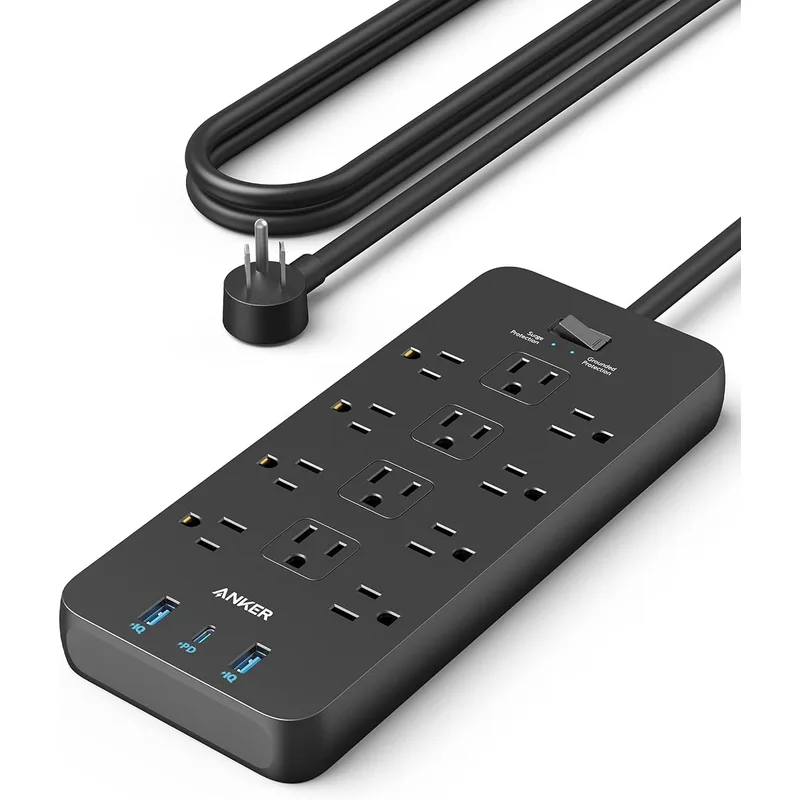
The Anker 351 is the right first buy for most home offices: 12 outlets, a USB-C 20W fast charging port, TUV-certified surge protection, and a flat plug that handles real desk geometry without fighting you.
The 20W USB-C port is the feature that differentiates this strip from simple extension cords. It fast-charges iPhones and Android phones directly from the strip, eliminating one power brick from your outlet count. Combined with two USB-A ports, you’re charging three devices from the strip’s built-in ports — leaving all 12 AC outlets free for equipment.
Outlet spacing is generous. Large wall-wart power supplies — the boxy kind that come with routers, speakers, and external hard drives — install without blocking adjacent outlets. On most competing strips, these take up two slots each.
The 2100 Joule rating covers the basics, backed by TUV Listing (a German safety certification that’s arguably more rigorous than UL for consumer electronics). The $200,000 connected equipment warranty provides a reasonable coverage level for a desk setup.
The flat 90° plug disappears behind furniture. If you’re mounting this under the desk with adhesive strips or Velcro, the low-profile plug keeps the strip flush.
Anker 351 Power Strip
Pros
- 20W USB-C fast charging port charges an iPhone from 0–50% in under 30 minutes
- Flat 90° plug fits behind desks and furniture without wasting space
- TUV-certified surge protection provides verified safety assurance
- 12 widely-spaced outlets handle large power bricks without blocking neighbors
- Lightweight and compact enough to mount under the desk with adhesive strips
Cons
- 2100 Joules is adequate but not the highest protection rating on this list
- No coaxial or ethernet port protection for router/modem gear
- 5ft cord may be short for desks far from the wall outlet
2. Belkin BE112230-08 — Best Value
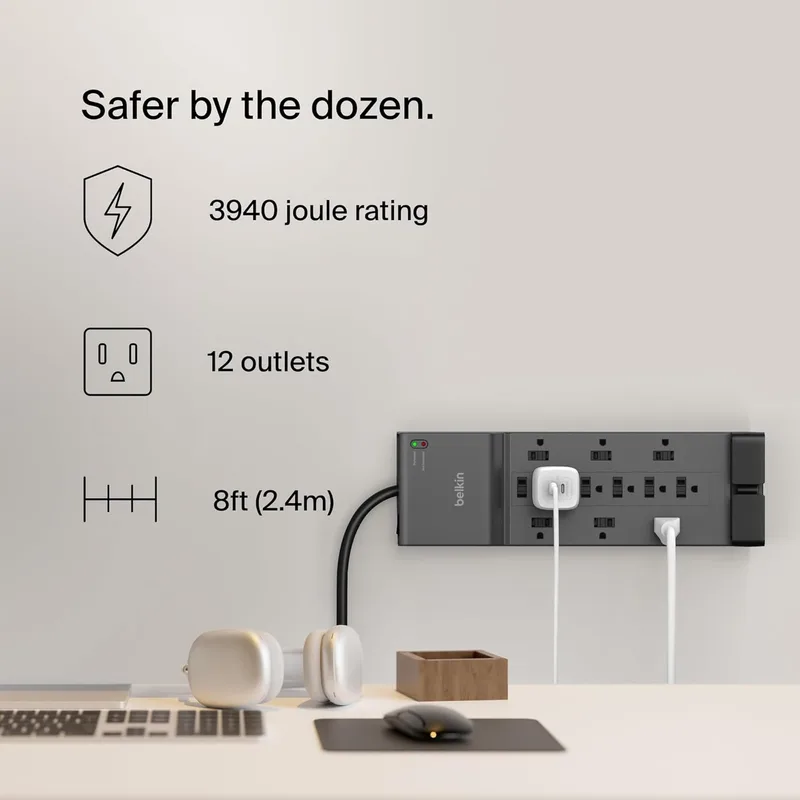
The Belkin BE112230-08 is the strip for home office workers who want the highest practical surge protection at a moderate price — and who run equipment that’s connected to a cable or phone line.
3,940 Joules is among the highest ratings in this price range. For a desk that has expensive equipment and stays on all day, the protection margin matters. The 8ft cord reaches floor outlets from any desk configuration, including full sit-stand desks at maximum height.
The coaxial and RJ11 protection covers cable modem and phone line connections — both common paths for electrical surges to enter your equipment. If your cable modem is on the same strip as your router, monitor, and laptop dock, having coaxial protection on the strip closes an otherwise open vulnerability.
The $300,000 Connected Equipment Warranty is the highest on this list — Belkin backs this strip more heavily than anyone else here.
The notable gap is USB charging. The BE112230-08 has no USB ports. If you need to charge phones and tablets from your desk setup, you’ll need a separate USB charger or a second strip slot for your existing charger brick.
Belkin BE112230-08 Surge Protector
Pros
- 3940 Joules — nearly double the Anker 351's rating for significantly better protection
- 8ft cord reaches floor outlets from any desk height with room to spare
- Coaxial and RJ11 phone/modem protection covers the full desk ecosystem
- $300,000 Connected Equipment Warranty — highest on this list
- Trusted brand with consistent build quality across the lineup
Cons
- No USB charging ports — you'll need a separate charger for phones and tablets
- Heavier and less compact than the Anker 351
- No USB-C port for fast charging modern devices
3. Tripp Lite TLP1208SAT — Best for Network Equipment
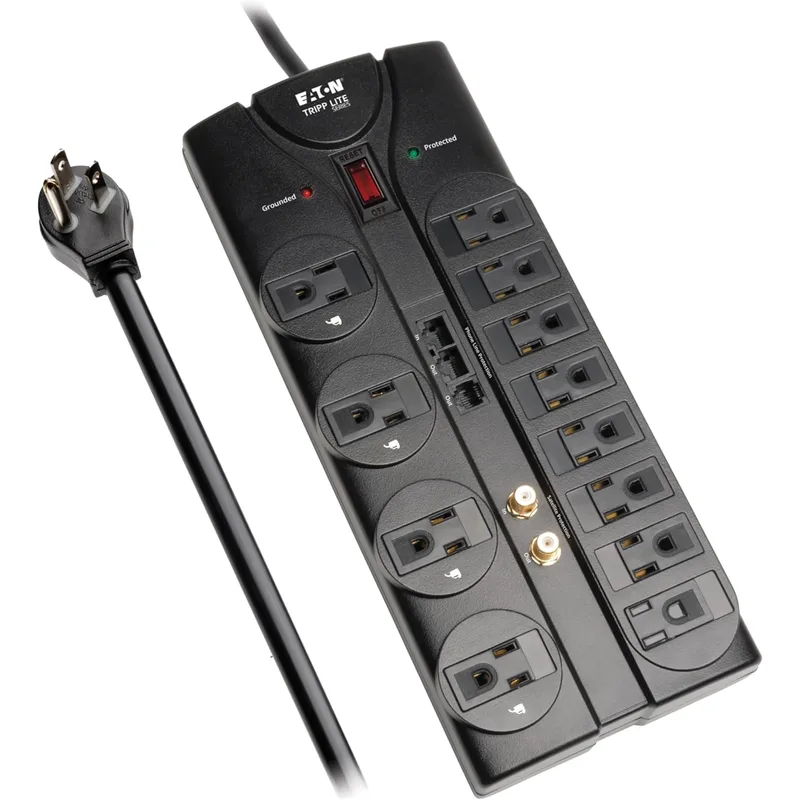
The Tripp Lite TLP1208SAT is built specifically for the desk setup that includes a router, cable modem, and/or network-attached storage — and it’s the only pick on this list with RJ45 Ethernet port protection.
The distinction matters. A surge that travels through your cable provider’s coaxial line hits the modem. If the modem is connected to your router via Ethernet, and that router is connected to your NAS and dock, a surge can cascade through the wired network. The TLP1208SAT breaks that chain: coaxial input protects the cable signal; RJ45 Ethernet ports protect the wired network connections between devices; RJ11 protects the phone/DSL line.
For home offices running wired Ethernet to desktops, NAS units, or switches — which is increasingly common as WiFi 6/7 speeds no longer justify avoiding cables — this strip is the right architecture choice.
12 outlets with an 8ft right-angle flat cord give it the same desk-friendly installation profile as the Belkin. The Eaton/Tripp Lite brand carries enterprise-level power protection pedigree that consumer strip brands don’t match.
At $40–$55, it costs more than the Belkin and Anker options. That premium is entirely for the network port protection. If you don’t run wired Ethernet from your desk and have no coaxial devices, the Belkin BE112230-08 gives you more Joules for less money.
Tripp Lite TLP1208SAT
Pros
- RJ45 Ethernet port protection — the only pick on this list that protects wired network connections
- Coaxial and RJ11 protection covers cable modem, DSL, and satellite equipment
- Flat right-angle plug sits flush against the wall for clean desk cable management
- 12 outlets with spacing that accommodates chunky wall-wart adapters
- Eaton-backed build quality with diagnostic LED indicators
Cons
- Higher price than comparable 12-outlet strips without the network ports
- No USB charging ports
- 2880 Joules is lower than the Belkin despite the higher price
4. APC SurgeArrest P11VT3 — Best Mid-Range
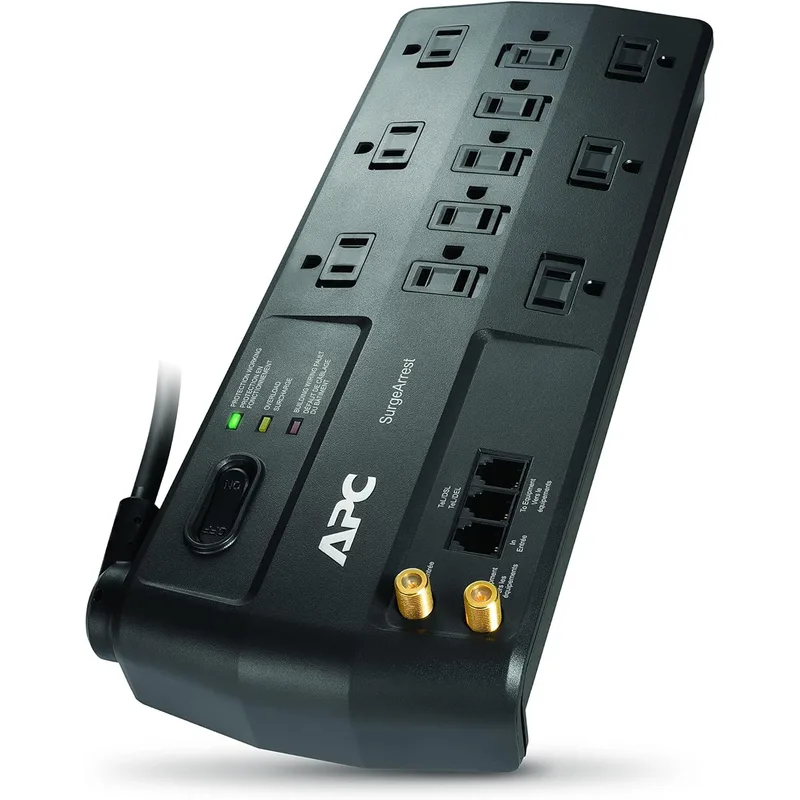
APC built its reputation on UPS battery backup units for servers and data centers. The SurgeArrest P11VT3 brings that background to a desk power strip form factor, and it delivers a 3,020 Joule rating at a competitive mid-range price.
The rotating 180° cord is a practical differentiator. Standard surge protector plugs point one direction — if your wall outlet faces the wrong way or you’re installing behind a tight desk configuration, you’re working around it. The rotating cord solves that without adapters.
The built-in Tel2 DSL/phone splitter is unusual and useful for workers with a dedicated office phone line or DSL connection. It accepts one phone input and splits to two outputs, both protected — without needing a separate filter or splitter device.
11 outlets instead of 12 is the meaningful tradeoff here. For most desks — monitor, dock, laptop charger, desk lamp, speakers, USB charger, external drive — 11 is enough. But if your setup is already at 11 devices, there’s no spare.
No USB ports and a $75,000 equipment warranty (the lowest on this list) are the other gaps. For buyers who want APC’s protection pedigree at a mid-range price with network port coverage and a flexible cord, the P11VT3 delivers. For buyers who also need USB charging, look at the Anker 351.
APC SurgeArrest P11VT3
Pros
- 3020 Joules at a mid-range price — strong protection-to-cost ratio
- Rotating 180° cord accommodates tight spaces and unusual outlet orientations
- Built-in Tel2 splitter lets you protect two phone/DSL lines simultaneously
- 11 outlets covers a full desk setup — monitor, speakers, lamp, chargers, laptop dock
- APC's reputation in power protection carries over from their UPS product line
Cons
- 11 outlets instead of 12 — you may need to prioritize
- No USB charging ports
- Equipment warranty ($75,000) is the lowest on this list
- No RJ45 Ethernet protection
5. Anker PowerExtend Strip 12 — Best Heavy-Duty

The Anker PowerExtend Strip 12 exists for one specific use case: maximum surge protection at Anker’s build quality, without paying for features you don’t need.
The dual 4,000 Joule rating — 4,000 Joules applied across two separate protection stages — is the highest on this list. This matters for home offices in areas with frequent power fluctuations, or for desks running high-value equipment (color-accurate monitors, video editing workstations, high-end audio interfaces) where replacing damaged gear would be expensive.
The flat 90° plug handles tight desk installations cleanly. 12 widely-spaced outlets fit large power supplies without adjacent-slot conflicts. The heavy-gauge construction is noticeably more substantial than budget strips — this is an outlet strip built to stay in one place for years, not to be shuffled around.
What it doesn’t have: USB charging ports of any kind, and a 6ft cord instead of the 8ft cord on the Belkin and Tripp Lite options. If your desk is far from the wall outlet and you run devices that need USB charging from the strip, neither the cord length nor the port selection works in your favor.
For the home office that prioritizes surge protection above all else and handles charging via a separate USB charger or dock, the PowerExtend Strip 12 is the cleanest no-compromise option on joule rating.
Anker PowerExtend Strip 12
Pros
- Dual 4000 Joule surge protection — highest raw joule rating on this list
- Flat 90° plug sits behind furniture cleanly at any installation angle
- 12 outlets with wide spacing prevents large adapters from blocking neighbors
- UL Listed certification from an independent safety lab
- Sturdy, heavy-gauge construction built for the demands of a full desk setup
Cons
- No USB charging ports — the entire value is in surge protection, not charging
- 6ft cord is shorter than the Belkin and Tripp Lite 8ft options
- Higher price than the Anker 351 without adding USB ports
Comparison Table
| Power Strip | Price | Joules | Outlets | USB-C | Cord | Network Ports | Equip. Warranty |
|---|---|---|---|---|---|---|---|
| Anker 351 | $23.37-$28.99 as of Oct 18, 2026 | 2,100 | 12 | 20W | 5 ft | None | $200,000 |
| Belkin BE112230-08 | Unavailable | 3,940 | 12 | No | 8 ft | Coax + RJ11 | $300,000 |
| Tripp Lite TLP1208SAT | Unavailable | 2,880 | 12 | No | 8 ft | RJ11 + RJ45 + Coax | $250,000 |
| APC SurgeArrest P11VT3 | Unavailable | 3,020 | 11 | No | 8 ft | Coax + Tel2 splitter | $75,000 |
| Anker PowerExtend Strip 12 | Unavailable | 4,000 | 12 | No | 6 ft | None | — |
Buying Guide
Buy the Anker 351 if you want the best balance of outlets, USB-C fast charging, and surge protection in a compact, flat-plug form factor. The right default pick for most home offices.
Buy the Belkin BE112230-08 if you want maximum joule rating per dollar, the highest equipment warranty on this list, and coax/phone protection — without needing USB charging from the strip itself. The strongest value pick for pure protection.
Buy the Tripp Lite TLP1208SAT if your desk setup includes a wired Ethernet connection from a cable modem or switch and you want surge protection on both the power and network signal paths. The only pick with RJ45 Ethernet port protection.
Buy the APC SurgeArrest P11VT3 if you have a DSL phone line, need a rotating cord to handle an awkward outlet orientation, or want APC’s protection engineering at a mid-range price. Solid for desks with a landline or DSL modem in the mix.
Buy the Anker PowerExtend Strip 12 if you want the highest joule rating available and your desk doesn’t need USB charging from the strip. Purpose-built for maximum surge protection without compromise.
When the joule rating actually matters
Joule ratings describe cumulative energy absorption — how much total surge energy the protection circuitry can handle over its lifetime before the MOV (metal oxide varistor) is depleted. A single large surge (lightning strike nearby) can consume a significant portion of a lower joule rating in one event. Multiple smaller surges from grid fluctuations add up over months.
For a home office with a $1,500+ monitor and $300+ dock, spending $10–$15 more for 3,500–4,000 Joules versus 2,100 Joules is straightforward math. The protection margin matters when what’s downstream costs more to replace.
When to replace a surge protector
Surge protectors don’t last forever. The protection circuitry (MOV) degrades with each absorbed surge and with age. A strip that looks functional electrically may have zero remaining surge protection. Most strips have a protection LED that turns off or changes color when the MOV is depleted — check yours. If yours is more than 5 years old with no indicator, replace it.
Frequently Asked Questions
What’s the difference between a power strip and a surge protector?
A basic power strip extends outlet count but provides no protection against voltage spikes. A surge protector includes a MOV (metal oxide varistor) circuit that absorbs excess voltage and diverts it away from connected equipment. All five options on this list are surge protectors. “Power strip” is commonly used for both, but check the joule rating — if a product doesn’t list one, it’s just an extension cord.
Is a higher joule rating always better?
Higher joule ratings absorb more surge energy before the protection circuit is depleted, so yes — higher is better, assuming the other specs (outlets, cord length, price) work for your setup. The tradeoff is price. For a desk running a single monitor and laptop, 2,100 Joules is sufficient. For a full workstation with monitor, NAS, audio interface, and dock, 3,000–4,000 Joules gives you a more durable protection margin.
Do I need network port protection (coax, RJ11, RJ45) for my home office?
If your cable modem is on the same power strip as your computer equipment, coaxial protection closes a real vulnerability — surges can travel through the cable provider’s line and hit your modem, then propagate to connected devices. RJ45 Ethernet protection matters if you’re running wired Ethernet between devices. For a purely WiFi setup with no coaxial cable entering your desk area, standard AC surge protection is sufficient.
Can I plug a laser printer or space heater into a surge protector?
Laser printers draw high inrush current at startup — enough to trip circuit breakers on lesser strips. Space heaters and other resistive heating elements should be plugged directly into a wall outlet rather than a surge protector strip, as they often exceed the strip’s continuous load rating. All five strips on this list are rated at 1,800–1,875W. A 1,500W space heater leaves almost no headroom for other devices and isn’t recommended on the same strip.
How do I know when my surge protector has stopped protecting?
Most quality surge protectors include a protection indicator LED. When the MOV is depleted, the LED turns off or changes state. Some advanced models cut power entirely when protection fails — you can’t use a surge protector that’s lost its protection circuitry, which prevents the false sense of security that old, depleted strips create. If your strip has no LED and is more than 3–5 years old, replace it. The cost is minimal relative to what’s downstream.
Bottom Line
For most home offices, the Anker 351 is the right starting point — flat plug, USB-C fast charging, 12 outlets, and TUV-certified surge protection at under $30. If your desk includes a cable modem or DSL router and you want complete network path protection, the Tripp Lite TLP1208SAT is the only pick here with RJ45 Ethernet coverage. For the highest joule rating per dollar and the best equipment warranty, the Belkin BE112230-08 at $25–$35 is the strongest value on protection alone.
Whatever you pick, make sure the protection LED is working and plan to replace the strip every 3–5 years. The cost of replacing a surge protector is always less than replacing the equipment behind it.
Detailed Reviews
Anker 351 Power Strip
Pros
- 20W USB-C fast charging port charges an iPhone from 0–50% in under 30 minutes
- Flat 90° plug fits behind desks and furniture without wasting space
- TUV-certified surge protection provides verified safety assurance
- 12 widely-spaced outlets handle large power bricks without blocking neighbors
- Lightweight and compact enough to mount under the desk with adhesive strips
Cons
- 2100 Joules is adequate but not the highest protection rating on this list
- No coaxial or ethernet port protection for router/modem gear
- 5ft cord may be short for desks far from the wall outlet
Belkin BE112230-08 Surge Protector
Pros
- 3940 Joules — nearly double the Anker 351's rating for significantly better protection
- 8ft cord reaches floor outlets from any desk height with room to spare
- Coaxial and RJ11 phone/modem protection covers the full desk ecosystem
- $300,000 Connected Equipment Warranty — highest on this list
- Trusted brand with consistent build quality across the lineup
Cons
- No USB charging ports — you'll need a separate charger for phones and tablets
- Heavier and less compact than the Anker 351
- No USB-C port for fast charging modern devices
Tripp Lite TLP1208SAT
Pros
- RJ45 Ethernet port protection — the only pick on this list that protects wired network connections
- Coaxial and RJ11 protection covers cable modem, DSL, and satellite equipment
- Flat right-angle plug sits flush against the wall for clean desk cable management
- 12 outlets with spacing that accommodates chunky wall-wart adapters
- Eaton-backed build quality with diagnostic LED indicators
Cons
- Higher price than comparable 12-outlet strips without the network ports
- No USB charging ports
- 2880 Joules is lower than the Belkin despite the higher price
APC SurgeArrest P11VT3
Pros
- 3020 Joules at a mid-range price — strong protection-to-cost ratio
- Rotating 180° cord accommodates tight spaces and unusual outlet orientations
- Built-in Tel2 splitter lets you protect two phone/DSL lines simultaneously
- 11 outlets covers a full desk setup — monitor, speakers, lamp, chargers, laptop dock
- APC's reputation in power protection carries over from their UPS product line
Cons
- 11 outlets instead of 12 — you may need to prioritize
- No USB charging ports
- Equipment warranty ($75,000) is the lowest on this list
- No RJ45 Ethernet protection
Anker PowerExtend Strip 12
Pros
- Dual 4000 Joule surge protection — highest raw joule rating on this list
- Flat 90° plug sits behind furniture cleanly at any installation angle
- 12 outlets with wide spacing prevents large adapters from blocking neighbors
- UL Listed certification from an independent safety lab
- Sturdy, heavy-gauge construction built for the demands of a full desk setup
Cons
- No USB charging ports — the entire value is in surge protection, not charging
- 6ft cord is shorter than the Belkin and Tripp Lite 8ft options
- Higher price than the Anker 351 without adding USB ports