| Spec | Logitech MX Keys S | Keychron Q1 Pro | Keychron K4 V2 |
|---|---|---|---|
| Rating | 8.8/10 | 9.0/10 | 8.5/10 |
| Price | $100.09-$119.99as of Oct 18, 2026 | Unavailable | $74.99-$99.99as of Oct 18, 2026 |
| Layout | Full-size (104 keys) | 75% compact (84 keys) | 96% compact (100 keys) |
| Switch type | Scissor (low-profile) | K Pro Red (linear, hot-swappable) | Gateron G Pro Red (linear) |
| Wireless | Bluetooth 5.1 + Logi Bolt USB | Bluetooth 5.1 / USB-C wired | Bluetooth 5.1 / USB-C wired |
| Battery | 10 days (backlight on) / 5 months (off) | 4000mAh | 240 hours (backlight off) |
| Charging | USB-C | USB-C | USB-C |
| Multi-device | 3 devices (Easy-Switch buttons) | 3 devices via Bluetooth | 3 devices via Bluetooth |
| Backlight | Adaptive ambient sensing | South-facing RGB | RGB (15+ modes) |
| Software | Logi Options+ | — | — |
| Weight | 810g | 1.4kg | 870g |
| Firmware | — | QMK/VIA programmable | — |
| Frame | — | Full aluminum with gasket mount | Aluminum |
| Check Price → | Check Price → | Check Price → |
Prices change daily — tap Check Price for the current Amazon price.
Keychron opened 2026 at CES by launching the Q Ultra ZMK series — wireless mechanical keyboards with up to 660-hour battery life at 8K polling rate. That announcement confirmed what the remote work keyboard market already knew: Keychron is seriously competing for the productivity space that Logitech has owned for a decade. The question is whether they’ve closed the gap on the things remote workers actually care about.
The MX Keys S has been the default “what keyboard should I buy for remote work?” answer for over a year. It’s quiet, wireless, multi-device capable, and ships with the best peripheral software available. The Keychron lineup offers something the MX Keys S cannot: mechanical switches, real customization, and build quality that outlasts most desks.
This comparison analyzes three keyboards — the Logitech MX Keys S, Keychron Q1 Pro, and Keychron K4 V2 — across the categories that matter most for remote work: typing feel, multi-device reliability, software, and value.
Quick Comparison
| Keyboard | Type | Layout | Wireless | Battery | Price | Rating |
|---|---|---|---|---|---|---|
| Logitech MX Keys S | Scissor | Full-size | Logi Bolt + BT | 10 days / 5 months | $100.09-$119.99 as of Oct 18, 2026 | 8.8 |
| Keychron Q1 Pro | Mechanical | 75% | Bluetooth | 4000mAh | Unavailable | 9.0 |
| Keychron K4 V2 | Mechanical | 96% | Bluetooth | 240 hours | $74.99-$99.99 as of Oct 18, 2026 | 8.5 |
1. Logitech MX Keys S — Best for Multi-Device Remote Work
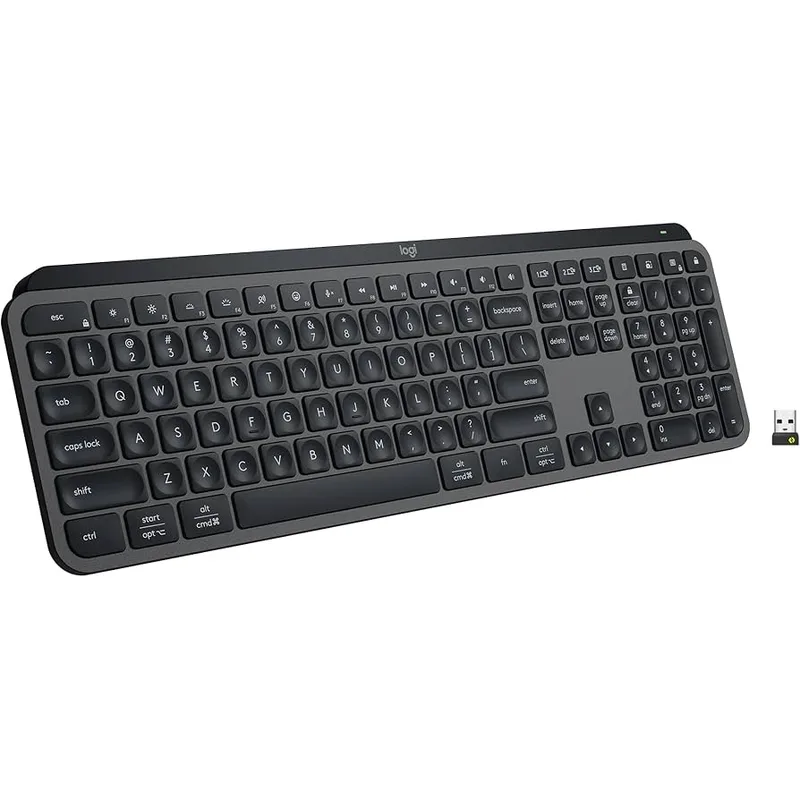
Logitech MX Keys S
Pros
- Logi Bolt dongle delivers faster, more reliable multi-device switching than Bluetooth alone — sub-second handoff between work laptop and personal desktop
- Scissor switches stay quiet on calls — no mechanical clatter bleeding into the microphone
- Smart backlighting adjusts automatically to ambient light without manual fiddling
- Logi Options+ enables per-app key customization across Mac and Windows without learning QMK
- USB-C rechargeable with up to 5 months battery when backlight is off
Cons
- Scissor switches feel flat compared to mechanical alternatives — no physical click or tactile bump
- Full-size layout with numpad is wider than most remote workers actually need
- No hot-swap support — switch type is fixed at purchase
- Premium price for a non-mechanical keyboard
The MX Keys S is not the most exciting keyboard in this comparison. It does not have mechanical switches, hot-swap capability, or QMK firmware. What it has is a set of practical features that remote workers actually use daily — and it executes all of them cleanly.
Logi Bolt is the differentiator. Most wireless keyboards rely exclusively on Bluetooth, which introduces occasional pairing drops, latency spikes near interference sources, and multi-device switching that requires button presses followed by a 3-5 second reconnection delay. Logi Bolt operates on a dedicated 2.4 GHz channel that avoids the congested Bluetooth band — switching between a laptop and desktop takes under a second. For workers who move between a work machine and a personal machine multiple times per day, this is not a minor convenience. It eliminates a friction point that compounds across hundreds of daily device switches.
The scissor switches divide opinion. They are quiet enough to use on calls without mic bleed — a real advantage in home offices where the microphone is always open during meetings. The tradeoff is tactile feedback: the key press registers but doesn’t communicate itself the way a mechanical switch does. Writers and coders who type 6-8 hours a day often report that scissor switches feel fatiguing over extended sessions compared to mechanical alternatives.
Logi Options+ adds app-specific key customization — the function row can behave differently in Zoom versus VS Code versus Figma. For remote workers who spend their day in 3-4 applications, this is practical workflow automation that takes 15 minutes to configure and disappears into the background after that.
Best for: Remote workers who prioritize multi-device reliability, type frequently on video calls, and want a professional keyboard that works well from day one.
2. Keychron Q1 Pro — Best Build Quality for Desk Workers
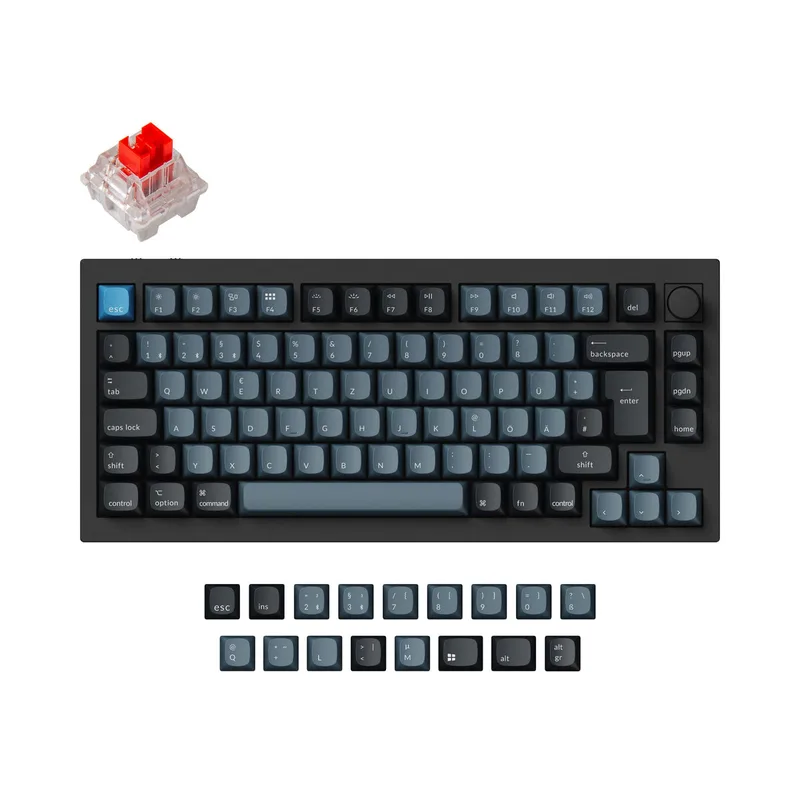
Keychron Q1 Pro
Pros
- QMK/VIA firmware allows remapping every key without third-party software — true unlimited customization
- Hot-swappable switch sockets let you change switch types without soldering
- Gasket-mounted aluminum frame absorbs typing vibration — noticeably quieter sound profile than hard-mount keyboards
- 75% layout is the sweet spot for desk space without losing arrow keys or function row
- South-facing RGB minimizes glare on keycaps — lighting looks cleaner than top-facing alternatives
Cons
- At 1.4kg, this is a desk-only keyboard — impractical to move or travel with
- Bluetooth-only wireless lacks the reliability of Logi Bolt for multi-device switching
- QMK configuration has a meaningful learning curve for non-technical users
- Highest price in this comparison at $169-$199
The Q1 Pro is the keyboard Keychron built for remote workers who care about typing — not just typing adequately, but typing on something that feels worth using every day. The full aluminum case with gasket mount is a specific engineering choice: it absorbs the vibration of each keystroke before it reaches the desk, producing a lower-pitched, more muffled sound profile than the hard-mounted aluminum on the K4 V2.
QMK/VIA firmware is the headline feature for customization. Every key is individually programmable — any modifier, layer, macro, or shortcut can be assigned to any key position without installing a proprietary app. This is the standard firmware used by serious keyboard builders, and it runs on the Q1 Pro out of the box. The learning curve is real: first-time QMK users should set aside a few hours to understand layers, keymaps, and the VIA interface. Once configured, the keyboard behaves exactly as you specify, permanently.
Hot-swappable switches mean the typing experience is adjustable. The Q1 Pro ships with K Pro Red switches — smooth, light, linear. To add tactile feedback, swap in Browns. For the audible click, swap in Blues. No soldering, no voiding the warranty — pull the switch out with the included puller and press the new one in. This extends the useful lifespan of the keyboard significantly: switch preferences can change as they evolve without buying a new board.
The Bluetooth-only wireless is the main limitation on this model. Multi-device switching works but takes 3-5 seconds and occasionally requires re-pairing. At 1.4kg, this keyboard stays on the desk.
Best for: Desk-bound remote workers who type heavily, want the best mechanical build quality, and are willing to spend time on QMK configuration.
3. Keychron K4 V2 — Best Value Mechanical Option
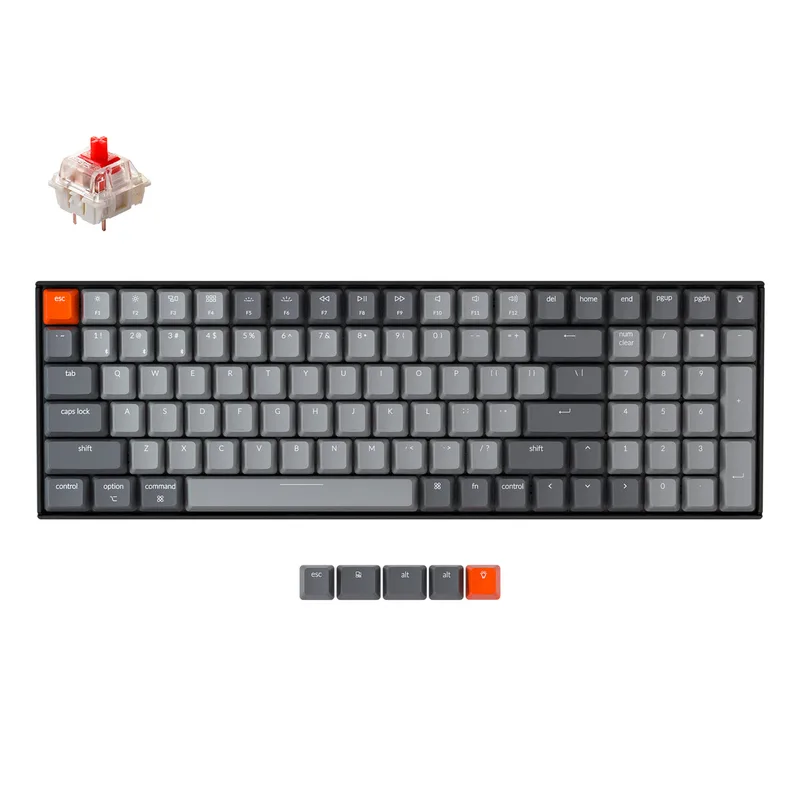
Keychron K4 V2
Pros
- Mechanical Gateron G Pro Red switches deliver genuine tactile depth that no scissor keyboard can replicate
- 96% layout retains numpad while reducing desk footprint versus standard full-size boards
- 240-hour battery with backlight off means charging is a weekly task at most
- Aluminum frame adds rigidity and premium feel at a mid-range price point
- Available in Red, Blue, or Brown switches at no additional cost
Cons
- No dedicated software — macro customization requires third-party tools
- Bluetooth device switching is functional but slower than Logi Bolt
- RGB battery drain drops usable time to roughly 3 hours with backlight fully on
- No hot-swap switches — soldering required to change switch type
The K4 V2 makes the case for mechanical keyboards at a price point where the comparison with the MX Keys S becomes genuinely competitive. At $84-$94, it costs $15-$25 less than the MX Keys S while delivering Gateron G Pro mechanical switches with real tactile depth.
The 96% layout is well-considered. It keeps all 100 keys — including the numpad — while removing the physical gaps between key clusters that make standard full-size keyboards wider than necessary. The result is a keyboard that fits noticeably better on smaller desks without sacrificing any key access. Compared to the Q1 Pro’s 75% layout, the K4 V2 is wider but retains the numpad that spreadsheet-heavy workers rely on.
Battery life stands out: 240 hours with backlight off. With RGB disabled, this keyboard charges roughly once every 10 days at 8 hours of daily use. The RGB power draw is aggressive when fully on — battery drops to about 3 hours of backlit use — so most K4 V2 owners end up running with the backlight off or dimmed anyway.
The primary limitation versus the Q1 Pro is that switches are soldered and there is no QMK support. Customization requires third-party software or accepting the default layout. For workers who don’t need macros or remapping, this is a non-issue. But it means the K4 V2 is less adaptable over time.
Best for: Remote workers who want their first mechanical keyboard, need a numpad, and don’t need deep software customization.
Head-to-Head: Key Categories
Typing Feel
Keychron wins on both boards. Gateron G Pro and K Pro Red switches deliver a keystroke with physical feedback that scissor switches cannot replicate. The Q1 Pro’s gasket mount further improves typing sound quality versus the K4 V2’s harder aluminum frame. If typing feel matters to you, the MX Keys S is the wrong keyboard.
Multi-Device Switching
Logitech wins clearly. Logi Bolt’s dedicated 2.4 GHz channel switches devices faster and with greater reliability than Bluetooth on either Keychron board. For remote workers pairing a work laptop and personal machine daily, sub-second Logi Bolt switching versus Keychron’s 3-5 second Bluetooth handshake is a constant quality-of-life difference.
Software and Customization
Keychron Q1 Pro wins on depth; Logitech wins on ease. QMK/VIA gives the Q1 Pro unlimited customization potential but requires learning. Logi Options+ is more restricted but configures useful per-app key behavior in 15 minutes. The K4 V2 has no dedicated software, limiting it to default firmware behavior.
Build Quality and Durability
Q1 Pro wins. Full aluminum with gasket mount construction at 1.4kg is built to outlast most desks. The K4 V2’s aluminum frame also outperforms the MX Keys S’s plastic body. All three handle daily work reliably, but the Q1 Pro is in a different build tier.
Value
K4 V2 wins. At $84-$94, it delivers mechanical switches and an aluminum frame for less than the MX Keys S. The Q1 Pro’s $169-$199 is justified by its build and QMK support — but only if you’ll actually use those features. The MX Keys S’s $99-$109 is competitive only if multi-device connectivity is the real priority.
Which Keyboard Should You Buy?
Choose the Logitech MX Keys S if:
- You switch between two or three computers multiple times per day
- You type frequently on video calls and need minimal sound bleed into the mic
- You want a keyboard that works well out of the box with minimal configuration
- Multi-device workflow matters more than typing experience
Choose the Keychron Q1 Pro if:
- You type 6+ hours per day and care about how the keyboard actually feels
- You want a keyboard you can modify and reconfigure over years
- Your workspace is permanent — this keyboard will not move
- You’re willing to invest time in QMK setup
Choose the Keychron K4 V2 if:
- You want mechanical switches at the MX Keys S price or below
- You need a numpad and want a more compact footprint than full-size
- You don’t need deep software customization
- This is your first mechanical keyboard and you want to try the feel without overcommitting
FAQ
Do Keychron keyboards work well with Mac?
Yes. Both the Q1 Pro and K4 V2 include Mac and Windows keycap sets in the box, plus a physical Mac/Windows toggle switch on the side. In Mac mode, the modifier key layout matches macOS conventions. The MX Keys S also works well with Mac, and Logi Options+ has strong macOS support with per-app customization.
Is the Logitech MX Keys S worth it if you only use one computer?
Probably not. If you have a single machine and don’t need Logi Bolt’s reliability advantage, the Keychron K4 V2 delivers mechanical switches and an aluminum frame for $15-$25 less. The MX Keys S premium is largely justified by its multi-device reliability and software polish — without that use case, value tilts toward Keychron.
Can Keychron keyboards connect via 2.4 GHz dongle?
The K4 V2 and Q1 Pro support Bluetooth 5.1 and USB-C wired, but not 2.4 GHz dongle wireless. Keychron’s newer Q Ultra series (launched at CES 2026) adds 2.4 GHz wireless with 8K polling rate, but that lineup is a separate product family from these boards.
How loud are these keyboards for video calls?
The MX Keys S is the quietest by a significant margin — scissor switches produce minimal noise. The K4 V2 with Red switches is moderately audible; linear switches are quieter than clicky Blue switches. The Q1 Pro’s gasket mount absorbs some typing impact before it resonates through the desk, making it noticeably quieter than a hard-mounted mechanical board at comparable switch types.
Which keyboard is best for programmers working remotely?
The Keychron Q1 Pro is the strongest option for programmers. QMK firmware enables layer-based shortcuts, custom modifiers, and macros that reduce friction in coding workflows. The 75% layout keeps arrow keys and function row accessible without the extra desk width. The K4 V2 with Blue or Brown switches is a strong budget alternative, though without QMK remapping.
Verdict
The Logitech MX Keys S earns the top recommendation for most remote workers — not because it’s the best keyboard, but because it’s the best tool for how most remote workers use keyboards. Frequent device switching, call-friendly typing, and a polished software experience are the priorities for the majority of WFH setups, and the MX Keys S addresses all three without requiring any configuration.
For remote workers who type heavily and want a keyboard worth using every day for years, the Keychron Q1 Pro is the better choice. Better build, better typing feel, real customization — and a price premium that reflects genuine quality differences.
The Keychron K4 V2 is the right pick for anyone who wants to experience mechanical keyboards without committing to the Q1 Pro’s price. At $84-$94 with mechanical switches and an aluminum frame, it represents solid value for a first mechanical board.
For more keyboard picks, see Best Ergonomic Keyboards for Remote Workers.
Detailed Reviews
Logitech MX Keys S
Pros
- Logi Bolt dongle delivers faster, more reliable multi-device switching than Bluetooth alone — sub-second handoff between work laptop and personal desktop
- Scissor switches stay quiet on calls — no mechanical clatter bleeding into the microphone
- Smart backlighting adjusts automatically to ambient light without manual fiddling
- Logi Options+ enables per-app key customization across Mac and Windows without learning QMK
- USB-C rechargeable with up to 5 months battery when backlight is off
Cons
- Scissor switches feel flat compared to mechanical alternatives — no physical click or tactile bump
- Full-size layout with numpad is wider than most remote workers actually need
- No hot-swap support — switch type is fixed at purchase
- Premium price for a non-mechanical keyboard
Keychron Q1 Pro
Pros
- QMK/VIA firmware allows remapping every key without third-party software — true unlimited customization
- Hot-swappable switch sockets let you change switch types without soldering
- Gasket-mounted aluminum frame absorbs typing vibration — noticeably quieter sound profile than hard-mount keyboards
- 75% layout is the sweet spot for desk space without losing arrow keys or function row
- South-facing RGB minimizes glare on keycaps — lighting looks cleaner than top-facing alternatives
Cons
- At 1.4kg, this is a desk-only keyboard — impractical to move or travel with
- Bluetooth-only wireless lacks the reliability of Logi Bolt for multi-device switching
- QMK configuration has a meaningful learning curve for non-technical users
- Highest price in this comparison at $169-$199
Keychron K4 V2
Pros
- Mechanical Gateron G Pro Red switches deliver genuine tactile depth that no scissor keyboard can replicate
- 96% layout retains numpad while reducing desk footprint versus standard full-size boards
- 240-hour battery with backlight off means charging is a weekly task at most
- Aluminum frame adds rigidity and premium feel at a mid-range price point
- Available in Red, Blue, or Brown switches at no additional cost
Cons
- No dedicated software — macro customization requires third-party tools
- Bluetooth device switching is functional but slower than Logi Bolt
- RGB battery drain drops usable time to roughly 3 hours with backlight fully on
- No hot-swap switches — soldering required to change switch type