TP-Link spent CES 2026 announcing its next generation of WiFi 7 mesh systems — the Deco BE63, BE77, and BE85 — complete with an AI assistant called Aireal. The announcements pushed the spotlight toward WiFi 7 and left the WiFi 6E lineup looking like yesterday’s news. But there’s a practical consequence: the Deco XE75 has hit its lowest prices since launch, with the 2-pack now regularly found at $189–$200 during Spring 2026 sales. For home offices on gigabit connections, the XE75 just became the most compelling value in mesh networking.
This review covers who the XE75 is actually right for, where it falls short, and whether the $100+ premium for the XE75 Pro or a competing Eero Pro 6E is worth paying.
Quick Comparison
| XE75 2-Pack | XE75 3-Pack | |
|---|---|---|
| Coverage | Up to 5,500 sq ft | Up to 7,200 sq ft |
| Nodes | 2 | 3 |
| WiFi Standard | WiFi 6E (AXE5400) | WiFi 6E (AXE5400) |
| Ethernet Ports | 6 total (3 per unit) | 9 total (3 per unit) |
| Max Speed | 5,400 Mbps | 5,400 Mbps |
| Devices | Up to 200 | Up to 200 |
| Price | $189–$229 | $199–$269 |
| Best For | Apartments, homes ≤2,500 sq ft | Larger homes, multi-level, detached offices |
What You’re Getting
The Deco XE75 is a tri-band WiFi 6E mesh system. The key word is the 6E — it adds a 6GHz radio band that has no legacy device support, which means TP-Link uses it exclusively for backhaul. The nodes talk to each other on 6GHz, leaving both the 5GHz and 2.4GHz bands free for your actual devices. This dedicated wireless backhaul is the feature that separates WiFi 6E mesh systems from older dual-band systems that sacrifice client bandwidth to maintain the inter-node connection.
Combined theoretical throughput: 5,400 Mbps (574 + 2,402 + 2,402) Real-world performance: Reviewers consistently measured 600–700 Mbps on WiFi 6E-capable devices at distances up to 15 meters from the primary node, and near-identical speeds from secondary nodes thanks to the clean 6GHz backhaul.
Each unit is a compact 4.1 × 4.1 × 6.7-inch cylinder that blends into a bookshelf or sits discreetly on a surface. Three Gigabit Ethernet ports per unit give you wired options — though the 1 Gbps ceiling is the main hardware limitation covered later.
2-Pack — Recommended for Most Remote Workers

TP-Link Deco XE75 (2-Pack)
Pros
- Lowest-priced WiFi 6E mesh system available in 2026 — delivers the dedicated 6GHz backhaul band that keeps client speeds fast as you move across floors and rooms, at a price that undercuts Eero Pro 6E by roughly 40%
- Dedicated 6GHz band handles the backhaul connection between nodes, leaving the 5GHz band free for client devices — this architecture eliminates the speed penalty that haunts two-band mesh systems in multi-story homes
- 1.7 GHz quad-core processor handles 200+ simultaneous devices without bogging down — a meaningful upgrade over the dual-core chips in Google Nest WiFi Pro and early Eero units
- Deco app guides setup in under 15 minutes with a step-by-step node placement guide that uses signal strength readings to confirm optimal positioning before finalizing installation
- 2-year warranty covers both hardware defects and shipping replacement — longer than the 1-year warranty on most budget mesh competitors
- AI-driven mesh automatically shifts devices between bands based on congestion and signal quality without requiring manual band steering configuration
Cons
- All Ethernet ports are limited to 1 Gbps — homes with multi-gig internet plans (2.5G or faster) will hit a wired bottleneck; the XE75 Pro fixes this with a 2.5G port but costs significantly more
- Advanced parental controls (content filtering by category, screen time limits, real-time protection) require a HomeShield Pro subscription at approximately $2.99/month — Eero and Google Nest include comparable controls at no additional cost
- Deco app has a steeper learning curve than Eero's interface — finding advanced settings like DHCP reservations, QoS configuration, and port forwarding requires navigating several menu layers rather than surfacing on the main dashboard
- No OFDMA scheduling on the 2.4GHz band, reducing efficiency in environments with dense smart-home device populations (15+ IoT devices)
The 2-pack covers up to 5,500 sq ft with two nodes. For most remote workers in homes up to roughly 2,000–2,500 sq ft, this means one node at the router location (typically near a cable modem) and one node positioned centrally on a second floor or at the far end of the main floor.
The 6GHz backhaul is what makes this two-node setup work well in practice. Older mesh systems using dual-band WiFi 5 or early WiFi 6 dedicated one radio to backhaul and halved client bandwidth in the process. The XE75 avoids that penalty — the 6GHz band handles node-to-node communication while your MacBook, phone, and smart home devices compete only for the 5GHz and 2.4GHz radios.
Setup experience: The Deco app walks through node placement with live signal strength feedback. The app tells you to move the second node if the backhaul signal is too weak rather than letting you commit to a poor placement. Initial configuration runs about 10–15 minutes; adding the second node takes another 3–5 minutes after the first is online.
App and management: The Deco app shows a network map, connected device list, and basic usage stats. Speed test is built in. DHCP reservations, port forwarding, and QoS controls are present but buried — finding them takes more navigation than Eero’s cleaner dashboard. HomeShield provides basic antivirus and intrusion detection for free; upgrading to HomeShield Pro (~$2.99/month or ~$24.99/year) unlocks content filtering and detailed activity reports.
The 1 Gbps Ethernet limit: If your internet plan is 500 Mbps or 1 Gbps, this doesn’t matter. If you’re on a 2 Gbps or multi-gig fiber plan, you’ll cap at 940 Mbps on the WAN port. That’s a real limitation for multi-gig subscribers — but those users should be looking at the XE75 Pro or a higher-end WiFi 7 system anyway.
Best for: Home offices in apartments or houses up to ~2,000 sq ft, gigabit internet subscribers, buyers who want WiFi 6E at the lowest available price point.
3-Pack — For Larger Homes and Detached Offices
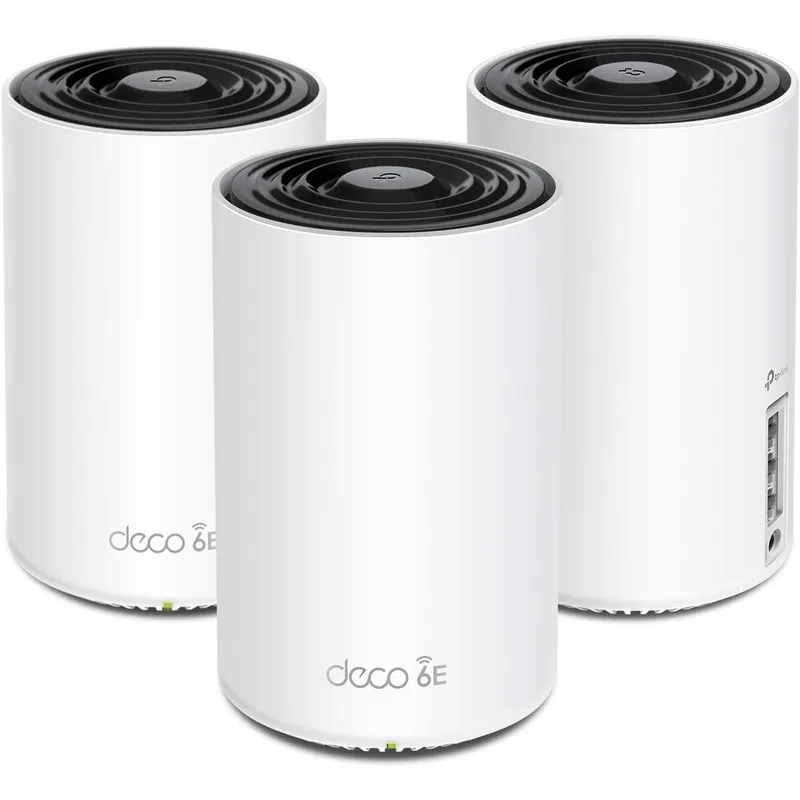
TP-Link Deco XE75 (3-Pack)
Pros
- Three nodes blanket up to 7,200 sq ft — appropriate for 2,500+ sq ft homes, multi-level houses, or properties with detached home offices or studios where a 2-pack leaves dead zones
- Third node enables a daisy-chain or triangle topology — positioning the third unit between the primary and the furthest room maintains backhaul signal strength through the entire mesh
- Currently the most cost-effective way to achieve whole-home WiFi 6E coverage; the 3-pack regularly sells near the 2-pack's full retail price during sales
- Same processor and band architecture as the 2-pack — performance per node is identical, just extended to cover more square footage
Cons
- Three nodes add desk or outlet real estate in three locations — each unit is 6.7 inches tall and requires AC power, which complicates placement in rooms without convenient outlet locations
- Same 1 Gbps Ethernet port limitation applies to all three units — multi-gig subscribers still hit the same wired ceiling as the 2-pack
- Price difference from the 2-pack narrows during sales, making the 3-pack an obvious choice; at full retail the gap widens and the math is less compelling for smaller homes
The 3-pack extends coverage to 7,200 sq ft and makes sense for three situations: homes over 2,000–2,500 sq ft, multi-level houses where a 2-pack leaves dead zones on floors farthest from the primary node, and setups where a detached home office, garage studio, or backyard workspace needs coverage.
The third node can be placed as a relay between the primary and the furthest secondary, maintaining a stronger 6GHz backhaul chain throughout. This topology keeps signal quality consistent from primary to secondary to tertiary — the same principle that makes powerline-extended setups more reliable than single-hop wireless bridges.
At sale pricing (currently $199–$210 during Spring 2026 promotions), the 3-pack often costs barely more than the 2-pack at full retail. If you’re on the fence about needing the third node, it’s generally worth it at those prices just for the future flexibility.
XE75 vs. the Competition
Eero Pro 6E: Amazon’s premium mesh system delivers cleaner software, tighter Alexa integration, and a more beginner-friendly app experience. But a 2-pack costs roughly $150–200 more than the XE75 2-pack at comparable prices. The XE75’s 1.7 GHz quad-core processor actually outperforms the Eero Pro 6E’s chip, and real-world speed comparisons show the Deco XE75 delivering nearly identical throughput for about 60% of the cost. If app simplicity and Amazon ecosystem integration matter, Eero justifies its price. If raw value is the priority, XE75 wins clearly.
Google Nest WiFi Pro: Google’s WiFi 6E mesh system launched with competitive specs but has fallen behind — its 1.0 GHz dual-core processor trails the Deco XE75’s quad-core, coverage is lower (4,400 sq ft for a 3-pack vs. XE75’s 5,500 sq ft for a 2-pack), and the price remains high. The Nest WiFi Pro’s advantage is its all-free feature set including parental controls and Matter/Thread smart home support. If your home runs Google Home devices heavily, the Nest Pro has integration advantages. For pure networking performance per dollar, the Deco XE75 wins.
TP-Link Deco XE75 Pro: The Pro variant adds a 2.5 Gbps Ethernet port per unit and costs roughly $100–$150 more per pack. If you have a multi-gig internet subscription or run a NAS or wired workstation that benefits from 2.5G LAN speeds, the Pro is worth the premium. For gigabit connections, the standard XE75 provides identical wireless performance.
TP-Link Deco BE63 (WiFi 7): The new WiFi 7 system from CES 2026 starts at $250–$300 for a single node. WiFi 7 brings MLO (Multi-Link Operation) for simultaneous multi-band connections and higher theoretical speeds — meaningful if you have WiFi 7 devices. For workers using current laptops, phones, and peripherals, the practical speed difference over the XE75’s WiFi 6E is minimal on gigabit connections. The XE75 remains the better financial decision for most buyers through at least 2027.
Who Should Buy the XE75
Buy it if:
- You have a gigabit or slower internet plan
- You want WiFi 6E coverage without paying premium prices
- Your home is 1,500–3,000 sq ft (2-pack) or 2,500–4,500 sq ft (3-pack)
- You have existing WiFi 5 or dual-band WiFi 6 equipment with dead zones
Skip it if:
- You’re on a 2 Gbps+ internet plan (get the XE75 Pro or a WiFi 7 system)
- You want completely free parental controls and content filtering (Eero or Nest)
- Your router setup requires 2.5G wired connections to a NAS or server rack
- You’re building a heavily Google-integrated smart home
FAQ
Does the Deco XE75 work with any internet provider? Yes. It connects to any cable modem, fiber ONT, or DSL modem via the WAN port on the primary node. Compatible with all major US internet providers. If your ISP provides a gateway (modem+router combo), put it in bridge or passthrough mode before connecting the Deco.
Can I add more nodes later? Yes. You can purchase single-node XE75 units and add them to an existing 2-pack mesh through the Deco app. TP-Link also allows mixing certain Deco models in the same mesh, though identical models perform best together.
Is HomeShield Pro worth the subscription cost? For families with children, the content filtering and screen time controls are useful. For solo remote workers or households without children, the free tier (basic antivirus, intrusion detection, network monitoring) is sufficient. The $24.99/year price is reasonable if you use the parental controls actively; skip it otherwise.
How does the XE75 handle video calls specifically? Zoom, Teams, and Google Meet prioritize the 5GHz radio on the nearest node. With dedicated 6GHz backhaul between nodes, you won’t experience the bandwidth sharing problem that causes call drops and latency spikes on older mesh systems. QoS settings in the Deco app let you manually prioritize video call traffic if you notice inconsistency.
Will the Deco XE75 be obsolete soon given TP-Link’s WiFi 7 launch? Not for most users. WiFi 7 benefits are most meaningful on multi-gig internet connections and with WiFi 7-capable client devices. The XE75 handles current-generation laptops, phones, and tablets at full gigabit speeds. It will remain a capable system through the lifespan of most current-generation devices.
Verdict
The Deco XE75 is the right answer for the majority of remote workers who want to upgrade from a dead-zone-prone single router. Its dedicated 6GHz backhaul delivers consistent speeds across multiple nodes without the bandwidth penalty that makes dual-band mesh systems frustrating in multi-room setups. At Spring 2026 sale prices, it represents significantly better value than any comparable WiFi 6E system on the market.
The 1 Gbps Ethernet ceiling is a real limitation for multi-gig subscribers, and the HomeShield Pro subscription for full parental controls is less generous than competitors. But for the target buyer — a remote worker on a gigabit connection who needs reliable whole-home coverage — the XE75 delivers without requiring justification.
Bottom line: The best budget WiFi 6E mesh system for home offices in 2026, particularly while TP-Link’s WiFi 7 launch has pushed prices to new lows.
Detailed Reviews
TP-Link Deco XE75 (2-Pack)
Pros
- Lowest-priced WiFi 6E mesh system available in 2026 — delivers the dedicated 6GHz backhaul band that keeps client speeds fast as you move across floors and rooms, at a price that undercuts Eero Pro 6E by roughly 40%
- Dedicated 6GHz band handles the backhaul connection between nodes, leaving the 5GHz band free for client devices — this architecture eliminates the speed penalty that haunts two-band mesh systems in multi-story homes
- 1.7 GHz quad-core processor handles 200+ simultaneous devices without bogging down — a meaningful upgrade over the dual-core chips in Google Nest WiFi Pro and early Eero units
- Deco app guides setup in under 15 minutes with a step-by-step node placement guide that uses signal strength readings to confirm optimal positioning before finalizing installation
- 2-year warranty covers both hardware defects and shipping replacement — longer than the 1-year warranty on most budget mesh competitors
- AI-driven mesh automatically shifts devices between bands based on congestion and signal quality without requiring manual band steering configuration
Cons
- All Ethernet ports are limited to 1 Gbps — homes with multi-gig internet plans (2.5G or faster) will hit a wired bottleneck; the XE75 Pro fixes this with a 2.5G port but costs significantly more
- Advanced parental controls (content filtering by category, screen time limits, real-time protection) require a HomeShield Pro subscription at approximately $2.99/month — Eero and Google Nest include comparable controls at no additional cost
- Deco app has a steeper learning curve than Eero's interface — finding advanced settings like DHCP reservations, QoS configuration, and port forwarding requires navigating several menu layers rather than surfacing on the main dashboard
- No OFDMA scheduling on the 2.4GHz band, reducing efficiency in environments with dense smart-home device populations (15+ IoT devices)
TP-Link Deco XE75 (3-Pack)
Pros
- Three nodes blanket up to 7,200 sq ft — appropriate for 2,500+ sq ft homes, multi-level houses, or properties with detached home offices or studios where a 2-pack leaves dead zones
- Third node enables a daisy-chain or triangle topology — positioning the third unit between the primary and the furthest room maintains backhaul signal strength through the entire mesh
- Currently the most cost-effective way to achieve whole-home WiFi 6E coverage; the 3-pack regularly sells near the 2-pack's full retail price during sales
- Same processor and band architecture as the 2-pack — performance per node is identical, just extended to cover more square footage
Cons
- Three nodes add desk or outlet real estate in three locations — each unit is 6.7 inches tall and requires AC power, which complicates placement in rooms without convenient outlet locations
- Same 1 Gbps Ethernet port limitation applies to all three units — multi-gig subscribers still hit the same wired ceiling as the 2-pack
- Price difference from the 2-pack narrows during sales, making the 3-pack an obvious choice; at full retail the gap widens and the math is less compelling for smaller homes