| Spec | Logitech Brio 305 Full HD Webcam | Logitech C920S HD Pro Webcam |
|---|---|---|
| Rating | 8.2/10 | 8.0/10 |
| Price | $28.99-$54.99as of Oct 18, 2026 | Unavailable |
| Resolution | 1080p/30fps, 720p/30fps | 1080p/30fps |
| Field of View | 70° diagonal | 78° diagonal |
| Focus | Fixed focus | Autofocus |
| Microphone | Mono noise-reduction mic, up to 4 ft range | Dual stereo mics |
| Connection | USB-C | USB-A |
| Privacy Shutter | Integrated physical shutter | Physical shutter |
| Certifications | Teams, Zoom, Google Meet, Chromebook | — |
| Dimensions | 2.58" × 2.09" × 1.78" | 3.7" × 2.8" × 1.7" (approx.) |
| Weight | 2.63 oz (74.6g) | 4.7 oz (133g) |
| Light Correction | — | Auto light correction |
| Check Price → | Check Price → |
Prices change daily — tap Check Price for the current Amazon price.
Both webcams cost about $60. Both shoot 1080p at 30fps. Both work on every major video platform. So which one should you buy?
The answer comes down to one hardware decision that Logitech made differently for each: the Brio 305 connects via USB-C with a fixed-focus lens, while the C920S connects via USB-A with autofocus. That single difference — plus a handful of downstream tradeoffs — determines which camera works better for your specific desk setup.
One 2026 note worth mentioning: the Brio 305 was recently updated on Amazon to explicitly list compatibility with the Nintendo Switch 2’s GameChat mode. That’s not a feature remote workers care about, but it signals that Logitech is actively maintaining the Brio 305’s compatibility list — a sign the product is being invested in rather than phased out.
Quick Comparison
| Logitech Brio 305 | Logitech C920S | |
|---|---|---|
| Price | $59–$69 | $59–$69 |
| Resolution | 1080p/30fps | 1080p/30fps |
| Field of View | 70° | 78° |
| Focus | Fixed | Autofocus |
| Microphone | Mono (noise-reducing) | Dual stereo |
| Connection | USB-C | USB-A |
| Privacy Shutter | Integrated | Physical |
| Weight | 2.63 oz | 4.7 oz |
| Best For | Modern laptops, USB-C setups | Versatility, autofocus needs |
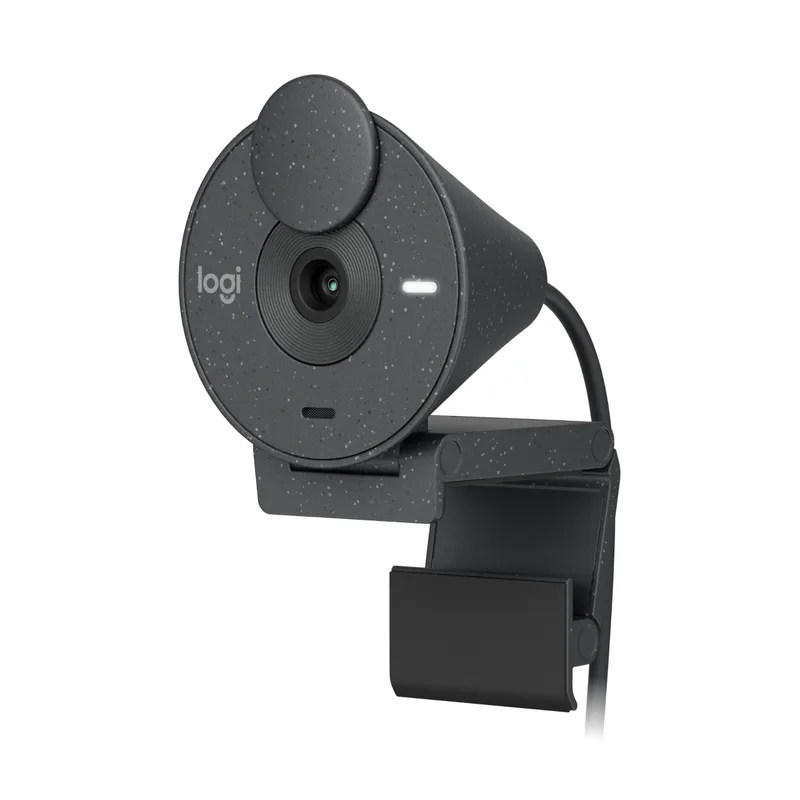
Logitech Brio 305 Full HD Webcam
Pros
- USB-C connection is native on every modern laptop released since 2021 — no adapter, no dongle, just plug in and the webcam shows up immediately across Windows 11, macOS, and Chrome OS
- Integrated privacy shutter slides to cover the lens mechanically — far more reliable than software-based muting because it works even when the operating system or video app freezes
- 48% recycled plastic construction makes this one of the few budget webcams with verified sustainability certifications — worth noting for remote workers at companies with green procurement policies
- Certified for Microsoft Teams, Zoom, and Google Meet, meaning Logitech has validated device-level compatibility and optimized firmware behavior for each platform — matters for enterprise IT deployments
- Compact and light at 2.63 oz with integrated mount clip — travels easily in a laptop bag without the bulk of the C920S's wider body
Cons
- Fixed focus means the camera cannot track you if you lean forward or step back — users who move during calls or don't sit at a consistent distance from their desk will appear soft-focused at times
- Mono microphone captures audio from one channel rather than stereo — call participants can hear you clearly, but the audio lacks the spatial depth of the C920S's dual-mic setup
- 70° field of view is narrower than the C920S's 78° — the background behind you is more tightly cropped, which may or may not suit your setup depending on how much of your workspace you want visible
Brio 305: The Modern Default
The Brio 305 is what Logitech designed for the current generation of remote workers — people on MacBook Airs, XPS 13s, and ThinkPad X1s who have USB-C ports and no patience for adapters. Plug in the USB-C cable, and it shows up in Zoom without configuration. That’s genuinely the full setup story for most users.
What the Brio 305 does well
The auto light correction handles most typical home office lighting scenarios — overhead lighting without a key light, side windows casting uneven illumination, late afternoon sun shifting the white balance. Owner reports describe the correction as competent rather than exceptional, but it’s good enough that you won’t show up to calls looking washed out or dim without any additional lighting.
The integrated privacy shutter is a mechanical cover that slides in front of the lens. The practical value: when you close it, there is no possible way the camera is active. No firmware, no software glitch, no OS-level override can capture video through a physical barrier. This matters more in enterprise environments than home offices, but it’s a genuine hardware advantage over software muting.
The compact form factor deserves mention. At 2.63 oz, the Brio 305 sits lightly atop almost any monitor without creating imbalance or requiring a separate weighted base. For travel or moving between home and office setups, it’s the more portable choice.
Where it falls short
Fixed focus is the Brio 305’s most important limitation. The camera locks focus at a set distance — around 2–3 feet from the lens. If you sit at that distance consistently, you’ll always appear sharp. If you lean forward to reference notes, reach for something off-screen, or stand up during a call, the focus won’t follow you. Owner feedback confirms this is real in practice, though many users report it’s only noticeable during active movement rather than during normal seated calls.
The mono microphone captures audio in a single channel. Call quality is clear — the noise reduction works — but you lose the stereo depth that the C920S’s dual mics provide. For standard work calls, this is a non-issue. For users who also record podcasts, conduct video interviews, or create content alongside their day job, the mono limitation starts to matter.
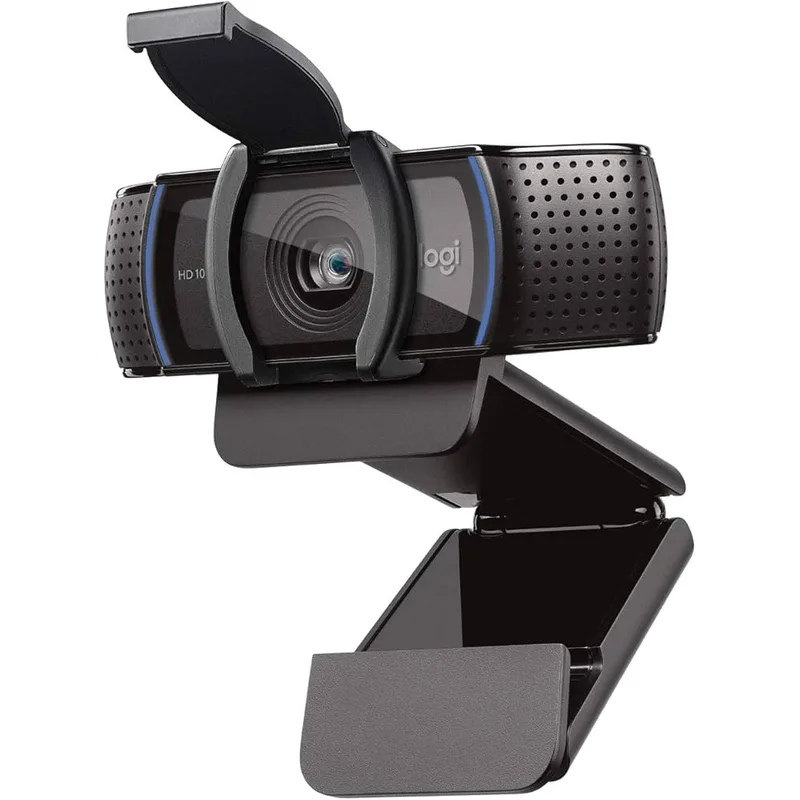
Logitech C920S HD Pro Webcam
Pros
- Autofocus continuously adjusts as you move — owner reports confirm smooth, non-jarring focus tracking when leaning in, reaching for items on desk, or presenting physical documents to the camera
- Dual stereo microphones provide directional audio capture that separates left-right sound sources — interview-style calls and conversations where audio directionality matters benefit from this over mono alternatives
- 78° field of view provides noticeably wider framing than the Brio 305's 70° — useful for showing a physical whiteboard, a second person sharing the desk, or simply giving call participants more spatial context
- USB-A connection is universally compatible with desktop PCs, older laptops, monitors with USB hubs, and KVM switches that pre-date USB-C — no adapter required on non-modern setups
- Proven reliability across over a decade of production — firmware is mature, driver compatibility across every major operating system is well-documented, and the clip mount design has been refined across multiple hardware revisions
Cons
- USB-A connection requires a dongle or adapter on USB-C-only laptops like the MacBook Air M2/M3, Dell XPS 13 Plus, and LG Gram — adds cost and a cable point-of-failure
- Heavier and bulkier than the Brio 305 — sits more prominently atop a monitor and weighs nearly twice as much, though the stable clip mount does compensate for the added mass
- Product design dates to 2012 for the original C920 — the physical form factor is showing its age compared to modern slim-profile webcams like the Brio 305
C920S: The Proven Workhorse
The C920 line has been around since 2012. The C920S is the current version with a physical privacy shutter added. The longevity isn’t just a marketing point — it means every operating system, every video platform, and every IT department has already solved any compatibility edge case that could come up. Firmware is mature. Driver support is comprehensive.
What the C920S does well
Autofocus is the C920S’s clearest advantage. The lens continuously adjusts as you move, tracking your face through the frame without visible lag or abrupt snapping. For users who lean forward during intense conversations, hold up documents or products for the camera to see, or simply don’t maintain a fixed seated position throughout a workday, autofocus provides consistently sharp footage that fixed-focus cameras can’t match.
The wider 78° field of view is meaningful if your workspace has context you want to share. A physical whiteboard behind you, a second colleague sharing your desk, bookshelf organization you’ve deliberately curated — the C920S captures more of it. If you want to look framed close-up in a neutral background, the difference is minor. If you want to present your environment, 78° shows substantially more than 70°.
Dual stereo microphones add depth to audio. The improvement over mono varies by voice and room acoustics, but owner reports describe the C920S audio as fuller and more natural on calls compared to single-mic alternatives. If you’re in a profession where voice presentation matters — sales calls, client-facing roles, video content — the stereo advantage is worth considering.
Where it falls short
USB-A is the C920S’s primary liability in 2026. Any laptop released in the last two to three years that doesn’t include a USB-A port requires an adapter — at minimum a $15–$25 USB-C to USB-A dongle, and ideally a USB-C hub to consolidate connections. That adds cost and complexity to what should be a simple webcam setup.
The physical bulk is also real. The C920S is nearly twice the weight of the Brio 305 and occupies more horizontal space on top of a monitor. Neither is a dealbreaker, but if desk real estate is limited or you move your setup frequently, the difference in form factor adds up.
Head-to-Head: The Deciding Factors
Connection type
If your laptop has USB-C only (or primarily), the Brio 305 wins here without qualification. If your desktop or laptop has USB-A ports available, both options are equivalent in practice.
Focus behavior
If you sit at a consistent distance from your monitor throughout the workday, fixed focus is a non-issue — the Brio 305 will be sharp. If you move, fidget, stand, or frequently shift your position, the C920S’s autofocus actively improves your image quality. This is the single most important spec difference between the two cameras.
Audio
Dual stereo mics on the C920S are meaningfully better for content creation and high-production-value calls. For standard Zoom and Teams meetings with colleagues, the Brio 305’s mono noise-reduction mic is adequate and may actually provide cleaner speech isolation in noisy home environments.
Video platform certification
Both webcams work with Zoom, Teams, and Google Meet. The Brio 305 has current Teams and Zoom certification. The C920S has years of validated compatibility on those same platforms, plus Skype, FaceTime, and every other platform you’re likely to encounter. Neither will fail to connect.
Buying Guide: How to Decide
Buy the Brio 305 if:
- Your laptop is USB-C only or USB-C primary (MacBook Air, Dell XPS, modern ThinkPad)
- You sit at a fixed, consistent distance from your monitor
- You want the lightest, most portable webcam option
- Your workplace has USB-C-focused docking or KVM setup
Buy the C920S if:
- You have USB-A ports available and don’t want to deal with adapters
- You move frequently during calls — autofocus genuinely matters for your workflow
- You also do content creation, podcasting, or video recording alongside work calls
- You need the widest possible field of view for presenting your workspace
Skip both and consider alternatives if:
- You need 4K resolution: look at the Logitech MX Brio or Elgato Facecam 4K
- You need AI auto-framing: the Brio 505 adds this for ~$100
- You want exceptional low-light performance: the Elgato Facecam 4K’s Sony STARVIS 2 sensor is the standard at this tier
FAQ
Is the Logitech Brio 305 better than the C920S? For most remote workers in 2026, yes — the USB-C connection is simpler on modern laptops and the compact design is more practical. The exception is users who need autofocus or have USB-A-only setups, where the C920S has clear advantages.
Does the Logitech Brio 305 have autofocus? No. The Brio 305 uses fixed focus set at a working distance of roughly 2–3 feet. For users who sit consistently at desk distance, this is rarely a problem in practice. If you move frequently during calls, the C920S’s autofocus is a better fit.
Can I use the Logitech C920S with a MacBook Air? Yes, but you need a USB-C to USB-A adapter or hub, since the MacBook Air M1/M2/M3 has only USB-C ports. The adapter adds cost (~$15–$25) and a potential connection point. The Brio 305’s USB-C cable plugs directly into the MacBook with no adapter.
Which webcam has better microphone quality? The C920S has dual stereo microphones with auto light correction and is generally considered the better audio option for content creation. For standard video calls in a reasonably quiet home office, both mics are adequate. In noisy environments, the Brio 305’s noise-reduction mono mic may provide cleaner speech isolation.
Are both webcams compatible with Microsoft Teams? Yes. The Brio 305 carries current Teams certification from Logitech. The C920S is compatible with Teams and has years of enterprise deployment history across IT departments. Both will work reliably in Teams environments, including rooms managed by IT with device policies.
What’s the difference between the C920 and C920S? The C920S adds a physical privacy shutter to the original C920 design. Specs are otherwise identical. The C920 original is still available on Amazon at a lower price, but lacks the privacy shutter.
Conclusion
At the same price point, these are different tools optimized for different setups — not one clearly superior option.
The Logitech Brio 305 is the right buy for most remote workers in 2026. USB-C native connection, compact form, current platform certifications, and a light-correction system that handles typical home office lighting. If you have a modern laptop and sit at a consistent desk distance, it covers the job without compromise.
The Logitech C920S is the right buy if autofocus matters for your workflow, you have USB-A ports and want to skip adapters entirely, or you create content alongside your calls and want dual stereo mics. Its decade-long track record also makes it the lower-risk choice for enterprise environments where IT departments have extensive C920 deployment experience.
Bottom line: USB-C laptop? Get the Brio 305. USB-A setup or need autofocus? Get the C920S.
Detailed Reviews
Logitech Brio 305 Full HD Webcam
Pros
- USB-C connection is native on every modern laptop released since 2021 — no adapter, no dongle, just plug in and the webcam shows up immediately across Windows 11, macOS, and Chrome OS
- Integrated privacy shutter slides to cover the lens mechanically — far more reliable than software-based muting because it works even when the operating system or video app freezes
- 48% recycled plastic construction makes this one of the few budget webcams with verified sustainability certifications — worth noting for remote workers at companies with green procurement policies
- Certified for Microsoft Teams, Zoom, and Google Meet, meaning Logitech has validated device-level compatibility and optimized firmware behavior for each platform — matters for enterprise IT deployments
- Compact and light at 2.63 oz with integrated mount clip — travels easily in a laptop bag without the bulk of the C920S's wider body
Cons
- Fixed focus means the camera cannot track you if you lean forward or step back — users who move during calls or don't sit at a consistent distance from their desk will appear soft-focused at times
- Mono microphone captures audio from one channel rather than stereo — call participants can hear you clearly, but the audio lacks the spatial depth of the C920S's dual-mic setup
- 70° field of view is narrower than the C920S's 78° — the background behind you is more tightly cropped, which may or may not suit your setup depending on how much of your workspace you want visible
Logitech C920S HD Pro Webcam
Pros
- Autofocus continuously adjusts as you move — owner reports confirm smooth, non-jarring focus tracking when leaning in, reaching for items on desk, or presenting physical documents to the camera
- Dual stereo microphones provide directional audio capture that separates left-right sound sources — interview-style calls and conversations where audio directionality matters benefit from this over mono alternatives
- 78° field of view provides noticeably wider framing than the Brio 305's 70° — useful for showing a physical whiteboard, a second person sharing the desk, or simply giving call participants more spatial context
- USB-A connection is universally compatible with desktop PCs, older laptops, monitors with USB hubs, and KVM switches that pre-date USB-C — no adapter required on non-modern setups
- Proven reliability across over a decade of production — firmware is mature, driver compatibility across every major operating system is well-documented, and the clip mount design has been refined across multiple hardware revisions
Cons
- USB-A connection requires a dongle or adapter on USB-C-only laptops like the MacBook Air M2/M3, Dell XPS 13 Plus, and LG Gram — adds cost and a cable point-of-failure
- Heavier and bulkier than the Brio 305 — sits more prominently atop a monitor and weighs nearly twice as much, though the stable clip mount does compensate for the added mass
- Product design dates to 2012 for the original C920 — the physical form factor is showing its age compared to modern slim-profile webcams like the Brio 305