| Spec | LG 27UP850K-W | LG 32UN880-B Ergo | Dell UltraSharp U2723QE | Dell P2723QE |
|---|---|---|---|---|
| Rating | 8.8/10 | 9.1/10 | 9.4/10 | 8.9/10 |
| Price | $267.80-$349.99as of Oct 18, 2026 | $499.99as of Oct 18, 2026 | $512.34-$689.00as of Oct 18, 2026 | Unavailable |
| Size | 27 inches | 32 inches | 27 inches | 27 inches |
| Resolution | 3840x2160 (4K UHD) | 3840x2160 (4K UHD) | 3840x2160 (4K UHD) | 3840x2160 (4K UHD) |
| Panel | IPS | IPS | IPS Black | IPS |
| Refresh Rate | 60Hz | 60Hz | 60Hz | 60Hz |
| USB-C Power Delivery | 90W | 60W | 90W | 65W |
| Connectivity | USB-C, HDMI, DisplayPort | — | USB-C, USB-A hub (5 ports), HDMI, DisplayPort, RJ45 | USB-C, USB-A hub, HDMI, DisplayPort, RJ45 |
| HDR | DisplayHDR 400 | HDR10 | HDR400 | HDR400 |
| Color Coverage | 95% DCI-P3 | 95% DCI-P3 | — | 99% sRGB |
| Stand | — | Ergo C-Clamp (full articulation) | — | — |
| Factory Calibrated | — | — | Yes (Delta E < 2) | — |
| Check Price → | Check Price → | Check Price → | Check Price → |
Prices change daily — tap Check Price for the current Amazon price.
When choosing between LG and Dell for a home office monitor, you’re not picking between good and bad — you’re picking between two distinct engineering philosophies. LG prioritizes design flexibility and color performance. Dell prioritizes connectivity, reliability, and ecosystem depth. Eight or more hours a day on video calls and juggling applications — those differences show up fast.
This comparison covers four monitors: two from LG and two from Dell. Four real options, each with a clear argument for your desk.
Quick pick: For a single-cable laptop setup with the full dock experience, the Dell UltraSharp U2723QE is the one to get. For maximum desk ergonomics, the LG 32UN880-B Ergo is in a class of its own. For a strong all-rounder LG with 90W USB-C at the lowest price in this group, the new LG 27UP850K-W at $399 is worth a close look.
Brand Overview: LG vs Dell for Home Office
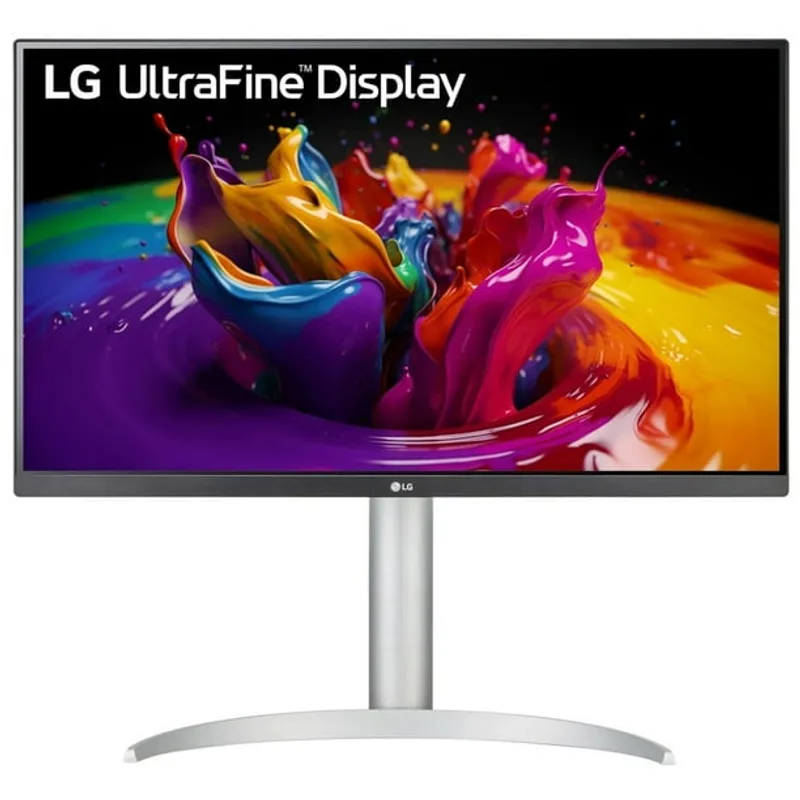
LG’s monitor line attracts creatives and anyone who cares about color. LG IPS panels are known for wide color gamuts, competitive DCI-P3 coverage, and solid sRGB accuracy. Their Ergo line adds an articulating arm stand that clamps to the desk edge and frees up the entire desk surface — genuinely useful if you move your monitor position during the day. More recently, LG has improved USB-C power delivery: the 27UP850K-W now delivers 90W, closing the gap that separated older LG models from Dell on laptop charging.
Dell’s monitor line — particularly the UltraSharp family — is built for productivity professionals who need monitors to function as near-complete docking stations. The combination of 90W USB-C, built-in ethernet, and multi-port USB hubs means a single cable connects a laptop to a Dell UltraSharp while charging it, giving it wired internet, and connecting peripherals. For remote workers who live on a laptop, that’s a serious practical advantage. The IPS Black panel in the U2723QE adds noticeably better contrast than standard IPS, which matters for all-day reading and document work.
The Dell P series sits one tier below UltraSharp. It offers ethernet and a USB hub at a lower price, with 65W USB-C instead of 90W and standard IPS contrast instead of IPS Black.
Head-to-Head: Key Criteria for Remote Workers
Color Accuracy
Both brands deliver solid color accuracy in this price range. LG’s 27UP850K-W covers 95% DCI-P3 — useful for anyone doing light photo or design work alongside remote meetings. The 32UN880-B Ergo also delivers 95% DCI-P3. Neither LG model ships with a factory calibration certificate, but out-of-the-box accuracy is generally competitive for general office use.
Dell’s UltraSharp U2723QE ships factory calibrated with a Delta E rating under 2, meaning colors are accurate from the moment you plug it in. The IPS Black panel gives this monitor better contrast than standard IPS — roughly 2000:1 versus 1000:1 — which makes text look sharper and colors appear richer. If you review design work, marketing assets, or photography over video calls, the U2723QE has a real and visible edge.
The Dell P2723QE covers 99% sRGB without factory calibration. Fine for general remote work; less ideal for color-critical tasks where you need to trust what you’re seeing.
Winner: Dell UltraSharp U2723QE for factory-calibrated accuracy and IPS Black contrast; LG is competitive for general use.
Build Quality and Ergonomics
The LG 32UN880-B Ergo stands apart from everything else in this comparison. Its C-clamp stand attaches to the desk edge and gives you a full articulating arm — swing out, push back, raise, lower, pivot to portrait mode, tilt freely. That’s the most ergonomically flexible option here by a wide margin, and it frees up the entire area under the monitor for desk space or cable management. If neck and shoulder health matter to you across a long workday, this monitor earns its premium.
The LG 27UP850K-W uses a conventional stand with height adjustment, tilt, swivel, and pivot. It’s a solid adjustable stand that works well for daily use, though it doesn’t approach the Ergo arm’s range. If you want arm-level flexibility on the 27-inch LG, any VESA 100×100-compatible aftermarket arm works with it.
Dell’s stands on both the U2723QE and P2723QE are stable and professional — height, tilt, swivel, and pivot included. They won’t win design awards, but they feel solid and both support standard VESA mounts if you want to upgrade to an arm later.
Winner: LG 32UN880-B Ergo for ergonomic flexibility; Dell wins for conventional stand build quality.
Connectivity and USB-C for Remote Work
The gap between LG and Dell has narrowed significantly on USB-C. The LG 27UP850K-W now delivers 90W over USB-C — enough to fully charge a 14-inch MacBook Pro or most Windows ultrabooks while simultaneously running the display. That closes the main practical disadvantage older LG models had against Dell’s top tier.
Dell still leads on ethernet. Both the U2723QE and P2723QE include a built-in ethernet port, meaning one cable connects your laptop to the monitor, charges it, and gives it a stable wired network connection. For remote workers far from their router, or anyone on VPN who needs consistent low-latency throughput, that wired connection removes a meaningful friction point.
The LG 27UP850K-W has no built-in ethernet — you’d need a USB-C hub or dock for wired networking. The LG 32UN880-B Ergo also lacks ethernet and delivers 60W USB-C, which covers most MacBook Air and base MacBook Pro configurations but may not keep pace with 16-inch high-performance models under heavy load.
For laptop users who want to run everything through a single monitor cable including wired internet, Dell is still the stronger complete solution. For users who have an external dock already, or work from a desktop, LG is now much more competitive on USB-C than it used to be.
Winner: Dell for complete single-cable docking; LG 27UP850K-W has closed the power delivery gap.
Value for Money
At $399, the LG 27UP850K-W delivers 90W USB-C and 95% DCI-P3 — strong all-around specs for the money. The Dell P2723QE at $405 is essentially the same price but brings ethernet and a 5-port USB hub. Those two are the closest matchup in this group; the choice comes down to whether you value LG’s color coverage or Dell’s ethernet.
The Dell U2723QE at $549 commands a premium over the 27-inch LG option, but the IPS Black panel, factory calibration, 90W USB-C, and ethernet collectively justify the gap for power users who want a monitor that functions as a complete dock. The LG 32UN880-B Ergo at $699 is the most expensive option, and its value depends entirely on whether the articulating stand solves a real problem for your specific desk setup.
Winner: LG 27UP850K-W at $399 for specs-per-dollar; Dell P2723QE at $405 wins if ethernet is a requirement.
Comparison Table
| Monitor | Size | Panel | USB-C PD | Ethernet | Factory Cal | Price |
|---|---|---|---|---|---|---|
| LG 27UP850K-W | 27” | IPS | 90W | No | No | $267.80-$349.99 as of Oct 18, 2026 |
| LG 32UN880-B Ergo | 32” | IPS | 60W | No | No | $499.99 as of Oct 18, 2026 |
| Dell U2723QE | 27” | IPS Black | 90W | Yes | Yes | $512.34-$689.00 as of Oct 18, 2026 |
| Dell P2723QE | 27” | IPS | 65W | Yes | No | Unavailable |
Buying Guide: What to Look For
USB-C power delivery. A monitor delivering 60W or less may not fully charge a laptop under load. If you’re connecting a 14-inch MacBook Pro, a Dell XPS 15, or any high-performance Windows laptop, 90W is the safe minimum. Both the LG 27UP850K-W and Dell U2723QE hit that mark. The Dell P2723QE at 65W covers most mainstream laptops but may fall short for demanding configurations.
IPS Black vs standard IPS. Dell’s IPS Black technology (found in the U2723QE) achieves roughly twice the contrast ratio of a standard IPS panel. For all-day text reading and document work, that difference is visible: darker backgrounds in dark mode, better perceived sharpness on small text. LG’s panels have excellent color breadth but standard contrast levels. If you’re spending the day in dark mode, the U2723QE wins on readability.
Factory calibration. For most remote workers, uncalibrated panels look fine. If you review design assets, print materials, or photography on these monitors, factory calibration as found in the U2723QE means you can trust what you’re seeing without needing a hardware calibrator.
Ethernet at the monitor. If your home office is far from your router, a monitor with built-in ethernet eliminates an extra hub and cable. Both Dell options include ethernet; neither LG does. For users already running a full dock, this distinction disappears.
Ergonomic stand vs VESA. The LG 32UN880-B Ergo’s C-clamp arm is a genuine premium feature that improves long-day posture for many users. If you’re not willing to pay the premium, any VESA-compatible monitor in this list can be paired with a good aftermarket arm for a similar result at lower total cost.
Which Monitor is Right for You?
Choose LG 32UN880-B Ergo if: Your desk space is at a premium, you move your monitor position throughout the day, or you need portrait mode flexibility. The C-clamp arm stand is the best ergonomic option in this comparison by a clear margin.
Choose LG 27UP850K-W if: You want strong 4K color performance and full 90W USB-C charging at the lowest price in this roundup. You don’t need built-in ethernet and you’re satisfied with a conventional adjustable stand.
Choose Dell U2723QE if: You’re connecting a MacBook or high-performance Windows laptop via a single USB-C cable and want that cable to handle charging, wired internet, display output, and peripheral passthrough simultaneously. The IPS Black panel and factory calibration make it the most complete 27-inch option in this group.
Choose Dell P2723QE if: You want Dell’s ethernet hub at essentially the same price as the LG 27UP850K-W, and you’re willing to trade 95% DCI-P3 color coverage for 99% sRGB on a standard IPS panel.
Overall Winner
The Dell UltraSharp U2723QE is still the best all-around monitor in this comparison for remote workers. The combination of 90W USB-C, built-in ethernet, factory-calibrated IPS Black panel, and 5-port USB hub is unmatched at this price point. At $549, it costs more than the LG options, but it functions as both a monitor and a dock for most laptop setups — eliminating a separate docking station purchase entirely.
That said, LG has made real progress. The 27UP850K-W at $399 now matches Dell on USB-C power delivery — the main practical gap from older LG models is gone. For users who have an external dock or work from a desktop, the LG 27UP850K-W is an excellent value that doesn’t concede much.
And if you specifically need articulating arm ergonomics, the LG 32UN880-B Ergo delivers something no Dell in this comparison can match. For anyone putting in long hours at a fixed desk, that ergonomic flexibility has lasting value.
Frequently Asked Questions
Is LG or Dell better for panel quality in home office monitors?
Both brands use quality IPS panels. Dell’s UltraSharp line has an advantage with IPS Black technology, which achieves contrast ratios around 2000:1 compared to roughly 1000:1 on standard IPS. That difference shows in text clarity and dark-background app legibility. LG counters with competitive DCI-P3 color gamuts, making LG panels slightly better suited to color-saturated creative work. For standard remote work tasks — video calls, documents, spreadsheets — both brands produce excellent panels.
How do LG and Dell warranties compare?
Dell UltraSharp monitors include a 3-year Advanced Exchange Service warranty, meaning Dell ships a replacement before you return the defective unit. The Dell P series includes a standard 3-year warranty. LG monitors in this range include a 3-year limited warranty with standard return service. For remote workers who depend on their monitor every day, Dell’s premium exchange warranty has genuine practical value.
Which brand is better for MacBook users?
Both are now strong choices for MacBook users. The LG 27UP850K-W and Dell U2723QE both deliver 90W via USB-C — enough to charge a 14-inch MacBook Pro under typical workloads while running the display. The Dell P2723QE at 65W covers MacBook Air and base MacBook Pro configurations. The LG 32UN880-B Ergo at 60W is fine for lighter MacBook models but may not keep pace with a fully-loaded 16-inch under sustained heavy load.
Which brand has better USB-C support overall?
The gap has narrowed significantly. The LG 27UP850K-W now matches the Dell U2723QE at 90W USB-C. Dell still leads on ethernet integration, which turns the monitor into a more complete single-cable docking solution for laptop users. If ethernet is not a requirement, LG’s 90W models are now equally capable for USB-C laptop charging.
Which monitor is best for all-day remote work use?
For all-day laptop use via a single cable, the Dell U2723QE remains the top choice — 90W USB-C, wired internet, and factory-accurate color in one cable. If you have a desktop workstation or external dock already, the LG 32UN880-B Ergo becomes more compelling: the articulating arm genuinely improves posture and desk ergonomics over a long workday, and the connectivity limitations matter less when you’re not relying on the monitor for laptop charging.
Detailed Reviews
LG 27UP850K-W
Pros
- 90W USB-C charges MacBook Pro 14" and most laptops at full speed
- 95% DCI-P3 color suits light creative and design work alongside remote meetings
- Built-in speakers reduce desk clutter
- Height, pivot, and tilt adjustable stand with solid ergonomic range
Cons
- No built-in ethernet — you need a separate hub for wired networking
- 60Hz only, no gaming refresh rate option
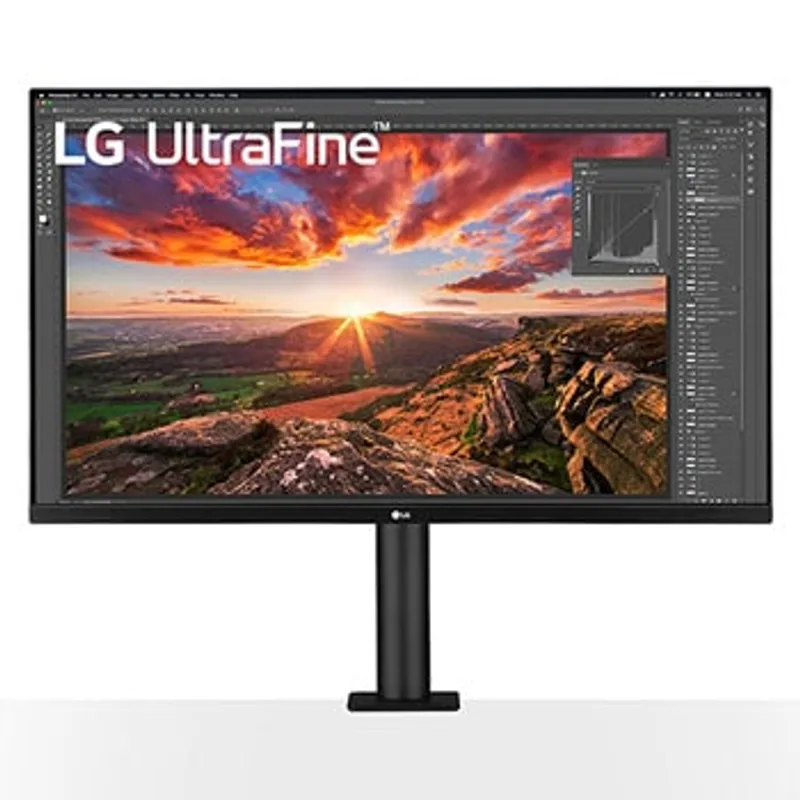
LG 32UN880-B Ergo
Pros
- Ergo C-clamp stand frees up the entire desk surface
- Full articulation: height, tilt, pivot, and horizontal arm extension
- Large 32-inch 4K panel gives more screen real estate for multitasking
- 95% DCI-P3 color coverage for accurate creative work
Cons
- C-clamp mount requires a desk edge with sufficient thickness and clearance
- 60W USB-C won't fully charge higher-wattage laptops under heavy load
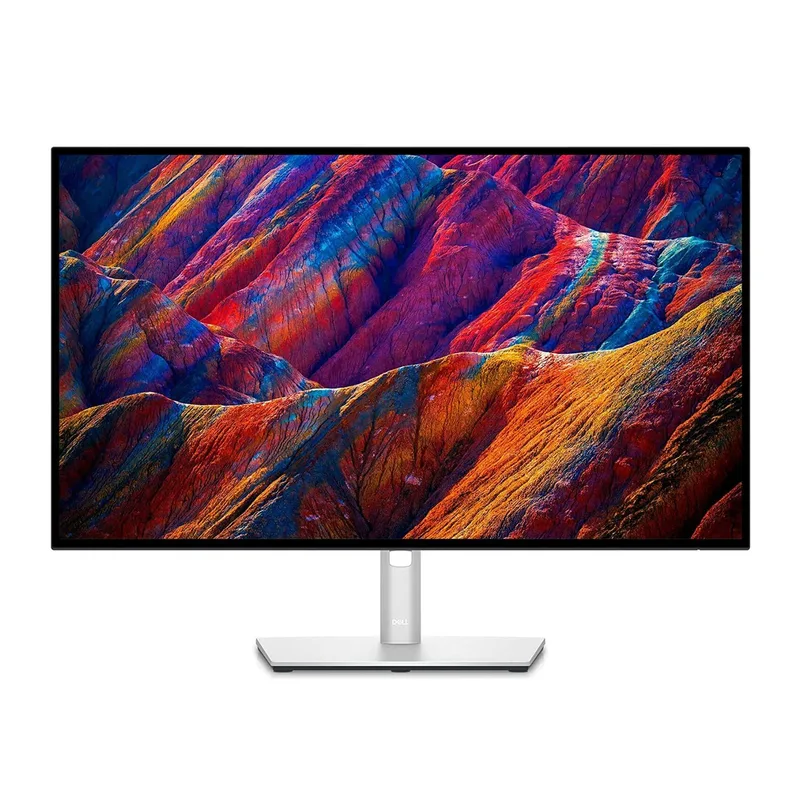
Dell UltraSharp U2723QE
Pros
- 90W USB-C powers virtually any laptop including power-hungry MacBook Pro models
- IPS Black panel delivers noticeably deeper blacks than standard IPS
- Factory calibrated to Delta E under 2 for accurate color out of the box
- Built-in ethernet port and 5-port USB hub replace a separate dock
Cons
- Pricier than the LG 27UP850K-W for the same screen size
- Bulkier stand design compared to LG Ergo options
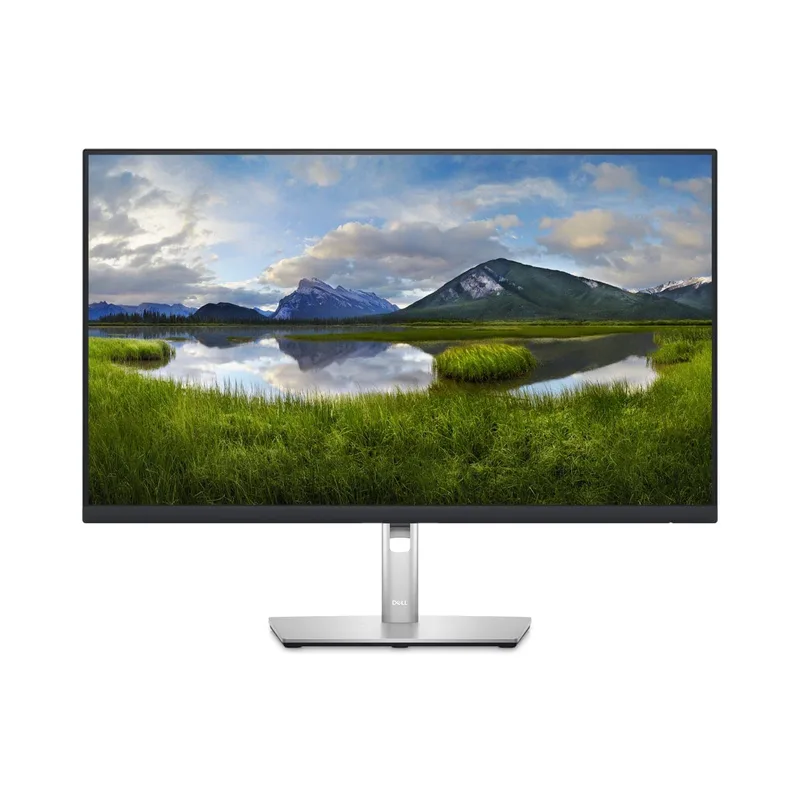
Dell P2723QE
Pros
- Built-in ethernet port for a stable wired video call connection
- 65W USB-C covers most mainstream laptops
- 99% sRGB color accuracy at a lower price than the U2723QE
- Strong 5-port USB hub built in
Cons
- No IPS Black panel — blacks and contrast are standard IPS levels
- 65W USB-C may not charge high-performance laptops at full speed under load