| Spec | CalDigit TS4 | Anker 778 Thunderbolt 4 Dock |
|---|---|---|
| Rating | 9.0/10 | 8.0/10 |
| Price | $379.99as of Oct 18, 2026 | Unavailable |
| Connectivity | Thunderbolt 4 | Thunderbolt 4 |
| Total Ports | 18 | 12 |
| Laptop Charging | 98W | 100W |
| Ethernet | 2.5 GbE | 1 GbE |
| Display Outputs | 3x Thunderbolt 4 (2 active) | 1x HDMI 2.1 + 2x DisplayPort 1.4 |
| Max Resolution | 2x 6K@60Hz or 1x 8K@30Hz | 1x 8K@30Hz or 4x 4K@60Hz |
| USB-C Data Ports | 3x 10 Gbps | 2x 10 Gbps (30W each) |
| USB-A Data Ports | 5x 10 Gbps + 1x 5 Gbps | 2x 5 Gbps + 2x 480 Mbps |
| SD Card Reader | UHS-II | — |
| Warranty | 3 years | 18 months |
| Downstream TB4 | — | Yes (daisy-chain) |
| Check Price → | Check Price → |
Prices change daily — tap Check Price for the current Amazon price.
Affiliate disclosure: SetupRanked earns a commission on qualifying purchases made through links on this page. This does not affect our editorial rankings.
Both CalDigit and Anker released Thunderbolt 5 docks in early 2026 — the CalDigit TS5 and Anker Prime TB5. These new flagships cost $450-$600 and require a laptop with a Thunderbolt 5 port to deliver any benefit. For the vast majority of remote workers running MacBook Pros from 2021-2024, Dell XPS, or HP Spectre machines, those specs are irrelevant. Thunderbolt 4 remains the practical standard, and the two docks that define it are the CalDigit TS4 and the Anker 778.
This comparison covers what actually matters for a remote work desk: how many peripherals you can connect simultaneously, whether your Mac works properly, display output flexibility, and whether the price difference is justified.
Quick Comparison
| Spec | CalDigit TS4 | Anker 778 Thunderbolt 4 Dock |
|---|---|---|
| Rating | 9.0/10 | 8.0/10 |
| Price | $379.99as of Oct 18, 2026 | Unavailable |
| Connectivity | Thunderbolt 4 | Thunderbolt 4 |
| Total Ports | 18 | 12 |
| Laptop Charging | 98W | 100W |
| Ethernet | 2.5 GbE | 1 GbE |
| Display Outputs | 3x Thunderbolt 4 (2 active) | 1x HDMI 2.1 + 2x DisplayPort 1.4 |
| Max Resolution | 2x 6K@60Hz or 1x 8K@30Hz | 1x 8K@30Hz or 4x 4K@60Hz |
| USB-C Data Ports | 3x 10 Gbps | 2x 10 Gbps (30W each) |
| USB-A Data Ports | 5x 10 Gbps + 1x 5 Gbps | 2x 5 Gbps + 2x 480 Mbps |
| SD Card Reader | UHS-II | — |
| Warranty | 3 years | 18 months |
| Downstream TB4 | — | Yes (daisy-chain) |
| Check Price → | Check Price → |
Prices change daily — tap Check Price for the current Amazon price.
The Brands
CalDigit is a Taiwan-based specialist that has built Thunderbolt docks since the standard launched. The TS4 is their third-generation Thunderbolt Station, and CalDigit ships with a reputation for reliability and genuine Mac focus. Three-year warranties and broad Mac compatibility — including Apple Silicon base models — reflect a manufacturer that targets creative professionals and remote workers who cannot afford downtime.
Anker approaches the premium dock market from a consumer electronics perspective. The 777 and 778 are their most capable TB4 offerings, engineered for maximum port flexibility and positioned at a lower entry price. Anker’s design philosophy prioritizes practical connectivity for Windows-first workflows, which creates tradeoffs that Mac users need to understand before buying.
The core divide: CalDigit builds for Mac reliability and port density; Anker builds for display flexibility and lower price.
CalDigit TS4
CalDigit TS4
Pros
- 18 ports covers every peripheral scenario — nothing gets left out
- Full compatibility with every Mac including M1/M2 base MacBook Air and Pro
- 2.5 GbE ethernet handles fast NAS transfers and future multi-gig ISP plans
- Three-year warranty is the best coverage in the Thunderbolt dock category
- 98W charging keeps MacBook Pro 16-inch and most Windows laptops topped up under load
Cons
- $380 price tag is a significant premium over competing TB4 docks
- No native HDMI or DisplayPort ports — older monitors need a TB4-to-HDMI adapter
- Runs warm under heavy sustained loads (NAS + multiple displays simultaneously)
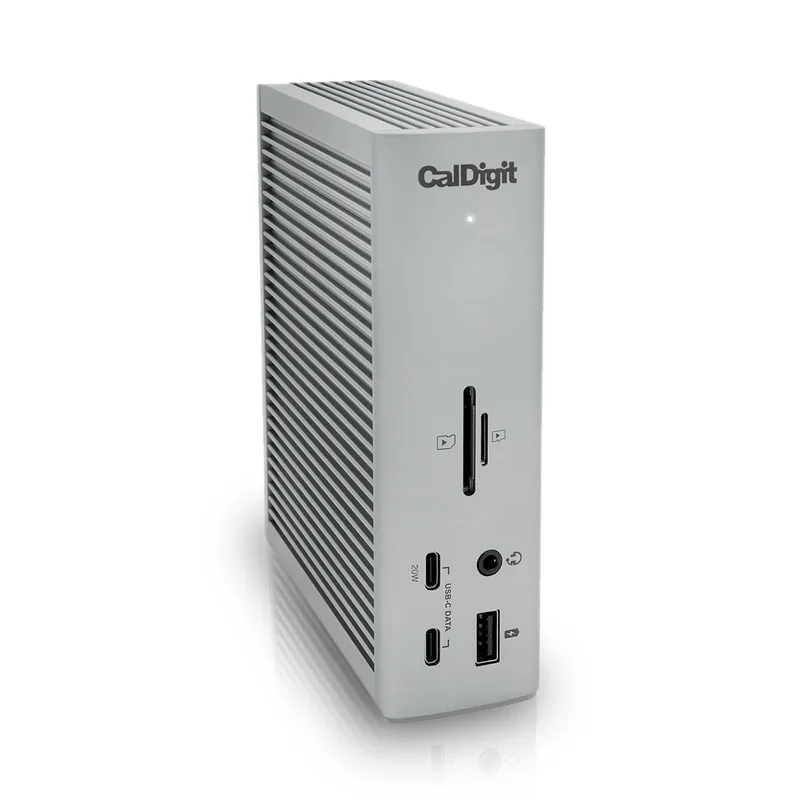
The TS4’s defining feature is its port count. 18 ports is exceptional for a TB4 dock — most competitors cap out at 11-13. The practical breakdown: three Thunderbolt 4 downstream ports, three 10 Gbps USB-C ports, five 10 Gbps USB-A ports on the rear plus one 5 Gbps USB-A on the front, a UHS-II SD card slot, a 3.5mm combo audio jack, and 2.5 GbE ethernet. You can connect a USB audio interface, multiple external drives, a full-size keyboard with USB passthrough, a USB-C monitor, a mouse, and still have ports available.
Display connectivity works differently here than on most docks. The TS4 has no native HDMI or DisplayPort outputs. Instead, the three downstream TB4 ports carry DisplayPort signals — two can drive external monitors simultaneously at up to 6K@60Hz each. For monitors with Thunderbolt 3/4 or USB-C DisplayPort inputs, connection is direct. For monitors with HDMI or standard DisplayPort inputs, a Thunderbolt-to-HDMI or Thunderbolt-to-DP cable or adapter is required. This is the one area where setup complexity is higher than the Anker 778.
The 2.5 GbE ethernet port is the fastest available in any TB4 dock. Most home offices don’t have 2.5 GbE infrastructure yet, but with multi-gig routers becoming standard and ISP speeds increasing, having 2.5 GbE available means this dock won’t become the network bottleneck in a few years.
Mac compatibility is comprehensive. Every Apple Silicon model — M1, M2, M3, M4, base configurations included — works without limitations. Display support follows Apple’s own restrictions per chip, not any limitation from the TS4.
The three-year warranty is the best in the category. For a $380 dock that sits on a desk and runs continuously, warranty length matters more than on cheaper peripherals.
Best for: Mac users, remote workers with four or more USB peripherals, anyone who needs 2.5 GbE ethernet, power users who want to set up once and never deal with port shortage.
Anker 778 Thunderbolt 4 Dock
Anker 778 Thunderbolt 4 Dock
Pros
- Native HDMI 2.1 and dual DisplayPort 1.4 — quad 4K monitors with no adapters required
- 100W laptop charging is the highest available in any TB4 dock
- Downstream TB4 port supports external GPUs and high-speed storage daisy-chains
- Priced at $199-$249 — one of the best TB4 values in the category
- Solid aluminium chassis with clean cable exit design
Cons
- M1/M2 base MacBook Air and Pro are not supported at all; M1/M2 Pro/Max limited to mirrored displays
- Only 1 GbE ethernet — the CalDigit TS4 includes 2.5 GbE for the same target market
- 18-month warranty is the shortest of any premium TB4 dock
- 12 ports total limits simultaneous peripheral connections for power users
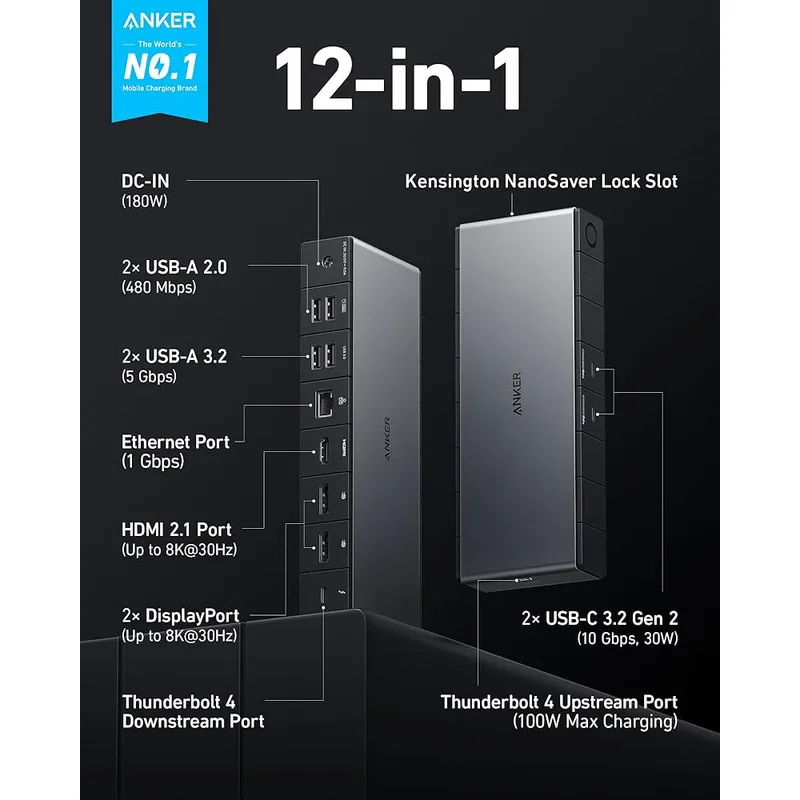
The Anker 778 makes a compelling argument when the comparison focuses on display connectivity. Its three dedicated video outputs — one HDMI 2.1 and two DisplayPort 1.4 — support up to four 4K@60Hz monitors simultaneously. For Windows users running a triple or quad-monitor setup on a ThinkPad or Dell, this configuration works without any adapters, which is genuinely convenient. The HDMI 2.1 port supports up to 8K@30Hz, making it forward-compatible with next-generation displays.
The 100W laptop charging is the highest specification available in any TB4 dock, two watts above the TS4. In practice, the difference between 98W and 100W charging is not measurable during typical remote work use. Both docks keep most laptops fully charged. The margin matters only for 16-inch MacBook Pro or Windows workstation laptops under sustained CPU+GPU load — a narrow edge case.
The 12-port count is where the 778 shows its tradeoffs. Two USB-A ports run at 5 Gbps; two run at USB 2.0 speeds (480 Mbps — fine for keyboards and mice, but a limitation for storage or audio interfaces). USB-A expansion is more constrained than the TS4.
Mac compatibility is the most important caveat. M1 and M2 base MacBook Air and base MacBook Pro models are not supported. M1/M2 Pro and Max configurations can connect but are limited to mirrored display output rather than extended desktop. For any buyer with an M1/M2 base Mac, the Anker 778 should not be purchased — the TS4 or a different dock is required.
The 18-month warranty is shorter than any competing premium dock at this price point. Now priced at $199-$249, the Anker 778 has dropped significantly in price — but the shorter warranty coverage remains a drawback compared to the TS4.
Best for: Windows-first users with dual or triple monitor setups using standard HDMI/DisplayPort displays, Apple Silicon Pro/Max users who understand the display limitations, and buyers who prioritize native video outputs over total port count.
Head-to-Head: Key Categories
Port Count and Peripheral Support
CalDigit TS4 wins decisively. 18 ports versus 12, with six additional 10 Gbps USB-A ports on the TS4 alone. For a remote worker running a podcast mic, external drives, a full keyboard/mouse/webcam setup, and a USB audio interface, the TS4 handles all of it from a single dock. The Anker 778 runs out of useful USB-A ports much faster.
Display Flexibility
Anker 778 wins for conventional monitor setups. Native HDMI 2.1 and dual DisplayPort 1.4 mean any monitor bought in the last five years connects without adapters. The TS4’s TB4-dependent display output works excellently with USB-C monitors but requires extra hardware for HDMI/DP monitors. If your monitors have HDMI or DisplayPort inputs and no USB-C, the Anker 778 is less setup friction.
Mac Compatibility
CalDigit TS4 wins without qualification. The TS4 works with every Mac including M1/M2 base models. The Anker 778 has documented compatibility issues with M1/M2 base Macs and limited extended display support on M1/M2 Pro/Max. For Mac users, this is not a minor caveat — it’s a binary decision.
Ethernet Speed
CalDigit TS4 wins. 2.5 GbE versus 1 GbE. For remote workers who transfer large files to NAS drives, sync video project files, or have ISPs delivering above 1 Gbps, the TS4’s ethernet is a practical upgrade. For users on typical gigabit plans who don’t move large files over the network, the difference is irrelevant.
Laptop Charging
Draw — both are sufficient. 100W (Anker 778) versus 98W (TS4). Both charge every mainstream laptop including MacBook Pro 16-inch, Dell XPS 15, and HP Spectre 16.
Value and Price
Anker 778 wins on price. At $199-$249, the Anker 778 delivers comparable performance for Windows users at a significantly lower price than the TS4’s $380. For Mac users, the TS4 isn’t optional — it’s the correct choice regardless of price.
Warranty and Long-term Reliability
CalDigit TS4 wins. Three years versus 18 months. At $380, a three-year warranty is appropriate and expected. At $199-$249, the Anker 778’s 18-month warranty is below the category standard for any dock above $150.
Buying Guide
Choose the CalDigit TS4 if:
- You use a Mac of any generation, especially M1 or M2 base models
- You have more than four USB peripherals on your desk simultaneously
- You need 2.5 GbE ethernet for NAS drives or fast file transfers
- Long-term reliability and warranty coverage are priorities
- You plan to keep this dock for three or more years
Choose the Anker 778 if:
- You use a Windows laptop exclusively and have confirmed it is compatible
- Your monitors use HDMI or DisplayPort inputs and you want no-adapter connections
- You need to drive three or four displays simultaneously from one dock
- The Anker 778 is currently priced at $199-$249 — strong value for Windows users
- You use an M1/M2 Pro or Max Mac and only need mirrored display output
Skip both if: You have a laptop with Thunderbolt 5 (MacBook Pro M4 Pro/Max, newer Intel Meteor Lake). The TB5 docks from CalDigit and Anker deliver meaningfully higher bandwidth at similar price points for those machines, and the TB5-to-TB4 backward compatibility means you’d be leaving performance unused with either of these docks.
FAQ
Is the CalDigit TS4 worth $130-$180 more than the Anker 778? For Mac users: yes, the compatibility and warranty differences alone justify the gap. The TS4 supports all Macs without display limitations; the Anker 778 has documented failures with M1/M2 base models. For Windows users who don’t need 2.5 GbE or the extra USB-A ports: the Anker 778 at $199-$249 is a compelling value alternative.
Does the CalDigit TS4 support dual 4K monitors? Yes. Two downstream Thunderbolt 4 ports can each drive a 4K@60Hz, 5K@60Hz, or 6K@60Hz monitor simultaneously. If your monitors have USB-C or Thunderbolt inputs, connection is direct. For HDMI or standard DisplayPort monitors, a TB4-to-HDMI or TB4-to-DP cable is needed. CalDigit sells certified cables, and third-party options from Club3D and Cable Matters work reliably.
Can the Anker 778 run extended displays on a MacBook Pro M2 Max? According to Anker’s own compatibility documentation and owner reports, the Anker 778 supports M1/M2 Pro and M1/M2 Max models but limits external display output to mirrored mode, not extended desktop. Users who need two independent monitors showing different content should use the CalDigit TS4 instead.
Does either dock work with a USB-C only laptop (non-Thunderbolt)? The CalDigit TS4 and Anker 778 both require Thunderbolt 4 on the host laptop to unlock full functionality. Connected via USB-C without Thunderbolt, data transfer and charging still work, but display output and full bandwidth are unavailable. For laptops with USB 4 (common on AMD Ryzen processors), partial functionality — data, charging, some display — works depending on the specific USB 4 implementation.
Should I wait for Thunderbolt 5 docks in 2026? Only if your laptop has a Thunderbolt 5 port (MacBook Pro M4 Pro or M4 Max, select Intel Core Ultra 2 machines). TB5 docks offer 120 Gbps bandwidth and better support for 8K displays, but cost $450-$600 and require a TB5-capable laptop to benefit. For every other laptop on the market, the TS4 or Anker 778 fully saturates available bandwidth, and buying a TB5 dock delivers no advantage.
Conclusion
For most remote workers, the choice is straightforward once Mac compatibility is factored in.
The CalDigit TS4 is the correct pick for Mac users, power users with many peripherals, and anyone who needs 2.5 GbE ethernet. Its 18-port design, three-year warranty, and unrestricted Mac compatibility make it the most complete Thunderbolt 4 dock available. The $380 price is real, and it is worth it.
The Anker 778 is the right pick for Windows users who want native HDMI/DisplayPort outputs and drive multiple standard monitors. At $199-$249, it represents strong value — the TS4’s extra $130-$180 buys significantly more ports, better ethernet, and twice the warranty coverage, which matters more for Mac users and power users.
If you’re on a Mac of any generation, buy the CalDigit TS4. If you’re on a confirmed-compatible Windows laptop and your monitors all have HDMI or DisplayPort inputs, the Anker 778 at sale pricing is a strong alternative.
Detailed Reviews
CalDigit TS4
Pros
- 18 ports covers every peripheral scenario — nothing gets left out
- Full compatibility with every Mac including M1/M2 base MacBook Air and Pro
- 2.5 GbE ethernet handles fast NAS transfers and future multi-gig ISP plans
- Three-year warranty is the best coverage in the Thunderbolt dock category
- 98W charging keeps MacBook Pro 16-inch and most Windows laptops topped up under load
Cons
- $380 price tag is a significant premium over competing TB4 docks
- No native HDMI or DisplayPort ports — older monitors need a TB4-to-HDMI adapter
- Runs warm under heavy sustained loads (NAS + multiple displays simultaneously)
Anker 778 Thunderbolt 4 Dock
Pros
- Native HDMI 2.1 and dual DisplayPort 1.4 — quad 4K monitors with no adapters required
- 100W laptop charging is the highest available in any TB4 dock
- Downstream TB4 port supports external GPUs and high-speed storage daisy-chains
- Priced at $199-$249 — one of the best TB4 values in the category
- Solid aluminium chassis with clean cable exit design
Cons
- M1/M2 base MacBook Air and Pro are not supported at all; M1/M2 Pro/Max limited to mirrored displays
- Only 1 GbE ethernet — the CalDigit TS4 includes 2.5 GbE for the same target market
- 18-month warranty is the shortest of any premium TB4 dock
- 12 ports total limits simultaneous peripheral connections for power users