Shure’s launch of the MV88 USB-C Stereo Microphone at CES 2026 underlined something that’s been clear for a while: the USB microphone market has matured. A category that once meant choosing between a tinny webcam mic and an expensive XLR rig now covers everything from $60 ultra-compact mics to $279 professional dynamic capsules — all with plug-and-play USB connections.
For remote workers who also stream, record podcasts, or create content, this creates a real decision: you want a mic that sounds clean on Zoom calls, handles vocal clarity for your YouTube videos, and doesn’t take over your desk. The picks below cover that full range, with specific guidance on which one fits which work-and-create setup.
Quick pick: The Shure MV7+ handles both professional calls and podcasting equally well, and its dynamic capsule naturally rejects keyboard clatter and HVAC noise that plague condenser mics in typical home offices. If budget is the priority, the Razer Seiren V3 Mini at $60 outperforms its price with a supercardioid pattern that punches well above its size.
Comparison
| Spec | Shure MV7+ | Elgato Wave:3 | HyperX QuadCast S | Rode NT-USB Mini | Razer Seiren V3 Mini |
|---|---|---|---|---|---|
| Rating | 9.4/10 | 9.2/10 | 8.8/10 | 8.9/10 | 8.5/10 |
| Price | $269.77-$299.00as of Oct 18, 2026 | Unavailable | Unavailable | $97.85-$103.00as of Oct 18, 2026 | Unavailable |
| Type | Dynamic | Condenser | Condenser | Condenser | Condenser |
| Connections | USB-C + XLR | — | — | — | — |
| Polar Pattern | Cardioid | Cardioid | — | Cardioid | Supercardioid |
| Sample Rate | 48kHz / 24-bit | 96kHz / 24-bit | 48kHz / 16-bit | 48kHz / 24-bit | 48kHz |
| Frequency Response | 50Hz–16kHz | 70Hz–20kHz | — | 20Hz–20kHz | — |
| Auto Level Mode | Yes | — | — | — | — |
| OBS Certified | Yes | — | — | — | — |
| Weight | 550g | — | — | 105g | 113g |
| Connection | — | USB-C | USB | USB-C | USB-A |
| Clipguard | — | Yes | — | — | — |
| Software | — | Wave Link (free) | — | — | — |
| Mute | — | Capacitive touch | — | — | — |
| Polar Patterns | — | — | 4 (Stereo, Omni, Cardioid, Bidirectional) | — | — |
| Shock Mount | — | — | Built-in anti-vibration | — | — |
| Pop Filter | — | — | Built-in | — | — |
| RGB | — | — | Yes (HyperX NGENUITY) | — | — |
| Headphone Output | — | — | — | 3.5mm zero-latency monitoring | — |
| Tap-to-Mute | — | — | — | — | Yes (LED indicator) |
| Shock Absorber | — | — | — | — | Built-in |
| Check Price → | Check Price → | Check Price → | Check Price → | Check Price → |
Prices change daily — tap Check Price for the current Amazon price.
The Picks
1. Shure MV7+ — Editor’s Pick
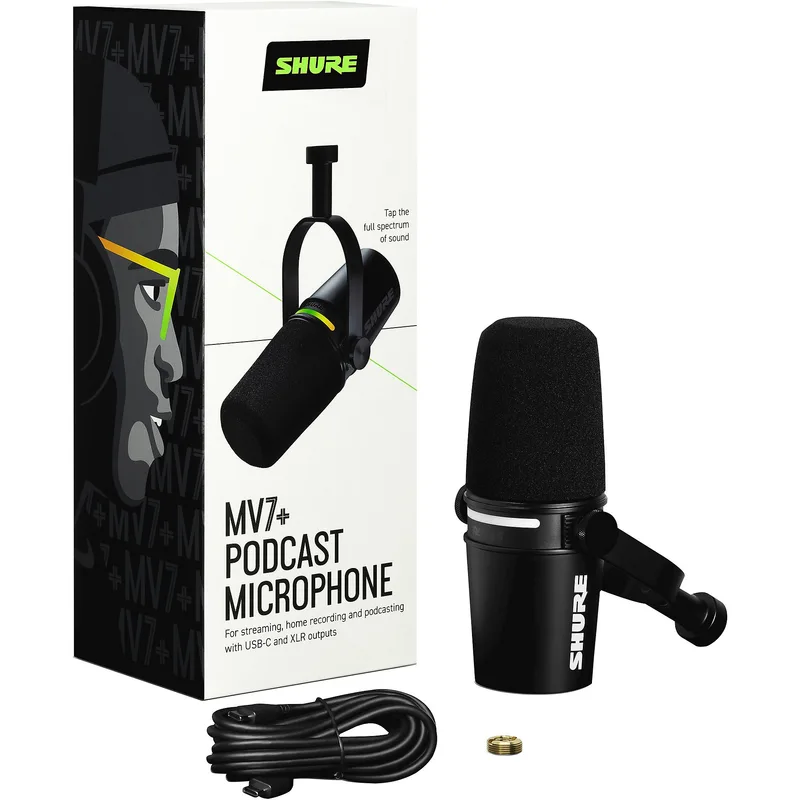
Shure MV7+
Pros
- Dynamic capsule rejects background noise without noise-gate artifacts
- USB-C and XLR outputs — plug into a laptop today, upgrade to an interface later
- Auto Level Mode handles gain automatically during calls and streams
- OBS Certified for one-click integration with major streaming software
- LED touch panel with zero-latency headphone monitoring
Cons
- Dynamic capsule captures less room detail than condenser options
- Heavier than compact alternatives at 550g
- No software EQ or effects on the free tier without ShurePlus MOTIV app
The MV7+ is built around a dynamic capsule, and that single design decision makes it the most practical choice for real home offices. Dynamic microphones are directional by nature — they capture sound directly in front while rejecting room noise from sides and behind. In practice, this means your keyboard clicks, desk fan, and street traffic stay out of the recording without any noise-gate processing.
The USB-C output connects directly to any modern laptop. The XLR output is there if you later add an audio interface for a studio upgrade path — you buy the mic once and keep it as your setup scales. Auto Level Mode adjusts gain automatically during calls, which removes the fiddling that plagues home office setups with changing environments throughout the day.
OBS Certification means the MV7+ shows up as a pre-tuned device in OBS Studio. One click and your levels, EQ, and monitoring are configured. The LED touch panel handles muting, and the headphone output gives you zero-latency monitoring during recordings. At $279, it’s the most expensive mic here, but it’s the one that earns its cost every single workday.
Who should buy this: Podcasters, streamers who care about call quality, and remote workers in noisy home environments. Also the right pick for anyone considering an XLR interface upgrade later.
Who should skip this: Creators who record music or need the wide frequency response of a condenser for instrument recording.
2. Elgato Wave:3 — Best for Streamers
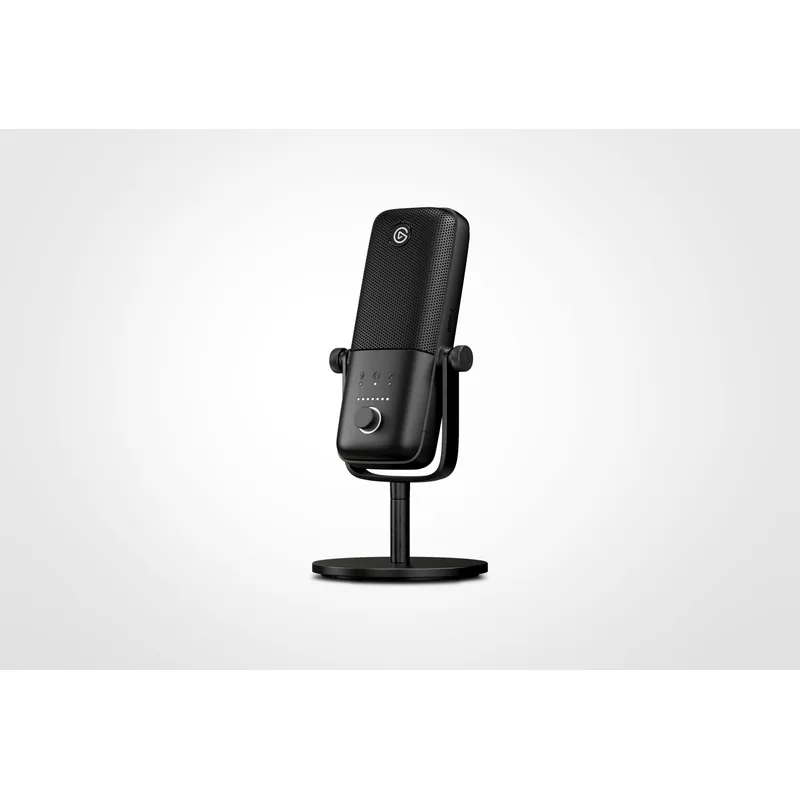
Elgato Wave:3
Pros
- Wave Link software functions as a full audio mixer — layers game audio, mic, browser, and music into separate faders for stream or recording
- Clipguard dual-capsule system prevents audio distortion during loud moments
- 24-bit / 96kHz captures room detail clearly for music or voice content
- Capacitive mute is silent — no audible click during calls
- USB-C connection is more durable than Micro-USB alternatives
Cons
- Wave Link software is Windows/Mac only — no mobile or iPad support
- Cardioid-only — no polar pattern flexibility for group recording
- Has dropped to $100 on sale; paying $149 full price requires patience
The Wave:3 is the mic that thinks like a streamer. The hardware is excellent — 24-bit/96kHz condenser capsule, USB-C connection, capacitive mute — but the real value is Wave Link, Elgato’s free mixing software. Wave Link creates separate faders for every audio source: your mic, game audio, browser tabs, Discord, Spotify. You can route different mixes to your stream and your headphones independently. It’s the mixing board that most dedicated streaming setups spend $100–$200 on hardware to replicate, included for free.
Clipguard is a practical feature that matters: a second internal capsule runs at a lower gain level simultaneously. When a loud moment — a shout, a sudden audio peak — would clip the main capsule, Clipguard switches transparently to the lower-gain capsule. The result is clean audio during moments that would distort other microphones.
The Wave:3 hit $100 in February 2026 during a sale. At that price it’s an exceptional buy. At its regular $149, it’s still strong if you use Wave Link actively. If you just need a clean mic without software integration, the Rode NT-USB Mini at $99 is sharper value.
Who should buy this: Streamers who want a real mixing layer between their mic and their stream output. Also good for anyone who records voice-over alongside game or screen capture audio.
Who should skip this: Users who primarily use mobile or iPad setups, since Wave Link has no app support. Also skip this if you need multiple polar patterns for recording other people.
3. HyperX QuadCast S — Best RGB Setup
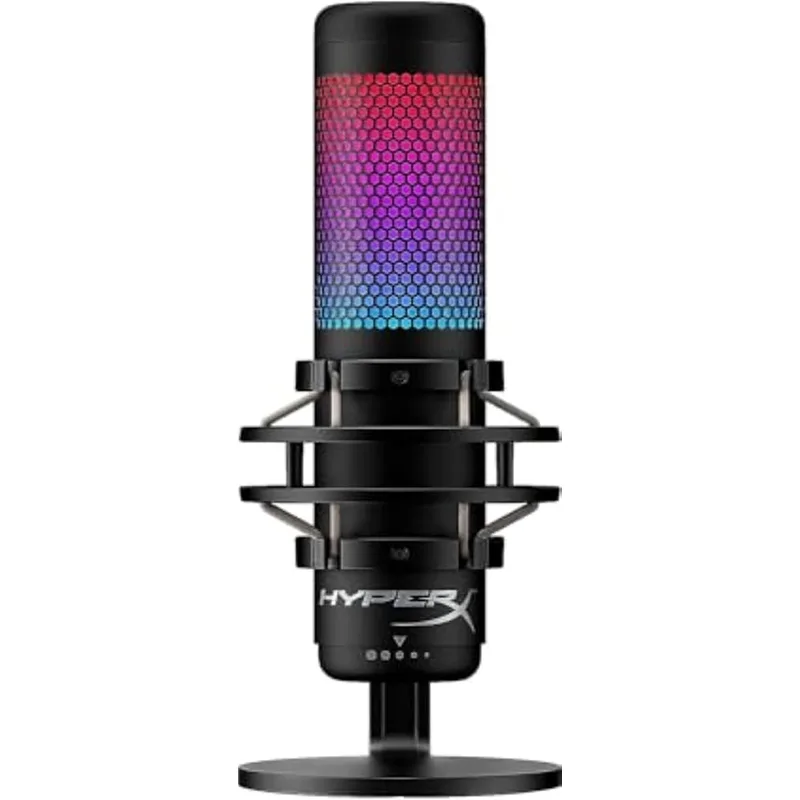
HyperX QuadCast S
Pros
- Four polar patterns cover solo streaming, podcast interviews, and group recording
- Anti-vibration shock mount and built-in pop filter included — no accessories needed out of the box
- RGB lighting syncs with HyperX NGENUITY and compatible ecosystems
- Touch-sensitive mute ring with visual indicator
- Works with PC, Mac, PS4, and PS5 without drivers
Cons
- 16-bit audio ceiling is behind Wave:3 and Rode NT-USB Mini in resolution
- RGB hardware adds bulk — larger footprint than compact streaming mics
- Requires HyperX NGENUITY software for full RGB customization
The QuadCast S earns its place here because of flexibility. Four polar patterns — cardioid, bidirectional, omnidirectional, and stereo — cover every recording scenario you’ll encounter: solo podcast, two-person interview across a desk, room ambience for ASMR, or stereo instrument capture. Most streaming mics in this price range are cardioid-only. The QuadCast S gives you a complete studio in one unit.
The built-in anti-vibration shock mount and pop filter mean you’re not buying accessories separately. At $149, those are typically $30–$50 in add-ons that other mics require to sound their best on a desk. The touch-sensitive mute ring is intuitive — the entire top of the mic lights differently when muted, so you know your status without looking at software.
The 16-bit audio ceiling is the main limitation. It’s audibly clean, but the Wave:3’s 24-bit/96kHz captures more room detail for music or ambient recordings. For voice content and gaming streams, the difference is not meaningful.
Who should buy this: Streamers who occasionally record interviews or two-person content, setup builders who want the visual cohesion of RGB hardware, and users who run PlayStation consoles alongside PC.
Who should skip this: Minimalist desk setups where the QuadCast S’s size would dominate the workspace.
4. Rode NT-USB Mini — Best Compact
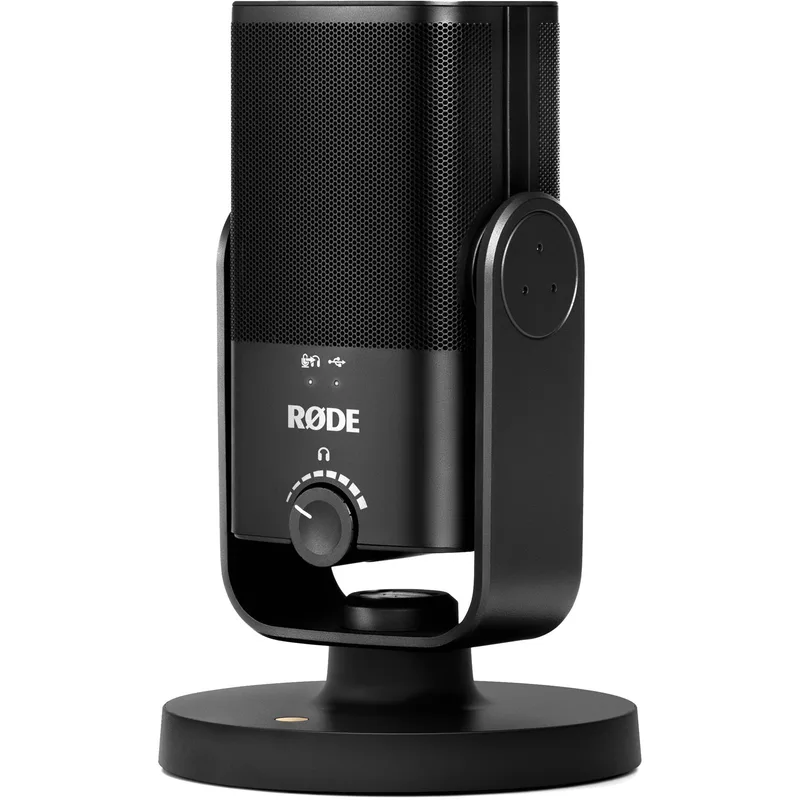
Rode NT-USB Mini
Pros
- Smallest footprint of any mic here — barely larger than a thumb drive on a stand
- 24-bit audio at a sub-$100 price point is exceptional value
- Rode's condenser capsule is tuned for voice clarity on calls and recordings
- USB-C connection with zero-latency headphone monitoring built in
- Flat-bottom design works on any desk without a separate stand
Cons
- No polar pattern options — cardioid only
- No onboard software integration — basic plug-and-play, nothing more
- Stand is fixed angle — cannot adjust tilt without a separate boom arm
The Rode NT-USB Mini is the mic that disappears into your desk setup. At 105g and roughly the size of a large marker, it takes up almost no desk space. The flat-bottom design lets it sit stable on any desk surface without a separate stand. Plug in USB-C, set it in front of your laptop, done.
Despite its size, the audio output is 24-bit at 48kHz — technically superior to the QuadCast S in bit depth, and matched to the Shure MV7+. Rode’s condenser capsule is tuned specifically for voice frequencies, which translates to naturally warm, clear vocal capture without heavy EQ processing. For video calls, recordings, and straightforward streaming, this mic punches considerably above its $99 price.
The limitations are simple: cardioid only, no software ecosystem, fixed-angle stand. It’s a pure plug-and-play device. If you want flexibility or integration, look at the Wave:3 or QuadCast S. If you want the cleanest possible audio in the smallest possible footprint at the lowest reasonable price, the NT-USB Mini is the answer.
Who should buy this: Minimalist desk setups, frequent travelers who pack their mic, and anyone who wants professional call quality without desk real estate or software complexity.
Who should skip this: Content creators who need pattern flexibility or software mixing for multi-source streams.
5. Razer Seiren V3 Mini — Best Budget
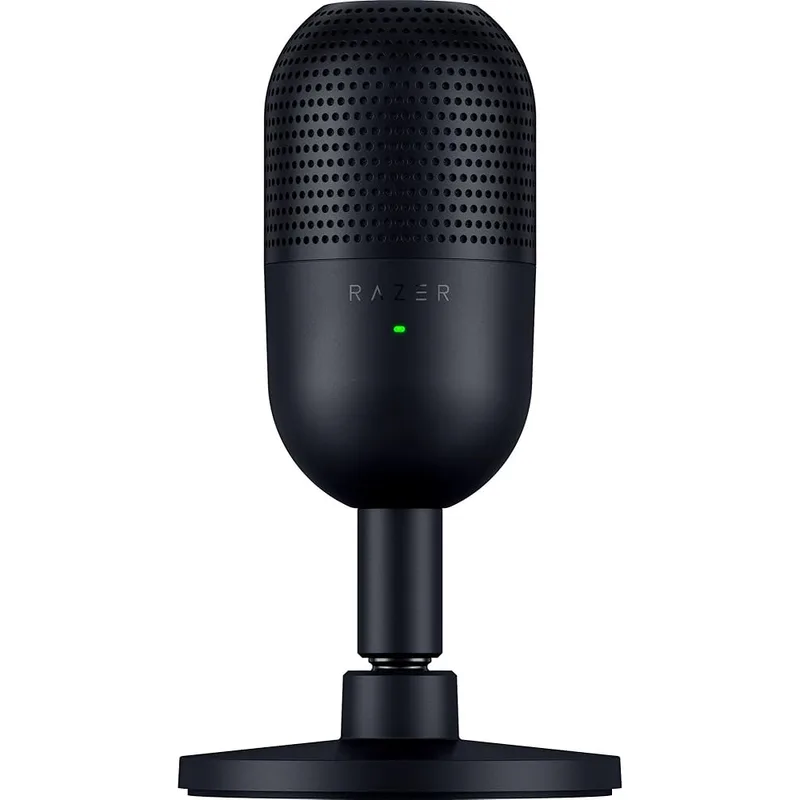
Razer Seiren V3 Mini
Pros
- Supercardioid pattern has tighter pickup than standard cardioid — excellent background rejection for noisy home offices
- Tap-to-mute with LED confirmation is clear and reliable
- Built-in shock absorber handles desk vibration at this price point
- Ultra-compact — fits in a laptop bag without a case
- Plug-and-play with no driver installation needed
Cons
- USB-A only — no USB-C connection
- No headphone monitoring output
- No software mixing or effects ecosystem
- Supercardioid requires more precise mic placement than cardioid options
The Seiren V3 Mini is the 2026 successor to Razer’s popular Seiren Mini, and Razer made meaningful improvements: the tap-to-mute sensor is more responsive, the shock absorber is more effective, and the supercardioid pattern is tighter than the original’s cardioid. At $60, it’s the most affordable pick here by a significant margin.
Supercardioid is a meaningful upgrade for home office use. Where cardioid mics have a roughly 130-degree pickup angle, supercardioid narrows that to about 115 degrees with significantly stronger side rejection. In practice, if you have a mechanical keyboard, a fan, or nearby conversations, the supercardioid pattern filters them more effectively than a standard cardioid at the same distance.
The limitations at this price are predictable: no headphone output, no software ecosystem, USB-A only. But for a remote worker who wants better call audio than their laptop’s built-in mic and doesn’t need to edit recordings, the Seiren V3 Mini covers the need completely.
Who should buy this: Budget-conscious remote workers, new streamers testing the waters before investing further, and anyone who needs a travel-friendly mic with strong background rejection.
Who should skip this: Anyone who needs headphone monitoring, or who runs a modern USB-C-only laptop without a USB-A port or hub.
Buying Guide: Choosing a Streaming Mic for Dual-Use Home Office Work
Dynamic vs. Condenser
Dynamic microphones use a moving coil to capture sound and naturally reject off-axis noise. They work well in untreated rooms with background noise — typical home offices. The Shure MV7+ is the dynamic option here.
Condenser microphones use a charged capsule that captures a wider frequency range with more sensitivity. They sound more detailed and accurate but also pick up more room noise, keyboard clicks, and HVAC sounds. Everything else on this list — Wave:3, QuadCast S, NT-USB Mini, Seiren V3 Mini — is a condenser.
If your home office has significant background noise (shared space, street-facing window, mechanical keyboard), lean toward dynamic. If it’s reasonably quiet, a condenser will deliver better audio quality at any given price.
USB vs. XLR
All five picks here offer USB connections. USB microphones are self-contained — the analog-to-digital conversion happens inside the mic, and the digital signal goes directly to your computer via USB. Zero additional hardware needed.
XLR requires an external audio interface (typically $100–$200) to convert analog to digital. The Shure MV7+ includes both outputs, so you can start with USB and upgrade later without replacing the mic.
For most remote workers and streamers, USB is the correct choice. XLR makes sense if you already own an interface or plan to invest in one within the next year.
Polar Patterns
Most USB streaming mics use cardioid only — they capture sound directly in front of the mic. This is correct for solo streaming, podcast recording, and remote work calls.
Bidirectional captures from front and back — useful for face-to-face interviews across one mic. Omnidirectional captures in all directions — useful for group recording in a room. Stereo uses both capsules together for ambient or instrument recording.
The HyperX QuadCast S offers all four patterns. The Shure MV7+, Wave:3, NT-USB Mini, and Seiren V3 Mini are cardioid or supercardioid only. Choose based on whether you ever need to record more than one person.
Software Ecosystems
Software adds significant value at the mid-range. Elgato Wave Link is the most capable free offering here — it functions as a virtual mixing board. Razer Synapse offers effects and customization for the Seiren V3 Mini. HyperX NGENUITY handles RGB and basic EQ for the QuadCast S.
If you want no software involvement, the Rode NT-USB Mini is genuinely plug-and-play.
Frequently Asked Questions
Is a dynamic or condenser mic better for home office streaming? Dynamic mics (like the Shure MV7+) reject background noise more aggressively, making them the better choice for home offices with keyboard noise, HVAC, or shared spaces. Condenser mics capture more detail and frequency range, which sounds better in acoustically treated or very quiet rooms.
Do I need a boom arm for any of these microphones? The Rode NT-USB Mini and Razer Seiren V3 Mini sit directly on your desk and don’t require a boom arm. The Shure MV7+ and Elgato Wave:3 benefit from a boom arm to position them at the correct distance (about 6–8 inches from your mouth). The HyperX QuadCast S ships with its own stand but also accepts a standard 3/8” or 5/8” boom arm mount.
Can I use a streaming mic for Microsoft Teams and Zoom calls? All five picks here are USB class-compliant and appear as standard audio devices in Teams, Zoom, Google Meet, and every other conferencing platform without any driver installation. You select them in the audio settings of your software. The Shure MV7+ is also TeamSpeak certified.
What’s the difference between the Shure MV7 and MV7+? The MV7+ (reviewed here) added a USB-C connection (replacing USB-A on the original), a redesigned LED touch panel, an improved Auto Level Mode, and built-in real-time denoiser and reverb effects in the ShurePlus MOTIV app. The original MV7 is still available at a lower price if you don’t need those additions.
Why does the Elgato Wave:3 cost more than the Rode NT-USB Mini if they’re both cardioid condensers? The Wave:3 includes Wave Link software (a full audio mixing application), Clipguard anti-distortion technology, and 96kHz/24-bit audio. The Rode NT-USB Mini is plug-and-play with no software ecosystem and 48kHz/24-bit audio. The Wave:3 is priced around its software integration value, not just its hardware. If you won’t use Wave Link, the NT-USB Mini is sharper value at $99.
Top Pick Summary
For most remote workers who also create content, the Shure MV7+ is the clearest choice: it handles calls well, sounds professional in recordings, and the dynamic capsule means you spend zero time noise-gating keyboard clatter from your recordings. The USB-C and XLR outputs mean you’re not locked into one setup forever.
Streamers who need a software mixing layer should look at the Elgato Wave:3 — Wave Link genuinely replaces dedicated hardware for most stream audio setups. And for anyone starting out or working in a minimal desk setup, the Razer Seiren V3 Mini at $60 delivers more voice clarity than most laptop microphones at a fraction of the cost of the premium options here.
Detailed Reviews
Shure MV7+
Pros
- Dynamic capsule rejects background noise without noise-gate artifacts
- USB-C and XLR outputs — plug into a laptop today, upgrade to an interface later
- Auto Level Mode handles gain automatically during calls and streams
- OBS Certified for one-click integration with major streaming software
- LED touch panel with zero-latency headphone monitoring
Cons
- Dynamic capsule captures less room detail than condenser options
- Heavier than compact alternatives at 550g
- No software EQ or effects on the free tier without ShurePlus MOTIV app
Elgato Wave:3
Pros
- Wave Link software functions as a full audio mixer — layers game audio, mic, browser, and music into separate faders for stream or recording
- Clipguard dual-capsule system prevents audio distortion during loud moments
- 24-bit / 96kHz captures room detail clearly for music or voice content
- Capacitive mute is silent — no audible click during calls
- USB-C connection is more durable than Micro-USB alternatives
Cons
- Wave Link software is Windows/Mac only — no mobile or iPad support
- Cardioid-only — no polar pattern flexibility for group recording
- Has dropped to $100 on sale; paying $149 full price requires patience
HyperX QuadCast S
Pros
- Four polar patterns cover solo streaming, podcast interviews, and group recording
- Anti-vibration shock mount and built-in pop filter included — no accessories needed out of the box
- RGB lighting syncs with HyperX NGENUITY and compatible ecosystems
- Touch-sensitive mute ring with visual indicator
- Works with PC, Mac, PS4, and PS5 without drivers
Cons
- 16-bit audio ceiling is behind Wave:3 and Rode NT-USB Mini in resolution
- RGB hardware adds bulk — larger footprint than compact streaming mics
- Requires HyperX NGENUITY software for full RGB customization
Rode NT-USB Mini
Pros
- Smallest footprint of any mic here — barely larger than a thumb drive on a stand
- 24-bit audio at a sub-$100 price point is exceptional value
- Rode's condenser capsule is tuned for voice clarity on calls and recordings
- USB-C connection with zero-latency headphone monitoring built in
- Flat-bottom design works on any desk without a separate stand
Cons
- No polar pattern options — cardioid only
- No onboard software integration — basic plug-and-play, nothing more
- Stand is fixed angle — cannot adjust tilt without a separate boom arm
Razer Seiren V3 Mini
Pros
- Supercardioid pattern has tighter pickup than standard cardioid — excellent background rejection for noisy home offices
- Tap-to-mute with LED confirmation is clear and reliable
- Built-in shock absorber handles desk vibration at this price point
- Ultra-compact — fits in a laptop bag without a case
- Plug-and-play with no driver installation needed
Cons
- USB-A only — no USB-C connection
- No headphone monitoring output
- No software mixing or effects ecosystem
- Supercardioid requires more precise mic placement than cardioid options