Samsung’s expanded 2026 audio lineup — announced at CES alongside new Wi-Fi speaker series — pushed buyers to evaluate where soundbar audio fits in a work setup rather than a home theater. The answer for remote workers is more specific than it sounds: a compact desk soundbar solves a distinct problem that neither laptop speakers, headsets, nor TV-scale soundbars address well.
Built-in laptop and monitor speakers are typically 2–5W drivers with no bass extension and no stereo separation. They’re fine for system notifications. For six hours of background music, video calls, YouTube briefings, and streaming content during the workday, they produce the kind of fatiguing, thin audio that makes people reach for headphones. But headphones create their own problem — isolation fatigue after prolonged wear, reduced situational awareness in home environments, and the social friction of being visibly closed off to family members or coworkers in a shared space.
A desk soundbar sits below the monitor, adds real bass, produces proper stereo separation, and stays out of the way. This roundup covers four desk soundbars evaluated across the criteria that matter most for home office use: audio clarity for speech and music, desk footprint, connectivity options, and honest value at each price tier.
Quick Comparison
| Soundbar | Power | Inputs | Bass | Highlights | Price |
|---|---|---|---|---|---|
| Creative Stage Air V2 | 10W RMS | USB-C, BT 5.3, 3.5mm | 80 Hz | Portable, battery | Unavailable |
| Creative Stage SE | 24W RMS | USB-A, BT 5.3 | 55 Hz | Best value stationary | Unavailable |
| Yamaha SR-C20A | 100W | HDMI ARC, Optical, 3.5mm, BT | 65 Hz | Built-in 2.1 sub | Unavailable |
| Samsung HW-S60D | 200W | HDMI ARC, Optical, Wi-Fi, BT | ~70 Hz | Wi-Fi, Atmos, Alexa | $249.97-$277.99 as of Oct 18, 2026 |
1. Creative Stage Air V2 — Best Budget
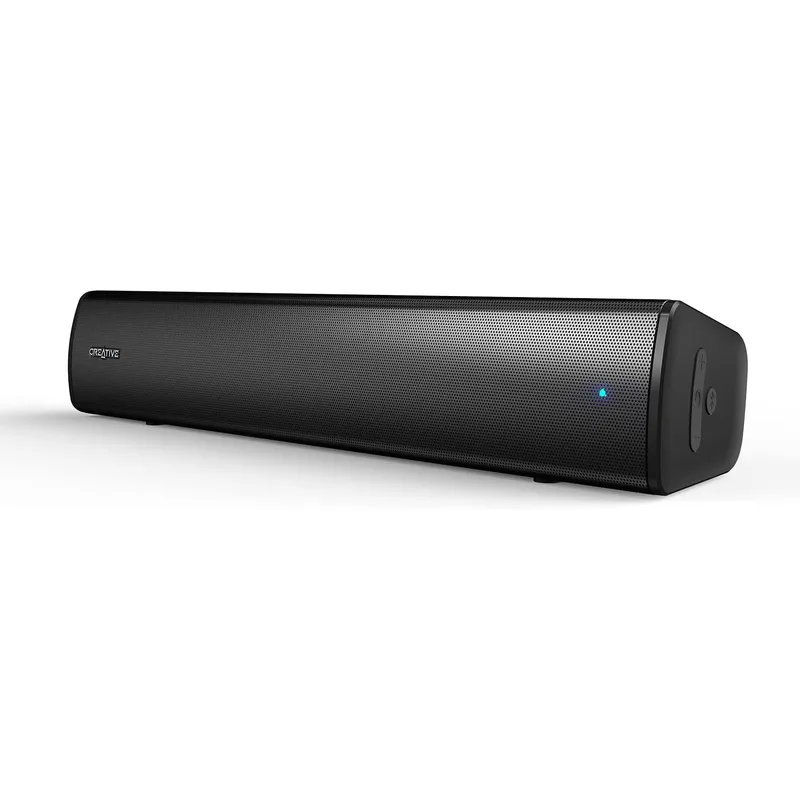
Creative Stage Air V2
Pros
- Battery-powered design means zero additional cables on your desk — plug in USB-C to charge and use simultaneously, or run untethered for up to 6 hours when working from different rooms, a couch, or a client site
- True under-monitor footprint at 16.1 inches wide and 3.7 inches tall fits beneath virtually any monitor including compact 24-inch displays without blocking the bottom edge of the screen
- Three input options (USB-C digital audio, Bluetooth 5.3, and 3.5mm AUX) cover every connection scenario — wired to a laptop, wirelessly paired to a phone, or physically connected to an older audio interface
- USB-C powers the bar and transfers digital audio simultaneously — no separate power adapter needed, and the USB-C cable already used for a laptop or dock often handles both functions
- At $60, it outperforms built-in laptop and monitor speakers significantly — the dual-driver setup with passive radiator adds genuine bass presence that flat panel speakers cannot produce
Cons
- Bluetooth limited to SBC codec only — no AAC, aptX, or LDAC means Bluetooth audio quality is noticeably lower than the 3.5mm wired input, which produces the cleanest sound
- 80 Hz lower frequency rolloff means bass-heavy music loses sub-bass information — the passive radiator helps but cannot compensate for the fundamental driver size limitation
- 10W RMS output gets loud enough for a quiet home office but starts to distort at higher volumes in open spaces; not adequate for filling a room or competing with background noise
The Stage Air V2 is the right call for remote workers who need better-than-laptop audio without committing to a permanent desk fixture. It runs on an internal battery for up to 6 hours, charges via USB-C, and moves between rooms as easily as a water bottle.
That portability distinguishes it from every other soundbar in this roundup. The Stage SE, Yamaha, and Samsung require an AC outlet and a semi-permanent desk position. The Air V2 doesn’t. For workers with multiple work spots — main desk in the morning, kitchen table for a midday call, couch for a late-afternoon reading session — this flexibility is worth more than the 10W output limitation.
The dual-driver setup with passive radiator pushes audio quality meaningfully beyond built-in laptop speakers. Bass is present and audible down to 80 Hz, which covers the fundamental frequencies of human voices and most music. It does not produce club-floor bass, but it produces the difference between laptop-speaker thinness and genuine desktop listening.
The 3.5mm AUX input delivers the cleanest audio. Bluetooth SBC quality is noticeably lower — more compressed, less detailed — and USB-C audio sounds slightly colored compared to analog. For music listening, run the 3.5mm cable from a headphone jack or audio interface. For calls and casual listening, Bluetooth is convenient enough.
The volume ceiling is a real limitation. The Stage Air V2 handles a quiet home office well. It cannot compete with background noise from an HVAC system, busy street, or shared household. If your workspace has significant ambient noise, the Stage SE’s 24W RMS is the more appropriate choice.
Best for: Remote workers who move between multiple work spots, want a portable upgrade from laptop speakers, or need a secondary audio option for travel.
2. Creative Stage SE — Best Under-Monitor
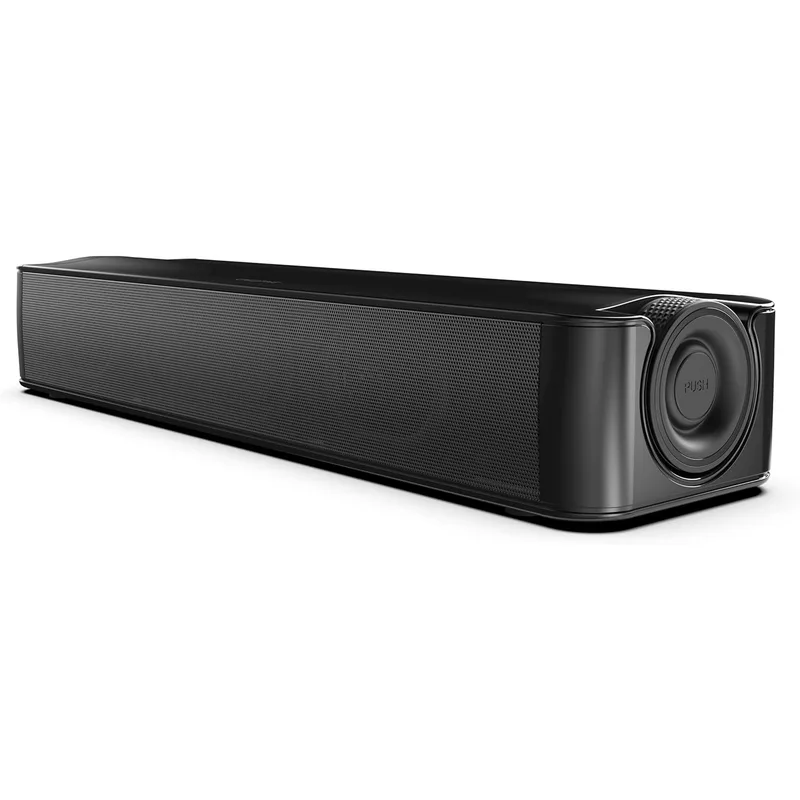
Creative Stage SE
Pros
- 48W peak output is genuinely powerful for a sub-$65 under-monitor bar — gets loud enough to fill a medium-sized room without distortion, which the Stage Air V2 cannot manage
- 55 Hz low-end extension is impressive for a bar this compact and this affordable — music and video audio have real bass weight rather than the thin, midrange-heavy sound typical of budget computer speakers
- Clear Dialog mode applies Sound Blaster DSP processing to center and elevate vocal frequencies — speech intelligibility on calls, podcasts, and YouTube commentary improves noticeably with this mode active
- USB-A digital audio connection provides clean, jitter-free audio directly from the computer's USB port without touching the analog signal chain — eliminates the hiss and interference common with 3.5mm connections on desktop PCs
- Bluetooth 5.3 allows pairing a phone while staying connected via USB — useful for playing music from a mobile device without switching the laptop's audio routing
Cons
- No 3.5mm analog input — the only wired option is USB-A digital audio, which requires a computer or device with a USB-A port rather than USB-C or 3.5mm
- Requires an AC power adapter with an external power brick, adding a cable run to the desk that battery-powered alternatives avoid
- The glossy plastic body picks up fingerprints and smudges visibly — looks best when cleaned regularly, which is a minor irritation on a product used daily
- No included elevation stand — sits flat on the desk and fires audio at table level rather than at ear level; a small book or riser improves dispersion meaningfully
The Stage SE is the desk soundbar that replaces computer speakers for most remote workers. At $49–$65, it delivers 24W RMS output, 55 Hz bass extension, and Sound Blaster DSP processing — audio capabilities that match soundbars costing two to three times as much from five years ago.
The 55 Hz frequency floor is the key number. Human voices range from roughly 85 Hz to 255 Hz for fundamental frequencies, but the harmonics that convey warmth and presence extend down to 60–80 Hz. The Stage SE captures those harmonics where the Stage Air V2 starts rolling off. The practical difference is audible: voices on calls and in video content sound grounded and full rather than nasal and thin.
The 48W peak output is surprising for the price. It gets genuinely loud in a medium-sized room — loud enough that most remote workers will set volume to 40–60% for comfortable daily listening. The headroom means the bar is never working at its limit during normal use, which reduces distortion and maintains audio quality.
Clear Dialog mode applies EQ to center vocal frequencies. Enable it for call audio, podcasts, and speech-heavy content. Disable it for music listening, where the flat frequency response is more natural. Switching takes one button press and becomes part of the daily workflow quickly.
The USB-A input is the right choice over Bluetooth for work audio. It carries digital audio from the computer with no codec compression, no latency, and no interference from other nearby Bluetooth devices. The one limitation: USB-C-only laptops or docking stations without a USB-A port need a USB-C to USB-A adapter.
Best for: Remote workers who want a permanent under-monitor audio upgrade at the lowest reasonable price — the best combination of output, bass, and clarity below $100.
3. Yamaha SR-C20A — Editor’s Pick
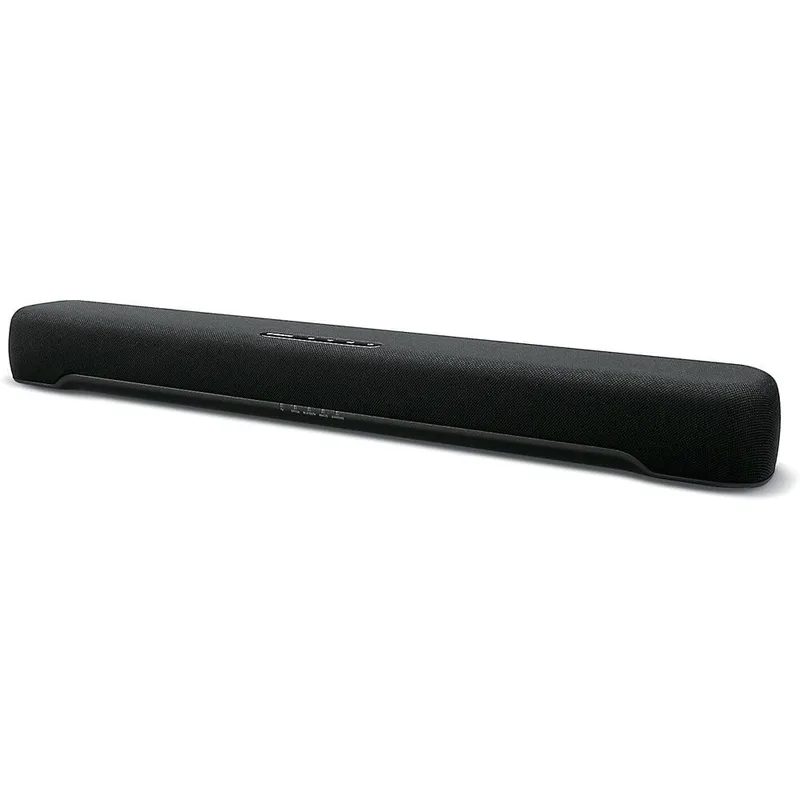
Yamaha SR-C20A
Pros
- Built-in 75mm downward-firing subwoofer with dual passive radiators produces genuine low-end weight without requiring a separate sub unit — 65 Hz extension covers the bass fundamentals of music, film dialogue, and podcast voices that 2.0 bars at this size cannot reach
- 3.5mm analog input is present and clean — the Yamaha works with virtually any source device including older laptops, docking stations with analog outputs, and audio interfaces, unlike Samsung's digital-only input approach
- HDMI ARC allows TV-connected home office setups to route audio through a single cable — useful for remote workers who use a large TV as a secondary display or primary monitor
- At 23.6 inches wide and 2.5 inches tall, it fits comfortably below most 27-inch and 32-inch monitors without blocking the bottom bezel — genuinely compact for a 2.1 all-in-one
- Yamaha's Clear Voice technology isolates and enhances vocal frequencies — dialogue clarity on video calls and streaming content is noticeably better than generic 2.0 bars, which treat all frequencies equally
- AAC Bluetooth codec support delivers higher wireless audio quality than SBC-only competitors — relevant for iPhone users streaming Apple Music or Spotify, where AAC provides audibly better wireless performance
Cons
- At $150–$180, it costs roughly three times the Creative Stage SE — the built-in sub and HDMI ARC justify the price for home theater-connected setups, but pure desktop computer users may not use most of its inputs
- No USB audio input — computer audio must route through HDMI ARC, Optical, or 3.5mm, which may require an adapter from USB-C-only laptops
- No Wi-Fi, no voice assistants, no app — control is limited to the remote and front panel; not part of a smart home ecosystem
The SR-C20A earns the Editor’s Pick for one reason the Creative options cannot match: it’s a genuine 2.1 system in a compact bar. The 75mm downward-firing subwoofer with dual passive radiators produces real bass extension down to 65 Hz from a unit that’s only 2.5 inches tall and 23.6 inches wide.
That bass matters most in two scenarios. First, long-duration background music listening — the kind that fills eight hours of a remote workday. Bass-thin audio is fatiguing over time in ways that aren’t immediately obvious; the body compensates by tensing toward the sound source. The SR-C20A’s low-end extension produces naturally relaxed listening that you notice primarily when comparing it directly to the Creative options. Second, film and streaming content — which most home office setups serve double duty for in the evenings. The SR-C20A handles cinematic audio with the weight that 2.0 bars cannot.
The input selection is the most comprehensive in this roundup: HDMI ARC, two optical inputs, 3.5mm, and Bluetooth. This breadth makes the SR-C20A the right choice for mixed-use setups — a desktop computer via optical, a gaming console or TV via HDMI ARC, and a phone via Bluetooth, without swapping cables.
Yamaha’s Clear Voice processing applies DSP to vocal frequencies across all inputs. On video calls, it reduces the effort required to track speech in longer meetings — the kind of accumulated cognitive load that remote workers feel as afternoon fatigue. This isn’t audiophile processing; it’s practical clarity enhancement that improves the daily experience of calls.
The HDMI ARC input and the 23.6-inch width together make the SR-C20A the correct choice for remote workers who run a hybrid setup — desktop monitor plus a TV or large display in the same room.
Best for: Remote workers who want genuine 2.1 bass, broad input compatibility, and a compact bar that handles both work audio and evening media.
4. Samsung HW-S60D — Best Premium
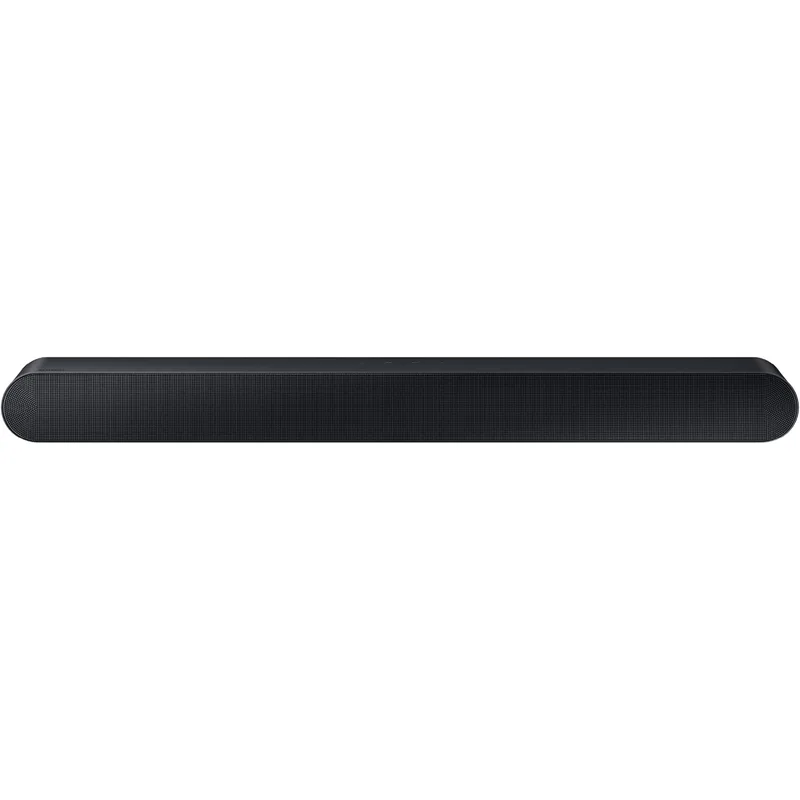
Samsung HW-S60D
Pros
- Wi-Fi streaming via AirPlay 2 and Chromecast allows lossless or high-quality audio streaming from any device on the network without Bluetooth compression — meaningful for remote workers who listen to music seriously during the workday
- Alexa built-in handles timers, reminders, smart home controls, and quick queries without reaching for a device — genuinely useful in a home office context where keyboard hands stay on the desk
- SpaceFit Sound Pro analyzes the room's acoustic properties using the built-in microphones and adjusts EQ automatically to compensate for reflections, furniture absorption, and room shape — one of the few consumer soundbars that adapts to its environment rather than applying a fixed EQ
- 5.0 channel processing creates a convincingly wide soundstage across the horizontal plane — background music fills the room rather than emanating from a point source in front of the monitor, which is audibly more pleasant during long work sessions
- 200W drives a medium to large home office room at comfortable volume without strain — significantly more headroom than Creative or Yamaha options at lower price points
- Dolby Atmos support processes height information from Atmos-encoded content — relevant for remote workers who use their office setup to watch films and streaming content in the evenings
Cons
- No subwoofer included — the 5.0ch setup produces a wide soundstage but lacks the bass extension of the Yamaha SR-C20A's built-in sub; add-on wireless sub available but adds $200+ to the cost
- At $299, it costs five times the Creative Stage SE — the Wi-Fi, Alexa, and Dolby Atmos features are premium, but pure voice call clarity per dollar lags behind much cheaper options
- Best smart features (Q Symphony, Adaptive Sound) require a Samsung TV — Alexa and Wi-Fi streaming work on any setup, but the ecosystem features are locked to Samsung hardware
- At 26.3 inches wide, it occupies significant desk real estate below a monitor — works well at the front edge of a deep desk but may crowd smaller setups
The HW-S60D is the premium choice for remote workers who use their office soundbar as much for music and media as for work audio. Samsung’s 2026 model (which remains the right desk choice for 2026 — no compact Samsung desk soundbar was announced in Samsung’s CES 2026 lineup) brings Wi-Fi streaming, Dolby Atmos, Alexa, and SpaceFit Sound Pro into a 26.3-inch bar that sits comfortably below a 32-inch or larger monitor.
Wi-Fi streaming via AirPlay 2 and Chromecast is the premium feature that matters most. Bluetooth audio compresses the signal; Wi-Fi streaming at the same bitrate as the source file is audibly different on high-quality music. For remote workers who spend substantial time with background music during the workday, this difference is meaningful over dozens of hours per week.
Alexa built-in handles the small friction points of office life without requiring voice routing through a separate smart speaker: timers for meeting prep, reminders for medication or breaks, and quick queries handled without lifting hands from the keyboard. In a home office context, not interrupting workflow for these tasks has compounding value.
SpaceFit Sound Pro is genuinely novel at this price. The bar uses its built-in microphones to analyze the room’s acoustic response — measuring reflections, dead zones, and frequency absorption patterns — then adjusts its EQ to compensate. A setup in a carpeted room with soft furnishings gets different processing than a hardwood room with concrete walls. Most soundbars apply a fixed EQ regardless of environment; the S60D adapts.
The absence of a subwoofer is the primary limitation. The 5.0 channel processing produces a wide, engaging soundstage, but the HW-S60D’s bass extension is less deep than the Yamaha SR-C20A’s built-in sub. For music genres that lean on sub-bass — electronic, hip-hop, film scores — the Yamaha’s physical subwoofer wins. For jazz, vocals, classical, and spoken audio, the Samsung’s soundstage width is the better experience.
Best for: Remote workers who prioritize Wi-Fi audio quality, Alexa integration, and smart home ecosystem over raw bass output — and who listen to music seriously during the workday.
Buying Guide: Choosing the Right Desk Soundbar
Desk Size and Footprint
Under-monitor soundbars range from 15 to 27 inches wide. Measure the gap between your monitor stand’s base legs or the front edge of your desk before buying:
- Under 24 inches available: Creative Stage Air V2 (16.1 in) or Stage SE (16.14 in)
- 24–27 inches available: Yamaha SR-C20A (23.6 in) fits comfortably
- 27+ inches available: Samsung HW-S60D (26.3 in) is the right size for 32-inch+ monitors
Height matters too. Soundbars taller than 4 inches may obstruct the bottom edge of the screen, especially on monitors with minimal lower bezels or monitors set close to desk height.
Connectivity Matching
The inputs you need depend on your setup:
- Laptop only, USB-C dock: Creative Stage SE (USB-A) or Creative Stage Air V2 (USB-C) — no adapter needed on most docks
- Desktop PC with optical out: Yamaha SR-C20A — dual optical inputs cover PC plus TV or gaming console simultaneously
- TV or large display in the room: Any bar with HDMI ARC (Yamaha, Samsung) — one cable carries audio and remote control signals
- Multi-room audio / Wi-Fi streaming: Samsung HW-S60D — only option in this roundup with AirPlay 2 and Chromecast
Bass Expectations
Budget soundbars below $100 produce bass you can hear but not feel. The passive radiators in the Creative Stage SE and Air V2 extend to 55–80 Hz, which covers music and voices. For anything below that — the thump in electronic music, the low rumble in film soundtracks, the physicality of a live drum kit — a 2.1 system is required. The Yamaha SR-C20A’s built-in subwoofer is the most cost-effective way to get there without adding a separate unit.
Soundbar vs. Speakerphone
Desk soundbars and speakerphones solve different problems. A speakerphone (Jabra Speak2, Poly Sync) places a 360-degree microphone at desk level for conference calls — multiple people can speak around it. A soundbar has a microphone only in premium models and is primarily for personal listening.
If your primary use case is conference calls with multiple participants in the room, a speakerphone is the correct tool. If your primary use case is music, podcasts, video audio, and solo calls where you already have a good microphone, a soundbar is the better upgrade.
FAQ
Do desk soundbars improve video call audio quality?
Yes, on the output side. A desk soundbar produces clearer, fuller audio from the other participants than built-in laptop speakers — speech is easier to track over longer calls, and you’re less likely to develop listening fatigue in multi-hour meeting days. The soundbar does nothing for how your voice sounds to others, which is determined by your microphone. A soundbar plus a dedicated USB microphone is the correct upgrade path for remote workers who want to improve both ends of call quality.
Will a soundbar under my monitor interfere with my webcam or screen?
Not if you check the height. Most under-monitor soundbars are 2.5–4.5 inches tall. The issue arises when a bar taller than the gap between your monitor’s lower edge and the desk surface blocks part of the screen. Most modern monitors with stands have several inches of clearance below the panel. Check your monitor’s lower bezel height before ordering, and note the soundbar’s height in the specs. Webcams clip to the top of the monitor or sit on the desk behind the bar, so they’re unaffected.
Should I choose Bluetooth or wired for daily use?
For stationary desk setups, wired audio (USB digital or 3.5mm analog) is more reliable and sounds better than Bluetooth. Bluetooth introduces codec compression, occasional dropout on crowded 2.4 GHz channels, and a slight connection delay that matters for video sync. The exception is the Samsung HW-S60D’s Wi-Fi streaming via AirPlay 2 or Chromecast — this avoids Bluetooth compression while maintaining wireless convenience. For the Creative Stage Air V2’s portability use case, Bluetooth is the practical choice.
How much should I spend on a home office soundbar?
Diminishing returns kick in fast in this category. The Creative Stage SE at $49–$65 delivers a significant upgrade over laptop speakers for most remote workers. The Yamaha SR-C20A at $150–$180 adds real bass and broader connectivity for workers who also use the bar for media. The Samsung at $249–$279 makes sense only if Wi-Fi streaming, Alexa, or Dolby Atmos specifically matter to your daily use case. Spending more than $300 on a desk soundbar for solo work audio is not justified by the incremental return.
Can I use a home theater soundbar on my desk?
Technically yes, but the fit is poor. Home theater soundbars like the Yamaha SR-B20A are designed for TV placement — they’re 36 inches wide, optimized for 55-inch+ TV height, and set up for 8-foot listening distances rather than the 2–3 feet typical of desk use. At close range, they produce a wide and diffuse soundstage that lacks the focused imaging of near-field desk speakers. Purpose-built desk soundbars in this roundup are engineered for the 2–3 foot listening distance that desktop use requires.
Conclusion
For most remote workers, the Creative Stage SE is the right starting point. At $49–$65, it delivers 24W RMS, 55 Hz bass extension, and Sound Blaster DSP from a bar that fits below any monitor. The price-to-performance ratio makes it the obvious upgrade from laptop or monitor speakers without requiring a budget justification conversation.
The Yamaha SR-C20A earns the Editor’s Pick for workers who want a complete audio system in one unit. The built-in 2.1 subwoofer, broad input selection, and Yamaha’s Clear Voice processing cover both workday use and evening media in a compact package. At $150–$180, it’s the best all-around desk soundbar for workers who use their setup for more than just calls and background music.
If budget is the primary constraint, the Creative Stage Air V2 at $60 is an honest upgrade. The battery-powered design and USB-C connectivity add flexibility that the Stage SE doesn’t offer, and the audio quality clears the built-in speaker threshold comfortably.
The Samsung HW-S60D at $299 is the right purchase for workers who specifically value Wi-Fi streaming, Alexa integration, and Dolby Atmos — and who listen to music seriously during the workday. It’s the only option in this roundup built for a smart home ecosystem rather than a standalone desk.
Detailed Reviews
Creative Stage Air V2
Pros
- Battery-powered design means zero additional cables on your desk — plug in USB-C to charge and use simultaneously, or run untethered for up to 6 hours when working from different rooms, a couch, or a client site
- True under-monitor footprint at 16.1 inches wide and 3.7 inches tall fits beneath virtually any monitor including compact 24-inch displays without blocking the bottom edge of the screen
- Three input options (USB-C digital audio, Bluetooth 5.3, and 3.5mm AUX) cover every connection scenario — wired to a laptop, wirelessly paired to a phone, or physically connected to an older audio interface
- USB-C powers the bar and transfers digital audio simultaneously — no separate power adapter needed, and the USB-C cable already used for a laptop or dock often handles both functions
- At $60, it outperforms built-in laptop and monitor speakers significantly — the dual-driver setup with passive radiator adds genuine bass presence that flat panel speakers cannot produce
Cons
- Bluetooth limited to SBC codec only — no AAC, aptX, or LDAC means Bluetooth audio quality is noticeably lower than the 3.5mm wired input, which produces the cleanest sound
- 80 Hz lower frequency rolloff means bass-heavy music loses sub-bass information — the passive radiator helps but cannot compensate for the fundamental driver size limitation
- 10W RMS output gets loud enough for a quiet home office but starts to distort at higher volumes in open spaces; not adequate for filling a room or competing with background noise
Creative Stage SE
Pros
- 48W peak output is genuinely powerful for a sub-$65 under-monitor bar — gets loud enough to fill a medium-sized room without distortion, which the Stage Air V2 cannot manage
- 55 Hz low-end extension is impressive for a bar this compact and this affordable — music and video audio have real bass weight rather than the thin, midrange-heavy sound typical of budget computer speakers
- Clear Dialog mode applies Sound Blaster DSP processing to center and elevate vocal frequencies — speech intelligibility on calls, podcasts, and YouTube commentary improves noticeably with this mode active
- USB-A digital audio connection provides clean, jitter-free audio directly from the computer's USB port without touching the analog signal chain — eliminates the hiss and interference common with 3.5mm connections on desktop PCs
- Bluetooth 5.3 allows pairing a phone while staying connected via USB — useful for playing music from a mobile device without switching the laptop's audio routing
Cons
- No 3.5mm analog input — the only wired option is USB-A digital audio, which requires a computer or device with a USB-A port rather than USB-C or 3.5mm
- Requires an AC power adapter with an external power brick, adding a cable run to the desk that battery-powered alternatives avoid
- The glossy plastic body picks up fingerprints and smudges visibly — looks best when cleaned regularly, which is a minor irritation on a product used daily
- No included elevation stand — sits flat on the desk and fires audio at table level rather than at ear level; a small book or riser improves dispersion meaningfully
Yamaha SR-C20A
Pros
- Built-in 75mm downward-firing subwoofer with dual passive radiators produces genuine low-end weight without requiring a separate sub unit — 65 Hz extension covers the bass fundamentals of music, film dialogue, and podcast voices that 2.0 bars at this size cannot reach
- 3.5mm analog input is present and clean — the Yamaha works with virtually any source device including older laptops, docking stations with analog outputs, and audio interfaces, unlike Samsung's digital-only input approach
- HDMI ARC allows TV-connected home office setups to route audio through a single cable — useful for remote workers who use a large TV as a secondary display or primary monitor
- At 23.6 inches wide and 2.5 inches tall, it fits comfortably below most 27-inch and 32-inch monitors without blocking the bottom bezel — genuinely compact for a 2.1 all-in-one
- Yamaha's Clear Voice technology isolates and enhances vocal frequencies — dialogue clarity on video calls and streaming content is noticeably better than generic 2.0 bars, which treat all frequencies equally
- AAC Bluetooth codec support delivers higher wireless audio quality than SBC-only competitors — relevant for iPhone users streaming Apple Music or Spotify, where AAC provides audibly better wireless performance
Cons
- At $150–$180, it costs roughly three times the Creative Stage SE — the built-in sub and HDMI ARC justify the price for home theater-connected setups, but pure desktop computer users may not use most of its inputs
- No USB audio input — computer audio must route through HDMI ARC, Optical, or 3.5mm, which may require an adapter from USB-C-only laptops
- No Wi-Fi, no voice assistants, no app — control is limited to the remote and front panel; not part of a smart home ecosystem
Samsung HW-S60D
Pros
- Wi-Fi streaming via AirPlay 2 and Chromecast allows lossless or high-quality audio streaming from any device on the network without Bluetooth compression — meaningful for remote workers who listen to music seriously during the workday
- Alexa built-in handles timers, reminders, smart home controls, and quick queries without reaching for a device — genuinely useful in a home office context where keyboard hands stay on the desk
- SpaceFit Sound Pro analyzes the room's acoustic properties using the built-in microphones and adjusts EQ automatically to compensate for reflections, furniture absorption, and room shape — one of the few consumer soundbars that adapts to its environment rather than applying a fixed EQ
- 5.0 channel processing creates a convincingly wide soundstage across the horizontal plane — background music fills the room rather than emanating from a point source in front of the monitor, which is audibly more pleasant during long work sessions
- 200W drives a medium to large home office room at comfortable volume without strain — significantly more headroom than Creative or Yamaha options at lower price points
- Dolby Atmos support processes height information from Atmos-encoded content — relevant for remote workers who use their office setup to watch films and streaming content in the evenings
Cons
- No subwoofer included — the 5.0ch setup produces a wide soundstage but lacks the bass extension of the Yamaha SR-C20A's built-in sub; add-on wireless sub available but adds $200+ to the cost
- At $299, it costs five times the Creative Stage SE — the Wi-Fi, Alexa, and Dolby Atmos features are premium, but pure voice call clarity per dollar lags behind much cheaper options
- Best smart features (Q Symphony, Adaptive Sound) require a Samsung TV — Alexa and Wi-Fi streaming work on any setup, but the ecosystem features are locked to Samsung hardware
- At 26.3 inches wide, it occupies significant desk real estate below a monitor — works well at the front edge of a deep desk but may crowd smaller setups