Affiliate disclosure: SetupRanked earns a commission on qualifying purchases made through links on this page. This does not affect our editorial rankings.
ASUS launched four new ZenScreen models in early 2026 — including the dual-panel ZenScreen Duo MB14FCD — signaling that the portable monitor market is accelerating beyond basic screen extension into versatile multi-display travel rigs. The underlying technology is catching up: OLED panels are trickling into the segment, IPS Black is arriving in sub-$300 14-inch monitors, and the 16:10 aspect ratio has become standard across quality options.
For remote workers, a portable monitor solves a specific problem: a hotel room, a co-working space, or a client’s conference room doesn’t have a second display. Carrying a 15-16 inch portable with your laptop means you always have your standard two-screen workflow regardless of where you are working.
Quick picks: The ASUS ZenScreen MB16QHG ($399) is the best all-round choice for most remote workers — it’s the brightest 16-inch portable with HDMI plus dual USB-C. Budget-conscious? The LG Gram+View 16MR70 ($319) cuts 530g compared to the ASUS and handles color-accurate work at a lower price. Need touch and pen? The Lenovo M14t Gen 2 ($340) is the only mainstream portable that offers it. And for the best raw display quality, the HP 514pn ($299) delivers 2000:1 contrast that no other portable monitor on this list can match.
This guide covers all four monitors evaluated on brightness, weight, display quality, and the practical realities of working away from a home office.
What Makes a Good Portable Monitor for Remote Work
Weight vs. screen size. Every portable monitor in this guide is bus-powered — it draws power from your laptop’s USB-C port. The trade-off is weight. A 16-inch portable at 670g is dramatically different to carry daily than one at 1.2kg. If you commute by foot or train every day, weight compounds over weeks. If you primarily move between cars and hotel rooms, the difference matters less.
Brightness. Most portable monitors rate 300-400 nits. In a controlled office environment that’s sufficient. In a hotel room with large windows, a coffee shop, or an airport lounge, anything below 350 nits starts to look washed out. The ASUS ZenScreen MB16QHG’s ~479 nits real-world output is a meaningful differentiator in variable environments.
Stand design. A kickstand is more stable than a folio cover that doubles as a stand. If you frequently work on surfaces you don’t control — plane tray tables, cafeteria tables, co-working hot desks — a rigid kickstand is more reliable. Folio stands work best on stable, flat surfaces.
Ports. USB-C only is a real limitation when working with older office equipment, presentation setups, or hotel room TVs. A monitor with HDMI plus USB-C has meaningfully broader compatibility. USB-C pass-through charging is separately valuable — it means you can charge your laptop via the monitor’s second USB-C port rather than needing two wall outlets.
Resolution and aspect ratio. The 16:10 aspect ratio has become standard in quality portable monitors because it adds vertical height compared to 16:9 — more visible content per scroll on documents, code, and spreadsheets. 2560x1600 at 16 inches delivers sharp text rendering without aggressive display scaling. 2240x1400 at 14 inches achieves a similar pixel density.
Comparison Table
| Monitor | Size | Resolution | Brightness | Weight | Ports | Price |
|---|---|---|---|---|---|---|
| ASUS ZenScreen MB16QHG | 16” | 2560x1600 | ~479 nits | 1.2 kg | 2x USB-C + HDMI | Unavailable |
| LG Gram+View 16MR70 | 16” | 2560x1600 | ~269 nits | 670g | 2x USB-C | Unavailable |
| Lenovo ThinkVision M14t Gen 2 | 14” | 2240x1400 | ~270 nits | 680g | 2x USB-C | $289.99 as of Oct 18, 2026 |
| HP Series 5 Pro 514pn | 14.3” | 2560x1600 | ~352 nits | 635g | 2x USB-C (65W PD) | $299 |
1. ASUS ZenScreen MB16QHG — Editor’s Pick
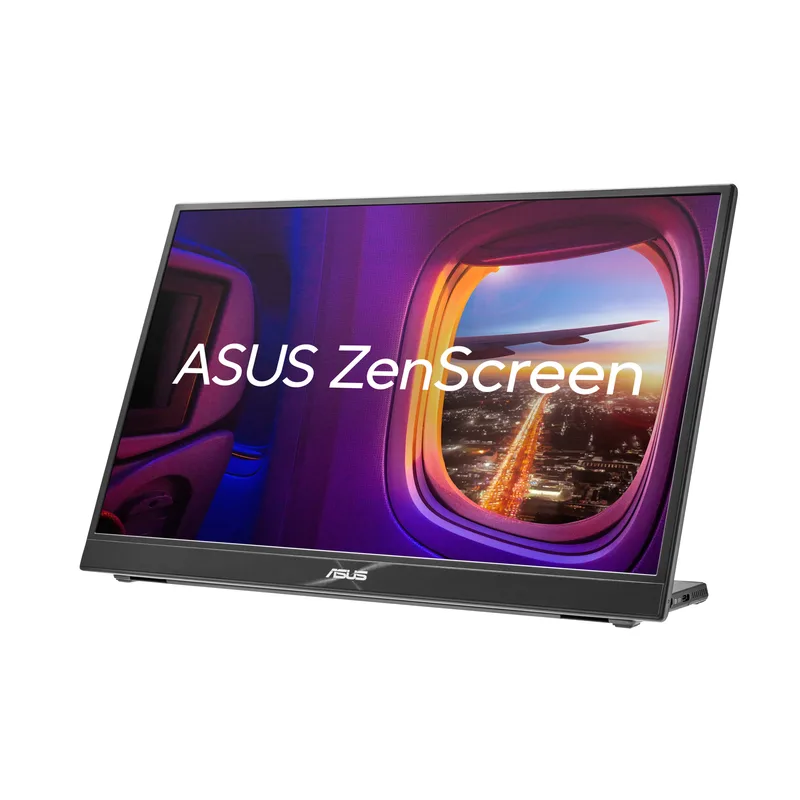
The MB16QHG is the most capable all-round portable monitor for remote workers who need a reliable second screen in varied environments. Its defining advantage is brightness: at approximately 479 nits SDR output, it performs acceptably in hotel rooms with open blinds, bright co-working spaces, and environments where other portable monitors start to look washed out.
The 120Hz refresh rate isn’t primarily a gaming feature — it makes scrolling through long documents, dragging windows, and navigating dense spreadsheets noticeably smoother. Remote workers who spend extended time reading or writing find that 120Hz reduces the subtle eye fatigue that builds over a long work session.
The 16:10 aspect ratio at 2560x1600 provides a sharp, practical workspace. At 16 inches, this resolution delivers clear text rendering without needing to scale aggressively. The 100% DCI-P3 color coverage handles design work or photo review with reasonable accuracy.
The practical limitation is brightness under single USB-C power: when powered by a single cable, the MB16QHG caps at 60% of maximum — approximately 285 nits. To achieve full brightness, you need either a USB-C PD hub providing separate power to the monitor, or a USB-A to USB-C power cable alongside the display cable. Manageable, but it requires planning your travel kit.
The HDMI port earns its keep. Presenting in a conference room, connecting to a hotel display, or working at a client office with older equipment — HDMI compatibility means fewer adapters to pack.
Buy this if: You travel frequently and need the best all-conditions portable monitor. Brightness and connection flexibility (HDMI + 2x USB-C) matter more to you than shaving weight.
Skip this if: You carry your gear on foot daily. The 1.2kg weight adds up over a long commute in ways the spec sheet doesn’t communicate.
2. LG Gram+View 16MR70 — Best Value
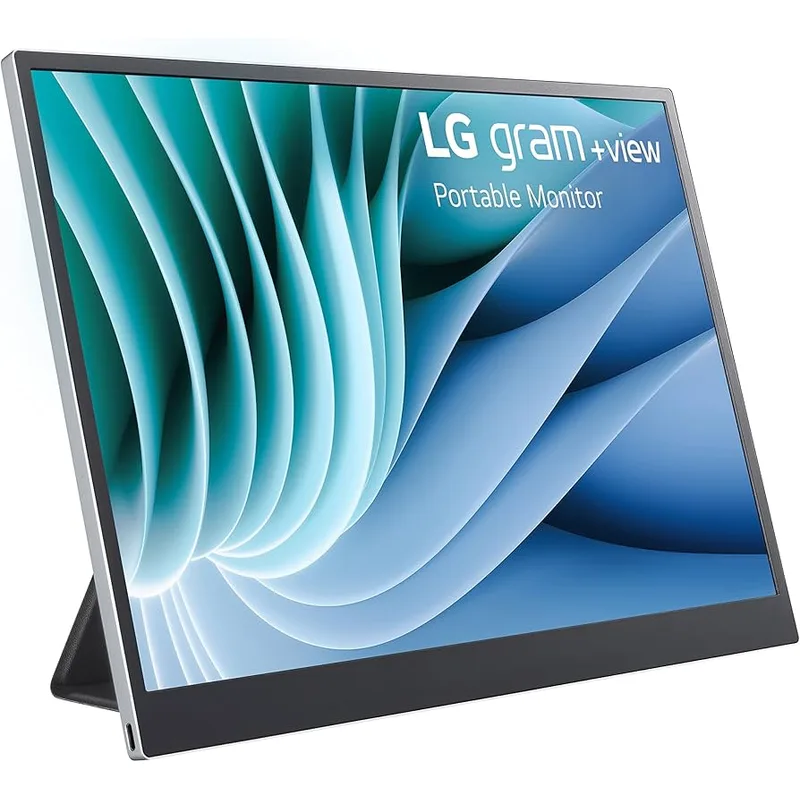
The Gram+View 16MR70 makes the clearest case that you don’t need to spend $400 on a portable monitor. At 670g for the display body — roughly half a pound lighter than the ZenScreen MB16QHG — it’s the monitor that disappears in your bag rather than reminding you it’s there every time you lift it.
The display specifications closely match the MB16QHG at the resolution level: 2560x1600, 16:10, 99% DCI-P3 color coverage. For color-accurate creative work in controlled conditions, the Gram+View is a capable tool. The 45W USB-C PD pass-through means you can charge your laptop at a reasonable rate simultaneously.
The brightness gap is the primary differentiator. Measured real-world brightness of approximately 269 nits is adequate in a controlled office environment but insufficient in brighter spaces. Remote workers who primarily work in hotels with controllable lighting, or dim co-working spaces, won’t notice the limitation. Those who frequently work near windows or in varied lighting will.
The folio stand is the other practical trade-off. It works well on flat, stable surfaces. On surfaces with any vibration or incline — a train tray table, a cafeteria, a surface that’s not perfectly level — the folio stand requires adjustment and is less reliable than a rigid kickstand. A $80 price difference versus the ASUS is real money, but the LG’s limitations are also real.
Buy this if: You’re budget-conscious, prioritize weight reduction, and primarily work in controlled lighting. Daily commuters who need every gram off their back will feel the difference.
Skip this if: You work in cafes, bright hotel rooms, or anywhere near windows. The 269 nits measured brightness gets painful fast.
3. Lenovo ThinkVision M14t Gen 2 — Best for Productivity
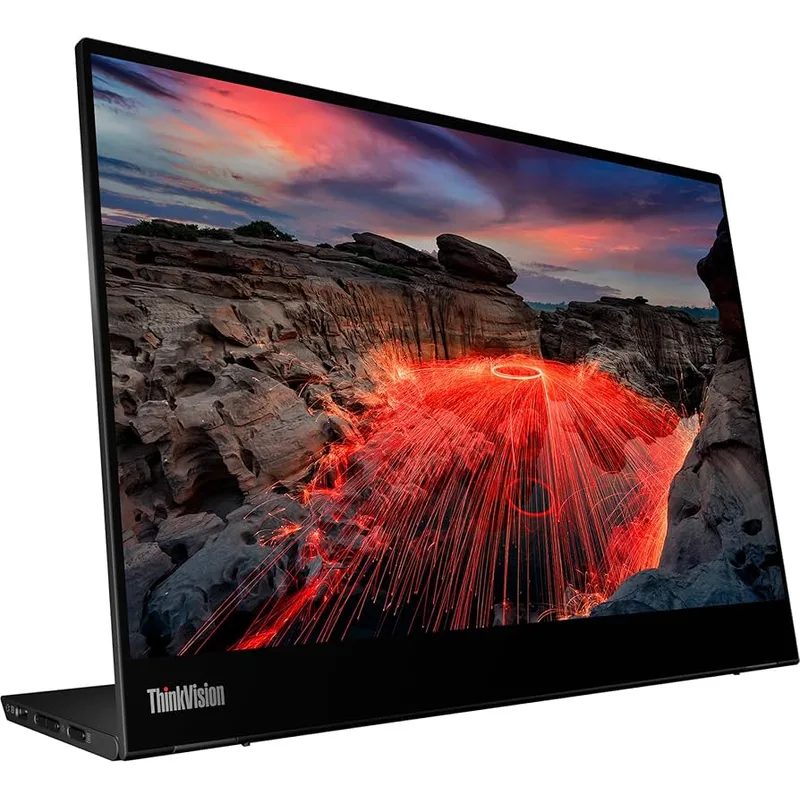
The M14t Gen 2 is the only monitor on this list with a touchscreen and active pen support. For remote workers whose workflow includes annotation, document review, signing contracts, or sketch-based design work, it’s in a category of its own.
The resolution upgrade from the first generation’s 1080p to 2240x1400 (16:10) is substantial. Text rendering at this resolution on a 14-inch panel is sharp enough that small text in dense spreadsheets or code editors is comfortably readable. The 1500:1 contrast ratio is high for IPS — blacks appear noticeably deeper than on standard IPS monitors, which makes text-heavy work more comfortable over long sessions.
The 4.6mm thickness makes it the slimmest panel on this list. Paired with 680g weight, it fits easily in the sleeve of a laptop bag alongside a 14 or 15-inch notebook without noticeable bulk.
The brightness limitation is real: 300 nits means this monitor works best in controlled lighting. In any environment with significant ambient light from windows or overhead fluorescents, the image washes out. For remote workers who control their environment — hotel rooms with blackout curtains, dim conference rooms — this is less of a problem. For those who work in cafes or bright open co-working spaces, the low brightness is a consistent frustration.
Touch functionality is also Windows-centric. On macOS, basic touch interaction works but without the precision and system integration available on Windows. Active pen support requires Windows Ink.
Buy this if: You’re on Windows and frequently annotate documents, sketch wireframes, sign contracts digitally, or want a touchscreen for a more interactive workflow on the road.
Skip this if: You’re on macOS, work in bright environments, or don’t have a specific touch/pen workflow. The premium over non-touch alternatives isn’t justified without those use cases.
4. HP Series 5 Pro 514pn — Best Contrast
The HP 514pn launched in late 2025, and its IPS Black panel technology is the reason to consider it. Standard IPS monitors deliver approximately 1000:1 static contrast. The 514pn’s IPS Black with Neo LED backlighting achieves 2000:1 — blacks are genuinely dark compared to what standard IPS portable monitors produce.
For remote workers who do substantial reading, document review, or any work where the difference between deep blacks and washed-out grays affects eye fatigue over a long day, the contrast advantage is tangible. It’s also the most color-complete monitor on this list: 100% Adobe RGB, 100% DCI-P3, and 100% sRGB certification means it handles any color space a remote creative worker might need.
The 65W USB-C pass-through is the most capable on this list. At 65W, it charges most laptops at full speed while the monitor runs — practical for a single-outlet hotel desk where you want your laptop topped up throughout the day. The built-in aluminum kickstand is stable and adjustable across a 90° range, making it reliable on the varied surfaces remote workers encounter.
The main limitation is distribution: the 514pn is not sold on Amazon. Purchase requires HP.com, Best Buy, B&H Photo, or CDW. For a product you might want to return or exchange, this adds friction compared to an Amazon purchase. No HDMI port is the other caveat — USB-C only limits compatibility with older display sources.
At $299, it’s actually the least expensive monitor on this list despite having the best display quality metrics. The catch is just the purchase channel.
Buy this if: You prioritize display quality — especially deep contrast and wide color coverage — and don’t mind buying direct from HP or Best Buy. Creative professionals who need accurate color everywhere will appreciate this.
Skip this if: You frequently need to connect to HDMI-only equipment, or if Amazon’s return policy is important to your buying decision.
Buying Guide: Choosing the Right Portable Monitor
Match size to use case. A 14-inch portable (M14t, HP 514pn) is easier to carry and fits more bags, but a 16-inch display (ZenScreen, Gram+View) gives you meaningfully more screen real estate for side-by-side applications. If your primary use is running a reference document or chat window alongside your main display, 14 inches is sufficient. If you want something that functions as a near-replacement second screen with comfortable reading room, 16 inches is the better choice.
Consider your power situation. Most portable monitors draw power from your laptop’s USB-C port. This works fine at a desk, but on battery it drains your laptop faster. If you frequently work without access to a power outlet — flights, co-working spaces with limited sockets — either carry a USB-C power bank that can power the monitor, or look for a monitor with 65W pass-through charging (HP 514pn) so you can charge the laptop via the monitor from one adapter.
Check your laptop’s USB-C output. Not all USB-C ports support DisplayPort Alt Mode (required for video output). Intel integrated graphics machines typically support it. Apple Silicon Macs and most AMD-based laptops support it. Some USB-C ports on laptops are data-only and cannot drive an external display. Verify your laptop supports DP Alt Mode over USB-C before purchasing a USB-C-only monitor.
Weigh the stand carefully. This is consistently underestimated in buying decisions. If you ever work on a train, a plane, or an unstable surface, a kickstand (HP 514pn has one built-in; the ZenScreen MB16QHG uses a fold-out stand that is reasonably rigid) is worth specifically prioritizing. Folio stands work well on standard flat desks — that’s about it.
Touch for specific workflows. The ThinkVision M14t’s touchscreen adds real value if your workflow involves annotation or document interaction. For remote workers who primarily use a portable monitor for app windows and reference material, touch adds cost and weight without meaningful benefit.
FAQ
Do portable monitors drain my laptop battery significantly?
Yes, noticeably. A bus-powered portable monitor typically draws 5-10W from your laptop’s USB-C port. On a laptop with a 50Wh battery at moderate load (browsing, documents, video calls), a connected portable monitor can reduce battery life by 1.5-2.5 hours. For work sessions away from power outlets, budget for this drain and consider carrying a small USB-C power bank rated for 45W+ PD if you need both the monitor and laptop battery management.
Will a portable monitor work with my M-series MacBook?
Apple Silicon MacBooks (M1 through M4) support external displays via USB-C and Thunderbolt ports using DisplayPort Alt Mode. A USB-C portable monitor connected to a MacBook’s Thunderbolt port will work correctly. MacBook Air models with M1/M2 chips support only one external display. MacBook Pro models support multiple displays depending on the chip. Check your specific MacBook’s maximum external display count before purchasing two portable monitors.
What’s the difference between a portable monitor and a USB-C monitor for a desk?
Portable monitors are optimized for low weight, bus-powered operation, and travel durability — typically 14-16 inches, under 1.5kg, drawing power from the connected laptop. USB-C desk monitors (like the Dell S2722QC or LG 27UK850) are heavier, larger (27-32 inches), brighter, and require wall power. A portable monitor makes sense when you need a second screen away from a permanent desk setup.
Is 60Hz vs. 120Hz noticeable in a portable monitor for work?
Yes, in practice. Remote workers who spend long hours reading documents, scrolling through code, or moving between applications will notice that 120Hz feels smoother than 60Hz when scrolling and dragging windows. It’s not as dramatic as it is for gaming, but it reduces the subtle eye fatigue that builds over a long work session. If you’re using the portable monitor primarily for video calls, document review, and static app windows, 60Hz is acceptable. For anything involving continuous scrolling, 120Hz is noticeably better.
Can I use a portable monitor with an iPad or Android tablet?
The USB-C portable monitors on this list require DisplayPort Alt Mode over USB-C. iPad Pros and recent iPad Airs support USB-C video output and will drive these monitors directly. Older iPads with Lightning connectors require an Apple adapter with video output capability. Most Android tablets support USB-C video output, but it varies by manufacturer and device model. Check whether your specific device supports “USB-C DisplayPort Alt Mode” before purchasing.
Conclusion: The Right Pick for Your Setup
The ASUS ZenScreen MB16QHG ($399) is the best portable monitor for most remote workers. Brightness, refresh rate, and connection flexibility (HDMI + 2x USB-C) make it the most practical choice across varied work environments. The brightness limitation under single-cable power is manageable — bring a USB-C PD hub or a second power cable in your travel kit.
If weight is your primary constraint — you carry your setup daily on foot — the LG Gram+View 16MR70 ($319) at 670g body weight is the right choice. The brightness trade-off is real but acceptable for anyone with reasonable control over their lighting conditions.
The HP Series 5 Pro 514pn ($299) is the best display quality option on this list, and it’s the cheapest. Its IPS Black contrast and full color gamut make it the choice for creative professionals who won’t compromise on display quality. The lack of Amazon availability is the meaningful caveat.
The Lenovo ThinkVision M14t Gen 2 ($340) stands alone as the choice for Windows users who need touch and pen interaction in a portable form factor. No other mainstream portable monitor provides that combination.
Detailed Reviews
ASUS ZenScreen MB16QHG
Pros
- Highest brightness in the portable class at ~479 nits SDR — usable in brighter environments
- 120Hz refresh rate makes scrolling and motion smoother than 60Hz competitors
- 16:10 aspect ratio adds meaningful vertical screen space for documents and code
- HDMI port plus two USB-C ports means fewer adapter worries with older laptops and hotel displays
- Accurate color coverage (100% DCI-P3) for design work on the road
Cons
- Brightness drops to 60% when powered by a single USB-C cable — needs a separate charger or PD hub
- Plastic chassis feels less premium than the price suggests
- At 1.2kg it is one of the heavier 16-inch portable options
- DisplayHDR 400 certification means HDR performance is basic, not cinematic
LG Gram+View 16MR70
Pros
- Lightest mainstream 16-inch portable at 670g body weight — meaningfully lighter in a laptop bag
- 99% DCI-P3 color accuracy makes it a solid option for color-critical creative work
- 45W USB-C PD pass-through means you can charge your laptop while powering the monitor from one port
- Elegant, minimal design with a matte panel that reduces glare in varied lighting
- Strong value for a 16-inch WQXGA resolution portable monitor
Cons
- Folio stand is less stable than a kickstand — surfaces with any vibration (train, plane tray table) cause wobble
- Real-world brightness averages ~269 nits, which is low for bright rooms or near windows
- No HDMI port — USB-C only, requiring an adapter for HDMI-only devices
- 60Hz refresh rate is noticeably less smooth than the ZenScreen MB16QHG at the same resolution
Lenovo ThinkVision M14t Gen 2
Pros
- Only mainstream portable monitor with touchscreen and active pen support — opens up annotation, sketching, and signing documents natively
- Ultra-slim 4.6mm profile makes it the easiest to fit in any laptop bag sleeve
- 1500:1 contrast ratio is high for an IPS panel, making blacks noticeably deeper
- 2240x1400 resolution is a significant upgrade over the previous generation's 1080p
- USB-C ports on both sides means you can route the cable to either side depending on your setup
Cons
- 300 nits brightness is the lowest on this list — not suitable for bright environments
- 100% sRGB only; the DCI-P3 coverage is not certified, which matters for color-accurate creative work
- Touch latency is noticeable for fast interactions — better for annotation than navigation
- Full touch and pen functionality requires Windows; macOS touch support is limited
- At $340, the price is high for a 14-inch non-HDR panel without HDMI
HP Series 5 Pro 514pn
Pros
- IPS Black panel delivers 2000:1 contrast — blacks look genuinely dark compared to standard IPS competitors
- Full color gamut coverage: 100% Adobe RGB, DCI-P3, and sRGB in a 635g portable package
- Built-in aluminum kickstand is rigid and adjustable — more reliable than folio covers on any surface
- 65W USB-C pass-through charging means the monitor and your laptop charge simultaneously from one wall adapter
- Premium aluminum unibody construction feels durable in frequent travel conditions
Cons
- Not sold on Amazon — available through HP.com and select retailers only
- No HDMI port; USB-C only limits compatibility with older display sources
- 75Hz is a modest step above 60Hz but below the 120Hz of the ZenScreen
- IPS Black panels can show mild backlight bleed at edges — a known limitation of the technology