Disclosure: SetupRanked earns a commission on qualifying purchases through Amazon affiliate links at no extra cost to you.
You can tell who’s using a laptop microphone the moment they start talking. The audio sounds like they’re three rooms away, every keyboard click comes through, and participants on the call are straining to understand them. A dedicated USB microphone changes this immediately — no audio interface, no drivers, just plug it in and speak clearly.
Short on time? Start with the Blue Yeti at $99. It covers 95% of remote work use cases, has a physical mute button, and has been the benchmark USB microphone for years. If you want the cleanest audio and don’t mind paying more, the Elgato Wave:3 at $100 adds Clipguard distortion protection and a professional audio mixer.
Below are five USB microphones tested across Zoom, Microsoft Teams, and Google Meet — picked for voice clarity, noise rejection, and ease of use.
What Remote Workers Should Look for in a USB Microphone
Cardioid polar pattern. Cardioid captures sound from one direction — directly in front of the capsule. It rejects keyboard noise behind the mic, room echo from walls, and HVAC hum. For solo video calls, cardioid is the right choice. Omnidirectional (captures everything equally) and bidirectional (front and back) are niche patterns that most remote workers don’t need.
Physical mute button. This seems minor until you’re on your fifth call of the day. Reaching for a software mute, clicking the correct button, confirming it worked — that sequence is slow and error-prone under pressure. A physical LED mute button on the microphone body takes one tap. The LED confirms mute status in peripheral vision without checking the screen.
USB-C vs. USB-A. USB-C is more durable long-term and the current standard on most computers. The Blue Yeti and Blue Snowball iCE use USB-A; the Elgato Wave:3, HyperX SoloCast, and Rode NT-USB Mini use USB-C. Both work reliably — it’s a minor consideration unless you’re working from a laptop that requires a USB-A adapter.
Headphone monitoring output. A 3.5mm jack on the microphone lets you hear your voice in real time with zero software latency. This confirms the mic is active, that levels are correct, and that you sound the way you expect during calls. The Elgato Wave:3, Blue Yeti, and Rode NT-USB Mini have this. The HyperX SoloCast and Blue Snowball iCE do not.
Sample rate and bit depth. For video calls, 48kHz / 16-bit is sufficient — Zoom and Teams compress audio regardless. For podcast recording or voice-over work alongside calls, 96kHz / 24-bit gives more headroom. Don’t overweight sample rate for pure call usage; the microphone’s capsule quality and polar pattern matter more.
The 5 Best Microphones for Remote Work
1. Blue Yeti USB Microphone — Editor’s Pick
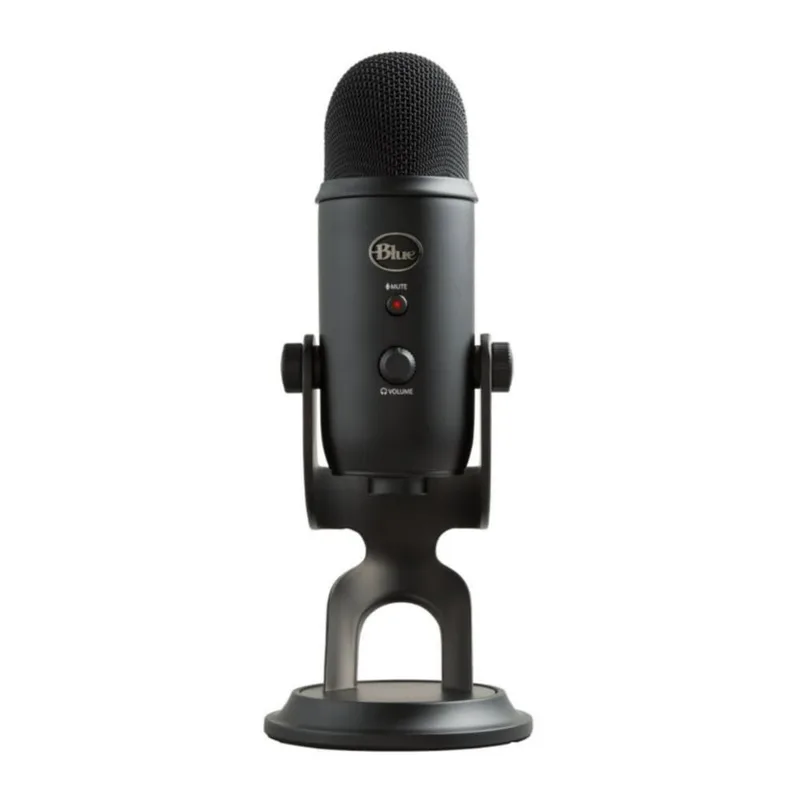
The Blue Yeti is still the most reliable USB microphone for daily remote work. It’s not the flashiest option, but it consistently delivers clear, balanced voice audio on all platforms without configuration, and its four polar patterns give it a flexibility no other mic on this list matches.
That flexibility matters more than it sounds. Use cardioid for solo calls — it’s the standard. Switch to omnidirectional when you need to capture multiple people in the same room for a hybrid meeting. The bidirectional pattern works for two people seated across a desk from each other. No other USB microphone at this price does this.
The physical mute button is large, LED-ringed, and easy to hit without looking. LED status is visible from the corner of your eye during calls. The 3.5mm headphone monitoring output lets you hear your voice through headphones in real time. Both features make the Yeti feel purpose-built for call-heavy workdays.
The footprint is the main drawback. The Yeti is larger than every other option here, and the stock stand keeps the capsule at desk level — it performs better on a boom arm (sold separately) that positions the mic closer to your mouth at a comfortable angle. Typing noise can transmit through the desk to the mic; a shock mount further reduces this.
At $99, the Yeti is priced below the Rode NT-USB Mini ($109) and the Elgato Wave:3 ($100), making it the best value for features. For remote workers who want one microphone that handles all call scenarios without accessories, it’s the straightforward choice.
Who should buy this: Remote workers who want versatile polar patterns, a physical mute button, and proven compatibility with all platforms. Also good for occasional podcast recording.
Who should skip: Anyone with a small desk who needs a compact profile, or those who prefer USB-C.
2. Elgato Wave:3 — Best Premium
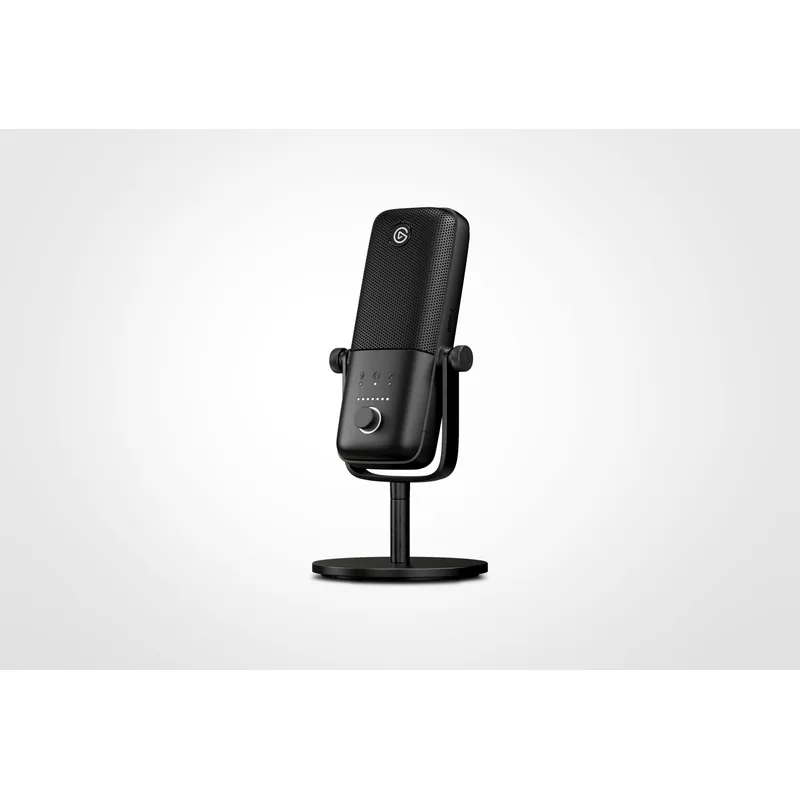
The Wave:3 is for remote workers who want the best possible audio quality on calls and are willing to pay $100 for it. Two features justify the premium over the Blue Yeti: Clipguard and Wave Link.
Clipguard runs a second capsule at lower sensitivity alongside the primary one. When your voice spikes above the primary capsule’s threshold — during emphasis, laughter, or a strong “p” or “b” sound — the Wave:3 switches to the backup capsule rather than letting the audio clip into distortion. Call participants never hear that blown-out, crackling quality that happens with cheaper mics during animated speech. For presenters and talkers, this matters.
Wave Link is a software audio mixer that blends your mic level, computer audio, browser audio, and application audio into a single output that call platforms receive. Remote workers who screen-share while playing audio, or who want to control what meeting participants hear separately from their own headphone mix, get genuine value from this. It eliminates the need for a separate hardware mixer.
The 24-bit/96kHz audio quality is noticeably cleaner than the 16-bit options on this list. The capacitive mute button produces no audible click when activated — a detail that matters when you’re muting frequently during calls. USB-C connection, zero-latency headphone monitoring, and a quality cardioid capsule complete the package.
At $100 it’s now the same price as the Blue Yeti. The Wave Link software is Windows/Mac only with no mobile support, which isn’t a problem for most desk-based remote workers.
Who should buy this: Heavy call users, presenters, or anyone who creates content alongside daily calls and wants a single mic that handles both. Also ideal for those who get clipping issues with other mics.
Who should skip: Budget-conscious buyers or those who only need basic call audio. The premium over the Blue Yeti and Rode NT-USB Mini is hard to justify for simple call use alone.
3. HyperX SoloCast — Best Budget
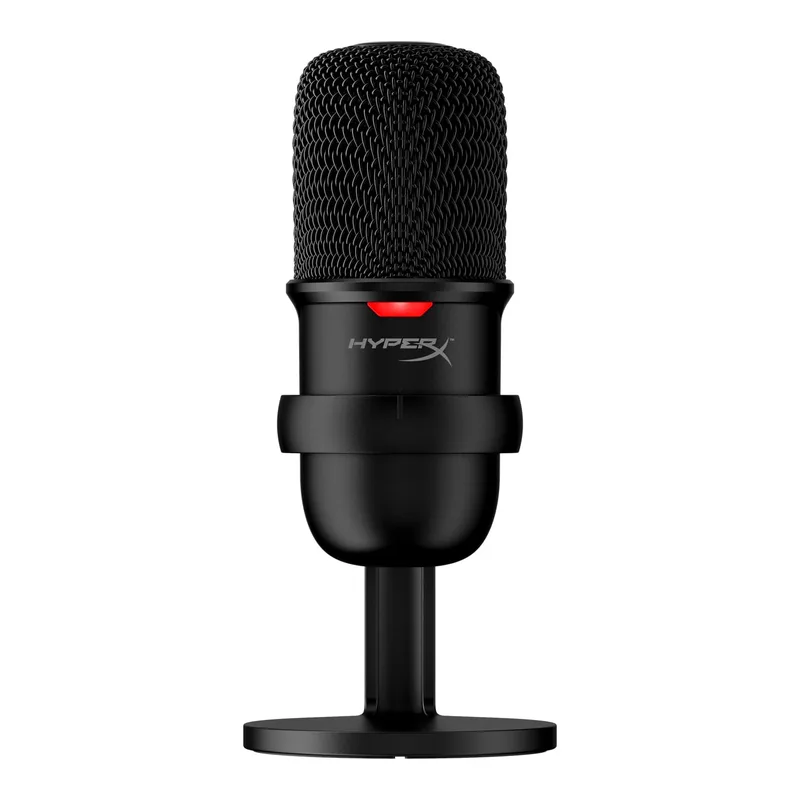
At $50, the HyperX SoloCast shows that a purpose-built cardioid microphone doesn’t need to cost much to dramatically outperform laptop audio. The tight cardioid pattern focuses on the voice and rejects room noise when positioned 6–12 inches from the mouth, and the results on calls are immediately better than any built-in microphone array.
The tap-to-mute feature works well in daily use. The tap registers reliably, the status is visually indicated, and the mechanism is quiet. For back-to-back call days where you’re constantly muting and unmuting, having mute on the microphone body rather than in software is a genuine improvement — especially at this price, where many alternatives don’t include any hardware mute at all.
The USB-C connection and flexible stand mount are modern choices that make the SoloCast compatible with most standard boom arms without adapters. The compact body keeps desk footprint small — relevant for remote workers with limited desk space or who travel with their setup.
No headphone monitoring output is the SoloCast’s main limitation. You’ll hear audio through whatever is connected to your computer. For most remote workers this is fine since headphones are typically plugged into the computer or headset receiver anyway.
Who should buy this: First-time USB mic buyers who want a hardware mute button and compact design without spending $100. A significant upgrade over laptop audio at a low entry cost.
Who should skip: Those who need headphone monitoring directly from the mic, or who want polar pattern flexibility beyond cardioid.
4. Blue Snowball iCE — Best Entry Level
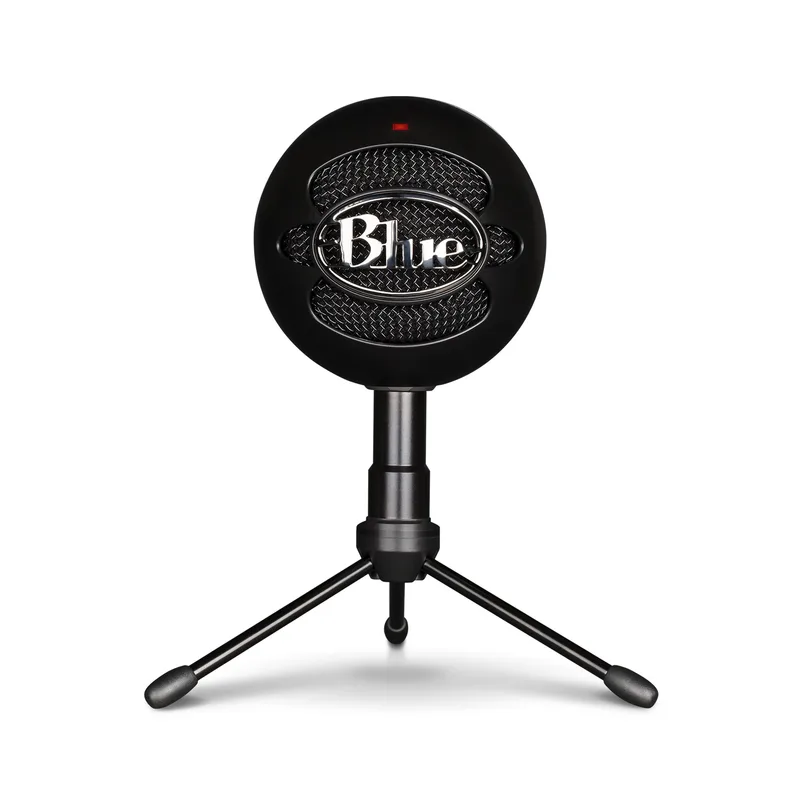
The Blue Snowball iCE is the simplest entry point: $30-$35, plug in via USB-A, and you’re immediately capturing better voice audio than any laptop microphone. No software to install, no configuration required. It registers as a standard USB audio device on both Windows and macOS.
The spherical design is compact and distinctive. It sits on an adjustable tripod at desk level, and positioning is basic but sufficient. The cardioid pattern works best close to the speaker — within 6–10 inches — to maximize voice pickup and minimize room reflections picking up around the sides of the capsule.
The absence of a physical mute button is the most significant daily limitation. You’ll mute through Zoom, Teams, or your operating system’s audio settings during calls. This friction is real on busy call days, and it’s the main reason to step up to the SoloCast at $50 if budget allows.
For a remote worker making their first dedicated mic purchase, the Snowball iCE represents a clear and immediate improvement in call clarity with no learning curve.
Who should buy this: Remote workers on a tight budget making their first upgrade from laptop audio. Also useful as a secondary mic for a shared conference room.
Who should skip: Anyone who needs quick hardware muting, headphone monitoring, or who does back-to-back calls where software muting feels clunky.
5. Rode NT-USB Mini — Best Sound Quality
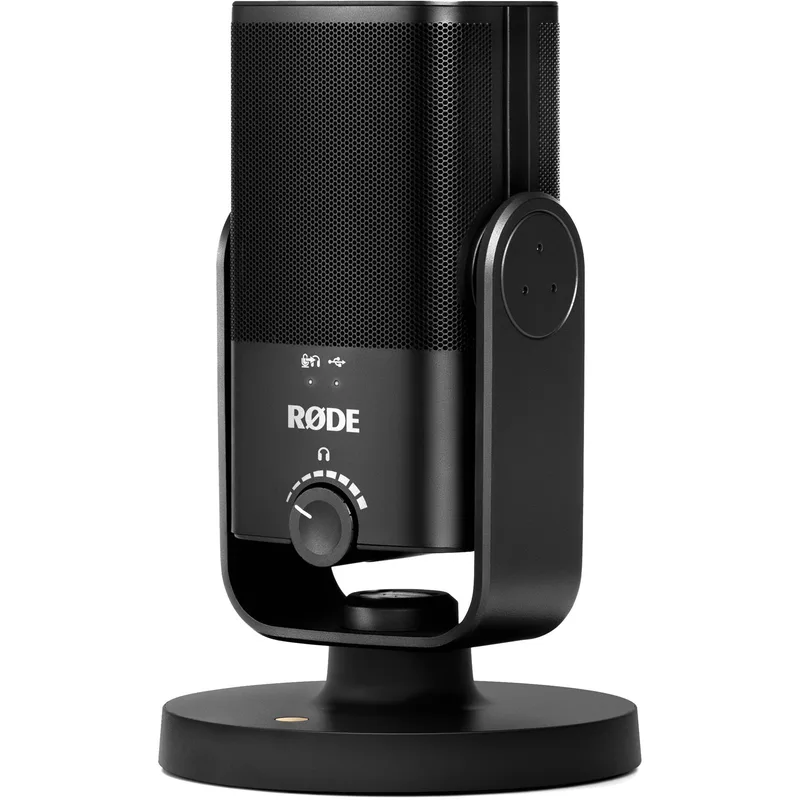
The Rode NT-USB Mini brings Rode’s broadcast-heritage condenser capsule design into a compact USB form factor at $109. The result is audio quality that regularly draws comments from call participants — the clarity and warmth are noticeable even through Zoom’s audio compression.
The detachable magnetic stand is well-designed. It snaps securely into place and releases easily for repositioning or boom arm mounting. The integrated pop filter eliminates plosives — those “p” and “b” sounds that cause audio pops — without a separate accessory. At $109, it is priced at a slight premium over the Blue Yeti’s $99, and the trade-off is better audio quality without hardware mute.
The tight cardioid pattern effectively rejects off-axis noise from the sides and rear. Combined with the 24-bit audio resolution, calls in well-treated or quiet spaces sound noticeably professional. This is the mic that makes meeting participants ask what microphone you’re using.
No physical mute button is the notable omission at this price. The Blue Yeti at $99 — $19 more — includes a physical mute with LED indicator. If quick hardware muting is a daily priority, that matters. If audio quality is the priority and you can work with software muting, the NT-USB Mini delivers the best sound on this list.
Who should buy this: Remote workers who prioritize voice quality above convenience features, podcast hosts who also take calls, and those who appreciate the included pop filter.
Who should skip: Anyone who needs a physical mute button on the mic itself. The Blue Yeti solves that at the same price.
Comparison Table
| Microphone | Price | Pattern | Sample Rate | Mute Button | Headphone Out | USB |
|---|---|---|---|---|---|---|
| Blue Yeti | $94.99-$99.99 as of Oct 18, 2026 | 4-pattern | 48kHz/16-bit | Yes (LED) | Yes | USB-A |
| Elgato Wave:3 | Unavailable | Cardioid | 96kHz/24-bit | Yes (silent) | Yes | USB-C |
| HyperX SoloCast | Unavailable | Cardioid | 48kHz/16-bit | Yes (tap) | No | USB-C |
| Blue Snowball iCE | Unavailable | Cardioid | 44.1kHz/16-bit | No | No | USB-A |
| Rode NT-USB Mini | $97.85-$103.00 as of Oct 18, 2026 | Cardioid | 48kHz/24-bit | No | Yes | USB-C |
Buying Guide: What to Prioritize
Physical mute vs. audio quality is the key trade-off. The Blue Yeti ($99) and Elgato Wave:3 ($100) have hardware mute buttons. The Rode NT-USB Mini has better audio quality than both but no hardware mute. The HyperX SoloCast has a mute button with no headphone monitoring. Decide which matters more for your workflow before buying.
Boom arm vs. desk stand. All five microphones include a desk stand. For the Blue Yeti and Elgato Wave:3, a boom arm is a meaningful upgrade — it positions the capsule closer to your mouth, reduces desk vibration noise, and frees up desk real estate. The SoloCast and NT-USB Mini’s compact stands work well on desks with limited space.
Room treatment matters more than sample rate. A $40 microphone in a quiet room with soft furnishings sounds better than a $100 microphone in a hard-surfaced echo-heavy room. Before upgrading, close doors, add soft surfaces, and position the microphone between your mouth and any noise sources. The sample rate difference between 44.1kHz and 96kHz has zero practical impact on video call clarity.
Avoid polar pattern mismatch. Don’t use omnidirectional in a noisy room. Don’t use cardioid more than 18 inches from your mouth and expect noise rejection. Proper positioning — mic close to the mouth, cardioid pattern aimed at your face — does more for call quality than any spec upgrade.
Frequently Asked Questions
Will a USB microphone work with Zoom, Microsoft Teams, and Google Meet without setup?
All five microphones are plug-and-play USB devices that register as audio input sources on both Windows and macOS. Zoom, Teams, and Meet detect them automatically. You may need to select the microphone as your default input in the app’s audio settings if it doesn’t switch on its own.
How close should I sit to the microphone for best results?
For cardioid USB microphones, the optimal distance is 6–12 inches from the capsule. Closer positioning captures more voice with less room ambience. Farther positioning increases room reflections. For the Blue Yeti and Elgato Wave:3, speaking slightly off-axis — past the microphone rather than directly into it — reduces plosive sounds further.
Do these microphones work with Chromebooks?
All five use the USB Audio Device Class standard, which Chrome OS supports natively. They plug in and work without any drivers or configuration.
Should I get a boom arm?
A boom arm elevates the microphone off the desk, reducing vibration noise from typing and positioning the capsule closer to your mouth at a natural speaking angle. It also frees up desk space. For the Blue Yeti and Elgato Wave:3, a boom arm is a meaningful improvement. The HyperX SoloCast and Rode NT-USB Mini’s compact mounts work with most standard boom arms without adapters.
Can call participants hear my keyboard if I use a USB microphone?
Cardioid microphones reject sound from behind the capsule, and keyboards typically sit behind or below the microphone. With correct positioning — microphone between your mouth and keyboard, aimed at your face — keyboard noise is significantly reduced compared to a laptop mic. The Blue Yeti is more sensitive to desk vibration than compact options; a shock mount accessory reduces this further.
Is the Elgato Wave:3 worth the premium over the Blue Yeti?
For straightforward call use, no. The Blue Yeti’s audio quality is excellent for video calls, and the Wave:3’s additional cost gets you Clipguard protection and Wave Link software that most remote workers won’t use. If you also record podcasts, stream, or create content alongside your calls, the Wave:3’s features justify the cost.
Conclusion
For most remote workers, the Blue Yeti is still the correct choice. It has the physical mute button, four polar patterns, headphone monitoring, and a proven track record — all at $99. It’s not the most compact or the newest design, but it solves every daily call problem without accessories.
If your calls are your livelihood and you want the best possible audio, the Elgato Wave:3 at $100 is a step above, especially if Clipguard and the Wave Link mixer are relevant to your workflow.
On a tight budget, the HyperX SoloCast at $50 gives you a hardware mute button, solid cardioid pickup, and a compact design. It’s the upgrade most remote workers actually need, at the price most remote workers are comfortable spending.
The Rode NT-USB Mini wins on pure audio quality — the best-sounding microphone here — but the absent hardware mute is a daily annoyance for call-heavy schedules. Buy it if audio quality is the priority and software muting doesn’t bother you.
The Blue Snowball iCE at $30-$35 is for first-time USB mic buyers who want a guaranteed improvement over laptop audio at minimal cost. It’s a floor, not a ceiling.
Detailed Reviews
Blue Yeti USB Microphone
Pros
- Four polar patterns give flexibility for solo calls, group recording, or conference room use
- Physical mute button with LED indicator — essential for quick muting during calls
- Zero-latency headphone monitoring for hearing your own voice
- Works natively with Zoom, Teams, Google Meet, and all major platforms
- Proven track record over many years — compatible with all operating systems
Cons
- Larger footprint than compact options — takes up more desk space
- Sensitive to desk vibrations and keyboard noise without a shock mount
Elgato Wave:3
Pros
- Clipguard technology prevents audio clipping during loud moments — no distorted voice spikes
- Wave Link software enables multi-source audio mixing without an interface
- USB-C connection is modern and durable
- 24-bit/96kHz audio quality is noticeably cleaner than 16-bit options
- Capacitive mute button is silent — no click sound audible to call participants
Cons
- Highest price on this list
- Wave Link software is Windows/Mac only — no mobile support
HyperX SoloCast
Pros
- Tap-to-mute on the microphone body — no reaching for keyboard shortcuts during calls
- Compact and lightweight — easy to position close to your mouth
- USB-C connection with flexible mount fits boom arms and stands
- Cardioid pattern rejects most room noise effectively at close range
- Most affordable dedicated USB microphone on this list
Cons
- No headphone monitoring output
- Single polar pattern limits use cases beyond solo voice
Blue Snowball iCE
Pros
- Simple plug-and-play — no software or drivers required
- Compact spherical design fits on any desk without dominating the space
- Cardioid pattern focused pickup reduces room echo on calls
- Price makes it an easy entry point for first-time USB mic users
Cons
- No physical mute button — requires software muting during calls
- Limited frequency range compared to higher-tier options
- No headphone monitoring
Rode NT-USB Mini
Pros
- Rode's broadcast-quality condenser capsule in a compact, affordable form factor
- Detachable magnetic stand with integrated pop filter included in the box
- Headphone monitoring jack for direct voice feedback during calls
- USB-C connection and 24-bit audio quality at $80 — $19 less than the Blue Yeti
- Tight cardioid pattern naturally reduces off-axis room noise
Cons
- No physical mute button requires software workaround for quick muting
- Smaller capsule means slightly less low-end warmth than larger-diaphragm options
- Pop filter is integrated into the magnetic stand — less adjustable than a separate accessory