This post contains affiliate links. If you buy through them, we earn a small commission at no extra cost to you.
The mechanical keyboard market kicked off 2026 with a clear trend: wireless QMK is no longer a premium-only feature. Keychron’s Q-series brought full QMK firmware over Bluetooth and 2.4GHz to the mid-$150 price range, while NuPhy and similar brands pushed sub-$130 tri-mode wireless into the budget tier. If you have been putting off the upgrade because wireless mechanical keyboards used to mean choosing between feel, programmability, and battery life — that tradeoff has mostly disappeared.
For remote workers specifically, the case for a good mechanical keyboard is straightforward: you type on it for 6 to 10 hours a day, five or more days a week. The keyboard is the highest-contact piece of equipment on your desk. A $150 keyboard used for two years costs less than $0.22 per day. The payoff in typing feel, reduced fatigue, and reduced error rate is not nothing.
This roundup covers five mechanical keyboards across four form factors and three price tiers — from a $119 portable wireless board to a $299 minimalist Topre keyboard that professional developers have been refining their preference toward for years.
Quick picks: For most remote workers, the Keychron Q5 Pro ($159-$199) is the obvious starting point — 96% layout with numpad, full aluminum, wireless QMK. Hate losing the numpad? Try the Q3 Pro SE ($149-$189) for pure TKL ergonomics. Work in a corporate environment that requires quiet typing? The Logitech MX Mechanical ($149-$179) is the safe, enterprise-compatible choice. On a tight budget? The NuPhy Air75 V2 ($119-$129) is the best sub-$130 mechanical you can buy. If you type constantly and want something that lasts decades, the HHKB Professional Hybrid Type-S ($249-$299) is the endgame board.
Quick Comparison
| Keyboard | Layout | Wireless | Switches | QMK/VIA | Price |
|---|---|---|---|---|---|
| Keychron Q5 Pro | 96% | BT 5.1 + 2.4GHz | Hot-swap (Brown/Red/Banana) | Yes | $159-$199 |
| Logitech MX Mechanical | Full-size | BT + Logi Bolt | Low-profile tactile quiet | No | $149-$179 |
| NuPhy Air75 V2 | 75% | BT 5.0 + 2.4GHz | Hot-swap LP Brown/Red | No | $119-$129 |
| Keychron Q3 Pro SE | TKL | BT 5.1 + 2.4GHz | Hot-swap (Brown/Red/Banana) | Yes | $149-$189 |
| HHKB Pro Hybrid Type-S | 60% | BT 4.2 | Topre 45g silenced | No | $249-$299 |
1. Keychron Q5 Pro — Editor’s Pick
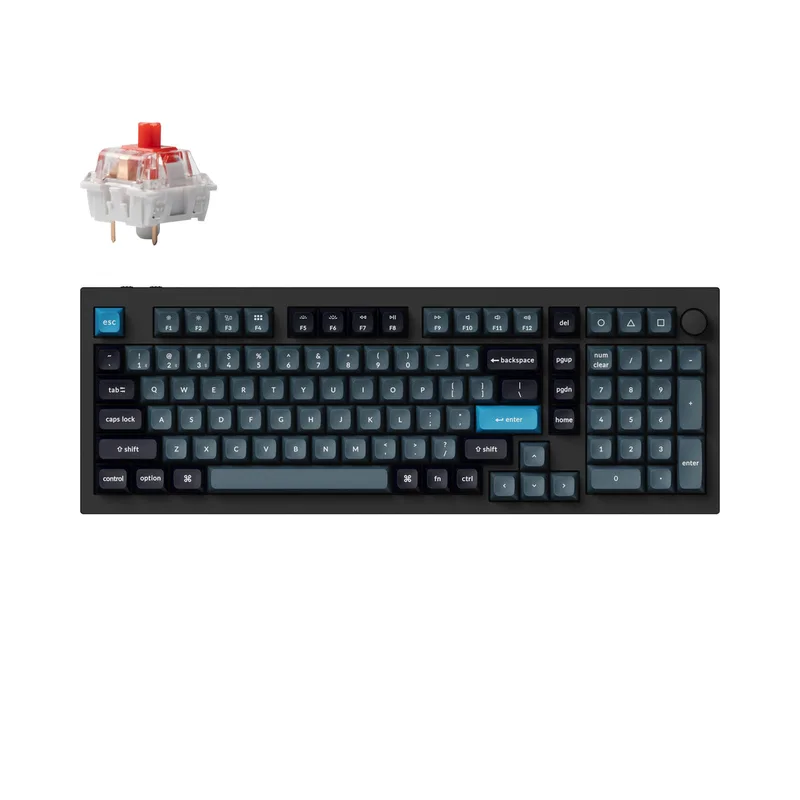
Keychron Q5 Pro
Pros
- 96% layout keeps the numpad — critical for finance, accounting, or any role with heavy data entry — without the full width of a standard 100% board that pushes the mouse too far right
- Double-gasket mount absorbs keystrokes twice before they reach the aluminum frame, giving the Q5 Pro a noticeably softer, less fatiguing bottom-out feel compared to single-gasket and tray-mounted competitors
- QMK and VIA firmware work wirelessly over Bluetooth and 2.4GHz — remapping keys, setting per-app macros, and adjusting RGB all function without a cable plugged in, which most 'QMK wireless' keyboards still cannot do
- K Pro Brown switches are quiet enough that Zoom's noise suppression filters out the switch sound, confirmed by owner reports in multiple Reddit threads on r/MechanicalKeyboards
- 4,000 mAh battery delivers roughly 300 hours of use at moderate RGB brightness — typical work week usage charges about once per month
- Hot-swappable 5-pin socket accepts Gateron, Cherry, Kailh, and most other MX-compatible stems for future switch upgrades without soldering
Cons
- At 4.32 lbs, this is not a travel board — it earns its place permanently on a desk but is impractical to pack in a laptop bag for coworking days
- 96% layout eliminates the gap between the numpad and the arrow cluster that full-size keyboards have — some touch-typists find the adjusted column spacing requires a brief reorientation period
- Sale pricing brings it to $159, but full MSRP of $199 is on the expensive side for a mechanical keyboard if you are not using QMK or VIA remapping features
The Q5 Pro is what Keychron built after deciding the Q5 (wired-only) left too many people asking for wireless. The result is the same double-gasket aluminum body, the same QMK/VIA programmability, the same hot-swappable PCB — now with Bluetooth 5.1, 2.4GHz, and a 4,000 mAh battery that charges via USB-C.
The 96% layout is the right call for most desk workers. You get the numpad for data entry without the 100% footprint that forces the mouse too far right. The typing angle improves the moment the numpad disappears from your reach — an underrated ergonomic gain. Most remote workers who try a 96% board do not go back to 100%.
The double-gasket mount is the biggest differentiator from budget Keychron models. Two layers of silicone absorb keystrokes before they reach the aluminum frame — the result is a soft, cushioned bottom-out that reduces finger fatigue during long sessions. Pair it with K Pro Brown switches and the experience is quiet, tactile, and substantially more comfortable than a membrane keyboard for eight-hour typing days.
QMK over wireless is still rare enough to be worth mentioning explicitly. VIA remapping, per-app macros, and layer configurations all work over Bluetooth and 2.4GHz without plugging in a cable. For developers who use extensive keyboard shortcuts, this is a meaningful unlock.
At $159 on sale (regular $199), the Q5 Pro competes with everything in this roundup on specs alone. The premium build justifies the price for anyone who wants a keyboard to last five or more years.
Best for: Remote workers with data entry requirements, developers who use QMK macros, and anyone who wants a keyboard to live permanently on their desk.
2. Logitech MX Mechanical — Best for Corporate
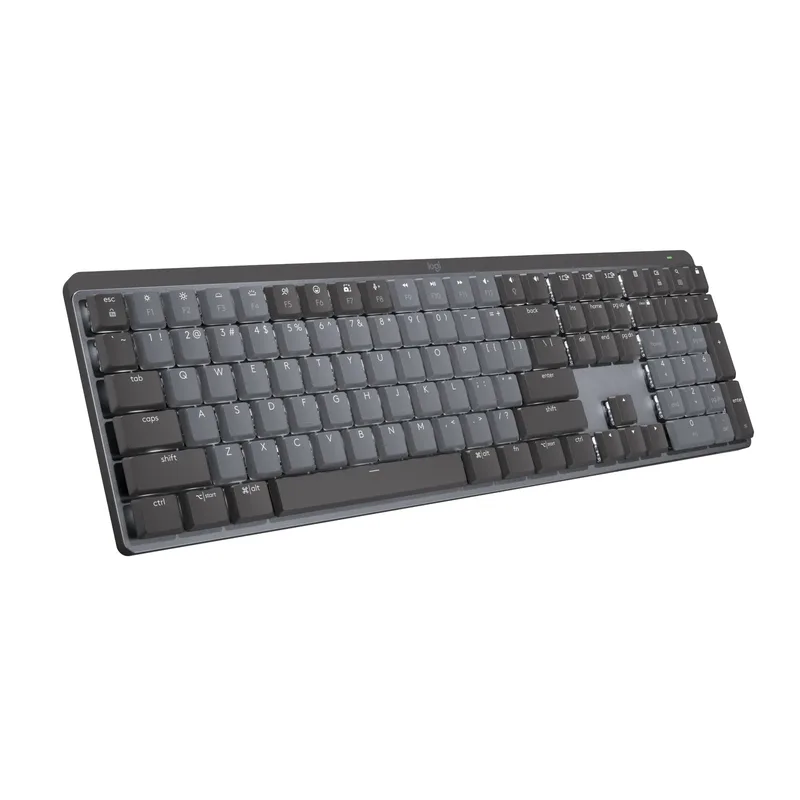
Logitech MX Mechanical
Pros
- Low-profile switches travel only 2mm versus the 4mm of standard mechanical switches — the reduced travel matches laptop typing muscle memory, making this the easiest mechanical upgrade for people coming from a MacBook keyboard
- Logi Options+ Flow lets the keyboard cursor-drag files between a Mac and Windows PC without a KVM switch — the keyboard follows the mouse across machines automatically when you push the cursor past the screen edge
- Smart Illumination turns the backlight on when your hands approach and off when idle — extends battery from 5 days with constant backlighting to approximately 15 days in typical office use
- Tactile quiet switches generate less than 35dB at bottoming out per Logitech spec — quieter than most membrane keyboards at the same keystroke force, safe for open-plan office background noise
- Full-size layout with dedicated function row and numpad — no layout learning curve for users upgrading from a standard office keyboard
Cons
- Low-profile switches feel noticeably less tactile than full-height Brown or Tactile switches — the feedback bump is present but subtle, and typists who prioritize feel over noise will find the MX Mechanical underwhelming compared to the Keychron Q5 Pro
- Single Bluetooth/Logi Bolt connectivity per profile — no simultaneous wireless protocols, so switching from a Logi Bolt PC setup to a Bluetooth iPad requires pressing the Easy-Switch button rather than automatic switching
- No QMK or VIA support — macro configurations are controlled only through Logi Options+ software, which means macros are lost if you sign out of the Logitech account or reinstall the OS
- USB-C port charges only; does not support wired typing mode
The MX Mechanical is what Logitech built for the corporate environment — full-size layout, no learning curve, low-profile switches that read as familiar to anyone coming from a laptop keyboard, and deep software integration through Logi Options+.
The low-profile tactile quiet switches are the defining feature. They travel 2mm total (versus 4mm for standard mechanical switches), bottom out quietly enough that open-plan office coworkers will not notice, and actuate at a lighter force than standard Browns. If you spend more than 30% of your day on video calls and have a microphone that picks up everything, this is the quietest mechanical keyboard in the roundup.
Logi Options+ Flow is the other compelling feature for multi-machine setups. The software allows seamless cursor and file transfer between a Mac and Windows PC — push the cursor off the edge of one screen and it appears on the other. The keyboard follows without pressing any button. For remote workers using both a work laptop and a personal desktop, this eliminates the need for a KVM switch in most workflows.
The MX Mechanical is not a keyboard for enthusiasts. No QMK, no hot-swap, no gasket mount. But for someone upgrading from a $25 office keyboard who uses Logi gear and does not want to think about firmware, it delivers a meaningful daily improvement in typing feel and ergonomics with zero configuration.
Best for: Corporate remote workers, anyone upgrading from a standard flat keyboard, and multi-machine setups using Logi Options+ Flow.
3. NuPhy Air75 V2 — Best Value
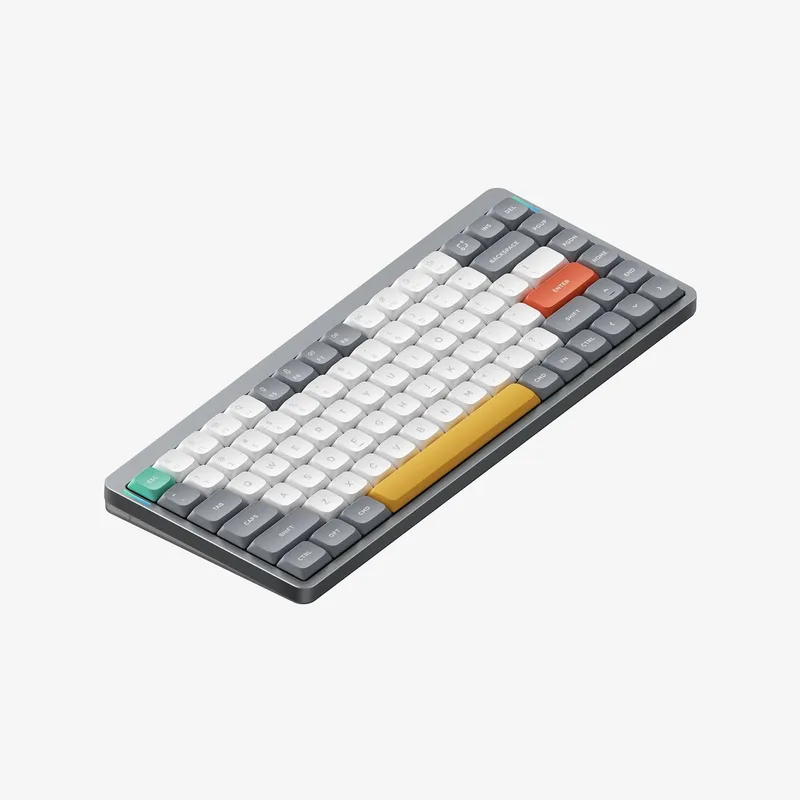
NuPhy Air75 V2
Pros
- At 635g, it is one of the lightest aluminum-framed wireless mechanical keyboards available — genuinely packable for a laptop bag without feeling like a compromise
- Translucent polycarbonate bottom case shows the PCB and internal structure — the RGB diffusion through the bottom panel makes this one of the better-looking keyboards at this price point
- Tri-mode wireless (Bluetooth, 2.4GHz, USB-C) at $119 undercuts most competitors by $30-$60 while delivering the same connectivity range
- Hot-swappable 3-pin socket supports standard low-profile Gateron switches — the upgrade path to quieter linear or clicky switches does not require desoldering
- 75% layout retains dedicated arrow keys and a function row, which 65% boards remove — the practical daily usability for remote workers is significantly higher than smaller form factors
- 3,000 mAh battery charges via USB-C and delivers 200+ hours without RGB, roughly 4-6 weeks of office use between charges
Cons
- Low-profile switches are an acquired preference — the shorter travel and lighter actuation force compared to full-height switches means the feel is closer to a high-end laptop keyboard than a traditional mechanical desktop board
- No QMK / VIA firmware — key remapping is handled through NuPhy's own software, which is functional but less powerful than open-source QMK for complex macro workflows
- Translucent bottom case shows fingerprints and dust collecting inside the case over time — the aesthetic degrades without occasional cleaning
The NuPhy Air75 V2 is the clearest proof that $120 buys a genuinely good mechanical keyboard in 2026. Tri-mode wireless (Bluetooth, 2.4GHz, USB-C), hot-swappable low-profile switches, an aluminum top frame, and per-key RGB — features that cost $180-$220 two years ago — now cost $119-$129 with an on-page Amazon coupon.
The 75% layout is the most practical for remote workers: 84 keys, function row intact, dedicated arrow keys, no numpad. The board saves roughly 3.5 inches of desk width compared to a full-size keyboard, which means more room to center the mouse and reduce right-shoulder stretch. Owner reports on Reddit consistently describe this as the first time a sub-$150 keyboard impressed them on build quality alone.
The translucent polycarbonate bottom case is either a feature or a neutral, depending on your preferences. The RGB diffuses through the clear bottom in a way that other keyboards in this price range do not do, and the internal PCB layout is visible — a detail that the mechanical keyboard community tends to appreciate. The tradeoff is that dust collecting inside the case shows over time.
At 635g, this packs into a laptop bag without complaint. If you split time between a home office and a coworking space or client site, the Air75 V2 goes where the Keychron Q5 Pro (1.96kg) cannot.
Best for: Budget-conscious remote workers, anyone who splits time between home and office, and people who want their first serious mechanical keyboard without the full Keychron price tag.
4. Keychron Q3 Pro SE — Best TKL
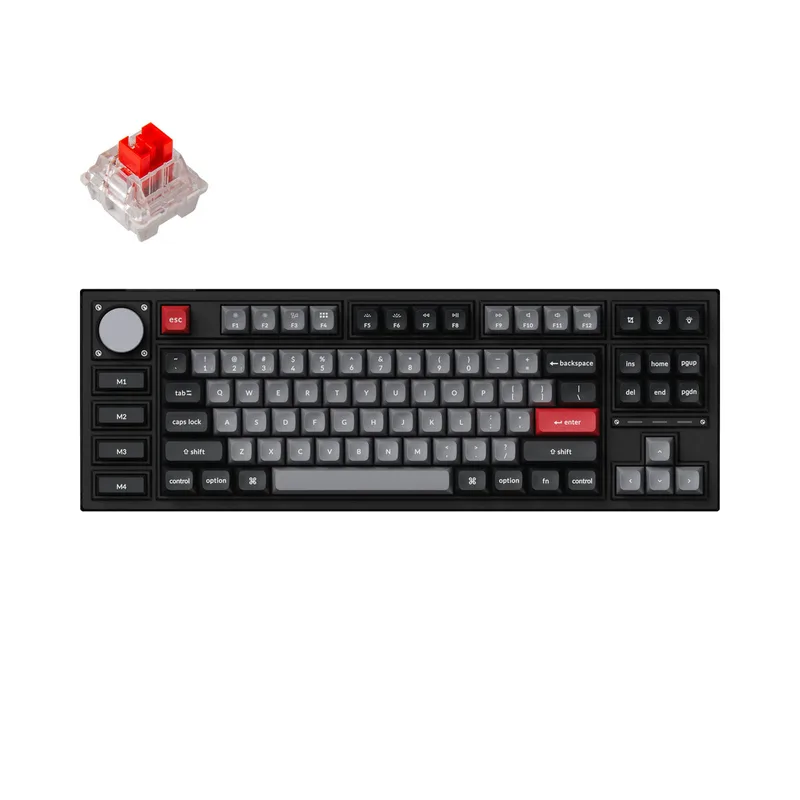
Keychron Q3 Pro SE
Pros
- TKL layout removes the numpad to move the mouse about 3.5 inches closer to center — reduces shoulder abduction and is measurably better for right-shoulder posture during long sessions with a mouse
- Double-gasket mount and south-facing RGB bring the same premium typing experience as the Q5 Pro in a narrower frame — the two boards use identical internals with a different key count
- SE (Special Edition) version adds an aluminum programmable knob to the TKL form factor — rare combination that most TKL competitors do not offer
- QMK and VIA wireless firmware enables full key remapping, per-app macros, and tap-hold layers over Bluetooth or 2.4GHz without a cable
- 4,000 mAh battery, same as the Q5 Pro, charges via USB-C and provides roughly 300 hours at moderate RGB brightness
Cons
- 3.42 lbs is heavy for a TKL — lighter TKL options exist at this price (Keychron K8 Pro at roughly half the weight), though the aluminum build quality justifies the weight for desk-permanent setups
- No numpad — if your work involves frequent data entry, the Q5 Pro's 96% layout preserves the numpad while staying nearly as compact as a TKL
- K Pro Brown switches are the quietest stock option but still audible in dead-quiet home offices on open calls — a switch lube or swap to silent linears addresses this, but requires additional investment
The Q3 Pro SE is the Q5 Pro minus the numpad — same double-gasket aluminum body, same wireless QMK firmware, same 4,000 mAh battery, same hot-swappable socket. The SE designation adds a programmable aluminum knob that standard TKL boards rarely include.
The TKL form factor’s primary ergonomic benefit is mouse placement. Removing the numpad moves the mouse 3.5 inches closer to center — the right shoulder no longer reaches across a numpad that goes unused 90% of the time. Over a full workday, the reduced abduction adds up. Owner reports in ergonomics communities consistently identify TKL as the minimum form factor change that produces noticeable shoulder and upper-arm fatigue reduction.
The Q3 Pro SE and Q5 Pro share the same internal architecture — the choice between them comes down entirely to whether you need the numpad. Finance and accounting roles that enter numbers constantly should take the Q5 Pro. Developers, writers, and anyone in a primarily keyboard-shortcut-heavy role should look seriously at the Q3 Pro SE.
The programmable knob on the SE is a practical daily feature that sounds optional until you use it. A single turn adjusts volume without alt-tabbing, touching the mouse, or memorizing a keyboard shortcut. Reassigned to scroll speed, zoom level, or timeline scrub in video editing applications, it becomes a workflow tool rather than a gimmick.
Best for: Remote workers who want TKL ergonomics, developers using QMK macros, and anyone who has identified the numpad as unused desk real estate.
5. HHKB Professional Hybrid Type-S — Premium Pick
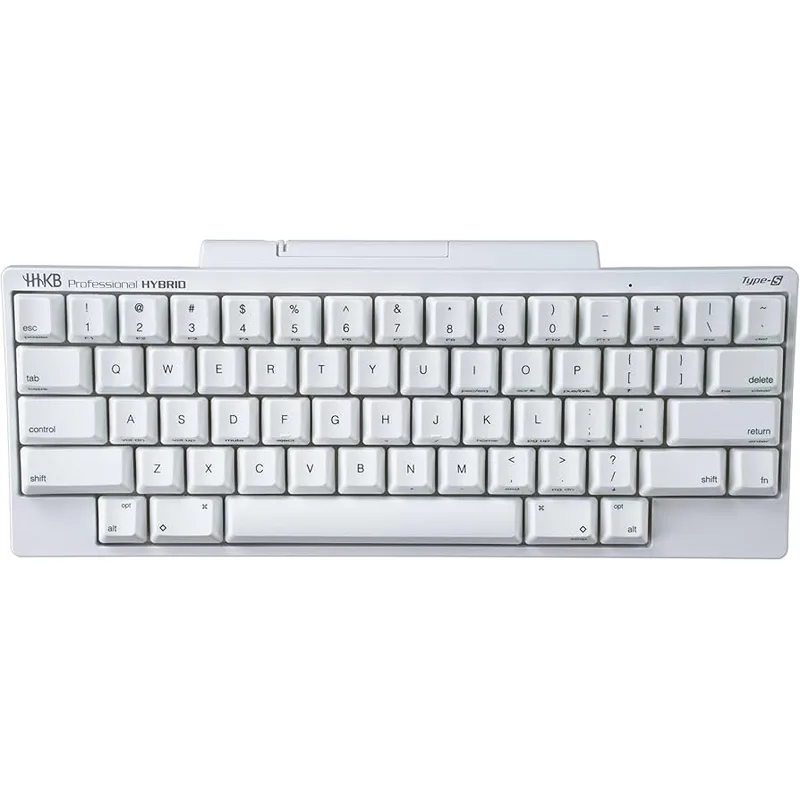
HHKB Professional Hybrid Type-S
Pros
- Topre electrostatic capacitive switches are neither mechanical nor membrane — they actuate with a rounded, pressure-sensitive bump that requires no audible click or sharp tactile snap, making the Type-S the quietest non-silent-switch keyboard in this roundup
- At 250g body weight (not including batteries), this is the lightest keyboard in the roundup — the HHKB slips into a laptop sleeve without adding noticeable weight to any bag
- Four-device Bluetooth pairing — switch between a desktop, laptop, tablet, and phone without extra hardware, and DIP switches on the bottom reconfigure the modifier layout between Mac and Windows modes in seconds
- HHKB layout places Control where Caps Lock normally sits — a remapping that programmers and keyboard-shortcut-heavy users describe as eliminating chronic pinky-strain from Ctrl key combinations
- No per-key RGB removes one battery-drain source entirely — the Type-S runs two AA batteries for approximately 3 months of daily use, longer than nearly any rechargeable keyboard in this category
Cons
- At $249-$299, this is the most expensive keyboard in the roundup — the Topre switch feel requires direct comparison to justify the premium over a $159 Keychron Q5 Pro with standard mechanical switches
- 60% layout removes the numpad, function row, and arrow keys entirely — arrow navigation requires Fn-layer combinations that take several days of deliberate practice to internalize
- Bluetooth 4.2 is an older specification — while functionally reliable, it lacks the 2.4GHz wireless option and QMK/VIA programmability of the Keychron boards
- Non-RGB, non-backlit by default — typing in low-light conditions requires either memorized key positions or an aftermarket backlit keycap set that is not cheap
The HHKB Professional Hybrid Type-S exists at the intersection of typing feel maximalism and physical minimalism. It is the smallest, lightest, quietest, and most expensive keyboard in this roundup. It also requires the most adaptation.
The Topre switches are the differentiating technology. Electrostatic capacitive switches use a rubber dome over a spring and capacitor — actuation is detected electronically rather than mechanically, with no physical contact point. The result is a switch that actuates smoothly, bottoms out with a thud rather than a click, and completely eliminates the mechanical snap of standard tactile switches. The silenced Type-S variant adds additional dampening rings to the dome. Developers who type continuously for 8+ hours a day and describe mechanical switches as “harsh” after years of use consistently converge on Topre as the long-term answer.
The HHKB layout is a deliberate design choice that predates modern keyboard culture by 30 years. Control sits where Caps Lock normally is, Delete sits where Backspace is, and there are no arrow keys or function row — those keys appear on Fn layers. The initial adjustment period is real. Most users report full muscle memory recalibration in about two weeks. After that, the Ctrl placement in particular is described as difficult to give up — reaching with the pinky for standard Ctrl position feels awkward by comparison.
At $249-$299, this is not a first mechanical keyboard purchase. But for remote workers who type constantly, want the quietest possible board, and have a clear preference for Topre after comparing switch feel — this is the keyboard you stop researching and keep for ten years.
Best for: Professional writers, developers, and researchers who type continuously and want the quietest, most refined typing experience regardless of price.
Buying Guide: Mechanical Keyboards for Remote Work
Form Factor: What Size Do You Actually Need?
100% (Full-size): Keeps the numpad, arrow keys, and function row. Best for: data entry, accounting, finance. Downside: pushes the mouse far right.
96% (like the Q5 Pro): Keeps the numpad but trims the gaps. Saves ~1.5 inches versus 100%. Best balance of complete functionality and desk space.
TKL (like the Q3 Pro SE): Removes the numpad. The standard for developers and anyone without heavy data-entry requirements. Moves the mouse closer by ~3.5 inches.
75% (like the NuPhy Air75 V2): Removes the numpad and condenses the layout while keeping arrows and function keys. Most portable option with full daily usability.
60% (like the HHKB): Navigation and function keys on Fn layers. Maximum desk space, minimum hand travel. Requires meaningful learning investment.
Switch Selection: Quiet vs. Feel
Silent linears (e.g., Gateron Silent Red): Nearly inaudible. Good for open offices and video calls. Lower tactile feedback — feels smooth rather than defined.
Tactile quiet (e.g., K Pro Brown, Logitech low-profile tactile): Bump feedback without an audible click. The most common choice for work-from-home environments. Zoom’s noise suppression handles the keystroke sound at normal typing pace.
Tactile clicky (e.g., K Pro Banana): Audible click on actuation. Not recommended for calls unless you mute consistently.
Topre (HHKB): Neither mechanical nor membrane. Unique rounded tactile feel with minimal noise. Requires hands-on comparison before purchasing — the preference is polarizing.
Wireless Protocols: What Matters
Tri-mode (BT + 2.4GHz + USB-C): Available on the Q5 Pro, Q3 Pro SE, and NuPhy Air75 V2. Covers all scenarios: low-latency gaming-grade 2.4GHz connection, multi-device Bluetooth pairing, and wired fallback.
Bluetooth only: HHKB Hybrid Type-S. Sufficient for office work; occasional connection latency in RF-dense environments.
Logi Bolt + Bluetooth: MX Mechanical. Corporate-safe wireless protocol with multi-device support.
QMK and VIA: Do You Need Them?
If you remap keys, set per-app macros, or use complex Fn layers: yes, QMK/VIA makes a meaningful difference. The Q5 Pro and Q3 Pro SE both offer QMK over wireless — rare and valuable.
If you use the keyboard as-is with no customization beyond Logi Options+ or system-level key remapping: no, QMK is not a necessary requirement. The MX Mechanical and NuPhy Air75 V2 are entirely capable without it.
FAQ
Are mechanical keyboards really noticeably quieter than membrane keyboards?
Tactile quiet switches (Brown or similar) are comparable in volume to a typical membrane keyboard. Silent mechanical switches are measurably quieter — typically 10-15dB less at the same keypress force. The HHKB Hybrid Type-S silenced Topre is the quietest in this roundup. For call-focused remote workers, the main concern is not peak volume but the sharp attack transient of clicky switches — a sound that microphones pick up regardless of Zoom noise suppression settings. Any non-clicky switch in this roundup is call-safe.
Do mechanical keyboards work with a Mac?
All keyboards in this roundup support macOS. The Keychron Q5 Pro and Q3 Pro SE ship with Mac-layout keycaps included and use QMK firmware that handles Mac modifier key mapping natively. The HHKB has DIP switches on the bottom that reconfigure the modifier layout between Mac and Windows modes without software. The Logitech MX Mechanical and NuPhy Air75 V2 support macOS via Bluetooth with standard modifier layouts.
How long do mechanical switches last?
Most mechanical switches are rated for 50-100 million keystrokes. At 50 words per minute for 8 hours a day, 250 days a year, that works out to roughly 40-80 years of switch life. The keyboard itself — the PCB, stabilizers, and keycaps — will likely need attention before the switches do. Hot-swappable boards (Q5 Pro, Q3 Pro SE, NuPhy Air75 V2) allow switch replacement without soldering, which extends the useful life of the board significantly.
Should I get a 60% keyboard for ergonomics?
The ergonomic benefit of a 60% is mainly hand repositioning — the board is narrower, so the mouse can sit closer to center. However, the Fn-layer navigation required on a 60% forces wrist movement to reach non-existent arrow keys, which can create different strain patterns for some users. A 75% board like the NuPhy Air75 V2 delivers most of the space saving while keeping dedicated arrow keys — a better starting point unless you have a specific reason for 60%.
Can I use a mechanical keyboard with an iPad or Android tablet?
All Bluetooth keyboards in this roundup pair with iPadOS and Android. The NuPhy Air75 V2 and Keychron boards ship with OS-switch keys and modifier layouts that accommodate mobile platforms. The HHKB connects via Bluetooth 4.2 to up to four devices including tablets and phones. The Logitech MX Mechanical connects via Bluetooth and Logi Bolt across Windows, macOS, iPadOS, and Android through the Easy-Switch button.
Conclusion
For most remote workers, the Keychron Q5 Pro is the right keyboard. The 96% layout keeps the numpad for data entry, the double-gasket mount makes it noticeably comfortable during long typing sessions, and wireless QMK firmware makes it the most programmable board in the roundup. At $159-$199, it competes seriously with boards that cost more.
If the numpad is truly unused in your workflow and mouse placement is the priority, the Keychron Q3 Pro SE delivers the same internals in a TKL footprint for $149-$189.
Corporate users or anyone who wants simple plug-and-work Logitech ecosystem integration should start with the MX Mechanical at $149-$179. For budget-conscious buyers, the NuPhy Air75 V2 at $119-$129 is the clear entry point — tri-mode wireless, hot-swap, and aluminum frame for less than $130.
The HHKB Professional Hybrid Type-S is a separate category — a specialized tool for heavy typists who want the quietest, most refined feeling board and have the patience for the 60% layout adjustment. At $249-$299, it rewards the commitment.
Detailed Reviews
Keychron Q5 Pro
Pros
- 96% layout keeps the numpad — critical for finance, accounting, or any role with heavy data entry — without the full width of a standard 100% board that pushes the mouse too far right
- Double-gasket mount absorbs keystrokes twice before they reach the aluminum frame, giving the Q5 Pro a noticeably softer, less fatiguing bottom-out feel compared to single-gasket and tray-mounted competitors
- QMK and VIA firmware work wirelessly over Bluetooth and 2.4GHz — remapping keys, setting per-app macros, and adjusting RGB all function without a cable plugged in, which most 'QMK wireless' keyboards still cannot do
- K Pro Brown switches are quiet enough that Zoom's noise suppression filters out the switch sound, confirmed by owner reports in multiple Reddit threads on r/MechanicalKeyboards
- 4,000 mAh battery delivers roughly 300 hours of use at moderate RGB brightness — typical work week usage charges about once per month
- Hot-swappable 5-pin socket accepts Gateron, Cherry, Kailh, and most other MX-compatible stems for future switch upgrades without soldering
Cons
- At 4.32 lbs, this is not a travel board — it earns its place permanently on a desk but is impractical to pack in a laptop bag for coworking days
- 96% layout eliminates the gap between the numpad and the arrow cluster that full-size keyboards have — some touch-typists find the adjusted column spacing requires a brief reorientation period
- Sale pricing brings it to $159, but full MSRP of $199 is on the expensive side for a mechanical keyboard if you are not using QMK or VIA remapping features
Logitech MX Mechanical
Pros
- Low-profile switches travel only 2mm versus the 4mm of standard mechanical switches — the reduced travel matches laptop typing muscle memory, making this the easiest mechanical upgrade for people coming from a MacBook keyboard
- Logi Options+ Flow lets the keyboard cursor-drag files between a Mac and Windows PC without a KVM switch — the keyboard follows the mouse across machines automatically when you push the cursor past the screen edge
- Smart Illumination turns the backlight on when your hands approach and off when idle — extends battery from 5 days with constant backlighting to approximately 15 days in typical office use
- Tactile quiet switches generate less than 35dB at bottoming out per Logitech spec — quieter than most membrane keyboards at the same keystroke force, safe for open-plan office background noise
- Full-size layout with dedicated function row and numpad — no layout learning curve for users upgrading from a standard office keyboard
Cons
- Low-profile switches feel noticeably less tactile than full-height Brown or Tactile switches — the feedback bump is present but subtle, and typists who prioritize feel over noise will find the MX Mechanical underwhelming compared to the Keychron Q5 Pro
- Single Bluetooth/Logi Bolt connectivity per profile — no simultaneous wireless protocols, so switching from a Logi Bolt PC setup to a Bluetooth iPad requires pressing the Easy-Switch button rather than automatic switching
- No QMK or VIA support — macro configurations are controlled only through Logi Options+ software, which means macros are lost if you sign out of the Logitech account or reinstall the OS
- USB-C port charges only; does not support wired typing mode
NuPhy Air75 V2
Pros
- At 635g, it is one of the lightest aluminum-framed wireless mechanical keyboards available — genuinely packable for a laptop bag without feeling like a compromise
- Translucent polycarbonate bottom case shows the PCB and internal structure — the RGB diffusion through the bottom panel makes this one of the better-looking keyboards at this price point
- Tri-mode wireless (Bluetooth, 2.4GHz, USB-C) at $119 undercuts most competitors by $30-$60 while delivering the same connectivity range
- Hot-swappable 3-pin socket supports standard low-profile Gateron switches — the upgrade path to quieter linear or clicky switches does not require desoldering
- 75% layout retains dedicated arrow keys and a function row, which 65% boards remove — the practical daily usability for remote workers is significantly higher than smaller form factors
- 3,000 mAh battery charges via USB-C and delivers 200+ hours without RGB, roughly 4-6 weeks of office use between charges
Cons
- Low-profile switches are an acquired preference — the shorter travel and lighter actuation force compared to full-height switches means the feel is closer to a high-end laptop keyboard than a traditional mechanical desktop board
- No QMK / VIA firmware — key remapping is handled through NuPhy's own software, which is functional but less powerful than open-source QMK for complex macro workflows
- Translucent bottom case shows fingerprints and dust collecting inside the case over time — the aesthetic degrades without occasional cleaning
Keychron Q3 Pro SE
Pros
- TKL layout removes the numpad to move the mouse about 3.5 inches closer to center — reduces shoulder abduction and is measurably better for right-shoulder posture during long sessions with a mouse
- Double-gasket mount and south-facing RGB bring the same premium typing experience as the Q5 Pro in a narrower frame — the two boards use identical internals with a different key count
- SE (Special Edition) version adds an aluminum programmable knob to the TKL form factor — rare combination that most TKL competitors do not offer
- QMK and VIA wireless firmware enables full key remapping, per-app macros, and tap-hold layers over Bluetooth or 2.4GHz without a cable
- 4,000 mAh battery, same as the Q5 Pro, charges via USB-C and provides roughly 300 hours at moderate RGB brightness
Cons
- 3.42 lbs is heavy for a TKL — lighter TKL options exist at this price (Keychron K8 Pro at roughly half the weight), though the aluminum build quality justifies the weight for desk-permanent setups
- No numpad — if your work involves frequent data entry, the Q5 Pro's 96% layout preserves the numpad while staying nearly as compact as a TKL
- K Pro Brown switches are the quietest stock option but still audible in dead-quiet home offices on open calls — a switch lube or swap to silent linears addresses this, but requires additional investment
HHKB Professional Hybrid Type-S
Pros
- Topre electrostatic capacitive switches are neither mechanical nor membrane — they actuate with a rounded, pressure-sensitive bump that requires no audible click or sharp tactile snap, making the Type-S the quietest non-silent-switch keyboard in this roundup
- At 250g body weight (not including batteries), this is the lightest keyboard in the roundup — the HHKB slips into a laptop sleeve without adding noticeable weight to any bag
- Four-device Bluetooth pairing — switch between a desktop, laptop, tablet, and phone without extra hardware, and DIP switches on the bottom reconfigure the modifier layout between Mac and Windows modes in seconds
- HHKB layout places Control where Caps Lock normally sits — a remapping that programmers and keyboard-shortcut-heavy users describe as eliminating chronic pinky-strain from Ctrl key combinations
- No per-key RGB removes one battery-drain source entirely — the Type-S runs two AA batteries for approximately 3 months of daily use, longer than nearly any rechargeable keyboard in this category
Cons
- At $249-$299, this is the most expensive keyboard in the roundup — the Topre switch feel requires direct comparison to justify the premium over a $159 Keychron Q5 Pro with standard mechanical switches
- 60% layout removes the numpad, function row, and arrow keys entirely — arrow navigation requires Fn-layer combinations that take several days of deliberate practice to internalize
- Bluetooth 4.2 is an older specification — while functionally reliable, it lacks the 2.4GHz wireless option and QMK/VIA programmability of the Keychron boards
- Non-RGB, non-backlit by default — typing in low-light conditions requires either memorized key positions or an aftermarket backlit keycap set that is not cheap