Laptop throttling is a real productivity problem in 2026, not just a gaming concern. Modern work laptops with Intel Core Ultra 200 series and AMD Ryzen AI chips run efficiently under light loads but generate sustained heat during extended video calls, local model inference, and long compilation runs. Coverage of laptop cooling in early 2026 confirmed that higher-TDP chips packed into slimmer chassis are making active cooling relevant for everyday productivity work — not just gaming sessions. When the CPU temperature hits 90°C and the firmware pulls back clock speeds, your $1,200 ultrabook becomes noticeably slower at exactly the moment you need it most.
A cooling pad costs under $65 and often eliminates the throttle entirely. The goal is simple: lower the intake air temperature, raise the chassis for better natural airflow, or force additional air through the bottom vents. Each of these pads takes a different approach.
Quick picks:
- Best overall: Kootek Laptop Cooling Pad — 5 fans, adjustable height, two USB ports, under $27
- Quietest: Thermaltake Massive 20 RGB — single 200mm fan, far quieter than fan-array designs
- Best performance: KLIM Everest — sealed foam pressure chamber, measurable temperature drops, $55–$65
- Best portable: HAVIT HV-F2056 — slim enough to travel with, fits 15.6”–17” laptops
Comparison
| Spec | Kootek Laptop Cooling Pad | HAVIT HV-F2056 Laptop Cooler | KLIM Wind Laptop Cooling Pad | Thermaltake Massive 20 RGB | KLIM Everest Laptop Cooling Pad |
|---|---|---|---|---|---|
| Rating | 8.7/10 | 8.2/10 | 8.0/10 | 8.5/10 | 8.9/10 |
| Price | Unavailable | $27.99as of Oct 18, 2026 | $27.97as of Oct 18, 2026 | $47.29-$59.99as of Oct 18, 2026 | $34.97-$44.97as of Oct 18, 2026 |
| Fans | 5 (1x 110mm + 4x 70mm) | 3 x 70mm | 4 fans at 1200 RPM | — | 2 turbofans at 4300 RPM |
| Compatibility | 12"-17" laptops | 15.6"-17" laptops | 11"-19" laptops | 10"-19" laptops | 14"-17.3" laptops |
| USB Ports | 2x USB 2.0 | 1x USB passthrough | 2x USB (hub + passthrough) | — | — |
| Height Settings | Adjustable multiple positions | 2 positions | Fixed angle | 3 positions (3°, 9°, 13°) | — |
| LED | Blue LED | — | — | — | — |
| Power | USB powered | Single USB cable | USB powered | — | USB powered |
| Profile | — | Ultra-slim | — | — | — |
| Colors | — | — | Blue, Black, Pink, Red, White | — | — |
| Fan | — | — | — | Single 200mm fan | — |
| RGB | — | — | — | 5 lighting modes | 7 colors, can be disabled |
| Speed Control | — | — | — | Manual fan speed dial | — |
| Surface | — | — | — | Steel mesh | — |
| Fan Speeds | — | — | — | — | 6 adjustable levels |
| Seal | — | — | — | — | Detachable foam pressure seal |
| Check Price → | Check Price → | Check Price → | Check Price → | Check Price → |
Prices change daily — tap Check Price for the current Amazon price.
The Best Laptop Cooling Pads for Remote Work in 2026
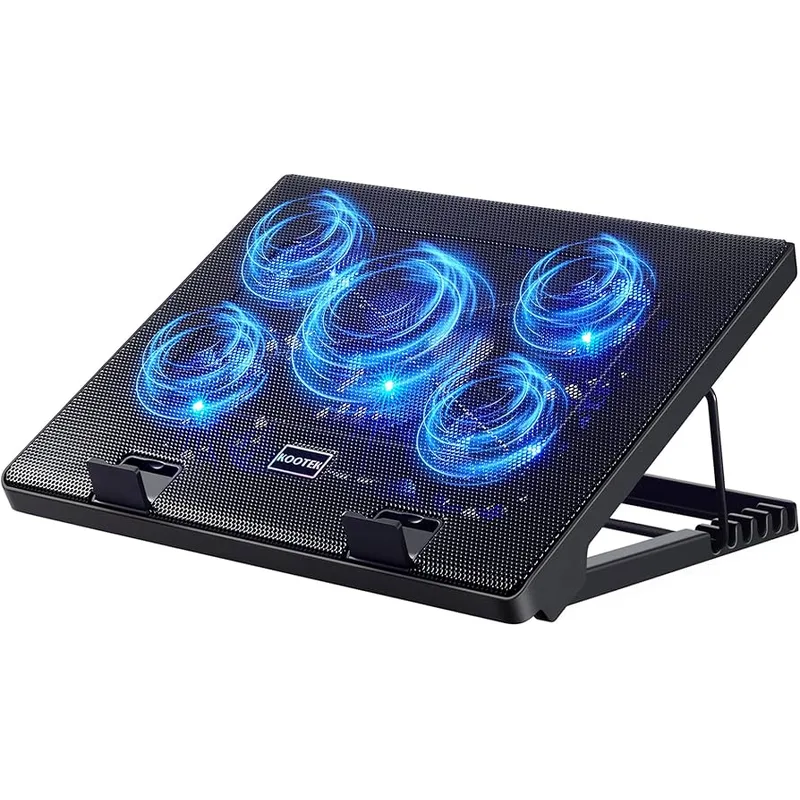
Kootek Laptop Cooling Pad
Pros
- Five-fan configuration pushes air across more of the laptop's underside than single or dual-fan designs — the 110mm center fan handles bulk airflow while four 70mm corner fans address heat near the processor and battery areas
- Multiple adjustable height positions let remote workers find an ergonomic viewing angle without adding a separate laptop stand — owner reports confirm the height increments are meaningful rather than cosmetically different
- Two USB 2.0 hub ports prevent the cooling pad from consuming one of the laptop's ports without giving anything back — a practical advantage for thin-and-light laptops already short on USB connections
- Under $27 with consistent Amazon availability — one of the few laptop accessories that maintains stable pricing and stock through the fluctuations that affect accessories in this category
Cons
- Plastic construction feels less refined than metal-mesh options — functional but not ideal if the desk aesthetic matters
- Blue LED cannot be turned off — fine in most setups but a distraction if the pad is visible in a camera frame during video calls
- 5-fan design draws slightly more USB current than single-fan pads — a non-issue on modern laptops but worth noting for older machines with marginal USB power output
The Kootek sits at the top of this list because it gets the balance right. Five fans provide solid coverage across the laptop’s underside, the adjustable height positions add ergonomic flexibility, and two USB ports mean you’re not losing port access by adding the pad to your desk. For remote workers who want something reliable and versatile without spending more than $30, this is the straightforward answer.
The 110mm center fan handles the bulk of airflow and runs quieter than four small fans at equivalent speed. Owner reports from extended work sessions describe the sound as audible but not disruptive — at typical home office background noise levels, it blends in. The plastic construction is the one area where this shows its price point; on a permanent desk with everything visible, it looks like what it is.
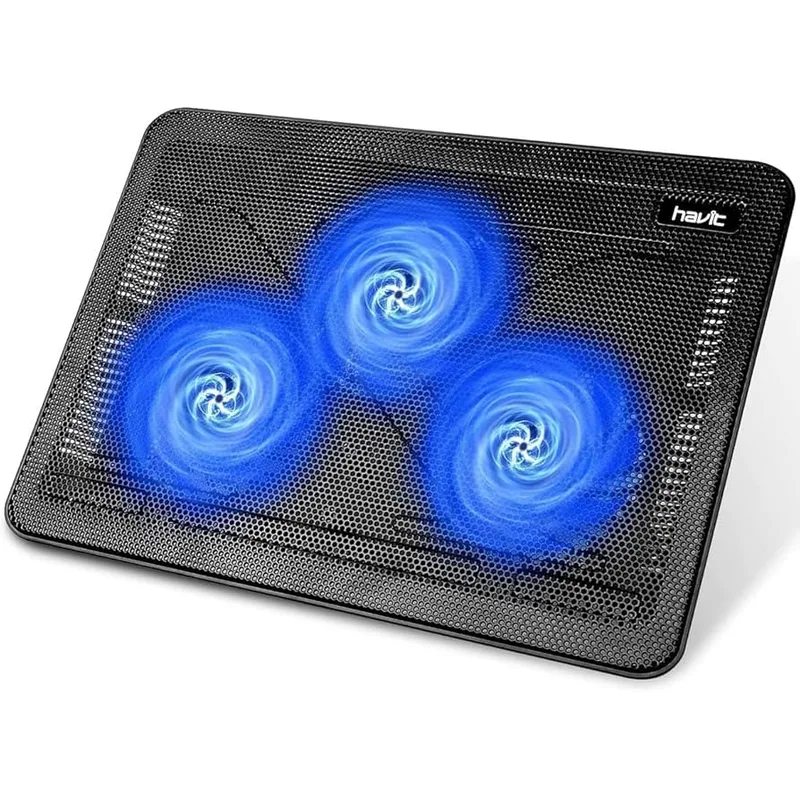
HAVIT HV-F2056 Laptop Cooler
Pros
- Ultra-slim profile travels easily in a laptop bag alongside a 15.6-inch laptop without noticeable added bulk — the go-to choice for remote workers who split time between home and co-working spaces
- Single USB cable powers all three fans with no separate power adapter — straightforward setup with minimal cable management impact
- Two adjustable height settings provide a meaningful angle change for improved ergonomics over using a laptop flat on a desk
- Consistently priced under $30 with straightforward Amazon availability throughout 2026
Cons
- Only fits 15.6"-17" laptops — owners with 13" or 14" ultrabooks will find the pad oversized and laptop positioning awkward
- Two height settings versus the adjustable multi-position options on the Kootek and Thermaltake — limits ergonomic fine-tuning
- No USB hub means this pad consumes one laptop port without offering a replacement — the Kootek and KLIM Wind both include USB hubs
The HAVIT HV-F2056’s appeal is its portability. It folds nearly flat and fits in a laptop bag alongside a 15.6-inch laptop without taking up meaningful space. For remote workers who split the week between home and co-working spaces, the HV-F2056 is the easiest choice to carry consistently.
Three fans are sufficient for moderate workloads — video calls, document work, browsing — but won’t match the sustained cooling of the Kootek’s five-fan layout under heavy processing loads. The size restriction matters: this pad is designed specifically for 15.6” to 17” laptops. Owners with 13” or 14” ultrabooks will find the positioning awkward and the coverage uneven.
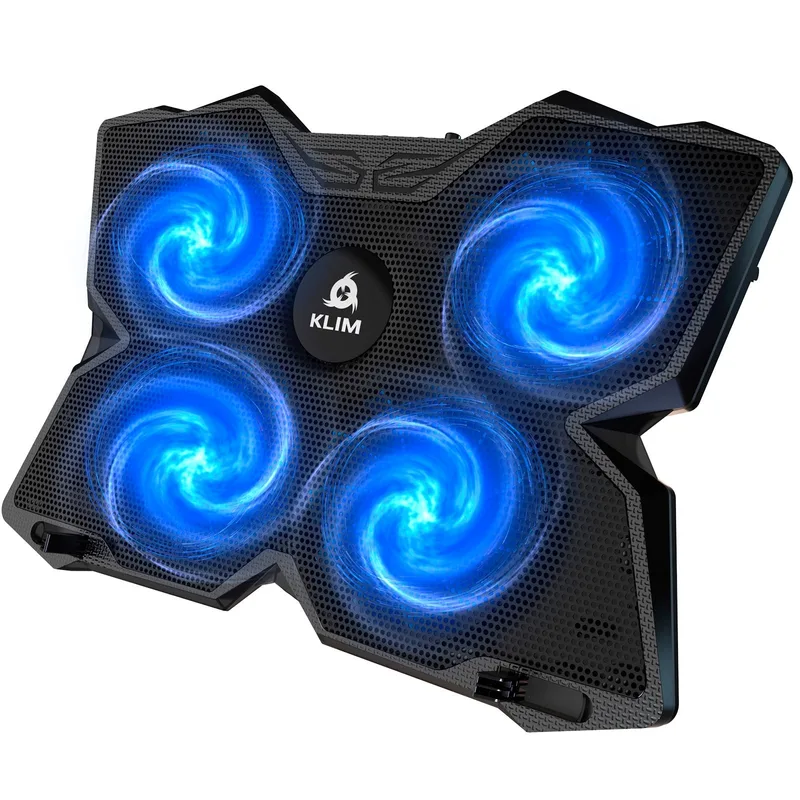
KLIM Wind Laptop Cooling Pad
Pros
- Supports laptops up to 19 inches — the widest compatibility of any pad in this roundup, covering large workstation and gaming laptops most pads are too narrow for
- Over 500,000 units sold across multiple production years — the volume of real-world owner experience makes reliability easier to assess than newer entrants
- Two USB ports included — one powers the pad, one remains free for other devices
- Available in multiple colors including white — unusually broad color selection for this category, relevant for desk setups where accessories are visible
Cons
- Fixed angle with no height adjustment — you get one elevation and adapt to it, unlike the Kootek or Thermaltake options with multiple height positions
- Four 70mm fans at 1200 RPM are audible at quiet-room noise levels — acceptable in most home offices but noticeable during silent recording sessions
- Plastic construction similar to most budget options in this price range — functional but not the most desk-presentable option
KLIM Wind’s track record stands out in a category full of forgettable generic options. Over 500,000 units sold across production years means the ownership experience is well-documented. At 1200 RPM, four fans provide steady airflow without dominating the room acoustically.
The tradeoff is flexibility. The KLIM Wind has no height adjustment — you get one elevation and work with it. For users running a separate monitor on a monitor arm, this doesn’t matter much. For users relying on the laptop screen as their primary display, the inability to raise the screen to eye level is a real ergonomic limitation. The widest size compatibility (11”–19”) is genuinely useful for owners of large workstation laptops.
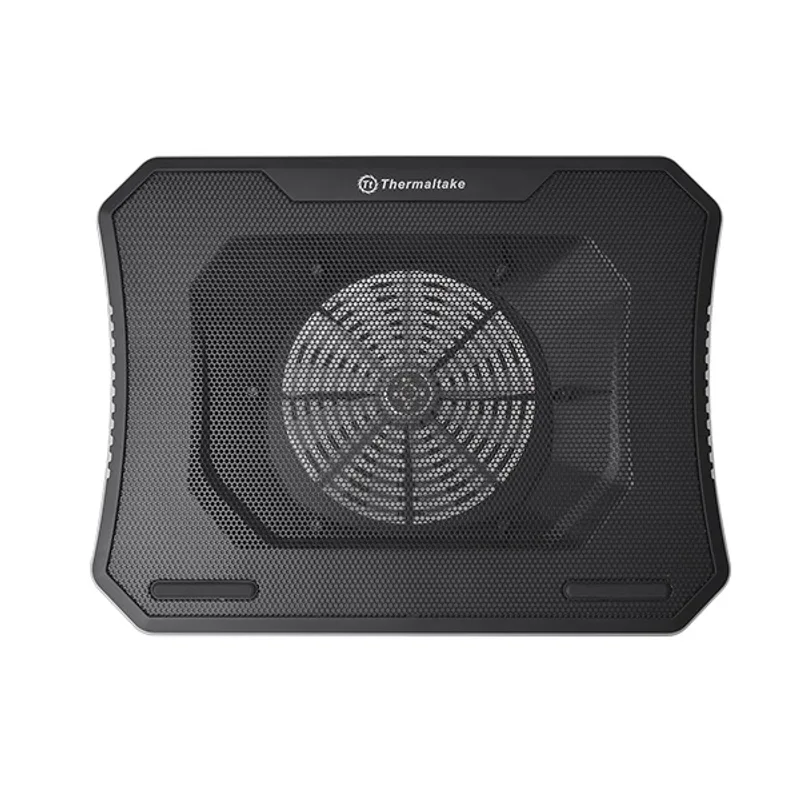
Thermaltake Massive 20 RGB
Pros
- A 200mm fan running at low RPM generates far less noise than four or five 70mm fans spinning at equivalent airflow — owner feedback consistently identifies this as one of the quietest active cooling pads available, which is the primary reason remote workers choose it over fan-array alternatives
- Three height settings at 3°, 9°, and 13° offer meaningful angle differences that accommodate different desk-to-monitor-height ratios — more variety than the two-position options in budget pads
- Steel mesh surface is more durable than plastic and resists the scratches that appear on budget pads after months of daily use
- Fan speed dial lets you tune airflow versus noise — minimal speed during video calls, full speed during heavy render or compile jobs
Cons
- Larger footprint than slim pads — the 200mm fan format makes this notably wider than most laptops, which can crowd a compact desk
- RGB requires 1.2 Amp minimum from USB to activate the LEDs — some USB ports on older laptops may not deliver enough current for full lighting operation
- Costs $20–$35 more than the Kootek — justified for users who value quiet operation and plan to leave it on their desk permanently
The physics of fan noise favor larger fans. A single 200mm fan moving the same volume of air as four 70mm fans rotates much more slowly, and slower rotation produces less noise. Owner feedback on the Thermaltake Massive 20 consistently identifies quiet operation as the main reason to choose it over cheaper fan-array alternatives — not specs on paper, but how the desk sounds during a full workday.
The steel mesh surface and three distinct height positions (3°, 9°, 13°) justify the higher price for anyone setting up a permanent home office. The manual fan speed dial is a practical addition: keep it at low speed during calls, push it higher during demanding jobs. The physical footprint is larger than slim pads — something to consider on a compact desk — but for a pad that stays on the desk rather than traveling, this is a minor concern.
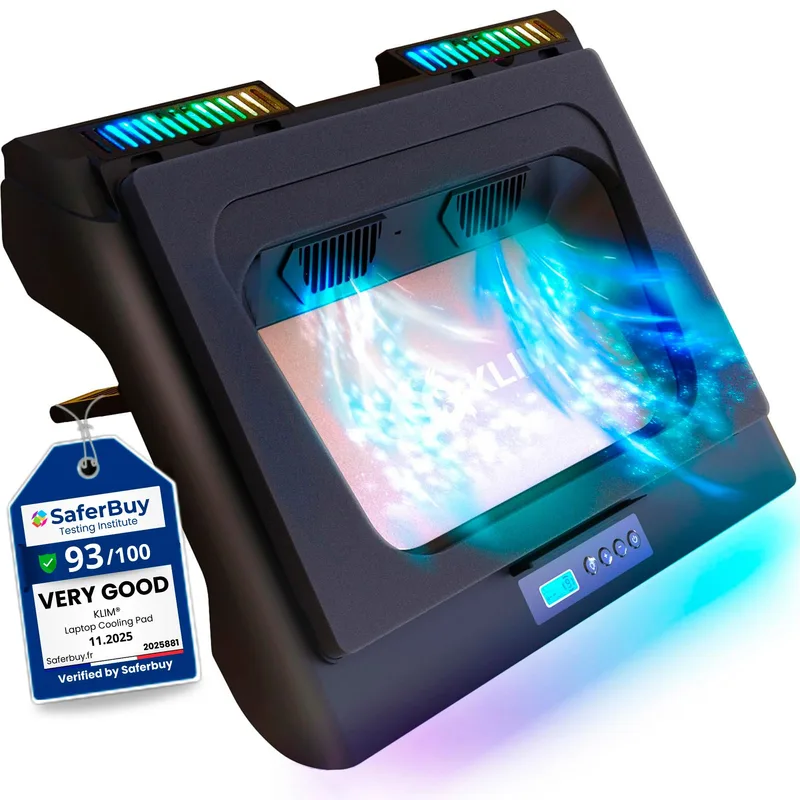
KLIM Everest Laptop Cooling Pad
Pros
- Detachable foam seal creates a directed pressure chamber against the laptop's ventilation grills — focused airflow into the actual intake points produces measurably lower CPU temperatures under sustained load compared to open-mesh pads that circulate ambient air underneath
- Six adjustable fan speed settings let remote workers balance noise against cooling — lower speeds are suitable during video calls; full 4300 RPM is for demanding render or compilation jobs where thermal performance takes priority
- 7-color RGB can be turned off completely — important for video call setups where the illuminated pad would be visible behind the laptop
- Owner reports from developers and graphic professionals describe consistent temperature drops under sustained workloads compared to running without a pad
Cons
- Does not work with Apple MacBooks — MacBooks lack bottom ventilation grills for the foam seal to mate with; this pad is only suitable for Windows and Linux laptops with dedicated bottom intake vents
- Dual turbofans at full 4300 RPM are loud — suitable for isolated workstation use but too noisy for video calls at full speed; speed level 1 or 2 is appropriate during meetings
- 14" minimum means compact ultrabooks between 12" and 13.9" are not officially supported — narrower coverage than most options in this roundup
The KLIM Everest operates on a different principle from the other pads here. Rather than circulating air generally underneath the laptop, the foam seal mates with the laptop’s ventilation grills to create a directed pressure chamber. Air is pushed through the actual intake points rather than around them. Owner reports from developers and graphic designers who track CPU temperature metrics describe consistent temperature drops under sustained load compared to running without a pad.
Two important caveats: This pad does not work with Apple MacBooks. MacBooks have sealed bottoms with no intake grills, so the foam seal has nothing to mate with. This is a Windows and Linux laptop product. And at full 4300 RPM, the dual turbofans are loud — speed levels 1 or 2 are appropriate during video calls; full speed is for isolated workstation sessions where thermal performance is the priority.
For Windows remote workers who do sustained heavy work — rendering, compilation, VMs, video editing — and are willing to manage fan speed manually, the Everest is the most effective thermal option in this roundup.
What to Look For in a Laptop Cooling Pad
Active vs passive. Powered cooling pads (all five above) use fans to force air movement. Passive laptop stands (simple risers without fans) elevate the chassis for natural convection and are completely silent. Passive stands work for light workloads and laptops that run warm without throttling. If your laptop is actually throttling under load, you need active cooling.
Fan size versus fan count. A single large fan (190–200mm) is typically quieter than four small fans moving equivalent air volume, because the large fan spins more slowly to achieve the same airflow. If quiet operation is the priority — home office with a microphone, shared workspace — the Thermaltake Massive 20 format is worth the extra cost.
Compatibility. Most active pads work with most laptops, but the KLIM Everest requires bottom ventilation grills. MacBook users should stick with mesh pads or passive stands rather than sealed foam designs.
USB port math. Every pad here draws power from one USB port. Pads with an integrated USB hub (Kootek, KLIM Wind) give back the port they consume. Pads without a hub (HAVIT) are a net loss of one port — relevant on thin-and-light laptops where USB ports are already scarce.
Height adjustment for ergonomics. A cooling pad that doubles as an ergonomic laptop stand reduces desk clutter. The Kootek and Thermaltake Massive 20 offer the most height flexibility. A fixed-angle pad like the KLIM Wind improves cooling without contributing to ergonomic positioning.
FAQ
Does a laptop cooling pad actually reduce throttling?
Yes, for laptops that throttle due to heat. If the CPU temperature is consistently hitting 85–95°C under load, a cooling pad that reduces intake air temperature by even 5–10°C can give the firmware headroom to maintain full clock speeds. For laptops that don’t throttle under typical workloads, a pad will lower temperatures modestly without a perceptible performance change.
Will a cooling pad work with my MacBook?
Mesh and open-bottom pads (Kootek, HAVIT, KLIM Wind, Thermaltake) work with MacBooks as elevation aids that improve natural airflow. The KLIM Everest’s foam seal does not work with MacBooks — it requires bottom ventilation grills. If you’re on a MacBook that throttles under heavy load, a passive stand combined with an external monitor to reduce screen heat is typically more effective than an active pad.
How loud are these cooling pads?
The Thermaltake Massive 20 with its 200mm single fan is the quietest active option in this roundup. The Kootek, HAVIT, and KLIM Wind are audible but not obtrusive at normal home office background noise levels. The KLIM Everest at full speed is the loudest — it has six adjustable speed settings specifically so remote workers can reduce the noise during calls.
Do I need a cooling pad if my laptop is new?
Modern thin-and-light designs still reach high temperatures under prolonged CPU load, regardless of how recent the hardware is. High-efficiency processors in 2026 can still sustain 85–90°C during extended video editing, compilation, or model inference. If your use case includes tasks that keep the CPU or GPU busy for extended periods, a cooling pad is cheap thermal insurance. If your typical workload is documents and browser tabs, the benefit is marginal.
Can a cooling pad scratch or damage my laptop?
No — cooling pads only add airflow and elevation. The only practical risk is a pad with rough plastic edges that could mark the laptop’s bottom casing. Steel mesh surfaces (Thermaltake) and smooth plastic designs (Kootek, KLIM Wind) avoid this. All five options here are safe for daily desk use.
Conclusion
For most remote workers, the Kootek Laptop Cooling Pad is the right starting point: five-fan coverage, adjustable height, USB hub, and a sub-$30 price that’s easy to justify without second-guessing. It covers the widest range of laptop sizes and use cases in this roundup.
If desk noise is a priority — you record audio, work in a quiet shared space, or simply want a setup that doesn’t add auditory clutter — upgrade to the Thermaltake Massive 20 RGB. The 200mm single-fan design is meaningfully quieter than small fan arrays, and the steel mesh and height adjustment make it a proper desk accessory rather than an afterthought.
For the highest thermal performance, especially under sustained workstation loads, the KLIM Everest is the pick — with the firm caveat that it only works with Windows and Linux laptops that have dedicated bottom ventilation grills.
Detailed Reviews
Kootek Laptop Cooling Pad
Pros
- Five-fan configuration pushes air across more of the laptop's underside than single or dual-fan designs — the 110mm center fan handles bulk airflow while four 70mm corner fans address heat near the processor and battery areas
- Multiple adjustable height positions let remote workers find an ergonomic viewing angle without adding a separate laptop stand — owner reports confirm the height increments are meaningful rather than cosmetically different
- Two USB 2.0 hub ports prevent the cooling pad from consuming one of the laptop's ports without giving anything back — a practical advantage for thin-and-light laptops already short on USB connections
- Under $27 with consistent Amazon availability — one of the few laptop accessories that maintains stable pricing and stock through the fluctuations that affect accessories in this category
Cons
- Plastic construction feels less refined than metal-mesh options — functional but not ideal if the desk aesthetic matters
- Blue LED cannot be turned off — fine in most setups but a distraction if the pad is visible in a camera frame during video calls
- 5-fan design draws slightly more USB current than single-fan pads — a non-issue on modern laptops but worth noting for older machines with marginal USB power output
HAVIT HV-F2056 Laptop Cooler
Pros
- Ultra-slim profile travels easily in a laptop bag alongside a 15.6-inch laptop without noticeable added bulk — the go-to choice for remote workers who split time between home and co-working spaces
- Single USB cable powers all three fans with no separate power adapter — straightforward setup with minimal cable management impact
- Two adjustable height settings provide a meaningful angle change for improved ergonomics over using a laptop flat on a desk
- Consistently priced under $30 with straightforward Amazon availability throughout 2026
Cons
- Only fits 15.6"-17" laptops — owners with 13" or 14" ultrabooks will find the pad oversized and laptop positioning awkward
- Two height settings versus the adjustable multi-position options on the Kootek and Thermaltake — limits ergonomic fine-tuning
- No USB hub means this pad consumes one laptop port without offering a replacement — the Kootek and KLIM Wind both include USB hubs
KLIM Wind Laptop Cooling Pad
Pros
- Supports laptops up to 19 inches — the widest compatibility of any pad in this roundup, covering large workstation and gaming laptops most pads are too narrow for
- Over 500,000 units sold across multiple production years — the volume of real-world owner experience makes reliability easier to assess than newer entrants
- Two USB ports included — one powers the pad, one remains free for other devices
- Available in multiple colors including white — unusually broad color selection for this category, relevant for desk setups where accessories are visible
Cons
- Fixed angle with no height adjustment — you get one elevation and adapt to it, unlike the Kootek or Thermaltake options with multiple height positions
- Four 70mm fans at 1200 RPM are audible at quiet-room noise levels — acceptable in most home offices but noticeable during silent recording sessions
- Plastic construction similar to most budget options in this price range — functional but not the most desk-presentable option
Thermaltake Massive 20 RGB
Pros
- A 200mm fan running at low RPM generates far less noise than four or five 70mm fans spinning at equivalent airflow — owner feedback consistently identifies this as one of the quietest active cooling pads available, which is the primary reason remote workers choose it over fan-array alternatives
- Three height settings at 3°, 9°, and 13° offer meaningful angle differences that accommodate different desk-to-monitor-height ratios — more variety than the two-position options in budget pads
- Steel mesh surface is more durable than plastic and resists the scratches that appear on budget pads after months of daily use
- Fan speed dial lets you tune airflow versus noise — minimal speed during video calls, full speed during heavy render or compile jobs
Cons
- Larger footprint than slim pads — the 200mm fan format makes this notably wider than most laptops, which can crowd a compact desk
- RGB requires 1.2 Amp minimum from USB to activate the LEDs — some USB ports on older laptops may not deliver enough current for full lighting operation
- Costs $20–$35 more than the Kootek — justified for users who value quiet operation and plan to leave it on their desk permanently
KLIM Everest Laptop Cooling Pad
Pros
- Detachable foam seal creates a directed pressure chamber against the laptop's ventilation grills — focused airflow into the actual intake points produces measurably lower CPU temperatures under sustained load compared to open-mesh pads that circulate ambient air underneath
- Six adjustable fan speed settings let remote workers balance noise against cooling — lower speeds are suitable during video calls; full 4300 RPM is for demanding render or compilation jobs where thermal performance takes priority
- 7-color RGB can be turned off completely — important for video call setups where the illuminated pad would be visible behind the laptop
- Owner reports from developers and graphic professionals describe consistent temperature drops under sustained workloads compared to running without a pad
Cons
- Does not work with Apple MacBooks — MacBooks lack bottom ventilation grills for the foam seal to mate with; this pad is only suitable for Windows and Linux laptops with dedicated bottom intake vents
- Dual turbofans at full 4300 RPM are loud — suitable for isolated workstation use but too noisy for video calls at full speed; speed level 1 or 2 is appropriate during meetings
- 14" minimum means compact ultrabooks between 12" and 13.9" are not officially supported — narrower coverage than most options in this roundup