AI auto-framing and integrated noise cancellation are now standard features even in sub-$100 video bars — a shift that became clear in 2026 as products like the TOALLIN 4K all-in-one began shipping with speaker-tracking capabilities previously exclusive to enterprise conferencing hardware. Remote workers upgrading from a standalone webcam and separate speakerphone now have an all-in-one alternative at every price point.
A conference video bar combines camera, microphone array, and speaker into a single unit that mounts above or below your display and connects via one USB cable. The practical advantages over separate components: no audio sync issues between the webcam mic and a speakerphone positioned elsewhere on the desk, no cable routing from multiple devices, and a cleaner desk profile. The tradeoff versus a dedicated external microphone is raw audio quality at the top of the price range — but for most home office video calls, the integrated approach performs comparably at significant cost and complexity savings.
The five products in this guide cover the full home office spectrum from budget all-in-ones under $100 to established conference systems approaching $450: budget picks that outperform built-in laptop audio by a wide margin, mid-range personal video bars with enterprise-grade noise cancellation, and room-scale options with 120° coverage for dedicated home office spaces.
Quick Comparison
| Product | Price | Video | FOV | AI Framing | Best For |
|---|---|---|---|---|---|
| Poly Studio P15 | $119.99-$279.99 as of Oct 18, 2026 | 4K | 90° | Yes | Home office desk |
| Logitech MeetUp | $254.95-$537.35 as of Oct 18, 2026 | 4K | 120° | No | Huddle rooms |
| EMEET C980 PRO 4K | $89.91 as of Oct 18, 2026 | 4K | 60°–98° | No | Budget all-in-one |
| TOALLIN 4K Video Bar | $159.00 as of Oct 18, 2026 | 4K | Wide | Yes | Budget 4K with AI |
| Poly Studio R30 | $273.65-$399.99 as of Oct 18, 2026 | 4K | 120° | Yes | Dedicated home office room |
1. Poly Studio P15 — Editor’s Pick
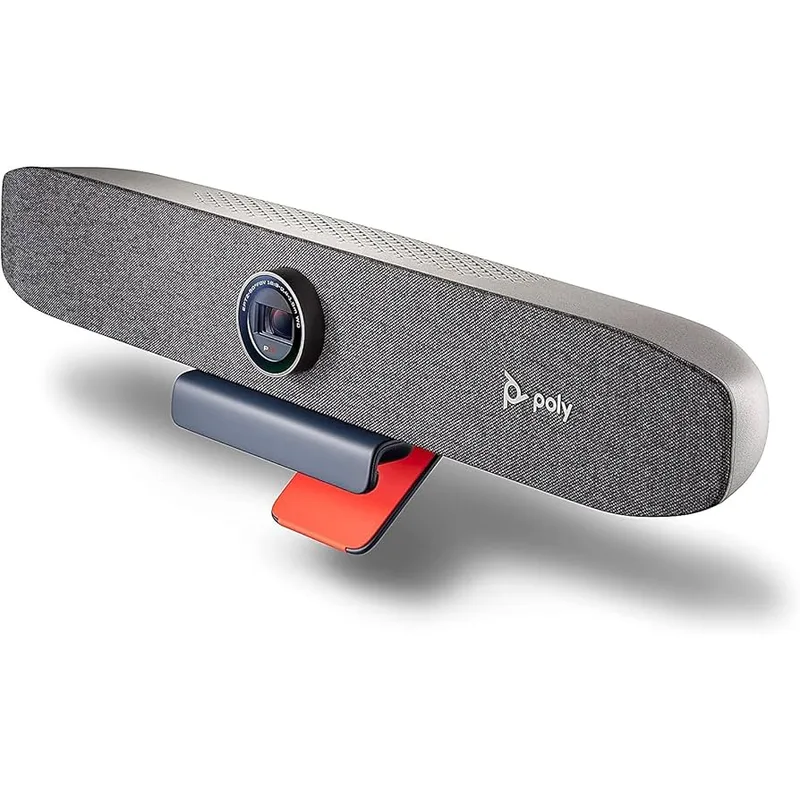
Poly Studio P15 Personal Video Bar
Pros
- AcousticFence technology creates a virtual microphone perimeter that limits pickup to sounds within your immediate desk area — owner reports consistently note it eliminates keyboard echo, HVAC noise, and ambient room sound that cheaper mics capture indiscriminately
- NoiseBlockAI actively differentiates human speech from background noise in real time, not just during quiet gaps — the system continues filtering while you are speaking, which matters in home offices with continuous background noise sources like fans or street traffic
- Auto-framing keeps you centered regardless of movement — users who switch between sitting upright and leaning back report the camera adjusts smoothly without snapping or over-correcting, unlike budget alternatives that reframe with visible lag
- 3-element beamforming microphone array provides directional audio pickup, allowing the system to focus on the speaker's position relative to the bar rather than capturing the entire room equally — call participants report substantially cleaner audio compared to webcam mics
- Single USB-A cable handles power, audio, and video with no additional power adapter required — a meaningful practical advantage for home office setups where cable management and desk space are limited
Cons
- Priced at $199–$249, the P15 costs roughly 3x more than budget all-in-one alternatives — the audio processing gap is real, but workers doing primarily one-on-one calls may not get full value from AcousticFence and NoiseBlockAI compared to less demanding use cases
- Speaker output is optimized for personal listening distances — adequate for solo work and monitoring call audio, but limited in volume for shared desk environments or users who want room-filling playback
- 17-inch width occupies significant horizontal space on top of a monitor — requires a substantial display to mount on and reduces sightline clearance for users with limited monitor height
The P15 earns its position through a combination of hardware and software that addresses the real problems remote workers face: background noise bleeding into calls and poor audio capture from non-ideal microphone placement.
AcousticFence creates a configurable virtual boundary around your desk. Sounds outside the boundary — adjacent room noise, hallway traffic, HVAC — are filtered before reaching call participants. The technology is derived from Poly’s enterprise conferencing hardware, not repackaged consumer noise suppression, and owner reports confirm it handles consistent background noise sources more aggressively than competing approaches.
NoiseBlockAI handles dynamic noise — typing, paper shuffling, brief ambient spikes — in real time while you speak. The distinction from basic noise gates is that the AI continues processing during speech rather than only activating during silence. Home office workers with mechanical keyboards or environmental noise report a consistent improvement in call quality perception from participants.
The beamforming microphone array directs capture toward your seated position relative to the bar. For typical desk setups — display mounted at arm’s length, user seated 18–24 inches back — the directional pickup significantly reduces room reverb compared to omnidirectional mics at the same physical distance.
At $199–$249, the P15 sits above budget all-in-ones but well below enterprise video conferencing hardware. For remote workers who spend multiple hours per day on video calls, the audio quality gap over the $79–$119 alternatives is audible and sustained.
Bottom line: The most complete home office video bar for workers who prioritize audio quality and spend significant time on calls.
2. Logitech MeetUp — Most Proven
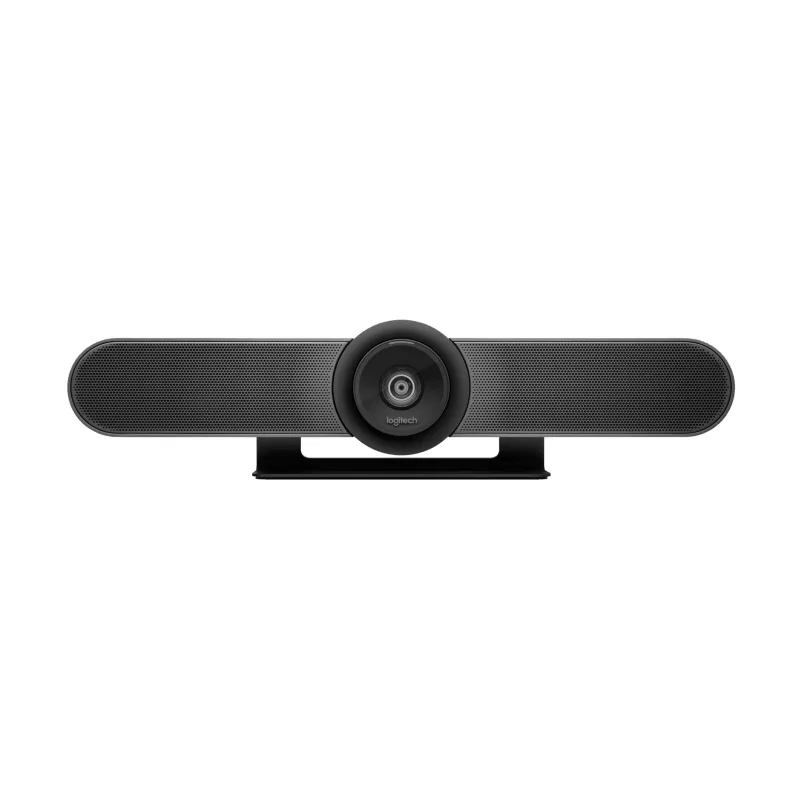
Logitech MeetUp Conference Camera
Pros
- 120° ultra-wide field of view is the widest in this roundup — designed to capture an entire huddle space in a single shot, but equally useful for remote workers with second monitors, whiteboards, or wide desk arrangements that a narrower camera would miss
- Bluetooth connectivity in addition to USB allows the unit to act as a speakerphone independently of the computer — useful for audio-only conference calls without firing up a video meeting, or in setups where the host device is positioned away from the display
- Over seven years of production and widespread enterprise adoption has created an extensive user base — troubleshooting resources, driver support, and compatibility documentation are more robust than newer or less-established products in the category
- 10x digital zoom allows post-capture crop and reframe for screen sharing or demonstrations — practical for workers who alternate between wide-room and tight-focus framing during presentations without repositioning the camera
- Built-in audio uses beamforming array specifically tuned for the 120° capture geometry — the microphones track the speaker within the wide field rather than capturing the full room uniformly, which reduces wash-out effect in larger spaces
Cons
- Released in 2017, the MeetUp uses first-generation AI framing without the adaptive speaker-tracking found in newer products like the Poly P15 and R30 — auto-framing is static rather than actively following movement
- At $429–$449, the MeetUp carries a higher price than personal video bars like the P15 despite the P15's superior noise-cancellation technology — the MeetUp's value proposition is its wider FOV and Bluetooth, not processing sophistication
- Requires external power via the included AC adapter in addition to the USB cable, which means two cables running to the unit — more cable management complexity compared to USB-only alternatives
The MeetUp has been the reference point for huddle room video conferencing since 2017. Seven years of widespread enterprise deployment has created something newer products cannot replicate: deep compatibility documentation, extensive troubleshooting resources, and proven long-term hardware reliability.
The 120° ultra-wide field of view remains a practical differentiator. At 120°, the MeetUp captures the full width of a standard home office at typical room distances without distortion — a layout that also frames an entire small group around a shared desk during hybrid calls where one home-office worker and one or two colleagues participate simultaneously.
Bluetooth connectivity adds a standalone speakerphone mode independent of the computer. For audio-only conference calls via phone dial-in or a mobile device, the MeetUp functions without the laptop being present in the call chain. Busy workers switching between computer calls and mobile calls benefit from that flexibility.
The 10x digital zoom enables post-capture reframing for presentations and screen shares. Walking to a whiteboard or holding up a physical document while staying in-frame is manageable through the digital crop even at the MeetUp’s wide native angle.
The key limitation relative to newer products in this roundup is the absence of AI-driven auto-tracking. The MeetUp captures a static frame within its 120° FOV without following movement — presenters who move around the frame are visible within the wide angle but not actively recentered. For workers who stay seated, this is not a practical issue; for those who move during presentations, the Poly R30 or P15 are more appropriate.
Bottom line: The proven choice for workers who value long-term reliability and compatibility over the newest AI features, and whose setup benefits from 120° coverage or standalone Bluetooth audio.
3. EMEET C980 PRO 4K — Best Budget
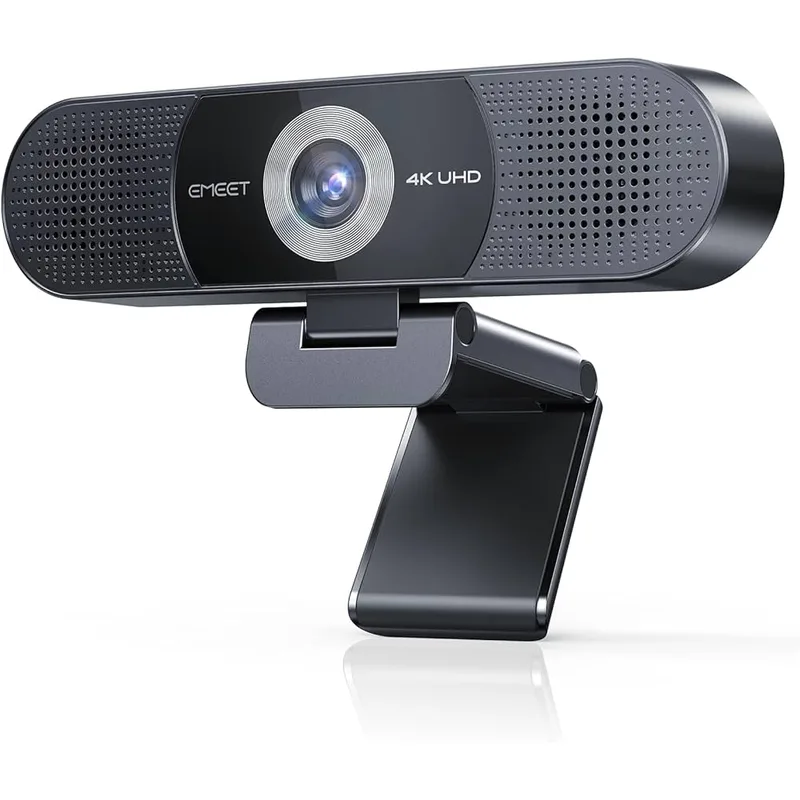
EMEET C980 PRO 4K Webcam
Pros
- Four omnidirectional noise-canceling microphones provide 360° audio pickup — the array design captures voices clearly from multiple positions relative to the camera, which benefits home office workers who move around or participate in small group calls at a shared desk
- Dual built-in 1W speakers deliver audio directly from the video bar without requiring a separate speakerphone or headset for routine calls — owner feedback notes the speaker volume is sufficient for personal use at normal desk distances
- 60°-98° adjustable field of view is unique in this price category — you can narrow to 60° for solo close-up framing or widen to 98° for group setups, providing framing flexibility that fixed-FOV budget alternatives lack
- Magnetic privacy cover attaches and detaches cleanly without plastic tabs or sliding mechanisms that wear out over time — a durability advantage over integrated shutter designs on comparable products
- Plug-and-play USB connection works without driver installation on Windows, macOS, and Chrome OS — straightforward setup that the majority of owner reviews cite as a practical advantage for non-technical users
Cons
- Fixed focus lens means the camera cannot autofocus as you move toward or away from the camera — sharp at the calibrated distance, but softening is noticeable if you sit closer or farther than expected; best suited for users with a consistent seat position
- 1W speakers are audible but lack the output level and frequency response of dedicated speakerphones — for workers who prioritize audio quality for music playback or high-volume calls, the speaker is a functional solution rather than a high-fidelity one
- No AI auto-framing or speaker tracking — the camera captures a static frame within the selected FOV without adjusting to movement; users who move frequently during calls may fall out of frame
The C980 PRO 4K answers a specific question: what is the minimum entry price for a true all-in-one video bar with 4K resolution, integrated speaker, and multi-microphone array? The answer as of 2026 is $79–$99 — a price point that would have bought 1080p without integrated audio two years ago.
Four omnidirectional noise-canceling microphones provide broader pickup coverage than the two-mic arrays found in most budget alternatives. The practical difference surfaces in small group calls at a shared desk — two people seated side by side can both speak clearly without one being significantly louder than the other due to microphone proximity.
The adjustable 60°–98° field of view is a useful feature at this price tier. Budget video bars typically ship with a fixed 90° or 78° FOV. The EMEET’s adjustable range lets you narrow to 60° for solo close-framing that reduces visible background, or widen to 98° for group setups or to capture more of a home office background for professional staging.
The fixed focus lens is the meaningful functional tradeoff relative to autofocus alternatives. Users who sit consistently 20–30 inches from their monitor will see sharp capture within the camera’s calibrated focus range. Those who lean significantly forward or move closer will notice softening. For a fixed-position desk setup, this is rarely an issue in practice.
The magnetic privacy cover is a practical durability choice. Integrated sliding shutters on comparably priced cameras show wear within 12–18 months of regular use, based on owner feedback patterns. The detachable magnetic cover removes and reattaches without mechanical wear.
Bottom line: The right pick for remote workers who want 4K, integrated speaker, and a four-mic array at the lowest entry price in this category.
4. TOALLIN 4K All-in-One Video Bar — Best Value 4K with AI
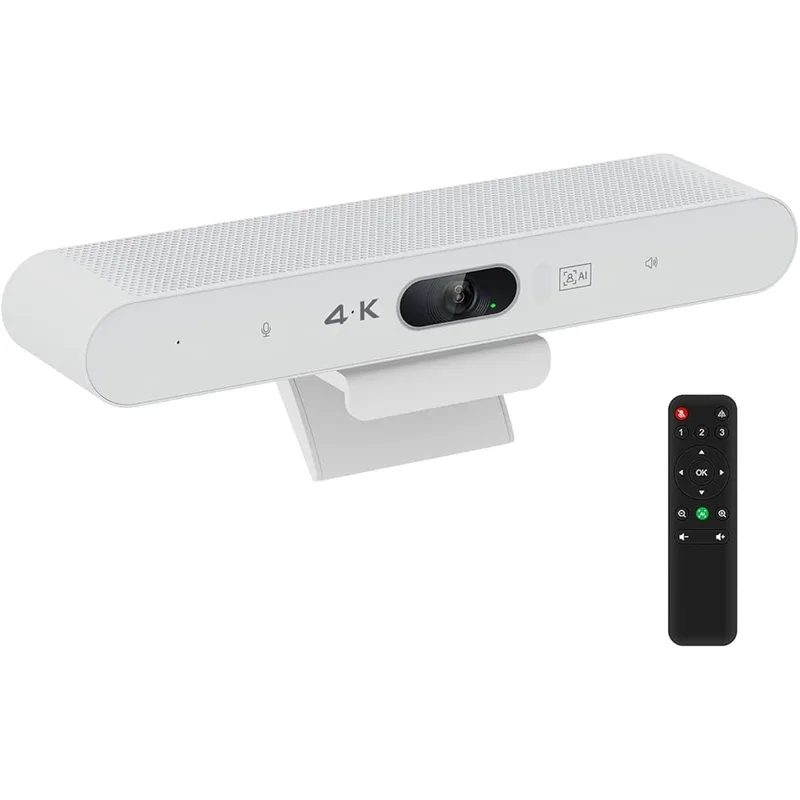
TOALLIN 4K All-in-One Video Bar
Pros
- AI auto-framing with Voice Activity Detection automatically identifies and reframes toward the active speaker — a feature typically found in products priced $200 and up, making it a meaningful differentiator at the $89–$119 price point
- 4K resolution at sub-$100 pricing delivers noticeably more detail than 1080p alternatives at the same price — text on whiteboards, fine facial detail, and shared physical documents are clearer to call participants at 4K output
- Speaker tracking follows whoever is speaking within the frame, which benefits home office workers who occasionally join from a space with a second person at the desk without purchasing a dedicated multi-person conferencing system
- Single USB cable connection handles all power, video, and audio without additional adapters or power bricks — practical for desk setups where outlet space or cable routing is limited
- Compatibility with all major conferencing platforms including Zoom, Teams, Webex, Skype, and GoToMeeting requires no platform-specific drivers or configuration — works as a standard USB audio/video device
Cons
- Newer brand with limited long-term reliability data compared to established players like Poly and Logitech — owner review volume is lower, which makes it harder to identify consistent failure patterns or software support longevity
- 2-microphone array provides less spatial pickup coverage than the 3- or 4-element arrays in the Poly P15 and EMEET C980 PRO — adequate for a single speaker but less effective for multi-person calls at the same desk
- No enterprise noise-cancellation technology equivalent to Poly's NoiseBlockAI — built-in noise reduction is effective for typical background sounds but less aggressive against continuous noise sources like HVAC fans or street noise
The TOALLIN’s position in this roundup is a specific one: the only sub-$120 video bar with AI auto-framing and speaker tracking. At this price tier, those features normally require stepping up to the Poly P15’s $199–$249 range.
Voice Activity Detection-based speaker tracking identifies who is speaking and crops the 4K sensor feed toward that person. For home office workers who occasionally join calls with a partner, family member, or visiting colleague, the automatic camera reframe means the visible participant stays centered without manual adjustment between speakers.
AI auto-framing also handles solo repositioning — if you lean forward to share a document or move to the side of your desk, the camera adjusts the frame crop to keep you centered within the 4K sensor area. This is distinct from the static framing in the EMEET C980 PRO, which captures a fixed area regardless of your movement.
The speaker tracking and auto-framing use the 4K sensor crop rather than physical camera movement — the bar itself does not pan or tilt. The effective working range for tracking is limited to the native field of view. Users who move more than a body-width off-center may exit the trackable area entirely, which is a practical limitation in larger open-plan home offices where movement ranges are wider.
The TOALLIN’s brand history is shorter than Poly or Logitech, and the long-term software support trajectory is less established. For workers who need a video bar for 3–5 years with guaranteed firmware updates and enterprise support, the Poly P15 is a more reliable investment. For budget-constrained remote workers who need AI framing now without a $200 spend, the TOALLIN offers genuine value at $89–$119.
Bottom line: The right choice if AI auto-framing is a must-have and budget is constrained to under $120.
5. Poly Studio R30 — Best for Dedicated Home Office Room
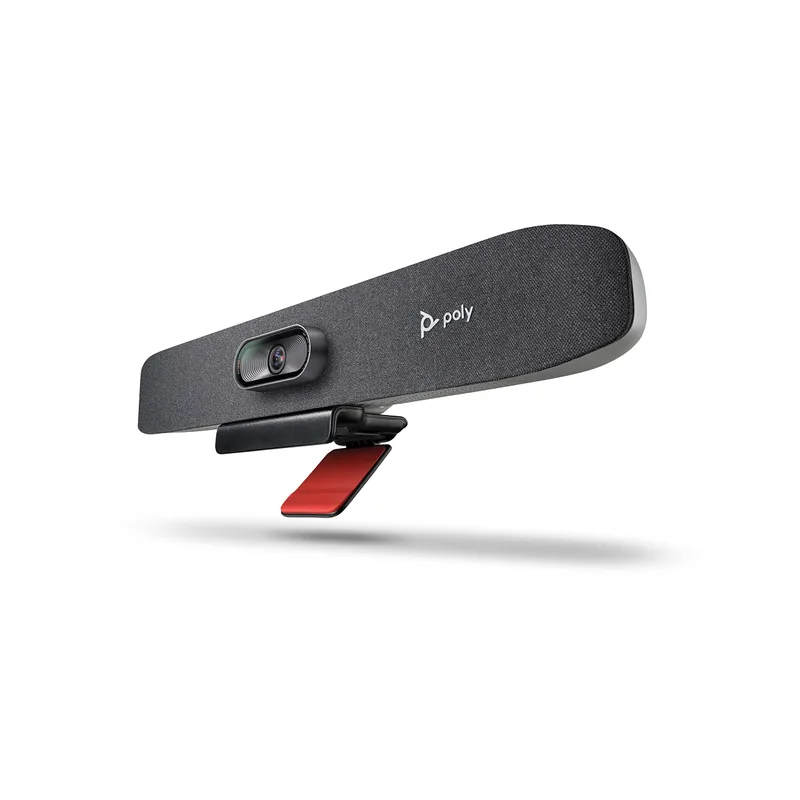
Poly Studio R30 Video Bar
Pros
- 120° ultra-wide field of view matches the Logitech MeetUp's coverage at a lower price point — captures the full width of a standard home office wall including monitor, bookshelves, and any visible background elements without needing to mount the camera at a distance
- Presenter tracking with speaker framing intelligently crops the 4K sensor feed to keep the active speaker centered — useful for solo workers who present from whiteboards or physical materials and move around during calls
- NoiseBlockAI carries over from the P15, providing the same enterprise-grade background noise suppression at the R30's price point — workers in loud home environments get meaningful noise rejection without paying the P15's price premium
- Plug-and-play USB setup works without any software installation — the R30 presents as a standard USB audio/video device on Windows, macOS, and Linux, and is detected automatically by Zoom Rooms, Teams, and Google Meet
- 15-inch compact form factor fits on top of most displays without overhang — narrower than the P15's 17-inch width, which matters for users with 24-inch or smaller monitors where larger bars create a visually unbalanced setup
Cons
- 120° FOV, while excellent for room coverage, captures more background than necessary for solo remote workers — backgrounds require more attention to staging since more of the room is visible compared to narrower-FOV alternatives
- At $249–$299, the R30 overlaps in price with the Poly P15 and costs significantly more than the EMEET and TOALLIN options — the 120° FOV and presenter tracking justify the premium for dedicated home office rooms, but the P15 is the better fit for standard desk setups
- Stereo speaker output is suitable for monitoring call audio but not optimized for media playback or music — the speaker system prioritizes voice reproduction fidelity over full-frequency audio response
The R30 targets a specific setup: a dedicated home office with enough physical space to benefit from 120° wide-angle coverage. At a desk pushed against a wall in a bedroom corner, the P15’s 90° FOV is typically sufficient. In a dedicated office room where the desk is positioned away from walls, or where background staging with bookshelves and artwork is intentional, the R30’s 120° capture is the more appropriate choice.
Presenter tracking with speaker framing uses the full 4K sensor resolution to crop and reframe toward the active speaker within the 120° field. This enables a workflow where you can move from your desk to a whiteboard, reference physical materials across the room, or walk through a space during a virtual tour while remaining properly framed without touching any controls.
NoiseBlockAI carries over from the P15 at a price point approximately $50–$100 lower in street pricing. The noise cancellation performance is equivalent — the distinction between the R30 and P15 is the FOV (120° vs. 90°) and framing behavior (120° presenter tracking vs. 90° adaptive framing), not the underlying audio processing quality.
The 15-inch width is narrower than the P15’s 17 inches and fits comfortably on top of 27-inch or larger displays without visual imbalance. Mounting the R30 on a 24-inch display creates some horizontal overhang; the P15 and TOALLIN are better fits for smaller screens.
Bottom line: The right choice for remote workers with a dedicated home office space who want 120° coverage and AI presenter tracking at a price below the Logitech MeetUp.
Buying Guide: What to Look For in a Home Office Video Bar
Integrated vs. Separate Components
A video bar trades raw component quality for simplicity. A dedicated external USB microphone like the FIFINE K669B ($30) captures cleaner audio at its price point than the built-in microphone on a $30 equivalent video bar — but the video bar eliminates the cable, positioning, and sync complexity of combining a webcam, mic, and speakerphone separately. For workers who spend more than 2–3 hours daily on calls, the all-in-one simplicity is usually worth the audio quality tradeoff.
Field of View
A 90° FOV frames a single person well at typical desk distances (18–30 inches). A 120° FOV captures a wider background or a small group at the same distance. Wider is not unconditionally better — a 120° camera at a desk against a wall shows more of the room behind you, which requires more attention to visible background staging.
AI Framing
Budget video bars without AI framing capture a static frame within their FOV. AI framing tracks your position within the sensor area and recenters the crop as you move. For workers who stay seated and stationary during calls, the distinction is minimal. For workers who move during presentations or frequently shift in their chair, AI framing produces a more professional result without effort.
Noise Cancellation Tiers
Basic noise reduction filters constant background sounds during silence. Mid-tier noise cancellation (EMEET’s array design, TOALLIN’s built-in processing) handles typical home office ambient noise adequately. Enterprise-grade noise cancellation like Poly’s NoiseBlockAI and AcousticFence processes speech and noise simultaneously and handles more demanding environments — loud HVAC, nearby construction, adjacent rooms — more reliably.
Connectivity
All products in this roundup connect via USB and appear as standard audio/video devices — no driver installation required. The Logitech MeetUp adds Bluetooth for standalone speakerphone use. USB-C cables are increasingly common for new laptops; confirm your laptop has USB-A ports or stock a USB-A to USB-C adapter if needed.
Frequently Asked Questions
Do I actually need a video bar, or is a good webcam and separate speakerphone better? A separate webcam and speakerphone combination can outperform a video bar in raw component quality — a $150 webcam and $80 speakerphone purchased independently may exceed an equivalent $230 video bar. The video bar wins on desk simplicity: one device, one cable, no audio sync issues between the camera and a speakerphone placed elsewhere. For workers who prioritize a clean desk over peak component performance, the integrated approach makes practical sense.
Will these video bars work with my conferencing platform? All five products connect as standard USB audio/video devices and work with Zoom, Microsoft Teams, Google Meet, Webex, and essentially any application that accepts USB camera and audio input. The Poly P15 and R30 carry specific Zoom and Teams certification, meaning their AI features are integrated with those platforms’ speaker identification and noise processing pipelines. Non-certified products like the EMEET and TOALLIN work on all platforms but without deep platform-level integration.
Can I use a video bar as a regular speaker for music or YouTube? The built-in speakers in these video bars are sized and tuned for voice reproduction at close desk distances. They work for system audio, YouTube, and music playback at moderate volume levels. None of them approach the bass response or high-volume output of a dedicated computer speaker like the Edifier R1280T. If you want to use your video bar for calls and keep separate audio for media playback, the video bar’s audio output can typically be disabled in system settings so only the dedicated speakers play media.
Where should I mount a conference video bar? Most users mount video bars on top of their primary display, centered above the screen. This places the camera at or slightly above eye level when seated, which produces a neutral framing angle. Mounting below the display is possible but tends to create an unflattering upward angle. If your display has no flat top surface or is an ultrawide with significant curvature, a dedicated camera shelf or external VESA-mounted arm provides a stable alternative mounting point.
What is the difference between the Poly P15 and the Poly R30? The P15 has a 90° FOV and is designed for personal desk use — one person, close framing, typical seated desk distance. The R30 has a 120° FOV and is designed for small rooms or dedicated office spaces where wider coverage is needed. Both include NoiseBlockAI. The P15 is slightly narrower at 17 inches vs. the R30’s 15 inches (the P15 is actually wider). Street pricing typically puts the R30 $50–$100 above the P15.
Conclusion
For most home office remote workers, the Poly Studio P15 is the clearest recommendation: its AcousticFence and NoiseBlockAI combination addresses the real problem of home office background noise more effectively than any other product in this price range, and the 90° FOV is correct for single-person desk use.
If budget is the primary constraint, the EMEET C980 PRO 4K delivers 4K video, four microphones, and integrated speakers under $100 — a complete all-in-one at a price that is hard to argue against for workers whose home offices are reasonably quiet.
The TOALLIN 4K closes the AI framing gap at the budget tier, making it the right choice when auto-tracking is important and spending over $100 is not practical.
The Logitech MeetUp at $429–$449 earns its place through proven long-term reliability and 120° coverage — appropriate for workers who value hardware longevity and wide-angle framing over newer AI processing features.
The Poly Studio R30 bridges the gap between a personal video bar and a room solution: 120° coverage with NoiseBlockAI and presenter tracking at a price below the MeetUp, for workers whose dedicated home office space benefits from wider framing.
Detailed Reviews
Poly Studio P15 Personal Video Bar
Pros
- AcousticFence technology creates a virtual microphone perimeter that limits pickup to sounds within your immediate desk area — owner reports consistently note it eliminates keyboard echo, HVAC noise, and ambient room sound that cheaper mics capture indiscriminately
- NoiseBlockAI actively differentiates human speech from background noise in real time, not just during quiet gaps — the system continues filtering while you are speaking, which matters in home offices with continuous background noise sources like fans or street traffic
- Auto-framing keeps you centered regardless of movement — users who switch between sitting upright and leaning back report the camera adjusts smoothly without snapping or over-correcting, unlike budget alternatives that reframe with visible lag
- 3-element beamforming microphone array provides directional audio pickup, allowing the system to focus on the speaker's position relative to the bar rather than capturing the entire room equally — call participants report substantially cleaner audio compared to webcam mics
- Single USB-A cable handles power, audio, and video with no additional power adapter required — a meaningful practical advantage for home office setups where cable management and desk space are limited
Cons
- Priced at $199–$249, the P15 costs roughly 3x more than budget all-in-one alternatives — the audio processing gap is real, but workers doing primarily one-on-one calls may not get full value from AcousticFence and NoiseBlockAI compared to less demanding use cases
- Speaker output is optimized for personal listening distances — adequate for solo work and monitoring call audio, but limited in volume for shared desk environments or users who want room-filling playback
- 17-inch width occupies significant horizontal space on top of a monitor — requires a substantial display to mount on and reduces sightline clearance for users with limited monitor height
Logitech MeetUp Conference Camera
Pros
- 120° ultra-wide field of view is the widest in this roundup — designed to capture an entire huddle space in a single shot, but equally useful for remote workers with second monitors, whiteboards, or wide desk arrangements that a narrower camera would miss
- Bluetooth connectivity in addition to USB allows the unit to act as a speakerphone independently of the computer — useful for audio-only conference calls without firing up a video meeting, or in setups where the host device is positioned away from the display
- Over seven years of production and widespread enterprise adoption has created an extensive user base — troubleshooting resources, driver support, and compatibility documentation are more robust than newer or less-established products in the category
- 10x digital zoom allows post-capture crop and reframe for screen sharing or demonstrations — practical for workers who alternate between wide-room and tight-focus framing during presentations without repositioning the camera
- Built-in audio uses beamforming array specifically tuned for the 120° capture geometry — the microphones track the speaker within the wide field rather than capturing the full room uniformly, which reduces wash-out effect in larger spaces
Cons
- Released in 2017, the MeetUp uses first-generation AI framing without the adaptive speaker-tracking found in newer products like the Poly P15 and R30 — auto-framing is static rather than actively following movement
- At $429–$449, the MeetUp carries a higher price than personal video bars like the P15 despite the P15's superior noise-cancellation technology — the MeetUp's value proposition is its wider FOV and Bluetooth, not processing sophistication
- Requires external power via the included AC adapter in addition to the USB cable, which means two cables running to the unit — more cable management complexity compared to USB-only alternatives
EMEET C980 PRO 4K Webcam
Pros
- Four omnidirectional noise-canceling microphones provide 360° audio pickup — the array design captures voices clearly from multiple positions relative to the camera, which benefits home office workers who move around or participate in small group calls at a shared desk
- Dual built-in 1W speakers deliver audio directly from the video bar without requiring a separate speakerphone or headset for routine calls — owner feedback notes the speaker volume is sufficient for personal use at normal desk distances
- 60°-98° adjustable field of view is unique in this price category — you can narrow to 60° for solo close-up framing or widen to 98° for group setups, providing framing flexibility that fixed-FOV budget alternatives lack
- Magnetic privacy cover attaches and detaches cleanly without plastic tabs or sliding mechanisms that wear out over time — a durability advantage over integrated shutter designs on comparable products
- Plug-and-play USB connection works without driver installation on Windows, macOS, and Chrome OS — straightforward setup that the majority of owner reviews cite as a practical advantage for non-technical users
Cons
- Fixed focus lens means the camera cannot autofocus as you move toward or away from the camera — sharp at the calibrated distance, but softening is noticeable if you sit closer or farther than expected; best suited for users with a consistent seat position
- 1W speakers are audible but lack the output level and frequency response of dedicated speakerphones — for workers who prioritize audio quality for music playback or high-volume calls, the speaker is a functional solution rather than a high-fidelity one
- No AI auto-framing or speaker tracking — the camera captures a static frame within the selected FOV without adjusting to movement; users who move frequently during calls may fall out of frame
TOALLIN 4K All-in-One Video Bar
Pros
- AI auto-framing with Voice Activity Detection automatically identifies and reframes toward the active speaker — a feature typically found in products priced $200 and up, making it a meaningful differentiator at the $89–$119 price point
- 4K resolution at sub-$100 pricing delivers noticeably more detail than 1080p alternatives at the same price — text on whiteboards, fine facial detail, and shared physical documents are clearer to call participants at 4K output
- Speaker tracking follows whoever is speaking within the frame, which benefits home office workers who occasionally join from a space with a second person at the desk without purchasing a dedicated multi-person conferencing system
- Single USB cable connection handles all power, video, and audio without additional adapters or power bricks — practical for desk setups where outlet space or cable routing is limited
- Compatibility with all major conferencing platforms including Zoom, Teams, Webex, Skype, and GoToMeeting requires no platform-specific drivers or configuration — works as a standard USB audio/video device
Cons
- Newer brand with limited long-term reliability data compared to established players like Poly and Logitech — owner review volume is lower, which makes it harder to identify consistent failure patterns or software support longevity
- 2-microphone array provides less spatial pickup coverage than the 3- or 4-element arrays in the Poly P15 and EMEET C980 PRO — adequate for a single speaker but less effective for multi-person calls at the same desk
- No enterprise noise-cancellation technology equivalent to Poly's NoiseBlockAI — built-in noise reduction is effective for typical background sounds but less aggressive against continuous noise sources like HVAC fans or street noise
Poly Studio R30 Video Bar
Pros
- 120° ultra-wide field of view matches the Logitech MeetUp's coverage at a lower price point — captures the full width of a standard home office wall including monitor, bookshelves, and any visible background elements without needing to mount the camera at a distance
- Presenter tracking with speaker framing intelligently crops the 4K sensor feed to keep the active speaker centered — useful for solo workers who present from whiteboards or physical materials and move around during calls
- NoiseBlockAI carries over from the P15, providing the same enterprise-grade background noise suppression at the R30's price point — workers in loud home environments get meaningful noise rejection without paying the P15's price premium
- Plug-and-play USB setup works without any software installation — the R30 presents as a standard USB audio/video device on Windows, macOS, and Linux, and is detected automatically by Zoom Rooms, Teams, and Google Meet
- 15-inch compact form factor fits on top of most displays without overhang — narrower than the P15's 17-inch width, which matters for users with 24-inch or smaller monitors where larger bars create a visually unbalanced setup
Cons
- 120° FOV, while excellent for room coverage, captures more background than necessary for solo remote workers — backgrounds require more attention to staging since more of the room is visible compared to narrower-FOV alternatives
- At $249–$299, the R30 overlaps in price with the Poly P15 and costs significantly more than the EMEET and TOALLIN options — the 120° FOV and presenter tracking justify the premium for dedicated home office rooms, but the P15 is the better fit for standard desk setups
- Stereo speaker output is suitable for monitoring call audio but not optimized for media playback or music — the speaker system prioritizes voice reproduction fidelity over full-frequency audio response