The desktop speaker market moved in 2026. Cambridge Audio re-entered the desk speaker space with well-reviewed bookshelf designs, and Edifier’s R1380DB has emerged in expert roundups as the mid-range pick to beat — specifically for its optical input and Bluetooth combination in a wood-enclosure package under $150. That competitive pressure has made this a better value category than it was two years ago, with meaningful performance available at $80 and serious audio available under $280.
This roundup covers five computer speakers for home office use in 2026, from a $49 USB-C compact to a $279 audiophile desktop system with a built-in DAC. Products were selected based on verified Amazon availability, confirmed current pricing, manufacturer-published specifications, and patterns from real-world owner feedback.
Quick Comparison
| Speaker | Type | Bluetooth | Power | Inputs | Price |
|---|---|---|---|---|---|
| Audioengine A2+ Wireless | 2.0 Bookshelf | aptX HD | 60W peak | USB-C, BT, 3.5mm, RCA | $299.00 as of Oct 18, 2026 |
| Edifier R1380DB | 2.0 Bookshelf | 5.0 | 42W RMS | BT, Optical, Coax, RCA | Unavailable |
| Klipsch ProMedia 2.1 THX | 2.1 + Sub | No | 200W peak | 3.5mm only | $167.49 as of Oct 18, 2026 |
| Edifier R1280T | 2.0 Bookshelf | No | 42W RMS | 2× RCA, 3.5mm | $117.99 as of Oct 18, 2026 |
| Creative Pebble Pro | 2.0 Desktop | 5.3 | 16W RMS | USB-C, BT, 3.5mm | Unavailable |
The Picks
1. Audioengine A2+ Wireless — Best Overall
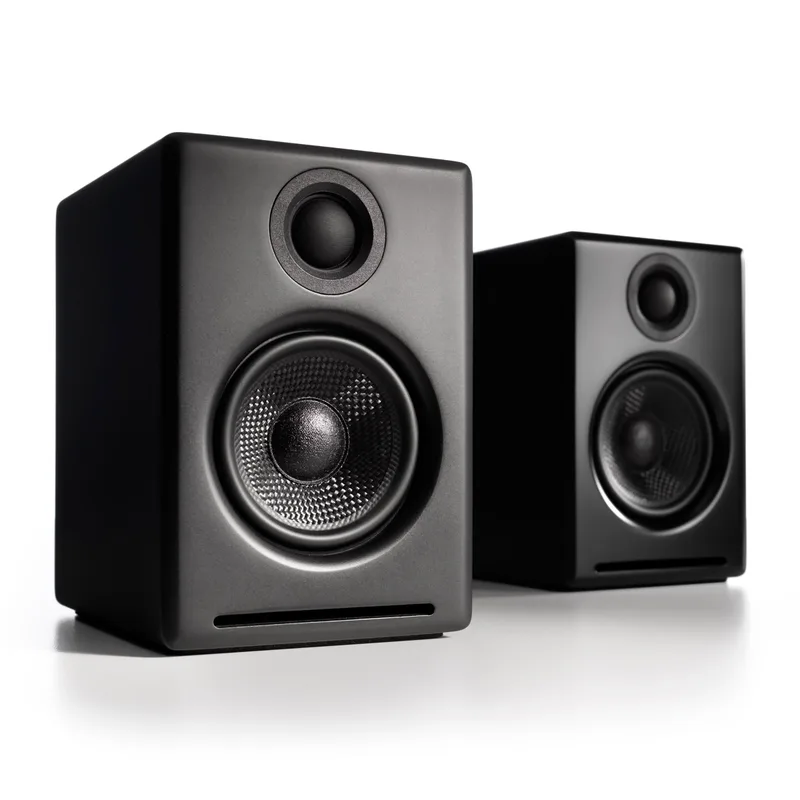
Audioengine A2+ Wireless
Pros
- Built-in 24-bit DAC bypasses the audio circuitry in your laptop or desktop computer — owner reports consistently describe a clarity improvement compared to the same source material through onboard audio, particularly for vocal intelligibility in podcasts and video calls
- aptX HD Bluetooth supports 24-bit/48kHz-equivalent wireless streaming, which is a step above standard SBC or even regular aptX — the difference is audible on acoustic recordings and spoken word content at typical desk listening distances
- Hand-built solid wood cabinets with machined aluminum volume knob — the construction standard is closer to $500 bookshelf speakers than the plastic-body speakers this competes with on price, and wood enclosures reduce cabinet resonance compared to plastic
- USB-C audio input works without drivers on Mac, Windows, and Linux — plug in and audio routes immediately without configuration, a practical advantage for remote workers on multiple operating systems
- 3-year warranty is the best coverage in this category by a full two years — most desktop speakers from Edifier, Creative, and Logitech offer one year
Cons
- 2.75-inch woofers produce tight, accurate midrange and high frequencies but won't reproduce deep bass below 65Hz — a separate subwoofer ($150+) is needed for users who want cinematic low-end impact from their desk setup
- At $249-$279, this is a significant investment for desktop speakers — the value is real, but it requires audio quality to be a daily priority; casual video-call users are better served by the Edifier R1380DB at half the price
- No Bluetooth multiroom capability — unlike Sonos Era 100 or similar smart speakers at this price point, the A2+ is a standalone stereo system with no ecosystem integration
The A2+ Wireless earns the top position by solving the problem that makes most desktop speaker upgrades disappointing: the audio chain bottleneck at your computer’s onboard sound. Built-in 24-bit DAC processing means the A2+ handles digital-to-analog conversion itself rather than relying on whatever analog output stage is integrated into your laptop’s motherboard. For remote workers, that translates to cleaner playback of video call audio, clearer speech on podcasts, and less listening fatigue over long sessions.
The size is worth noting: at 6 inches tall and 4 inches wide, these are small bookshelf speakers. The 2.75-inch woofers are physically limited in bass extension — they’re accurate from the midrange up, but they roll off significantly below 65Hz. For ambient music and podcast playback at desk listening distance, this limitation is rarely noticeable. For users who want physical bass impact from music or media, a separate subwoofer is eventually going to be on the list.
aptX HD Bluetooth supports higher-fidelity wireless streaming than standard aptX — the spec matters if you stream music from a phone or tablet at 24-bit quality. USB-C input makes connection from modern laptops seamless with no configuration. The machined aluminum volume knob has a weight and feel that most $100 desktop speakers don’t approach.
The 3-year warranty is the category-leading spec that rarely gets mentioned. Most desktop speakers ship with one year. Three years of coverage means the A2+ is designed and priced as a long-term purchase, not a commodity item.
Who should buy this: Remote workers who care about audio quality as a daily-use tool — for music focus during deep work, clear speech on video calls, and podcast listening — and are willing to spend $249-$279 to stop thinking about the speaker.
2. Edifier R1380DB — Best Mid-Range
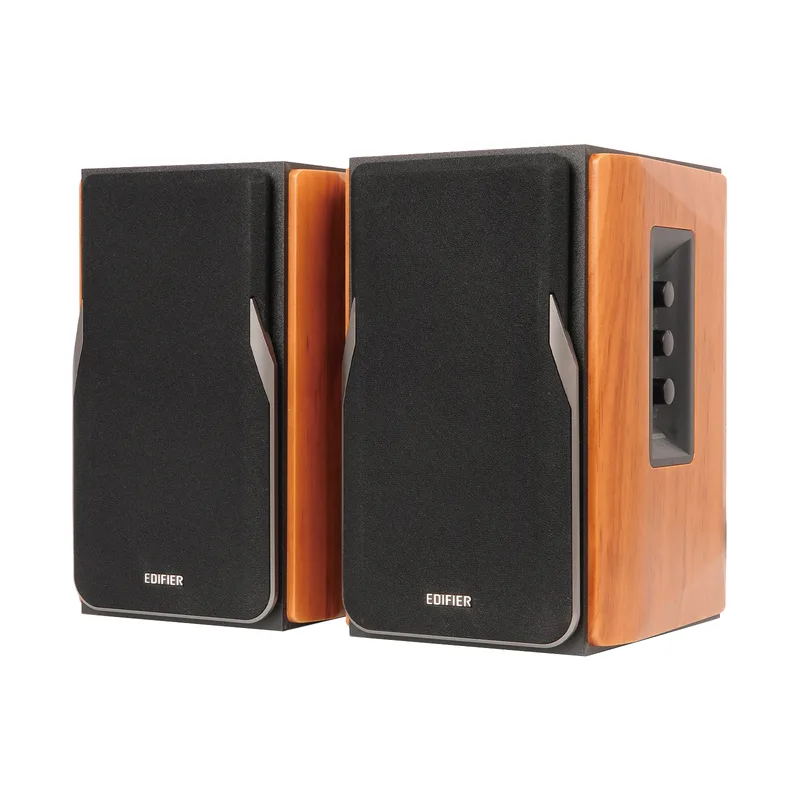
Edifier R1380DB
Pros
- Optical and coaxial digital inputs connect directly to monitors, soundbars, game consoles, and TVs — this keeps the audio signal digital-clean through the chain and eliminates the DAC quality bottleneck present in analog-only speakers
- Included remote control with dedicated bass/treble adjustment handles daily volume changes without reaching behind the speaker — a practical improvement over rear-panel-only controls on the Edifier R1280T and many competing models at this price
- Bluetooth 5.0 handles phone audio, tablet streaming, and laptop wireless connection simultaneously with the wired inputs — owner reports note the connection is stable across typical home office distances (within 30 feet)
- Wood grain enclosure reduces cabinet resonance compared to plastic-body desktop speakers, and the neutral finish suits both modern and traditional home office setups
- 42W RMS total power with 4-inch bass drivers fills a 10×12 home office room without distortion at typical work listening levels — measurably more headroom than the Creative Pebble Pro or similar compact USB speakers
Cons
- Bluetooth pairing process requires holding the remote button and is less automatic than newer Bluetooth 5.3 implementations — occasional owner reports of needing to re-pair after extended power-off periods
- No USB-C or USB audio input — laptop users must use 3.5mm cable, Bluetooth, or optical (if their laptop has it); the analog 3.5mm path is functional but bypasses any DAC quality advantage
- Depth of 8.3 inches is larger than compact desktop speakers — requires planning for desk placement vs. a wall, as rear bass ports need at least 2-3 inches of clearance
The R1380DB is the R1280T with three meaningful additions: Bluetooth 5.0, optical input, and a remote control. The first two expand the input options significantly. Optical connectivity lets you route audio from a monitor, TV, or external DAC directly in digital form — keeping the signal clean and avoiding the analog interference that can affect 3.5mm audio in busy desk environments. Bluetooth handles mobile audio and wireless switching without unplugging.
The remote control is underrated. The Edifier R1280T’s rear-panel volume knob is functional, but reaching behind the speaker to adjust volume ten times a day becomes irritating. The included remote addresses this directly. Combined with a front-panel knob as backup, the R1380DB is meaningfully easier to operate in daily use.
Audio quality matches the R1280T’s 42W RMS output with the same 4-inch bass driver format. Owner feedback describes consistent tonal balance — neither bass-heavy nor brightness-skewed — with room-filling volume for typical 10×12 home office spaces. The wood grain enclosure (or matte wood option) looks professional without being austere.
The specific limitation is USB audio. Laptop users who want to avoid the 3.5mm analog path will need to use Bluetooth or find a monitor with an optical output — the R1380DB has no USB input. For straightforward wired-and-wireless setups, this is rarely a practical problem. For users who want USB-C audio specifically, the Audioengine A2+ is the step up.
Who should buy this: The default recommendation for home office users who want a real upgrade from laptop speakers — better drivers than compact USB speakers, Bluetooth flexibility, optical input for monitor integration, and a remote that works.
3. Klipsch ProMedia 2.1 THX — Best for Bass
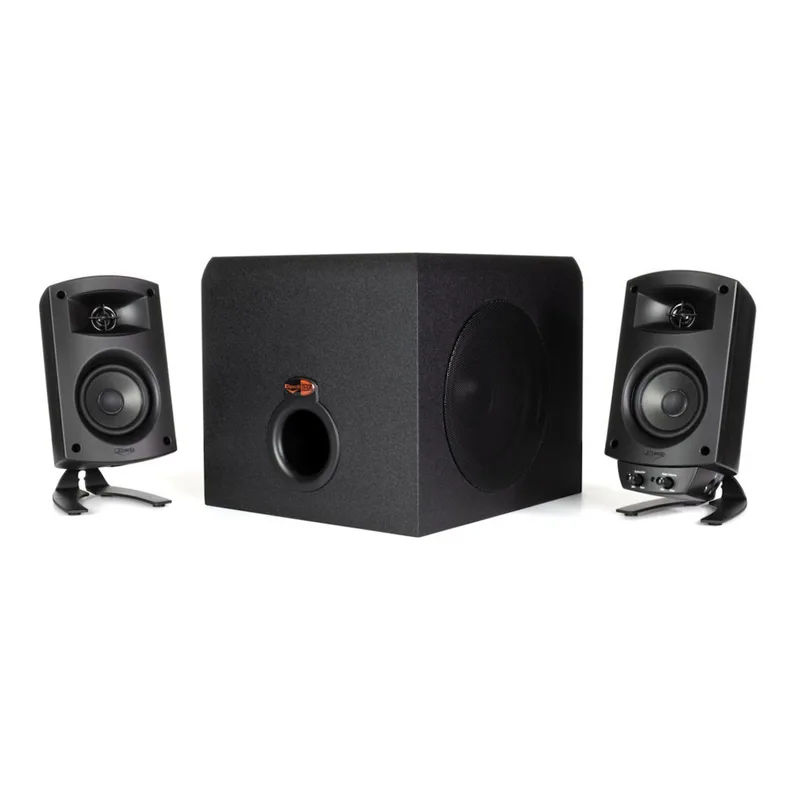
Klipsch ProMedia 2.1 THX
Pros
- THX certification means frequency response, dynamic range, and distortion specs were independently verified for cinema-accurate sound reproduction — not self-reported marketing numbers, but a third-party standard against which the performance was confirmed
- 6.5-inch down-firing subwoofer lives under the desk and keeps the desktop surface clear — the satellite speakers are compact enough to fit between a monitor and desk edge without consuming workspace
- Horn-loaded tweeter design in the satellites produces notably clearer high-frequency detail than competing 2.1 systems at this price — owner feedback consistently highlights crisp audio on music, video calls, and media playback
- 200W peak power output provides substantial volume headroom — the system rarely approaches its limits at typical home office listening levels, which means it runs cool and clean for everyday use
- Long production lifespan with consistent design — indicates sustained real-world reliability at scale, unlike newer models without multi-year track records
Cons
- Single 3.5mm input only — no Bluetooth, no optical, no USB audio; source switching requires manually swapping cables or using a headphone splitter, which is a limitation for users with multiple audio sources
- Subwoofer cable runs from the desktop satellites to the floor unit — adds a cable management challenge in clean setups; the sub must be within cable reach of the satellite speaker (typically 6-8 feet)
- Amazon availability is currently from third-party sellers rather than a direct Amazon listing — pricing and availability may vary more than with warehouse-stocked models
The ProMedia 2.1 is the oldest design on this list, and it remains here because the 2.1 subwoofer configuration solves a problem the bookshelf speakers don’t: a dedicated subwoofer handles low-frequency reproduction, freeing the satellite speakers to focus on midrange and high-frequency clarity without driver compromise.
The hardware reflects Klipsch’s engineering priorities. Horn-loaded tweeters in the satellite speakers produce high-frequency detail that is noticeably crisper than competing 2.1 systems at similar prices — the difference is audible on ambient music, vocals, and system sound effects. The 6.5-inch subwoofer covers frequencies from approximately 35Hz up, which includes the low-end content in most movie trailers, game audio, and bass-forward music.
THX certification means the system was independently verified against a defined acoustic standard — not a self-reported measurement, but a tested spec. That certification carries more weight for buyers making a purchase decision than marketing language does.
The single 3.5mm input is the primary limitation for a 2026 home office setup. No Bluetooth means your phone audio requires a cable. No optical means your monitor’s audio output requires an adapter. The ProMedia 2.1 predates the Bluetooth-first design era, and that shows in its connectivity options. The subwoofer cable runs to the floor, which requires some cable management planning.
Who should buy this: Users who prioritize bass impact and overall volume over connectivity flexibility — particularly those who use desktop speakers for media consumption, background music, and gaming audio in addition to video calls.
4. Edifier R1280T — Best Entry-Level Bookshelf
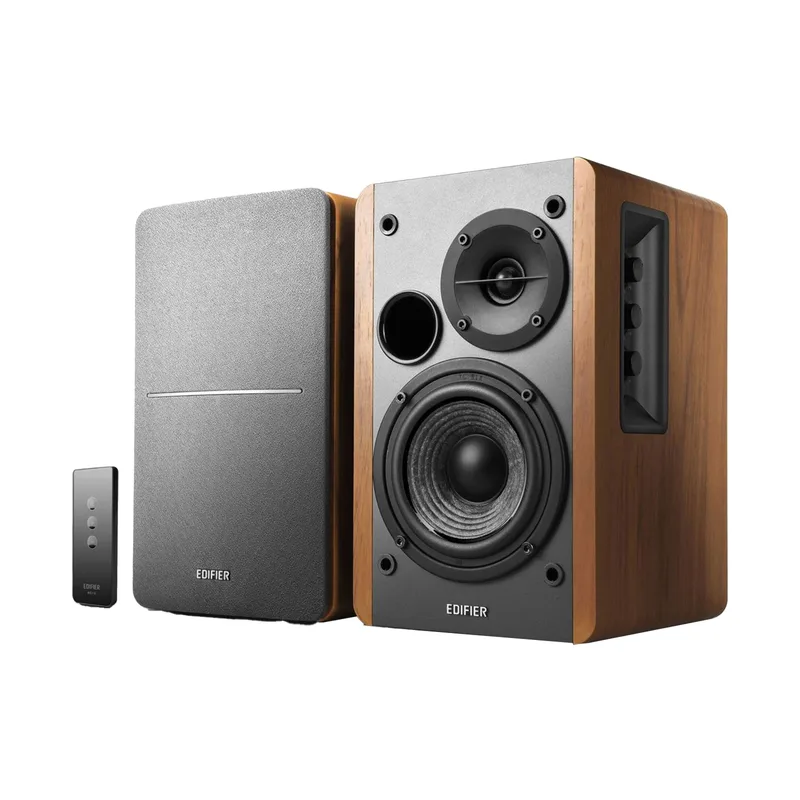
Edifier R1280T
Pros
- 42W RMS with a 4-inch woofer and separate silk dome tweeter at under $100 — the driver quality and cabinet construction represent better value than any equivalent-powered plastic-body desktop speaker at this price
- Two separate RCA inputs allow both a desktop computer and a secondary source (game console, audio interface, or turntable) to stay connected simultaneously, with switching handled by the front-panel knob
- Wood-finish enclosure reduces cabinet resonance compared to the plastic-body competitors — owner feedback describes a warmer, less harsh sound character than comparably priced ABS-enclosure speakers
- Rear bass/treble tone controls tune the sound output to your room's acoustics without any software — meaningful for home offices with hard walls or corner desk placement
- Clean visual design with discrete speaker grilles fits professional home office setups without calling attention to itself
Cons
- No Bluetooth — every audio source requires a physical cable connection; not compatible with wireless phone or tablet audio without an adapter
- Volume control and input selector are on the rear panel, which is inconvenient for desk placement against a wall — requires reaching behind the speaker for any level adjustment
- No remote control — the upgrade to the R1380DB adds a remote and Bluetooth for approximately $40-$50 more, which may be worth it depending on how frequently you adjust volume
The R1280T is the entry point for the category of “actual bookshelf speakers on your desk,” as distinct from USB desktop speakers or soundbars. At 42W RMS with separate 4-inch bass driver and 13mm silk dome tweeter, the R1280T’s driver architecture matches speakers sold at twice its price.
Two RCA inputs are a small but useful detail: one for a PC and one for a secondary source, with a front-panel knob handling input selection. For a desk setup with a computer and a game console, or a computer and turntable, this removes the cable-switching step that single-input desktop speakers require.
The wood-finish enclosure is a genuine acoustic advantage. Wood panels absorb internal resonance better than ABS plastic at comparable thickness, which contributes to the clean tonal response owner feedback consistently describes. The R1280T does not sound like a $90 speaker in a direct comparison with similarly priced plastic-enclosure alternatives.
The practical inconvenience is the rear-panel controls. Volume knob and input selector are mounted on the back of the active speaker. This works fine on open shelving. On a desk where the speaker sits against a wall or monitor stand, it becomes an inconvenience. If front-facing controls or a remote matter to your workflow, the R1380DB adds those features for $40-$50 more.
Who should buy this: Budget-conscious remote workers who want real bookshelf speaker audio quality, have wired inputs available, and don’t need Bluetooth — the clearest path from laptop speakers to a meaningful upgrade at under $100.
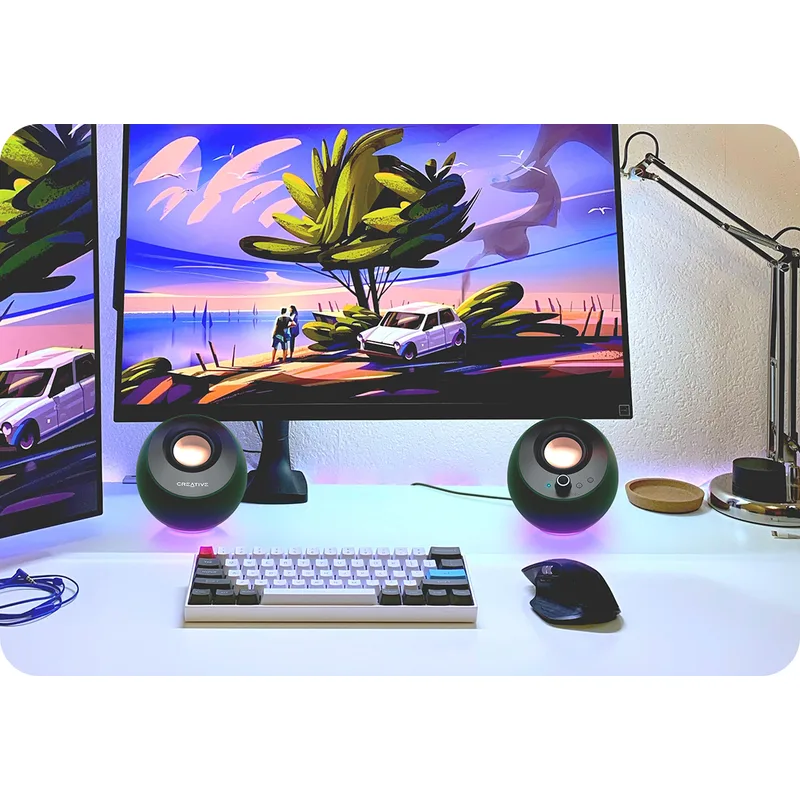
5. Creative Pebble Pro — Best Budget / Most Compact
Creative Pebble Pro
Pros
- Single USB-C cable from a laptop or PC handles both power and audio simultaneously — removes the need for a separate power adapter and simplifies the cable situation on any desk
- Bluetooth 5.3 is the newest Bluetooth standard on this list — more automatic reconnection behavior than Bluetooth 5.0 implementations, and works with phones, tablets, and laptops without pairing friction
- Front-mounted headset port makes headphone switching immediate without reaching behind the desk — a practical feature for remote workers who toggle between speakers and a headset during video calls
- Compact footprint fits on tight desks and minimal setups where bookshelf-sized speakers aren't practical
- Under $70 is a low entry point for anyone testing desktop speakers for the first time or equipping a secondary workstation
Cons
- 16W RMS total power limits maximum volume to small rooms (under 8×8 feet) before the passive radiator bass enhancement starts to strain — not suited for open floor plans or shared spaces
- No separate tweeter driver means high-frequency clarity at louder volumes trails behind bookshelf speakers with dedicated tweeters — the difference is audible on speech-heavy content like podcasts and video calls at higher levels
- RGB lighting is a feature with no professional use case — it can be disabled, but its presence indicates the product's design origins in gaming peripherals rather than audio equipment
The Creative Pebble Pro fits the desk situations where bookshelf speakers don’t: standing desk setups with minimal surface area, secondary workstations, travel-based home office configurations, or any setup where desk space is the binding constraint.
USB-C handles power and audio together from a single cable. On modern MacBooks and Windows laptops, this means plugging in one cable from the Pebble Pro to the laptop completes the speaker setup — no wall adapter, no separate audio cable, no configuration. Bluetooth 5.3 adds wireless flexibility for phone audio and tablet streaming. The front-mounted headset port puts the headphone switch within reach without turning the speakers around.
The 16W total output is accurately marketed as sufficient for small-room desktop listening. Owner reports confirm it performs well in dedicated home office rooms under 100 square feet. In larger rooms, open floor plan spaces, or when sharing audio during video calls on speaker mode, it reaches audible strain limits that the 42W bookshelf speakers don’t.
The passive radiator bass enhancement adds low-end warmth that the 16W power rating wouldn’t suggest on paper. It’s not subwoofer bass — it doesn’t extend into the lower frequencies — but it prevents the tinny, hollow character common in ultracompact desktop speakers at this price.
Who should buy this: Remote workers on tight desk budgets or limited desk space who need a real improvement over laptop audio — and who understand that compact speaker form factor comes with volume and bass limitations.
Buying Guide: How to Pick Computer Speakers for a Home Office
2.0 vs. 2.1: Do you need a subwoofer?
For the majority of home office use cases — video calls, podcasts, background music, system audio — a quality 2.0 bookshelf speaker pair performs better than a comparable-priced 2.1 system with a subwoofer. The reason: 2.1 systems at budget price points often compromise on satellite speaker quality to fund the subwoofer. The Klipsch ProMedia 2.1 is an exception with its horn-loaded satellites. For most buyers, a 2.0 system like the Edifier R1380DB at $130-$150 outperforms a generic 2.1 system at the same price in practical listening tests.
Buy 2.1 if bass-heavy audio is a genuine priority — gaming, film, or bass-forward music as your primary use.
Connectivity: What inputs do you actually need?
- USB-C (audio): Best for modern laptops without a headphone jack and for bypassing onboard audio. Available on the Creative Pebble Pro and Audioengine A2+.
- Bluetooth: Convenient for phone and tablet audio, useful for wireless switching between devices. Available on all picks except the Klipsch ProMedia 2.1 and Edifier R1280T.
- Optical: Highest quality analog-free path from monitors and TVs. Underrated for home office setups where the monitor is the audio source. Available on the Edifier R1380DB.
- 3.5mm AUX: Universal, but analog — susceptible to interference on busy desks and limited by your source device’s DAC quality. Available on all picks.
DAC: Does it matter for home office use?
A built-in DAC (digital-to-analog converter) in the speaker bypasses your computer’s onboard audio conversion. The difference is audible in comparison — voices sound clearer, high frequencies sound less harsh, and low-volume detail is more recoverable. The Audioengine A2+‘s built-in 24-bit DAC is the most significant technical differentiator on this list for buyers who care about audio quality. For casual use, the standard 3.5mm analog path is entirely adequate.
Size vs. sound: matching speakers to your desk
- Under 18 inches of desk depth: Creative Pebble Pro (compact)
- Standard desk with monitor stand: Edifier R1280T or R1380DB (7-9 inch depth)
- Open desk with shelf or riser: Audioengine A2+ or Klipsch satellites
- Klipsch ProMedia 2.1: requires planning for subwoofer floor placement
Frequently Asked Questions
Are computer speakers worth it if my monitor has built-in speakers? Built-in monitor speakers are designed to fit in the slimmest possible enclosure, which limits driver size and internal volume — the two factors that determine sound quality. Monitor speakers typically range from 2W to 7W per side. Even the entry-level Edifier R1280T produces 21W per side with a dedicated tweeter. The difference in voice clarity on video calls and music reproduction is substantial from the first use.
Can I use bookshelf speakers with my laptop if it only has a headphone jack? Yes — all of the bookshelf options here (Edifier R1280T, R1380DB, and Audioengine A2+) include a 3.5mm AUX input. For laptops without a headphone jack, the Creative Pebble Pro and Audioengine A2+ accept USB-C audio directly. The Edifier R1380DB connects via Bluetooth for jack-free laptops as well.
Do I need an amplifier to use these speakers? No. All speakers in this roundup are active (powered) speakers with built-in amplification. They connect directly to an audio source and require only a power outlet. Passive bookshelf speakers require a separate amplifier — none of the picks here are passive.
How loud do desktop speakers need to be for a home office? For a standard 10×12 home office room at typical work-from-home listening distances (4-8 feet from the speaker), any speaker here is loud enough. The relevant question is audio quality at low-to-moderate volumes, not maximum volume capability. The Creative Pebble Pro handles small room listening. The bookshelf options and Klipsch system provide more headroom for larger rooms, louder listening, or occasional use as a background audio source for a larger space.
Will a better speaker make video calls sound clearer to the people I’m talking to? No. How you sound to others on a video call is determined by your microphone, not your speakers. Speakers affect only what you hear — the other participants’ voices, system sounds, and any media you’re playing. For better audio quality in both directions, consider pairing a speaker upgrade with a USB microphone upgrade.
Conclusion
The Audioengine A2+ Wireless is the best computer speaker for home office use in 2026 — its built-in 24-bit DAC, aptX HD Bluetooth, and three-year warranty make it the most complete desktop audio system on this list for buyers who treat audio quality as a daily-use tool.
For most home office setups, the Edifier R1380DB at $129-$149 is the practical recommendation. The combination of 42W RMS bookshelf drivers, Bluetooth 5.0, optical input, and included remote covers every common connectivity scenario without the price premium of the Audioengine.
The Edifier R1280T at $79-$99 is the entry point for users upgrading from laptop speakers for the first time — better drivers and enclosure construction than anything in the compact USB speaker category, at the lowest bookshelf speaker price point available.
The Creative Pebble Pro earns its place for desk setups where size and USB-C simplicity matter more than audio performance ceiling.
Detailed Reviews
Audioengine A2+ Wireless
Pros
- Built-in 24-bit DAC bypasses the audio circuitry in your laptop or desktop computer — owner reports consistently describe a clarity improvement compared to the same source material through onboard audio, particularly for vocal intelligibility in podcasts and video calls
- aptX HD Bluetooth supports 24-bit/48kHz-equivalent wireless streaming, which is a step above standard SBC or even regular aptX — the difference is audible on acoustic recordings and spoken word content at typical desk listening distances
- Hand-built solid wood cabinets with machined aluminum volume knob — the construction standard is closer to $500 bookshelf speakers than the plastic-body speakers this competes with on price, and wood enclosures reduce cabinet resonance compared to plastic
- USB-C audio input works without drivers on Mac, Windows, and Linux — plug in and audio routes immediately without configuration, a practical advantage for remote workers on multiple operating systems
- 3-year warranty is the best coverage in this category by a full two years — most desktop speakers from Edifier, Creative, and Logitech offer one year
Cons
- 2.75-inch woofers produce tight, accurate midrange and high frequencies but won't reproduce deep bass below 65Hz — a separate subwoofer ($150+) is needed for users who want cinematic low-end impact from their desk setup
- At $249-$279, this is a significant investment for desktop speakers — the value is real, but it requires audio quality to be a daily priority; casual video-call users are better served by the Edifier R1380DB at half the price
- No Bluetooth multiroom capability — unlike Sonos Era 100 or similar smart speakers at this price point, the A2+ is a standalone stereo system with no ecosystem integration
Edifier R1380DB
Pros
- Optical and coaxial digital inputs connect directly to monitors, soundbars, game consoles, and TVs — this keeps the audio signal digital-clean through the chain and eliminates the DAC quality bottleneck present in analog-only speakers
- Included remote control with dedicated bass/treble adjustment handles daily volume changes without reaching behind the speaker — a practical improvement over rear-panel-only controls on the Edifier R1280T and many competing models at this price
- Bluetooth 5.0 handles phone audio, tablet streaming, and laptop wireless connection simultaneously with the wired inputs — owner reports note the connection is stable across typical home office distances (within 30 feet)
- Wood grain enclosure reduces cabinet resonance compared to plastic-body desktop speakers, and the neutral finish suits both modern and traditional home office setups
- 42W RMS total power with 4-inch bass drivers fills a 10×12 home office room without distortion at typical work listening levels — measurably more headroom than the Creative Pebble Pro or similar compact USB speakers
Cons
- Bluetooth pairing process requires holding the remote button and is less automatic than newer Bluetooth 5.3 implementations — occasional owner reports of needing to re-pair after extended power-off periods
- No USB-C or USB audio input — laptop users must use 3.5mm cable, Bluetooth, or optical (if their laptop has it); the analog 3.5mm path is functional but bypasses any DAC quality advantage
- Depth of 8.3 inches is larger than compact desktop speakers — requires planning for desk placement vs. a wall, as rear bass ports need at least 2-3 inches of clearance
Klipsch ProMedia 2.1 THX
Pros
- THX certification means frequency response, dynamic range, and distortion specs were independently verified for cinema-accurate sound reproduction — not self-reported marketing numbers, but a third-party standard against which the performance was confirmed
- 6.5-inch down-firing subwoofer lives under the desk and keeps the desktop surface clear — the satellite speakers are compact enough to fit between a monitor and desk edge without consuming workspace
- Horn-loaded tweeter design in the satellites produces notably clearer high-frequency detail than competing 2.1 systems at this price — owner feedback consistently highlights crisp audio on music, video calls, and media playback
- 200W peak power output provides substantial volume headroom — the system rarely approaches its limits at typical home office listening levels, which means it runs cool and clean for everyday use
- Long production lifespan with consistent design — indicates sustained real-world reliability at scale, unlike newer models without multi-year track records
Cons
- Single 3.5mm input only — no Bluetooth, no optical, no USB audio; source switching requires manually swapping cables or using a headphone splitter, which is a limitation for users with multiple audio sources
- Subwoofer cable runs from the desktop satellites to the floor unit — adds a cable management challenge in clean setups; the sub must be within cable reach of the satellite speaker (typically 6-8 feet)
- Amazon availability is currently from third-party sellers rather than a direct Amazon listing — pricing and availability may vary more than with warehouse-stocked models
Edifier R1280T
Pros
- 42W RMS with a 4-inch woofer and separate silk dome tweeter at under $100 — the driver quality and cabinet construction represent better value than any equivalent-powered plastic-body desktop speaker at this price
- Two separate RCA inputs allow both a desktop computer and a secondary source (game console, audio interface, or turntable) to stay connected simultaneously, with switching handled by the front-panel knob
- Wood-finish enclosure reduces cabinet resonance compared to the plastic-body competitors — owner feedback describes a warmer, less harsh sound character than comparably priced ABS-enclosure speakers
- Rear bass/treble tone controls tune the sound output to your room's acoustics without any software — meaningful for home offices with hard walls or corner desk placement
- Clean visual design with discrete speaker grilles fits professional home office setups without calling attention to itself
Cons
- No Bluetooth — every audio source requires a physical cable connection; not compatible with wireless phone or tablet audio without an adapter
- Volume control and input selector are on the rear panel, which is inconvenient for desk placement against a wall — requires reaching behind the speaker for any level adjustment
- No remote control — the upgrade to the R1380DB adds a remote and Bluetooth for approximately $40-$50 more, which may be worth it depending on how frequently you adjust volume
Creative Pebble Pro
Pros
- Single USB-C cable from a laptop or PC handles both power and audio simultaneously — removes the need for a separate power adapter and simplifies the cable situation on any desk
- Bluetooth 5.3 is the newest Bluetooth standard on this list — more automatic reconnection behavior than Bluetooth 5.0 implementations, and works with phones, tablets, and laptops without pairing friction
- Front-mounted headset port makes headphone switching immediate without reaching behind the desk — a practical feature for remote workers who toggle between speakers and a headset during video calls
- Compact footprint fits on tight desks and minimal setups where bookshelf-sized speakers aren't practical
- Under $70 is a low entry point for anyone testing desktop speakers for the first time or equipping a secondary workstation
Cons
- 16W RMS total power limits maximum volume to small rooms (under 8×8 feet) before the passive radiator bass enhancement starts to strain — not suited for open floor plans or shared spaces
- No separate tweeter driver means high-frequency clarity at louder volumes trails behind bookshelf speakers with dedicated tweeters — the difference is audible on speech-heavy content like podcasts and video calls at higher levels
- RGB lighting is a feature with no professional use case — it can be disabled, but its presence indicates the product's design origins in gaming peripherals rather than audio equipment