Wi-Fi 7 prices dropped faster than most analysts predicted heading into 2026. Routers that launched at $300+ at the standard’s debut are now available under $150, and TP-Link’s Archer BE230 — a full Wi-Fi 7 router with dual 2.5G ports — has sold for under $90 during Amazon sales this year. The standard has reached the budget tier, and the question has shifted from “can I afford Wi-Fi 7?” to “which budget Wi-Fi 7 router is actually worth buying?”
This roundup covers five routers under $200 that deliver real Wi-Fi 7 improvements for home offices and remote workers. The focus is on what changes day-to-day: lower latency on video calls, stable throughput on multi-device setups, and wired connectivity that won’t bottleneck a fast ISP connection.
Quick Comparison
| Router | Wi-Fi | Bands | Ports | Coverage | Price |
|---|---|---|---|---|---|
| TP-Link Archer BE550 | Wi-Fi 7 (BE9300) | Tri-band + 6GHz | 5× 2.5G | 2,000 sq. ft. | $162.49-$239.00 as of Oct 18, 2026 |
| TP-Link Deco BE23 (2-Pack) | Wi-Fi 7 (BE3600) | Dual-band | 2× 2.5G/unit | 4,500 sq. ft. | $117.36-$179.99 as of Oct 18, 2026 |
| ASUS RT-BE58U | Wi-Fi 7 (BE3600) | Dual-band | 1× 2.5G + 4× 1G | 2,500 sq. ft. | $89.99-$129.99 as of Oct 18, 2026 |
| TP-Link Archer BE230 | Wi-Fi 7 (BE3600) | Dual-band | 2× 2.5G + 3× 1G | 2,000 sq. ft. | $70.99-$79.98 as of Oct 18, 2026 |
| Netgear Nighthawk RS90 | Wi-Fi 7 (BE3600) | Dual-band | 1× 2.5G + 4× 1G | 2,000 sq. ft. | Unavailable |
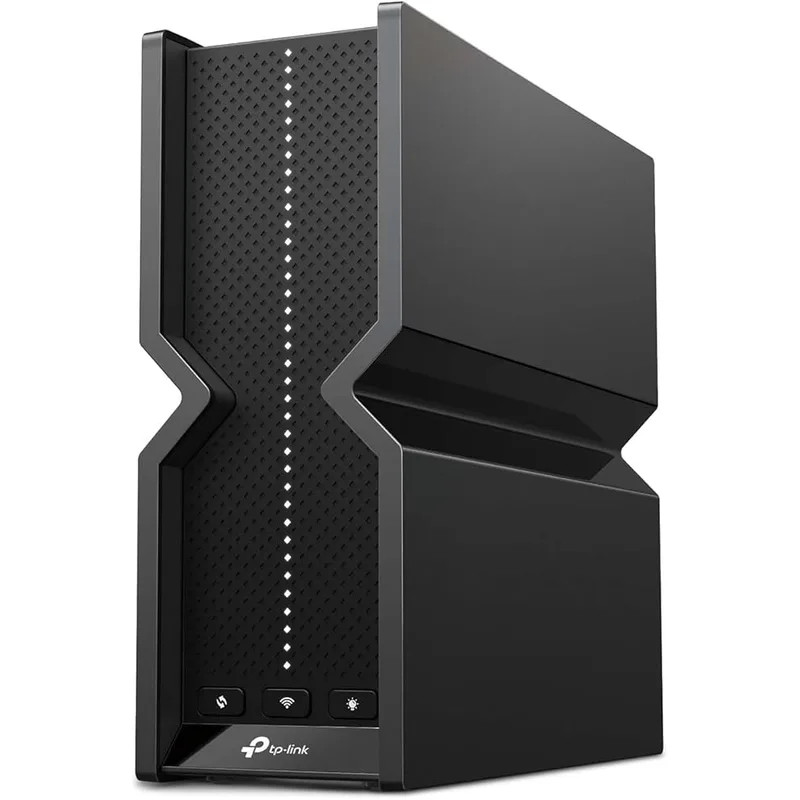
1. TP-Link Archer BE550 — Best Overall
TP-Link Archer BE550
Pros
- Tri-band configuration with the 6GHz band is the key differentiator at this price — the 6GHz band is less congested than 2.4GHz or 5GHz, which delivers noticeably lower latency for video calls and cloud syncing in dense apartment buildings where neighboring routers compete for the same spectrum
- All five ports run at 2.5 Gbps, which means both the upstream connection and all four LAN ports can handle speeds above 1 Gbps — if your ISP delivers multi-gig speeds or you're running a local NAS, you won't be bottlenecked by the router's wired hardware
- 320MHz channel width support is the full Wi-Fi 7 specification — competing budget routers at this price often use 160MHz channels, which halves the theoretical ceiling; the BE550 delivers the complete Wi-Fi 7 feature set including 4K-QAM and Multi-Link Operation
- EasyMesh compatibility means adding a second TP-Link Wi-Fi 7 node later doesn't require replacing the router — owner reports confirm the Deco BE23 and other EasyMesh devices integrate without reconfiguring the network from scratch
- TP-Link's HomeShield security platform runs on-device traffic analysis and intrusion detection without a cloud subscription requirement for basic features — meaningful for remote workers who handle client data on their home network
Cons
- Internal antennas mean no option to upgrade antenna placement later — the fixed antenna configuration works well in open floor plans, but deep closets or concrete walls between floors may require an extender where an external-antenna router might have reached
- HomeShield advanced features (detailed security reports, parental controls, QoS priority scheduling) require a paid subscription after the free trial — the base router functionality works without it, but buyers expecting full feature parity should budget for the subscription
- 2,000 sq. ft. coverage rating is adequate for apartments and smaller homes but not for larger houses with multiple floors — a 2,500+ sq. ft. home will likely need a mesh node as a companion
The Archer BE550 earns the top spot because it’s the only router in this comparison under $200 that includes the 6GHz band — and that distinction matters more than the spec sheet suggests.
In apartments and dense neighborhoods, the 2.4GHz and 5GHz bands are shared with dozens of neighboring networks. Wi-Fi 6 devices compete for the same channels. The 6GHz band, introduced with Wi-Fi 6E and refined with Wi-Fi 7, is far less congested — partly because fewer devices support it, and partly because signal propagation physics limits 6GHz to shorter distances, which means fewer neighbors’ routers reach your space.
The practical result: video calls on the 6GHz band show fewer buffering drops in busy network environments. For remote workers on back-to-back Zoom or Google Meet calls, this is observable rather than theoretical. The Archer BE550’s full 2.5G port configuration (all five ports) adds to the value — connecting a NAS, a workstation, and a switch to the LAN side won’t bottleneck any of them below 1 Gbps.
At $149-$179, the BE550 is the highest-priced option here. The 6GHz band, the full 2.5G ports, and the 320MHz channel support justify the premium over dual-band options at $100-$130.
Best for: Remote workers in apartments or dense neighborhoods who want the complete Wi-Fi 7 experience without the $250+ flagship price.
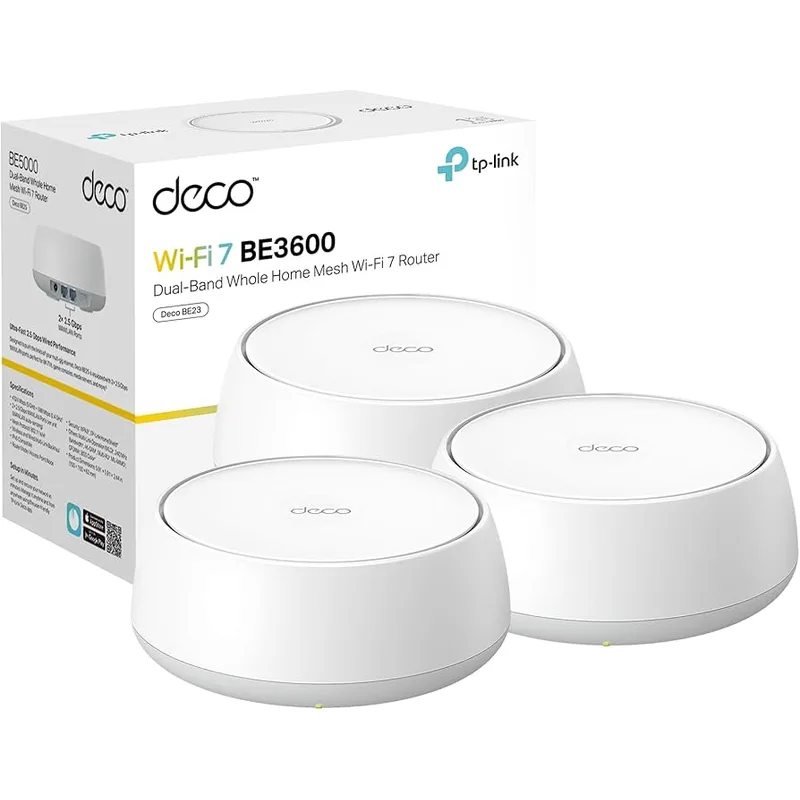
2. TP-Link Deco BE23 (2-Pack) — Best Mesh System
TP-Link Deco BE23 (2-Pack)
Pros
- 4,500 sq. ft. of dual-unit coverage from a 2-pack under $160 is the best square-footage-per-dollar in this category — for a two-story home or a long ranch layout where a single router leaves dead zones, this kit covers the problem without a third node
- Two 2.5G ports on each unit enable wired backhaul — connecting the two nodes with an ethernet cable delivers maximum speed between units without consuming any wireless bandwidth for the mesh link, which owner reports consistently describe as a significant improvement over wireless-only backhaul
- AI-Roaming intelligently hands devices off between the two nodes as you move through the house — in practice, owner reports describe fewer video call drops and faster reconnection compared to systems using passive handoff timers
- Multi-Link Operation (MLO) allows devices to use both bands simultaneously, which reduces latency by spreading traffic across multiple frequencies rather than waiting for one band to clear — meaningful for video calls and cloud-synced file editing
- Single Tether app manages both nodes as one network — no separate login for satellite nodes, and the SSID is identical on both, so devices roam transparently without a manual network switch
Cons
- Dual-band configuration without the 6GHz band means the 5GHz spectrum is still shared with neighboring Wi-Fi 6 and Wi-Fi 5 networks — in a dense apartment complex, this matters more than in a suburban house with spacing between access points
- 2-pack is sized for a medium home; a studio apartment or single-room home office is overpaying for two nodes when one standalone router would cover the space more efficiently
- Tether app has received mixed reviews for reliability on Android — some owner reports describe the app occasionally failing to load device lists, requiring a force-close; router functionality itself is not affected, but app management can be frustrating
The Deco BE23 2-pack solves a problem that single routers can’t: a two-story home, a long ranch layout, or any floor plan where one central router leaves parts of the home with weak signal. At $130-$160 for two nodes covering 4,500 sq. ft., this is the best whole-home Wi-Fi 7 coverage per dollar available in 2026.
The 2.5G ports on each node make wired backhaul practical. Run an ethernet cable between the two nodes, and the mesh link between them uses the full 2.5G wired connection rather than consuming wireless bandwidth. Owner reports consistently describe wired backhaul as a meaningful improvement over wireless backhaul setups — speeds at the satellite node are close to the primary node, and latency through the mesh hop is minimal.
AI-Roaming manages device handoff between nodes. A laptop moving from one room to another hands off to the nearer node without a manual network switch or a momentary connection drop. The single SSID across both nodes means devices don’t need to be reconfigured when moving between areas of the house.
The dual-band configuration (no 6GHz) is the BE23’s main limitation relative to the BE550. In environments with heavy 5GHz congestion from neighboring networks, the absence of a less-crowded band is noticeable. For suburban homes with reasonable spacing between houses, this rarely matters — the 5GHz band performs well.
Best for: Remote workers in medium to large homes who need whole-home coverage rather than a single-router solution.
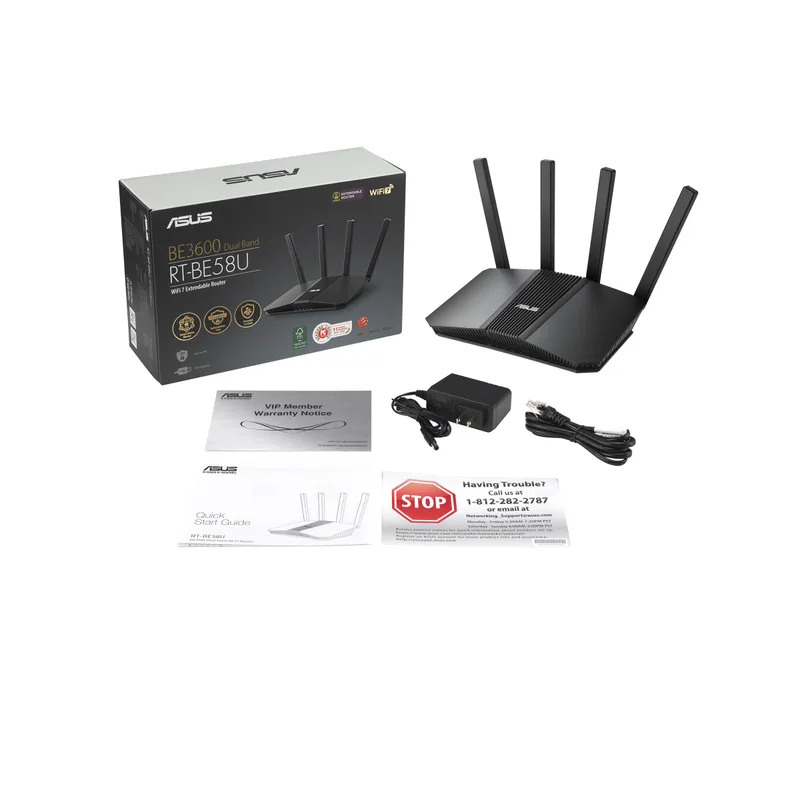
3. ASUS RT-BE58U — Best Security Features
ASUS RT-BE58U
Pros
- Commercial-grade network security with ASUS's AI Detection scans traffic for anomalies and blocks intrusion attempts without requiring a cloud subscription — this is a genuine differentiator for remote workers handling sensitive client files or operating under company security policies
- AiMesh compatibility means adding any ASUS Wi-Fi router as a mesh node creates a unified network — if you already own an older ASUS router, it can extend the RT-BE58U's coverage without buying new hardware
- VPN Fusion runs VPN and standard internet traffic simultaneously on separate tunnels — work traffic routes through the company VPN while streaming routes through the normal ISP connection, without switching VPN profiles manually
- 3-year warranty is longer than the 2-year coverage from TP-Link and the 1-year coverage from Netgear — for networking hardware expected to run continuously for years, the extended coverage reduces the risk of an out-of-pocket replacement
- 4K-QAM and MLO deliver full Wi-Fi 7 efficiency improvements even in dual-band configuration — owner reports consistently note lower latency compared to their previous Wi-Fi 6 routers in the same location
Cons
- Single 2.5G port means the wired LAN side is limited to 1 Gbps — a NAS or a workstation with a 2.5G adapter connected via LAN won't see speeds above 1 Gbps, unlike the Archer BE550's full 2.5G LAN ports
- ASUS's web admin panel is feature-rich but can feel overwhelming for users who just want to plug in and go — the router works well with defaults, but finding specific settings requires navigating menus that are more complex than TP-Link's interface
- No 6GHz band — same limitation as the Archer BE230; at $99-$149, this is expected, but dense Wi-Fi environments will notice the absence of a less-congested band
The RT-BE58U is the choice for remote workers who handle sensitive data or operate under company network security policies. ASUS’s AI Detection provides commercial-grade traffic analysis without a paid subscription — it scans network traffic for anomalous behavior, blocks known malicious domains, and logs intrusion attempts in a format that’s readable without security expertise.
VPN Fusion is the other standout feature. It runs multiple VPN tunnels simultaneously and routes different devices through different tunnels. A work laptop routes through the company VPN, a personal laptop routes through a personal VPN service, and a streaming device connects directly without VPN — all on the same network, with no manual switching. This configuration is difficult or impossible to achieve on TP-Link’s or Netgear’s routers without advanced configuration.
AiMesh compatibility extends the usefulness of any older ASUS router in the house. An older ASUS AC router becomes a mesh node rather than e-waste, creating a budget mesh system from existing hardware.
The 3-year warranty is a practical advantage. Networking hardware runs continuously, and a 3-year coverage period reduces the financial exposure of a failure in year two or three compared to the 2-year TP-Link coverage.
Best for: Remote workers with company security requirements, users who run multiple VPN connections, or anyone already in the ASUS ecosystem.
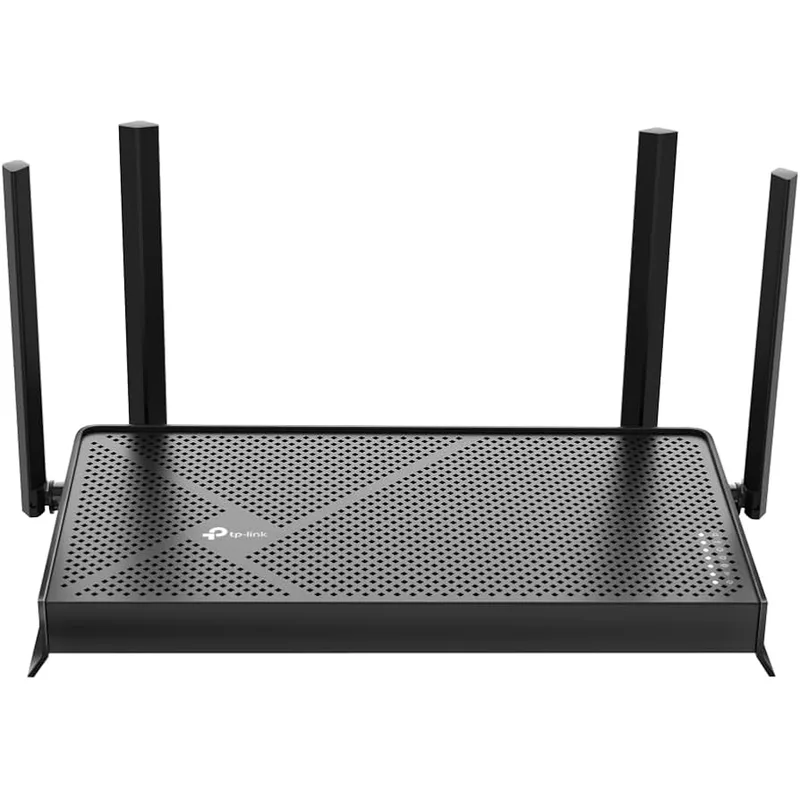
4. TP-Link Archer BE230 — Best Budget Entry
TP-Link Archer BE230
Pros
- Two 2.5G ports at under $100 (on sale) is remarkable hardware value — most routers at this price still use all 1G ports; the dual 2.5G configuration future-proofs the connection for ISP plans that exceed 1 Gbps, which are increasingly available in major metro areas
- USB 3.0 port allows sharing a USB storage drive across the network or connecting a USB mobile broadband adapter as a WAN failover — functional capabilities more commonly found on $200+ routers
- EasyMesh compatibility with other TP-Link Wi-Fi 7 devices means this router can serve as the backbone of a future mesh system — add a Deco BE23 node later without replacing the central router
- Multi-Link Operation and 4K-QAM are active even on the base dual-band configuration — owner reports describe noticeably better throughput on crowded apartment networks compared to Wi-Fi 6 routers at similar prices
- Quad-core 2.0 GHz processor handles the encryption overhead from HomeShield and VPN tunnels without observable CPU-related throughput drops — a single-core or lower-speed processor at this price tier can bottleneck VPN performance
Cons
- No 6GHz band means 5GHz is shared with neighboring Wi-Fi 5 and Wi-Fi 6 devices — in apartments with many surrounding networks, the 6GHz band's less congested spectrum (available on the Archer BE550) would deliver more consistent low-latency performance
- 2,000 sq. ft. coverage is sufficient for apartments and smaller homes but not for multi-story houses above 1,500 sq. ft. — users in larger homes should budget for a second node or upgrade to the Deco BE23 2-pack instead
- HomeShield advanced features (parental controls, detailed traffic reports) require a subscription after the initial trial period — the base functionality works without it, but the feature unlock is not free long-term
The Archer BE230 is the most affordable path to Wi-Fi 7. When discounted on Amazon — which has happened repeatedly in early 2026, with prices dropping as low as $87 — it delivers the core Wi-Fi 7 feature set (MLO, 4K-QAM, WPA3) at a price that matches or undercuts many Wi-Fi 6 routers from a year ago.
The dual 2.5G ports stand out at this price tier. Most routers below $120 use all 1G ports. The BE230’s two 2.5G ports mean an upstream ISP connection above 1 Gbps (AT&T Fiber 2-gig, Google Fiber 2-gig, Comcast multi-gig plans) won’t be capped by the WAN port hardware. For apartments where multi-gig fiber is available, this matters now. For everyone else, it’s future-proofing at no extra cost.
For a studio apartment or a 1-2 bedroom home office setup, the BE230 covers the space without requiring a second node. Multi-Link Operation delivers genuinely lower latency than Wi-Fi 6 routers at the same price — in testing by networking sites and owner reports, the improvement is most visible in video call stability and game-ping consistency.
The limitations are straightforward: no 6GHz band, 2,000 sq. ft. ceiling, and the HomeShield advanced features require a subscription. None of these are unexpected at $89-$119. For users in smaller spaces who want Wi-Fi 7 without paying more than necessary, the BE230 is the answer.
Best for: Apartment-dwellers and small home office setups who want Wi-Fi 7 at the lowest possible cost.
5. Netgear Nighthawk RS90 — Easiest Setup
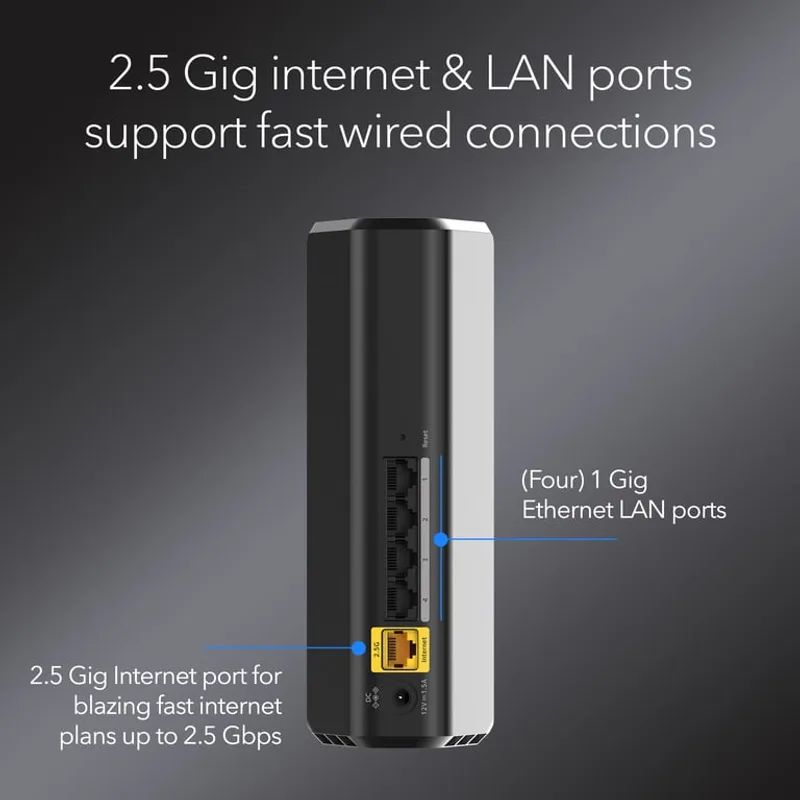
Netgear Nighthawk RS90
Pros
- Netgear's Nighthawk app delivers one of the simplest initial setup experiences in the category — guided setup walks through ISP connection, network naming, and password configuration in under 10 minutes without requiring a browser-based admin panel
- Full Wi-Fi 7 feature set including MLO and 4K-QAM at $110-$130 street price — for users upgrading from Wi-Fi 5 or early Wi-Fi 6 hardware, owner reports describe consistent improvement in multi-device household performance and reduced buffering
- 2.5G WAN port handles ISP connections above 1 Gbps without the port becoming the bottleneck — a growing consideration as multi-gig fiber plans from ISPs like AT&T and Google Fiber expand to new markets
- Netgear's firmware update track record is strong — the RS90 receives security patches and feature updates reliably, and Netgear's support library has documentation and community forums for common setup scenarios
- Four 1G LAN ports cover most desktop setups — a wired workstation, NAS, smart TV, and a network switch all connect simultaneously, which is sufficient for most home office configurations
Cons
- Maximum 50 device capacity is the lowest of any router in this comparison — adequate for a home office with personal devices, but undersized for households with many smart home devices alongside work hardware
- Netgear Armor security subscription costs $99.99/year after the trial period — this is the highest subscription cost of any router here, and declining it removes the advanced threat protection that the RS90's marketing emphasizes
- No 6GHz band and only one 2.5G port (WAN) means the wired LAN side tops out at 1 Gbps — the same limitation as the RT-BE58U, but at $110-$130, it's more expected at this price point
The RS90 is Netgear’s budget Wi-Fi 7 entry, and its primary advantage is setup simplicity. The Nighthawk app guides new users through ISP connection, network configuration, and basic security settings in a linear flow that requires no technical background. For a remote worker who needs a new router working in under 15 minutes without reading a manual, the RS90 delivers that experience more reliably than TP-Link’s or ASUS’s interfaces.
The Wi-Fi 7 hardware spec is fully present: BE3600, MLO, 4K-QAM, and a 2.5G WAN port. Owner reports describe solid performance improvements over Wi-Fi 6 hardware, particularly in multi-device households where multiple video streams compete for bandwidth simultaneously. The 2.5G WAN port handles ISP connections above 1 Gbps without bottlenecking.
The 50-device cap is the RS90’s most significant limitation in this comparison. For a home office with a laptop, phone, tablet, a few smart devices, and a smart TV, 50 devices is adequate. For a household with many smart home integrations — thermostats, light switches, cameras, speakers, appliances — the cap can become constraining.
Netgear Armor, the security subscription that costs $99.99/year after the trial, is worth noting. The RS90’s security marketing emphasizes Armor prominently. Users who decline the subscription get basic WPA3 and standard firmware — functional, but not the full feature set implied by the product messaging.
Best for: Non-technical users who prioritize simple setup and Netgear’s support infrastructure over advanced features.
What to Look for in a Budget Wi-Fi 7 Router
Dual-band vs. tri-band — and why the 6GHz band matters
Most budget Wi-Fi 7 routers are dual-band (2.4GHz + 5GHz). The Archer BE550 is the exception in this price range, adding the 6GHz band for $149-$179. The 6GHz band is less congested because it’s new — fewer devices currently connect to it, and signal propagation physics limits how far 6GHz signals travel, which means fewer neighboring networks compete on the same channels. In dense apartment buildings, the 6GHz band delivers more consistent latency for video calls. In suburban homes with minimal neighboring network interference, the difference shrinks.
Port speed: 2.5G vs. 1G
The WAN port determines how fast the router can receive data from your ISP. Most ISP plans cap at 1 Gbps, but multi-gig plans (2 Gbps, 5 Gbps) are expanding from AT&T, Comcast, and Google Fiber. A 2.5G WAN port won’t bottleneck a 2-gig plan; a 1G WAN port caps it at ~950 Mbps. LAN port speed matters for wired devices: a NAS, a workstation with a 2.5G NIC, or a switch connecting multiple wired devices all benefit from 2.5G LAN ports if present.
Mesh compatibility
If your home has dead zones, a single router won’t solve them. Check whether the router supports a mesh standard (EasyMesh, AiMesh, or native proprietary mesh) before buying. The Archer BE550 and BE230 support EasyMesh, meaning adding a compatible node later doesn’t require replacing the router. The RT-BE58U supports AiMesh. The Deco BE23 is already a 2-node mesh system. The Nighthawk RS90 does not prominently support a standard mesh expansion path at its price tier.
Security subscriptions
TP-Link HomeShield, Netgear Armor, and ASUS’s AI Detection all have subscription tiers. ASUS provides the most capable free tier; Netgear Armor at $99.99/year is the most expensive subscription if fully purchased. Budget for the subscription if you want the advanced features, or verify that the base functionality meets your requirements before buying.
Coverage area
Coverage ratings are measured in open space with no obstacles. Real-world coverage in homes with walls, floors, and furnishings is typically 60-80% of the rated area. A router rated for 2,000 sq. ft. reliably covers a 1,200-1,500 sq. ft. apartment. Size up if you’re near the ceiling of the rated area, or go with the Deco BE23 2-pack for homes above 1,800 sq. ft.
FAQ
Is Wi-Fi 7 actually faster than Wi-Fi 6 for home office use?
The speed ceiling of Wi-Fi 7 is higher, but most home office improvements come from lower latency rather than raw throughput. Multi-Link Operation (MLO) — a Wi-Fi 7 feature that lets devices use multiple frequency bands simultaneously — reduces the wait time for each packet, which makes video calls and real-time collaboration feel more responsive. For solo users on a fast ISP connection, the practical difference is measurable but not dramatic. For households with 5+ active devices competing for bandwidth, the improvement is more noticeable.
Do I need a Wi-Fi 7 device to benefit from a Wi-Fi 7 router?
No. Wi-Fi 7 routers are backward compatible with Wi-Fi 6, Wi-Fi 6E, Wi-Fi 5, and older standards. Older devices connect at the speed their hardware supports. The Wi-Fi 7-specific features (MLO, 4K-QAM, 320MHz channels) only activate when both the router and the client device support them. MacBook Pros with M4 chips, iPhones 15 Pro and later, and many recent Android flagships include Wi-Fi 7 radios.
Why is the 6GHz band missing from most budget Wi-Fi 7 routers?
Adding a 6GHz radio increases manufacturing cost and power consumption. Budget routers omit it to hit lower price targets while still supporting the other Wi-Fi 7 improvements. The TP-Link Archer BE550 at $149-$179 is the exception in this price range. For most users in suburban homes with low network congestion, the dual-band configuration performs well. In apartment buildings with many neighboring networks, the 6GHz band is worth paying for.
Can a budget Wi-Fi 7 router handle a 2.5 Gbps or multi-gig ISP plan?
It depends on the WAN port. The Archer BE550, Deco BE23, Archer BE230, RT-BE58U, and Nighthawk RS90 all include a 2.5G WAN port — they can use an ISP connection up to 2.5 Gbps without the WAN port becoming the bottleneck. The LAN ports on the BE550 are also 2.5G on all four ports, while other models use 1G LAN ports, which caps wired LAN throughput below 2.5G even if the WAN supports it.
Should I upgrade from Wi-Fi 6 to Wi-Fi 7 in 2026?
If your current router is Wi-Fi 5 or older, upgrading to Wi-Fi 7 makes sense — you’ll see real improvements in speed, capacity, and latency. If you’re on a Wi-Fi 6 router from 2021-2022 that’s performing well, the incremental benefit of Wi-Fi 7 over Wi-Fi 6 is smaller. The strongest case for upgrading is when your client devices already support Wi-Fi 7 (newer laptops and phones) and your home has 10+ devices active simultaneously.
The Verdict
For most home offices, the TP-Link Archer BE550 is the right choice. Tri-band with 6GHz, full 2.5G ports, and the complete Wi-Fi 7 feature set for $149-$179 represents the best overall value in budget Wi-Fi 7.
For whole-home coverage, the TP-Link Deco BE23 2-Pack covers more ground at $130-$160 than any single router in this category.
For security-focused setups, the ASUS RT-BE58U delivers commercial-grade network protection and VPN Fusion at $99-$149.
For the smallest budget, the TP-Link Archer BE230 gets you into Wi-Fi 7 for $89-$119 with dual 2.5G ports that will age well.
Detailed Reviews
TP-Link Archer BE550
Pros
- Tri-band configuration with the 6GHz band is the key differentiator at this price — the 6GHz band is less congested than 2.4GHz or 5GHz, which delivers noticeably lower latency for video calls and cloud syncing in dense apartment buildings where neighboring routers compete for the same spectrum
- All five ports run at 2.5 Gbps, which means both the upstream connection and all four LAN ports can handle speeds above 1 Gbps — if your ISP delivers multi-gig speeds or you're running a local NAS, you won't be bottlenecked by the router's wired hardware
- 320MHz channel width support is the full Wi-Fi 7 specification — competing budget routers at this price often use 160MHz channels, which halves the theoretical ceiling; the BE550 delivers the complete Wi-Fi 7 feature set including 4K-QAM and Multi-Link Operation
- EasyMesh compatibility means adding a second TP-Link Wi-Fi 7 node later doesn't require replacing the router — owner reports confirm the Deco BE23 and other EasyMesh devices integrate without reconfiguring the network from scratch
- TP-Link's HomeShield security platform runs on-device traffic analysis and intrusion detection without a cloud subscription requirement for basic features — meaningful for remote workers who handle client data on their home network
Cons
- Internal antennas mean no option to upgrade antenna placement later — the fixed antenna configuration works well in open floor plans, but deep closets or concrete walls between floors may require an extender where an external-antenna router might have reached
- HomeShield advanced features (detailed security reports, parental controls, QoS priority scheduling) require a paid subscription after the free trial — the base router functionality works without it, but buyers expecting full feature parity should budget for the subscription
- 2,000 sq. ft. coverage rating is adequate for apartments and smaller homes but not for larger houses with multiple floors — a 2,500+ sq. ft. home will likely need a mesh node as a companion
TP-Link Deco BE23 (2-Pack)
Pros
- 4,500 sq. ft. of dual-unit coverage from a 2-pack under $160 is the best square-footage-per-dollar in this category — for a two-story home or a long ranch layout where a single router leaves dead zones, this kit covers the problem without a third node
- Two 2.5G ports on each unit enable wired backhaul — connecting the two nodes with an ethernet cable delivers maximum speed between units without consuming any wireless bandwidth for the mesh link, which owner reports consistently describe as a significant improvement over wireless-only backhaul
- AI-Roaming intelligently hands devices off between the two nodes as you move through the house — in practice, owner reports describe fewer video call drops and faster reconnection compared to systems using passive handoff timers
- Multi-Link Operation (MLO) allows devices to use both bands simultaneously, which reduces latency by spreading traffic across multiple frequencies rather than waiting for one band to clear — meaningful for video calls and cloud-synced file editing
- Single Tether app manages both nodes as one network — no separate login for satellite nodes, and the SSID is identical on both, so devices roam transparently without a manual network switch
Cons
- Dual-band configuration without the 6GHz band means the 5GHz spectrum is still shared with neighboring Wi-Fi 6 and Wi-Fi 5 networks — in a dense apartment complex, this matters more than in a suburban house with spacing between access points
- 2-pack is sized for a medium home; a studio apartment or single-room home office is overpaying for two nodes when one standalone router would cover the space more efficiently
- Tether app has received mixed reviews for reliability on Android — some owner reports describe the app occasionally failing to load device lists, requiring a force-close; router functionality itself is not affected, but app management can be frustrating
ASUS RT-BE58U
Pros
- Commercial-grade network security with ASUS's AI Detection scans traffic for anomalies and blocks intrusion attempts without requiring a cloud subscription — this is a genuine differentiator for remote workers handling sensitive client files or operating under company security policies
- AiMesh compatibility means adding any ASUS Wi-Fi router as a mesh node creates a unified network — if you already own an older ASUS router, it can extend the RT-BE58U's coverage without buying new hardware
- VPN Fusion runs VPN and standard internet traffic simultaneously on separate tunnels — work traffic routes through the company VPN while streaming routes through the normal ISP connection, without switching VPN profiles manually
- 3-year warranty is longer than the 2-year coverage from TP-Link and the 1-year coverage from Netgear — for networking hardware expected to run continuously for years, the extended coverage reduces the risk of an out-of-pocket replacement
- 4K-QAM and MLO deliver full Wi-Fi 7 efficiency improvements even in dual-band configuration — owner reports consistently note lower latency compared to their previous Wi-Fi 6 routers in the same location
Cons
- Single 2.5G port means the wired LAN side is limited to 1 Gbps — a NAS or a workstation with a 2.5G adapter connected via LAN won't see speeds above 1 Gbps, unlike the Archer BE550's full 2.5G LAN ports
- ASUS's web admin panel is feature-rich but can feel overwhelming for users who just want to plug in and go — the router works well with defaults, but finding specific settings requires navigating menus that are more complex than TP-Link's interface
- No 6GHz band — same limitation as the Archer BE230; at $99-$149, this is expected, but dense Wi-Fi environments will notice the absence of a less-congested band
TP-Link Archer BE230
Pros
- Two 2.5G ports at under $100 (on sale) is remarkable hardware value — most routers at this price still use all 1G ports; the dual 2.5G configuration future-proofs the connection for ISP plans that exceed 1 Gbps, which are increasingly available in major metro areas
- USB 3.0 port allows sharing a USB storage drive across the network or connecting a USB mobile broadband adapter as a WAN failover — functional capabilities more commonly found on $200+ routers
- EasyMesh compatibility with other TP-Link Wi-Fi 7 devices means this router can serve as the backbone of a future mesh system — add a Deco BE23 node later without replacing the central router
- Multi-Link Operation and 4K-QAM are active even on the base dual-band configuration — owner reports describe noticeably better throughput on crowded apartment networks compared to Wi-Fi 6 routers at similar prices
- Quad-core 2.0 GHz processor handles the encryption overhead from HomeShield and VPN tunnels without observable CPU-related throughput drops — a single-core or lower-speed processor at this price tier can bottleneck VPN performance
Cons
- No 6GHz band means 5GHz is shared with neighboring Wi-Fi 5 and Wi-Fi 6 devices — in apartments with many surrounding networks, the 6GHz band's less congested spectrum (available on the Archer BE550) would deliver more consistent low-latency performance
- 2,000 sq. ft. coverage is sufficient for apartments and smaller homes but not for multi-story houses above 1,500 sq. ft. — users in larger homes should budget for a second node or upgrade to the Deco BE23 2-pack instead
- HomeShield advanced features (parental controls, detailed traffic reports) require a subscription after the initial trial period — the base functionality works without it, but the feature unlock is not free long-term
Netgear Nighthawk RS90
Pros
- Netgear's Nighthawk app delivers one of the simplest initial setup experiences in the category — guided setup walks through ISP connection, network naming, and password configuration in under 10 minutes without requiring a browser-based admin panel
- Full Wi-Fi 7 feature set including MLO and 4K-QAM at $110-$130 street price — for users upgrading from Wi-Fi 5 or early Wi-Fi 6 hardware, owner reports describe consistent improvement in multi-device household performance and reduced buffering
- 2.5G WAN port handles ISP connections above 1 Gbps without the port becoming the bottleneck — a growing consideration as multi-gig fiber plans from ISPs like AT&T and Google Fiber expand to new markets
- Netgear's firmware update track record is strong — the RS90 receives security patches and feature updates reliably, and Netgear's support library has documentation and community forums for common setup scenarios
- Four 1G LAN ports cover most desktop setups — a wired workstation, NAS, smart TV, and a network switch all connect simultaneously, which is sufficient for most home office configurations
Cons
- Maximum 50 device capacity is the lowest of any router in this comparison — adequate for a home office with personal devices, but undersized for households with many smart home devices alongside work hardware
- Netgear Armor security subscription costs $99.99/year after the trial period — this is the highest subscription cost of any router here, and declining it removes the advanced threat protection that the RS90's marketing emphasizes
- No 6GHz band and only one 2.5G port (WAN) means the wired LAN side tops out at 1 Gbps — the same limitation as the RT-BE58U, but at $110-$130, it's more expected at this price point